
Let’s be real — most Chrome extensions for SEO fall into two categories: bloated dashboards you’ll never use… or single-feature tools that quietly save you hours.
I’ve tested everything.
From quick keyword tools to full SERP simulators, redirect checkers to content optimizers — I’ve installed, tested, deleted, and reinstalled them all. Some of these extensions have lived on my browser for years. Others didn’t survive the week.
The truth? SEO Chrome extensions are underrated. They won’t replace your full SEO stack, but when you’re working fast — writing, researching, optimizing — having the right data in your browser is a total game-changer.
No fluff. No gimmicks. Just tools that work.
Let’s dive in 👇
🔍 Quick Comparison Table
| Extension | Cost | Best For | Main Features | Limitation |
|---|---|---|---|---|
| Detailed SEO Extension | Free | On-page SEO audits | Titles, meta, headers, word count, canonical | No backlinks or keyword data |
| Keyword Surfer | Free | In-SERP keyword research | Search volumes, related terms, Google Docs support | Limited to SERP data |
| SEOquake | Free | Comprehensive SEO metrics | In-SERP overlays, link data, domain metrics | Cluttered UI, Semrush tie-in |
| BacklinkCRM.io | Free / Paid | Link-building partnerships and collaborations | One-click prospect saving, backlink tracking | Not keyword or SERP data |
| Ubersuggest | Free / Paid | Competitor analysis | Traffic, keyword suggestions, backlinks | Limited data on free plan |
| SEO Minion | Free | Daily SEO tasks | Broken link checks, SERP preview, redirects, hreflang | Basic UI, no advanced metrics |
| SEO Extractor | Free | Content & SERP data extraction | Headings, links, PAA, images — exported in CSV | No keyword data or SERP metrics |
| Redirect Path | Free | Redirect and HTTP status checks | 301/302/404 checks, redirect chains, HTTP headers | Limited to redirects |
| SEO Search Simulator | Free | Localized SERP tracking | Simulated SERPs from global locations | No search volume, no keyword tracking |
| Ahrefs SEO Toolbar | Paid | Advanced SERP & on-page SEO | SERP overlays, backlink data, keyword insights | Requires Ahrefs plan |
1. Detailed SEO Extension – Best for On-Page SEO Analysis

The Detailed SEO Extension provides immediate access to essential on-page SEO elements. With a single click, you can view page titles, meta descriptions, URLs, word counts, and inspect technical SEO components. It’s an invaluable tool for rapid audits and ensuring your pages are optimized.
What You’ll Love:
- Instant access to key SEO information
- User-friendly interface
- No tracking or upsells
Drawbacks:
- Limited to on-page analysis
- Doesn’t provide backlink data
Perfect For:
- SEO professionals
- Wanting to do some technical SEO
- Content creators optimizing individual pages
2. Keyword Surfer – Best for In-SERP Keyword Research

Keyword Surfer brings keyword research directly into your search engine results pages. It displays search volumes, related keywords, and overlap percentages with your initial search term. Additionally, you can switch target countries to tailor data to specific regions.
A cool feature is if somebody optimises in the software you can see they percentages and optimize your self in Google docs as long as you have the extension.
What You’ll Love:
- Real-time keyword data in SERPs
- Country-specific insights
- User-friendly and free
Drawbacks:
- Limited to data displayed in SERPs
- No in-depth analysis tools
Perfect For:
- Content creators seeking quick keyword insights
- Marketers conducting preliminary keyword research
Keywords Everywhere is similar to Keyword Surfer but you have the option to upgrade to a paid version for more in-depth data.
3. SEOquake – Best for Comprehensive SEO Metrics

Developed by Semrush, SEOquake provides key SEO metrics directly in your browser. Analyze webpages without leaving the page, view metrics like page rank, and export SERP data for further analysis. It’s a versatile tool for quick SEO assessments.
What You’ll Love:
- Comprehensive SEO metrics
- Integration with SERPs
- Free to use
Drawbacks:
- Interface can be overwhelming for beginners
- Some features require Semrush account
Perfect For:
- SEO professionals needing quick access to metrics
- Marketers analyzing competitor data
4. BacklinkCRM – Best for Managing Backlinks
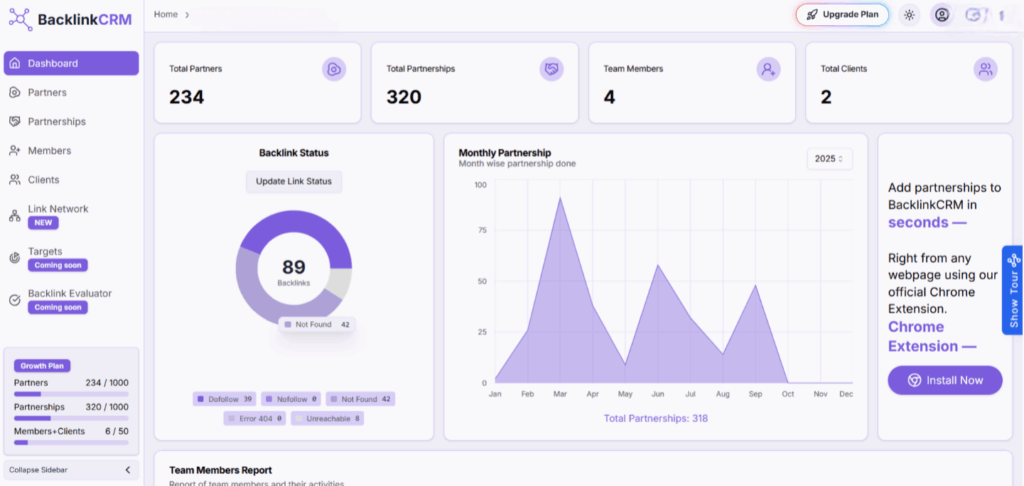
BacklinkCRM.io streamlines your backlink exchanges in a single dashboard. The BacklinkCRM extension auto-captures contact details, adds them to your pipeline, and keeps your backlink collaboration organized without relying on 100s of spreadsheets with different partners.
What You’ll Love:
- One-click backlink updates
- Automatic email/contact extraction of backlink partner
- Backlink tracking
- Have a free plan
Drawbacks:
- Focused only on backlink partnerships, not backlink prospecting
- No SEO metrics data available
Perfect For:
- SEOs doing 100s of backlink exchanges
- Agencies managing multiple backlink clients
- Anyone tired of manual backlink tracking
5. Ubersuggest – Best for Competitor Analysis

Created by Neil Patel, Ubersuggest helps you analyze competitors’ website traffic, identify high-performing keywords, and check backlinks. It’s a comprehensive tool for gaining insights into any search term and refining your SEO strategy.
What You’ll Love:
- Competitor traffic analysis
- Keyword suggestions
- Backlink data
Drawbacks:
- Limited features in the free version
- Data accuracy can vary
Perfect For:
- Marketers conducting competitor research
- SEO professionals seeking keyword opportunities
6. SEO Minion – Best for Daily SEO Tasks

This extension does a little bit of everything: SERP preview, broken link checking, hreflang tag audits, on-page analysis — it’s the Swiss Army knife for on-page SEO.
What You’ll Love:
- SERP preview tool
- Highlight nofollow/dofollow links
- Check redirects and broken links
Drawbacks:
- UI is basic
- Some features require API setup
Perfect For:
- Daily site maintenance
- Technical checks before publishing
7. SEO Extractor – Best for Data Extraction from SERPs

This one’s for power users. SEO Extractor lets you extract headings, links, images, and even People Also Ask (PAA) content directly from a page. It’s fast, clean, and super helpful for content strategists.
What You’ll Love:
- Pulls H1-H6, PAA questions, image URLs
- CSV exports
- Great for reverse engineering competitors
Drawbacks:
- No keyword metrics
- Limited to extraction only
Perfect For:
- Content strategists
- Competitive breakdowns
8. Redirect Path – Best for Redirect and HTTP Status Checks

Redirect Path shows HTTP status codes (301, 302, 404) and highlights redirect chains or loops. If you’re fixing old content or migrating sites, this is essential.
What You’ll Love:
- Clean UI
- Real-time HTTP status insights
Drawbacks:
- No broader SEO features
Perfect For:
- Tech SEOs
- Site migrations and audits
9. SEO Search Simulator by Nightwatch – Best for Location-Based SERP Testing

Want to check how your site ranks in New York vs London vs Sydney? This simulator fakes a location and shows you the local SERP — no VPN needed.
What You’ll Love:
- Simulates search from any region
- Great for local SEO and international audits
Drawbacks:
- Manual query entry
- No keyword suggestions or clustering
Perfect For:
- Local SEO
- Global site managers
10. Ahrefs SEO Toolbar – Best for Advanced SERP + On-Page Metrics

If you’re an Ahrefs user, this toolbar gives you a SERP overlay, backlink metrics, keyword data, and even content gap suggestions. It’s powerful — but you’ll need a paid Ahrefs plan to use it fully.
What You’ll Love:
- In-SERP metrics and overlays
- Page-specific keyword insights
- Backlink and URL metrics
Drawbacks:
- Requires Ahrefs account
- Slower load times on some pages
Perfect For:
- Advanced SEOs
- Agencies using Ahrefs already
Verdict: What’s the Best SEO Chrome Extension in 2025?
✅ Here’s the breakdown:
👉 Just starting out and want a clean, free audit tool? Go with Detailed SEO Extension.
👉 Want in-SERP keyword data while you browse? Keyword Surfer or SEOquake are a must.
👉 Doing technical audits or migrations? Redirect Path + SEO Minion will save you hours.
👉 Running competitive research? Ubersuggest and Ahrefs Toolbar give you backlink and traffic data.
👉 Power user needing custom extraction or insights? Check out SEO Extractor and SEO Search Simulator.
These tools won’t replace Answer Socrates. But for fast, in-browser data that speeds up your workflow? They’re invaluable.
Start with 2-3 from this list. Add what fits your stack. And keep your SEO sharp 🔍
Happy optimizing!
Share:
About the Author