
After extensively testing over 30 keyword research tools across three months, I can confidently say that the best free keyword research tool in 2026 is Answer Socrates.
While other tools restrict your daily searches or gate their best features behind expensive subscriptions, Answer Socrates offers unlimited access to deep keyword insights that most paid tools miss entirely!
(And now the new “recursive keyword” feature has been shipped, we find keywords that NO other tool finds! It’s the only tool on the market with this feature 🔥).
And, with with advanced topic clustering and trend analysis, it’s leagues ahead of many expensive keyword tools, despite being free!
But Answer Socrates isn’t your only option. Whether you’re launching a new website, planning content, or optimizing existing pages, having the right mix of keyword research tools can make or break your SEO strategy. I’ve compiled this comprehensive guide to the top free keyword research tools that can transform your search rankings in 2026 – no budget required.
Quick Comparison
Tool | Best For | Standout Feature | Limitations |
|---|---|---|---|
Answer Socrates | Overall SEO & content planning | Question-based keyword clustering | Limited to Google data |
Google Keyword Planner | PPC research | Direct Google Ads integration | Volume shown as ranges |
Keywords Everywhere | AI prompts and free traffic data | 200+ prompt templates, and in-serp data | Volume data is paid |
AnswerThePublic | Content ideation | Visual data presentation | Free tier heavily reduced |
Ubersuggest | Basic SEO research | User-friendly interface | 7-day trial only, then paid |
Keyword Tool | Multi-platform auto-suggestions | Google, YouTube, Amazon, Etsy and more | No metrics on the free tier |
Mangools KWFinder | Beginners | Clear difficulty metrics | 10 searches/day limit |
Google Trends | Trend analysis | Rising and breakout queries | Relative interest, not volume |
Soovle | Cross-platform research | Six engines at once | No search volumes, no export |
WordStream | PPC optimization | Industry benchmarks | Limited free features |
SE Ranking | Precise data validation | Exact search volumes | Limited free daily reports |
1. Answer Socrates – Best Overall Free Keyword Research Tool
After testing dozens of keyword research tools, Answer Socrates stands out as a game-changer in the keyword research space.
Most keyword tools make you scroll through to get 10 or 20 new keywords – Answer Socrates generates often over 1,000 keywords for each topic you research – something most paid tools don’t even offer.
And the best part? You get 3 free searches per day and an impressive 1,500 keyword clustering credits monthly, completely free.

Revolutionary Keyword Clustering
Answer Socrates isn’t just another keyword tool – it’s the best free keyword clustering tool available in 2026.
While other tools charge premium rates for basic clustering, Answer Socrates transforms your keyword lists into comprehensive topical maps in under 60 seconds, at no cost. This powerful clustering capability helps you create content hierarchies, plan your site structure, and identify gaps in your content strategy.
Why It’s #1
Overall, the extra keywords other tools don’t surface, the keyword clustering feature for organizing each individual keyword based on the article or topic it fits in, and the fact it pulls in People Also Asked questions and Google Trends data, makes Answer Socrates the best free keyword research tool.
Honestly, try it out. You’ll be impressed by how quickly it processes thousands of keywords into organized topic clusters – we’re talking under a minute here.
Here’s a guide for how to use it here:
Real-World Applications
I’ve found Answer Socrates particularly valuable when planning content hierarchies. Take “digital marketing” as an example: the tool not only generates over 1,000 related keywords but automatically organizes them into intuitive clusters covering social media marketing, content marketing, email marketing, and SEO. Each cluster comes with its own set of related terms and questions, effectively giving you a complete content roadmap in minutes.
The tool is perfect for content creators who need comprehensive keyword sets, SEO professionals building topic clusters, and digital marketers tracking trending topics.
I’ve seen content strategists use it to plan entire site architectures, and small businesses leverage its enterprise-level clustering capabilities without spending a dime. It’s especially valuable for content teams planning editorial calendars or businesses focusing on local markets.
Here’s how I use it for keyword clustering:
Understanding the Limitations
While Answer Socrates is incredibly powerful, it’s worth noting that it currently pulls data only from Google. You’ll get search volume metrics, and keyword difficulty and CPC data, though.
The 3 searches per day limit might seem restrictive at first, but I’ve found it quite generous compared to competitors – but genuinely it’s already very expensive to run, and if we made it unlimited we might just break the bank!
Maximizing Your Results
To get the most out of Answer Socrates, I recommend using your daily searches strategically by starting with broad topics.
Then, export your clustered keywords to maintain organization, and don’t forget to combine the trending topics feature with clustering for timely content planning.
Make the most of your 1,500 monthly clustering credits, and always use the recursive search feature to uncover those valuable niche long-tail keywords that your competitors might miss.
How To Use It In an SEO Workflow
I personally recommend using this workflow, as it’s what I use:
- Use Answer Socrates to do your initial keyword research and keyword clustering
- Use your choice of humans or AI in combination to create great content
- Use a rank tracker to track data from there, and keep optimizing based on the data
2. Google Keyword Planner – Best for PPC Research

Google Keyword Planner has long been considered the gold standard for keyword research, primarily because it’s the only tool that pulls data directly from Google’s advertising platform.
While it remains a powerful option, especially for PPC campaigns, my extensive testing reveals some significant limitations compared to specialized keyword research tools.
The tool’s greatest strength lies in its direct access to Google’s advertising data. You get real search volume ranges, bid estimates, and competition levels straight from the source. I particularly appreciate its ability to show historical trends and provide location-based data, which can be invaluable for seasonal planning and local SEO campaigns.
However, there’s a catch – you need to create a Google Ads account to access the tool, and non-advertisers only receive broad search volume ranges rather than specific numbers. While Answer Socrates might not provide direct search volumes, its ability to generate over 1,000 related keywords and organize them into topic clusters offers far more value for content planning and SEO strategy.
In my experience, Keyword Planner’s keyword suggestions tend to be limited and heavily focused on commercial intent. It often groups similar keywords together, which can mask valuable long-tail opportunities. Compare this to Answer Socrates, which uses recursive search to uncover deeper layers of related queries and questions that people actually ask.
The mobile vs. desktop breakdown feature is useful, but without the advanced clustering capabilities of Answer Socrates, you’ll spend considerable time manually organizing keywords into a coherent content strategy. I’ve found that what takes hours in Keyword Planner can be accomplished in minutes with Answer Socrates’s automated clustering.
3. Keywords Everywhere – Best Free Tier for AI Prompts and Traffic Data
Keywords Everywhere has a free tier that most people don’t know exists, because the paid part is what it’s famous for.
Install it without an API key and you get 200+ AI prompt templates built into ChatGPT, Claude, Gemini and DeepSeek, website traffic estimates, backlink data, on-page keyword density, a hashtag generator, and engagement metrics for Instagram, X and Pinterest. None of that costs anything or burns a credit.
Be clear on what isn’t free: search volume, CPC and competition. That’s the thing Keywords Everywhere is known for, and it needs a paid plan starting at $84 a year. If volume data is what you came here for, the free tools above cover it and this one doesn’t.
The prompt templates are the underrated part. They sit inside the AI tools you already use, cover most of the content-planning work you’d otherwise write prompts for from scratch, and cost nothing. For competitor research, the traffic and backlink estimates appearing on any site you visit are genuinely useful on their own.
A million people have it installed, rated 4.5 from 5,700 reviews.
Main Features:
- 200+ AI prompt templates in ChatGPT, Claude, Gemini and DeepSeek
- Website traffic and backlink estimates on any page
- On-page keyword density and Search Console visuals
- Social engagement metrics for Instagram, X and Pinterest
Best For:
- Content planners who work inside AI tools
- Anyone sizing up a competitor’s site quickly
- Free competitor research without a subscription
Limitations:
- Search volume, CPC and competition are paid only
- Paid plans are annual billing, from $84/year
- Credits burn fast once you are paying
Take the free half and leave the rest. For genuinely free volume data, Google Keyword Planner and Answer Socrates both cover it without a subscription.
4. AnswerThePublic – Best for Visual Content Ideation

AnswerThePublic made waves in the SEO community with its innovative visual presentation of question-based searches before being purchased by Neil Patel. While it remains a useful tool for basic content ideation, my testing shows it’s become increasingly limited compared to newer alternatives like Answer Socrates.
The tool’s signature feature is its visual “search cloud” that displays questions, prepositions, and comparisons in an eye-catching radial format. This can be helpful for quick inspiration, but I’ve found it can actually slow down the research process compared to more structured presentations. The visual approach, while novel, often becomes overwhelming when dealing with large volumes of keywords.
One of the most significant limitations is the three-search daily limit on the free plan – a fraction of Answer Socrates’s five daily searches. More importantly, AnswerThePublic typically returns far fewer keywords per search. While it might give you 50-100 questions, Answer Socrates generates 1,000+ keywords and automatically organizes them into topic clusters.
The tool also lacks several crucial features that Answer Socrates provides. There’s no search volume data, no trend analysis, and critically, no way to automatically organize keywords into topic clusters. You’ll need to manually sort through the results and create your own content hierarchy – a time-consuming process that Answer Socrates handles automatically.
The export capabilities are basic – you can download a CSV file, but without the sophisticated clustering and organization that Answer Socrates provides. In practice, this means more manual work to transform the raw keyword lists into actionable content plans.
5. Ubersuggest – Best for Basic SEO Research

Ubersuggest offers a surprisingly robust set of features in its free tier, making it an excellent choice for those just starting with SEO. The tool provides a good balance of keyword data and content suggestions.
Key Features:
- Keyword suggestions
- Content ideas
- Domain overview
- Mobile vs desktop data
- Keyword difficulty scores
- Basic competitor analysis
Best For:
- SEO beginners
- Small business owners
- Content marketers
- Competitor research
- Quick keyword analysis
Limitations:
- Limited daily searches
- Basic metrics only
- Some features require paid version
- Limited historical data
6. Keyword Tool – Best for Auto-suggestions

Keyword Tool excels at harvesting autocomplete suggestions from multiple search engines, providing a broader view of keyword opportunities than single-platform tools.
Key Features:
- Multi-platform keyword suggestions
- Negative keyword lists
- Questions and prepositions
- Multiple language support
- Region-specific results
- Quick export options
Best For:
- Cross-platform research
- International SEO
- Negative keyword research
- Long-tail keyword discovery
- Multi-language campaigns
Limitations:
- Basic features only in free version
- No search volume data
- Limited results per search
- No trend analysis
7. Mangools KWFinder – Best for Beginners

KWFinder stands out for its user-friendly interface and clear difficulty metrics, making it perfect for those new to SEO research.
Key Features:
- User-friendly interface
- Clear keyword difficulty scores
- Search trend graphs
- Related keywords
- Local keyword research
- Basic SERP analysis
Best For:
- SEO beginners
- Local businesses
- Quick difficulty checks
- Trend analysis
- Basic competitor research
Limitations:
- 10 searches per day limit
- Limited keyword suggestions
- Basic metrics only
- No advanced filtering
8. Google Trends – Best for Trend Analysis

Google Trends offers unique insights into search patterns and topic popularity over time, making it invaluable for timing content and campaign launches.
Key Features:
- Real-time trend data
- Historical search patterns
- Geographic insights
- Related topics and queries
- YouTube search trends
- News and shopping data
Best For:
- Seasonal trend research
- Geographic targeting
- Content timing
- Niche comparison
- YouTube optimization
Limitations:
- No specific search volumes
- Relative data only
- Limited keyword suggestions
- Basic export options
9. Soovle – Best for Cross-platform Research

Soovle aggregates suggestions from multiple search engines in real-time, offering a unique perspective on cross-platform keyword opportunities.
Key Features:
- Multi-engine suggestions
- Real-time results
- Quick engine switching
- Bookmark feature
- Simple interface
- Custom engine selection
Best For:
- Quick research
- Cross-platform comparison
- Content ideation
- Niche research
- Multiple platform targeting
Limitations:
- Very basic interface
- No advanced metrics
- No search volumes
- Limited export options
10. WordStream – Best for PPC Optimization

WordStream’s free tools provide valuable insights for both SEO and PPC campaigns, with a focus on practical keyword implementation.
Key Features:
- Industry benchmarks
- Keyword grouping
- Niche suggestions
- Basic metrics
- Account grading
- Performance analysis
Best For:
- PPC campaign planning
- Industry comparison
- Account analysis
- Quick research
- Performance benchmarking
Limitations:
- Limited free features
- Basic keyword data
- Time-restricted trials
- Focus on PPC metrics
11. SE Ranking – Best for Precise Data
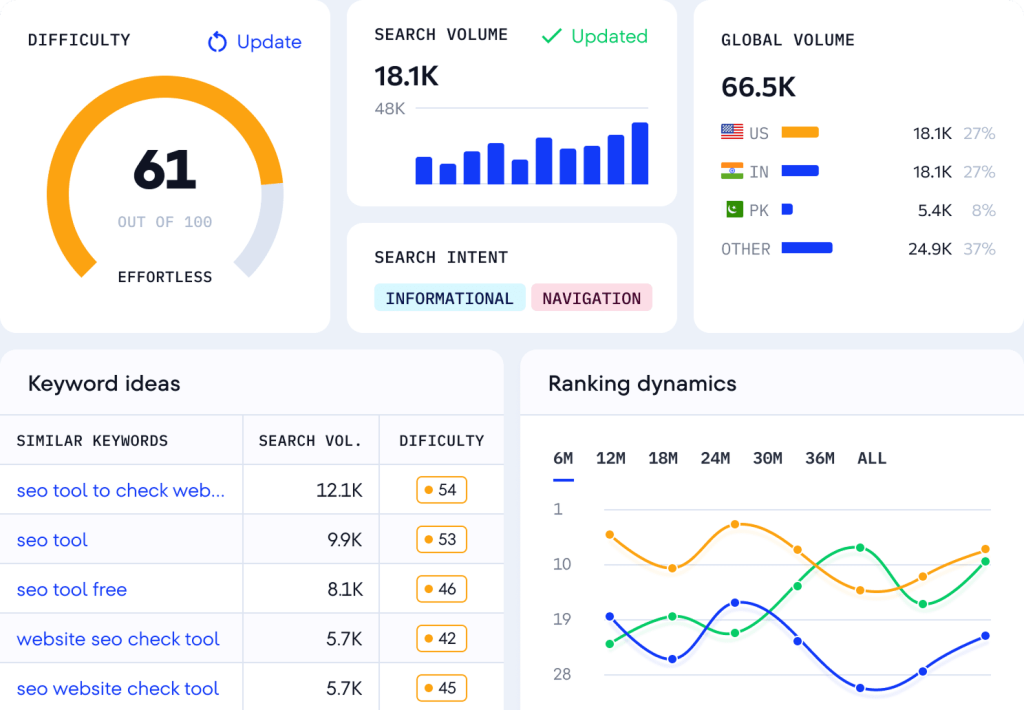
SE Ranking is a solid choice when you need specific numbers rather than guesses. While many free tools only show you broad volume ranges (like “1k–10k”), SE Ranking gives you exact search volumes and accurate difficulty scores. It is particularly helpful for double-checking data to see how hard a keyword truly is to rank for before you start writing. On top of that, SE Ranking offers solutions for competitive research and content creation.
Key Features:
- Exact search volume numbers
- Keyword difficulty scores
- Search intent identification
- Competitor analysis
- Bulk keyword processing
- Organic results overview
Best For:
- Checking specific search volumes
- Validating keyword difficulty
- Competitor research
- Identifying user intent
- Quick data verification
Limitations:
- Limited free daily searches
- Restricted number of results in free checks
- Account creation often required
- Detailed historical data is paid-only
Making the Most of Free Keyword Research Tools
To maximize your keyword research efforts without spending a dime, I recommend using a combination of these tools. Start with Answer Socrates for comprehensive question-based research and topic clustering, then supplement with Google Keyword Planner for search volume data and Google Trends for timing your content.
Pro Tips for Better Results:
- Use multiple tools to verify data accuracy
- Focus on long-tail keywords for easier ranking
- Consider search intent behind keywords
- Look for seasonal trends and timing
- Don’t ignore question-based searches
- Research competitors’ keywords
- Track keyword performance over time
- Use other search engine data, such as topics that are popular on Reddit, as well as Google keyword data
My Final Thoughts
While each tool has its strengths, Answer Socrates stands out in 2026 for its unlimited free access and unique ability to uncover valuable question-based keywords that other tools miss. Its keyword clustering and trending topics features make it an indispensable tool for modern SEO and content strategy.
For best results, I recommend starting with Answer Socrates as your primary research tool, then supplementing with other tools based on your specific needs. Whether you’re just starting with SEO or looking to optimize your existing strategy, these free tools provide everything you need without breaking the bank.
That said, if you have a premium SEO tool like Ahrefs or Semrush, these do have features that Answer Socrates doesn’t. But Answer Socrates is free, while Ahrefs and Semrush are $100+ per month.
Frequently Asked Questions About Keyword Research Tools
Which keyword research tool is best for beginners?
If you’re just starting with SEO, I recommend Answer Socrates. Unlike other tools that can be overwhelming with complex metrics, Answer Socrates provides clear, actionable insights with its automated keyword clustering. You’ll get 3 free searches daily and 1,500 clustering credits monthly, which is more than enough to get your SEO strategy off the ground.
Do I really need to pay for a keyword research tool?
Not necessarily. While paid tools offer additional features, free tools like Answer Socrates provide substantial value. The key is choosing a tool that offers essential features without restrictions. Answer Socrates, for example, gives you access to over 1,000 keywords per search and automated clustering capabilities that even some paid tools don’t offer.
How accurate are free keyword research tools?
The accuracy varies by tool. Google Keyword Planner provides accurate data but only in broad ranges for non-advertisers. Answer Socrates pulls data directly from Google’s search results and “People Also Ask” sections, ensuring you get current, accurate insights into what people are actually searching for.
Should I use multiple keyword research tools?
While using multiple tools can provide different perspectives, it’s not always necessary. I recommend starting with a comprehensive tool like Answer Socrates for your core research and clustering needs. You can supplement with Google Trends for seasonal timing and Google Keyword Planner for rough search volume estimates if needed.
How many keywords do I need for effective SEO?
Quality matters more than quantity. However, having a broader dataset helps you understand topic clusters and user intent better. This is why Answer Socrates’ ability to generate 1,000+ keywords per search and automatically organize them into clusters is so valuable – it gives you both quantity and strategic organization.
What’s the difference between keyword research tools and keyword clustering tools?
Most keyword research tools simply provide lists of keywords with basic metrics. Keyword clustering tools help organize these keywords into topical groups for content planning. Answer Socrates uniquely combines both functions, offering extensive keyword generation and automated clustering in one free tool.
Share:
About the Author


