
The 8 Best Keyword Clustering Tools in 2026 (Avoid Keyword Cannibalization)
|

Written by
Jamie I.F.
Keyword clustering is ESSENTIAL to making sure you’re fully covering your topic, as well as preventing keyword cannibalization (when you have 2 or more articles fighting for the same keyword, leading to neither of them ranking well).
Keyword cannibalization happens to even the best SEOs sometimes. Keyword clustering tools group your keywords together so all of these fall into specific topics and articles, so you don’t create multiple articles for the same topic.
The problem is, they often fall into two extremes: they either do ONLY keyword clustering and leave you doubting your keyword choices… or they add on a load of other features you don’t need, and charge you for the privilege.
Also, some keyword clustering tools just use basic AI prompts. This is just not anywhere as good as using proper machine learning and semantic technology to more accurately group keywords.
The best keyword clustering tool is Answer Socrates because it pairs in-depth keyword research with advanced clustering, processes everything in seconds, and is super affordable.
But there are other tools for grouping keywords that might suit you better, depending on your exact needs and budget. Let me share my top picks that have emerged from years of testing.
Overview of the Top Keyword Clustering Tools
| Tool | Best For | Standout | Free Plan | Price From |
| Answer Socrates | Question discovery & clustering | Recursive question search | Y | Free / $9/month |
| Search Atlas | Enterprise content planning | AI topical mapping | N | $99/month |
| Ahrefs | Existing users | Parent Topic method | N | Free tools / $129/month |
| KeyClusters | Project-based work | No subscription | N | $9 per 1,000 keywords |
| Keyword Cupid | Visual clustering | Confidence scoring | N | $9.99/month |
| Keyword Insights | Content creation | Real-time SERPs | Y | $1 trial / $58/month |
| Semrush | All-in-one SEO | Intent labeling | Y – basic features | $139/month |
| Surfer SEO | Content optimization | Content-first approach | N | $99/month |
1. Answer Socrates: Best Overall Keyword Clustering Tool
Answer Socrates is the best keyword clustering tool as it starts by finding question-based keywords that other tools miss, then it groups them into semantically-related clusters to use in your content planning.
Pros:
- Question-focused discovery reveals authentic user intent
- Lightning-fast clustering (seconds vs minutes)
- Generous free plan includes CSV exports
- Recursive search finds hidden long-tail opportunities
- Supports 190+ countries and languages
- Clusters show clear search volume and competition data
Cons:
- Relies only on Google data sources
- High-volume users will eventually need paid plans
- Clustering suggestions occasionally need manual review
There’s nothing worse than carefully crafting a content strategy and publishing a bunch of articles, only to realise you missed some important keywords and now you have to re-do it all.
That’s why Answer Socrates’ recursive search feature is so valuable: it finds the terms people search for AFTER your main keyword, giving you confidence that you really are covering all possible angles of your topic.

If you already have a comprehensive keyword list, you can simply upload it into Answer Socrates’ keyword clustering tool and receive your results in seconds. It’s free to cluster up to 1,500 keywords per month, and you can download your results in a CSV for free.
Alternatively, here’s how to pair deep keyword research with clustering:
Step 1: Enter your main keyword
In this example, I’ve used ‘how to write a blog’. Answer Socrates finds 967 questions in about 2 seconds.
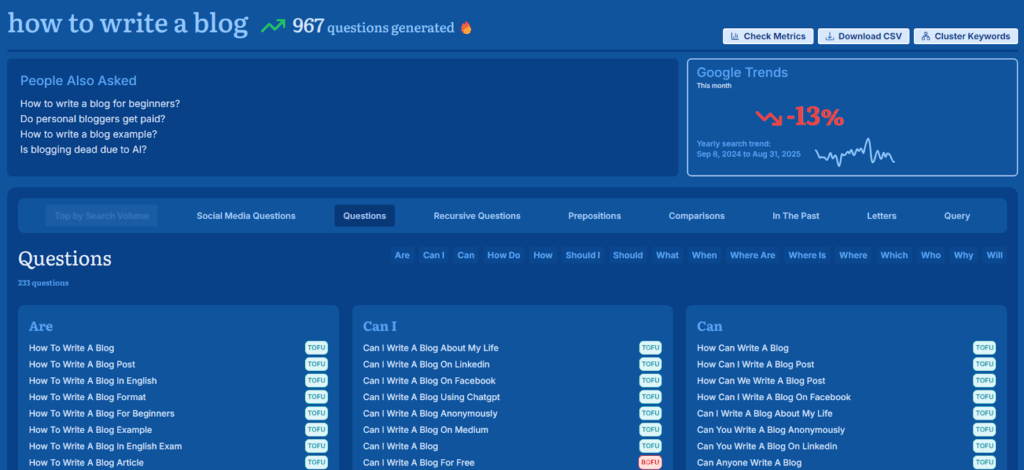
The questions are sorted by type (are, can, how, when, etc.) and labelled according to whether they are top, middle, or bottom-of-funnel queries (TOFU/MOFU/BOFU).
What’s great about question-based keywords is they let you focus on the topics people actually want to know about.
Step 2: Discover recursive questions
The recursive search feature uncovers the next level of questions that people ask. Here, it found another 308 questions to add to my list.
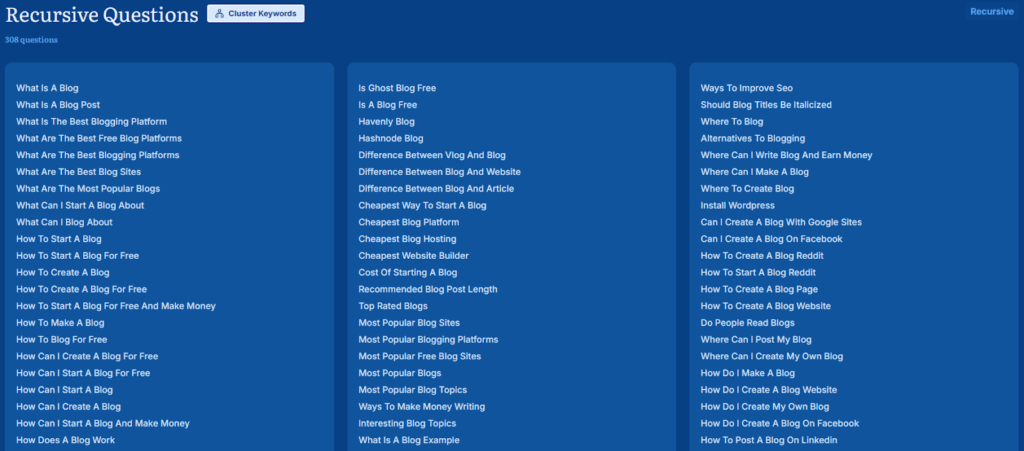
These include things like ‘Can I use wordpress for free?’ and ‘Difference between Medium and Substack’ – both very relevant topics to write about in the blogging niche. So many other keyword research tools miss keywords like this because they don’t contain the main search term.
Optionally, you can use Answer Socrates to run searches for long-tail, semantic, and LSI keywords to add to your list as well.
Step 3: Cluster your keywords
Now we’re ready to cluster our keywords. Either upload your own keyword list or use a list you’ve already generated on the platform. Hit ‘Cluster Keywords’, and within a few seconds, you’ll see them all grouped into usable topics for your content.
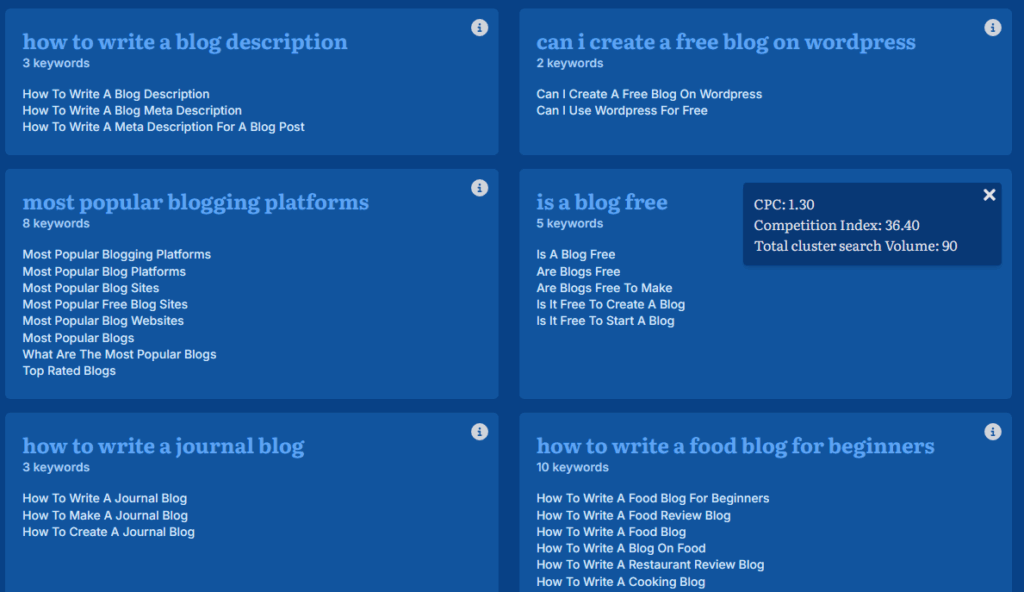
Click on any of the topics to view the CPC, competition index, and total search volume for the cluster.
Step 4: Download your report
Now you can download your data, make tweaks as you see fit, and start creating content briefs.
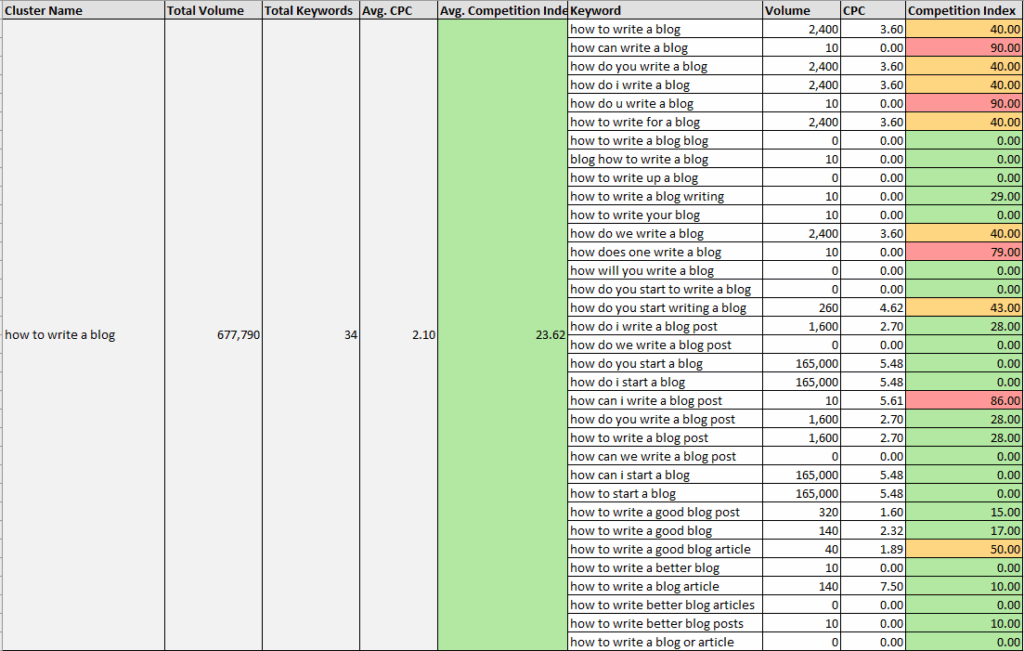
In this report you can view search metrics for each cluster and individual keyword.
Not sure what to look at when checking your report? Our keyword clustering guide explains this in more detail.
The best bit: everything I just showed you is free. You get 3 daily searches, 1 daily recursive search, and 1,500 monthly clustering credits without paying a thing.
If you need higher limits, the paid plans start at just $9/month for 3,000 monthly keyword clustering credits. This is by far the cheapest keyword clustering tool on the market, as most clustering SEO tools cost $99+ per month.
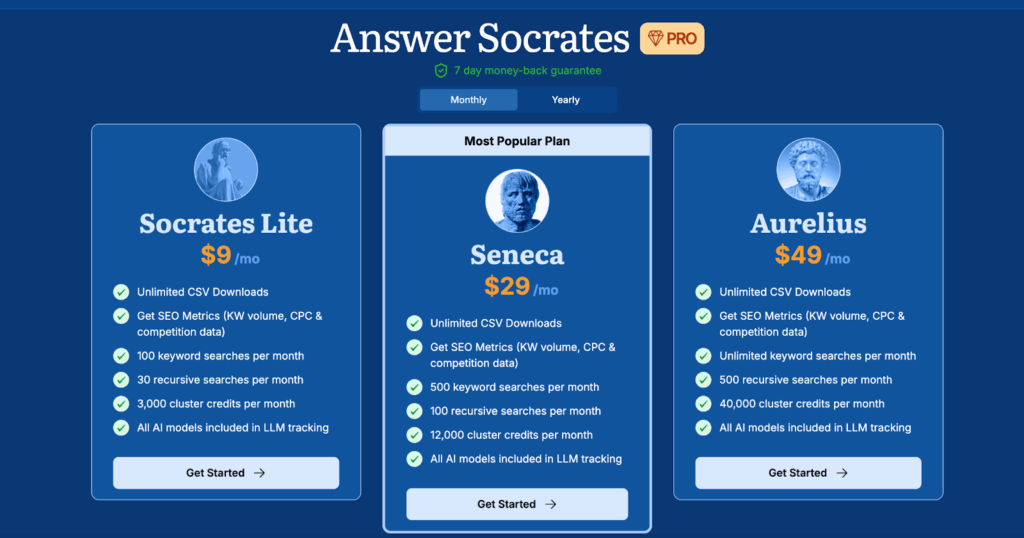
If you’re doing any serious content planning or managing multiple client sites, Answer Socrates quickly pays for itself by preventing the expensive mistake of content cannibalization.
2. Search Atlas: Best for Automated Content Planning
When you need to generate content at scale and have the budget to match, use Search Atlas to create topical maps and automate your content system.
Pros:
- AI-powered topical mapping
- Visual content architecture planning
- Complete content workflow integration
- Difficulty and intent analysis for each cluster
- One-click content publishing capabilities
Cons:
- Premium pricing reflects advanced features
- AI-generated content may lack brand nuance
- Overwhelming feature set for simple clustering needs
This isn’t just a clustering tool – it’s an entire content planning ecosystem that happens to include some impressive clustering capabilities.
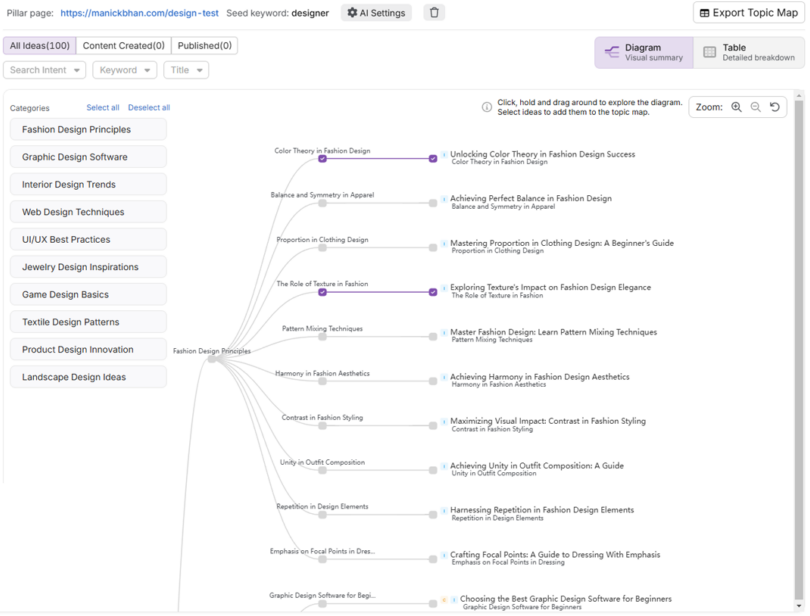
Search Atlas’s AI-powered topical map generation is perfect for businesses and agencies who need to map out hundreds of topics and present them in a visual hierarchy. It goes a step beyond grouping keywords by adding in recommended parent-child relationships.
But it doesn’t stop at topical maps (and honestly, the $99/month price tag isn’t worth it for this feature alone). The one-click publishing feature means you can generate optimized articles in bulk – with schema – and publish them straight to your website.
This approach of outsourcing content strategy decisions to AI works well for volume-focused campaigns but might miss nuanced brand positioning opportunities. If you prefer to retain more editorial control over your content, a more hands-on keyword clustering tool will suit you better.
I’ve written more about Search Atlas and the best alternatives in this article.
3. Ahrefs Keywords Explorer: Best for Existing SEO Workflows
If you’re already paying for Ahrefs, check out its built-in clustering feature before you spend more on a separate tool.
Pros:
- Parent Topic methodology focuses on ranking feasibility
- Fast processing of large keyword lists
- Complete integration with Ahrefs SEO ecosystem
- Multiple clustering perspectives (Parent Topic and Terms)
- No additional cost if you’re already an Ahrefs user
Cons:
- Less sophisticated intent analysis than specialized tools
- Limited cluster exploration and visualization
- Higher overall cost than standalone solutions
While it’s not as sophisticated or user-friendly as Answer Socrates, the Parent Topic methodology offers something valuable: clustering based on ranking feasibility rather than just semantic similarity.
Instead of asking “do these keywords mean similar things,” Ahrefs asks “could one piece of content realistically rank for all these terms?” This practical approach often reveals clustering opportunities that pure semantic analysis misses.
You might discover that “best project management software” and “project management tools comparison” cluster together not because they’re semantically identical, but because the same content types rank for both.
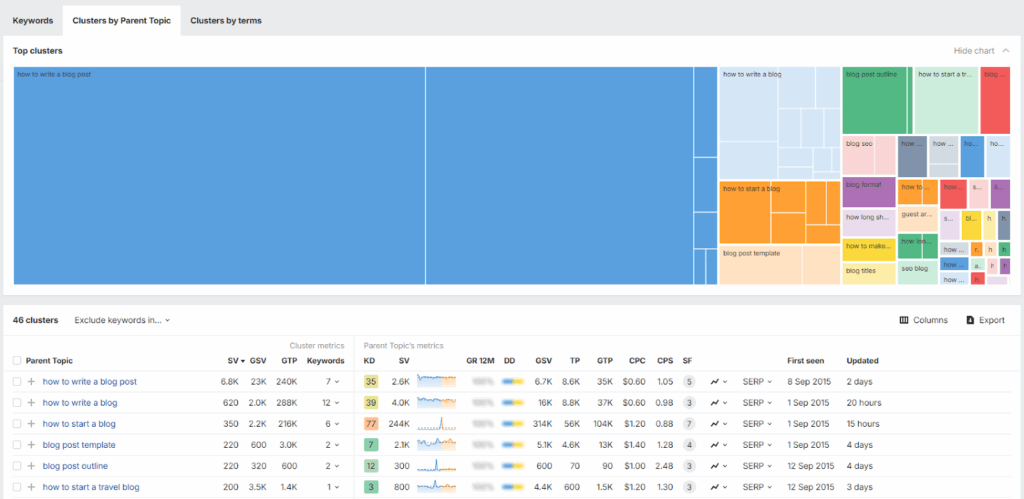
Where Ahrefs falls short is in the presentation of cluster data. It’s difficult to explore individual clustering recommendations on-screen, so it’s more of a quick organizing tool than a strategic planning platform.
And whereas Answer Socrates lets you cluster all your keywords in one place, Ahrefs clusters the main keyword list and related terms separately – meaning you miss any potential overlap between the two.
Ahrefs clustering works best as part of a broader SEO strategy rather than standalone keyword planning. If you’re not already an Ahrefs user, it’s hard to justify the $129+ monthly cost just for clustering, but existing users should definitely explore what they’re already paying for.
4. KeyClusters: Best Pay-Per-Use Option
Sometimes you need clustering for a specific project without committing to another monthly subscription. Enter: KeyClusters.
Pros:
- Pure SERP-overlap methodology for maximum accuracy
- Pay-per-use pricing avoids subscription commitment
- Simple, functional interface
- Real-time Google data for current relevance
Cons:
- Limited to SERP overlap (no semantic analysis)
- Basic interface may feel dated
- Data is difficult to use
- Dependent on current Google rankings (which change)
KeyClusters’ straightforward pay-per-use model focuses purely on SERP-overlap clustering without unnecessary bells and whistles.
The methodology is simple: if keywords share ranking URLs in Google’s top results, they belong in the same cluster. This SERP-based approach often produces highly accurate clusters because it mirrors Google’s own understanding of topic relationships. You’re not guessing about semantic similarity; you’re seeing exactly how Google groups related searches.
On the other hand, if Google’s current rankings don’t reflect optimal clustering (which happens more often than we’d like), you might miss strategic opportunities.
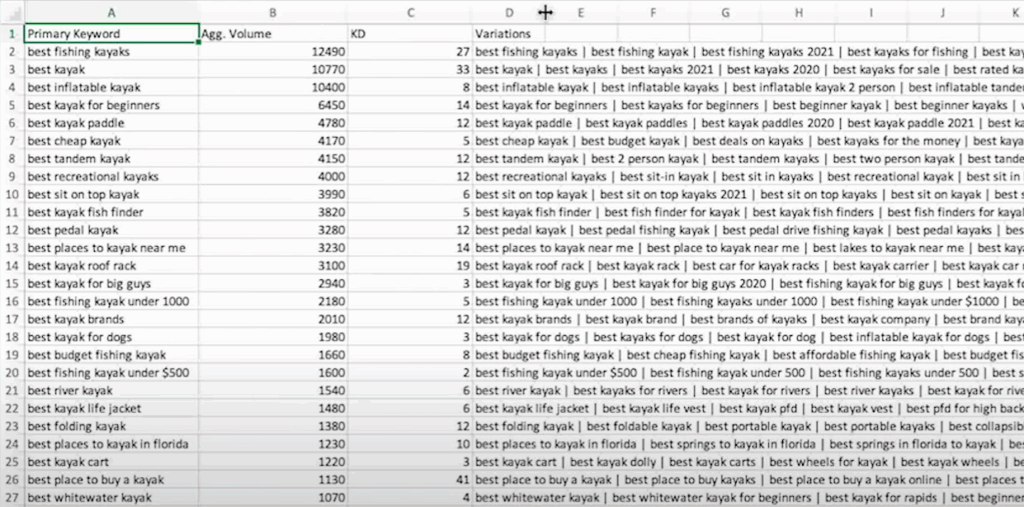
The interface won’t win any design awards, but it gets the job done. Upload your keyword list, wait for processing (usually under five minutes), and download organized clusters based on current SERP data. My only frustration is that the pipe-delimited format of the download requires some work to extract the keyword variations properly.
Starting at $9 per 1,000 keywords, it’s fine for sporadic use. But it’s still not great value compared with Answer Socrates, which lets you cluster 1,500 keywords/month for free, and 3,000/month for $9 (along with a bunch of other great features).
5. Keyword Cupid: Best for Visual Learners
If you struggle to make sense of keyword lists, Keyword Cupid’s visual approach might bring the clarity you need. This tool combines solid SERP-based clustering with interactive mind-map visualizations that make keyword relationships immediately obvious.
Pros:
- Interactive mind-map visualizations reveal relationship patterns
- Confidence scoring helps prioritize clustering decisions
- Import keyword lists from major SEO platforms
- Extra credits available to purchase
Cons:
- No keyword discovery or content creation features
- Some users may have difficulty exploring the visual interface
- Limited to clustering existing keyword lists
- Credit allowances less generous than some other tools
One feature that’s unique to Keyword Cupid’s clustering is the confidence scoring system. Instead of just saying “these keywords belong together,” it shows exactly how confident the algorithm is in each clustering decision.
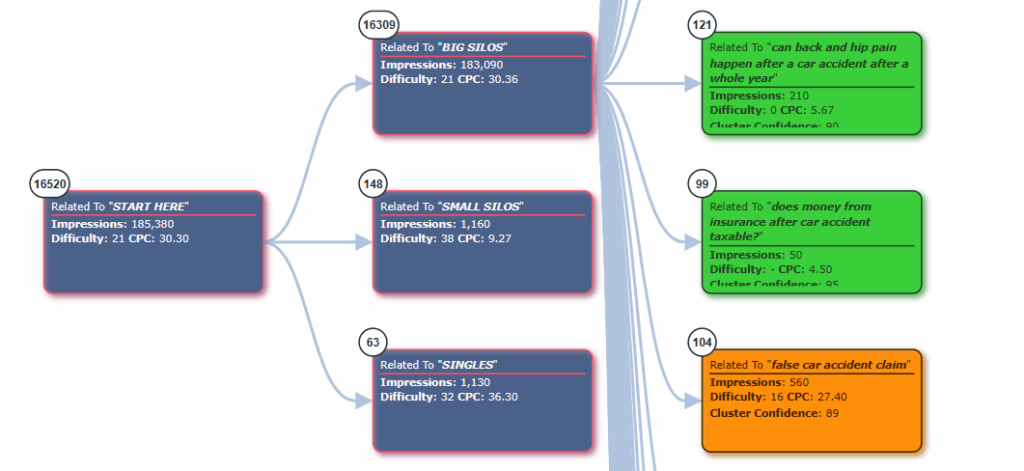
High-confidence clusters can be trusted for immediate content creation, while low-confidence groups might need manual review or represent opportunities for new content angles.
The mind-map format appeals to visual thinkers and teams that need to communicate clustering strategies to non-SEO stakeholders. But for those used to exploring lists in spreadsheets, it can feel clunky and difficult to navigate.
The main drawback for me is the pricing. At $9.99 for 500 keywords and $49.99 for 5,000, it works out expensive compared to Answer Socrates (and that’s before you factor in all the additional keyword discovery tools Answer Socrates has). However, the fact that you can buy additional credits starting at $0.02 per keyword does give Keyword Cupid bonus points for flexible pricing.
6. Keyword Insights: Best for Content Creation
Keyword Insights pairs accurate clustering with AI-assisted content planning and delivery.
Pros:
- Real-time, country-specific SERP analysis
- Advanced NLP + SERP overlap hybrid methodology
- Integrated content planning and brief generation
- Flexible credit allocation across multiple features
Cons:
- Premium pricing starts at $58 monthly
- Slower processing compared to simpler alternatives
- Overkill for basic clustering needs
This tool combines real-time, country-specific SERP data with advanced natural language processing to create clusters that reflect both current rankings and semantic relationships.
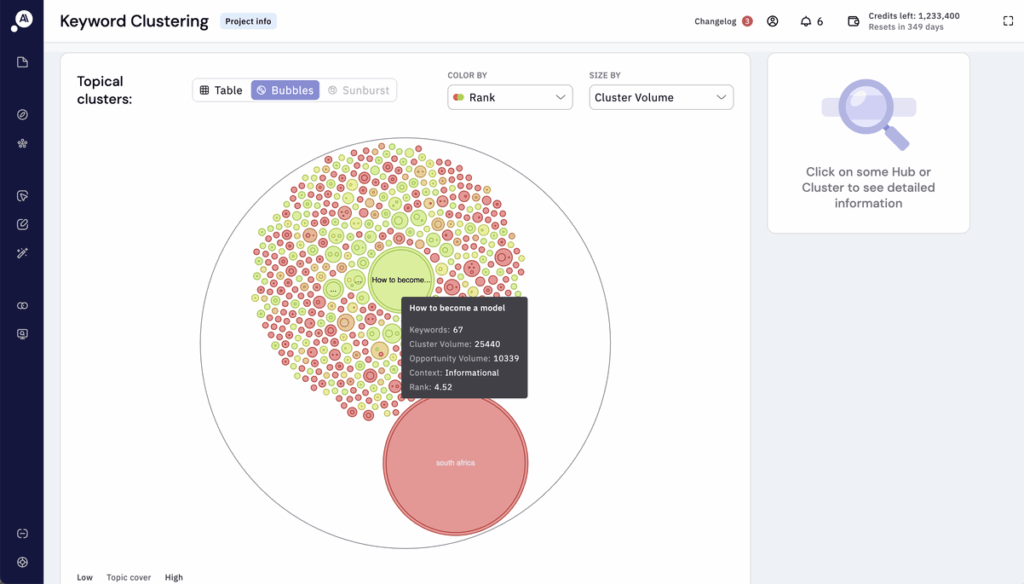
For international SEO or rapidly changing industries, this makes a significant difference in clustering accuracy. The trade-off is longer processing times. A list that would take seconds to cluster with Answer Socrates might take several minutes with Keyword Insights.
Beyond clustering, you can use Keyword Insights to write content briefs and assist you with your writing (or do it for you). The content planning integration is well-executed, with clustering feeding directly into brief generation and content optimization features.
Plans start at $58/month for 10,000 credits, which can be used flexibly across all different features according to your project needs. One month you might focus heavily on clustering; the next month you can shift credits toward content creation.
7. Semrush Keyword Strategy Builder: Best All-in-One SEO Suite
Semrush is another AI SEO tool that includes keyword clustering as part of a wider feature set.
Pros:
- Clear search intent labeling for each cluster
- Primary keyword identification for content planning
- Reliable SERP-based clustering methodology
- Bulk processing capabilities for large keyword lists
Cons:
- Requires expensive Semrush subscription
- Less sophisticated than dedicated clustering tools
- Limited customization options for clustering parameters
If you’re already using Semrush, their Keyword Strategy Builder is the first place you should look for keyword grouping.
Build your keyword list using the Keyword Magic Tool, then click “Cluster this list” to get organized groups based on SERP similarity and search intent.
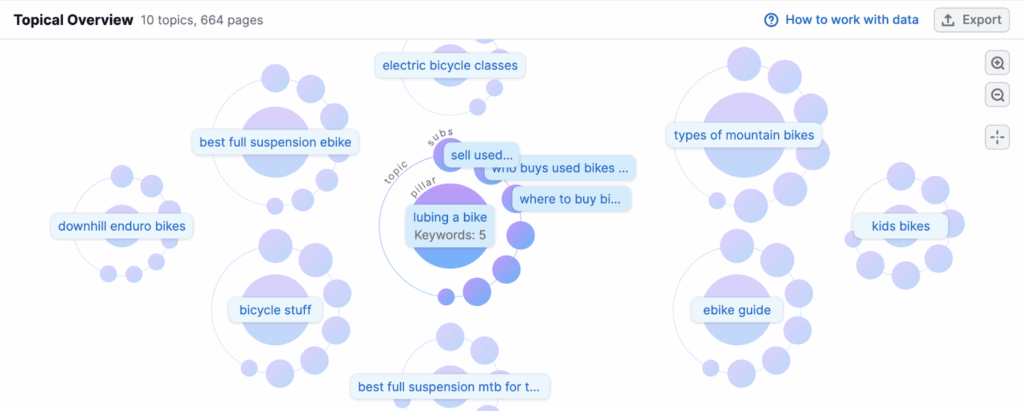
The integration with Semrush’s broader feature set means you can go from keyword research to competitor analysis to content planning without switching platforms.
For agencies already paying for Semrush’s $139+ monthly plans, the clustering functionality feels like a valuable bonus rather than an afterthought (although it doesn’t really break new ground). You may still want to compare the results with a couple of dedicated tools to see which make most sense to you.
8. Surfer SEO Content Planner: Best for Content-First Clustering
Surfer SEO approaches clustering from a different angle: instead of starting with keywords, it begins with content planning and reveals the keyword clusters that should support each piece.
Pros:
- Content-first clustering approach aligns with user intent
- Integrated content optimization and structure suggestions
- SERP analysis shows competitor cluster usage
- Intent-based grouping with difficulty scoring
Cons:
- Expensive monthly subscription ($99+)
- Complex interface with steep learning curve
- Focuses heavily on content optimization features
Surfer’s content-first philosophy makes it particularly valuable for editorial teams focused on user experience rather than pure SEO metrics.
The tool analyzes top-ranking pages for your keyword clusters and suggests how to structure content that covers all the related terms naturally. This prevents the common problem of keyword stuffing while ensuring comprehensive topic coverage.
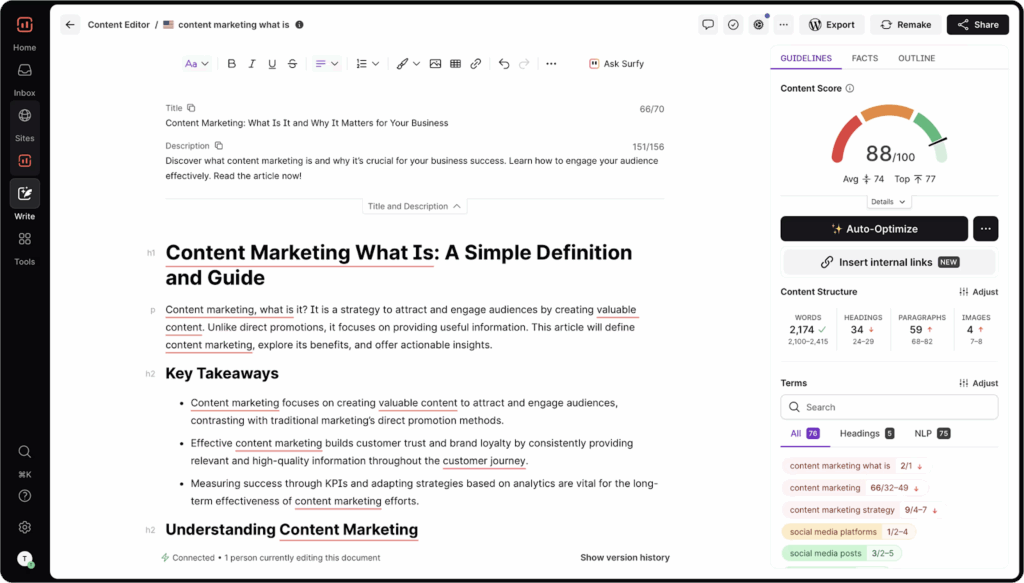
Surfer’s Content Editor automatically generates keyword clusters when you enter a focus keyword, but it goes further by suggesting content structures, headings, and even internal linking opportunities.
The SERP analysis integration shows you not just which keywords cluster together, but how competitors are actually using those clusters in their content. You can see which related terms appear in titles, headings, and body content across top-ranking pages.
The main limitation is cost and complexity. At $99+ monthly, Surfer is only worth it if you’re going to maximize your content optimization allowances each month.
How to Choose the Right Clustering Tool for Your Workflow
The best clustering tool depends entirely on your team structure, budget constraints, and existing SEO stack. Here’s how I recommend approaching the decision based on years of SEO content planning experience.
- Do any of your existing SEO tools have clustering? It may be a hidden feature you’ve never noticed, so check that out before you invest in another tool.
- What’s your budget and team size? Budget constraints often determine your clustering options more than feature preferences. For small agencies and freelancers, Answer Socrates’ free plan offers advanced clustering capabilities without any financial commitment.
- How many keywords do you need to cluster? If it’s just a couple of hundred keywords per month, KeyClusters’ pay-per-use model ($9 per 1,000 keywords) avoids monthly subscription overhead. Answer Socrates includes 1,500 keywords per month for free, though, which is more generous than any of the other tools mentioned here.
- How do you prefer to work with data? Will it be helpful for you to visualize your clusters in mind maps and diagrams? Or do you prefer to get stuck into spreadsheets? Most tools do the spreadsheet option, but only a few do diagrams.
One bonus option with a tool you’re probably already using: try clustering keywords with ChatGPT. It’s not as convenient as using a dedicated tool, but it can produce pretty good results for occasional use.
Final Verdict on the Best Keyword Clustering Tools
After years of hands-on experience with keyword research and clustering, here’s my rundown of the best tools for keyword grouping:
- Answer Socrates – Best for Question Discovery & Clustering: Combines keyword discovery, recursive searches, and fast clustering in one platform with a generous free plan.
- SearchAtlas – Best for Enterprise Content Teams: A complete content planning system with AI-powered topical mapping and direct publishing integration.
- Semrush – Best for All-in-One Teams: Reliable clustering and SEO tools within a comprehensive marketing platform.
- Keyword Insights – Best for Technical Precision: Real-time, country-specific SERP analysis with advanced NLP for international campaigns and rapidly changing industries.
The process of grouping keywords has shifted dramatically from simple keyword grouping toward intent-based content architecture. Modern tools don’t just organize words; they reveal the natural information hierarchies that search engines want to see and users expect to find.
Answer Socrates’ question-based approach makes it one of the best keyword clustering tools because it starts with genuine user intent rather than algorithmic similarity scores.
Even if you pick another tool for clustering, take advantage of Answer Socrates’ free keyword search to ensure your keyword list is complete.
FAQs
What is keyword clustering and why does it matter for SEO?
Keyword clustering groups related search terms into thematic topics, preventing content cannibalization and improving topical authority for better Google rankings.
How accurate are free keyword clustering tools compared to paid ones?
Many free clustering tools now match paid alternatives in accuracy, with Answer Socrates’ free tier often outperforming expensive enterprise platforms.
Should I use SERP-based or semantic clustering methods?
SERP-based clustering aligns with Google’s current understanding, while semantic methods can discover new opportunities. Hybrid approaches work best.
How many keywords should I cluster at once for best results?
Start with 100-500 keywords per topic to understand patterns, then scale up. Most tools handle thousands efficiently but smaller batches are easier to review.
Can keyword clustering tools prevent content cannibalization?
Yes, clustering tools identify competing keywords before content creation, allowing you to plan comprehensive articles that target entire topic clusters.
Which clustering tool integrates best with existing SEO workflows?
Ahrefs and Semrush clustering integrates seamlessly if you’re already using these platforms; otherwise, Answer Socrates offers the best balance of features and flexibility.
Share:
About the Author

