
Look, manually mining Google Autocomplete for SEO keywords works… but it’s painfully slow. 🤦♂️
Trust me, I’ve spent countless hours typing different letters, moving my cursor around, and copying suggestions one by one. What should take minutes ends up taking half a day if you want to be thorough.
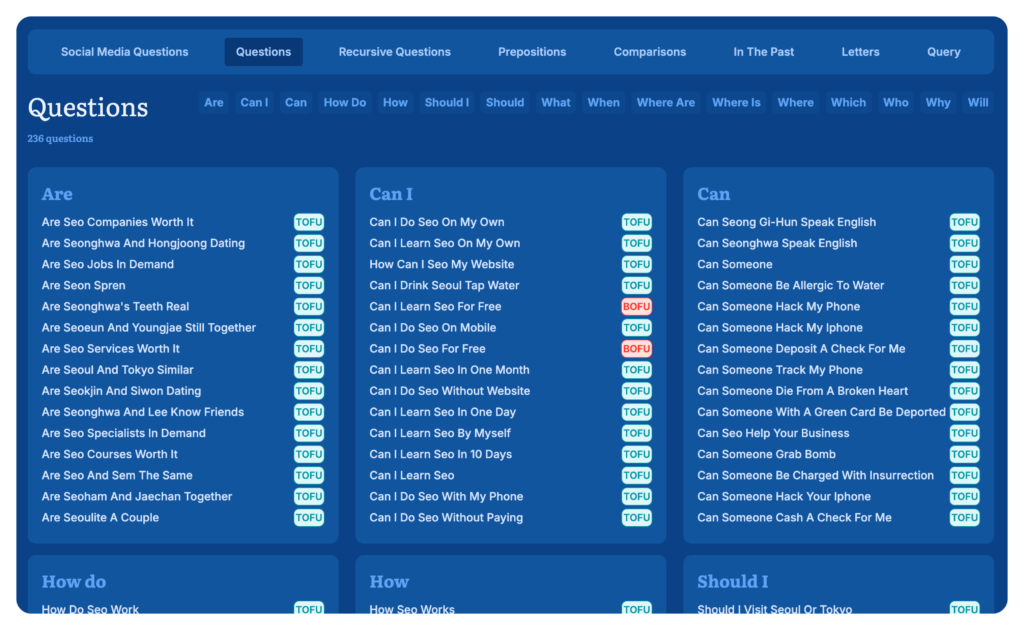
That’s exactly why we built the Google Autocomplete feature into AnswerSocrates.com – to automate this entire process. What takes 4-5 hours to do manually now takes less than 60 seconds.
Here’s what makes this so powerful:
- Get EVERY Google Autocomplete suggestion for your keyword instantly
- Discover suggestions from different cursor positions automatically
- Find alphabet soup variations without typing A-Z manually
- Export everything to a spreadsheet with one click
In this guide, I’ll show you exactly how Google Autocomplete can transform your SEO strategy – whether you choose to do it manually (free but time-consuming) or use Answer Socrates to automate the process (also free, but MUCH faster).
Let’s dive into everything you need to know about leveraging Google Autocomplete for better SEO results.
What is Google Autocomplete?
Google Autocomplete is a search feature that predicts what users are typing based on popular searches. According to Google, it saves over 200 years of typing time per day and reduces typing by about 25% for the average user.
Key points about Autocomplete:
- Shows predictions, not suggestions
- Based on real search patterns
- Considers location and language
- Updates frequently with trending topics
Why Autocomplete Matters for SEO
Google Autocomplete offers several unique advantages for SEO:
- Real User Intent: Shows actual search patterns rather than keyword tool estimates
- Fresh Content Ideas: Reveals trending topics and timely queries
- Long-tail Keywords: Uncovers specific phrases users are searching for
- Question-based Queries: Helps identify common user questions
- Local SEO Insights: Provides location-specific search patterns
Advanced Autocomplete Research Techniques
1. The Cursor Position Trick
Change your cursor position within the search query to get different predictions:
- Beginning: “_ best coffee shops”
- Middle: “best _ coffee shops”
- End: “best coffee shops _”
Each position reveals different search patterns and modifiers.
2. Alphabet Soup Method
Add letters after your main keyword:
- “coffee shops a”
- “coffee shops b”
- “coffee shops c”
This reveals different variations and long-tail keywords for each letter.
3. Preposition Mining
Add prepositions to uncover relationship-based searches:
- “coffee shops near”
- “coffee shops with”
- “coffee shops for”
4. Question Starters
Use question words to find informational queries:
- “why do coffee shops”
- “how do coffee shops”
- “what do coffee shops”
5. Recursive Search Method
The recursive search method is a powerful technique that reveals last-click keywords Google thinks users actually want to find – but it’s incredibly tedious to do manually.
- Type your primary keyword
- Record the suggestions
- Remove the keyword completely
- Type in modifiers from the suggestions
- Record new suggestions that represent final search intent
This method uncovers what Google believes users are ultimately searching for, revealing high-intent keywords that other tools completely miss. For example:
“coffee shops” → get suggestions → remove “coffee shops” → type “with free wifi” → get new suggestions that show what users really want when mentioning wifi.
The power lies in finding those final destination searches that represent exactly what users want to click on. However, this process is extremely time-consuming to perform manually – typing, deleting, copying, analyzing hundreds of variations.

That’s why we built this capability for free directly into the tool, using AI to automatically filter out irrelevant suggestions and present only the highest-value, most relevant keywords that no other tool can offer. What would take hours of manual work is now automated in seconds.
Best Practices for Using Autocomplete in SEO
- Use Incognito Mode
- Prevents personalization bias
- Shows broader search patterns
- Gets more objective results
- Consider Search Intent
- Informational queries
- Commercial intent
- Local searches
- Comparison searches
- Track Changes Over Time
- Monitor trending topics
- Note seasonal variations
- Identify emerging patterns
Practical Applications
- Content Planning
Content planning can make or break your SEO strategy, and Google Autocomplete is like having a direct line to your audience’s brain. Why guess what people want to read when Google will tell you exactly? 📝
Blog Topic Generation
Struggling with content ideas? Autocomplete is your new brainstorming partner:
- Start with broad industry terms and see what questions appear
- Look for comparison searches (X vs Y, alternatives to X)
- Identify problem statements (“how to fix,” “why isn’t my”)
- Find trending topics by monitoring changes weekly
One simple search term can easily generate 15-20 high-quality blog post ideas that you know people are actually searching for.
Question-Based Content Structure
The best content answers real questions in a logical order:
- Use autocomplete questions as H2 and H3 headings
- Structure content to flow naturally between related questions
- Address common concerns before they’re asked
- Create content clusters around related autocomplete questions
This approach not only helps with SEO but dramatically improves user experience and engagement metrics.
FAQ Development
Autocomplete is practically writing your FAQ sections for you:
- Compile questions directly from autocomplete
- Group similar questions together
- Use exact phrasing from autocomplete in your headers
- Update FAQs quarterly as new questions emerge
Bonus: These FAQs are perfect for schema markup that can boost your chances of winning featured snippets!
- Keyword Research
Traditional keyword research tools show volume, but autocomplete shows actual user behavior. It’s the difference between theorizing and knowing what people want.
Long-Tail Discovery
The money is in the long-tail keywords, and autocomplete is a gold mine:
- Find 4-5 word phrases that have clear purchase intent
- Discover specific problem statements you can solve
- Identify niche topics with less competition
- Uncover modifiers that change search intent
These longer phrases convert better because they match exactly what users want.
Related Term Exploration
One term leads to another, creating a web of related searches:
- Note down every related prediction
- Look for patterns in how terms connect
- Identify clusters of related searches
- Map out topic relationships for content planning
This network approach helps you build comprehensive coverage around topics rather than just individual keywords.
Question Keyword Mining
Question-based searches often indicate users ready to engage or buy:
- “How does [product] work” (research phase)
- “Is [product] worth it” (consideration phase)
- “Where to buy [product]” (purchase phase)
- “How to use [product]” (post-purchase phase)
Mapping autocomplete questions to these buyer journey stages gives you a complete funnel strategy.
- On-Page Optimization
The days of keyword stuffing are long gone, but strategic placement of autocomplete terms can significantly boost your page relevance.
Title Tag Enhancement
Your title tag is prime real estate – make it count:
- Incorporate exact autocomplete phrases when possible
- Test different popular completions in A/B testing
- Include modifiers that indicate value (“best,” “top,” “guide”)
- Match search intent revealed in autocomplete
Remember: A title tag that exactly matches an autocomplete prediction has a psychological advantage when users see it in search results.
Strategic Content Creation
Don’t just mention keywords – address the specific needs behind them:
- Create dedicated sections for popular autocomplete variations
- Answer each prediction thoroughly and completely
- Include tables, lists, and visual elements that enhance comprehension
- Update content when new autocompletions emerge
This approach creates comprehensive resources that satisfy search intent better than competitors.
URL Structure Planning
Clean, keyword-rich URLs perform better, and autocomplete helps prioritize:
- Use the most common autocomplete phrase in your URL
- Keep it short but descriptive
- Include category terms that appear in autocomplete
- Avoid unnecessary parameters or numbers
Pro tip: Check autocomplete before finalizing URL structures for new sections of your site to ensure you’re aligned with search patterns.
- Local SEO
Local businesses live and die by their search visibility, and autocomplete reveals exactly how locals search in your area.
Location Pattern Identification
People search differently in different areas:
- City name variations (“NYC” vs. “New York City”)
- Neighborhood terms and nicknames
- Regional terminology differences
- Local landmarks as reference points
These nuances can make or break your local SEO strategy.
Local Modifier Mining
Local intent is shown through specific modifiers:
- “Near me” and “nearby” variations
- “Open now” and hours-related searches
- “Best” and “top” combined with location terms
- Transportation-related modifiers (“parking,” “subway”)
Incorporating these modifiers into your content helps match exactly what locals are looking for.
Neighborhood-Specific Targeting
Get granular with hyper-local targeting:
- Create neighborhood-specific pages based on autocomplete data
- Address area-specific concerns or features
- Mention local cross-streets or landmarks that appear in autocomplete
- Build content around locality-specific events or characteristics
This micro-targeting helps you dominate the local pack for highly specific searches that your competitors might miss.
- E-commerce
E-commerce businesses have unique opportunities with Google Autocomplete that can drive targeted traffic and sales. Let’s face it – online shoppers are incredibly specific about what they want, and Autocomplete reveals exactly how they search.
Product Feature Modifiers
People don’t just search for “jeans” – they search for “high-waisted stretch black jeans with pockets.” Autocomplete helps you discover:
- Color variations: “blue coffee maker,” “red tennis shoes”
- Size specifications: “king size mattress,” “32 inch monitor”
- Material preferences: “leather backpack,” “cotton summer dress”
- Feature requirements: “waterproof earbuds,” “retractable dog leash”
These modifiers are gold for product descriptions, category pages, and even product development!
Price-Based Modifiers
Price sensitivity varies dramatically between shoppers, and Autocomplete reveals how people qualify their searches financially:
- Budget-conscious: “cheap,” “affordable,” “discount,” “under $50”
- Mid-range: “best value,” “good quality,” “worth it”
- Premium: “luxury,” “professional grade,” “high-end,” “best”
Pro tip: Create dedicated landing pages for different price tiers based on these modifiers to capture visitors at every budget level.
Seasonal Shopping Trends
Autocomplete updates quickly with seasonal patterns. Monitor how queries change throughout the year:
- Holiday-specific: “Valentine’s day gifts for him,” “Christmas stocking stuffers”
- Weather-driven: “summer beach essentials,” “winter running gear”
- Event-based: “graduation presents,” “wedding guest outfits”
Tracking these seasonal variations lets you prepare content before the competition and capture early-season shoppers.
- International SEO
Going global? Google Autocomplete varies dramatically across countries and languages, revealing cultural preferences you’d never discover otherwise. 🌎
Cross-Language Autocomplete Mining
Don’t just translate your keywords – discover what locals actually search for:
- Use Google’s country-specific domains (google.fr, google.de, etc.)
- Try autocomplete in the native language AND in English
- Look for product features that matter in specific regions
You’ll often find completely different priorities – what’s popular in one country might be an afterthought in another.
Cultural Search Behavior Differences
Autocomplete quickly reveals cultural nuances:
- Different terminology for the same product
- Unique use cases or applications
- Region-specific concerns or features
- Local competitor names and alternatives
These insights help you localize not just your language, but your entire value proposition.
Technical Setup for International Research
Getting accurate international autocomplete data requires some setup:
- Use a VPN to access Google from different countries
- Set your browser to the local language
- Clear cookies between searches to avoid personalization
- Consider using AnswerSocrates.com which automates this process across regions
Remember: What works in your home market might flop elsewhere. Let autocomplete guide your international content strategy instead of assuming needs are universal.
Common Mistakes to Avoid
- Ignoring Search Intent
- Not all predictions are relevant to your goals
- Consider user intent behind searches
- Focus on commercially valuable predictions
- Over-Optimization
- Don’t stuff content with every prediction
- Maintain natural writing style
- Focus on valuable, relevant predictions
- Missing Context
- Consider seasonal factors
- Account for location differences
- Note trending topics vs. evergreen searches
Pro Tips for Maximum Impact
- Combine with Other Tools
- Use with Google Trends
- Compare with keyword tools
- Verify search volume
- Regular Monitoring
- Check predictions monthly
- Note new trending terms
- Update content accordingly
- Location Testing
- Use VPN to check different locations
- Note regional variations
- Adapt content for local markets
Conclusion
Google Autocomplete is more than just a convenient search feature – it’s a powerful SEO tool when used correctly. But why spend hours doing this research manually when you can get all these insights instantly with AnswerSocrates.com?
Remember: Whether you choose the manual route or use our automated tool, the key is to understand the patterns you discover and use them to improve your SEO strategy.
Ready to start finding the keywords your audience is actually searching for? Try the tool now and get all your Google Autocomplete data in seconds.
Share:
About the Author

