
Keywords Everywhere is a handy quick-reference tool when you need to check keyword metrics as you browse.
But the limitations of a browser extension quickly appear when you need to do anything deeper, like content planning and competitor analysis. I know how frustrating it is trying to work with limited data, especially after you’ve had a taste of some of the more advanced tools around.
The best Keywords Everywhere alternative is Answer Socrates because it goes deeper into keyword discovery, competition and search volume metrics, and keyword clustering, helping you create a full content strategy rather than just checking keywords.
I’ve tested a wide range of tools, and Answer Socrates is my top pick for content planning, but it won’t be the perfect fit for everyone. That’s why I’m sharing 10 of my favorite alternatives to Keywords Everywhere, so you can find the right toolkit for your workflow.
| Tool | Best For | Key Features Covered | Free Plan Details | Starting Price |
| Answer Socrates | Comprehensive keyword research & clustering | Google Suggest, PAA, Trends, clustering, recursive search | 3 searches/day, 1 recursive, CSV export, clustering credits | Free – then $9/mo |
| Keyword Surfer | Quick, free Chrome extension | Volume, CPC, related keywords | Free extension, search volumes in SERPs | Free |
| Ahrefs (with Toolbar) | Enterprise SEO & link analysis | Keyword volumes, backlinks, competitor gap, DA-like metrics | Free Webmaster Tools, limited extension metrics | $129/mo |
| Moz (with MozBar) | Beginner-friendly SEO metrics | DA, Spam Score, backlinks, keyword difficulty, on-page analysis | 3 keyword searches/day (Keyword Explorer), MozBar free | $49/mo |
| Ubersuggest (with extension) | Affordable all-in-one SEO suite | Keyword metrics, competitor analysis, site audits, Chrome extension | 3 searches/day, detailed extension metrics | $12/mo |
| Semrush | Full SEO & marketing intelligence | Keyword research, traffic analytics, competitor gap, on-page SEO | 10 reports/day, 10 tracked keywords | $139.95/mo |
| Serpstat | Budget-friendly SEO platform | Keyword volume, CPC, rank tracking, backlinks, Chrome extension | 7-day free trial | $69/mo |
| Keyword Tool | Multi-platform keyword suggestions | Autocomplete data from Google, YouTube, Amazon, etc. | Limited free results | $89/mo |
| KeywordsPeopleUse | Community-driven conversational insights | Pulls from Google, Reddit, Quora; clustering, semantic variations | One-time 15 credits | $15/mo |
| Soovle | Free multi-engine autocomplete | Aggregates autocomplete from Google, YouTube, Amazon, Bing | Free | Free |
1. Answer Socrates: Best for Keyword Discovery & Content Planning
Answer Socrates is the best alternative to Keywords Everywhere because it focuses on the most valuable part of keyword research: finding the questions real people ask, and turning them into content strategies.
Pros
- Pulls from Google Suggest, People Also Asked, and Google Trends
- Recursive search digs deeper into related queries
- Advanced keyword clustering to build topical maps in seconds
- CSV exports (even on the free plan) with search volume and CPC
- Affordable plans for solo creators up to agencies
Cons
- Limited to Google data sources
- Free plan capped at 3 daily searches
- No backlink or link authority metrics (unlike KE’s Moz DA integration)
Keywords Everywhere vs Answer Socrates
While Keywords Everywhere excels at overlaying metrics in your browser – search volume, CPC, Moz DA, and on-page keyword data – it doesn’t help you discover new keywords or organize them into usable clusters.
Given the tool’s name, it’s surprising how little it actually does with keywords, especially on the free version.
If you want to discover all the questions people are asking about your topic – and group them into usable content clusters – try Answer Socrates instead.
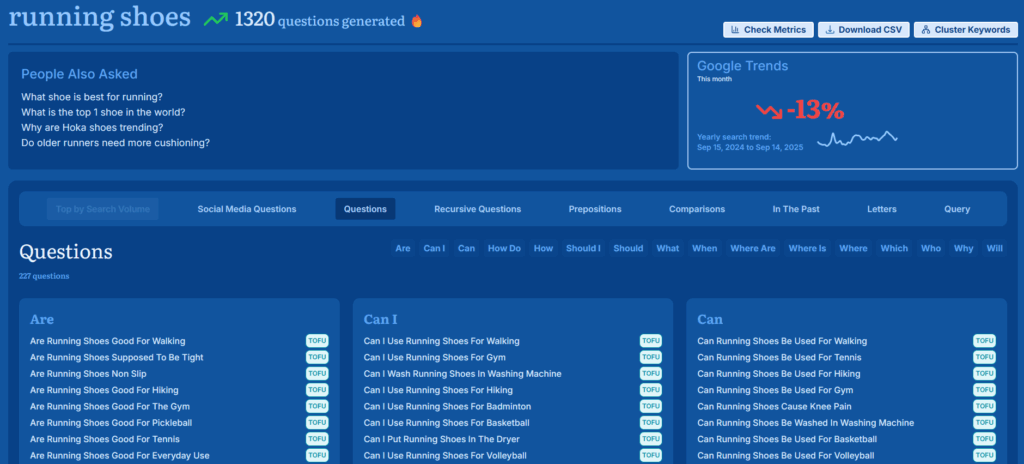
For example, when I search “running shoes” in Answer Socrates, I get 1,320 related questions, labelled by search intent (TOFU, MOFU, BOFU).
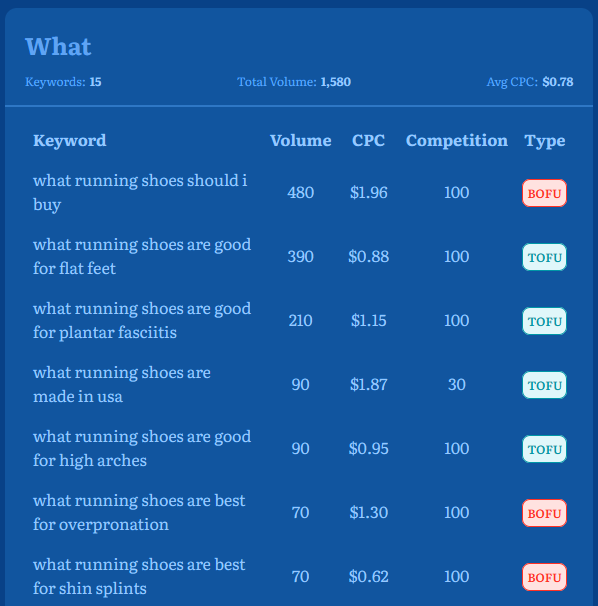
From here, I can check search metrics to see the volume, competition, and CPC for each keyword. This feature is only available on paid plans, but free users can still access the data on CSV downloads.
Next I run a recursive search, which finds the follow-up queries users search for after the main keyword, such as “Should I use compression socks for running?” and “How can I run faster?”, giving me a full roadmap for my content.
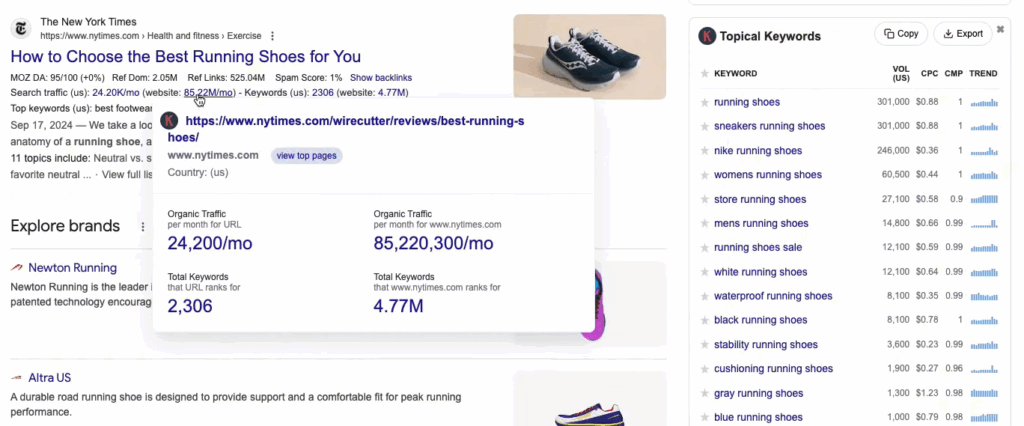
Keywords Everywhere, by contrast, displays a limited list of keywords with metrics in a sidebar (and only if you have a paid plan).
Answer Socrates is less about metrics in the SERP, and more about strategy: helping you plan content around clusters of real user questions (read more about how to cluster keywords here).
You can get a lot further with Answer Socrates’ free plan than you can with the free version of Keywords Everywhere.
And, unlike KE, Answer Socrates gives you the option to pay monthly rather than tying you in to an annual commitment.
Pricing
- Free: 3 searches/day, 1 recursive, 1 CSV, 1,500 clustering credits
- Lite ($9/mo): 100 searches, 30 recursive, unlimited CSVs, SEO metrics
- Seneca ($29/mo): 500 searches, 100 recursive, 12,000 clustering credits, SEO metrics
- Aurelius ($49/mo): Unlimited searches, 500 recursive, 40,000 clustering credits, SEO metrics
2. Keyword Surfer: Best Free Chrome Extension
Keyword Surfer is the closest like-for-like free alternative to Keywords Everywhere. It displays search volume and related keywords directly in Google’s search results, making it ideal for quick, lightweight research without leaving the SERP.
Pros
- 100% free Chrome extension
- Search volumes displayed directly in SERPs
- Related keyword suggestions with estimated traffic
- Easy to use, no learning curve
- Useful for quick validation while browsing
Cons
- Limited historical and trend data
- No clustering or in-depth keyword research
- Lacks competitor analysis and backlink metrics
- Data accuracy not as strong as premium tools
Keywords Everywhere vs Keyword Surfer
Keywords Everywhere provides richer datasets – including CPC, competition scores, Moz DA metrics, and integration with multiple platforms (Google, YouTube, Amazon, etc.) – but only if you pay for them.
Keyword Surfer is simpler: it’s a free SERP overlay with keyword volumes and suggestions for related keywords.
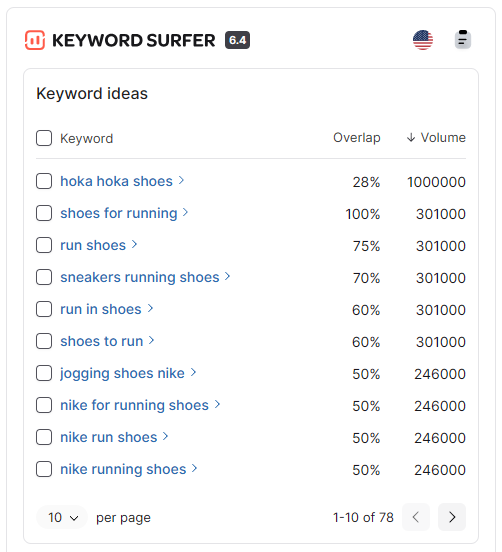
If you only need quick keyword insights without paying, Keyword Surfer is a practical option (although you shouldn’t take its search volumes too seriously, because I doubt there are 1 million monthly searches for ‘hoka hoka shoes’).
However, it doesn’t give you the traffic metrics, trend charts, or multi-platform coverage that Keywords Everywhere (or a fuller SEO suite) has. Check out this guide for a more detailed Keywords Everywhere vs Keywords Surfer comparison
Pricing
- Free: Chrome extension with keyword volumes, CPC, and related keyword suggestions
3. Ahrefs (with SEO Toolbar): Best for Link & Competitive Analysis
Ahrefs is one of the leading SEO platforms, and its Chrome/Firefox SEO Toolbar makes many of its metrics accessible right inside the browser.
It’s a premium option, but for professionals who need accuracy and competitor insights, it’s one of the strongest Keywords Everywhere alternatives.
Pros
- Industry-leading backlink and link metrics
- Accurate keyword volumes, CPC, and click metrics
- Competitor gap analysis and SERP overview
- SEO Toolbar adds keyword and link data to search results
- Huge keyword database across multiple search engines
Cons
- Expensive compared to Keywords Everywhere
- Steeper learning curve for new users
- More data-heavy than needed for basic keyword checks
Keywords Everywhere vs Ahrefs
Keywords Everywhere gives affordable, quick-access keyword metrics and Moz DA within the browser.
Ahrefs, however, goes far deeper: its toolbar shows backlink data, domain metrics, and keyword insights directly in SERPs. It also ties into the full Ahrefs suite, which adds competitor research, rank tracking, and historical SERP data.
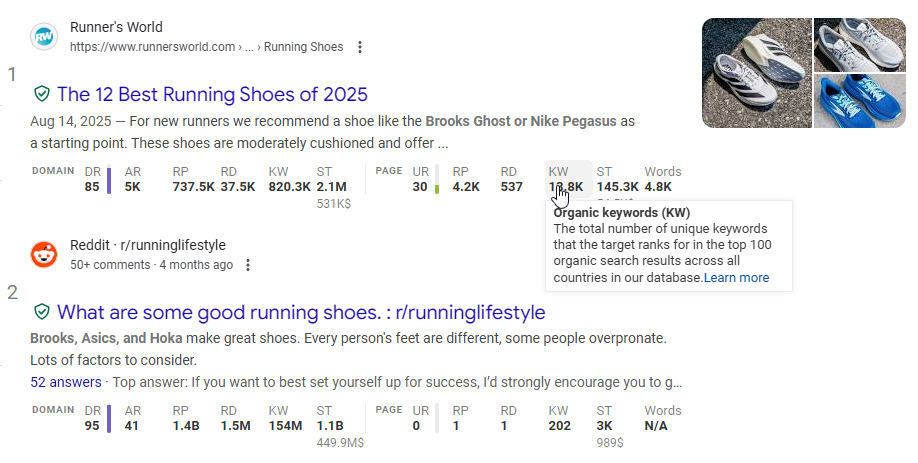
The Ahrefs toolbar also allows you to quickly view key metrics on any webpage – and click through to the full report if you want to explore deeper.
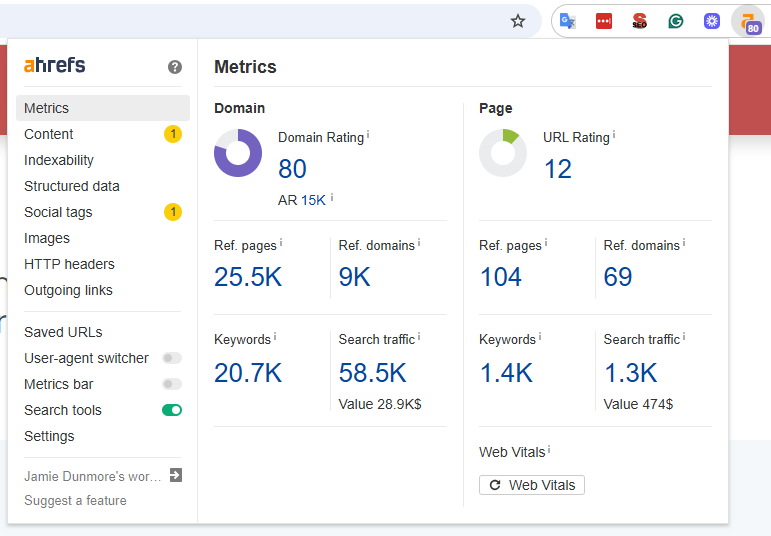
For casual keyword checks, Ahrefs is overkill. But if you need accurate data, strong backlink intelligence, and competitor analysis, Ahrefs surpasses Keywords Everywhere on nearly every front – albeit at a higher price.
Pricing
- Free: Ahrefs Webmaster Tools (limited access)
- Lite ($129/mo): 5 projects, 750 keywords, 100k crawl credits
- Standard ($249/mo): 20 projects, 2,000 keywords, 500k crawl credits
- Advanced ($449/mo): 50 projects, 5,000 keywords, 1.5m crawl credits
- Enterprise ($1,499/mo): API, SSO, unlimited projects
I have written more about Ahrefs and how it compares with other tools in this article.
4. Moz (with MozBar): Best for Beginner-Friendly SEO Metrics
Moz is a long-established SEO platform, and its free MozBar extension remains popular for quick domain and page metrics.
Pros
- MozBar extension shows DA, PA, and backlinks in SERPs
- Keyword Explorer includes difficulty and volume metrics
- Spam Score helps identify risky backlinks
- Clean, accessible interface
Cons
- Limited to 1,000 queries/month and 3 searches/day with free plan
- Paid plans pricier than Keywords Everywhere
- Data sometimes lags compared to competitors
Keywords Everywhere vs Moz
Keywords Everywhere offers broader keyword metrics in-browser (volume, CPC, competition, trend charts) and even on-page keyword density checks.
MozBar, on the other hand, emphasizes link metrics and domain authority.
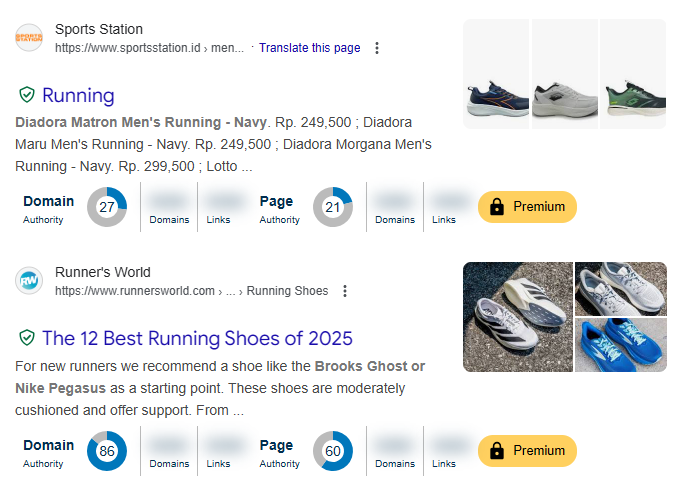
With a free account, MozBar just displays the top-level domain and page authority scores. However, you can click on any of these to see a more detailed report for that page or site.
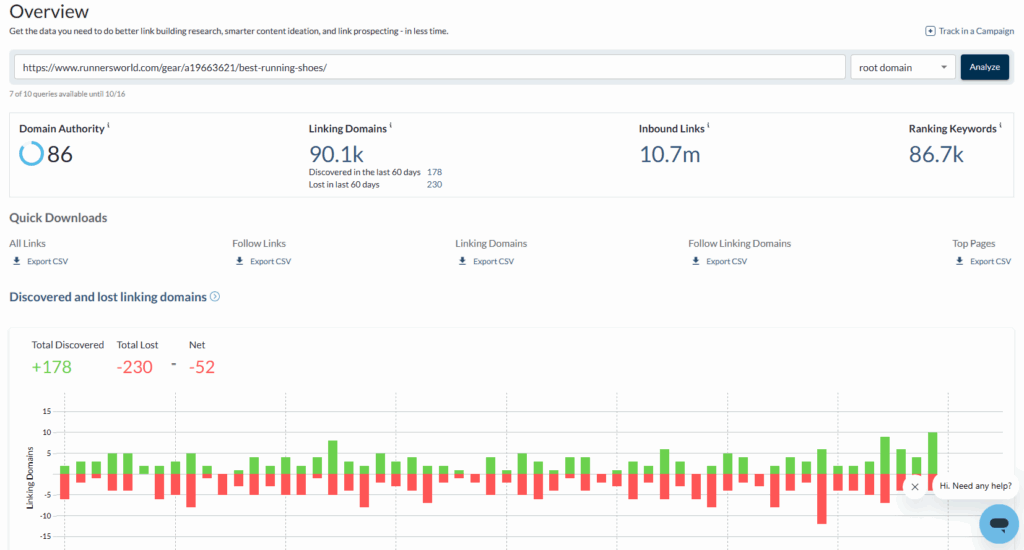
For more in-depth SERP overlay data and keyword insights, you’ll need to upgrade to Moz Pro. Although this costs considerably more than Keywords Everywhere, it’s one of the more affordable and beginner-friendly SEO toolkits.
Pricing
- Free: 3 searches/day via Keyword Explorer, MozBar extension
- Starter ($49/mo): 1 site, 75 keyword queries, 20k pages crawled
- Standard ($99/mo): 3 sites, 150 queries, 400k pages crawled
- Medium ($179/mo): 10 sites, 5,000 queries, 2m pages crawled
- Large ($299/mo): 25 sites, 15,000 queries, 5m pages crawled
5. Ubersuggest: Best Budget-Friendly All-in-One SEO Tool
Ubersuggest is designed to be an affordable entry-level SEO suite. It combines keyword research, competitor insights, and on-page audits, and also has its own Chrome extension for quick metrics.
Pros
- Affordable compared to most SEO suites
- One of the most comprehensive Chrome extensions (even for free)
- Keyword suggestions with CPC and competition data
- Simple, beginner-friendly interface
Cons
- Not the largest or most accurate database
- Constant upsell prompts can feel intrusive
- Limited free plan (3 searches/day)
- Keyword clustering not included
Keywords Everywhere vs Ubersuggest
Ubersuggest’s Chrome extension is one of the most comprehensive in terms of the data it shows, even on a free plan. Like Keywords Everywhere, you can view basic metrics for SERPs, along with a list of keyword suggestions in the sidebar.
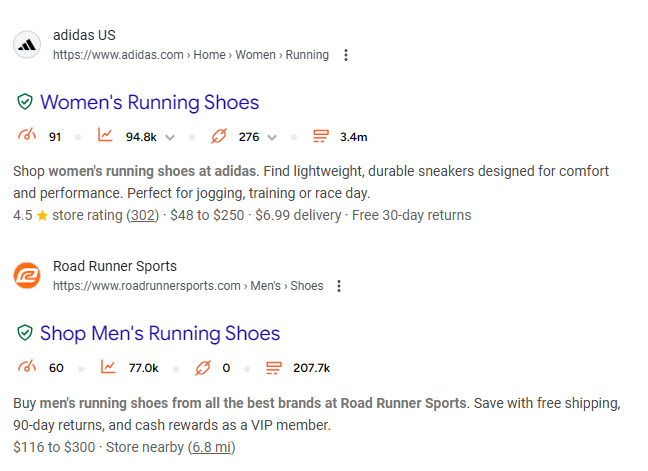
Ubersuggest goes a step further by letting you view keyword data as a SERP overlay: volume, difficulty, CPC, CTR, and a year of history.
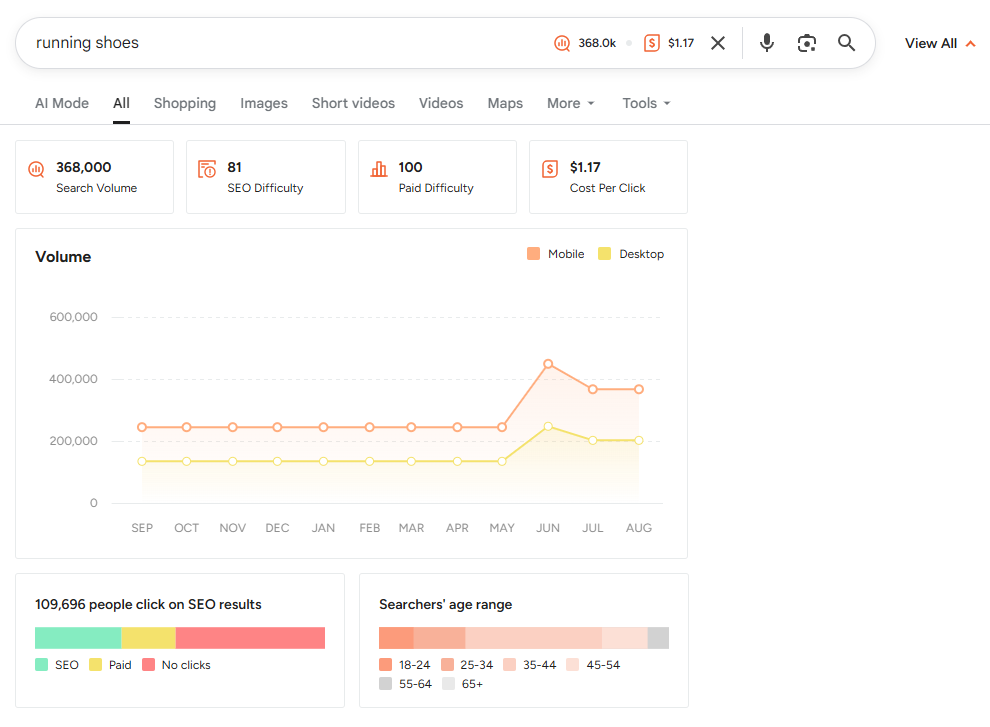
As well as the extension, Ubersuggest has a full SEO platform available. Its keyword database is shallower and less accurate than premium tools, but it’s a very affordable option if you want an all-in-one suite rather than just a keyword extension.
Pricing
- Free: 3 searches/day
- Individual ($12/mo): 1 site, 150 tracked keywords, 20k keyword suggestions
- Business ($20/mo): 7 domains, 2 users, 50k keyword suggestions
- Enterprise ($40/mo): 15 domains, 5 users, 100k keyword suggestions
- Lifetime plans: From $120
Ubersuggest is one of the best Chrome extensions from a budget SEO tool, but there are others that are helpful for more specific use cases.
6. Semrush: Best for Comprehensive SEO & Marketing Intelligence
Semrush is one of the most complete SEO and digital marketing suites, giving access to all the SEO tools you’d expect, with add-ons for local SEO, social media, ads, and more.
Pros
- Massive keyword and backlink database
- Competitor gap analysis and traffic insights
- On-page SEO checker and audits included
- Trusted by agencies and enterprise teams
Cons
- Expensive compared to Keywords Everywhere
- Interface can feel overwhelming for beginners
- Add-ons push cost even higher
Keywords Everywhere vs Semrush
Keywords Everywhere is a lightweight extension that’s cheap and fast, but limited in depth. Semrush is the opposite: an all-in-one suite that covers keyword research, competitor tracking, backlink analysis, site audits, and PPC insights.
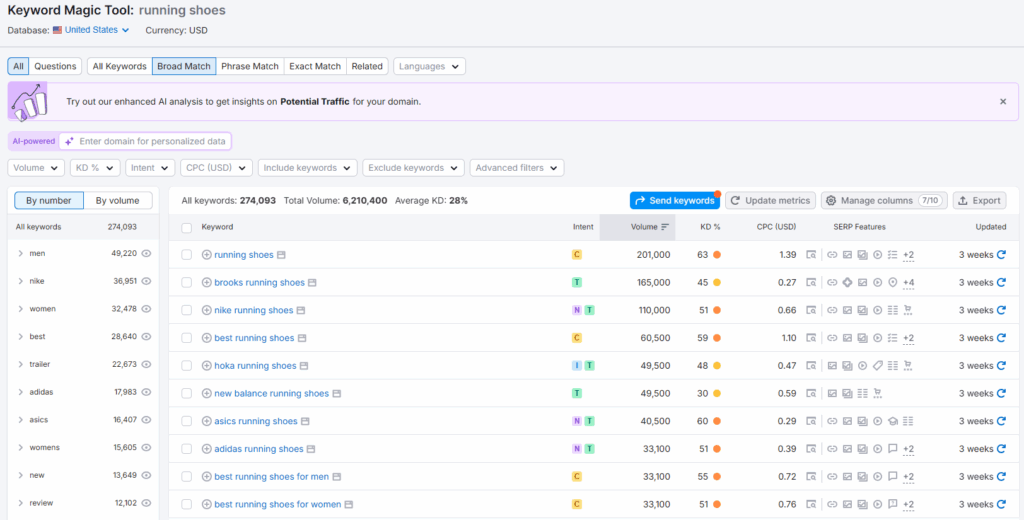
If you need a broad digital marketing toolkit with multi-project reporting, Semrush easily outpaces Keywords Everywhere. But if your main focus is fast keyword checks and affordability, Keywords Everywhere is simpler and more accessible.
One downside of Semrush vs other premium tools is that it doesn’t have a Chrome extension. I use the Ahrefs extension ALL the time, so this feels like a big gap in Semrush’s offering.
Pricing
- Free: 10 reports/day, 10 tracked keywords
- Pro ($139.95/mo): 5 projects, 500 keywords, 3,000 reports/day
- Guru ($249.95/mo): 15 projects, 1,500 keywords, historical data, Looker Studio integration
- Business ($499.95/mo): 40 projects, 5,000 keywords, API access, white-label reporting
- Enterprise: Custom pricing
7. Serpstat: Best Mid-Range SEO Platform with Extension
Serpstat is an all-in-one SEO platform that balances affordability with a wide feature set. It offers keyword research, rank tracking, competitor analysis, and a Chrome extension that surfaces quick data in search results.
Pros
- Affordable compared to Semrush/Ahrefs
- Keyword clustering included
- Rank tracking and site audit tools
- Chrome extension adds keyword/SEO metrics to SERPs
- Supports multi-language research
Cons
- Interface feels dated compared to newer tools
- Keyword difficulty metrics less precise than competitors
- Limited historical data
Keywords Everywhere vs Serpstat
Keywords Everywhere is leaner, focused on keyword metrics and quick SERP overlays. Serpstat is closer to a budget SEO suite: it provides keyword data, rank tracking, backlinks, and clustering.
The Serpstat Website SEO Checker extension does not do SERP overlays, but you can run it on any webpage to see detailed information about the page.
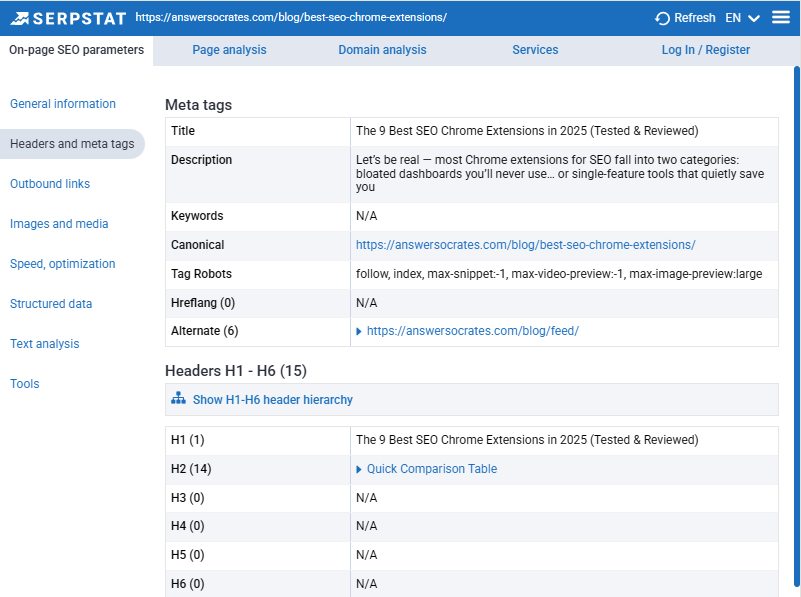
The free version includes on-page SEO parameters like headers, metadata, and link analysis. You’ll need a paid version if you want to see domain and keyword data, though.
While Keywords Everywhere is cheaper and simpler for basic metrics, Serpstat is better if you want multiple SEO features and deeper insights without paying premium prices.
Pricing
- Free Trial: 7 days full access
- Individual ($69/mo): 5 projects, 100 daily searches, 10k position checks
- Team ($129/mo): Unlimited projects, 500 daily searches, API, collaboration tools
- Agency ($499/mo): 5,000 daily searches, 500k position checks, white-label reports
8. KeywordTool.io: Best for Multi-Platform Keyword Suggestions
Keyword Tool specializes in pulling autocomplete suggestions from a wide range of platforms, including Google, YouTube, Amazon, eBay, Instagram, and TikTok. It’s ideal if you need ideas beyond Google Search.
Pros
- Multi-platform coverage
- Generates thousands of autocomplete suggestions per seed keyword
- Paid plan adds search volume, CPC, and competition data
- Supports multiple languages and regions
Cons
- Free version shows limited results and no metrics
- No clustering or competitor gap analysis
- Pricing higher than some beginner-friendly tools
Keywords Everywhere vs KeywordTool.io
Keywords Everywhere gives you volumes, CPC, competition, and trend data across Google and YouTube, with added traffic metrics and Moz DA scores.
Keyword Tool takes a different approach by generating keyword suggestions across multiple search engines, social media, and e-commerce platforms.
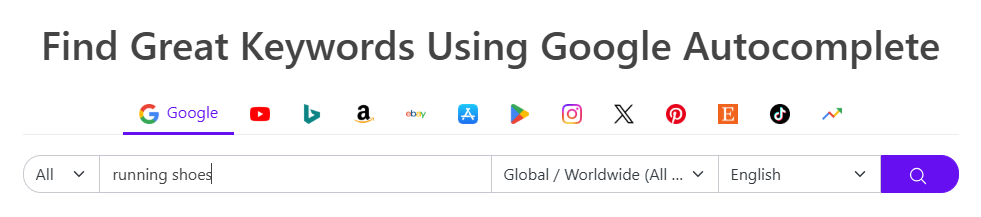
Most SEO tools focus on Google and Bing, so Keyword Tool fills a big gap by including e-commerce platforms (Amazon, eBay, Etsy) and social platforms (TikTok, X, Instagram).

Keyword Tool delivers comprehensive keyword lists for free, but you can only access metrics on a paid plan. Answer Socrates, although it uses purely Google data, does include search metrics with free CSV downloads.
Pricing
- Free: Autocomplete suggestions only
- Pro Basic ($89/mo): Search volumes, CPC, competition data for one user
- Pro Plus ($99/mo): Adds CPC, competition, and up to 5 user seats
- Pro Business ($199/mo): 10 user seats, API access, bulk data exports
9. KeywordsPeopleUse: Best for Community-Driven Insights
KeywordsPeopleUse combines Google search data with questions from Reddit and Quora, giving you a more conversational angle on keyword research.
Pros
- Pulls data from Reddit, Quora, and Google
- Supports semantic and clustering options
- Affordable starting price
- Great for conversational content ideas
Cons
- Free plan is only a one-time 15-credit trial
- Limited history and alerts on lower tiers
- No traffic or link metrics
Keywords Everywhere vs KeywordsPeopleUse
KeywordsPeopleUse focuses purely on keyword data – no domain or authority metrics like Keywords Everywere.
Its question-based approach is similar to Answer Socrates, but with the added benefit of Reddit and Quora search results, which can be helpful for understanding the conversations people are having around your chosen topic.
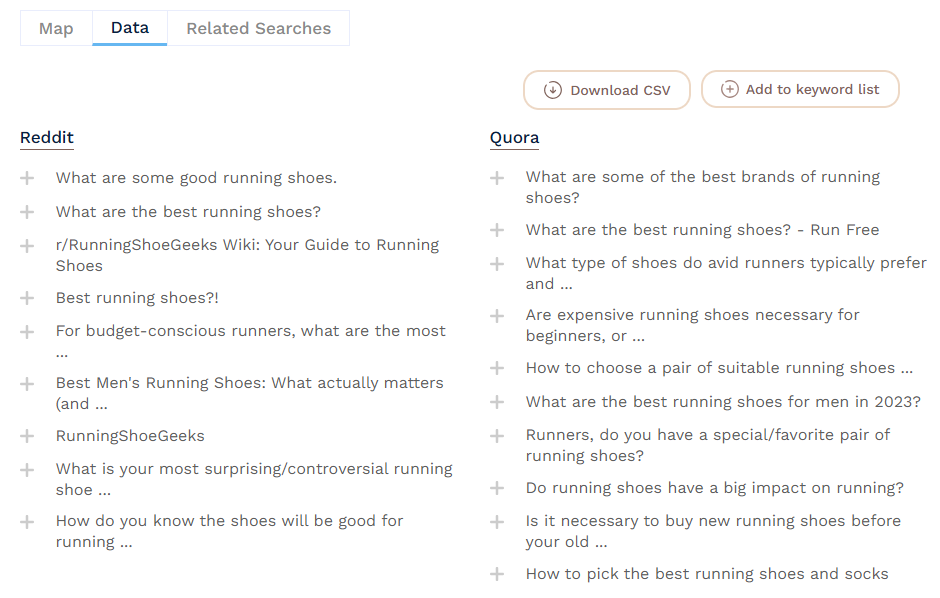
However (and it’s a big however)… you only get 15 free credits to try out KeywordsPeopleUse, and after that you must upgrade to a paid plan. Answer Socrates’ free plan is WAY better value, with 3 daily free searches and 1,500 monthly clustering credits.
You can read this article for more information about how KeywordsPeopleUse compares to other tools, and when it might be worth paying for.
Pricing
- Free: One-time 15 credits
- Lite ($15/mo): 150 credits/month
- Standard ($39/mo): 500 credits/month
- Pro ($79/mo): 1,500 credits/month
- Unlimited ($299/mo): Unlimited credits, history, alerts
10. Soovle: Best Free Multi-Engine Aggregator
Soovle is a lightweight, free tool that aggregates autocomplete suggestions from multiple search engines and platforms into one interface.
Pros
- Free and simple to use
- Pulls autocomplete suggestions from Google, YouTube, Amazon, Bing, and more
- Quick for early-stage brainstorming
- No signup required
Cons
- Cannot export results
- No keyword volumes, CPC, or difficulty scores
- No clustering or traffic analysis
- Frequent errors in fetching results
Keywords Everywhere vs Soovle
Soovle pulls autocomplete keyword ideas from multiple platforms – up to six at once. This makes it ideal for quick and simple idea generation, especially on platforms like Etsy and Pinterest that other tools overlook.
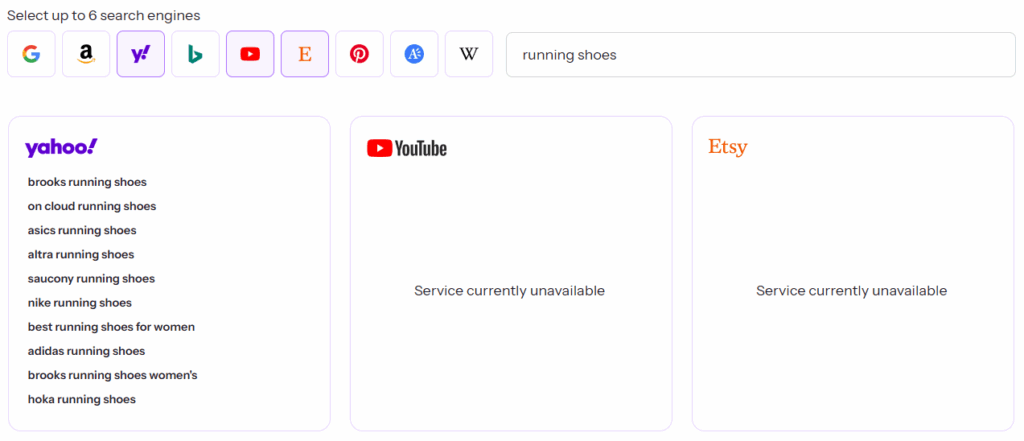
It does not provide any metrics or domain analaysis though, so Keywords Everywhere is still the better choice for these.
Soovle is not really suitable for meaningful keyword research, though. You can run unlimited searches for free, but it only provides 10 keywords per platform selected (no metrics) and you can’t export the list.
Plus, as you can see from the screenshot above, it is often unsuccessful in fetching results.
If you need fast brainstorming across multiple platforms, Soovle is useful. But for actionable keyword planning, Keywords Everywhere or Answer Socrates is far superior.
Pricing
- Free: Unlimited use
Final Verdict: The Best Keywords Everywhere Alternatives
Here’s the quick rundown of my top picks after testing all 10 tools:
- Answer Socrates (Best Overall Alternative): Uncovers real questions, recursive searches, clustering, and CSV exports – far more actionable than KE’s sidebar metrics.
- Ahrefs (Best Premium Suite + Extension): Enterprise-level accuracy for backlinks, competitor analysis, and keyword data.
- KeywordTool.io (Best for Multi-Platform keywords): Keyword lists from multiple social and e-commerce platforms.
- Ubersuggest (Best Budget Suite + Extension): Affordable all-in-one platform with keyword, site audit, and competitor features – plus a comprehensive Chrome extension.
If you want the best free Keywords Everywhere alternative, go with Answer Socrates – its free plan gives you clustering, recursive search, and CSV downloads that KE doesn’t match.
For the best paid upgrade, Ahrefs is my top pick for accuracy and depth, while Ubersuggest has a surprisingly good extension at the budget end of the scale.
FAQs
Is Keywords Everywhere really worth paying for?
If you want quick keyword metrics (volume, CPC, competition, DA) right inside your browser, it’s convenient and inexpensive. But for content planning and competitor analysis, other tools give you more value.
What is the best free Keywords Everywhere alternative?
The best free alternative is Answer Socrates. Its free plan includes 3 searches/day, recursive discovery, clustering, and CSV exports. Keyword Surfer is also a good free option if you want quick keyword volumes in Google SERPs.
Which paid tools are better than Keywords Everywhere?
For depth and accuracy, Ahrefs and Semrush outperform Keywords Everywhere. If you want a budget option, Ubersuggest or Serpstat give you all-in-one SEO features at a lower price.
Is Answer Socrates better than Keywords Everywhere?
Yes, if your main focus is building content strategies. Answer Socrates uncovers related questions, semantic keywords, and clusters them into topical maps. Keywords Everywhere is stronger for quick in-browser metrics like CPC and DA.
Does Keywords Everywhere show competitor or backlink data?
Yes, through Moz metrics (DA, Spam Score, backlinks) and traffic estimates. But if backlink analysis is your priority, Ahrefs or Moz Pro offer far more detailed link data.
What’s the best Keywords Everywhere alternative for e-commerce?
Keyword Tool is the strongest for e-commerce since it pulls autocomplete suggestions from Amazon, eBay, and Etsy.
Share:
About the Author