Building a content plan with an AI agent
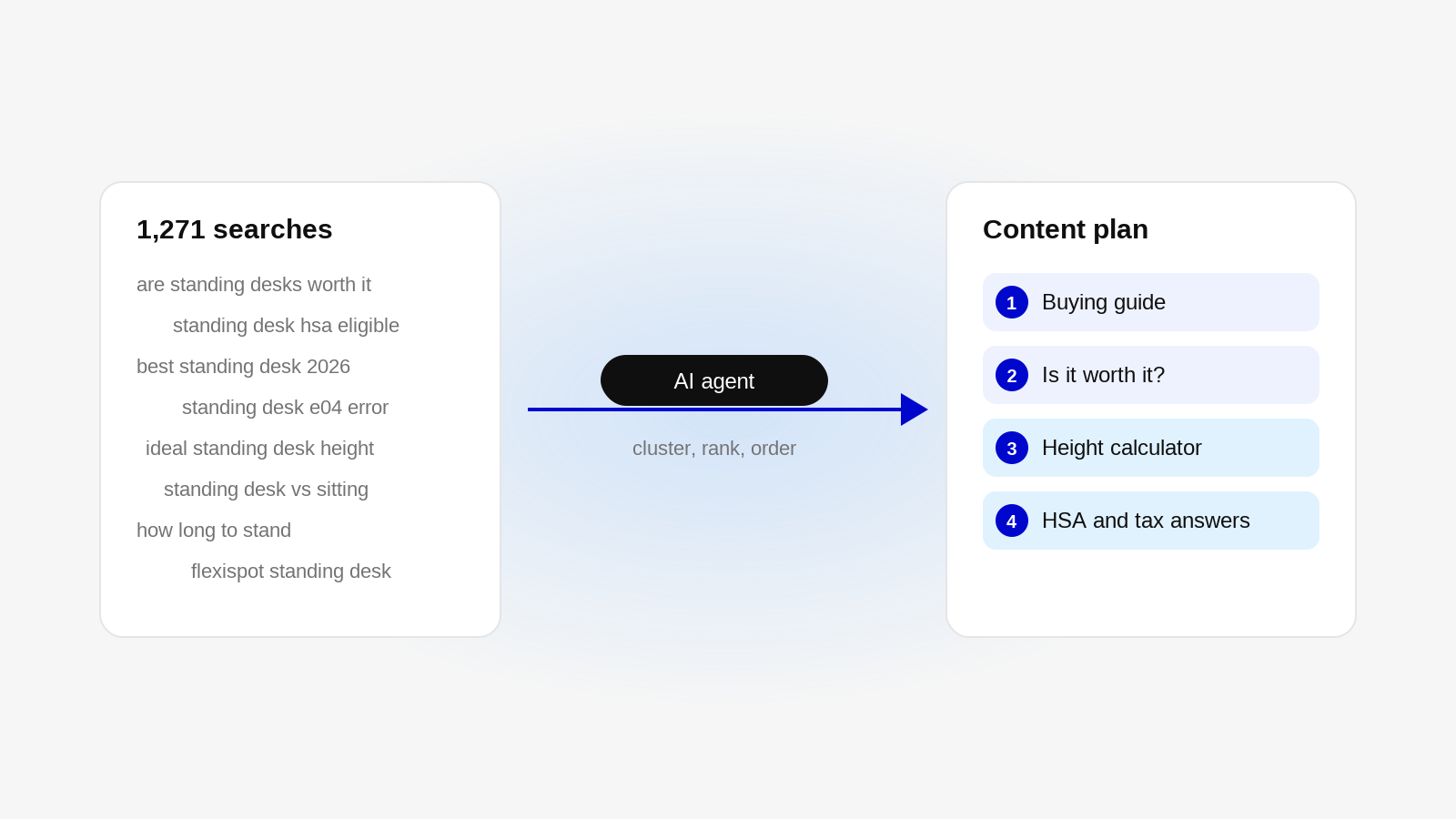
Building a content plan with an AI agent means letting Claude, ChatGPT or Claude Code fetch rising topics, trends and every real search through Answer Socrates, cluster them, and save the result to your project. It matters because the agent does hours of legwork in minutes, while you keep the one decision it cannot make: what to write first.
Key takeaways
- The real pipeline is five tool steps: rising topics (1 request), trends (1 per line), the keyword pull (1 per term), clustering (1 credit per keyword) and saving to a project (free).
- Clustering is gated: the agent must state the keyword count and credit cost and wait for your yes, so 142 questions cost exactly 142 topic cluster credits.
- One real standing desk session found a UK peak in late August and a US peak in mid-April, which sets when each market's buying guide should go live.
- The cluster table gives counts, funnel split and intent; you order the plan by size and closeness to purchase, so the one commercial cluster goes first.
- Ask the agent to save with save_to_project before the chat ends; the list opens in your Answer Socrates history where the team can see it.
An agent can do the legwork of a content plan
A content plan is an ordered list of pages to write: which topics get a page, what each page is for, and which goes live first. Building one by hand means hours of pulling keywords, sorting them into piles and checking when each topic peaks.
An AI agent is an assistant that can call tools by itself, one after another, to finish a job. Connected to Answer Socrates, Claude, ChatGPT or Claude Code can run that legwork in one conversation: find what is rising, time it with Google Trends, pull every real search, cluster the lot and save it to your project. What it cannot do is decide what your business should write first. That part stays with you.
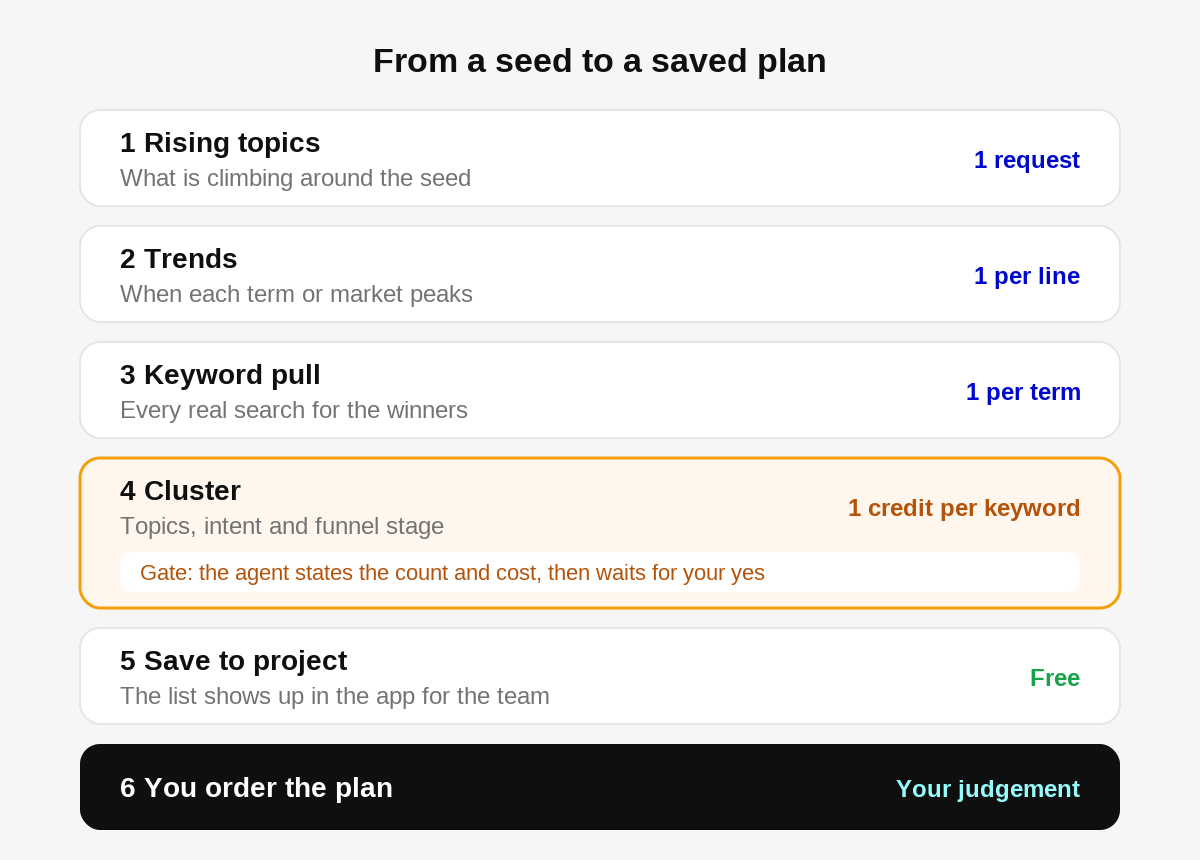
This lesson follows one real session in Claude Code for "standing desk", step by step, with the real replies. If your connector is not set up yet, start with Connecting Answer Socrates to Claude or Connecting Answer Socrates to ChatGPT.
What the agent does well, and what stays your call
Agents are fast at fetching, counting and grouping. They are weak at knowing your margins, your products and what you have already published. Split the work along that line.
| Job | Who should do it | Why |
|---|---|---|
| Find rising sub-topics | The agent | One tool call, and it reads the whole list in seconds |
| Spot seasonal peaks | The agent, you check | It reads 52 weekly points well, but only you know your sales calendar |
| Pull every real search | The agent | 1 request returns hundreds of searches |
| Group keywords into topics | The agent, with clustering | Intent and funnel labels come from the tool, not a guess |
| Decide which keywords are off-topic | You | Our server tells the agent to propose exclusions, never make them silently |
| Pick what to write first | You | It depends on what you sell and what already ranks |
Google's guidance is a useful check on the last row. It asks whether you are "producing lots of content on many different topics" in the hope some performs, and whether you are "using extensive automation to produce content on many topics" [1]. An agent makes it easy to plan 40 pages. A good plan is usually the 5 that matter most.
Step 1: find what's rising around the seed
Start with one broad seed and ask for rising searches. That is get_rising_topics, 1 request. Rising searches are the related searches growing fastest, and a Breakout is one that grew by more than 5,000% [2].
The prompt: "Use Answer Socrates to find the rising searches for standing desk." Claude Code called the tool once and came back with 15 climbers, led by "electric adjustable standing desk" at +600% and "duo standing desk" at +550%.
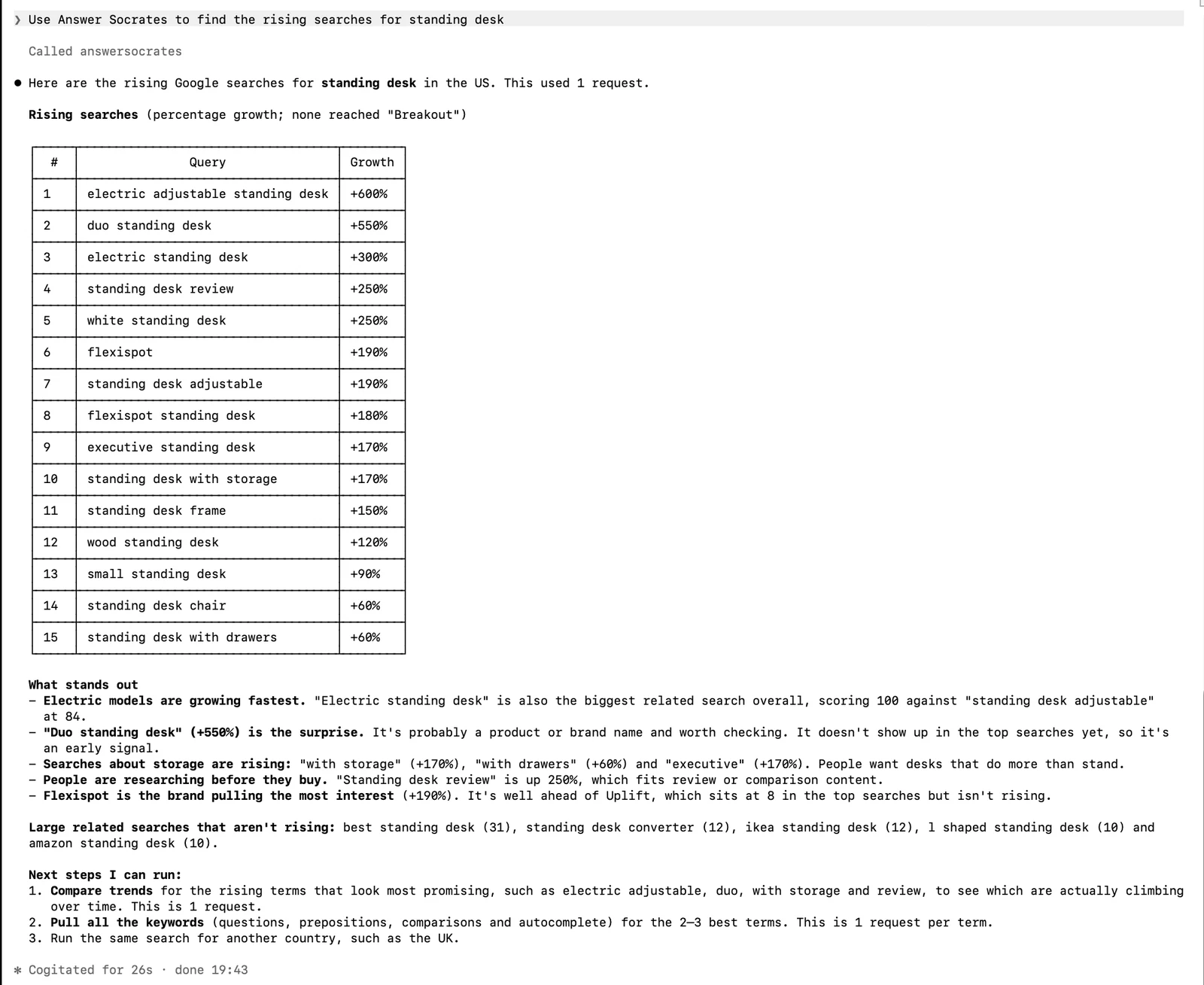
Notice what it did not do. It listed next steps (compare trends, pull keywords, try another country) with their cost, and stopped. Our server tells agents to offer the bigger pulls rather than run them uninvited, so you decide what to spend.
Step 2: time it with 12 months of trends
Before you commit to a topic, check when people search for it. get_trends returns 12 months of weekly Google Trends interest for one term in one country, 1 request per line.
The prompt: "Use Answer Socrates to compare Google Trends for standing desk in the UK and the US." Two calls, 2 requests. The agent found that the UK peaked in the week of 30 August, back-to-school and back-to-office time, while the US had one long spring surge peaking in mid-April.
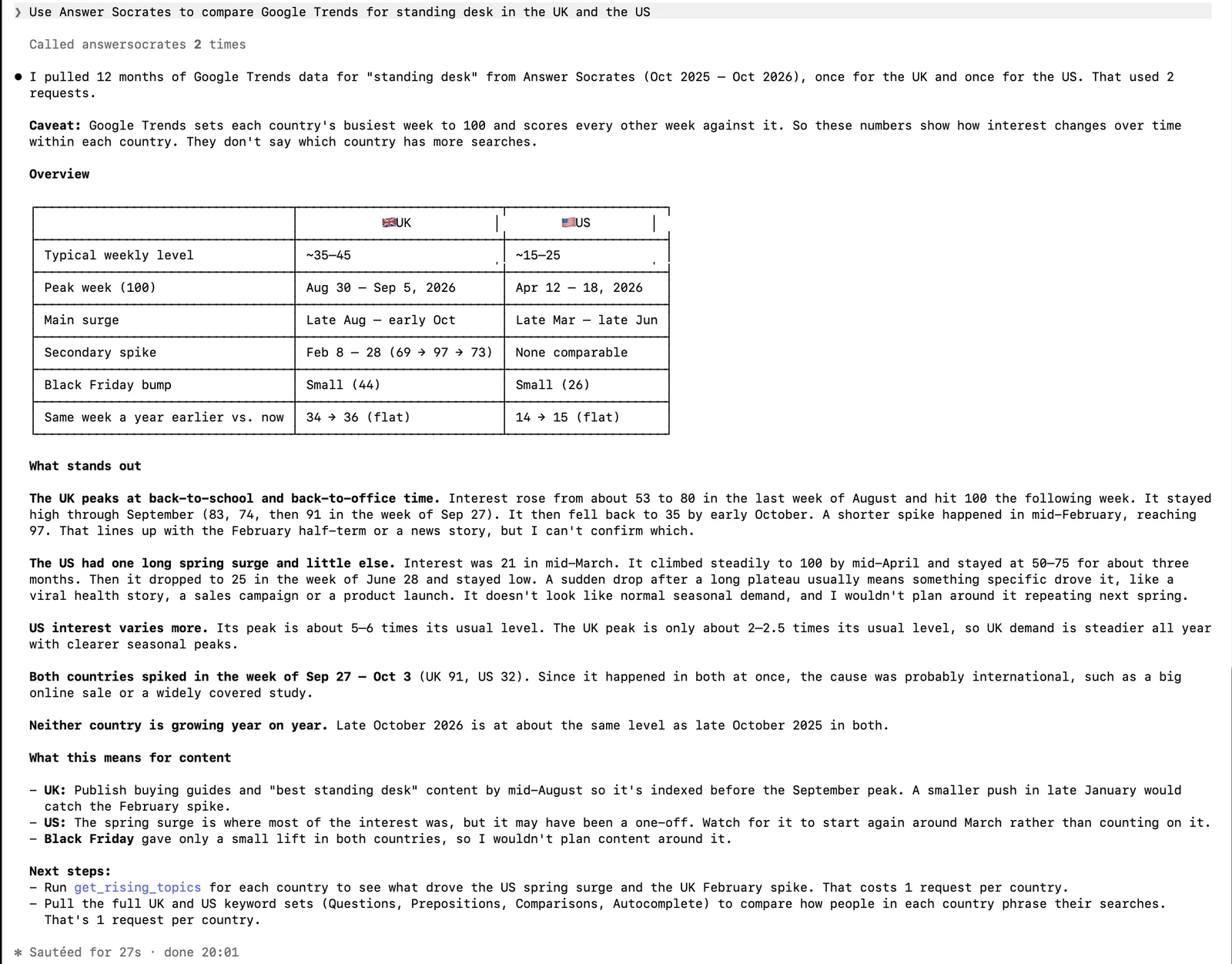
Google Trends numbers run from 0 to 100 and are scaled to a term's share of all searches [3], which is why the agent warns you not to compare the two countries' sizes. The timing is what you plan around: a UK buying guide should be live by mid-August, before the September peak.
Step 3: pull every real search for the winners
Now pull the full keyword set. get_keywords returns everything Google Suggest gives around the term, grouped into Questions, Prepositions, Comparisons and Autocomplete, for 1 request.
The prompt: "Use Answer Socrates to pull the keywords for standing desk." It returned 1,271 searches: 152 Questions, 105 Prepositions, 212 Comparisons, 776 Autocomplete and 26 in a small time-based group.
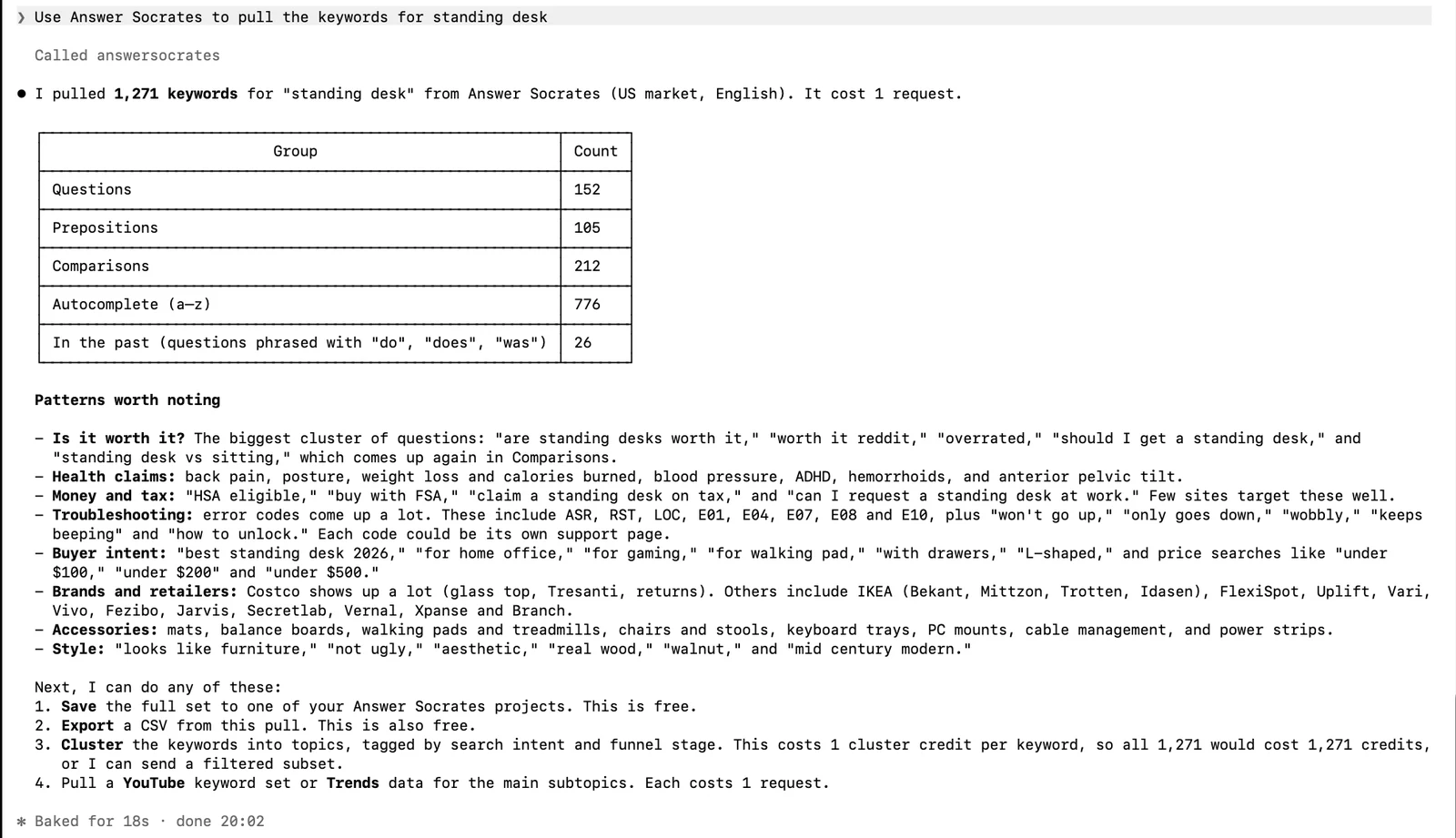
The agent's notes are already a rough plan: an "is it worth it" cluster, health claims, HSA and tax questions, error codes like E04 and E07, buyer terms with price caps. Treat that as a first draft. The next step gives it structure you can check.
Step 4: cluster, after the agent states the cost
Clustering turns the list into topics. cluster_keywords sorts each keyword into a group and labels its search intent (informational, commercial and so on) and funnel stage. TOFU, MOFU and BOFU mean top, middle and bottom of the funnel: learning, comparing and ready to buy.
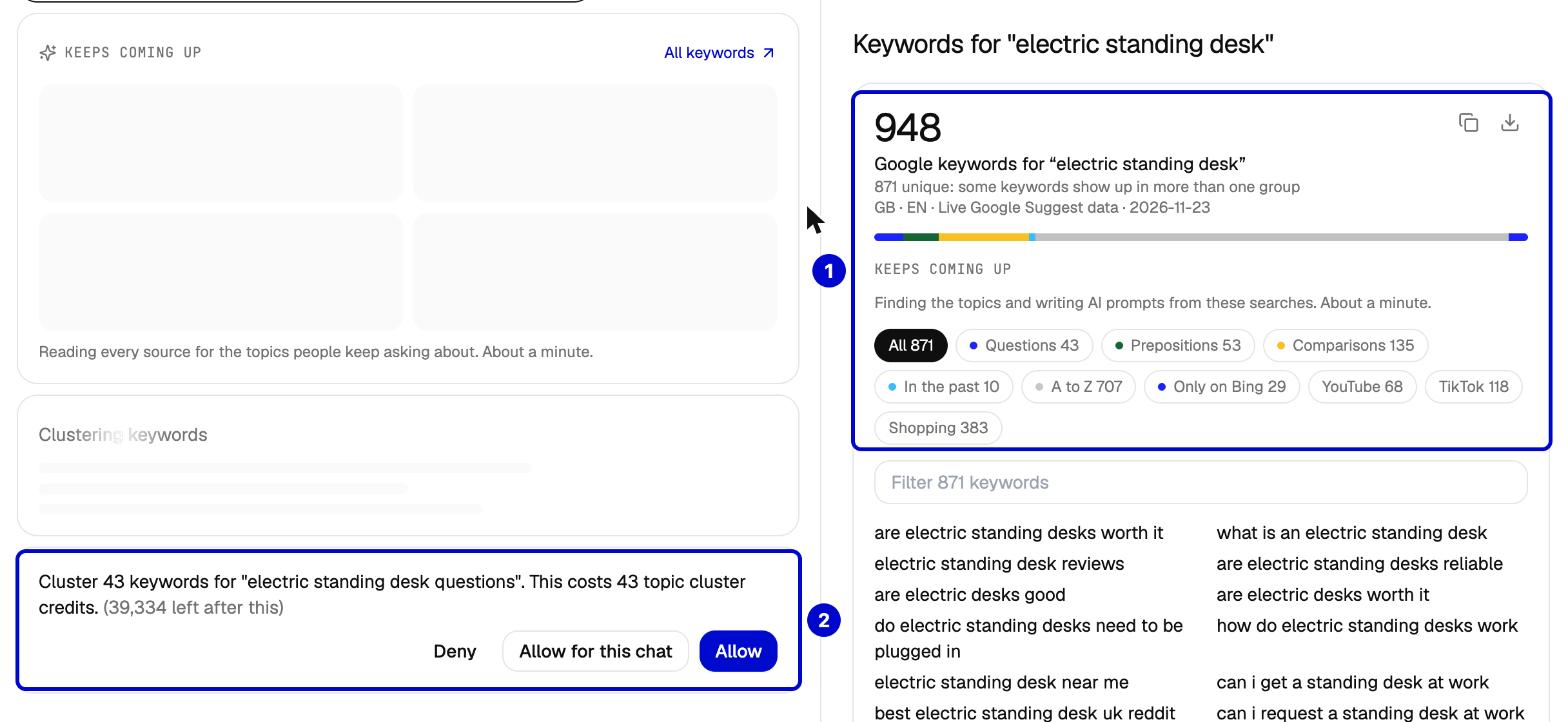
Clustering is priced differently from everything else. It costs 1 topic cluster credit per keyword, spends no requests, and through the connector it needs Seneca or above. Our server requires the agent to tell you how many keywords it will send, and so how many credits it will spend, and to wait for your agreement before it runs. It is also told to propose any off-topic keywords to drop, and let you decide.
In the real session, the agent offered to cluster all 1,271 (1,271 credits) or a smaller set. The agent then proposed a list of 142 questions, and the user replied: "Yes, go with 142. No CSV."
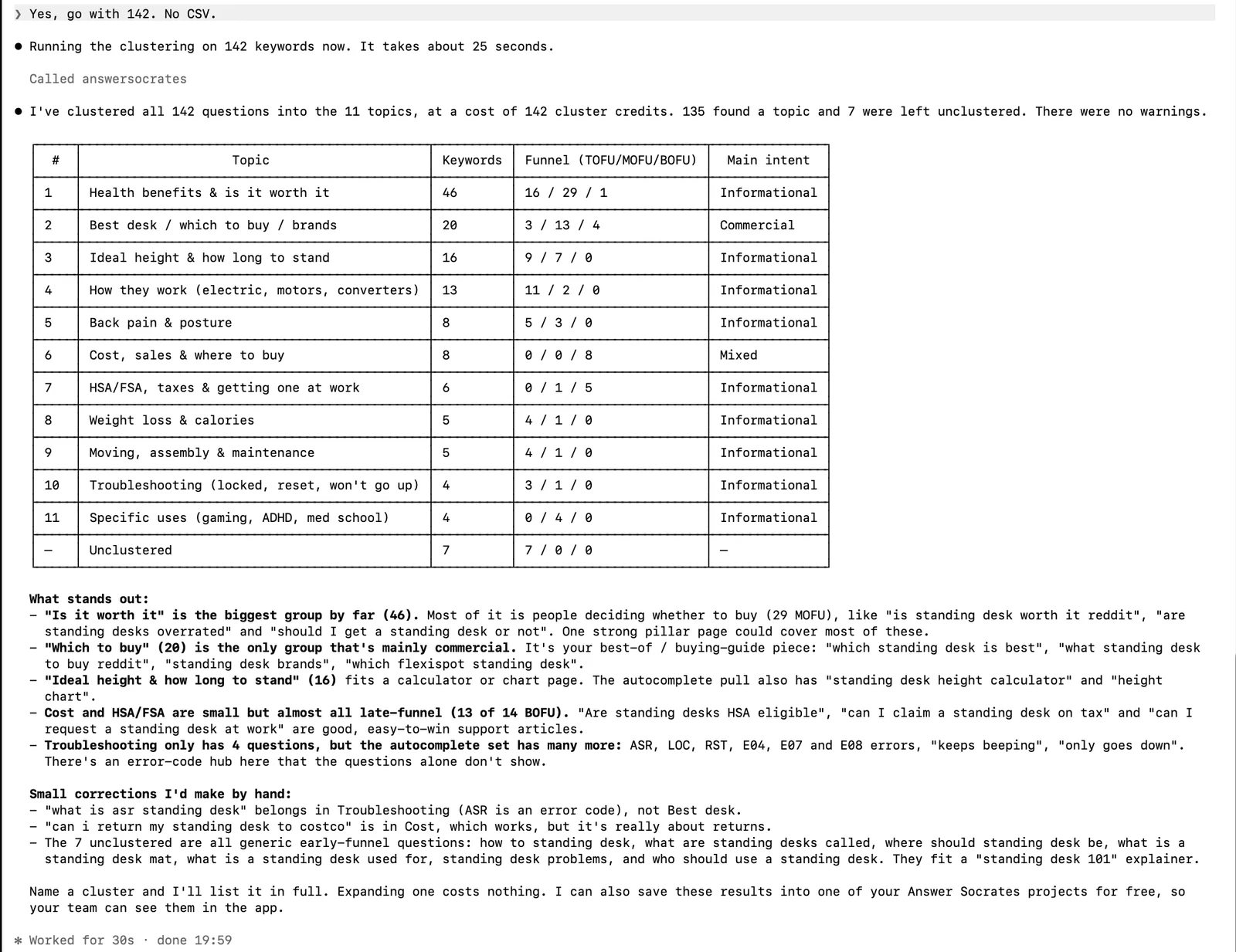
Read the result for problems, not just answers. Here the agent itself flagged two misplaced questions ("what is asr standing desk" belongs with troubleshooting, not buying) and seven unclustered questions that fit a "standing desk 101" explainer.
Step 5: save it, then order the plan
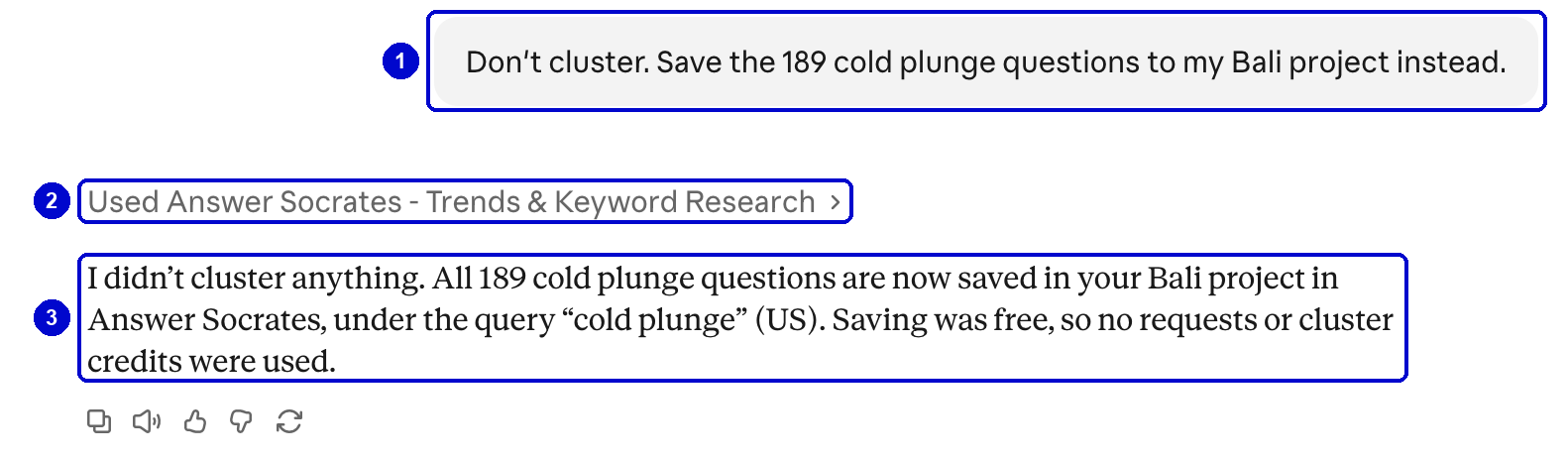
Save the work before the chat ends. Ask "save these to my Standing Desk project." The agent calls list_projects to find it and save_to_project to store the keywords. Both are free, and the list opens in your Answer Socrates history like any keyword search, where your team can see it. Clustering runs are saved to your history too.
Now the part the agent cannot do for you: order the plan. Two questions sort most clusters. How many searches sit in it? And how close is it to a purchase?
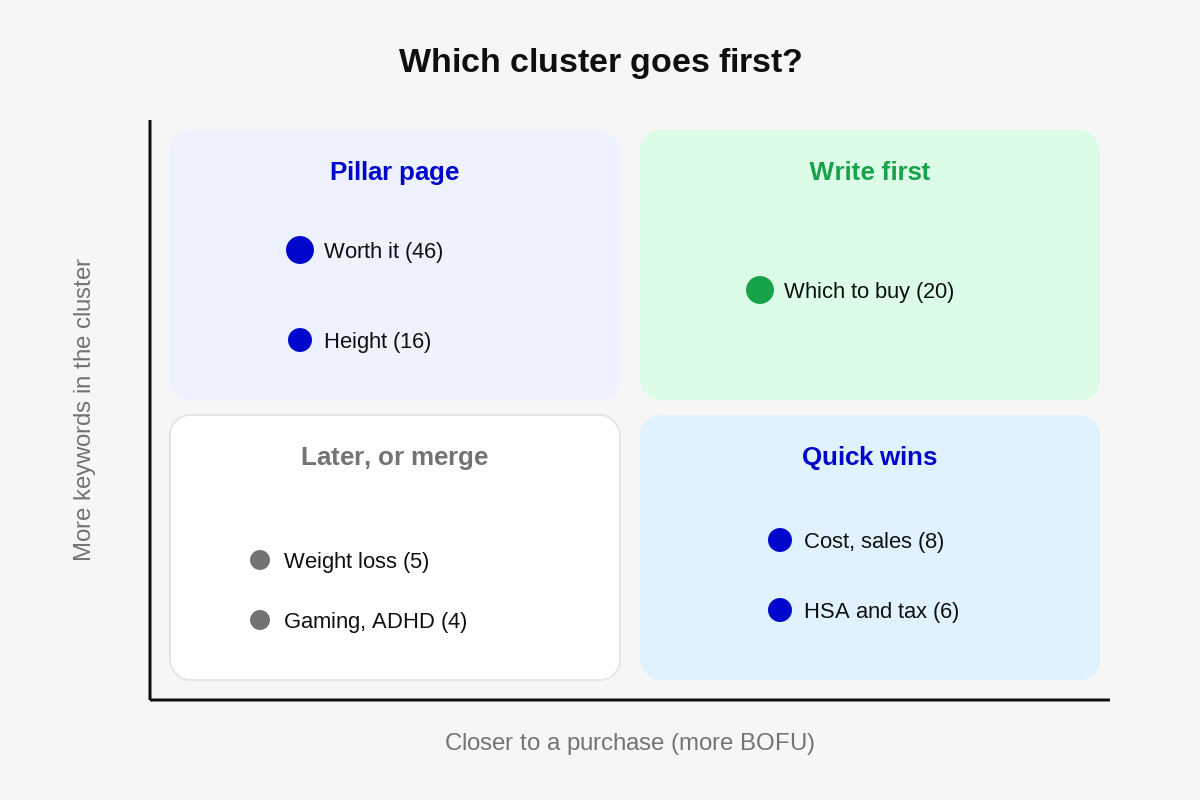
A made-up example: a small UK shop that sells standing desks takes the 11 clusters and orders them like this.
| Order | Cluster (keywords) | Page | Why this slot |
|---|---|---|---|
| 1 | Best desk / which to buy (20) | Buying guide | The only mainly commercial cluster, and the UK peak starts in late August |
| 2 | Health benefits and is it worth it (46) | Pillar page | The biggest group, mostly people deciding whether to buy |
| 3 | Ideal height and how long to stand (16) | Height calculator | A tool page that links into the guide |
| 4 | HSA/FSA, taxes and getting one at work (6) | Short answer page | Small but late-funnel (UK readers ask about work, not HSA) |
| 5 | Troubleshooting (4, plus error codes) | Error-code hub | The autocomplete list holds far more codes than the questions |
| Later | Weight loss (5), specific uses (4) | Sections of the pillar | Too thin for their own page |
For the method in depth, read From cluster to content plan: what to write first.
The same thing in Ask Socrates
If you would rather not connect anything, Ask Socrates, the chat inside Answer Socrates, has the same rising topics, trends, keyword and clustering tools, and saves to your projects. Whether it asks before spending depends on your spending setting.
Type: "Find what's rising around standing desk in the UK, compare the top 3 on 12-month trends, pull keywords for the best one and cluster its questions into a content plan."
| You want to... | Use |
|---|---|
| Plan inside the assistant you already work in | The connector in Claude or ChatGPT |
| Plan while you build the site in code | The connector in Claude Code |
| Plan with no setup, next to your projects | Ask Socrates |
| Turn a cluster into a written draft | Content Studio |
Where to go next
| If you want to... | Read |
|---|---|
| Order clusters into a plan in more depth | From cluster to content plan: what to write first |
| Understand clustering, intent and funnel stage | Keyword clustering: turning a list into topics |
| Decide when two keywords share a page | One page or many? Reading a keyword cluster |
| Write better research prompts | Keyword research from inside Claude |
| Know what to check in agent output | Where AI agents get SEO wrong |
| Turn each planned page into a brief | Content briefs: what to give a writer (or an AI) |
Sources
- Creating helpful, reliable, people-first content, Google Search Central, 2026
- Find related searches, Google (Trends Help), 2026
- FAQ about Google Trends data, Google (Trends Help), 2026
- Connect Claude Code to tools via MCP, Anthropic (Claude Code docs), 2026
