Tracking AI visibility over time
Tracking AI visibility means running the same buyer prompts through the same AI engines on a schedule and watching the share of answers that name you. AI answers change on every run, so only a series of checks can show whether you are gaining ground or losing it.
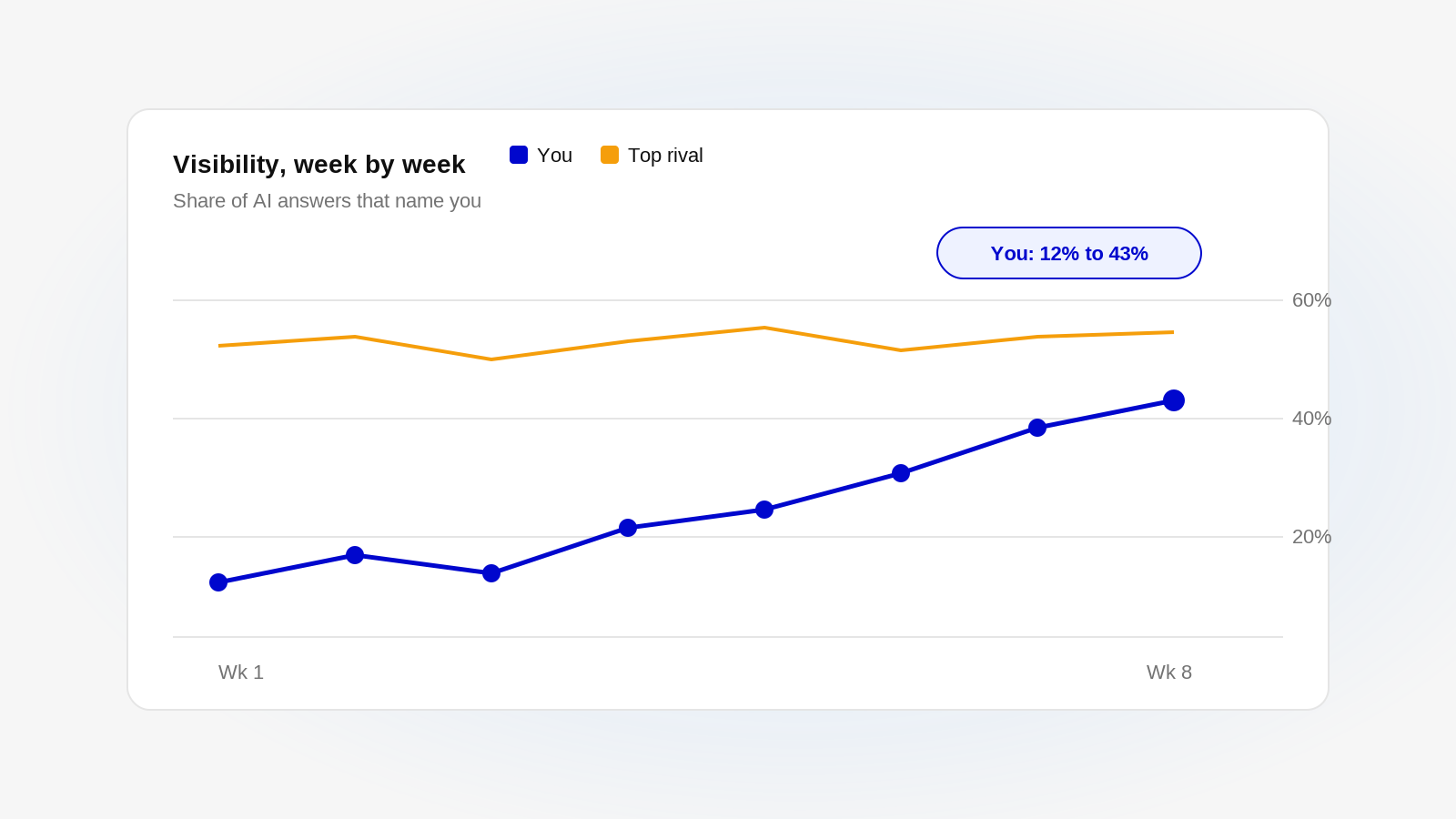
Key takeaways
- Trend visibility, the share of answers that name you; SparkToro found ChatGPT or Google's AI gave the same brand list less than 1 time in 100.
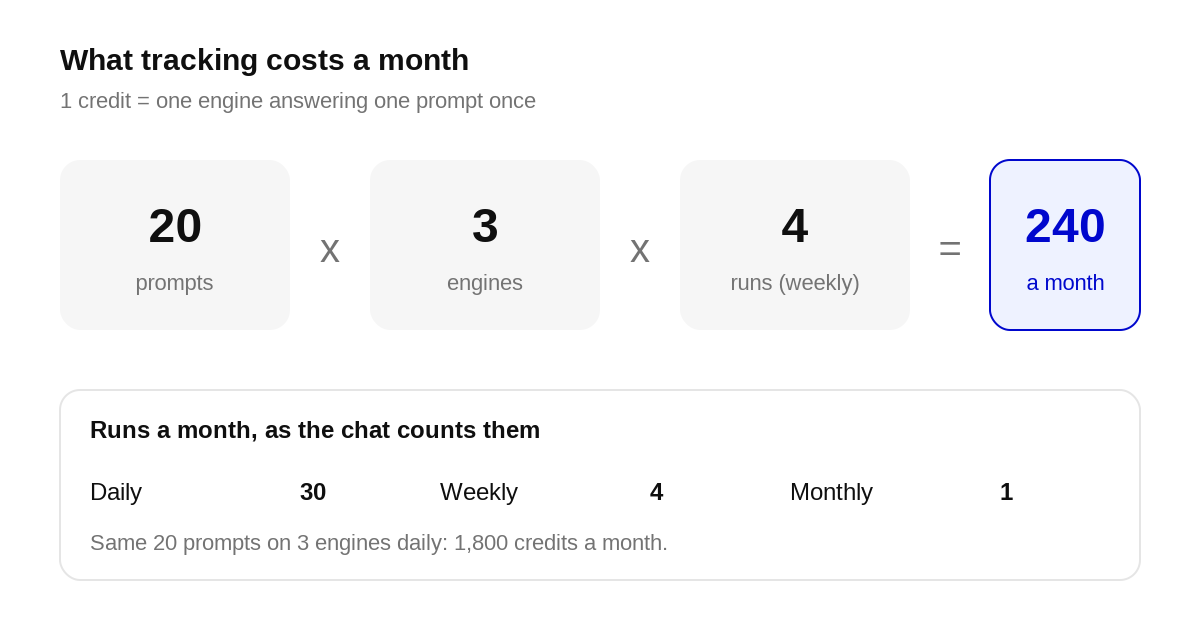
- Keep the prompts, engines, location and cadence fixed, and run core buyer prompts weekly; daily costs 30 runs a month per engine.
- Cost is prompts times engines times runs: 20 prompts on 3 engines weekly is 240 tracker credits a month.
- Pick 7, 30 or 90 days on the tracker Dashboard and Visibility shows its change in points against the window before.
- In Ask Socrates, tracking takes up to 10 prompts at a time and always shows the monthly cost on a card; asking what moved is free.
One check is a snapshot. Tracking shows the trend.
Tracking AI visibility means asking the same prompts to the same AI engines on a schedule, then watching how often you are named. One check tells you where you stand today. A run of checks tells you whether that is changing, and whether the work you did moved it.
You need the run because AI answers move on their own. In a study by SparkToro and Gumshoe, ChatGPT or Google's AI returned the same brand list for a prompt less than 1 time in 100 [1]. So a single bad week can be luck, and a single good week can be too.
The same study gives the number to trend. Its author calls visibility percentage, run across many prompts and many runs, "a reasonable metric", and is scathing about tools that report a "ranking position" in AI [1]. So the main line on your chart should be the share of answers that name you, not your place in a list.
Fix the four things that must not change
A trend only means something if the measuring stick stays the same. Decide these four once, write them down, and change them only on purpose:
- The prompts. Your 20 to 30 buyer prompts, worded exactly the same every run. The lesson on finding the prompts your buyers type covers building them.
- The engines. Pick the ones your buyers use, such as ChatGPT, Gemini and Perplexity. Adding an engine halfway through changes your average overnight.
| Cadence | Good for | Watch out for |
|---|---|---|
| Daily | A launch, a news story or a handful of money prompts during a campaign | 30 runs a month per engine, so it eats credits fast |
| Weekly | Your core buyer prompts, most of the time | Needs about a month before a trend shows |
| Monthly | Long-tail prompts, Learn prompts, branded checks | Too slow to tell you what caused a change |
Weekly is the sensible default. It is frequent enough to catch a change within a month and cheap enough to cover a full prompt list.
Work out what tracking costs before you start
On the LLM Brand Tracker, one credit is one engine answering one prompt once. So the monthly cost is simple multiplication: prompts, times engines, times runs a month.
Every paid plan comes with monthly LLM Brand Tracker credits, listed on the pricing page: 50 on Lite, 200 on Seneca, 500 on Aurelius and 3,000 on Senate. Here is what that buys at a weekly cadence (4 runs a month):
| Plan | Credits a month | Weekly tracking it covers |
|---|---|---|
| Lite | 50 | About 4 prompts on 3 engines, or 12 on ChatGPT alone |
| Seneca | 200 | About 16 prompts on 3 engines |
| Aurelius | 500 | About 40 prompts on 3 engines, or 20 on 6 |
| Senate | 3,000 | 250 prompts on 3 engines |
The numbers worth watching
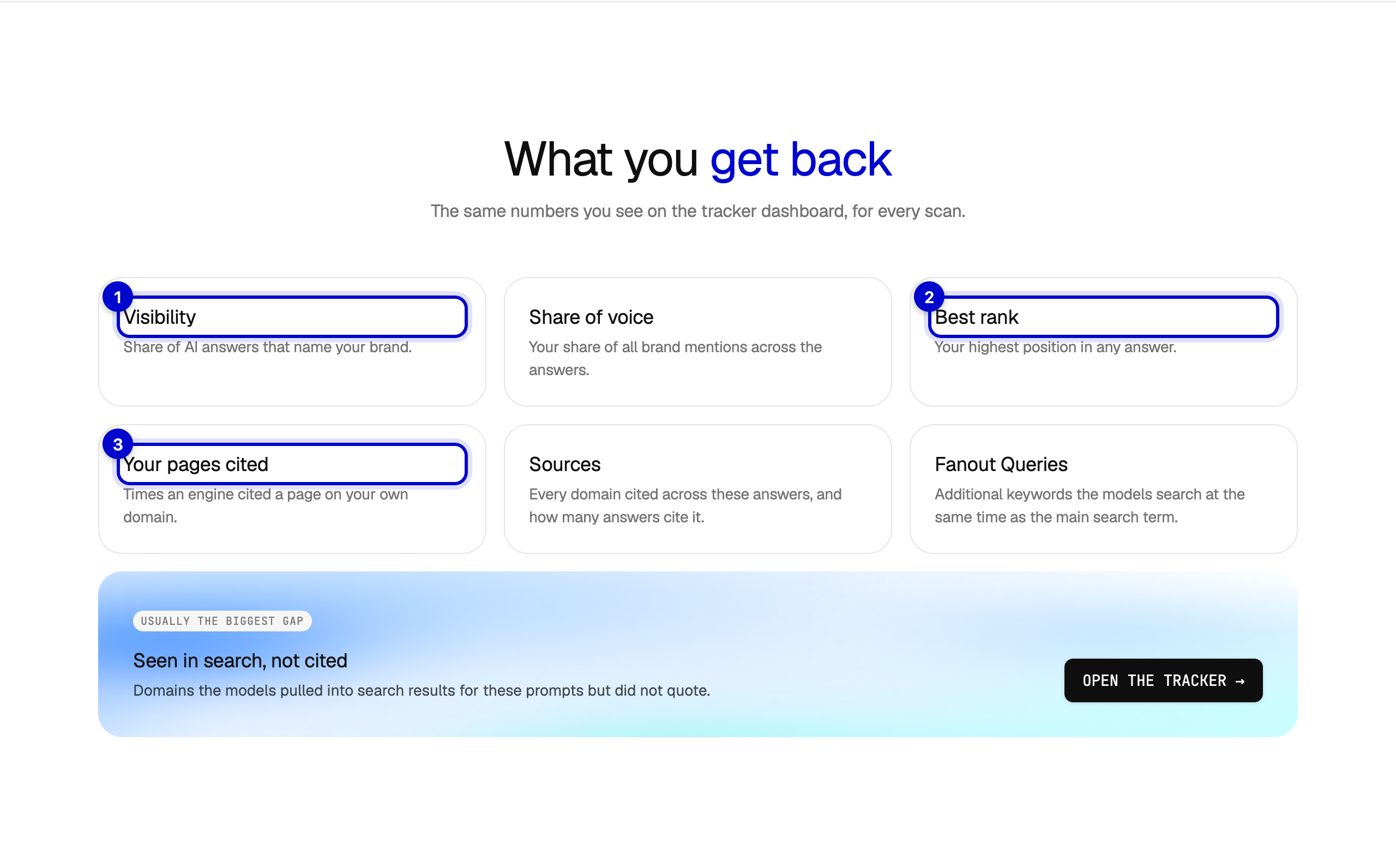
The tracker's Dashboard shows five numbers across your scans. All but Best rank have a small line of their daily values beside them.
- Visibility: the share of AI answers that name your brand. This is the headline number.
- Share of voice: for each scan, the share of answers that named you; the card averages it across scans. It moves with Visibility but weights each scan equally.
- Best rank: your highest place in any answer. Useful as a hint, weak as a target [1].
- Mentions: the count of answers that name you. A count rises when you run more scans, so compare it only between periods with the same schedule.
- Your pages cited: how many times an engine cited a page on your own domain.
The dashboard's Prompts card adds the most useful view for planning: a state for every tracked prompt, from its latest scan.
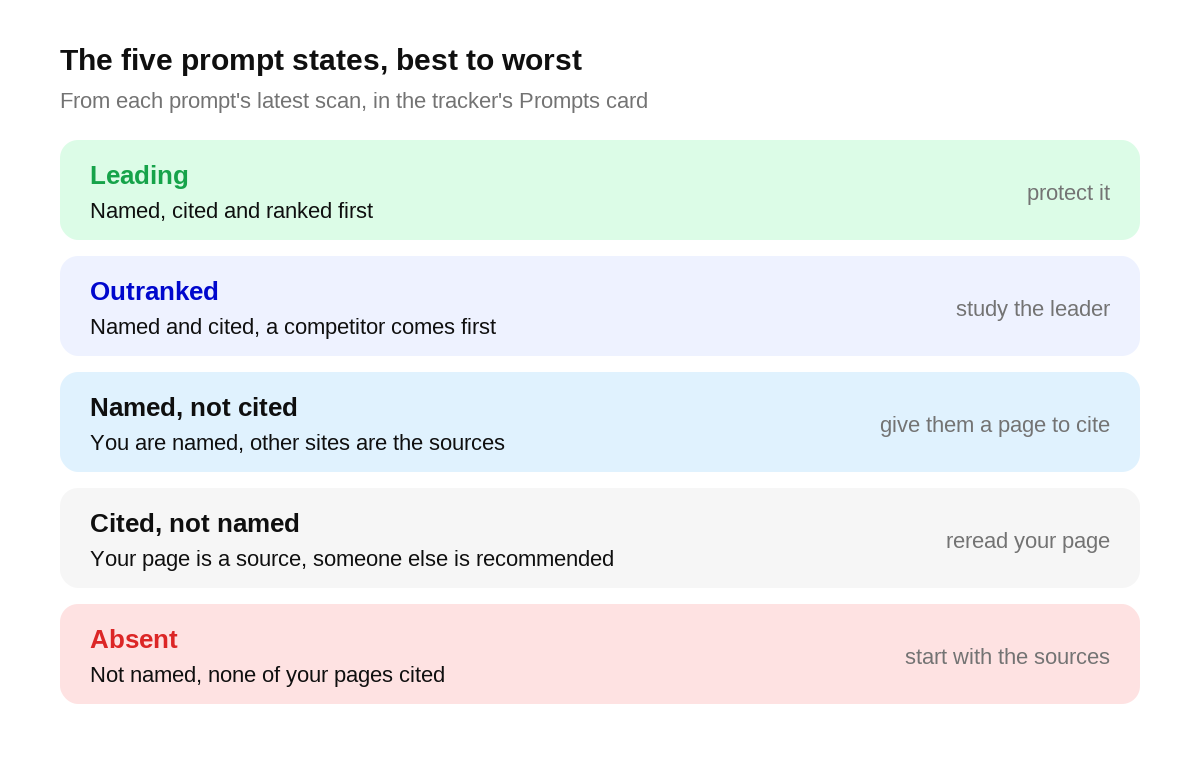
Watch the states move over time. A prompt going from Absent to Cited, not named means an engine has started reading your page; the next job is making the page recommend you clearly. A prompt slipping from Leading to Outranked tells you which rival to study.
Tell a real change from noise
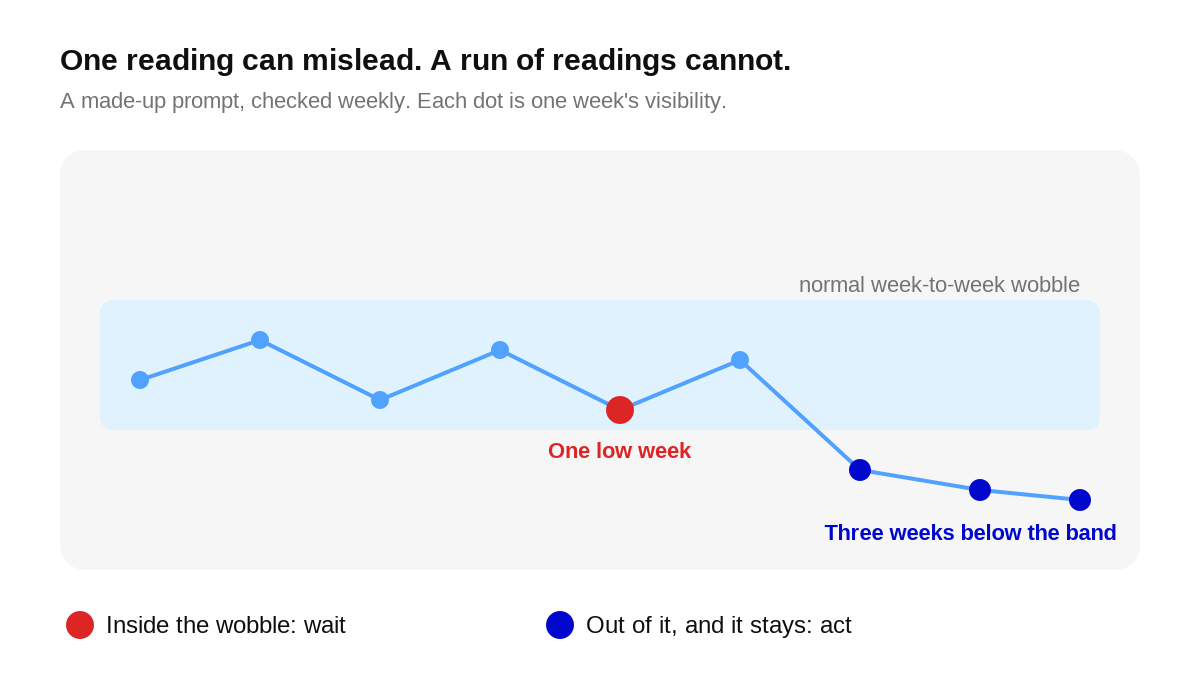
Most week-to-week movement is wobble. Use these rules before you act on a change:
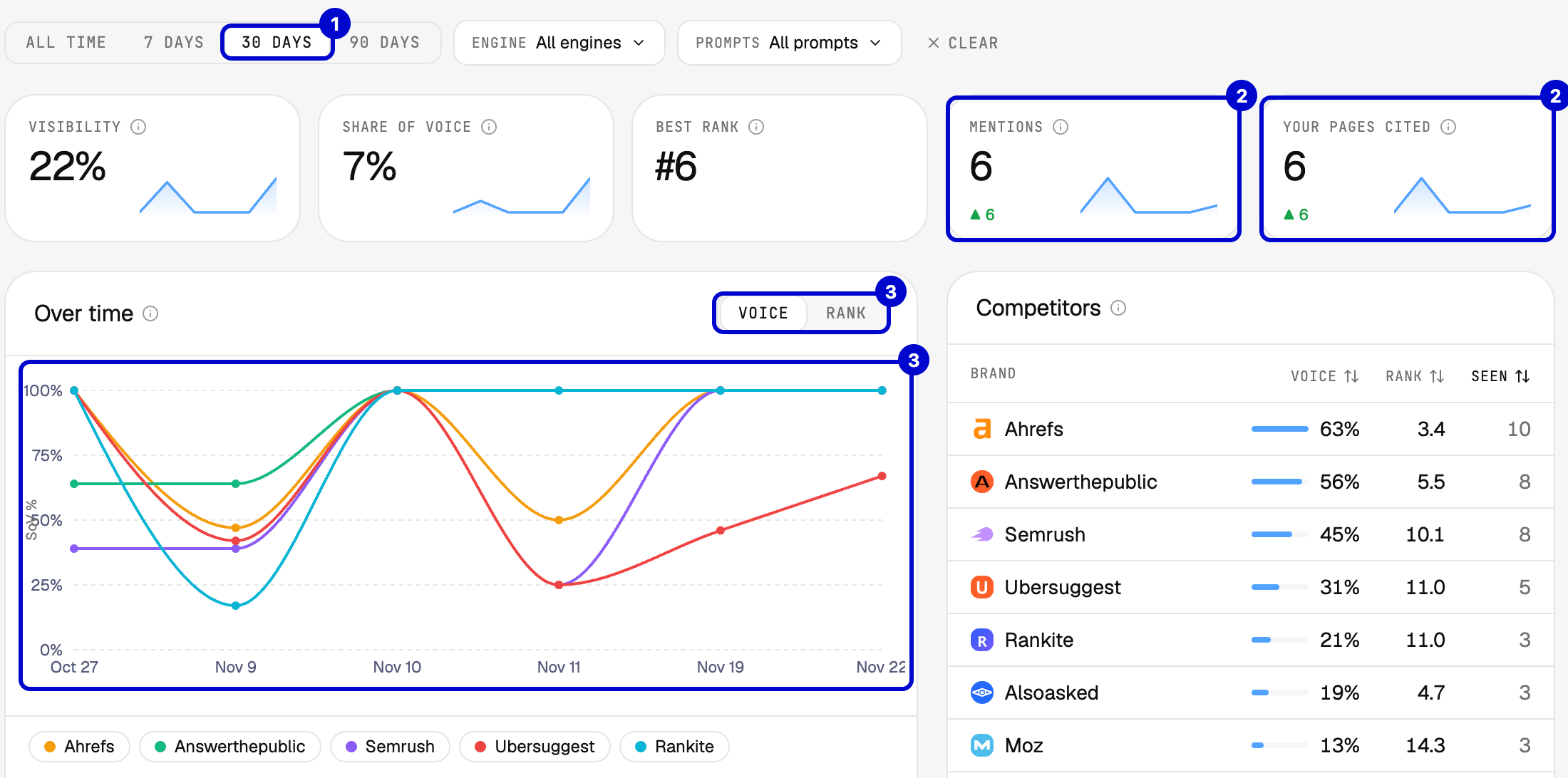
- Compare equal windows. On the dashboard, pick 7 days, 30 days or 90 days. With a window picked, the Visibility and Share of voice cards show the change against the window before it, in points (a move from 30% to 36% is 6 pts). With All time there is nothing to compare against.
- Wait for repeats. One low week inside the normal range is not a trend. Three in a row below it is.
- Look across prompts and engines. A drop on one prompt on one engine is weak evidence. The same drop across several prompts, or on one engine across all prompts, is strong. Filter by Engine to check.
- Check the engines changed, not you. Google says AI Overviews and AI Mode "may use different models and techniques" [2], and engines update their models without telling you. A drop on every prompt on one engine in the same week is more likely a model change than anything on your site.
- Remember the sample is small. SparkToro suggests "at least 60-100X" runs for research-grade numbers [1]. A weekly tracker gets you a trend, not a lab result. Report direction and size, not decimals.
A worked example: eight weeks for a plumber
A made-up example: a plumbing company in Bristol tracks 12 prompts weekly on ChatGPT, Gemini and Perplexity, set to the United Kingdom. That is 12 times 3 times 4, or 144 credits a month.
| Weeks | Visibility | What happened |
|---|---|---|
| 1 to 3 | 14%, 17%, 11% | Baseline. The wobble is about 6 points. |
| 4 | 22% | Up, but inside the wobble plus a little. No conclusion. |
| 5 to 8 | 28%, 31%, 27%, 33% | Four weeks above the old range. A real change. |
What changed? The Prompts card shows three prompts that went from Absent to Named, not cited in week 5, all on Perplexity, all about boiler repair costs. The Citations to target card had listed a local "best plumbers in Bristol" roundup cited in answers that named rivals but never them. The owner asked to be added in week 3, and the page added them in week 4.
That is a believable cause: a page the engines cite now names the company, and the prompts that cite it changed. It is not proof, and the owner should say so. But it is a far better case than a single good week would make.
How to do it in Answer Socrates
The LLM Brand Tracker runs your prompts on a schedule and keeps every result. Here are the steps.
Step 1. Schedule a prompt when you first scan it. Press New Scan in the tracker's sidebar. Type the prompt (100 characters at most), pick a Location, set Repeat to Daily, Weekly or Monthly, and choose the engines. The Cost line shows the credits for one run before you press Run Scan.
Step 2. Or schedule a prompt you already scanned. On the Prompts page, each row has a timer icon, Schedule rescan. Pick Daily, Weekly or Monthly; hovering the icon then shows "Scheduled: Weekly". Remove schedule stops it.
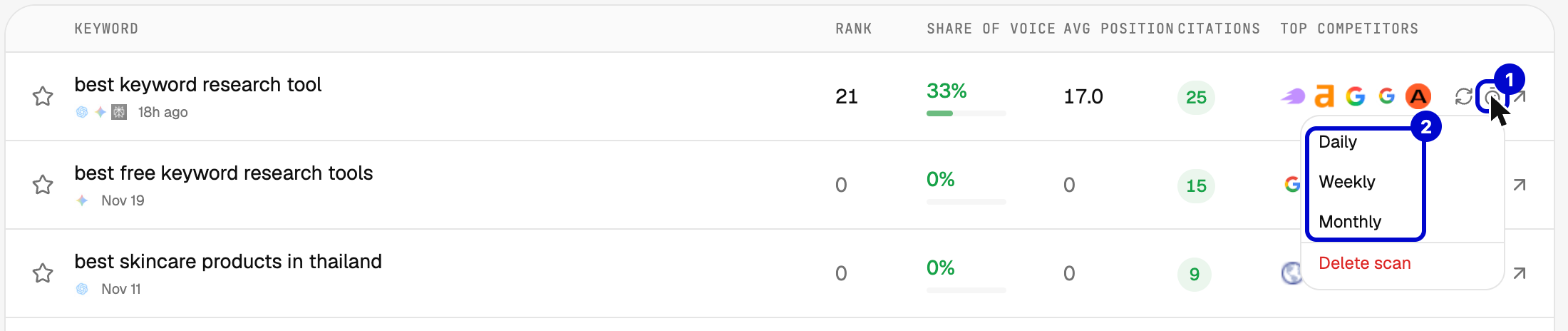
A scheduled prompt runs again once a day, a week or 30 days have passed since its last run, with the same engines and location. Each run uses 1 credit per engine, and engines that fail to answer are not charged. When a scan finishes, the bell shows Scan finished. If your plan has run out of tracker credits, that run is skipped and the prompt tries again at its next turn, so keep an eye on your balance.
Step 3. Read the Dashboard. Open Dashboard and set the filters at the top: a window (All time, 7 days, 30 days or 90 days), the Engine, the Prompts and the Location. Then read top to bottom: the five number cards, Competitors (each brand's Voice, Rank and how often it was Seen), Over time (the top brands across your scans, by day, with a Voice or Rank switch), the Prompts card with each prompt's state, Citations to target and By engine.
Step 4. Act on what moved. Open a prompt whose state got worse and read the answers and sources on its result page. On the Citations page, the Targets view lists pages cited in answers that name competitors but never you, and Add to To-dos puts one on your task list.
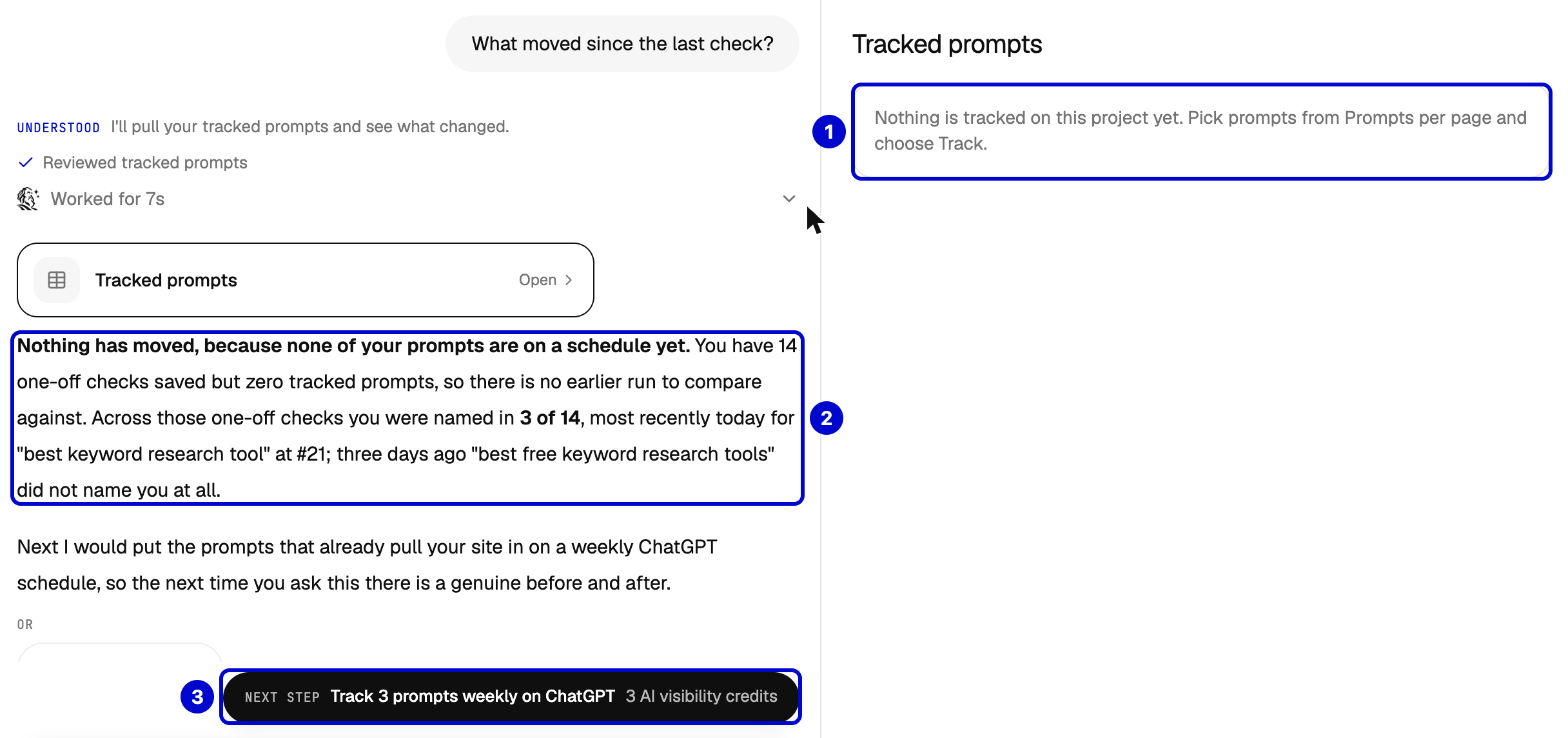
The same thing in Ask Socrates
Ask Socrates, our chat, sets up tracking and reads it back for you. Open a project with your brand set and type:
What comes back:
- A card with the monthly cost. It names the engines, says "About N AI visibility credits a month, from your plan", and the cost of a first check now for any prompt never checked before. Tracking always asks on this card, whatever your spending setting.
- Up to 10 prompts at a time. It runs ChatGPT, Gemini and AI Overviews unless you name other engines, and daily unless you say weekly or monthly.
- The first results, once the first checks finish.
Later, ask:
This is free. It lists your tracked prompts with how often each runs, the engines, the latest result and how each moved since the previous check: gained, lost, up, down or the same. "Stop tracking the Learn prompts" or "check these monthly instead" changes the schedule, also for free.
Where to go next
| If you want to... | Read |
|---|---|
| Build the prompt list you track | Finding the prompts your buyers type |
| Run a first check across engines | Is AI mentioning your brand? How to check |
| See what cited pages have in common | Why AI cites some pages and not others |
| Study the brands that beat you | Competitors in AI answers: who gets named instead of you |
| Measure the visits AI sends | Measuring traffic from AI search |
Sources
- NEW Research: AIs are highly inconsistent when recommending brands or products, SparkToro, 2026
- AI features and your website, Google Search Central, 2026
