Making AI writing sound human
AI writing sounds human when you remove its habits (stock openers, pet words, vague claims, recaps) and add specifics only you know. Google judges the page on quality, not on who or what typed it, so the edit that helps readers is also the one that helps you rank.
Key takeaways
- Google says appropriate use of AI is not against its guidelines; what it treats as spam is many pages made to rank without adding value for users.
- Six patterns give AI text away: stock openers, pet words like tapestry, "It's not X, it's Y" contrasts, reflex lists of three, vague claims and recaps.
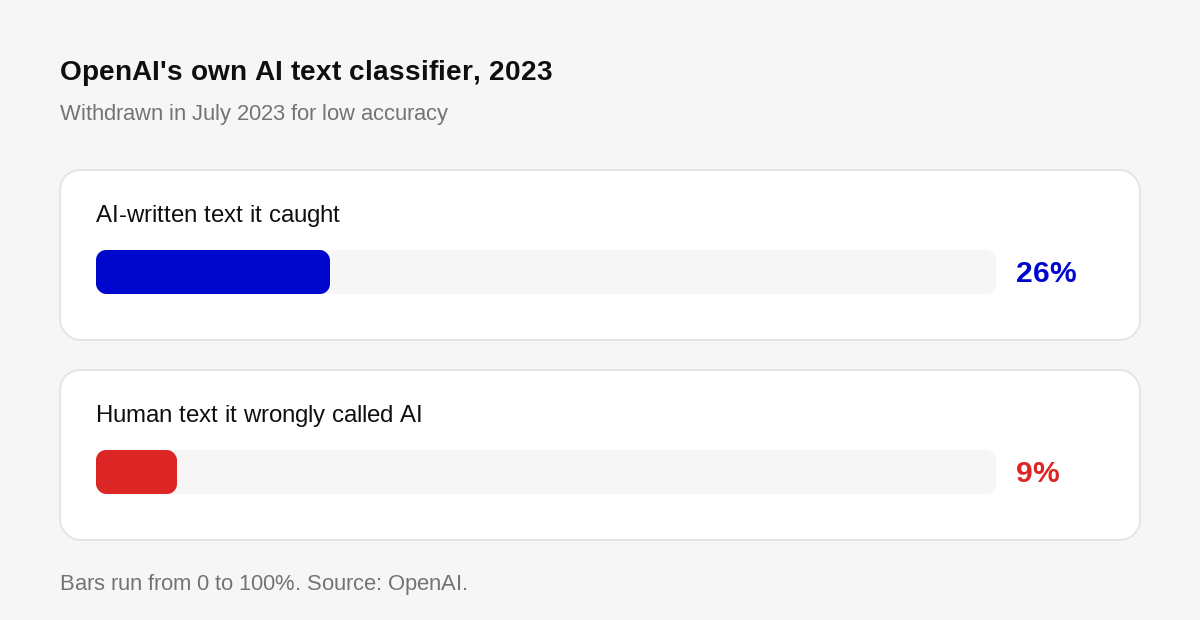
- AI detectors guess: OpenAI withdrew its own classifier in 2023 after it caught 26% of AI text and flagged 9% of human text as AI.
- Content Studio writes under about 70 banned phrases and nearly 200 banned words with no dashes, and its Voice check flags repeated sentences and question openers.
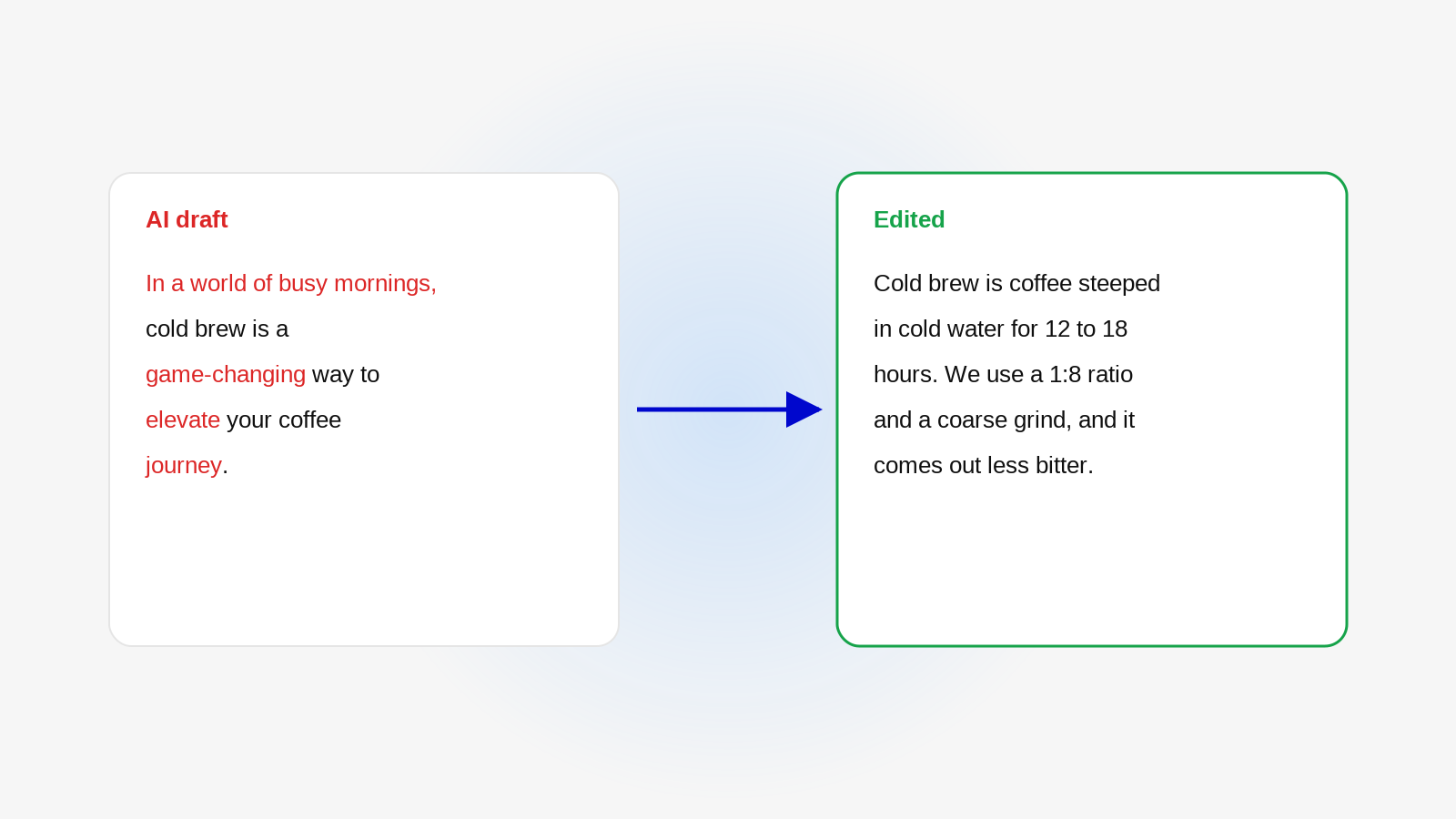
- Run a five-pass edit: cut warm-ups, swap pet words, turn vague claims into numbers, add one first-hand detail per section, then read it aloud.
Google judges the page, not who typed it
Google's position on AI writing is plain. It rewards quality "rather than how content is produced", and "appropriate use of AI or automation is not against our guidelines" [1]. What it calls spam is content made "with the primary purpose of manipulating ranking" [1].
The line Google draws is about value, not tools. Its spam policies name scaled content abuse: many pages made mainly to rank, "not helping users" [3]. One listed example is using generative AI "to generate many pages without adding value for users" [3]. For pages you do make with AI, Google asks you to "focus on accuracy, quality, and relevance", and to check titles, meta descriptions and image alt text the same way [2].
So "sounding human" is not about passing a test. It is about the reader. AI text has habits that readers notice, and once they notice, they trust the page less and skim. Remove the habits and add what only you know, and the page gets better for people. That is the same thing Google is asking for.
The six patterns that give AI text away
AI models write the most likely next words. That makes their drafts smooth, safe and alike. Wikipedia editors, who review a lot of AI-written text, keep a public list of the patterns they see, from overused words to "It's not ..., it's ..." sentences that rebut a claim nobody made [6].
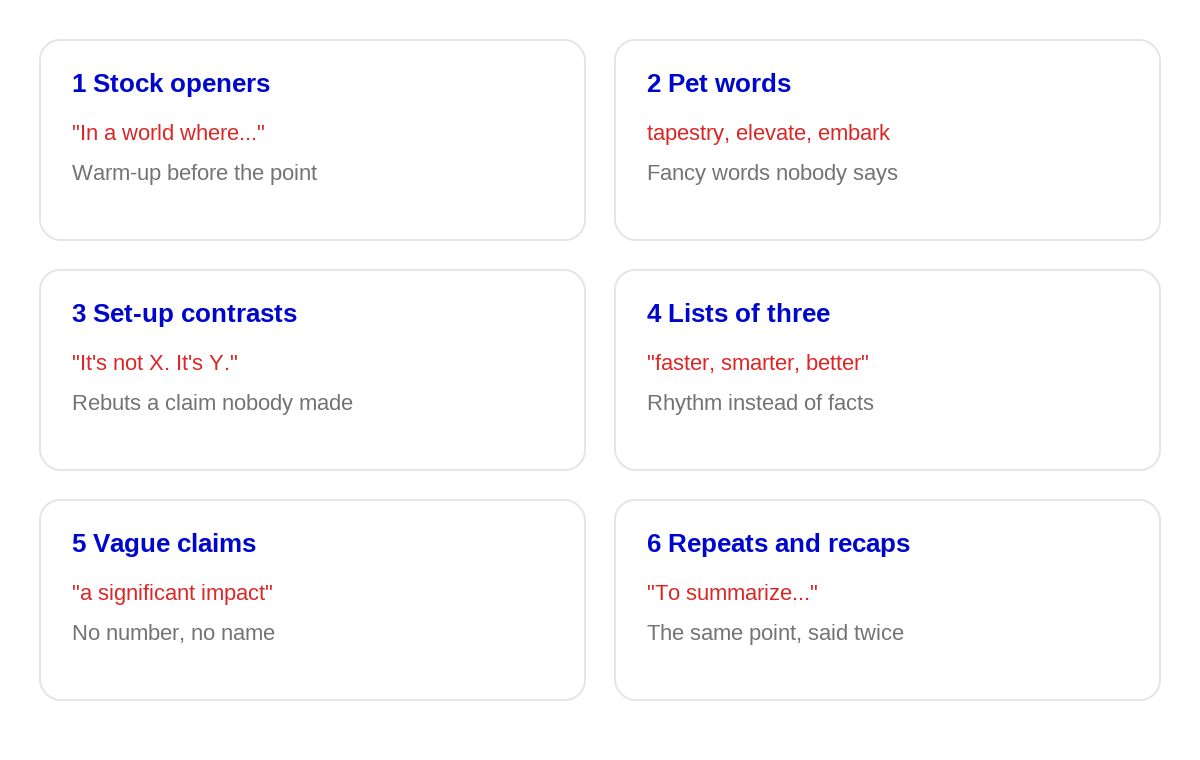
| Pattern | What it looks like | The fix |
|---|---|---|
| Stock opener | "In a world where everything moves fast, ..." | Start with the answer or the reader's problem |
| Pet words | tapestry, elevate, embark, foster, pivotal | Use the word you would say out loud |
| Set-up contrast | "It's not just a tool, it's a partner." | State the point once, without the fake "not" |
| Reflex list of three | "faster, smarter, better" | Keep only the item you can prove |
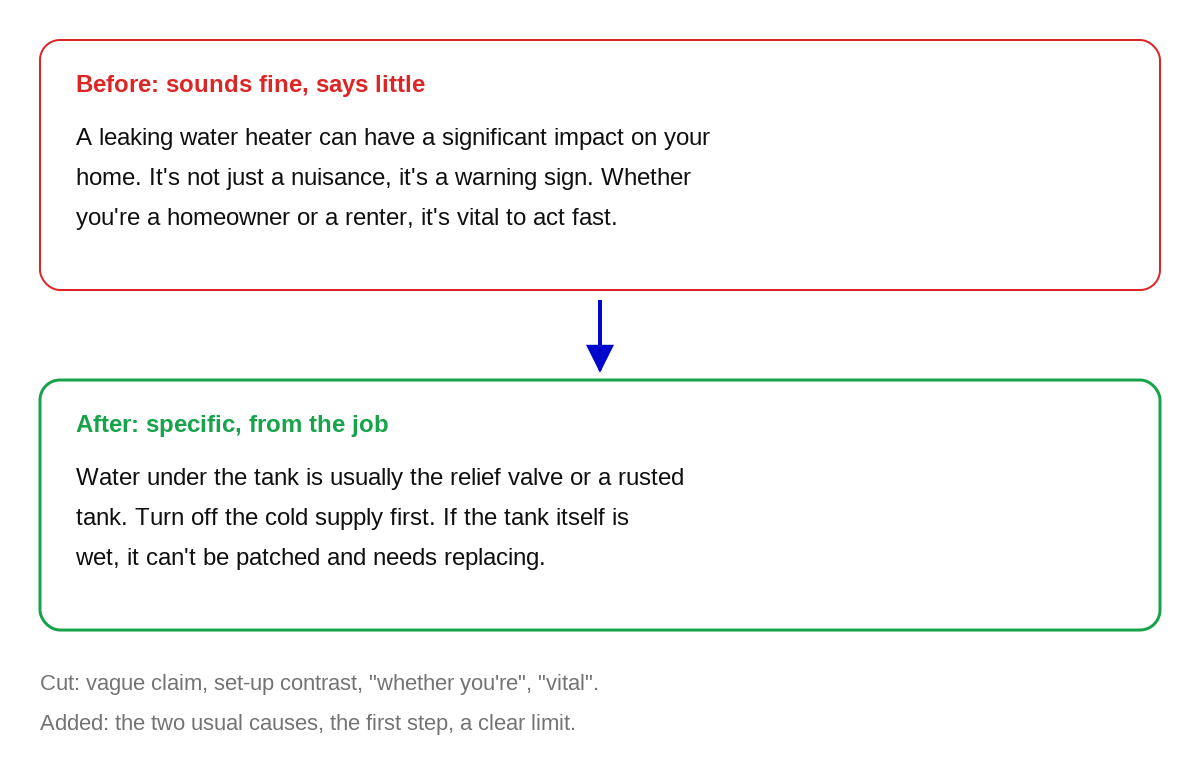
| Vague claim | "can have a significant impact" | Give the number, the name or the example |
| Recap | "To summarize, ..." or a sentence that repeats the heading | Cut it; end on the last useful point |
Two more show up often: filler adverbs (really, actually, simply, truly) and sentences that all have the same length and shape. Read a paragraph aloud. If every sentence lands with the same beat, vary it.
AI detectors guess, and they guess wrong often
An AI detector is a tool that reads text and estimates whether a model wrote it. It cannot know. It looks at patterns and gives a probability, and the results are shaky.
The clearest evidence comes from OpenAI itself. In 2023 it released a classifier to spot AI-written text, then withdrew it "due to its low rate of accuracy" [4]. In OpenAI's tests it caught 26% of AI-written text and wrongly labelled human text as AI 9% of the time [4].
There is a fairness problem too. A Stanford study found that common detectors "consistently misclassify non-native English writing samples as AI-generated" [5]. Plain, careful writing with simple words can look "too regular" to a detector, which is exactly how many people write in a second language.
What this means for you:
- Do not rewrite good text to beat a detector. Adding typos, slang or made-up stories to lower a score makes the page worse for readers.
- Do not use a detector score to judge a writer. A high score is not evidence, and a low one is not a clean bill of health.
- Do use a detector as a second reader. Its list of reasons can point at a paragraph that is bland or repetitive. Then you judge whether it needs fixing.
The Answer Socrates AI Content Detector
Our free AI Content Detector works this way. You paste text and press Analyze Content. Logged out and on the Free plan the box takes 1,000 characters; paid plans take 5,000.
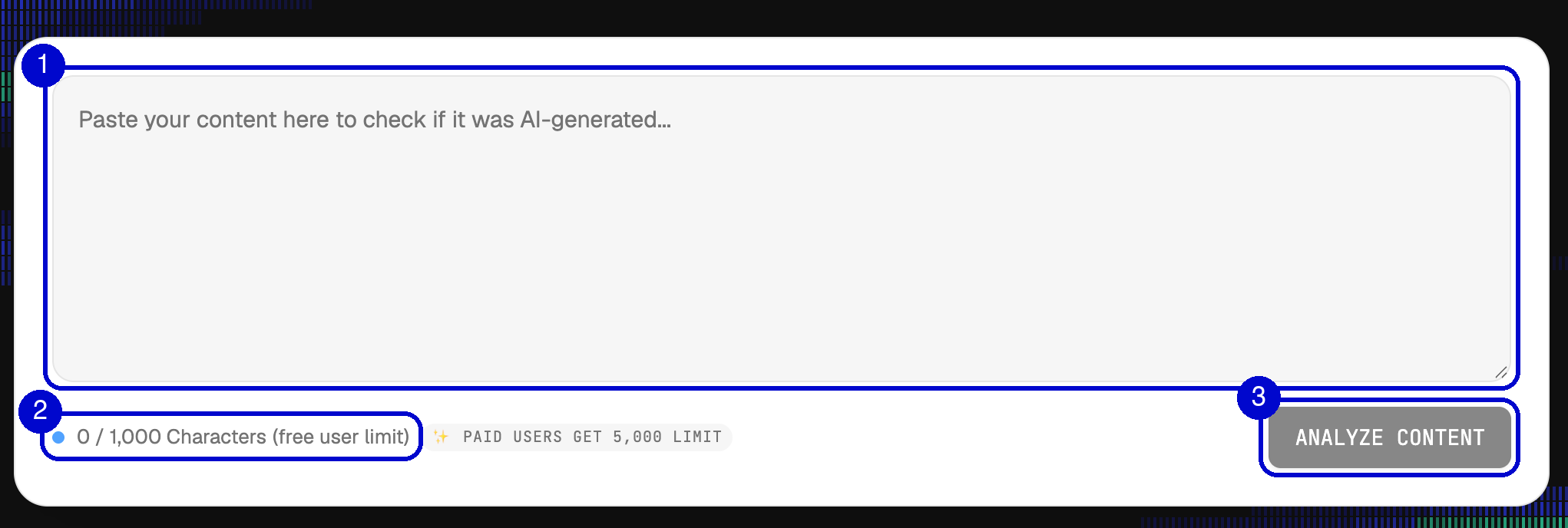
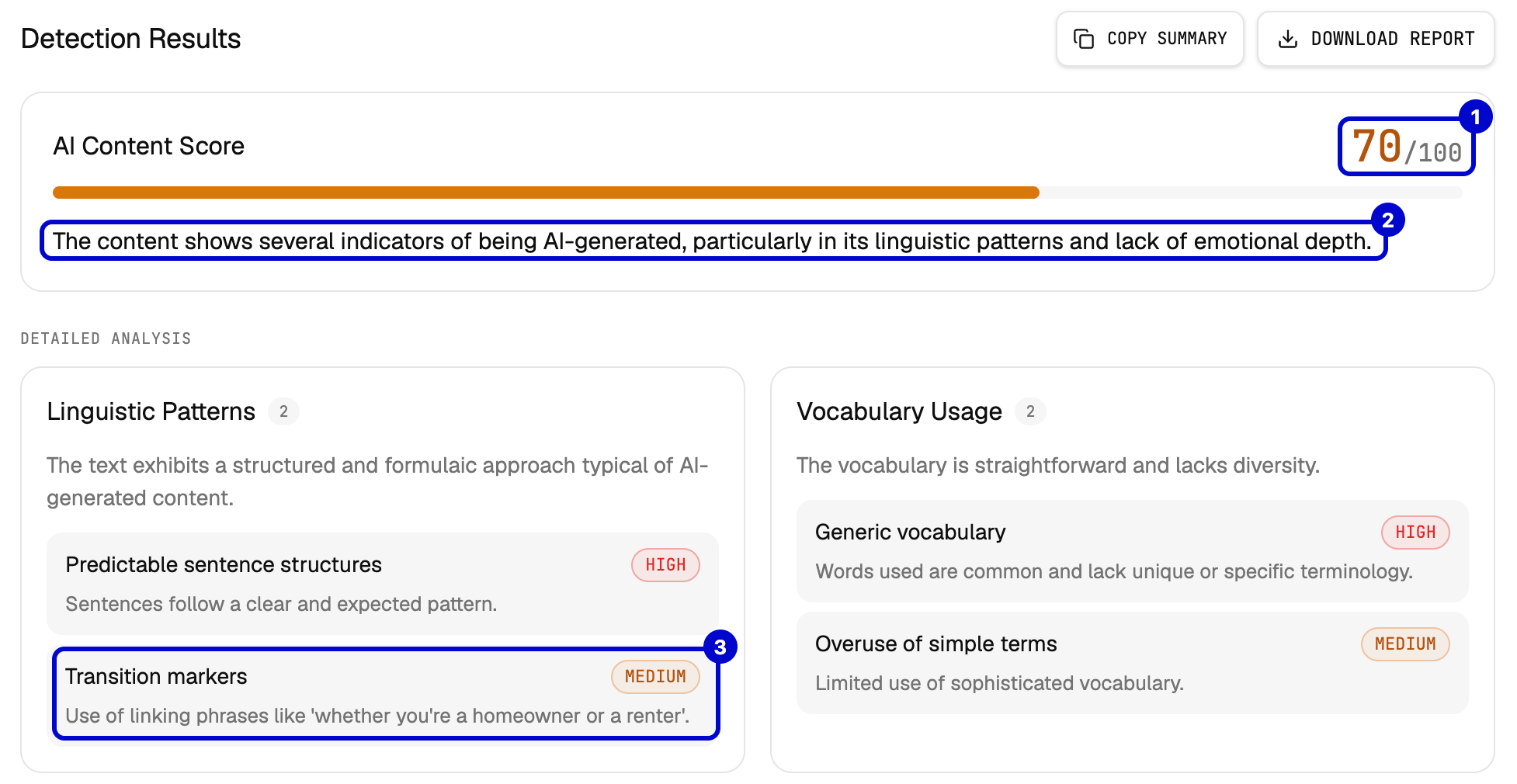
Be clear about how it works: it asks an AI model to read the text and judge it. It returns an AI Content Score from 0 to 100 (higher means more likely AI), a short summary, and a Detailed Analysis of indicators in categories, each marked High, Medium or Low. It is an opinion with reasons, not a measurement.
Specifics are what make writing sound human
The fastest way to make an AI draft sound human is not to change its style. It is to add things a model could not know: a number from your own work, a mistake a customer made, a step you do differently, a clear "this does not work".
Google asks for the same thing. Its guidance on AI content points to people-first content and its "Who, How, and Why" questions: who made it, how, and why it exists [1]. A page with real experience answers those questions on its own.
Where to find specifics:
- Your numbers. Prices you charge, how long a job takes, how many of a product you sold last month.
- Your process. What you check first, what you skip, what tool you use and why.
- Your customers. The question they ask most, the mistake they make before they call you.
- Your opinion. Which option you would pick, and for whom. A model hedges; you can choose.
How Content Studio handles the AI patterns
Content Studio is the Answer Socrates article writer. It does not try to fool detectors. It tries to stop the patterns above from getting into the draft in the first place, then shows you where the draft still reads badly.
What the writer is told. Every draft is written under a fixed set of style rules:
- No em dashes or en dashes, and the finished draft is cleaned of any that slip through.
- About 70 banned phrases, such as "in a world where", "buckle up", "it's worth noting" and "to summarize".
- Nearly 200 banned words, counting forms like embark, embarks and embarked: tapestry, elevate, foster, pivotal, landscape and more. Brand and product names are exempt.
- Banned structures: "It's not X, it's Y" contrasts, lists of three, sentences starting "Moreover" or "Furthermore", "not only... but also", and more than one rhetorical question in the article.
- Readability targets: a Flesch-Kincaid grade of 7 or under, short sentences and paragraphs of 1 to 3 sentences.
What the score checks. Every draft gets an Article Score out of 100. Two parts matter most here. Readability checks the grade level, an average sentence of 17 words or fewer, and paragraphs of no more than 3 sentences. Voice checks two tells the other checks miss: a sentence that comes back near word for word in another section, and an opening sentence that is a question or a stock opener such as "Imagine" or "Have you ever".
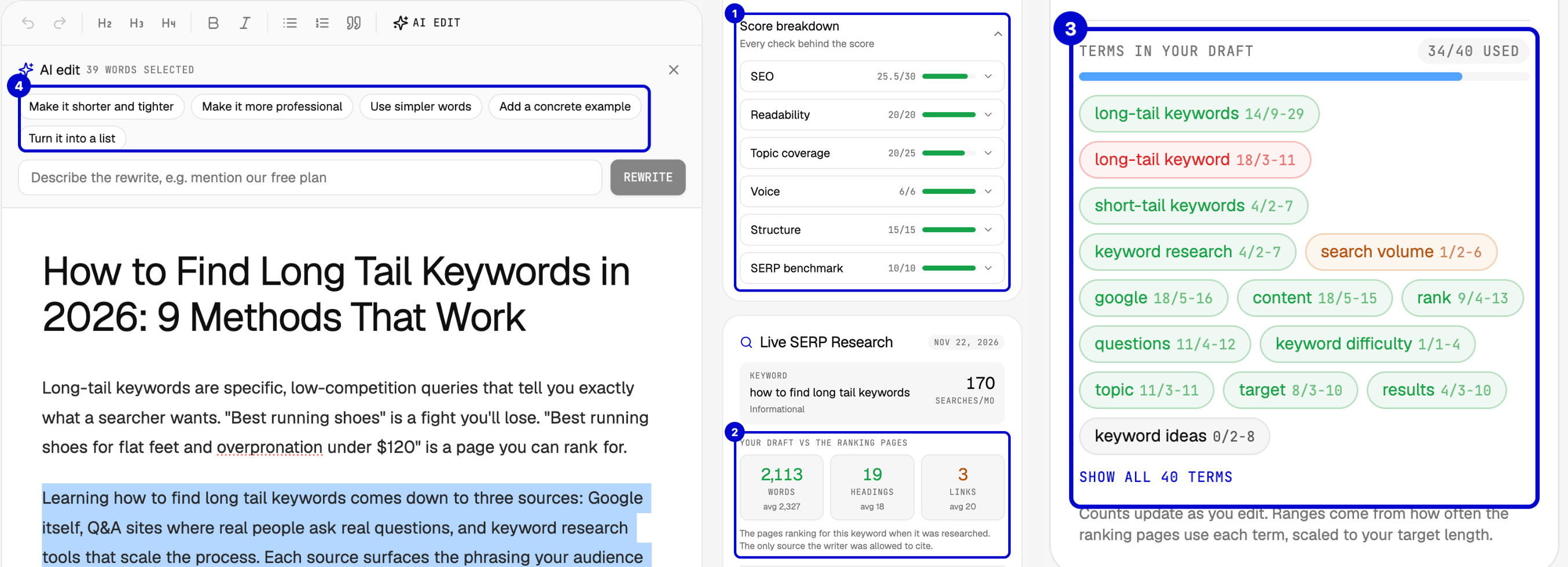
What it does not check. The banned word and phrase lists are rules for the writer; the score does not search the draft for them afterwards. Models slip, so read for pet words yourself.
Your voice. In setup, Learn my style reads up to three of your own articles and writes down your habits (tone, rhythm, openings, calls to action) for the writer to follow. In the editor, select any passage and use AI edit with a quick prompt such as "Use simpler words" or "Add a concrete example", or your own instruction.
If you start an article from the Ask Socrates chat, it is written by the same Content Studio writer, under the same rules. Ask Socrates is the Answer Socrates chat.
A five-pass edit for any AI draft
Whatever tool wrote the draft, this edit works. Do each pass on the whole article before the next.
- Cut the warm-ups. Delete the first sentence of the article and of each section if it only restates the heading. Delete any closing recap.
- Swap the pet words. Search for tapestry, vital, pivotal, foster, elevate, landscape and journey. Replace each with the plain word, or cut the sentence.
- Turn vague claims into specifics. Every "significant", "many" or "various" gets a number, a name or an example, or it goes.
- Add one thing per section only you know. A price, a photo you took, a customer question, a mistake you have seen.
- Read it aloud. Mark any sentence you would not say to a customer, and any run of sentences with the same length. Rewrite those.
A made-up example: a plumbing company's guide
A made-up example: Northside Plumbing uses an AI tool to draft "what to do when your water heater leaks". The draft scores well for readability but reads like every other result. The owner runs the five passes.
| Pass | What she found | What she changed |
|---|---|---|
| 1. Warm-ups | The intro opened "Water heaters are an essential part of every home" | Cut it; the article now starts with "Turn off the cold water supply" |
| 2. Pet words | "vital" twice, "navigate the repair process" | "Act within the day", "get it fixed" |
| 3. Vague claims | "can cause significant damage" | "a slow drip can soak a floor in a day", from her own call-outs |
| 4. Only she knows | Nothing about cost | Her real price range for a valve swap versus a new tank |
| 5. Read aloud | Four sentences in a row of the same length | Split one, joined two |
She did not add jokes, slang or a story about her uncle. The page got shorter, more specific, and something only a local plumber could have written.
Where to go next
| If you want to... | Read |
|---|---|
| See the full Content Studio flow, including the score | Writing with Content Studio, step by step |
| Find what the top pages are missing | Information gain: adding what other pages lack |
| Give the writer better notes before it starts | Content briefs: what to give a writer (or an AI) |
| Link the finished page into your site | Internal links: connecting your pages |
| Check AI tools before you trust their output | Where AI agents get SEO wrong |
Sources
- Google Search's guidance about AI-generated content, Google Search Central Blog, 2023
- Google Search's guidance on using generative AI content on your website, Google Search Central, n.d.
- Spam policies for Google web search, Google Search Central, n.d.
- New AI classifier for indicating AI-written text, OpenAI, 2023
- GPT detectors are biased against non-native English writers, Liang, Yuksekgonul, Mao, Wu and Zou (arXiv), 2023
- Wikipedia:Signs of AI writing, Wikipedia, n.d.
