Content briefs: what to give a writer (or an AI)
A content brief is the short document you hand a writer before they start: who the page is for, which search it must win, what it should say that others do not, and what to leave out. It matters because a thin brief gets filled with guesses, and an AI writer guesses with confidence.
Key takeaways
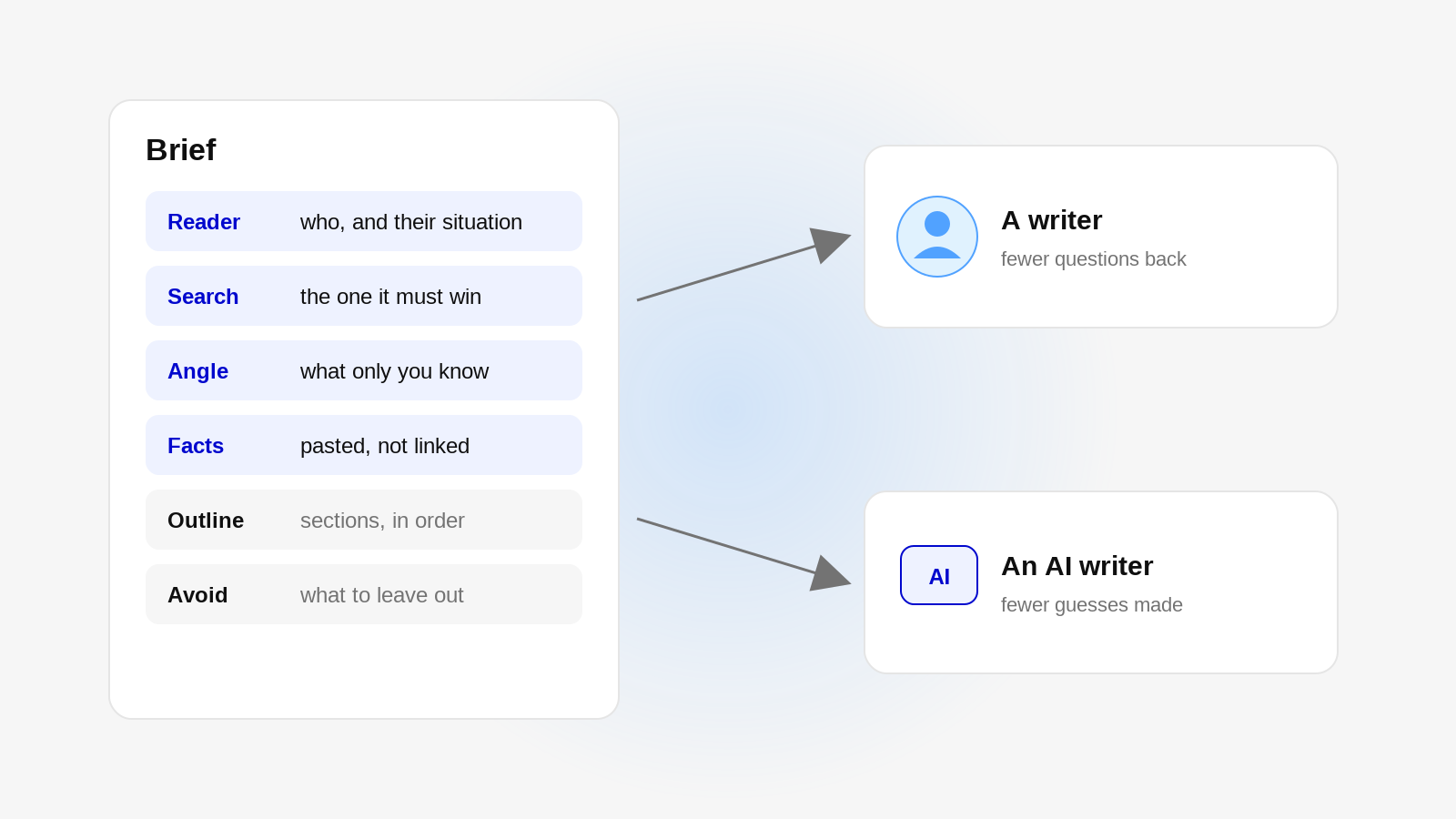
- Spend the brief on the reader's situation, the one search to win, your angle, pasted facts and what to leave out; those lines change the draft most.
- Exact word counts and keyword quotas rarely help: Google says length alone does not matter for ranking and repeated words are tiring for users.
- Paste facts instead of linking them: most AI writers cannot open links, and Content Studio's 800-character notes box says it does not open them.
- In Content Studio the sources step and the Review the outline screen together are the brief: Who this is for, Target length, section descriptions and Notes for the writer.
- Ask Socrates writes a brief from the chat (the search to win, who ranks now, the gap, points to cover) and shows it in the Brief tab before the article is written.
A brief holds the decisions a writer cannot make
A content brief is the short document you hand a writer before they start: who the page is for, which search it must win, what it should say that others do not, and what to leave out. A good brief is not long. It holds the decisions that only you can make, so the writer spends their time writing instead of guessing.
That is true whether the writer is a person or an AI. Anthropic's own advice for prompting Claude is to treat it like "a brilliant but new employee who lacks context on your norms and workflows" [1]. A freelance writer is in the same spot. Both can write well. Neither knows your customers, your prices or the mistake your support team sees every week unless you tell them.
The difference is what happens when the brief is thin. A person emails you a question. An AI fills the gap with something plausible: a generic reader, an average structure, a made-up number. So a brief for an AI needs to be more complete, not less.
The parts that change the result
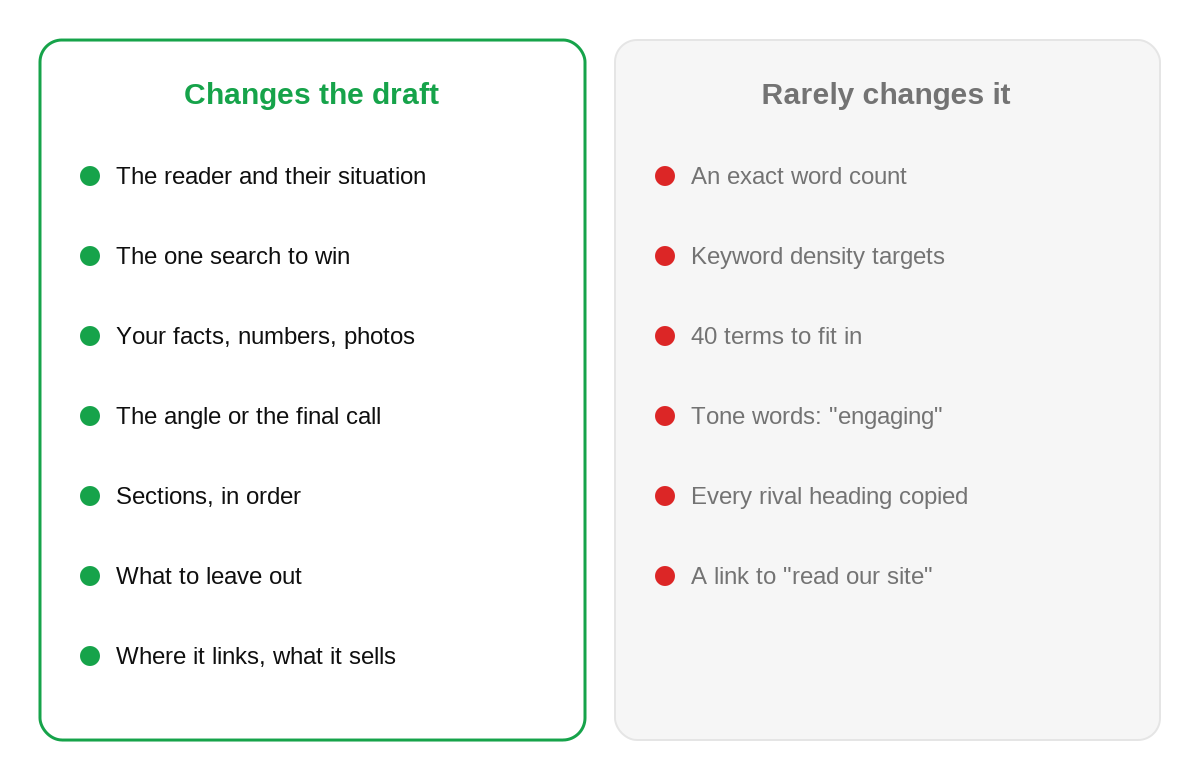
Some lines in a brief change the draft a lot. Others feel thorough but barely move it. This split is our view from reviewing drafts, not a measured study, so test it on your own work.
| Brief line | Why it changes the draft | Example |
|---|---|---|
| The reader and their situation | Sets the level, the examples and what to skip | "A homeowner whose boiler gauge reads under 1 bar on a cold morning" |
| The one search to win | Tells the writer what question the opening must answer | "boiler pressure too low" |
| The job of the page | Decides how it ends: learn, compare, or act | "Fix it safely, or know when to call a plumber" |
| Your angle | The part no other page has (see Information gain) | "Our engineers' three most common causes, in order" |
| Facts, pasted in | Stops invented numbers | "Call-out fee £85. Repressurising takes about 5 minutes." |
| What to leave out | Removes the risky or off-brand sections | "No steps for anything involving the gas supply." |
| Links and next step | Ties the page to the rest of your site | "Link to the boiler repair hub; end with booking." |
The reader line is the one people skip, and it does the most work. "Small business owners" is not a reader. "A café owner who has never set up Google Business Profile and has 20 minutes" is. You can write it as a job story: "When [situation], I want to [motivation], so I can [outcome]."
The parts that rarely change it
An exact word count. A target length helps the writer plan, so give a range. But Google says plainly that "the length of the content alone doesn't matter for ranking purposes" [2]. A brief that says "exactly 2,347 words because that is the competitor average" pushes the writer to pad.
Keyword density and long term lists. Telling a writer to use a phrase 12 times, or to fit in 40 related terms, produces sentences built around words instead of answers. Google's starter guide warns that repeating the same words over and over "is tiring for users" [2]. A short list of terms you want covered is fine; a quota is not.
Tone adjectives. "Engaging, authoritative, friendly" gives the writer nothing to act on. One paragraph of your own writing that you like says more.
Every heading the ranking pages use. Competitor headings show what readers expect, and they are useful as a checklist. Copied in full, they produce the same page as everyone else.
A one-page brief you can copy
Keep the brief to one screen. If it needs two, the page is probably two pages.
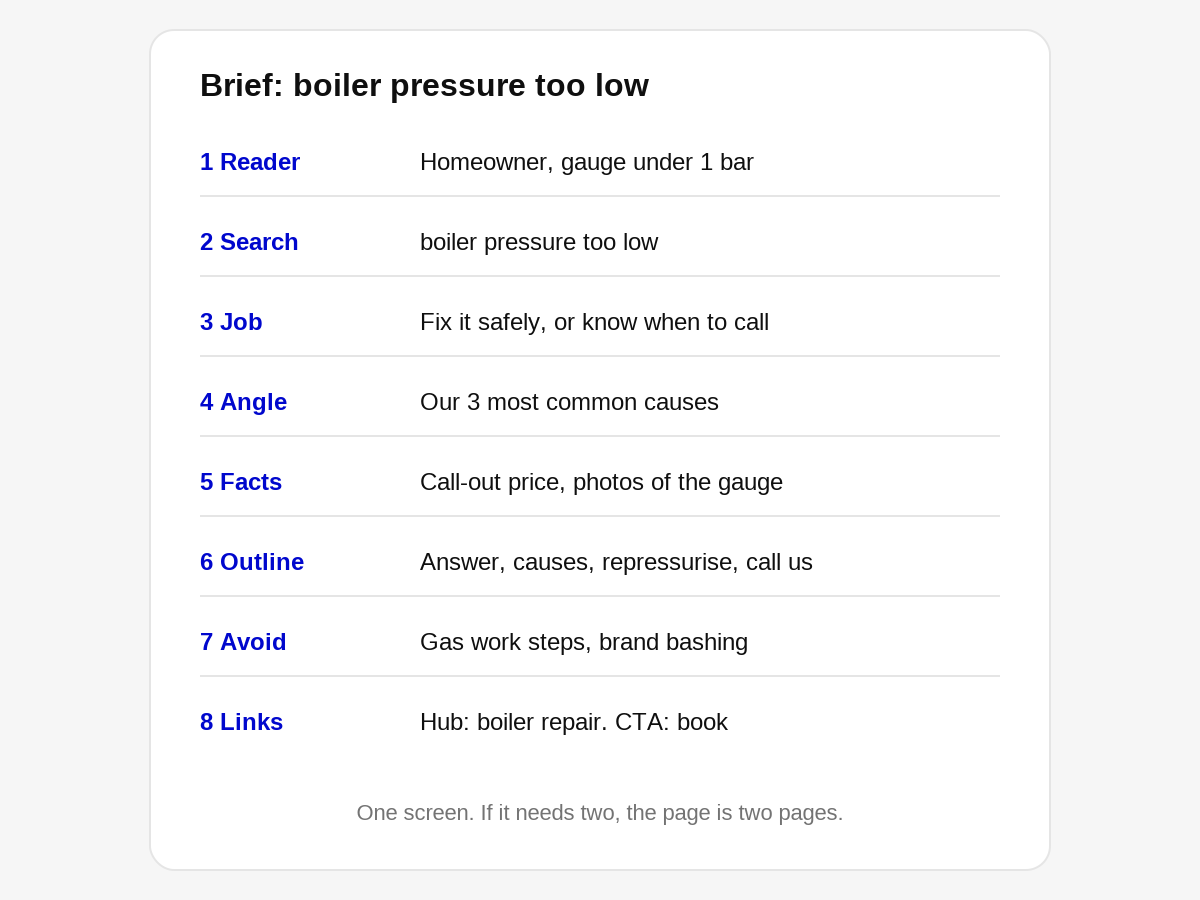
The eight lines:
- Reader: who, in what situation, knowing what already.
- Search: the main keyword, plus two or three close searches the page should also answer.
- Job: what the reader should be able to do after reading.
- Angle: the one thing this page says that the ranking pages do not.
- Facts: prices, numbers, test results, quotes, photo list. Pasted, with where each came from.
- Outline: section headings in order, each with one line on what it covers and a rough length.
- Avoid: topics, claims, competitor names or advice to leave out.
- Links: the hub page it links to, any pages it should link to, and the call to action.
How to do it in Answer Socrates
Content Studio does not call its screens a brief, but the sources step and the outline step together are one. Each brief line has a place.
1. Pick the sources the writer may use
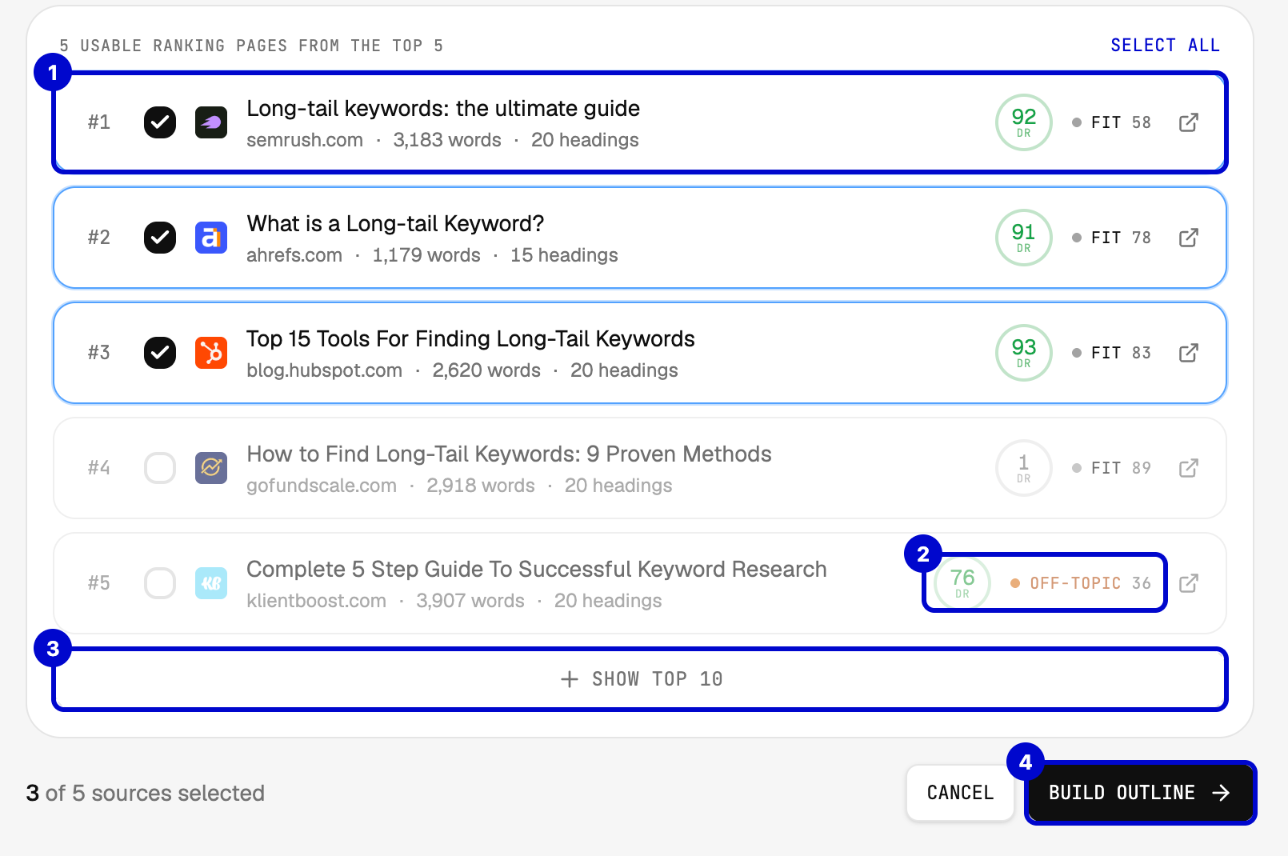
The first screen, Pick your sources, shows the ranking pages for your keyword with a relevance score (FIT) and a Domain Rating (DR). The pages you keep become the research notes, and the writer is told those notes are the only source for stats, prices and named claims.
2. Fill in the outline: reader, length, sections, notes
The next screen, Review the outline, is the rest of the brief. "The writer follows this exactly."
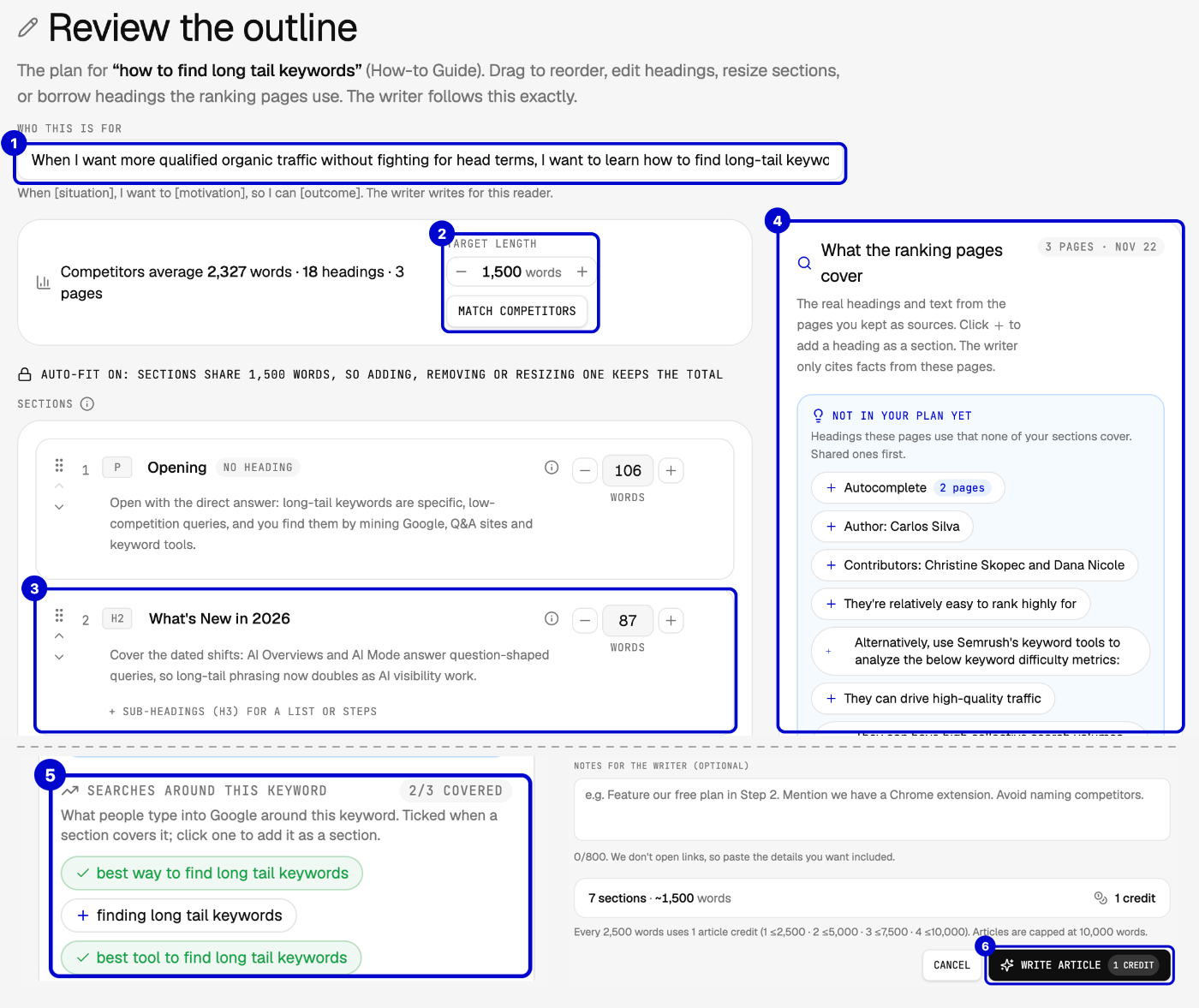
| Brief line | Where it goes in Content Studio |
|---|---|
| Reader | Who this is for, written as "When [situation], I want to [motivation], so I can [outcome]" |
| Search | The keyword you started from, plus Searches around this keyword (click one to add it as a section) |
| Job, Angle | A section description, and the notes box |
| Facts | The sources you kept, plus facts pasted in the notes |
| Outline | The section rows: heading, a description that "steers what gets written", and a word count |
| Avoid | The notes box ("Avoid naming competitors" is the placeholder's own example) |
| Length | Target length, with Match competitors to copy the average |
The notes box takes up to 800 characters and goes to both the outline and the writer. Use it for what only you know.
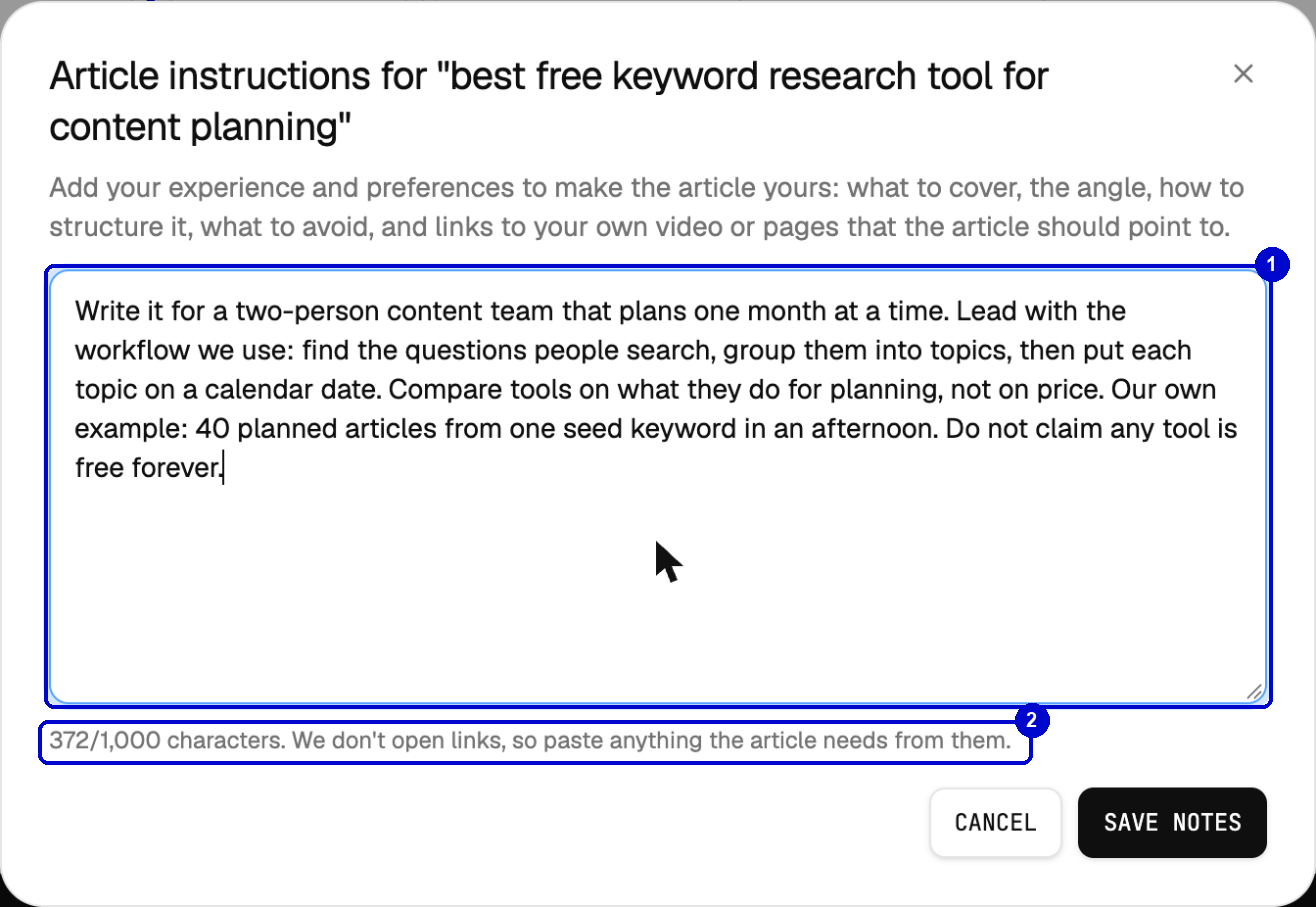
You can also write notes before an article is planned. On the Content Schedule, hover a planned article and press its notes button. That box takes up to 1,000 characters, and the same rule applies: links are not opened, so paste the facts.
Briefing a person vs briefing an AI
Most of the brief is the same. A few lines need more care for an AI writer.
| A person | An AI writer | |
|---|---|---|
| Missing fact | Asks you, or looks it up | Often writes something plausible instead |
| Links in the brief | Can open them | Usually cannot; paste the content |
| Your angle | Can interview you for it | Only knows what you wrote down |
| Reader line | Helpful | Essential, or it writes for an average reader |
| Outline | A guide they adapt | Followed closely, so make it right |
| Review | Edit for voice | Check every number and claim too |
Google does not object to AI-written pages as such. Its guidance asks for content that provides "substantial additional value and originality" rather than rewriting other sources, and notes that "attribution or giving credit to other sources doesn't replace the need for original effort" [3]. The brief is where that original effort is planned.
A made-up example: a plumbing company
A made-up example: Ridgeline Plumbing wants a page for "boiler pressure too low". Their first brief to a freelancer was one line: "1,500 words on boiler pressure too low, SEO friendly." The draft came back accurate and identical to every page on the first results page.
Their second brief, built in Content Studio:
- Sources: two manufacturer help pages and one heating guide, ticked. A DIY forum thread, flagged Thin, left out.
- Who this is for: "When my boiler gauge drops below 1 bar on a cold morning, I want to know if I can fix it myself, so I can get the heating back on without a call-out fee."
- Sections: the answer in two sentences; how to read the gauge; three common causes; how to repressurise, step by step; when to call a plumber.
- Searches around this keyword: they add "boiler losing pressure" as a section.
- Notes: their engineers' three most common causes in order, the £85 call-out fee, and "no steps for anything involving the gas supply".
The second draft had a section no ranking page had, in the order their engineers see the problems, and an honest point at which to call them.
The same thing in Ask Socrates
In Ask Socrates, the Answer Socrates chat, asking for an article turns the conversation into a brief. The chat writes it from what it found: the search the article should win, who ranks there now, the gap, and the points it must cover. It shows the article credit cost on a card first. The length is 1,500 words unless you name one.
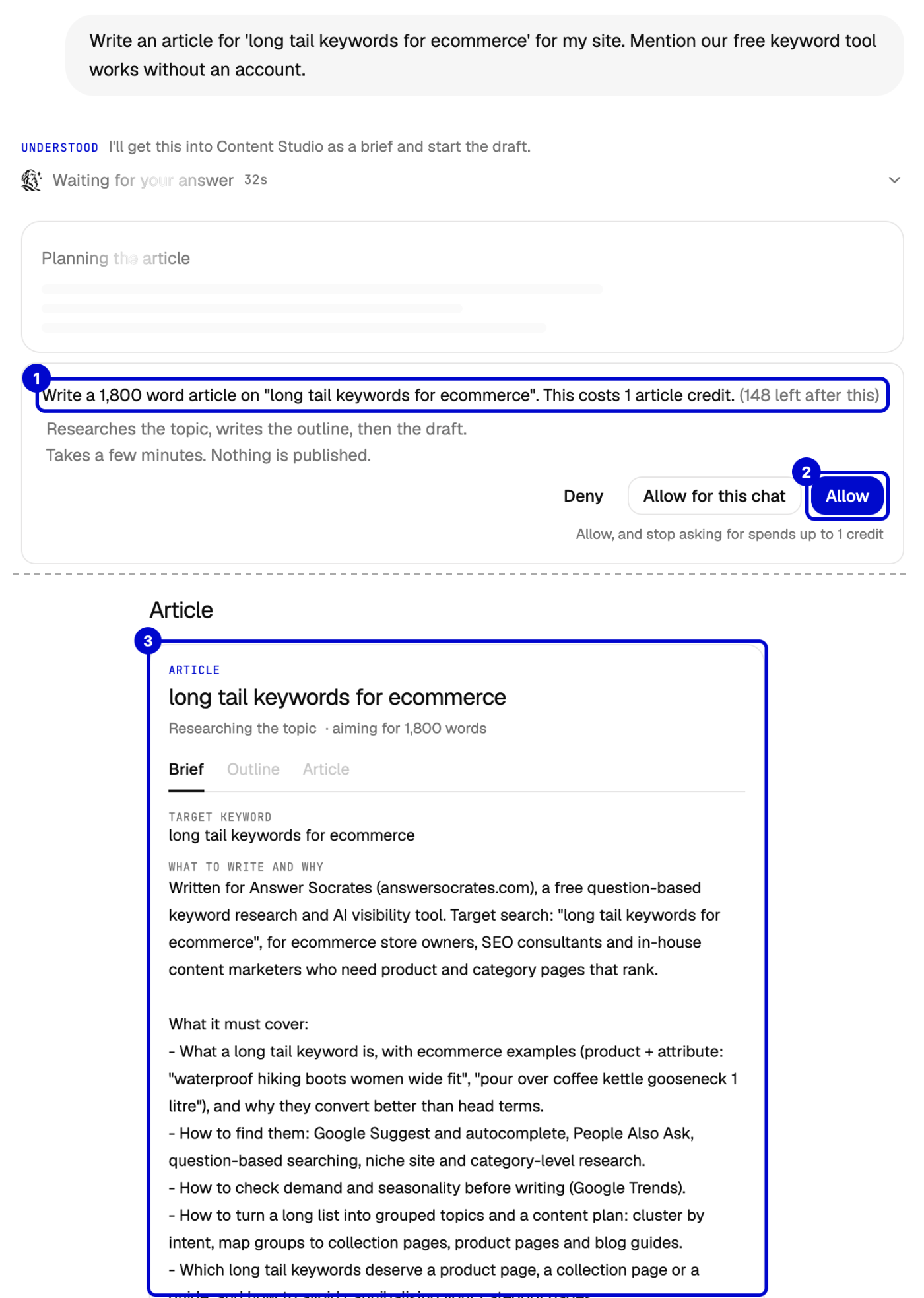
The Brief tab is the thing to check. If it names the wrong reader or misses your angle, say so before you allow the spend. Put your facts in the message itself, as in the prompt above: the chat can only brief the writer with what it has been told or has read.
The Topical map does the same from the other side. Each Write it button opens the chat with the topic and up to eight searches it should answer, so the brief starts with real searches.
Where to go next
| If you want to... | Read |
|---|---|
| Decide which pages to brief first | From cluster to content plan: what to write first |
| Find the angle for the brief | Information gain: adding what other pages lack |
| Run a brief through the full writing steps | Writing with Content Studio, step by step |
| Clean up the draft that comes back | Making AI writing sound human |
| Plan the links line properly | Internal links: connecting your pages |
Sources
- Prompting best practices: Be clear and direct, Anthropic (Claude docs), n.d.
- Search Engine Optimization (SEO) Starter Guide, Google Search Central, n.d.
- Creating helpful, reliable, people-first content, Google Search Central, n.d.
