Using the Answer Socrates API
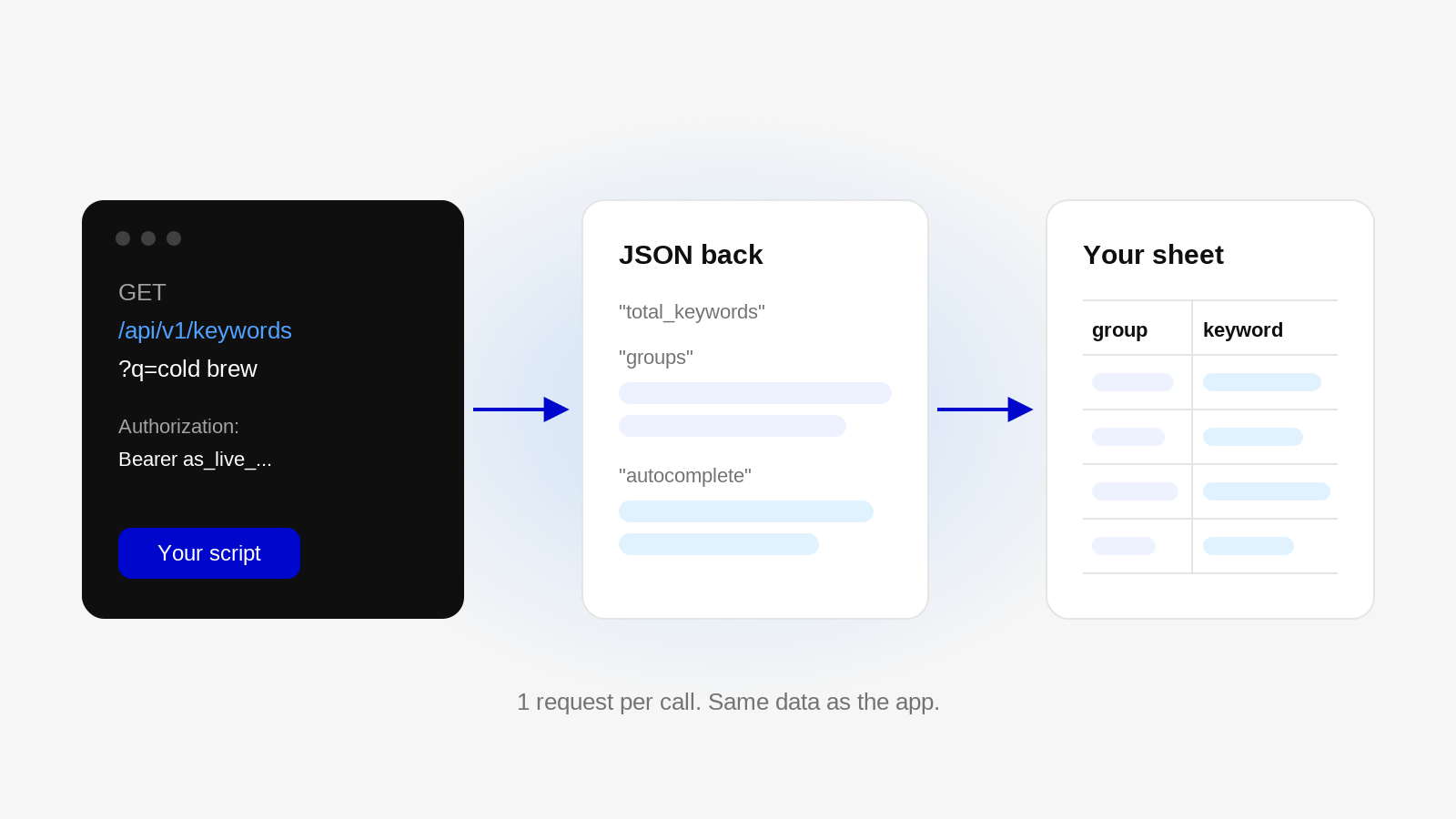
The Answer Socrates API is a set of web addresses your own code can call to get live Google autocomplete, YouTube, TikTok, shopping and Google Trends data back as JSON. It lets you feed keyword research straight into a spreadsheet, a report or an automation instead of copying it out of the app.
Key takeaways
- Every request sends a key that starts with as_live_ in an Authorization: Bearer header; you create up to 5 keys on your Account page, and each is shown only once.
- Each data call costs 1 request: Free and Lite get 3 a month, Seneca 500, Aurelius 2,500 and Senate 25,000, with a burst limit of 60 a minute per key.
- The /usage endpoint is free, so call it first to check a new key before you spend anything on /keywords or /trends.
- A /keywords reply holds named groups (each with count and keywords), a separate a to z autocomplete list, total_keywords, the market in geo, and a warnings list to read before trusting a zero.
- The API has no search volumes and no clustering endpoint; use the MCP server's cluster_keywords or the app's clustering tool to group a list into topics.
What the API gives you, and what it does not
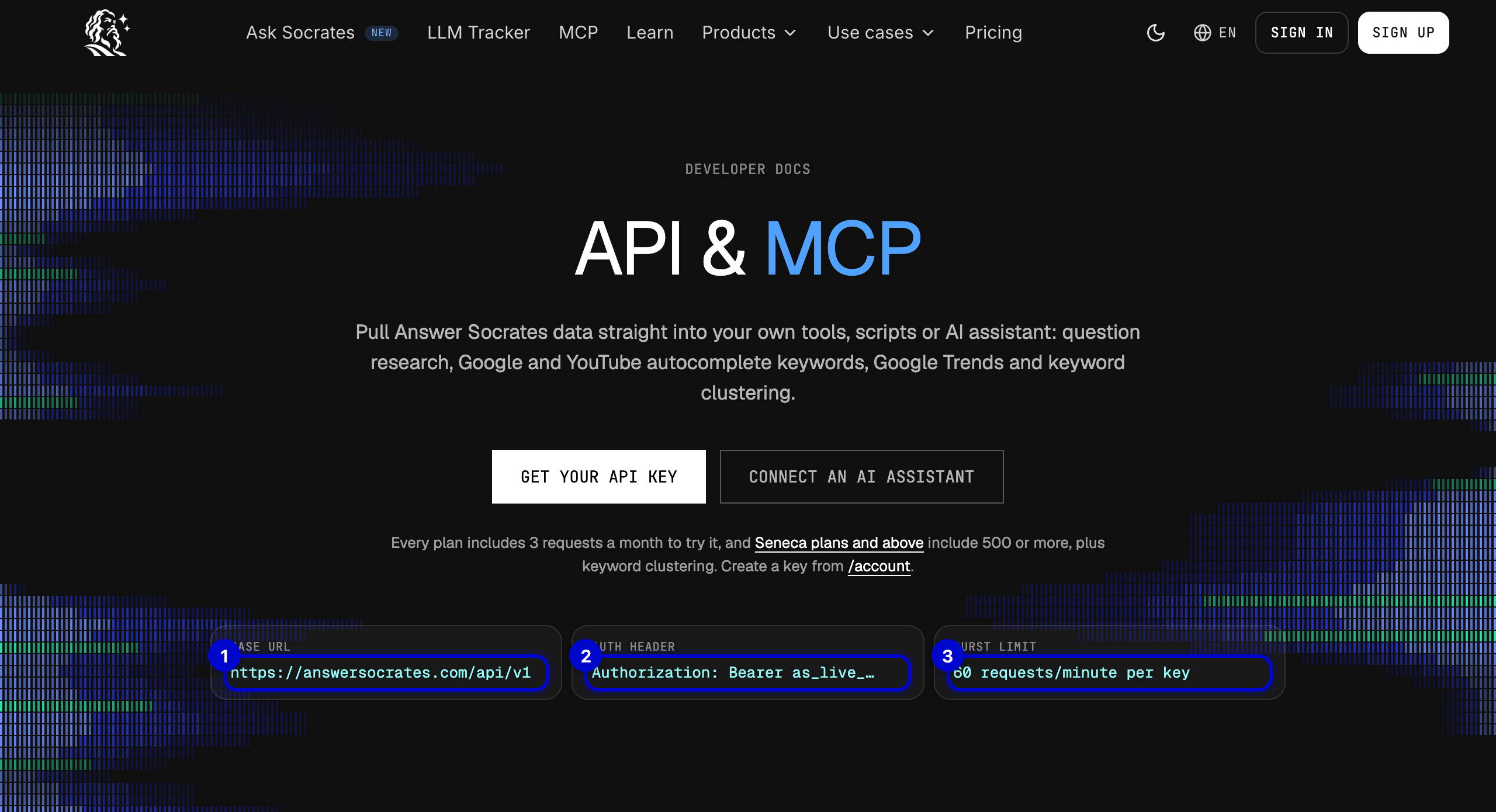
An API (application programming interface) is a web address your own code can call to get data back, with no browser in between. The Answer Socrates REST API lives at https://answersocrates.com/api/v1. You send a request such as "keywords for cold brew in the UK", and you get JSON back: plain structured text that a script, a spreadsheet or a no-code tool like n8n can read.
The data is the same live data the app and our MCP server use:
- Google autocomplete. The phrases Google suggests as people type. Google says these "reflect real searches that have been done on Google" [3].
- YouTube, TikTok and shopping autocomplete. The same idea, from YouTube search, TikTok search, and Google Shopping, Amazon and eBay.
- Google Trends. 12 months of interest over time, and the rising and top related searches around a topic.
Two things it does not give you. There are no search volumes anywhere in the API. And keyword clustering is not a REST endpoint: it runs only through the MCP server, where an assistant such as Claude calls it for you.
Every call passes four checks before it spends
Each request carries your API key in a header. Keys start with as_live_, and you send one like this:
Authorization: Bearer as_live_YOUR_KEY
An X-Api-Key header with the key works too, if your tool prefers it. The server then runs the same four checks on every call, in a fixed order.
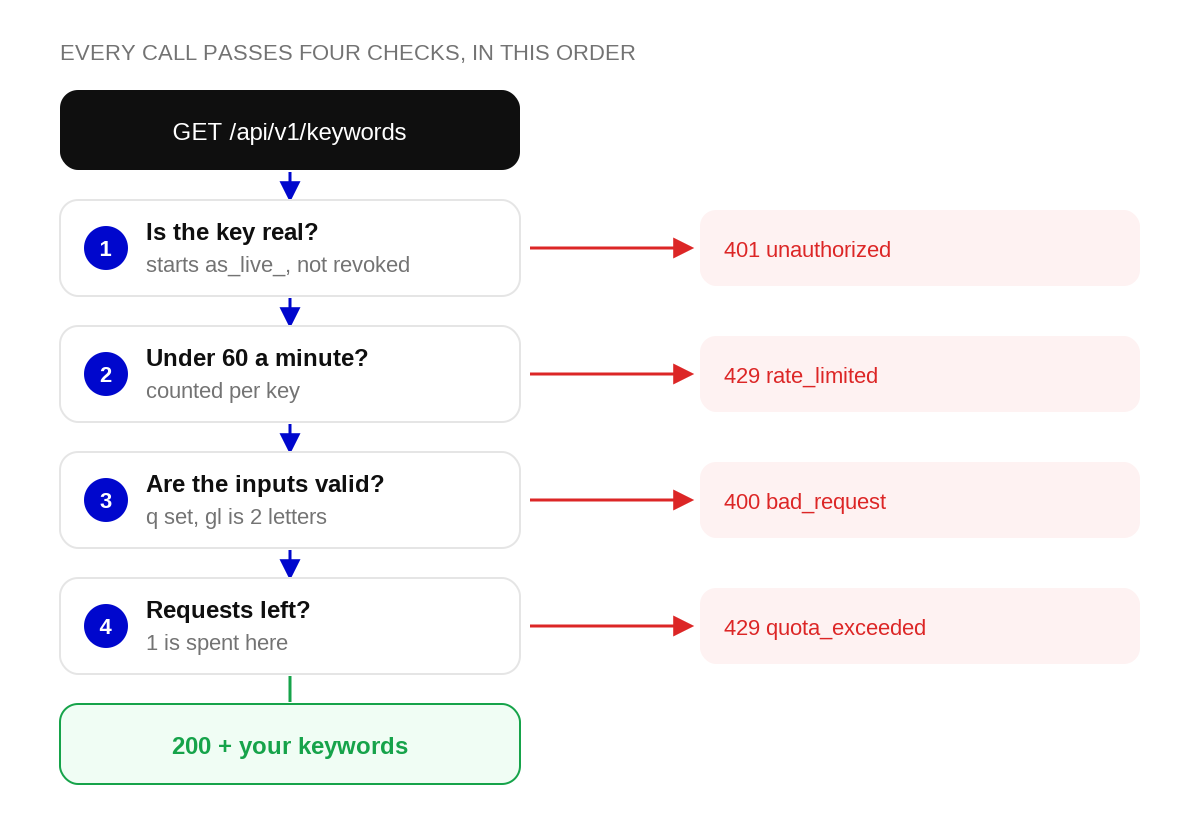
The order matters for your allowance. A wrong key, a burst over the limit or a missing q is turned away before anything is charged. Only a call that reaches check 4 spends a request.
The endpoints and what each one costs
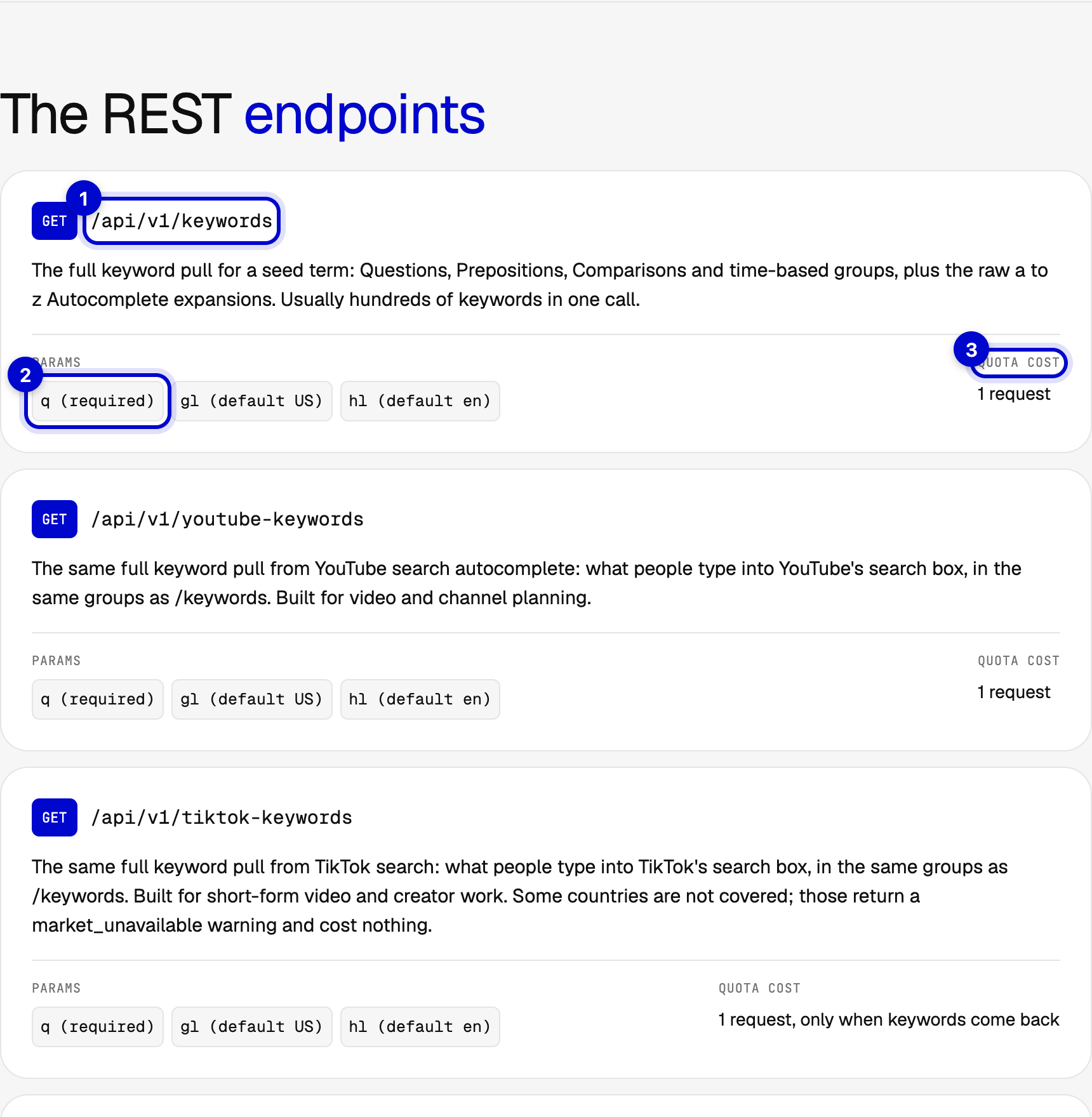
There are seven endpoints. All of them are GET requests, all but /usage take q (your seed term, up to 200 characters), and all default to the US market unless you pass gl, a 2-letter country code such as GB or DE.
| Endpoint | What comes back | Cost |
|---|---|---|
/api/v1/keywords | The full Google pull: named groups (Questions, Prepositions, Comparisons and more) plus the a to z Autocomplete list | 1 request |
/api/v1/youtube-keywords | The same pull from YouTube search | 1 request |
/api/v1/tiktok-keywords | The same pull from TikTok search | 1 request, only when keywords come back |
/api/v1/shopping-keywords | Google Shopping, Amazon and eBay in one call (pick some with platforms) | 1 request, only when keywords come back |
/api/v1/rising-topics | Google Trends related searches, split into rising and top | 1 request |
/api/v1/trends | 12 months of Google Trends interest for one term | 1 request |
/api/v1/usage | Your plan, your limits and what you have used | Free |
The keyword endpoints also take hl, the language code (default en). Trends numbers run from 0 to 100, scaled against all searches in that place and time range [4]. They show shape and timing, not a count of searches.
Plans, quotas and the 60-a-minute limit
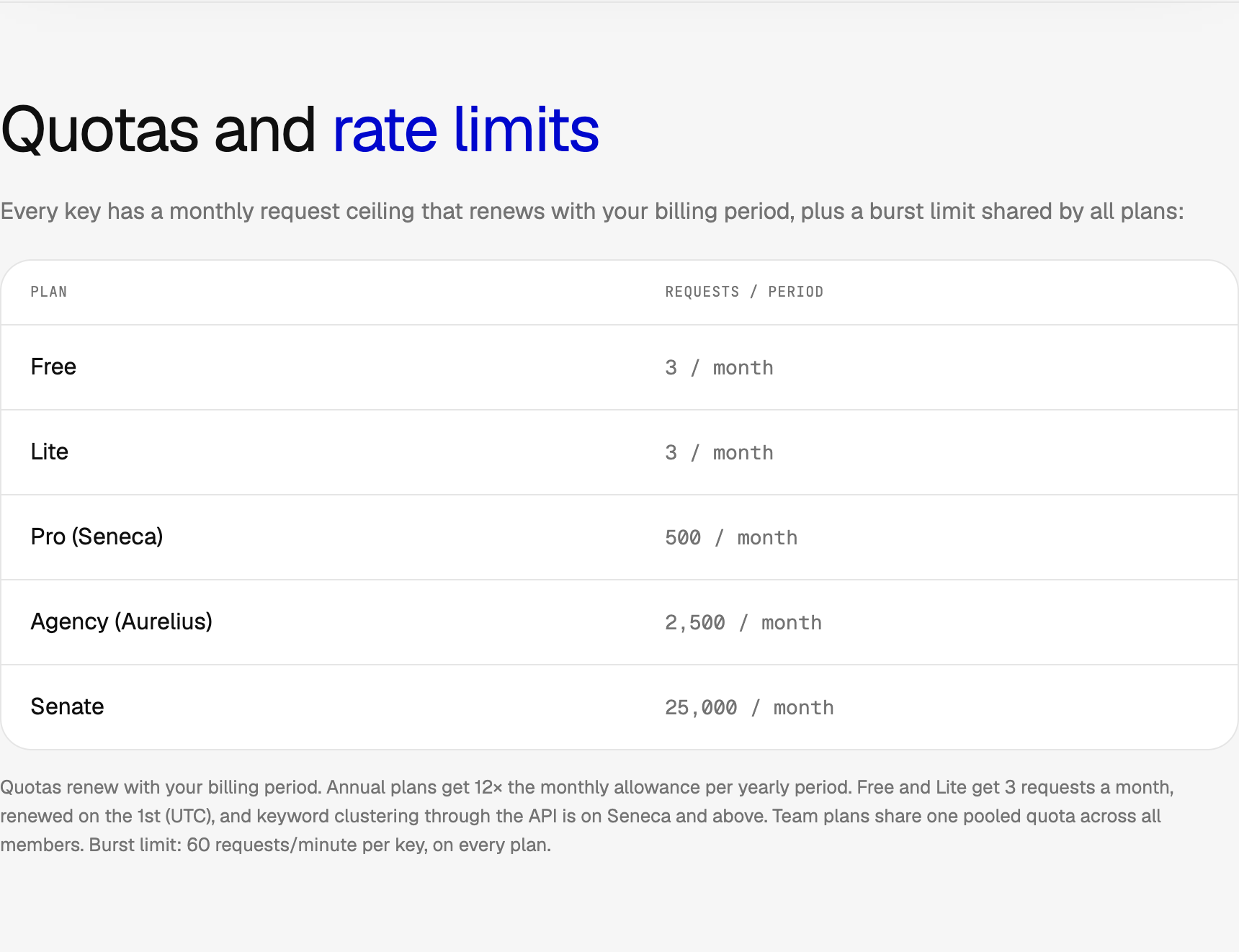
Every plan can use the API, including Free. What changes is the monthly allowance.
| Plan | API requests | Renews |
|---|---|---|
| Free | 3 a month | The 1st of each month (UTC) |
| Lite | 3 a month | The 1st of each month (UTC) |
| Seneca | 500 a month | With your billing period |
| Aurelius | 2,500 a month | With your billing period |
| Senate | 25,000 a month | With your billing period |
On yearly billing you get 12 times the monthly number for the year, so Seneca yearly is 6,000. On a team, every member draws from one shared pool, set by the owner's plan. API requests are a separate allowance from the searches you run in the app, so scripts never eat into your in-app searches.
On top of the monthly quota there is a burst limit: 60 requests a minute per key, on every plan. You can have up to 5 active keys at once.
How to do it in Answer Socrates
Five steps take you from no key to your first real pull.
-
Create a key. Sign in, open your Account page and find the API keys section. Type a name you will recognise later, such as "Google Sheets", and click Create key. The full key appears once, under "Copy this key now", so copy it straight away. Afterwards the page shows only the first characters, the date it was created and when it was last used.
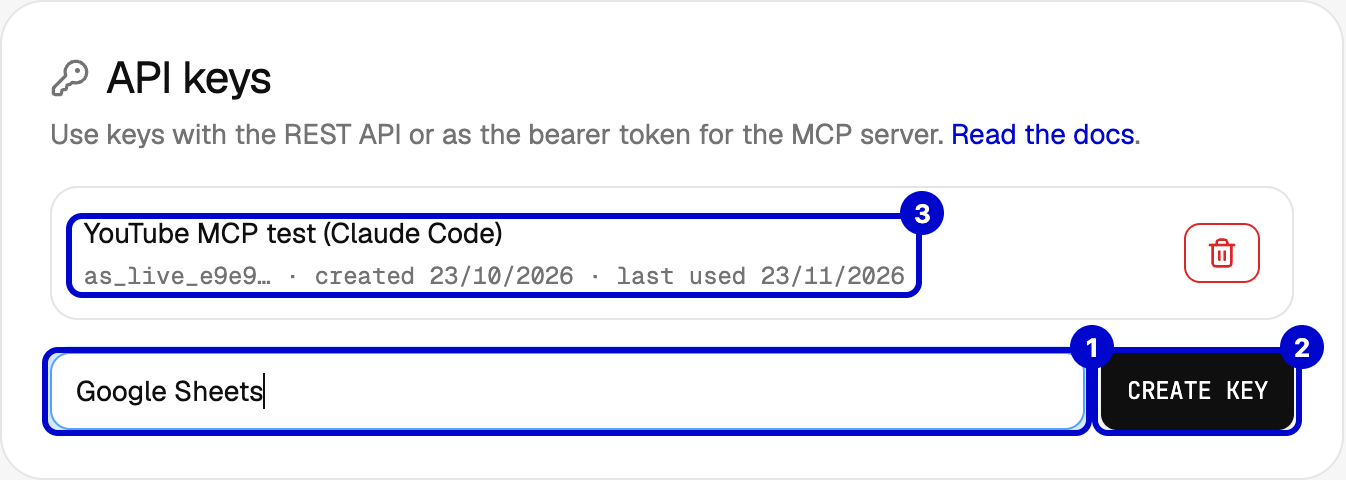
Name the key after where it will live (1), then Create key (2). The full key shows once, in a banner to copy, and is never shown again. Afterwards the row (3) keeps only the prefix and when it was last used. -
Keep it out of your code. Put the key in an environment variable, such as
ANSWERSOCRATES_API_KEY, or in your tool's secret store. In Google Apps Script that is Script Properties, which you add under Project Settings [2]. If a key leaks, revoke it with the bin icon on the Account page and make a new one. -
Check it with the free endpoint.
/usagecosts nothing, so it is the safe first call:curl "https://answersocrates.com/api/v1/usage" \ -H "Authorization: Bearer $ANSWERSOCRATES_API_KEY"You get back your
plan, yourlimitsandusedcounts (requests, plus cluster credits shown separately), apricingnote, andperiod_started_at. On Free and Lite there is alsorequests_renew_at. -
Run your first pull. This one spends 1 request:
curl "https://answersocrates.com/api/v1/keywords?q=cold%20brew&gl=GB&hl=en" \ -H "Authorization: Bearer $ANSWERSOCRATES_API_KEY" -
Read the reply. Every reply is JSON with the same top-level fields.
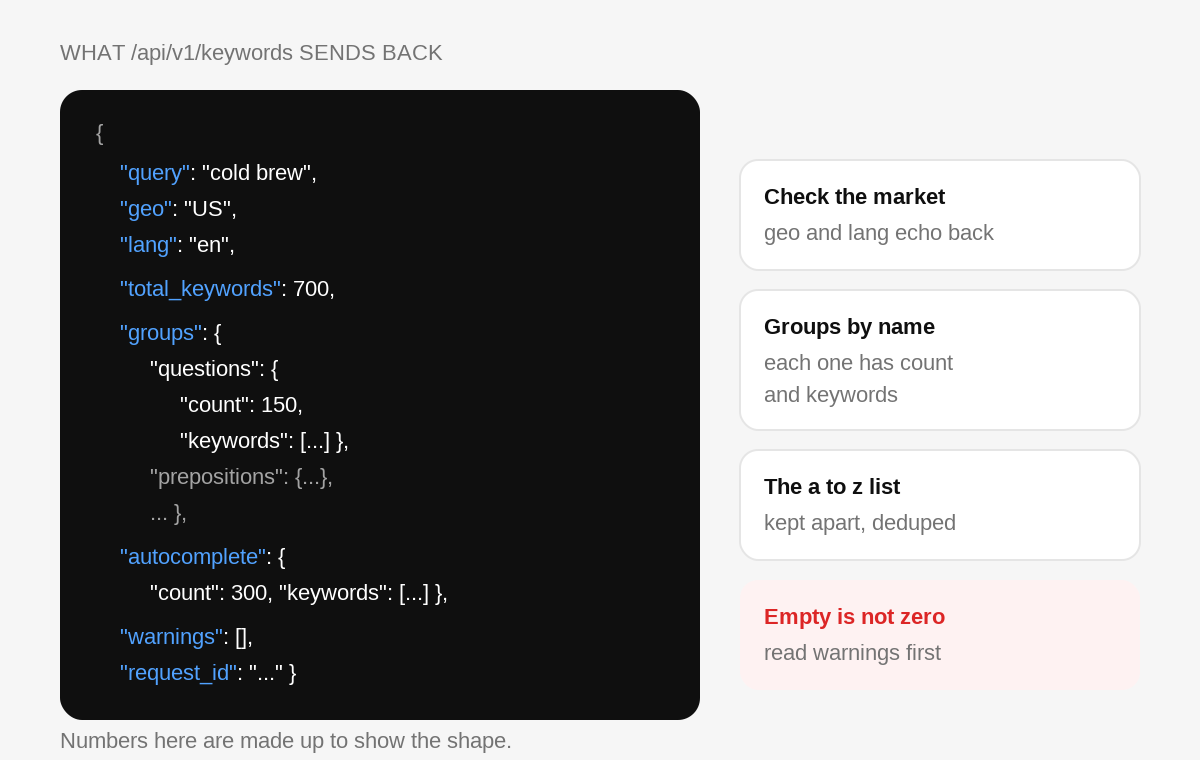
groups holds the named lists, autocomplete holds the a to z list, and total_keywords is both added together.
groups is an object keyed by group name. Each group has a count and a keywords list. autocomplete holds the a to z expansions, deduplicated, kept apart from the groups. total_keywords is the groups and the autocomplete list added together. geo and lang echo the market you asked for, so you can always tell which country a row came from.
Pull keywords into Google Sheets or Python
A made-up example: you run a small coffee roaster in Leeds and want a fresh sheet of UK cold brew searches each month to plan blog posts. Here is a short Apps Script that does it. In your sheet, open Extensions > Apps Script, paste this, save your key as a Script Property named ANSWERSOCRATES_API_KEY, and run pullKeywords.
function pullKeywords() {
  var key = PropertiesService.getScriptProperties()
    .getProperty('ANSWERSOCRATES_API_KEY');
  var seed = 'cold brew';
  var url = 'https://answersocrates.com/api/v1/keywords?q=' +
    encodeURIComponent(seed) + '&gl=GB&hl=en';
  var res = UrlFetchApp.fetch(url, {
    headers: { Authorization: 'Bearer ' + key },
    muteHttpExceptions: true
  });
  var body = JSON.parse(res.getContentText());
  if (body.error) {
    throw new Error(body.error.code + ': ' + body.error.message);
  }
  var rows = [['group', 'keyword']];
  Object.keys(body.groups).forEach(function (name) {
    body.groups[name].keywords.forEach(function (kw) {
      rows.push([name, kw]);
    });
  });
  body.autocomplete.keywords.forEach(function (kw) {
    rows.push(['autocomplete', kw]);
  });
  var tab = seed + ' ' + body.geo + ' ' +
    new Date().toISOString().slice(0, 10);
  var sheet = SpreadsheetApp.getActiveSpreadsheet().insertSheet(tab);
  sheet.getRange(1, 1, rows.length, 2).setValues(rows);
  if (body.warnings.length) {
    SpreadsheetApp.getUi().alert('Warnings: ' + body.warnings.join(', '));
  }
}
muteHttpExceptions tells Apps Script to hand back error replies instead of throwing [1], so the script can show our error code and message. Each run makes a new tab named with the seed, the market and the date, which gives you a monthly record to compare. Run it twice on the same day and the second run stops, because that tab name already exists.
The same pull in Python, written to a CSV file:
import csv, os, requests

key = os.environ["ANSWERSOCRATES_API_KEY"]
r = requests.get(
    "https://answersocrates.com/api/v1/keywords",
    params={"q": "cold brew", "gl": "GB", "hl": "en"},
    headers={"Authorization": f"Bearer {key}"},
    timeout=90,
)
data = r.json()
if "error" in data:
    raise SystemExit(f'{data["error"]["code"]}: {data["error"]["message"]}')

with open("cold-brew-gb.csv", "w", newline="") as f:
    w = csv.writer(f)
    w.writerow(["group", "keyword"])
    for name, group in data["groups"].items():
        for kw in group["keywords"]:
            w.writerow([name, kw])
    for kw in data["autocomplete"]["keywords"]:
        w.writerow(["autocomplete", kw])

print(data["total_keywords"], "keywords for", data["geo"], data["warnings"])
The long timeout is on purpose. A term nobody has pulled lately is fetched live and can take a while, while a recent one comes from our cache in a moment.
Errors and empty results
Every error has the same shape: an error object with a code and a plain-English message, plus a request_id. The HTTP status matches the code, so your script can branch on either.
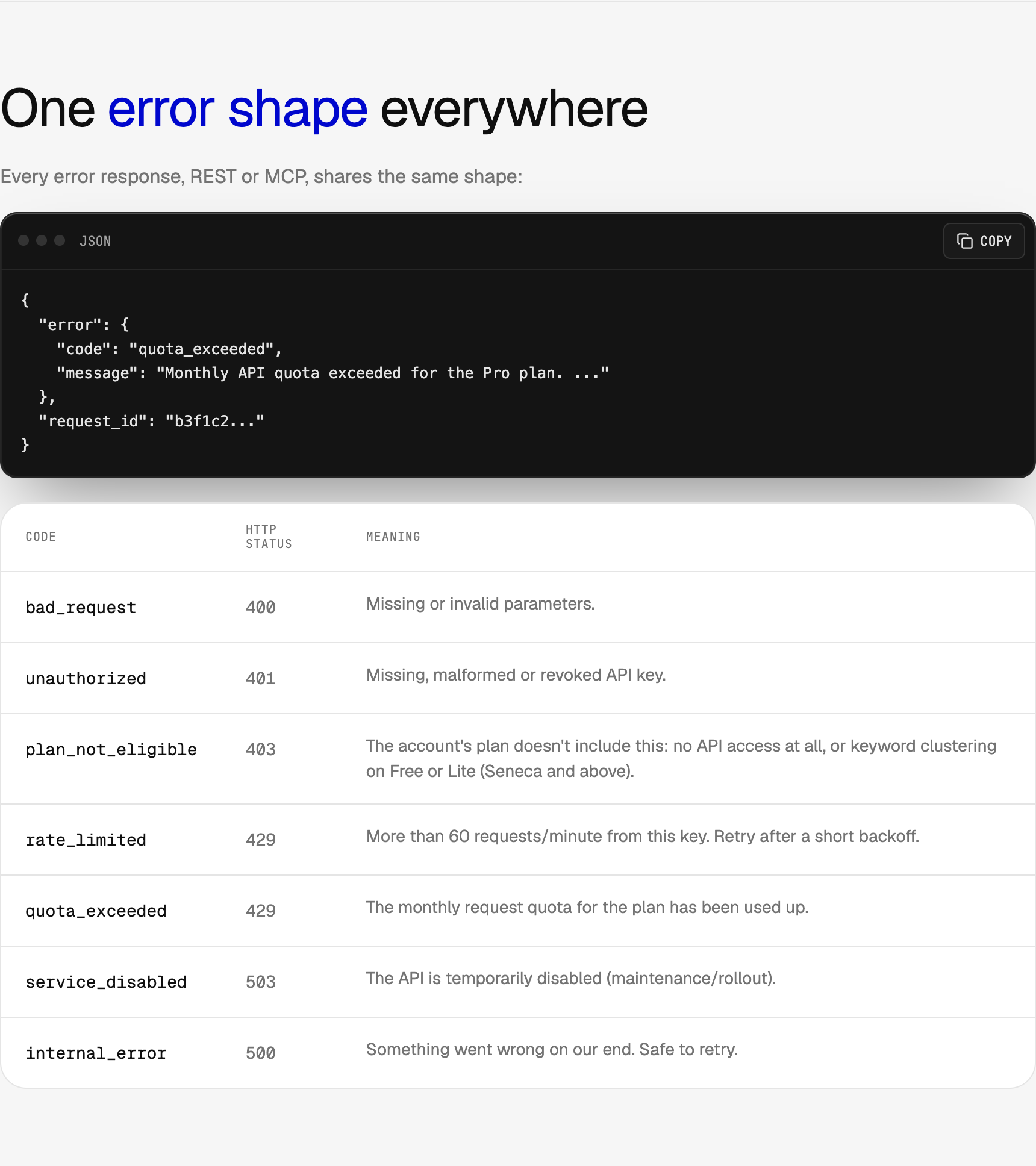
| Code | Status | What to do |
|---|---|---|
bad_request | 400 | Fix the parameters. q is missing, or gl is not 2 letters |
unauthorized | 401 | The key is missing, mistyped or revoked |
plan_not_eligible | 403 | The plan does not include this, such as clustering through MCP on Free or Lite |
rate_limited | 429 | Over 60 a minute on this key. Wait a few seconds and retry |
quota_exceeded | 429 | This month's requests are used. Wait for renewal or upgrade |
service_disabled | 503 | The API is paused for maintenance. Retry later |
internal_error | 500 | Our side failed. Safe to retry |
A success can still be empty. Always read warnings before you trust a zero: suggestions_unavailable means the pull failed upstream, trends_unavailable means Google Trends sent nothing, and market_unavailable (TikTok) means that country is not covered. /rising-topics may also return an advice line when a seed is too broad for a clean rising list.
The same thing in Ask Socrates, with no code
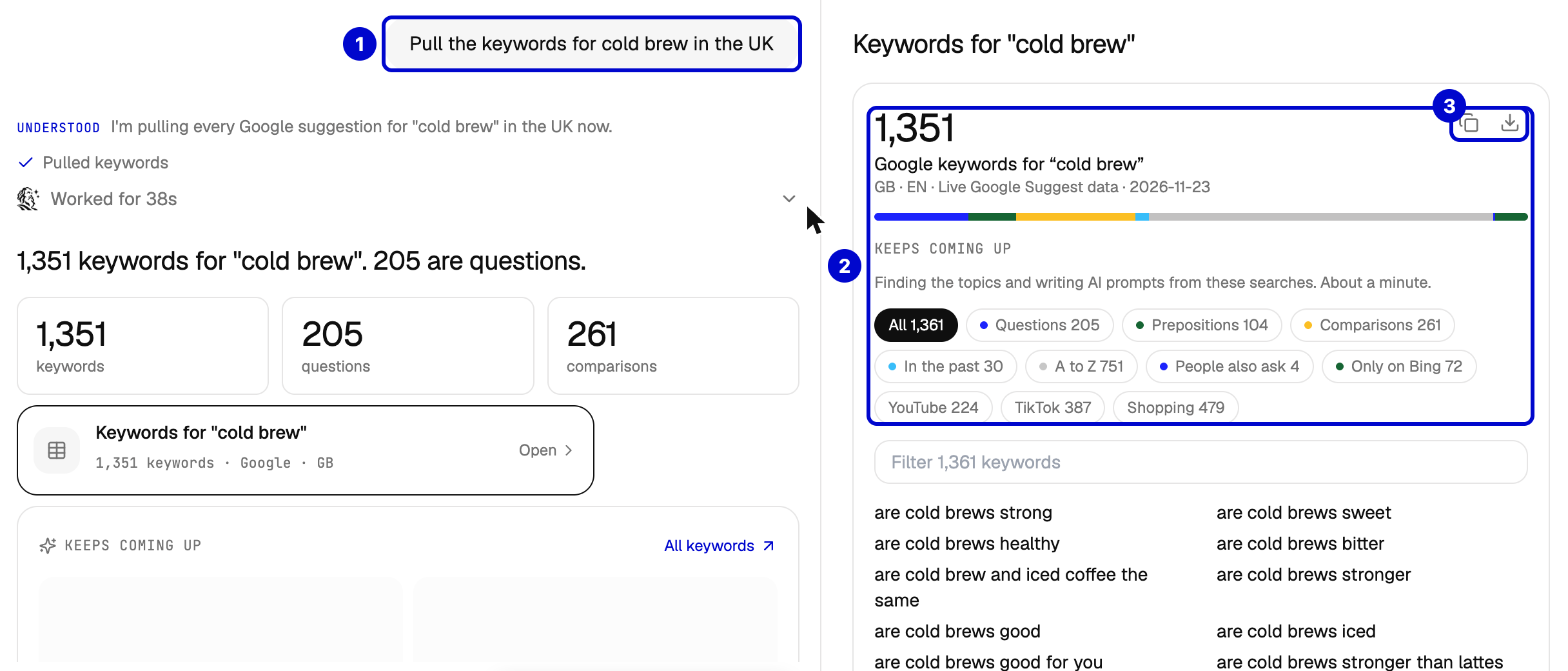
If you only need the list once, skip the script. Ask Socrates, the chat inside Answer Socrates, runs the same Google pull from a plain message, and the panel beside the chat has copy and CSV buttons. It spends 1 in-app search credit instead of an API request, nothing if the pull comes back empty, and nothing for the same term and country pulled in the last 7 days (it reopens that pull).
Type: "Pull the keywords for cold brew in the UK."
| You want to... | Use |
|---|---|
| A sheet or report that refreshes on a schedule | The REST API |
| Research inside Claude, ChatGPT or Cursor | The MCP server |
| One list, once, with no setup | Ask Socrates |
| Group a list into topics with intent | MCP (cluster_keywords) or the clustering tool in the app |
The full reference is on our API docs page.
Where to go next
| If you want to... | Read |
|---|---|
| Understand the MCP server the same key works with | What is MCP? A plain-words guide for SEOs |
| Use the data inside Claude instead of a script | Connecting Answer Socrates to Claude |
| Turn a raw pull into a plan with an agent | Building a content plan with an AI agent |
| Know what to check before you trust agent output | Where AI agents get SEO wrong |
| Read the Trends numbers correctly | Google Trends: seasonal and rising topics |
Sources
- Class UrlFetchApp, Google Apps Script, 2026
- Properties Service, Google Apps Script, 2026
- How Google autocomplete predictions work, Google Search Help, 2026
- FAQ about Google Trends data, Google Trends Help, 2026
