People Also Ask: pulling the questions Google shows
People Also Ask is the box of related questions Google shows in its results, each with a short answer taken from a web page. It is Google's own map of what searchers want to know next, which makes it one of the fastest ways to plan the sections of a page.
Key takeaways
- Google calls PAA a "related questions group", and each answer in it is a featured snippet taken from a web page, with a link to that page.
- The PAA Extractor runs five Google lookups (your term, then its first four questions) and returns up to 16 follow-ups per question for one search credit.
- The People Also Asked card on every keyword search shows Google's questions; paid plans see up to four follow-ups each for free, and Unlock more adds a third layer for 1 credit.
- The Extractor's CSV has three columns, Question, Answer and URL, so you can see which pages Google already quotes before you write.
- Main questions make good H2s and short follow-ups make good FAQ answers, but FAQ rich results now show only for well-known government and health sites.
People Also Ask is Google's list of next questions
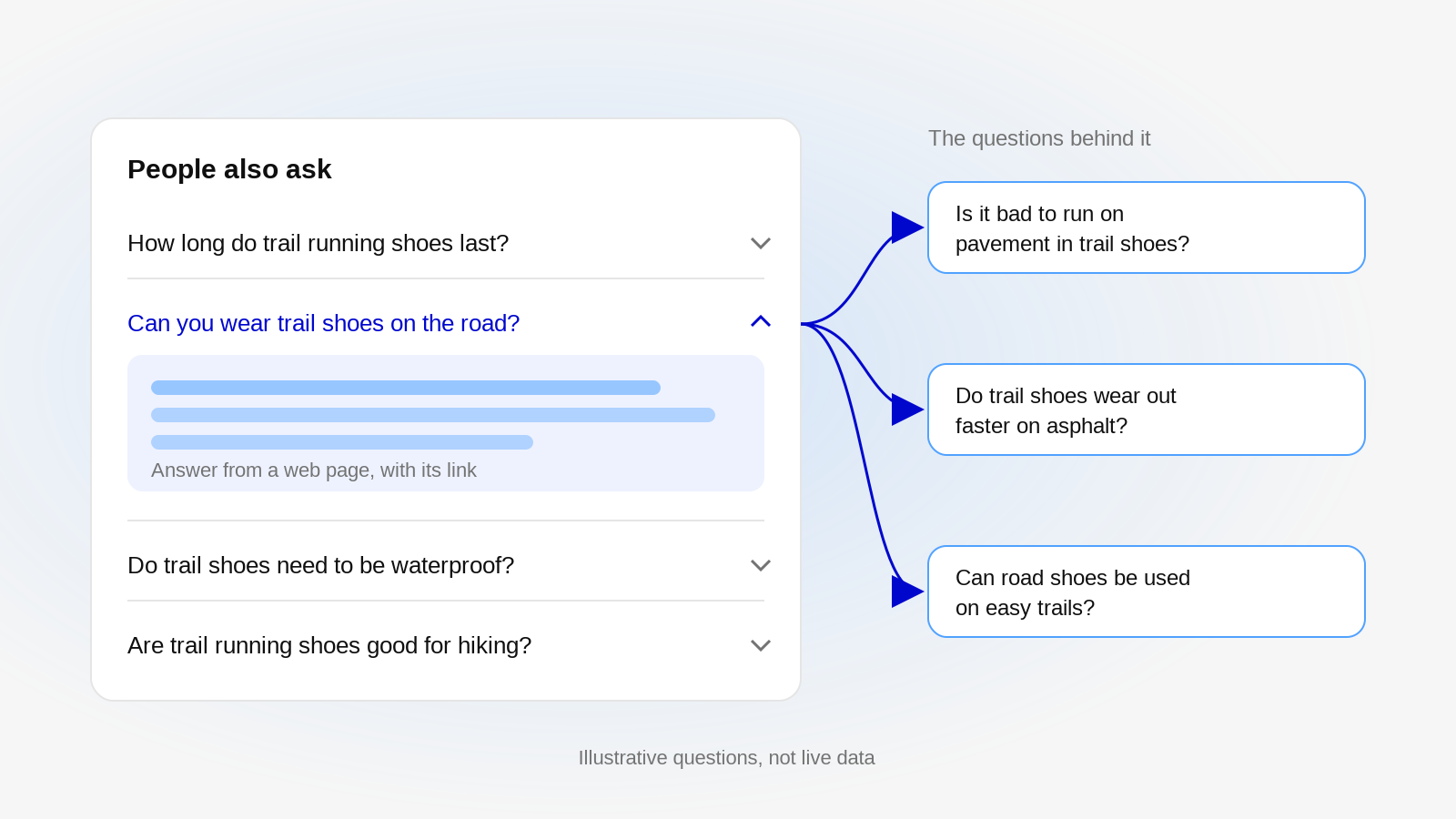
People Also Ask (PAA) is the box of related questions Google shows on many search results pages. Google's own documentation calls it a "related questions group" and describes it as a cluster of questions related to what the user first searched for [2]. Each question opens to show a short answer taken from a web page, with a link to that page. Google treats that answer as a featured snippet [1][2].
A made-up example: search "trail running shoes" and the box might hold "How long do trail running shoes last?" and "Can you wear trail shoes on the road?". Click the second one and an answer from a running site drops open. More questions then load under the box, often about the question you just opened, so the box keeps growing as you read [4].
That last part is why PAA matters for research. The box is not a fixed list. It is Google's guess at what you will want to know next, and every click shows you another layer of it.
What PAA tells you that autocomplete does not
Most keyword tools, including the classic keyword search, build their lists from autocomplete: the predictions Google shows while you type. PAA comes from a different place, and it answers a different question.
| Autocomplete | People Also Ask | |
|---|---|---|
| What starts it | The words you have typed so far | The search you already ran |
| What you get | Ways to finish your phrase | Whole questions Google links to the topic |
| Comes with | Nothing but the phrase | An answer and the page it came from |
| Best for | Finding many phrasings and the long tail | Planning the sections of one page |
| In Answer Socrates | Every group on the results page | The People Also Asked card and the PAA Extractor |
Autocomplete tells you how people start a search. PAA tells you what Google thinks they want to know once they have. That makes PAA good at one job in particular: deciding what a page about the topic must cover, and in what order.
It also shows you who is winning. Each answer names a page. If the same few sites answer every question, you know who you are up against before you write a word.
PAA questions arrive already grouped by topic and already worded as questions. You do not have to guess which searches belong together, because Google has put them in the same box.
One question leads to the next
Doing PAA research by hand means clicking a question, waiting for new ones to load, clicking one of those, and copying everything into a sheet. The PAA Extractor does that clicking for you.
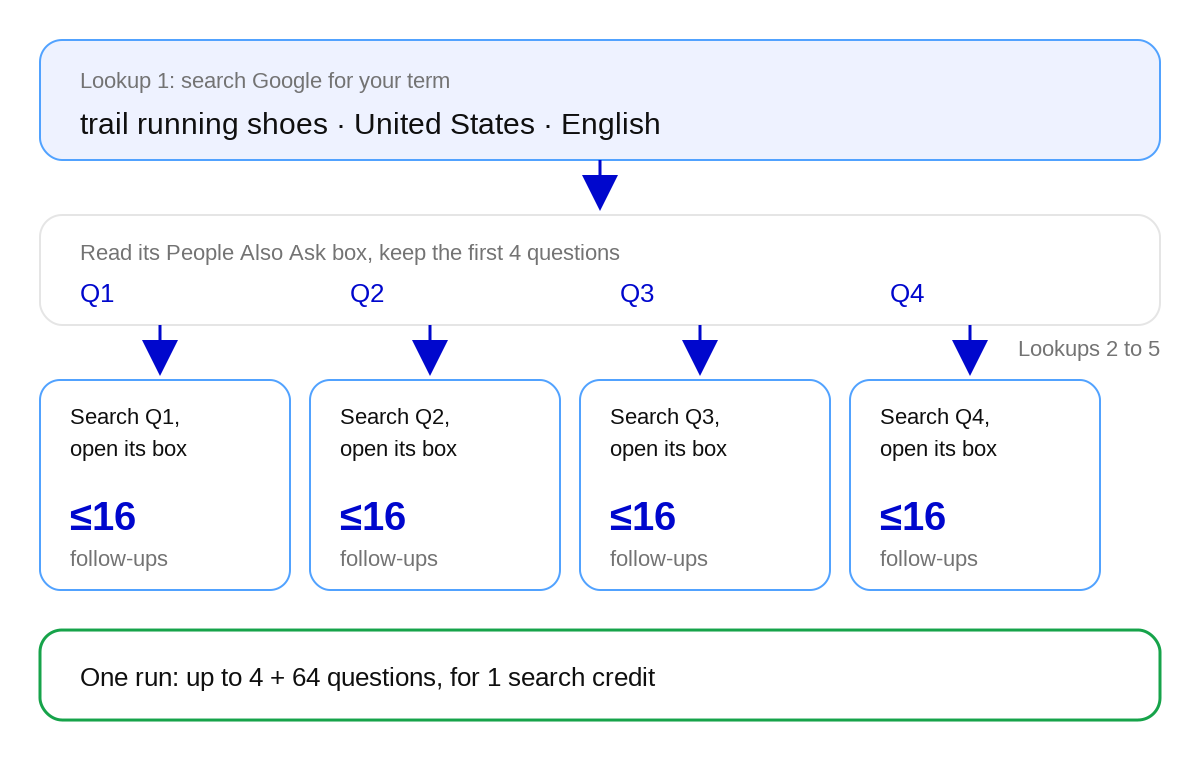
Here is what happens when you run it:
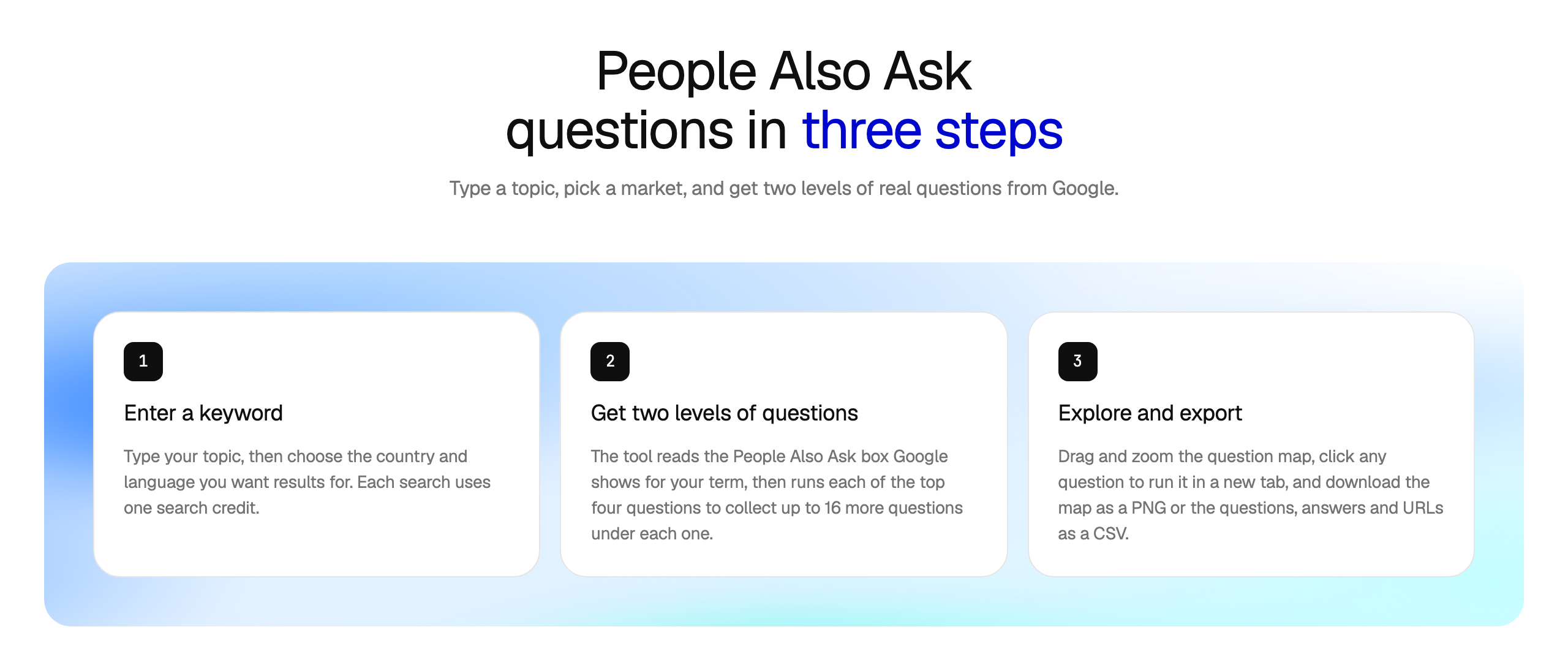
- Search your term. We search Google for your term in the country and language you picked, the same way a person in that market would see it.
- Read the box. We take the first four questions from its People Also Ask box.
- Search each question. Each of those four questions is then searched as its own query, and its PAA box is opened to load the extra questions.
- Keep up to 16 per question. Up to 16 follow-up questions are kept under each main question, with the answer and link Google shows for each one.
So one run can return 4 main questions and up to 64 follow-ups. The real number depends on what Google shows for your term in that market. Some terms have a rich box; some have none.
The People Also Asked card on your results
You do not have to open a separate tool to see PAA. Every classic keyword search shows a People Also Asked card at the top of the results, beside the Google Trends chart.
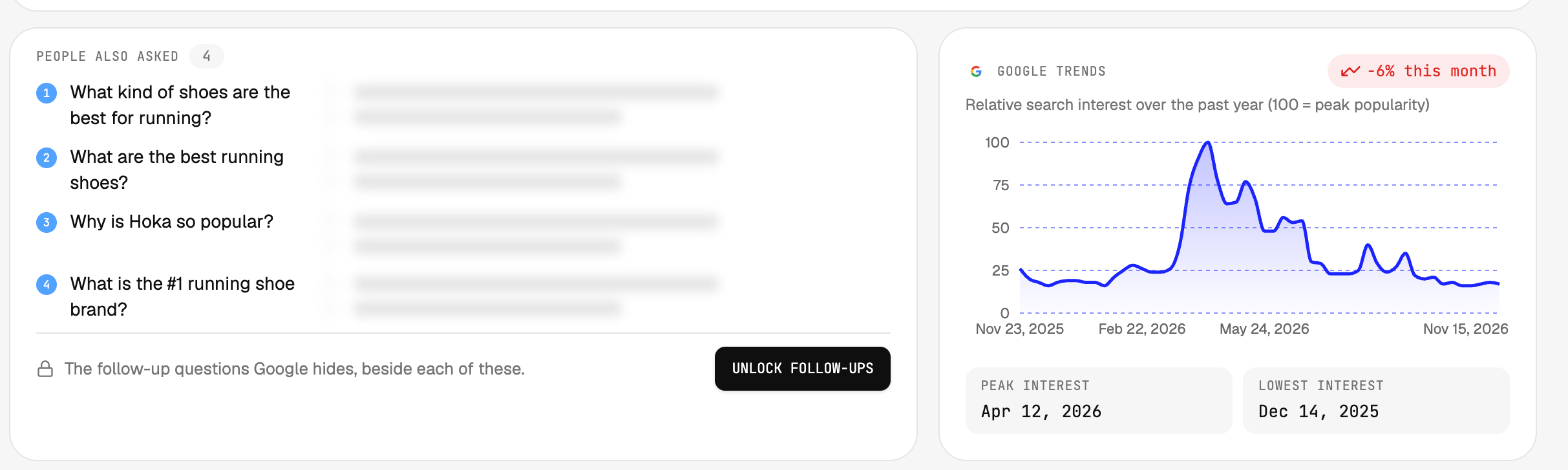
What the card shows depends on your plan:
- Free and signed out. You see up to four of Google's questions. The follow-ups beside them are placeholders, blurred, with the line "The follow-up questions Google hides, beside each of these." and an Unlock follow-ups button that leads to the plans.
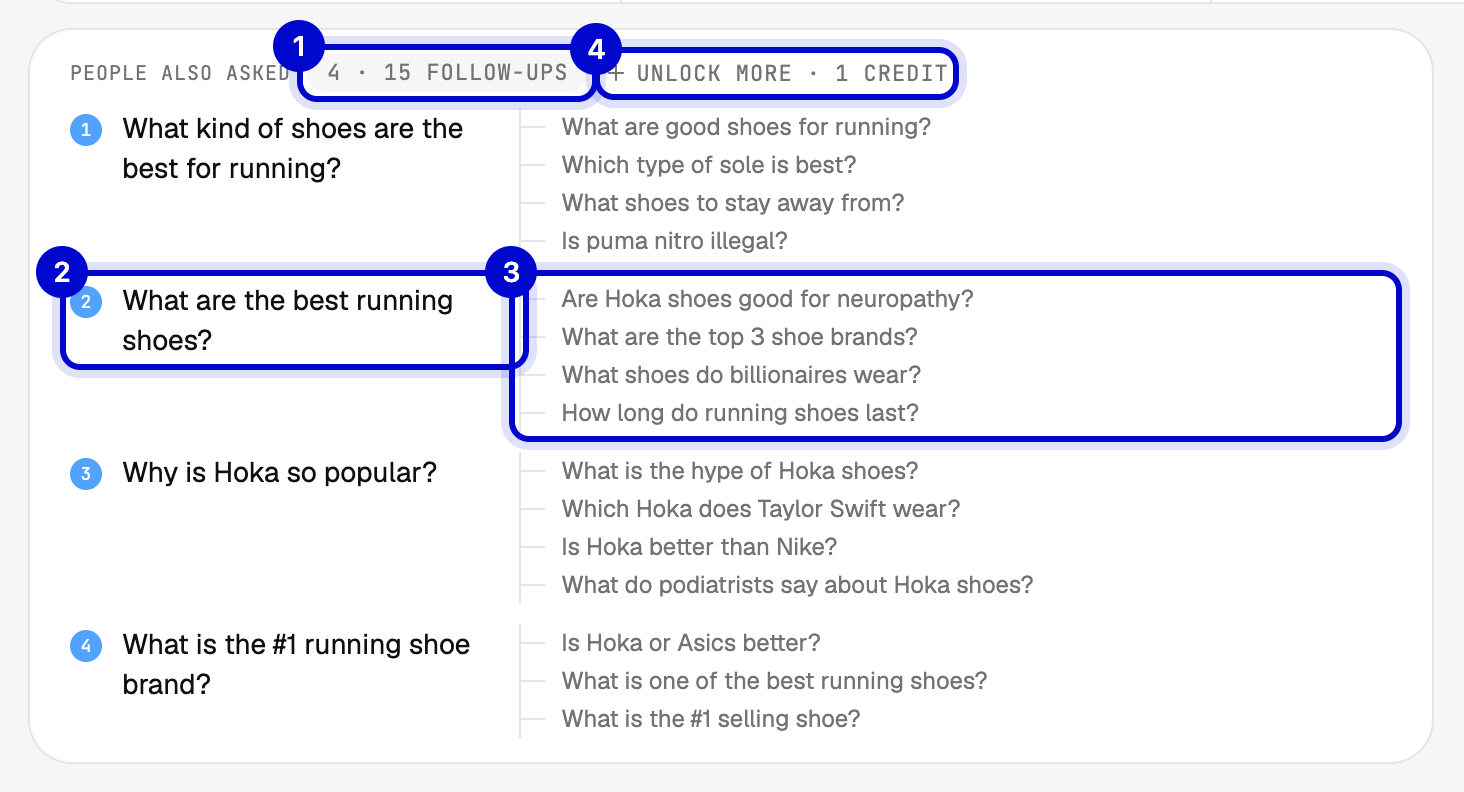
- Paid plans. The card loads the real follow-ups with the search, at no extra credit: up to four questions, each with up to four follow-ups. The count pill in the corner adds the number of follow-ups, for example "4 · 16 follow-ups".
- Going one level further. On a paid plan the card header has an Unlock more · 1 credit button. It searches each follow-up in turn and adds up to four of its follow-ups beside it, so you see three layers in one box. Once you have done this for a term, opening that search again shows the deeper map without asking for another credit.
The questions in this card also go into the classic search's Download CSV workbook, as rows with the Type "paa", so they sit beside your other keywords.
How to run the PAA Extractor
The PAA Extractor is the full, two-level version, with a map you can explore and a CSV with every answer.
Step 1. Fill in the form. Type your term, pick the country and language, then click Analyze Questions.
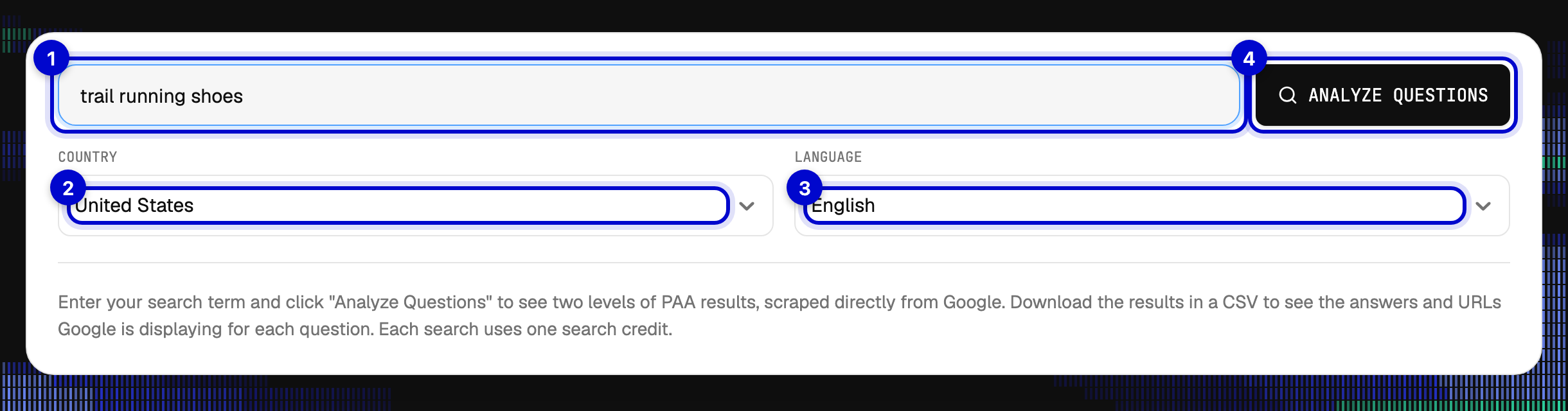
- The keyword box. One topic, a few words long. "Trail running shoes" works better than "shoes", because a broad term gets broad questions.
- Country. Defaults to United States. PAA boxes change a lot from one market to another.
- Language. Defaults to English.
- Analyze Questions. Starts the run. The page says it "can take up to 1 minute", because it runs five Google searches: your term first, then its four questions together.
Each run uses one search credit, the same credit the classic keyword search uses. Signed out, it shares the one free search a day the site gives visitors. Run the same term again and it uses another credit, even though you may see the same questions: results for a term are kept for up to 90 days, so the data does not change on every run.
Step 2. Read the map. The results open as a Question Map: your term in the middle, the main questions around it, and the follow-ups branching off each one. A line above the map says how many it found: "Found [number] main PAA questions with [number] child questions (max 16 per main question)".
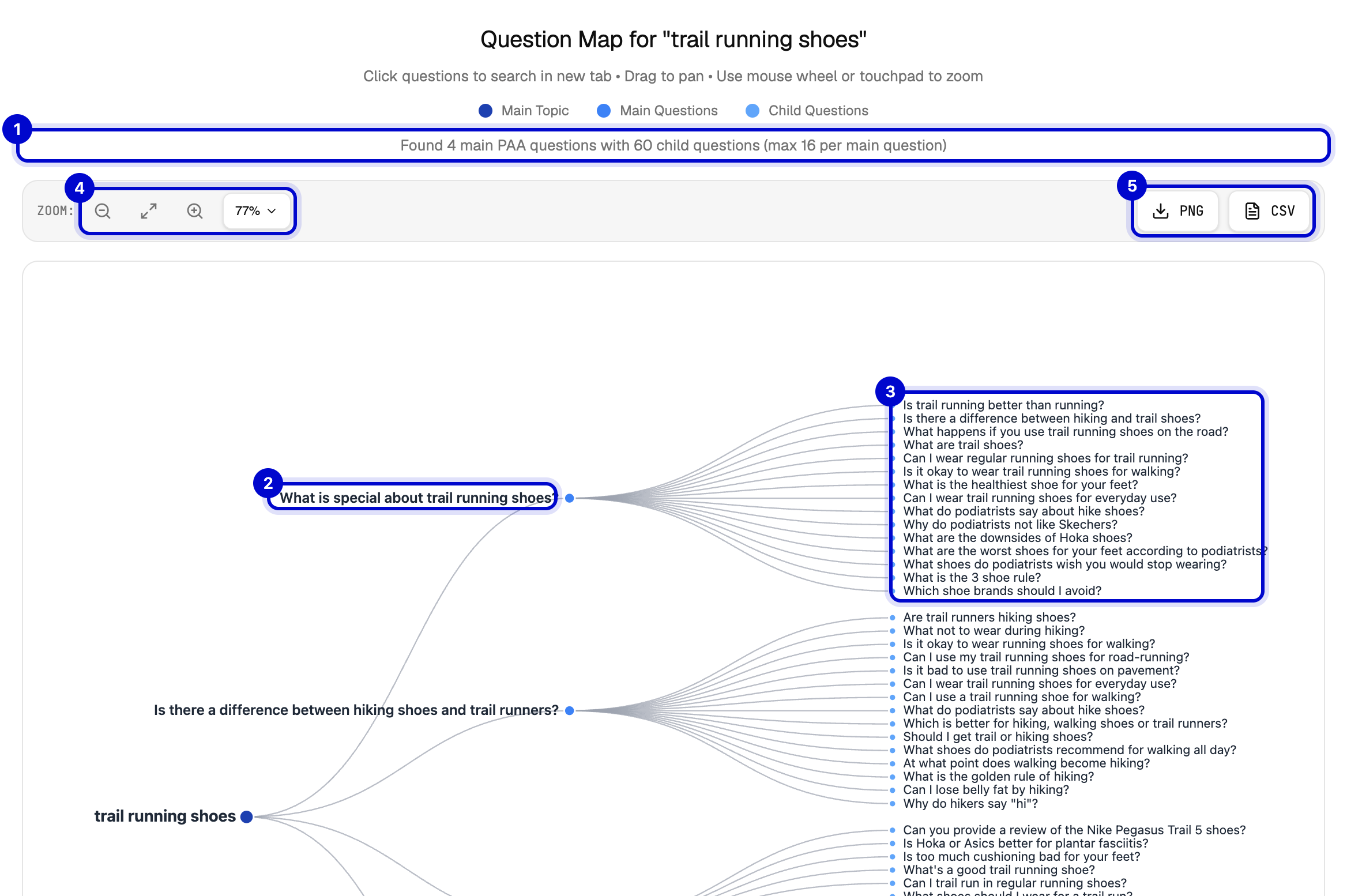
You can drag to pan, use the mouse wheel or the zoom buttons, and the reset button between them to centre it again. Hover a question to see the first 200 characters of the answer Google shows for it, when Google returned one. Some runs come back with no answers, and then hovering shows nothing. Click a question and it opens in a new tab as its own PAA Extractor search, which uses another credit.
Step 3. Export. Two buttons sit under the map:
- PNG saves the map as an image, good for a client report or a brief.
- CSV saves a file named after your term and the date, with three columns: Question, Answer and URL. Every question is a row, and each main question's follow-ups are listed straight after it. The Answer is the text Google shows when the question is opened, and the URL is the page it came from.
The free plan includes one CSV download a month, shared with the classic search's download. Paid plans have no cap.
Turn PAA questions into H2s and FAQ answers
A PAA run is close to a ready-made outline. The main questions are the big topics; the follow-ups are the detail people want under each one.
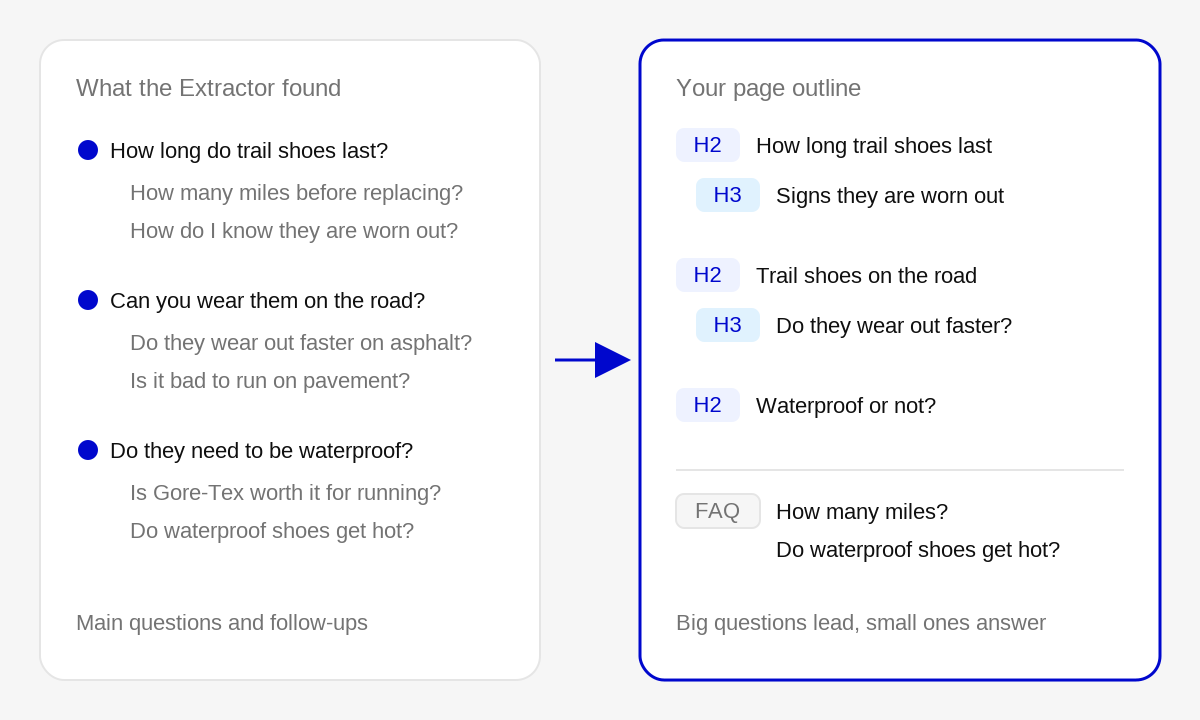
Use four rules:
- Main questions become H2s. Keep the searcher's words but make it read like a heading: "Can you wear trail shoes on the road?" becomes "Trail shoes on the road". Either form is fine; clear beats clever.
- Follow-ups that need a paragraph become H3s. "Do they wear out faster on asphalt?" needs an explanation, so it gets its own subsection.
- Follow-ups with a one-line answer go in an FAQ block. "How many miles do trail shoes last?" can be answered in two sentences.
- Answer first, then explain. Start each section with a direct answer in one or two sentences, then add the detail. That is the shape of every PAA answer Google shows, and it is what a reader skimming your page wants too.
Drop the questions your business cannot answer well, and the ones that are really a different topic. A shoe store does not need a section on "Are trail running shoes good for hiking?" unless it sells hiking shoes too.
Two honest limits. First, you cannot ask Google to use your page as a PAA answer. Google says its systems decide whether a page makes a good featured snippet [1]. A clear, direct answer under a matching heading gives you a chance; nothing guarantees it. Second, an FAQ block is for readers, not for a rich result. Since August 2023 Google shows FAQ rich results only for well-known, authoritative government and health sites [3]. You do not need to remove FAQ markup you already have [3], but do not add a FAQ section expecting extra space in the results.
A made-up example: a running shoe store
A made-up example: Stride Lab is a small running shoe store in Ohio. The owner wants one strong guide on trail shoes before spring. She runs the PAA Extractor for "trail running shoes" in the United States and downloads the CSV.
She goes through the main questions and their follow-ups with one test: does this belong on a trail shoe guide, and can we answer it from the shop floor?
| Question from the run | Level | Her call | Why |
|---|---|---|---|
| How long do trail running shoes last? | Main | H2 | Every buyer asks it, and staff see worn pairs every week |
| How do I know my trail shoes are worn out? | Follow-up | H3 under it | Needs photos of real worn soles, which she can take |
| Can you wear trail shoes on the road? | Main | H2 | Common worry for new trail runners who also run on pavement |
| Do trail shoes need to be waterproof? | Main | H2 | She stocks both, so she can compare them fairly |
| Do waterproof shoes get hot? | Follow-up | FAQ | A two-sentence answer |
| Are trail running shoes good for hiking? | Main | Skip | She does not sell hiking shoes |
The sorted CSV shows one large outdoor retailer answering five of the questions. She opens its page and notices it never mentions fit for wide feet, which her customers ask about at the till. That becomes her extra section.
The same thing in Ask Socrates
Ask Socrates, the Answer Socrates chat, does not run the PAA Extractor. What it does include is the People Also Ask questions from a normal keyword pull. Ask for keyword research on a topic (one search credit; whether the chat asks first depends on your spending setting), and the keyword panel beside the chat has a People also ask tab next to the other groups.
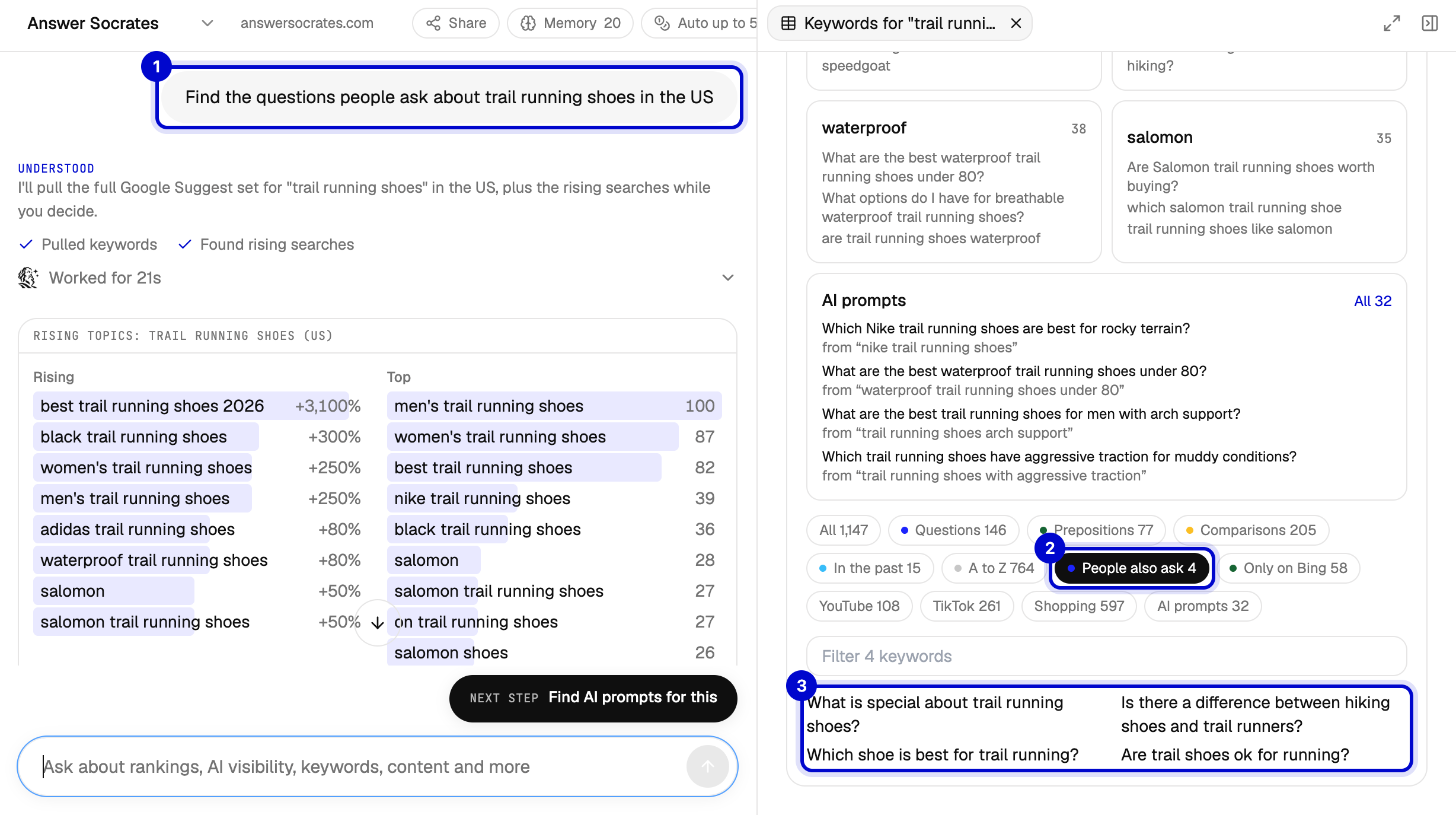
The tab lists the questions only, without answers or URLs. Where the chat helps is the next step: you can ask it to turn those questions and the rest of the pull into a page outline, and it works from the data it already has.
| Use this | When you want |
|---|---|
| The People Also Asked card | A quick look at Google's questions on every search |
| Unlock more on the card (paid) | A third layer of follow-ups without leaving the results page |
| The PAA Extractor | Two levels, up to 16 follow-ups per question, answers and URLs in a CSV |
| Ask Socrates | PAA questions inside a full keyword pull, then help shaping an outline |
Where to go next
| If you want to... | Read |
|---|---|
| Pull every question autocomplete knows about a topic | How to do keyword research: find what people actually ask |
| Keep digging on one question until the long tail runs out | Recursive search: going deeper on one question |
| Turn your questions into a brief a writer can follow | Content briefs: what to give a writer (or an AI) |
| Write a section that adds what the top pages lack | Information gain: adding what other pages lack |
| Make your answers easier for AI to quote | Getting your pages cited in AI answers |
Sources
- Featured snippets and your website, Google Search Central, 2026
- Visual elements gallery of Google Search, Google Search Central, 2026
- Changes to HowTo and FAQ rich results, Google Search Central Blog, 2023
- Google's new People Also Ask suggestions allow deeper exploration of topics, Search Engine Journal, 2017
