YouTube keyword research: what people search on YouTube
YouTube keyword research means finding the phrases people type into YouTube's own search box, which suggests from YouTube searches, not Google's. Those phrases lean towards tutorials, reviews and how-tos, so they tell you which videos to make and which words to put in their titles.
Key takeaways
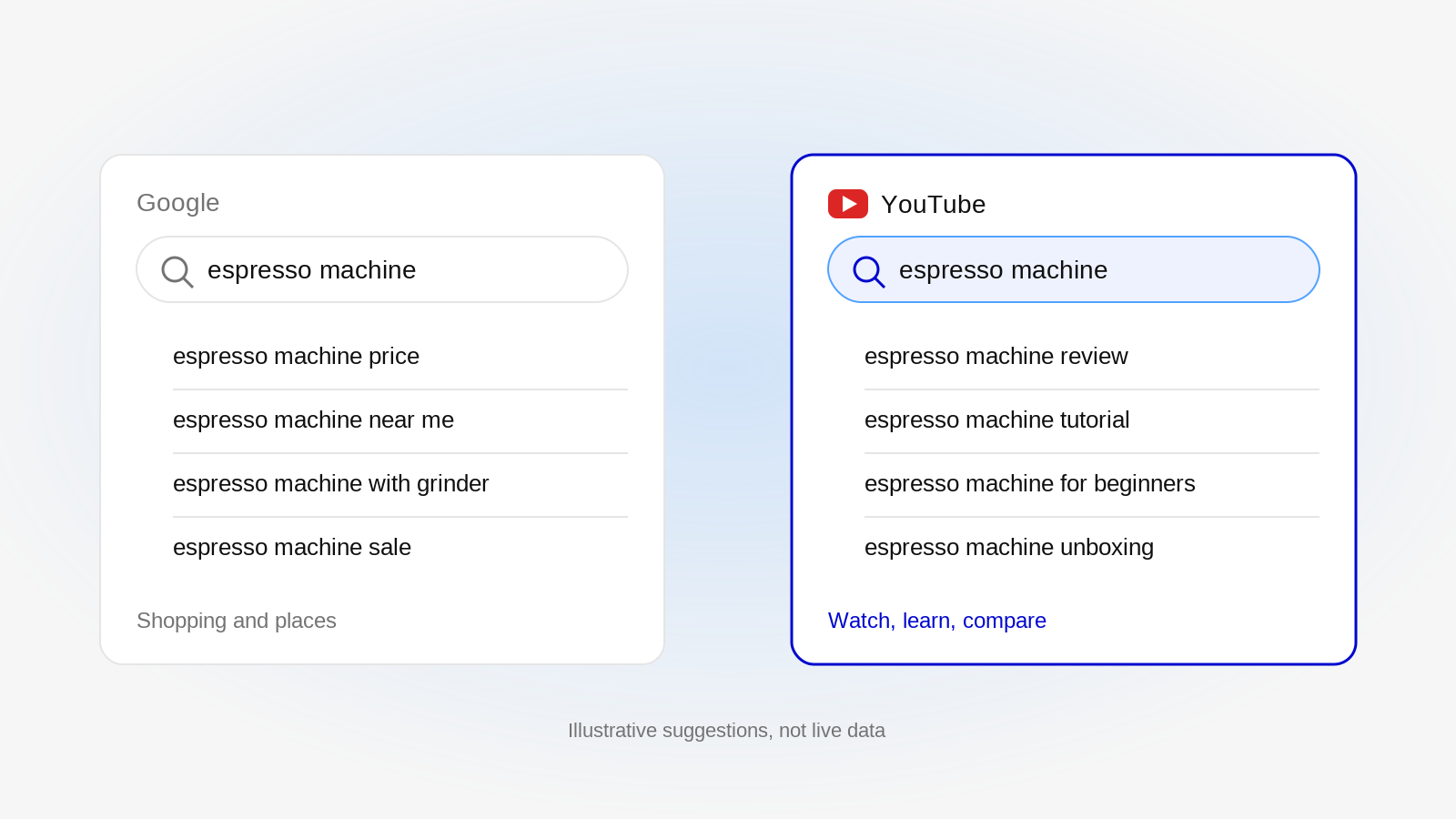
- YouTube and Google build their autocomplete from separate pools of searches, so the same seed gives a different list: YouTube leans towards tutorials, reviews, "for beginners" and "vs".
- Every classic keyword search in Answer Socrates includes a Social Media box with a YouTube button: the YouTube suggestions for your seed, in the same card grid, with no volume or CPC columns.
- Ask Socrates and the MCP tool get_youtube_keywords return the full YouTube pull, a to z included, for 1 search credit or 1 request; a real pull for "cold plunge" returned 863 keywords.
- Turn a YouTube phrase into a title by putting the searched words first and adding a promise, such as "How to Dial In Espresso (Beginner Guide)".
- The free YouTube Title Generator writes titles in styles like How-To and Comparison (5 per style free, 15 paid), but it does not read YouTube searches, so feed it a phrase from your pull.
YouTube search is its own search engine
When someone types into the YouTube search box, they are not asking Google. They are asking YouTube, and YouTube suggests endings from what people search on YouTube. That is why the same seed word gives you a different list on each site.
YouTube says its search predictions come from "popularity or similarity", from "what other people are searching for, including trending searches", and, when you are signed in, from your own past searches and watched videos [2]. Google says much the same about its own autocomplete: predictions "reflect real searches that have been done on Google" and take language, location and trending interest into account [3]. Same idea, two separate pools of searches.
The practical point: if you plan videos from a Google keyword list, you plan for people who want to read, buy or find a shop. If you plan from a YouTube list, you plan for people who want to watch.
The two lists lean different ways
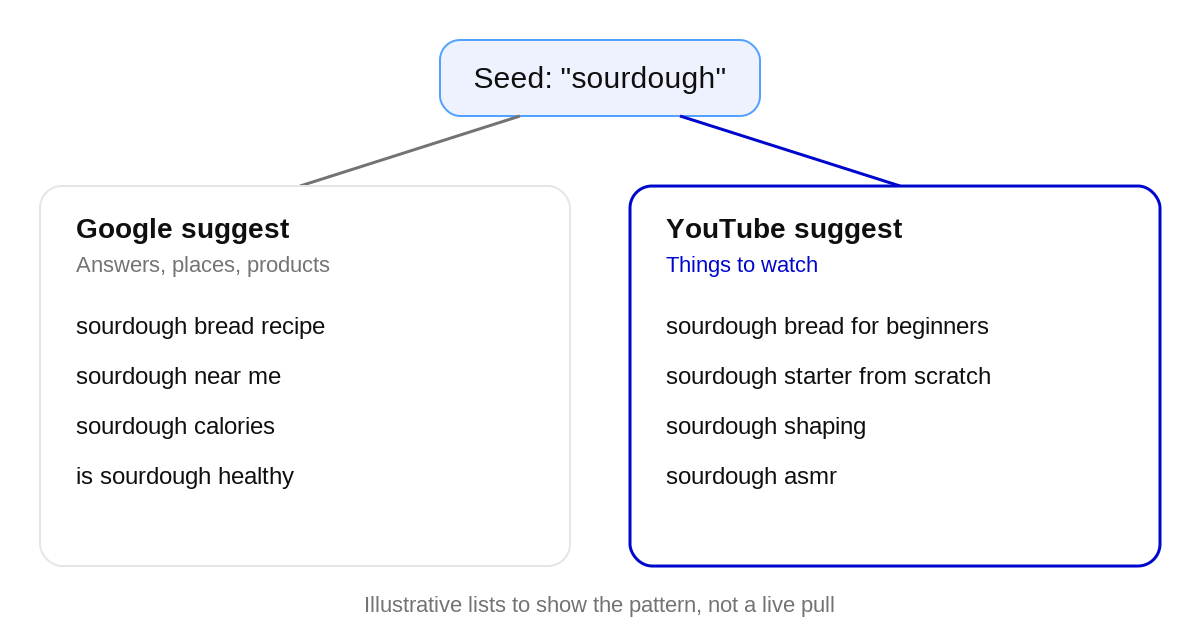
Google searches lean towards quick answers, products and places: "near me", "price", "calories". YouTube searches lean towards things you need to see: tutorials, reviews, "for beginners", unboxings, comparisons you want demonstrated. Our MCP page sums it up the same way: YouTube searches "lean towards tutorials, reviews and how-tos, so the list is different from Google's."
This changes what you do with the list:
| Question you are asking | Use Google keywords | Use YouTube keywords |
|---|---|---|
| What should my blog post cover? | Yes | Only as extra ideas |
| What video should I make next? | As a cross-check | Yes |
| What words go in my video title? | Rarely | Yes, use the searched phrase |
| How many people search this a month? | Yes, the classic search shows volume and CPC for Google | No volumes: Google Ads metrics do not cover YouTube searches |
| Is this a "show me" topic? | Look for "how to" and "vs" | If it is all over YouTube suggest, yes |
How Answer Socrates pulls YouTube keywords
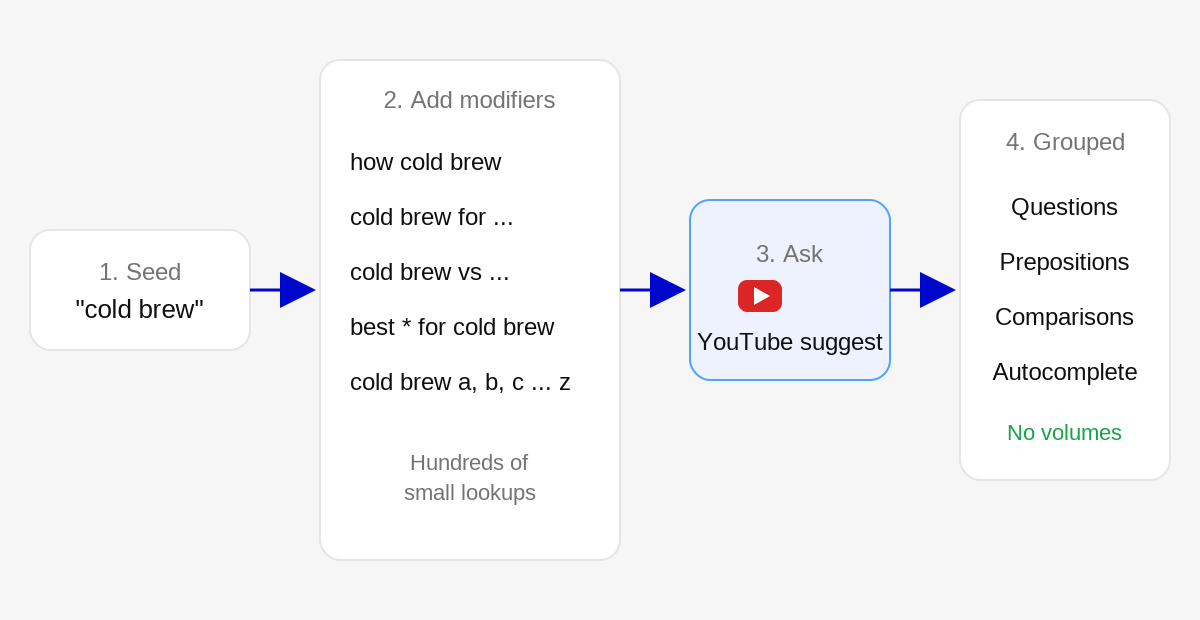
Typing letters into YouTube one at a time would take you hours. Answer Socrates does the same thing in bulk. It takes your seed, adds hundreds of small changes to it, asks YouTube's suggest service about each one and sorts the answers into groups.
Here is what happens, in order:
- Your seed and market. You give a topic, a country and a language. YouTube's suggestions change by country and language, so a UK pull and a US pull will differ.
- Modifiers. We add question words ("how", "what", "why"), prepositions ("for", "with", "near"), comparison words ("vs", "or", "and") and time words, plus the letters a to z after your seed.
- YouTube's suggest service. Each modified search goes to the YouTube version of the suggest service, the same list you see under YouTube's search box.
- Groups. The answers come back sorted into Questions, Prepositions, Comparisons, time-based groups and the a to z Autocomplete list.
One thing works differently from a Google pull. On Google we also run a "* seed" search that fills in words before your seed (for "golf" that finds "mini golf"). YouTube ignores that kind of request, so a YouTube pull has no front-fill group. Wildcards in the middle of a phrase, like "best * for cold brew", do work on YouTube and are included.
One more difference from typing into YouTube yourself: the requests come from our servers, not your signed-in YouTube account, so your own watch history does not tilt the list. YouTube says signed-in predictions can reflect "videos you've watched in the past" [2]. A clean pull shows you what the crowd searches, not what you already watch.
How to do it in Answer Socrates
The classic keyword search gives you the YouTube keywords with every search. You do not pick a separate mode.
Step 1. Enter a seed, a country and a language. Open a new search and type one or two words. Pick the country and language your viewers use.
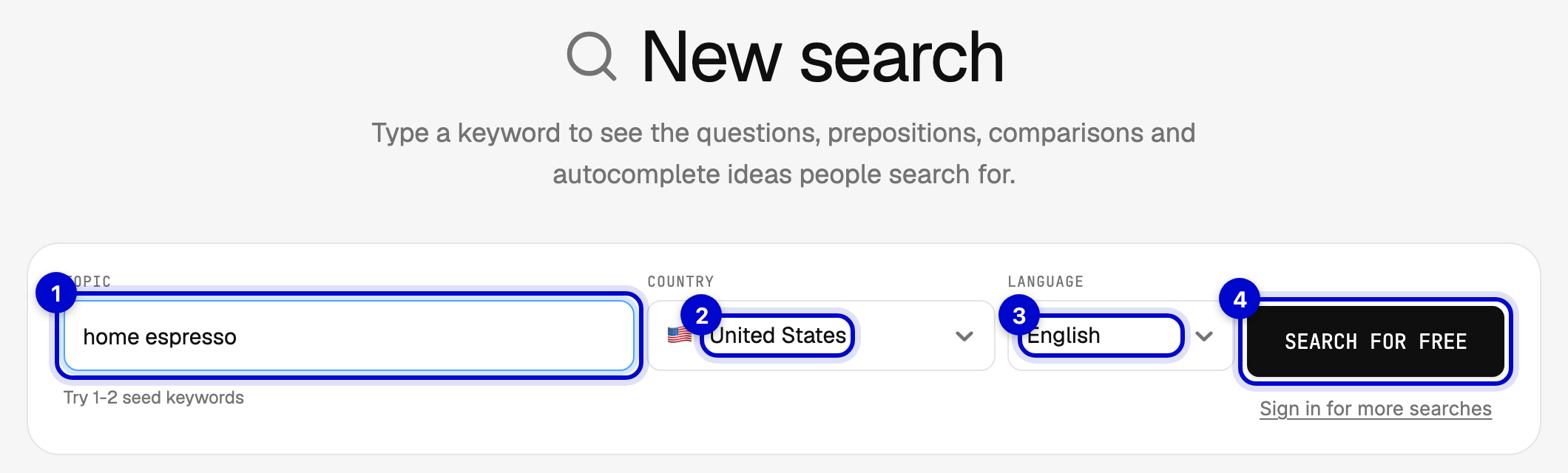
Keep the seed short. "home espresso" gives YouTube room to finish the phrase. "best home espresso machine under 300 for beginners" leaves almost nothing to suggest.
Step 2. Open the Social Media box. Click the Social tab at the top of the results, or scroll down to the Social Media section. It has platform buttons: All, TikTok and YouTube. Click YouTube to see only the YouTube suggestions, in the same card grid as the Google results.
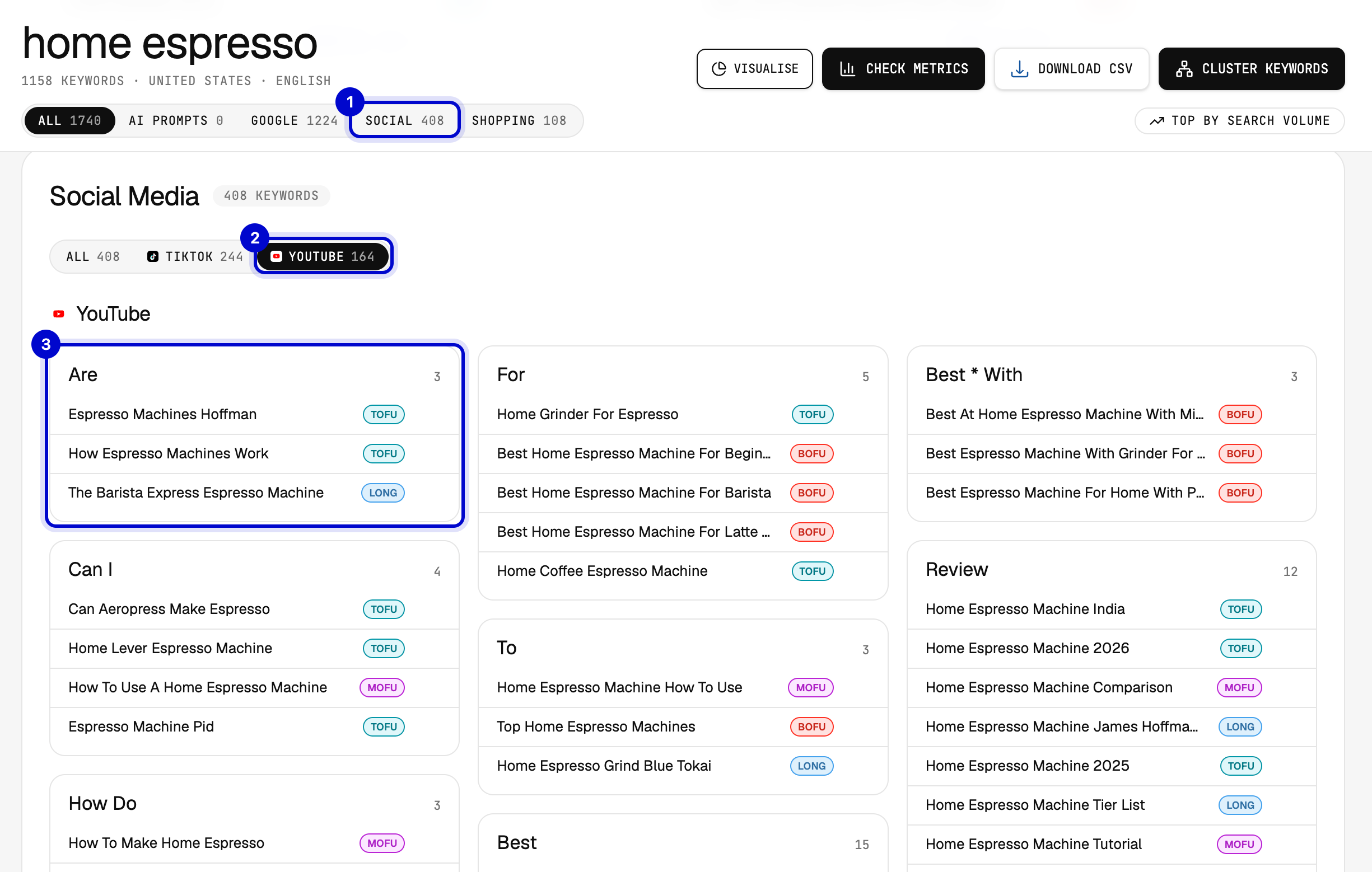
The YouTube box uses the same word groups as the main search, but leaves out the a to z letters group to keep the box short. For the full a to z list from YouTube, use the YouTube pull in Ask Socrates or the MCP tool (both covered below).
Step 3. Pick the "show me" phrases. Scan for lines that only make sense as a video: "for beginners", "tutorial", "review", "vs", "how to", "setup", "unboxing". Those are your video ideas. Lines that look like a shopping query ("price", "sale") are better left to your product pages.
Step 4. Copy or export. Copy the lines you want, or export the results, and keep them in one list per video idea.
Turn a YouTube search into a video title
A YouTube keyword is not a title yet. It is the words people type. YouTube says its search looks at "how well the title, tags, description, and video content match your search query" [1], so the searched words belong in the title. Then you add a reason to click.
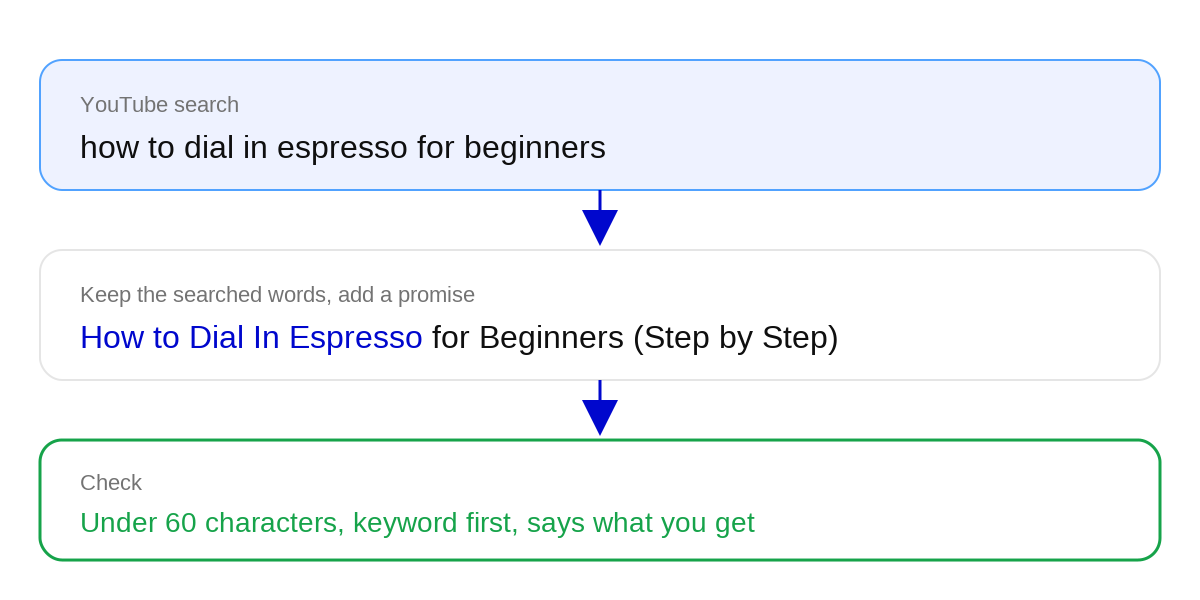
A made-up example: a small coffee roaster wants a video series. Their YouTube pull for "home espresso" turns up phrases like these, and each becomes a title:
| YouTube search phrase | Video title |
|---|---|
| how to dial in espresso | How to Dial In Espresso (Beginner Guide) |
| home espresso setup on a budget | My Home Espresso Setup on a Budget |
| espresso vs moka pot | Espresso vs Moka Pot: Which Should You Buy? |
| espresso grind size for beginners | Espresso Grind Size for Beginners, Explained |
Three rules of thumb, not laws:
- Searched words first. If the phrase is "how to dial in espresso", start the title with it.
- Keep it short. Our title generator aims for titles under 60 characters "when possible", so they are less likely to be cut off. That is a habit, not a YouTube limit.
- Add the promise. "(Beginner Guide)", "Explained", "Which Should You Buy?" tells the viewer what they get.
Search is only one way people find videos. YouTube ranks search results on relevance, engagement and quality [1], and says ranking also uses watch time signals like average view duration [4]. A good title gets the click. The video has to keep the viewer.
Get title ideas with the YouTube Title Generator
If you want a pile of title angles fast, the free YouTube Title Generator writes them for you.
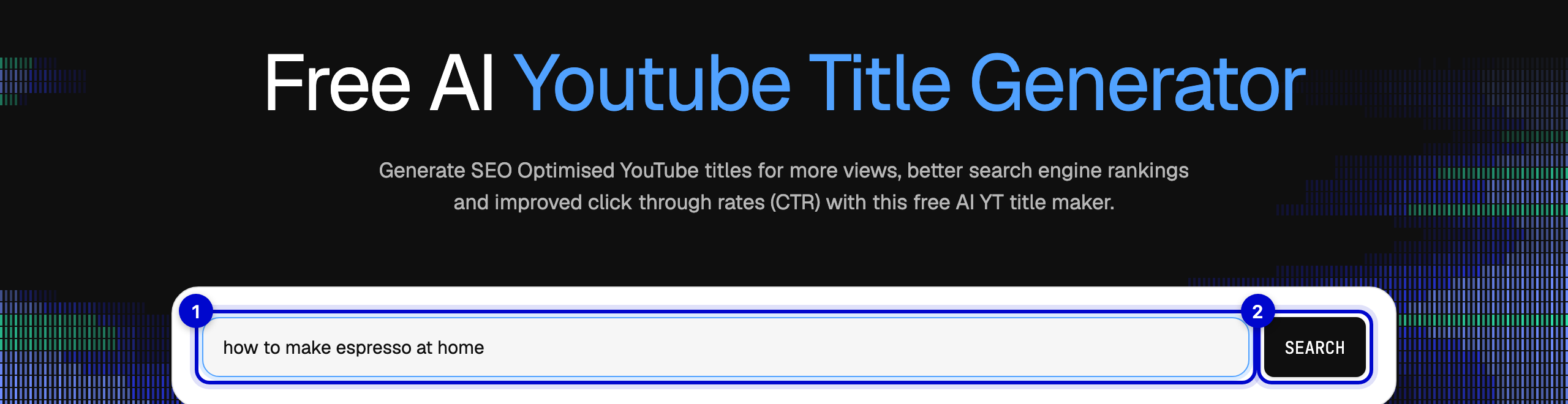
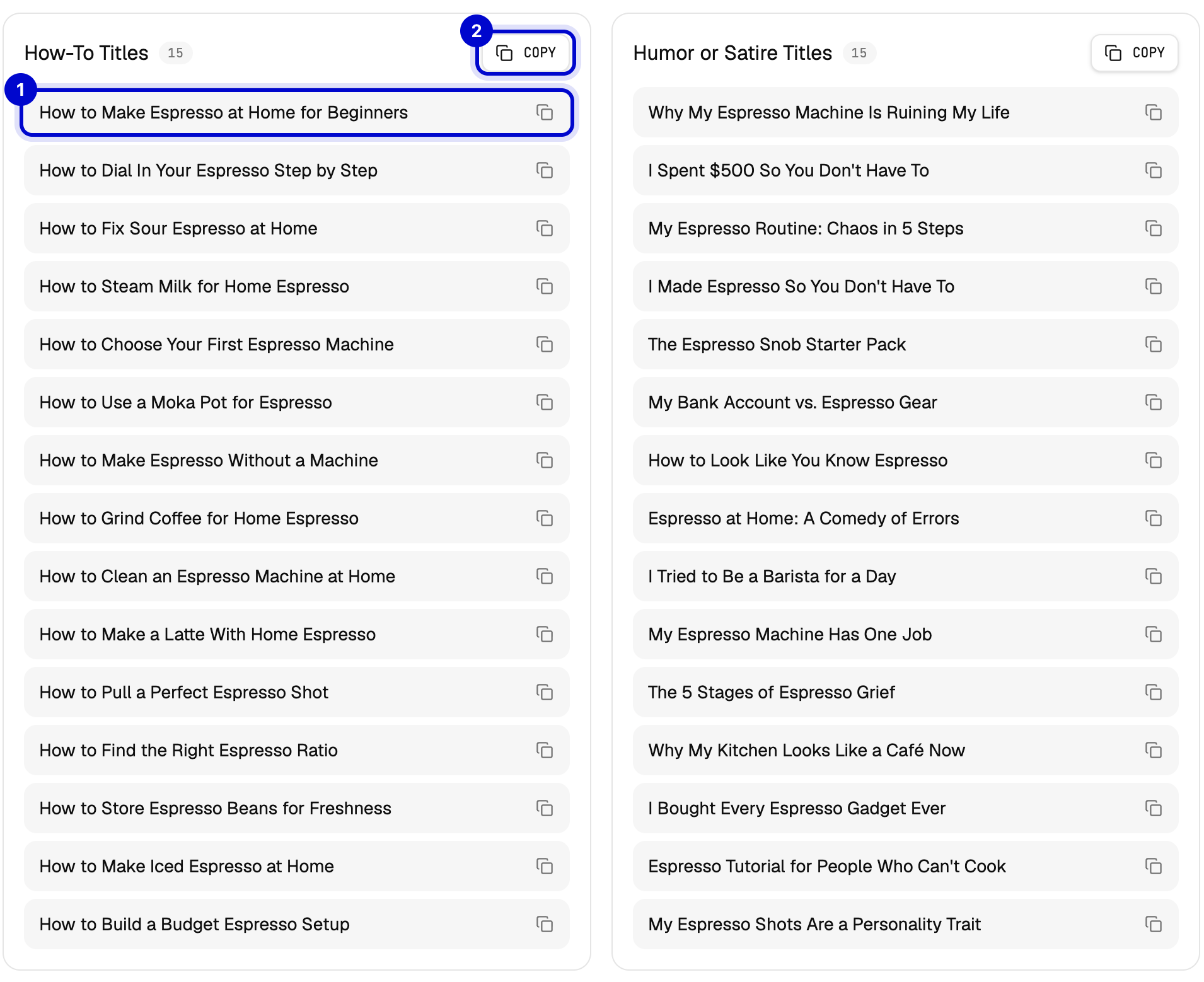
It returns titles grouped by style: Popular Titles (your topic dropped into proven formats like "I tried every X so you don't have to"), SEO-Optimized, Question-Based, List-Based, How-To, Comparison and more. Free results give 5 ideas per style and 5 popular templates. Paid plans give 15 per style and all 35 templates.
The same thing in Ask Socrates
In Ask Socrates you ask for the YouTube version in plain words. The chat has its own YouTube tool, and unlike the box on the classic results page, it returns the full pull, a to z included.
Type something like:
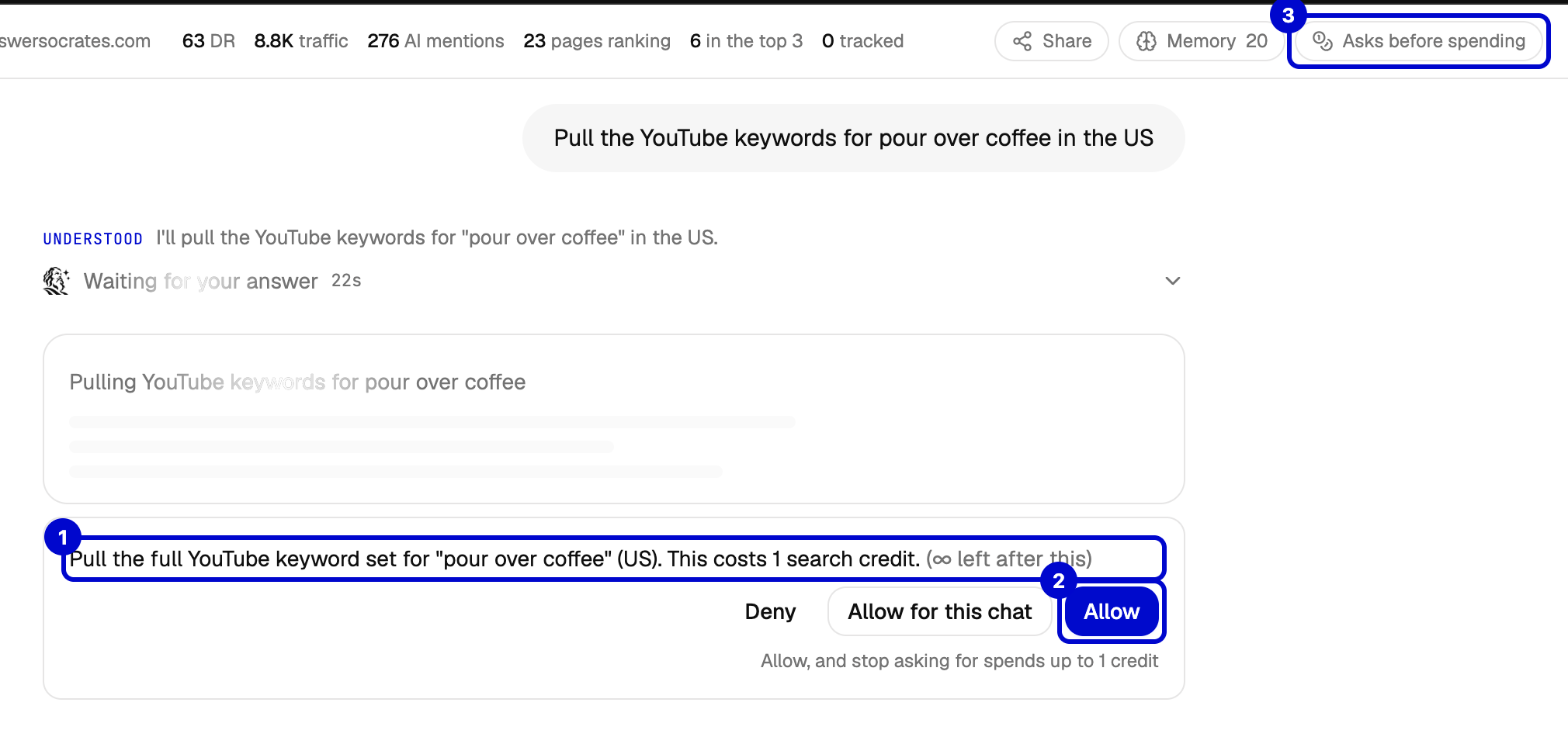
If your spending setting at the top of the chat is Asks before spending, the chat shows a card asking you to approve the pull first. It costs 1 search credit. If you pulled the YouTube keywords for the same term, country and language in the last 7 days, it reopens from your history for free.
After you approve, a results card shows the total and "YouTube keywords for" your seed, with the line "Live YouTube data" so you know the source. You can switch between groups, copy a group, or download it as CSV. The pull is saved to your search history marked "YouTube".
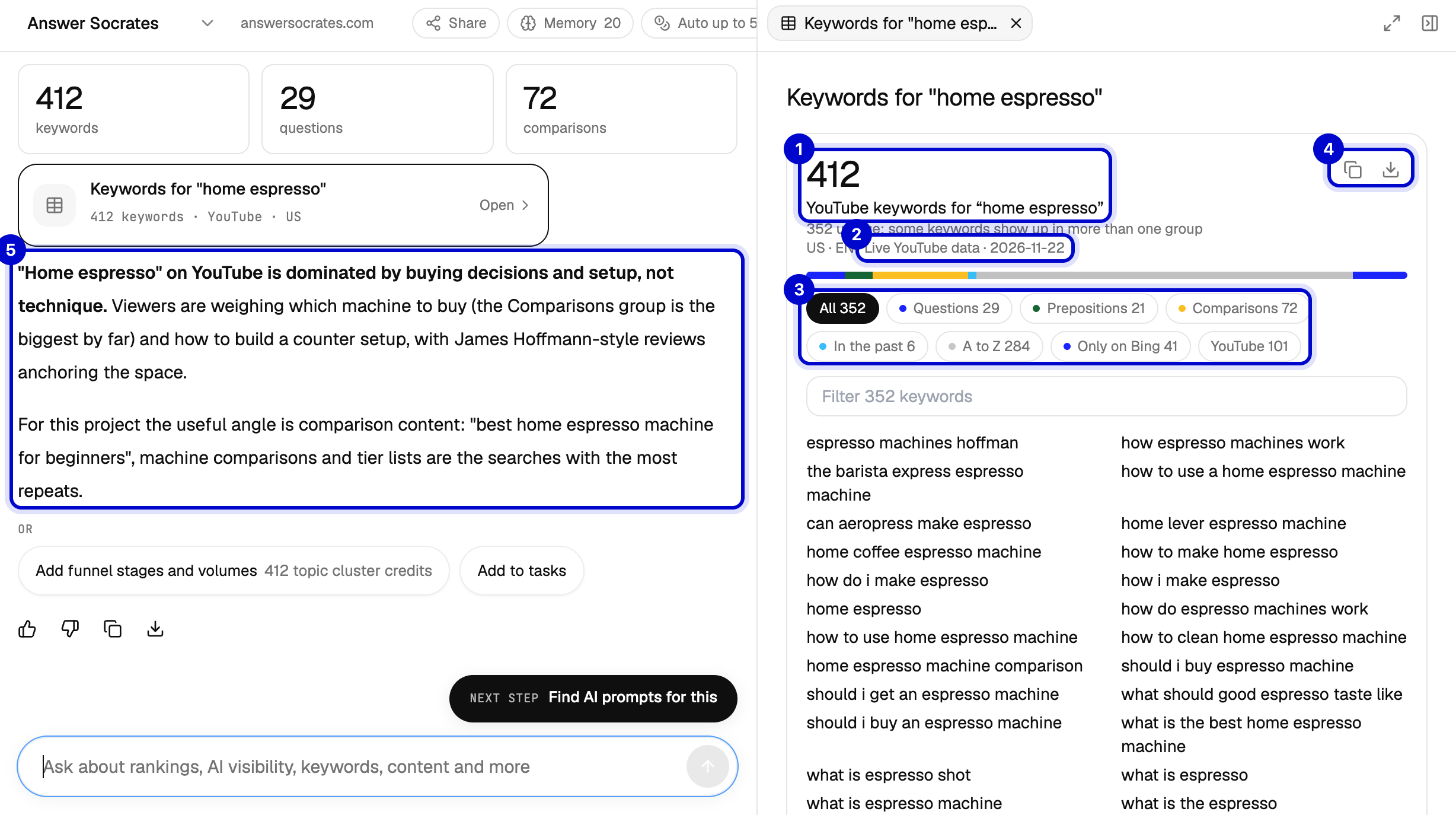
Then keep going in the same chat: "Which of these are comparisons I could film side by side?" or "Group these into a five-video series."
Pull YouTube keywords from Claude or ChatGPT with MCP
If you already work inside an AI assistant, the Answer Socrates MCP server gives it a tool called get_youtube_keywords. MCP (Model Context Protocol) is a standard way for an assistant like Claude to call outside tools. You ask in plain words and the assistant calls the tool for you.
Here is a real pull, the one shown on our MCP page. The prompt was "Use Answer Socrates to pull the YouTube keywords for cold plunge".
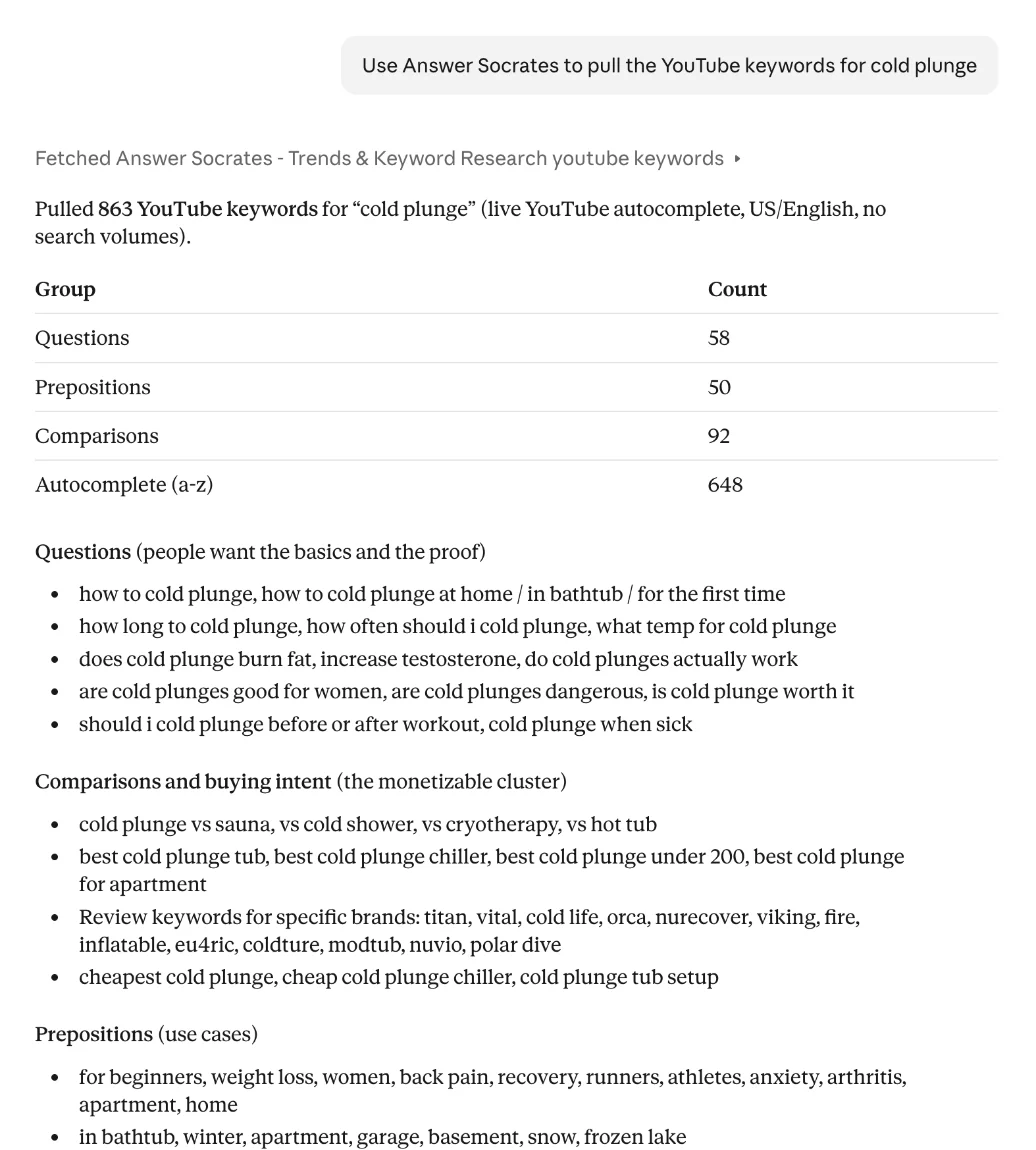
Notice what Claude did with it. "how to cold plunge at home", "how long to cold plunge" and "cold plunge vs sauna" are each a video. The Prepositions group ("for beginners", "for athletes", "in bathtub") gives you a series.
What to know about the tool:
- Cost: 1 request from your monthly quota per call.
- Same groups as Google: Questions, Prepositions, Comparisons and Autocomplete, so you can put a YouTube pull next to a Google one.
- No search volumes: the tool says so in its own description.
- Country and language: it defaults to the US and English. Name a country and the assistant passes it on.
- The API: the same pull is
GET /api/v1/youtube-keywordswithq,glandhl, also 1 request.
A good prompt for an assistant: "Pull the YouTube keywords for cold plunge, then pick the ten how-to questions that would make the best videos and write a title for each."
Where to go next
| If you want to... | Read |
|---|---|
| Understand the question groups in more depth | How to do keyword research: find what people actually ask |
| Do the same for short-form video | TikTok keyword research for short-form video |
| Turn a long YouTube list into a video series | Keyword clustering: turning a list into topics |
| Check if a video topic is rising or seasonal | Google Trends: seasonal and rising topics |
| Run all of this from one conversation | Keyword research in one chat with Ask Socrates |
| Set up the MCP tool in Claude | Connecting Answer Socrates to Claude |
Sources
- How YouTube search works, YouTube Help, n.d.
- Find videos faster (search predictions), YouTube Help, n.d.
- How Google autocomplete predictions work, Google Search Help, n.d.
- Search & discovery tips, YouTube Help, n.d.
