Link building with Ask Socrates
Link building with Ask Socrates means asking the chat for links and letting it run the next tactic on your project's plan, then pick the three to five prospects worth an email. It saves to the same lists as the Link Building page, where you send and track the outreach.
Key takeaways
- The chat works down a fixed plan, Reclaim and Unlinked mentions first, then best-of lists and link gap, and runs at most two tactics per turn.
- Reading the plan, finding published emails (25 prospects at a time) and rating up to 20 sites are free; only runs and finding competitors spend link scans.
- Competitor tactics cost one link scan per competitor, up to five for best-of lists, so a broad ask on an automatic spending setting can spend more than you expect.
- Name a tactic to run it directly: "who links to my competitors but not us?" runs Link gap, "best X lists" runs best-of lists.
- The chat does not write or send emails or change a row's status; drafts, Open in Gmail and Contacted or Linked all live on the Link Building page.
What the chat adds to link building
Ask Socrates is the chat in Answer Socrates. For link building, it does three jobs that are slow to do by hand on the Link Building page: it decides which tactic to run next, it runs it, and it reads the result and tells you which three to five prospects are worth your time. A prospect is a page with a reason to link to you and a person you can ask.
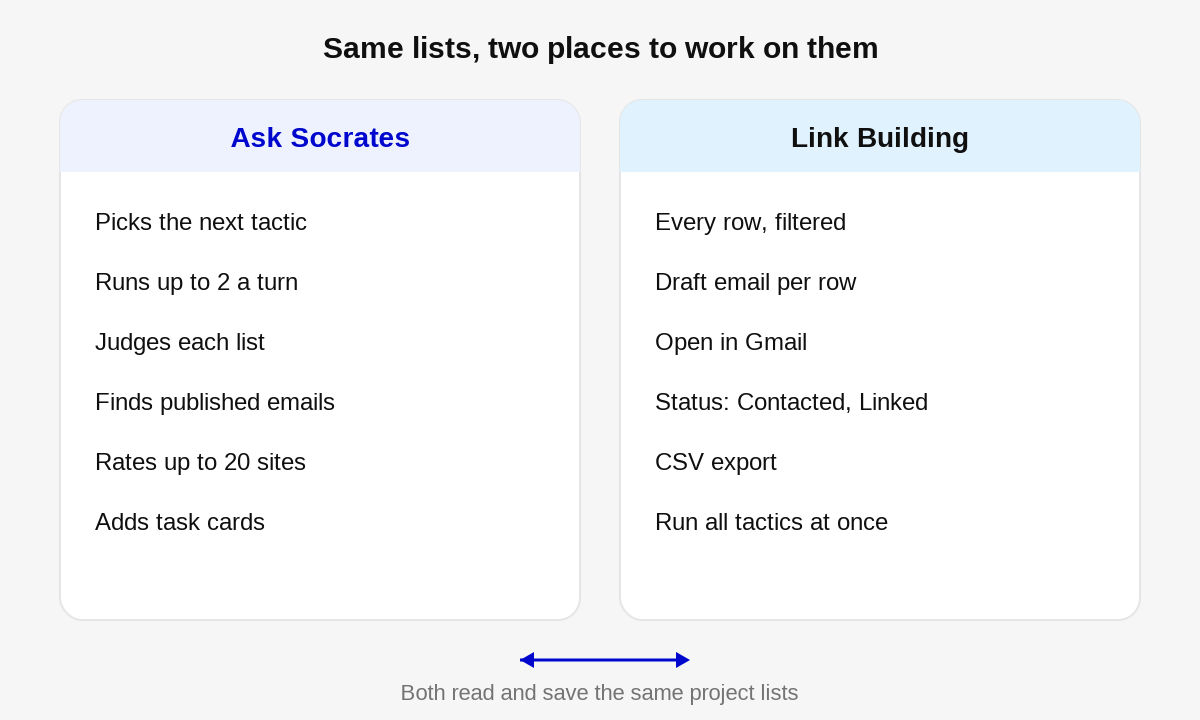
It works on the same lists as the Link Building section. Anything the chat runs is saved to the chat's project, and anything you ran on the Link Building page is already there when you open the chat. So the two are not rivals. You use the chat to find and sort, and Link Building to send and track.
If you have not met the tactics yet, read Finding link opportunities first. This lesson assumes you know what Reclaim, Mentions and Link gap mean.
The order the chat works in
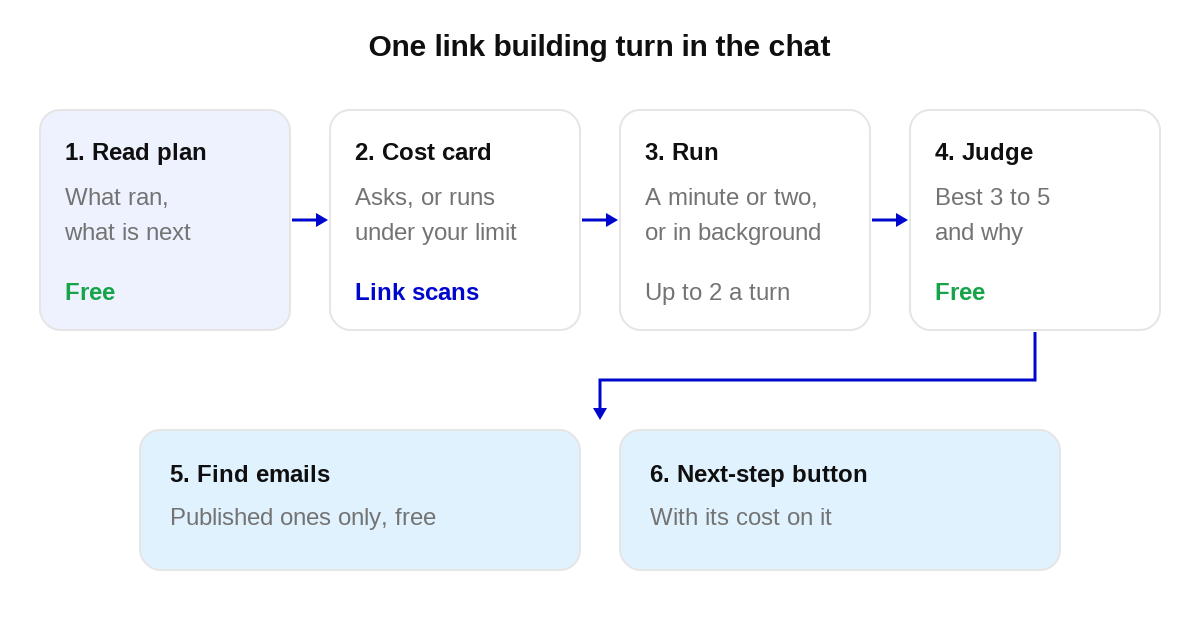
Link building is a sequence, not one run. When you ask for links, the chat first reads the project's link plan, which is free. The plan lists every tactic in a fixed order, quickest and warmest first, and shows what has already run, what it found and what the next step costs.
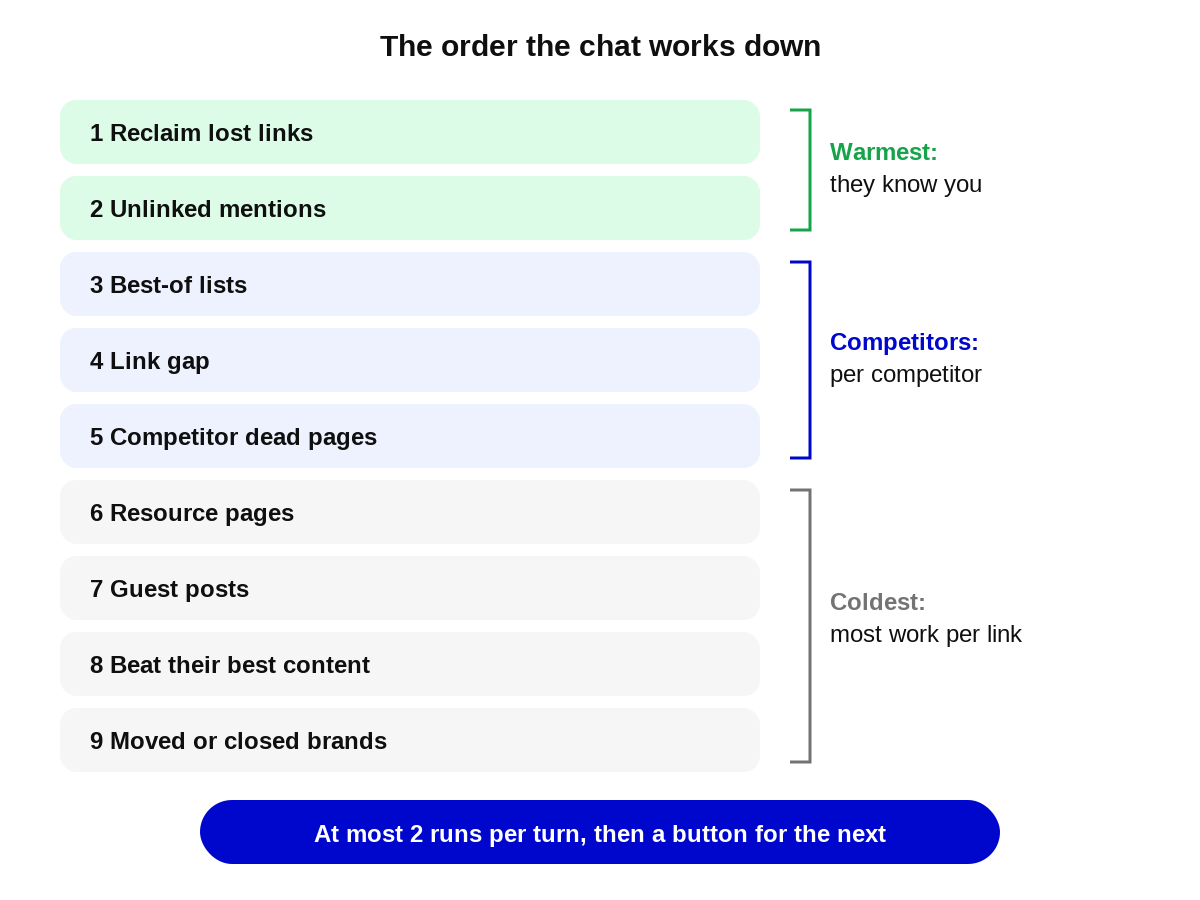
The order is written into the app, not left to the chat's judgement, and each step has a reason:
- Reclaim first: links you already earned. Dead pages to redirect need no outreach at all.
- Unlinked mentions: the writer already chose to name you, so it is the warmest ask there is. See Turning unlinked brand mentions into links.
- Best-of lists: lists naming your competitors but not you. A short ask with buying traffic behind it.
- Link gap: sites linking to at least two competitors. Colder, and they need a reason to add you.
- Competitor dead pages, then resource pages, guest posts, beating their best content, and moved or closed brands, which only works once the other runs have found pages to read.
The chat runs at most two tactics in one turn, because each run takes a minute or two. Then it stops, reports, and offers the next step as a button.
What it costs, and when it asks
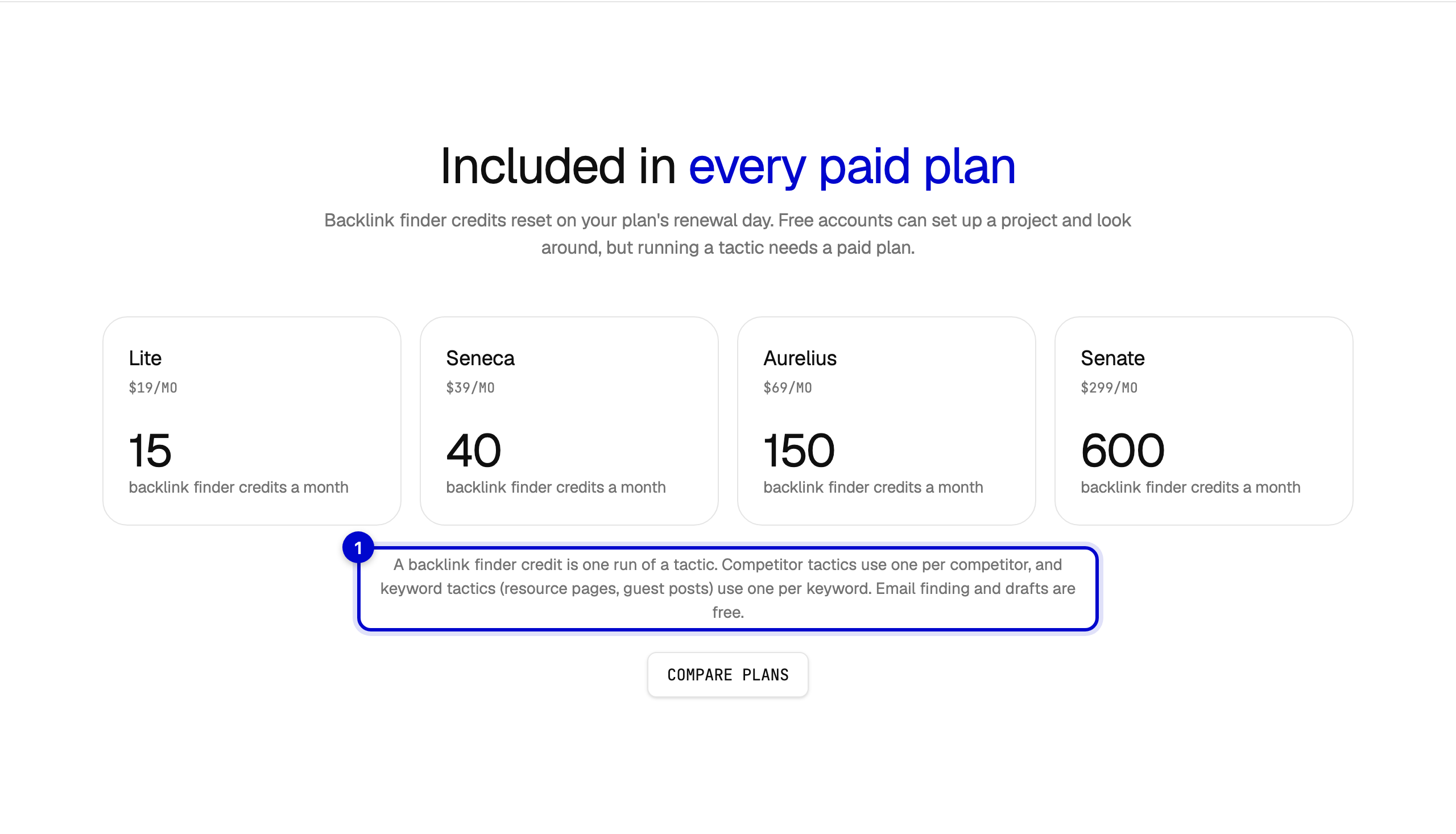
Most of what the chat does for link building is free. Only running a tactic, or finding competitors, spends from your plan's Link Building allowance. The chat calls these "link scans"; the plans and Link Building pages call them backlink finder credits. They are the same thing, and they are separate from search credits.
| What you ask for | What it runs | Cost |
|---|---|---|
| "What links can we get?" (reading the plan and saved lists) | Project data | Free |
| Run a tactic | The same run as the Link Building tab | 1 link scan, or 1 per competitor or keyword |
| Find emails for a list | Contact finder, up to 25 prospects at a time | Free |
| "How strong are these sites?" | Domain rating, up to 20 sites | Free |
| Add pages AI engines cite to your prospects | Saves up to 10 pages, after a confirm card | Free |
| Find competitors for the project | Sites ranking for your keywords | 1 link scan |
Competitor tactics charge one scan per competitor searched: up to five for best-of lists and dead pages, and up to three for link gap and skyscraper. Resource pages and guest posts charge one per keyword, up to five.
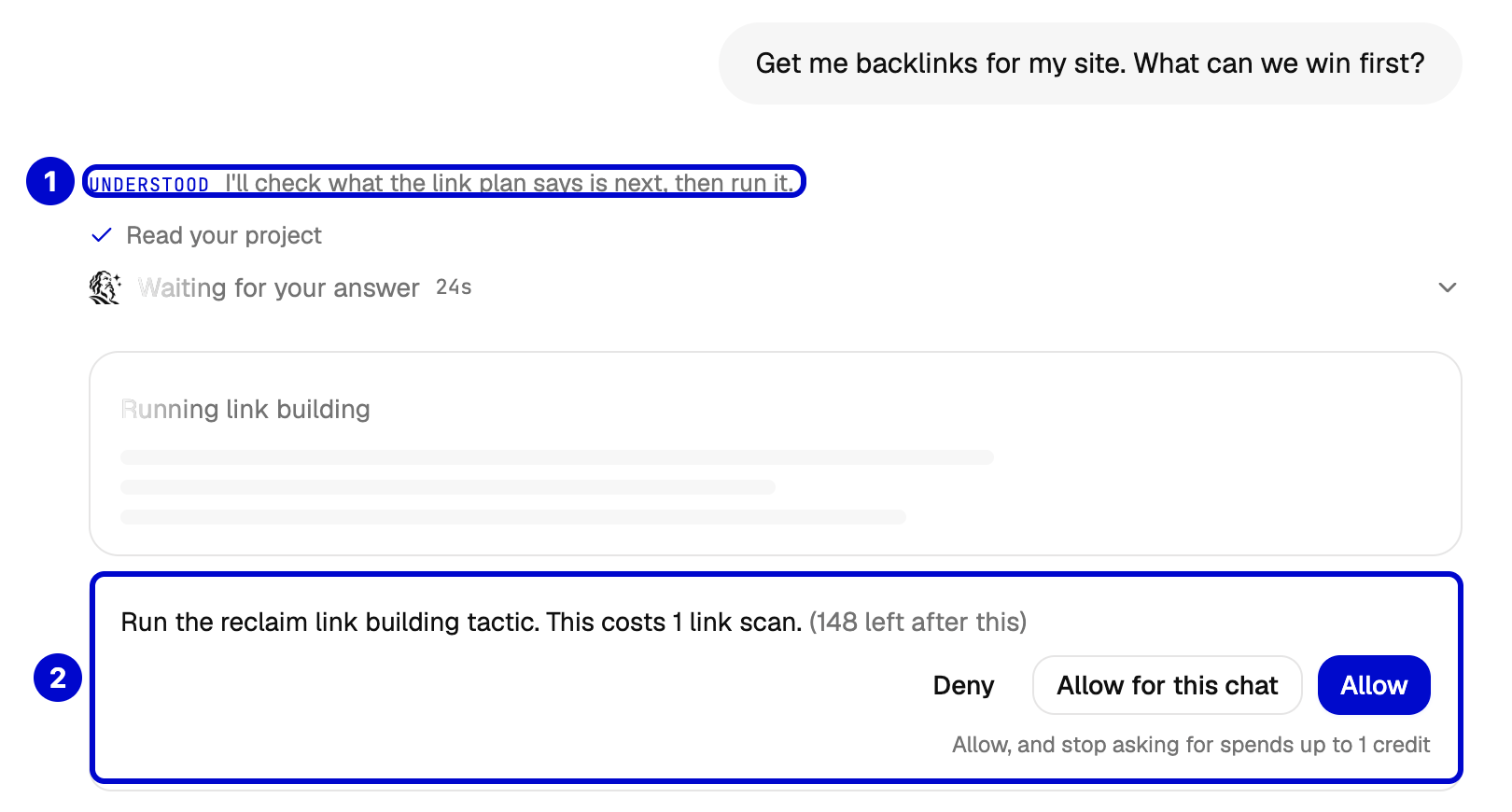
Whether the chat asks before it spends depends on your spending setting in the chat header. On "Asks before spending" every run shows a card with the price and waits for you. If you set an automatic limit (up to 1, 5 or 25 credits per action), smaller runs go ahead on their own. Anything bigger always asks, and nothing runs when there are not enough credits left.
How to run link building from a chat
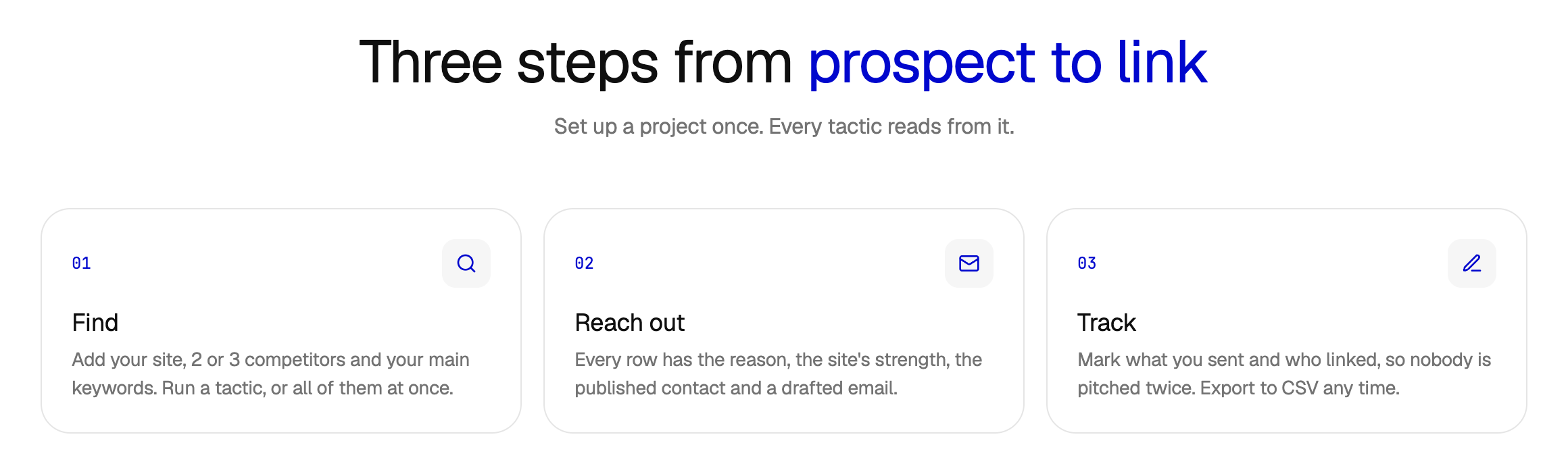
Step 1: Pick the project and check its setup. Open Ask Socrates and choose the project in the chat. Most tactics need saved competitors and main keywords. If they are missing, the chat offers to set them up: it reads your site and shows an editable card with up to five competitors, up to three other brand names and 3 to 15 main keywords. Nothing is saved until you confirm the card. You can also type /set-up-project.
Step 2: Ask broadly. Type:
Get me backlinks for my site. What can we win first?
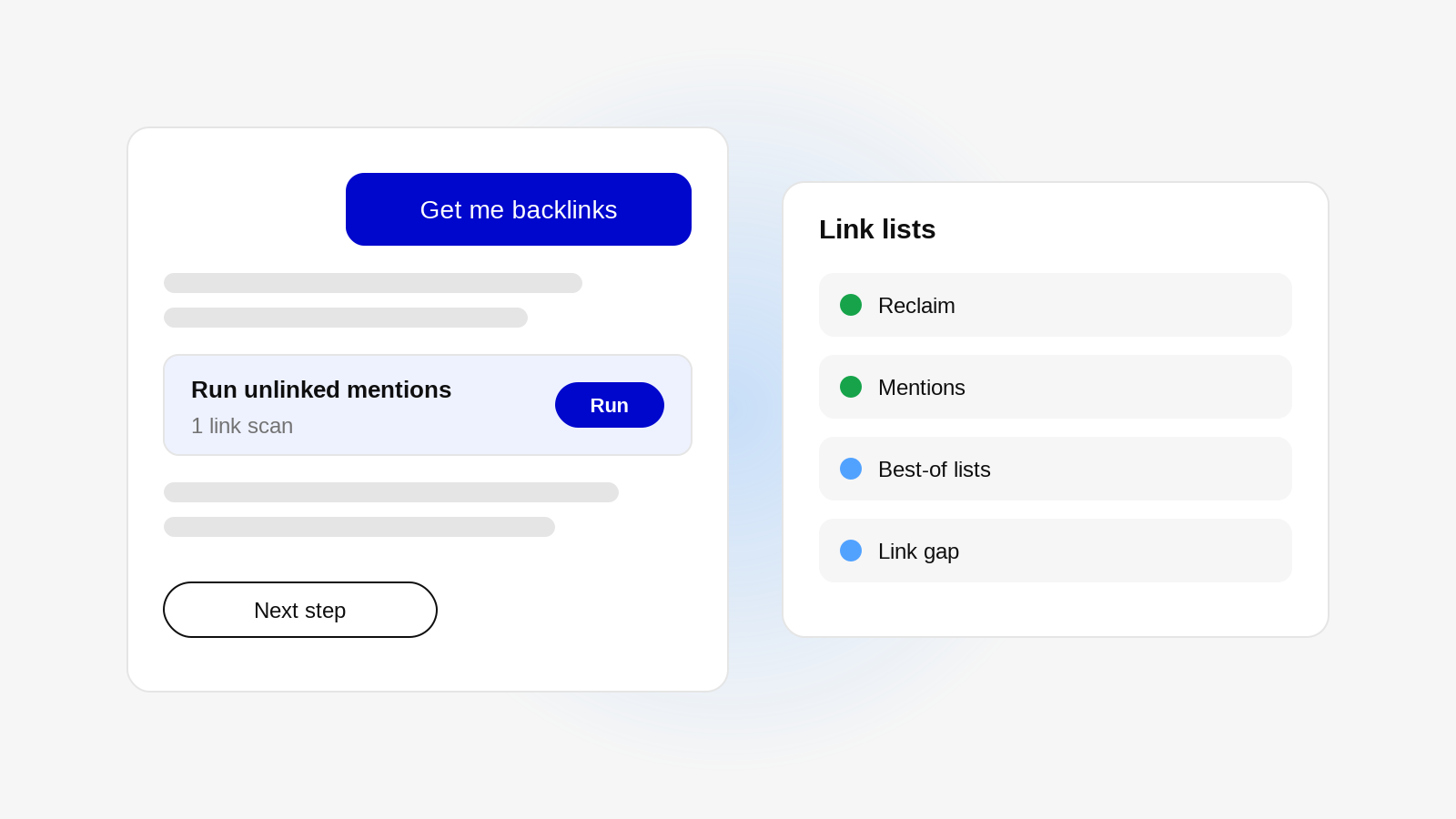
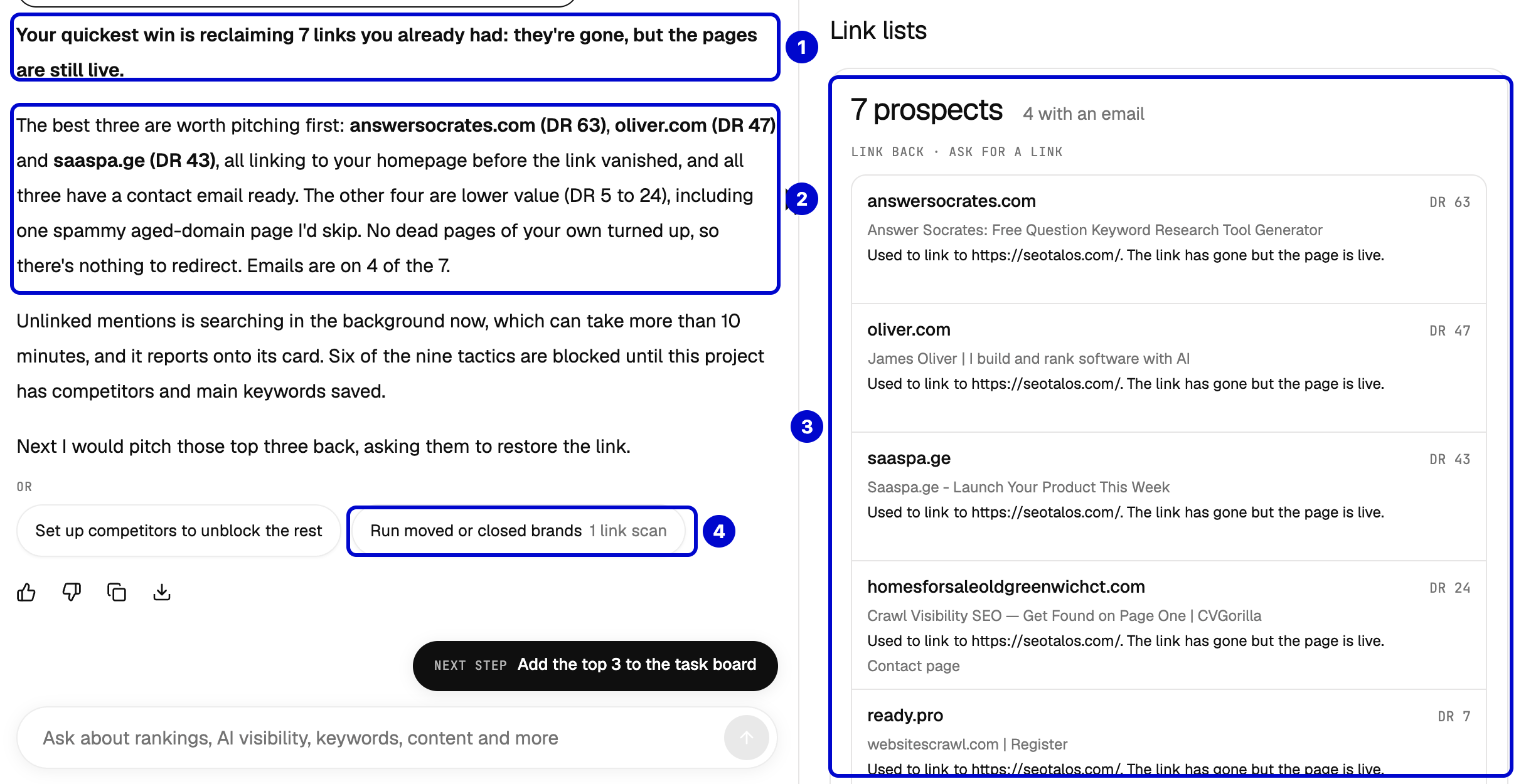
The chat says in a line or two what has already run and what it will do next, then runs the next one or two tactics on the plan. When they finish, it names the best prospects and why, looks for published contact emails on the lists worth pitching, and ends with a button for the next step with its cost on it. Typing /link-opportunities runs the same steps.
Step 3: Ask for a named tactic when you know what you want. A specific ask skips the queue and runs that tactic, then tells you what the plan says is next:
| Type something like | Runs |
|---|---|
| "Find our lost links" | Reclaim |
| "Find brand mentions without a link" | Unlinked mentions |
| "Which best X lists are our competitors on?" | Best-of lists |
| "Who links to my competitors but not us?" | Link gap |
| "Find our competitors' dead pages" | Competitor dead pages |
| "Find resource pages for our keywords" | Resource pages |
| "Which sites take guest posts?" | Guest posts |
| "What content should we beat?" | Skyscraper |
Step 4: Read the judgement, not just the count. The chat is told to think about every list for your site rather than count it (more on that below). The full list sits in the Link lists panel beside the chat, best sites first, with why each is listed and who to contact.
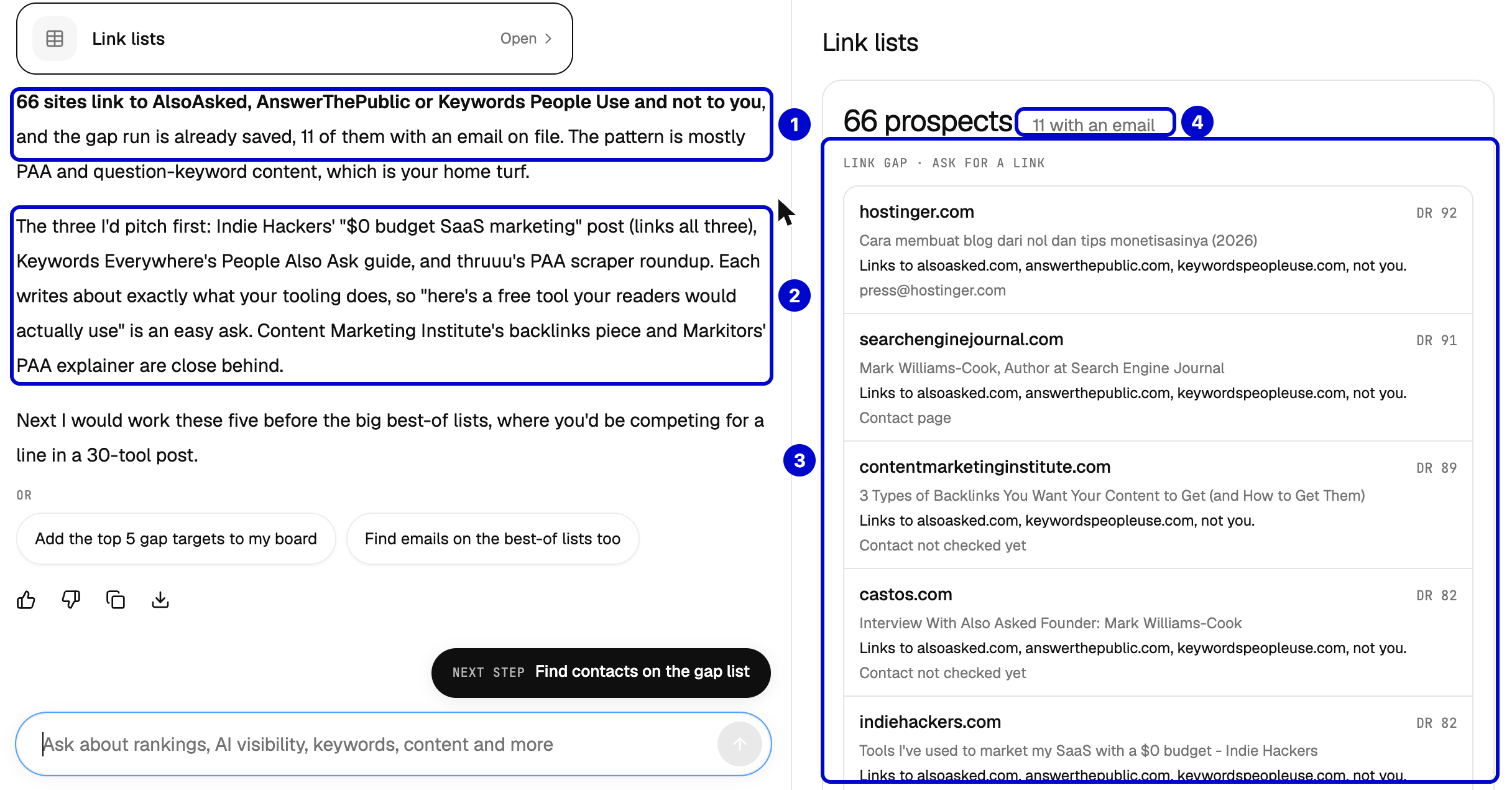
Step 5: Put the best ones on the task board. When a list has prospects worth pitching, the chat offers to add the top three as outreach cards on the project's task board, with the evidence it found.
Step 6: Send from Link Building. Open Link Building, find the row, and use its draft email, Open in Gmail and the status buttons. Mark it Contacted when you send and Linked when the link goes live. For the email itself, see Writing outreach emails that get replies.
Reading what comes back
The chat's answer is short: the best three to five prospects and why. It is told to judge each list for your site, and the rules differ by tactic:
- Reclaim: redirects are a fix list with no outreach, so it gives old URL to new URL pairs.
- Mentions: it drops complaints, negative reviews, forums and scraped copies, and says when a row could not be confirmed because the site blocked the check.
- Best-of lists: lists that already name you without a link come first.
- Link gap: it favours sites linking to several competitors, and says what reason they would have to link to you.
Two things in the answer are easy to misread.
A run that finds little is a finding, not a dead end. If a run checked few or no pages, the chat says the search could not look, rather than "nobody mentions you." It only claims nothing exists when it checked real pages and found none.
A run can also go to the background. Some searches are slow; the run then shows a live card, finishes on its own (sometimes after more than ten minutes) and appears in the bell, even if you leave. The chat carries on with the next step meanwhile. Do not ask it to run the same tactic again: it is already running.
Sizing up prospects with the free checks
Two free tools help you decide who is worth an email.
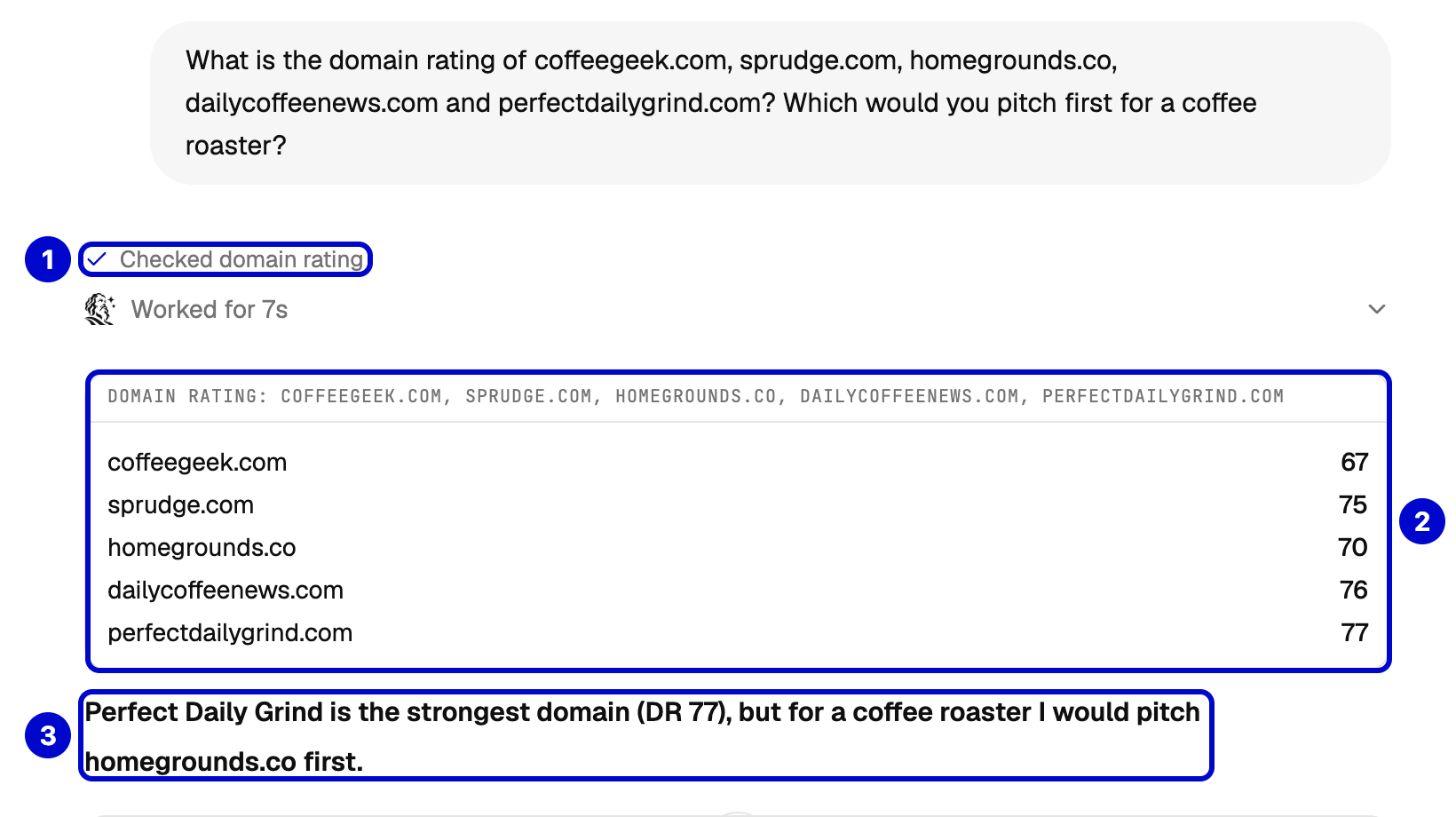
Domain rating for up to 20 sites at once. Ask "What's the domain rating of these sites?" and paste up to 20 domains. The score is Ahrefs' Domain Rating, a 0 to 100 measure of a site's backlink strength. It is a quick filter, not a final answer: Ahrefs says DR is "purely link-based", does not take search traffic into account, and "doesn't account for backlink SPAM" [1]. A high score on a site with no readers is still a site with no readers.
Pages AI engines cite, turned into prospects. If you have checked prompts in AI answers, the chat knows which pages ChatGPT and others keep citing. Best-of lists, directories and articles on that list are pages worth being on. Say "Add these cited pages to my link prospects" and, after a confirm card, they are saved to Link Building (up to 10 at a time, never your own pages or competitors' own pages). How AI citations work is covered in Getting your pages cited in AI answers.
A made-up example: a project-management app
A made-up example: Tasklane, a small project-management app, has a project with its domain, three competitors and eight main keywords saved. Nothing has been run.
Monday, the founder types "Get me backlinks. What can we win first?" with the spending setting on "Asks before spending." The chat reads the plan, says Reclaim and Mentions come first, and shows a card for each: one link scan apiece. Reclaim finds two dead feature pages that other sites still link to, and the chat gives the two redirects to set up. Mentions finds a review blog that names Tasklane with no link. The chat looks up published emails for free and offers an outreach card for it.
Tuesday: "Which best X lists are our competitors on?" The card shows three link scans (one per competitor). The run finds a "best project management apps for small teams" article naming two rivals. The chat puts it first and explains why: it names two competitors and is updated each year.
Then the founder asks for the domain rating of the five best sites, free, and drops one that scores well but turns out to be a page of paid posts. Five link scans in total, two outreach cards, two redirects. The emails go out from Link Building that afternoon.
What the chat will not do
- It does not write or send outreach emails. Drafts live on each row in Link Building, and you send from your own inbox. The chat's own instructions say outreach happens there.
- It does not change a prospect's status. Contacted, Linked and the rest are set on the Link Building page.
- It does not check a prospect's traffic. Domain rating measures links, not readers [1]. Look at whether a site ranks for real searches before you pitch it.
- It does not get you links. It finds and sorts pages. Whether a site links to you depends on your page and your email.
- It will not buy links. Nothing in Link Building pays for placements, and the guest post tactic flags sites that mention paid posts. Google's spam policies treat buying or selling links for ranking purposes as link spam [2].
If your plan has no Link Building, or no scans left, a run fails with that reason and the chat says so plainly.
Where to go next
| If you want to... | Read |
|---|---|
| Learn what each tactic finds | Finding link opportunities |
| Win the warmest links first | Turning unlinked brand mentions into links |
| Replace dead pages people still link to | Broken link building |
| Write the email the chat will not write | Writing outreach emails that get replies |
| Do keyword research in the same chat | Keyword research in one chat with Ask Socrates |
| Get onto the pages AI answers cite | Getting your pages cited in AI answers |
Sources
- Domain Rating (DR): What It Is and How to Use It, Ahrefs, 2025
- Spam policies for Google web search (Link spam), Google Search Central, 2025
