One page or many? Reading a keyword cluster
Two keywords belong on one page when they share the same intent and Google already shows mostly the same results for both; otherwise they need their own pages. Making that call for every pair in a cluster is how you avoid both thin duplicate pages and overloaded ones.
Key takeaways
- Run two checks in order: same intent (would one kind of page satisfy both searchers?), then same results (do the two Google top 10s share 3 or more URLs?).
- 3 or more shared URLs out of 10 is a working rule for one page, not a Google setting; 0 to 2 shared means Google treats the searches as different.
- Keyword cannibalisation is two of your own pages chasing one search; fix it by merging and 301 redirecting, a canonical tag, or retargeting the weaker page.
- Answer Socrates groups by meaning; the Jev AI Site structure tab keeps topics of 8 keywords or fewer as one page and leaves any placement under 45% confidence on the hub.
- Neither engine checks Google's results today (a results split is built but switched off), so run the results check yourself on close pairs and on every spoke page.
A cluster is a proposal, not a verdict
A keyword cluster tells you which searches look like they belong together. It does not tell you how many pages to write. That is a separate call, and it is the one this lesson is about.
Keyword clustering: turning a list into topics got you from a flat list to groups. Here you take one group and ask of each pair of keywords inside it: does one page answer both, or does each need its own?
You do not have to guess. Two checks settle it, and the second uses Google's own results as the evidence.
The test: same intent, same results
Put any two keywords from a cluster through these two checks, in this order.
1. Same intent? Read both keywords and picture the person typing each one. Do they want the same thing, and would the same kind of page satisfy them? "boiler not working" and "boiler repair" are the same person with the same problem. "boiler repair" and "boiler repair course" are a homeowner and a trainee plumber. Different people, different pages, even though the words nearly match.
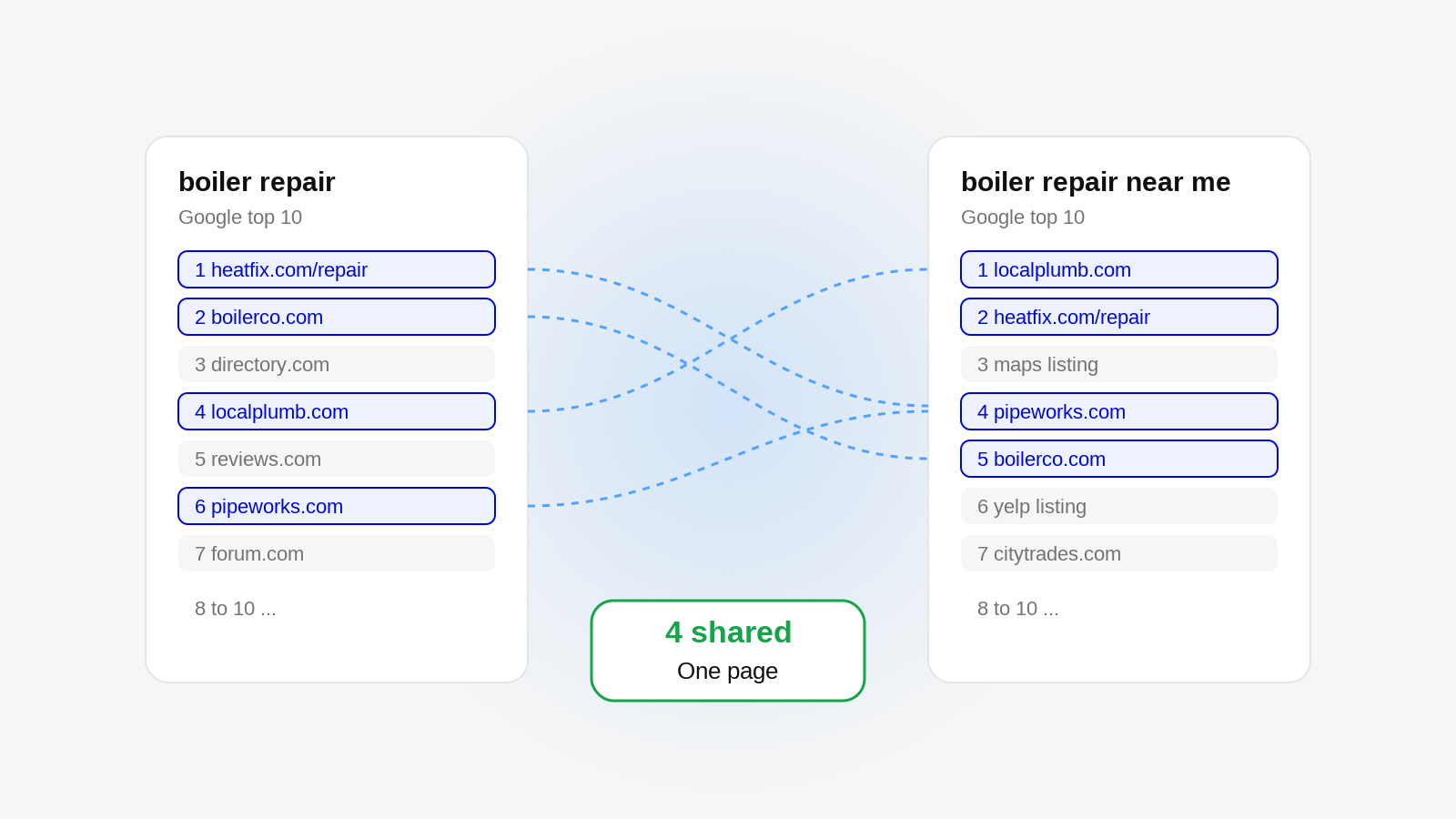
2. Same results? Search both keywords on Google, in the country you care about, and compare the top 10 organic results (the normal blue links, not the ads). If the two lists share several URLs, Google already ranks the same pages for both, which is strong evidence one page can win both. If they barely overlap, Google treats them as different searches, whatever the words look like.
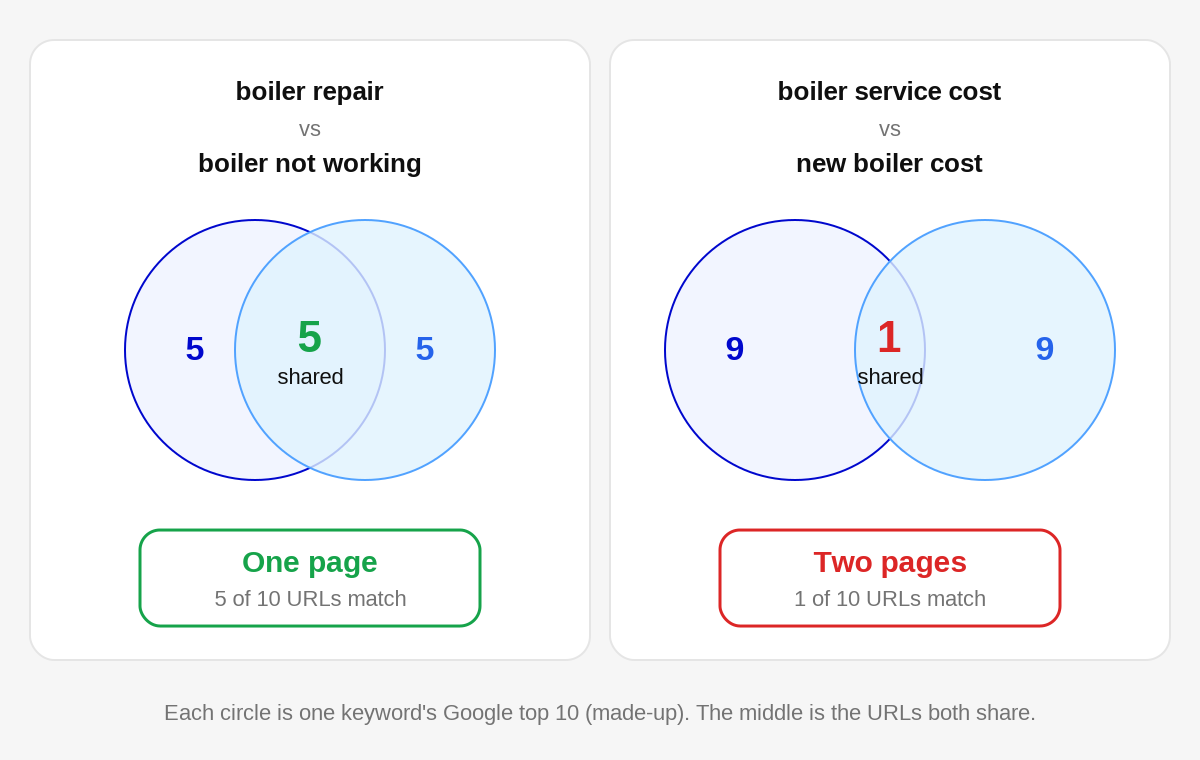
A common working rule is 3 or more shared URLs out of the top 10 means one page. It is a rule of thumb, not a Google setting.
Intent comes first because it is cheap. The results check settles the close calls, which are the ones a meaning-based cluster gets wrong.
How to run the results check by hand
You need a browser and five minutes per pair.
- Open a private window. Your own history and sign-in change what you see.
- Search the first keyword in the right country. If you sell in the UK, search google.co.uk, or set the country in your search settings.
- Write down the top 10 organic URLs. Skip ads, maps and video boxes. Paste them into a sheet, one column per keyword.
- Search the second keyword and do the same in the next column.
- Count the URLs that appear in both columns. Same exact page, not just the same site.
- Look at the page types too. If one list is all shop category pages and the other all blog posts, they disagree even if a URL or two overlaps.
Results move, so for a big decision (such as merging two pages that already get traffic) run the check twice, a few weeks apart.
| What you see | What it means |
|---|---|
| 5 or more shared URLs | Clearly one page. Merge the keywords into one brief |
| 3 or 4 shared URLs | One page is likely enough. Cover the second keyword as a section |
| 1 or 2 shared URLs | Google treats them as different. Plan two pages |
| 0 shared, different page types | Different intent. Two pages, possibly in different parts of your site |
One page or many: the decision table
This table covers the cases that come up again and again.
| Signal | One page | Separate pages |
|---|---|---|
| Wording | Synonyms or reordered words ("boiler repair", "repair boiler") | Different nouns that change the job ("repair" vs "course") |
| Intent | Same goal: both want to learn, or both want to buy | One learns, one buys ("how to fix a boiler" vs "boiler repair service") |
| Google top 10 | 3 or more of the same URLs | 0 to 2 shared URLs |
| Page types ranking | The same type for both (guides, or service pages) | Different types (blog posts for one, shop pages for the other) |
| Location | Both local, or both not | One has "near me" or a city name, the other does not, and the results differ |
| Size of the subtopic | It fits in a section of a few paragraphs | It needs its own steps, table or pictures to answer well |
| Your site today | No page targets either yet | You already have a page that ranks for one of them |
The last row matters more than it looks. If you already have a page that does well, adding a section to it is often cheaper than building a second page next to it.
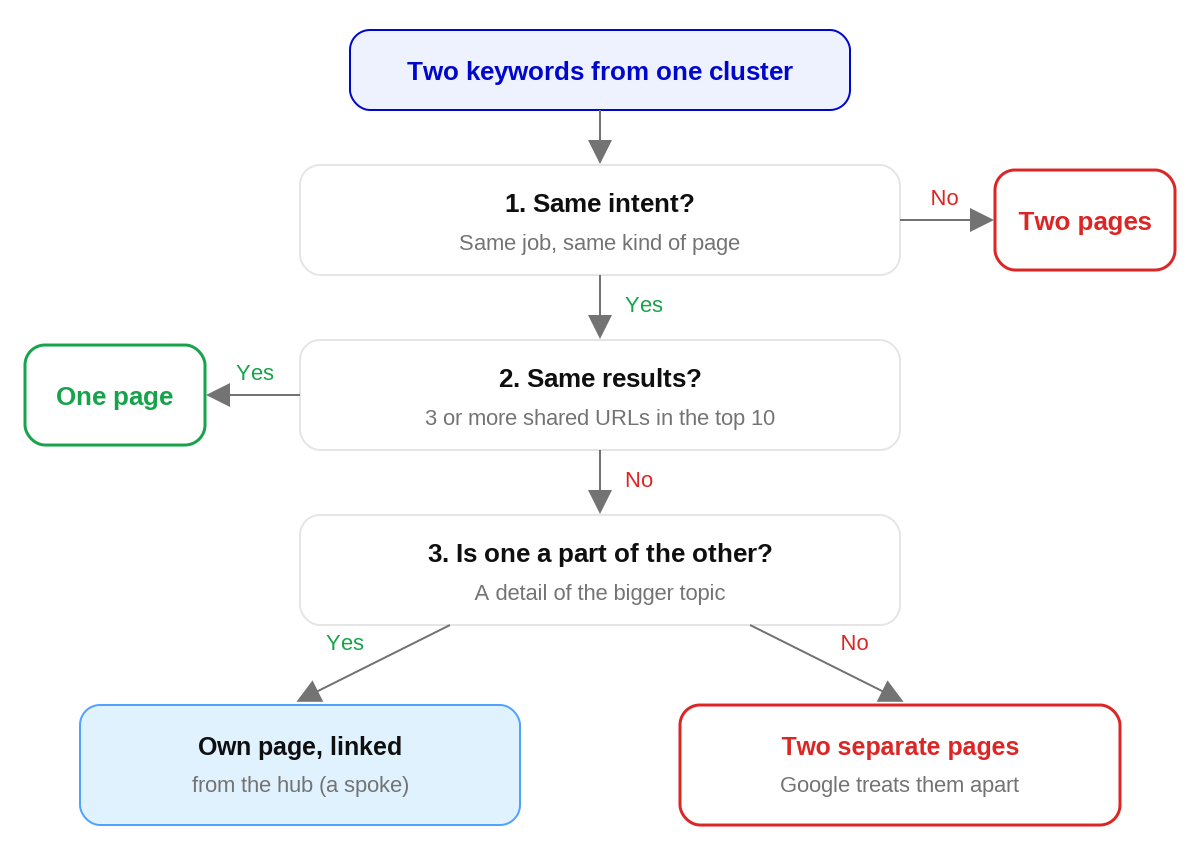
The middle case: "boiler pressure too low" has its own results and its own fix, but it is part of "boiler not working". It gets its own page, linked to and from the main boiler repair page. That is a hub and spoke: one broad hub page with detailed spoke pages around it.
Keyword cannibalisation: when your pages compete
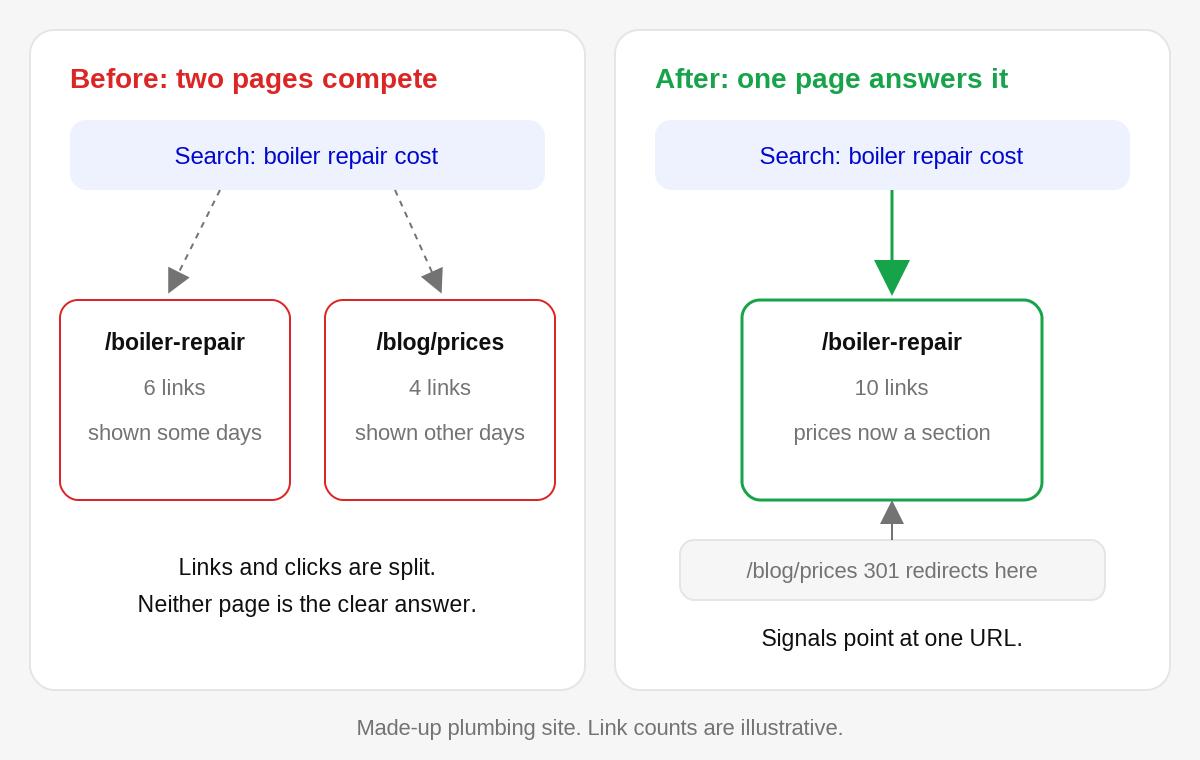
Keyword cannibalisation is what happens when two or more pages on your own site target the same search, so they compete with each other instead of with other sites. A plumber with both "/boiler-repair" and "/blog/boiler-repair-prices", each trying to rank for "boiler repair cost", is cannibalising.
The usual symptom: Google shows the service page one week and the blog post the next, and neither climbs. Links from other sites are split between the two URLs too.
How to spot it
- In Search Console. In the Performance report the table can be grouped by query or by page [3]. Filter to one query, then switch to the Pages tab. If two or more of your URLs keep getting impressions for it, you may have two pages doing one job.
- On Google. Search
site:yoursite.com boiler repair cost. Several of your pages saying roughly the same thing is the problem in plain sight. - In your own plan. Before you write a new page, check whether an existing page already targets the cluster. This is the cheapest place to catch it.
Two pages ranking for one query is not always bad. If a service page and a how-to guide both do well because some searchers want each, leave them. It is only cannibalisation when the pages try to do the same job.
How to fix it
| Situation | Fix |
|---|---|
| Two pages say the same thing | Merge the best parts into one page, then 301 redirect the other URL to it |
| One page must stay live for visitors (for example a printable version) | Keep both, and add a canonical tag on the copy pointing at the main page |
| The pages cover different jobs but both chase one keyword | Keep both, and change the weaker page's title, H1 and focus to its real job |
| A new page you have not published yet | Do not publish it. Add its content as a section of the existing page |
Both technical fixes come from Google's documentation. A 301 redirect tells Google "the redirect target should be canonical", the one to show in results [1]. A canonical tag is the softer version: it helps Google "consolidate signals for similar or duplicate pages" [2], such as links, onto one URL.
What Answer Socrates decides for you, and what it does not
The clustering tool (Classic) groups keywords by meaning. Each keyword is turned into an embedding, a list of numbers that stands for its meaning, and keywords that sit close together form a group. If a group comes out too big (more than 40 keywords, or more than 4.5% of your list), it is split again with a tighter setting. A keyword with no close neighbours is not forced into a group: it lands in Unclustered keywords.
The Jev AI keyword tool also groups by meaning, then goes one step further with its Site structure tab. Every topic becomes a hub page, and the tool decides which keywords deserve a page of their own underneath it:
- A topic with 8 keywords or fewer stays as one page. There is no split to make.
- A bigger topic gets up to 8 candidate sub-pages, named from phrases that keep recurring in its keywords.
- Each keyword is then placed on a sub-page or left on the hub. If the tool is less than 45% confident about a placement, the keyword stays on the hub rather than getting a page of its own.
Building the site structure costs nothing extra: it is covered by the cluster credits you spent on the run.
What neither tool does today is check Google's results for you. Both decide by meaning, so they cannot see that "boiler service cost" and "new boiler cost" get different results. A Google results split (3 or more shared URLs in the top 10) is built for the Jev AI tool but switched off and not on the site. Until then, the results check is yours to run on the close calls.
How to read a cluster in Answer Socrates
Step 1. Get a cluster. From a keyword search, click Cluster Keywords in the results header (button 6 below) and pick the Jev AI engine in the confirm dialog. Or paste a list into the Jev AI keyword tool. Either way it costs 1 topic cluster credit per keyword.

Step 2. Read the topic. Open the Clusters tab, then Topic clusters. A table lists every topic with its funnel split and volume, with a card per topic below. Read one topic's keywords as a list of searchers, not strings, and mark any pair where the intent looks different. Those go through the results check.
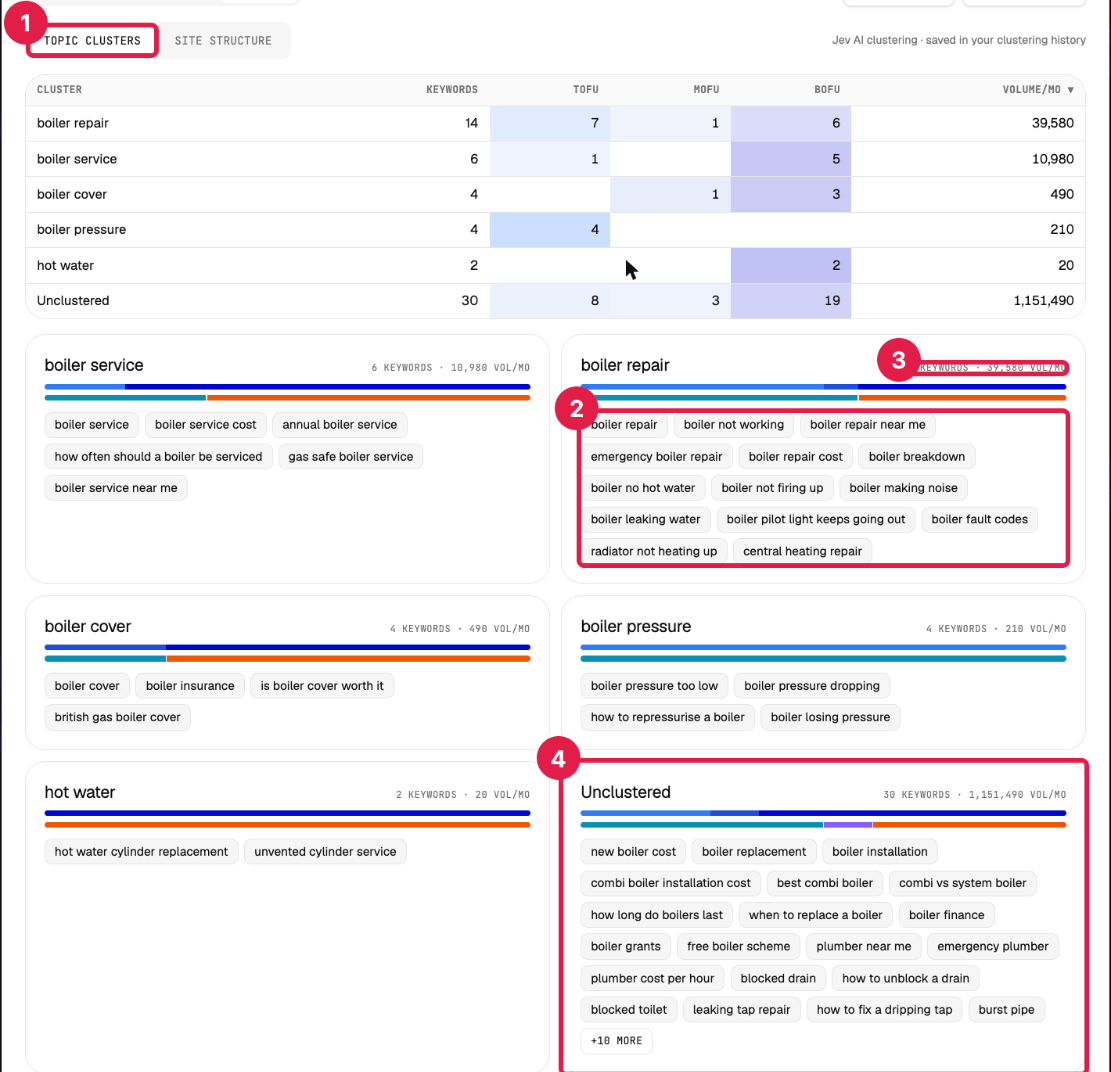
Step 3. Open the Site structure tab. Each topic shows a Hub page card, with the keyword it targets, and Page cards indented under it for the keywords that earned their own page. Each card shows its keyword count, volume and funnel mix.
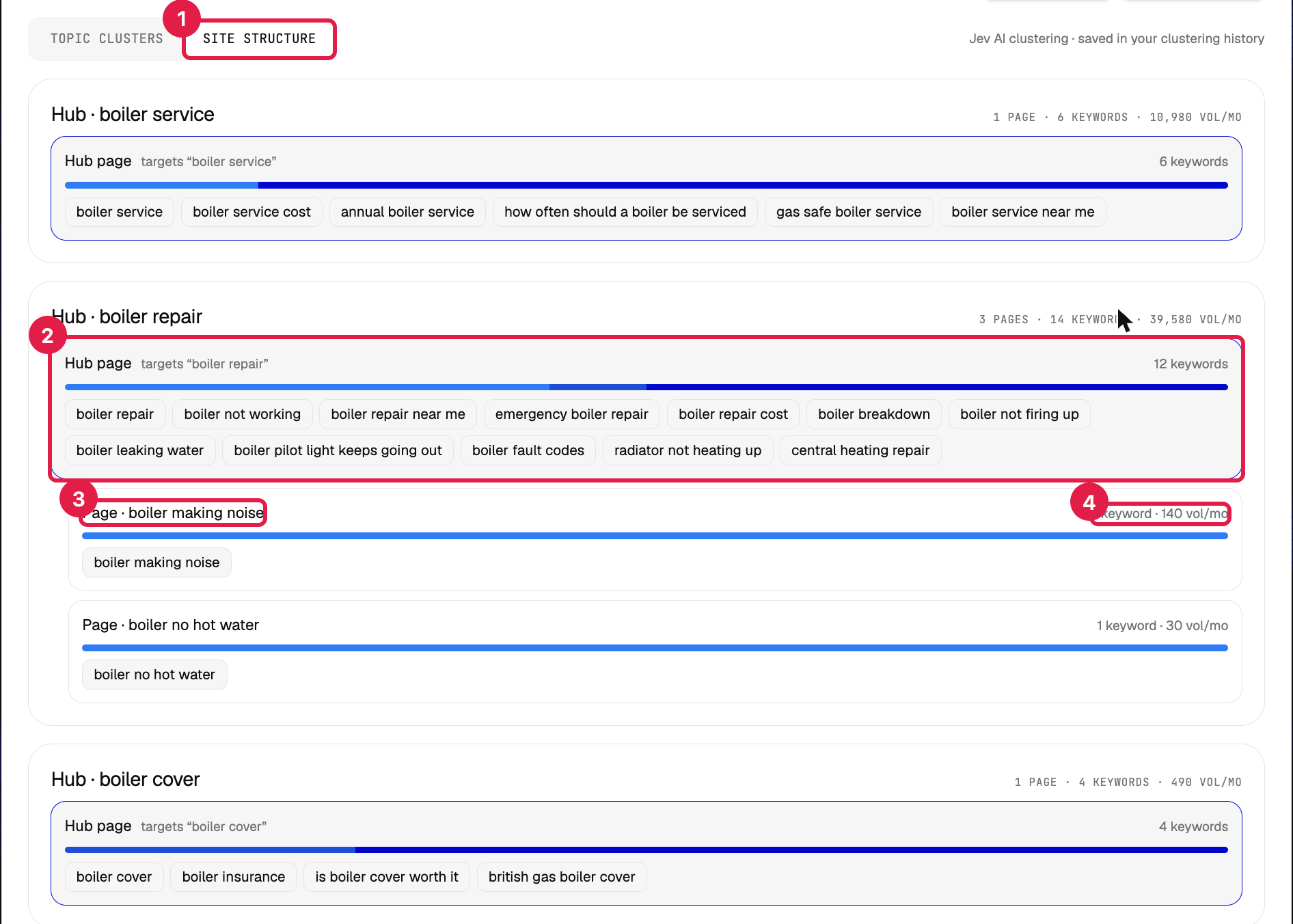
Step 4. Check the spokes against Google. Run the results check on each Page card's keyword and the hub's keyword. 3 or more shared URLs: fold the spoke into the hub as a section. 2 or fewer: keep the spoke and link it to the hub.
Step 5. Check against your own site. If a page already targets a hub or spoke, improve it instead of writing a new one.
A made-up example: a plumbing company
A made-up example: Ridgeline Plumbing serves one city with a small website. The owner pulls keywords for "boiler", clusters them with Jev AI, and gets a topic of 14 keywords about boiler problems and costs.
The Site structure tab proposes one hub ("boiler repair") and two pages: one for pressure problems and one for costs. She runs the results check on the pairs that look close.
| Keyword pair | Same intent? | Shared URLs (of 10) | Her call |
|---|---|---|---|
| boiler repair / boiler not working | Yes: both have a broken boiler | 5 | One page: the boiler repair hub |
| boiler repair / boiler repair near me | Yes: both want someone to fix it | 4 | Same hub page, plus her city on it |
| boiler repair / boiler pressure too low | Partly: a specific fault | 2 | Own page, linked from the hub |
| boiler service cost / new boiler cost | No: upkeep vs replacement | 1 | Two pages, not one "costs" page |
| boiler repair / boiler repair course | No: homeowner vs trainee | 0 | Drop it: not her customer |
| boiler repair cost / boiler repair | Yes | 4 | A price section on the hub |
The tool's "costs" page turned out to be two pages, and one keyword it kept was not worth a page at all. The meaning-based grouping got her most of the way; the results check fixed the last two calls.
Then she checks her own site. An old blog post, "What does a boiler repair cost?", already gets a few visits. Rather than write a third page on the same thing, she builds the boiler repair hub, moves the post's price table into it, and 301 redirects the post to the hub.
The same thing in Ask Socrates
Ask Socrates, the Answer Socrates chat, can pull keywords and cluster them with the Jev AI engine in one conversation. You can type:
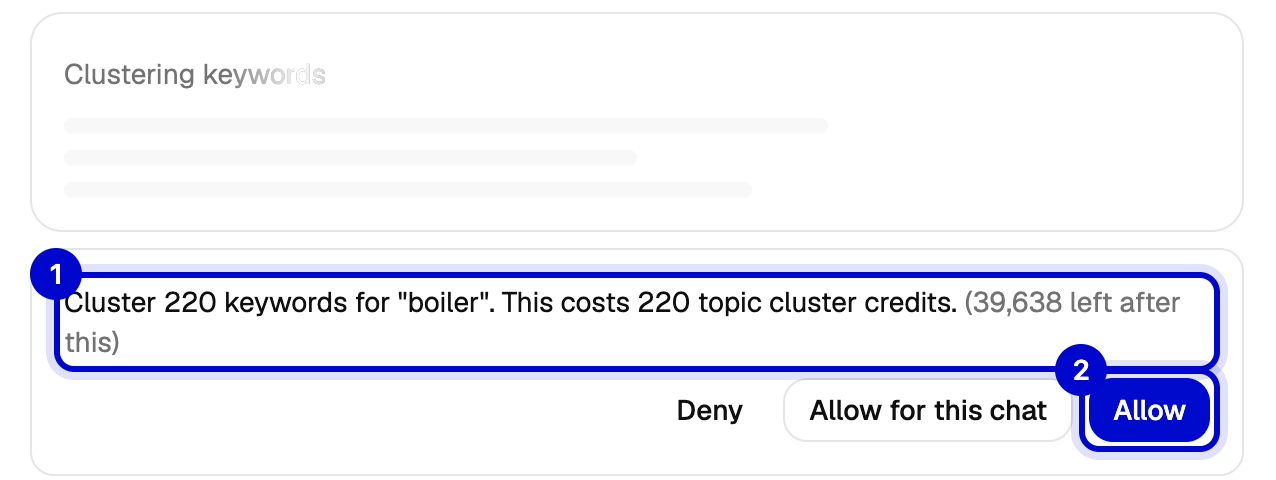
Before it clusters anything, Ask Socrates names the exact number of cluster credits. If your spending setting is "Asks before spending", it shows an approval card and waits for you. Then the topics come back with intent and funnel stage, and the run is saved on the Jev AI tool page, where you can open the Site structure tab.
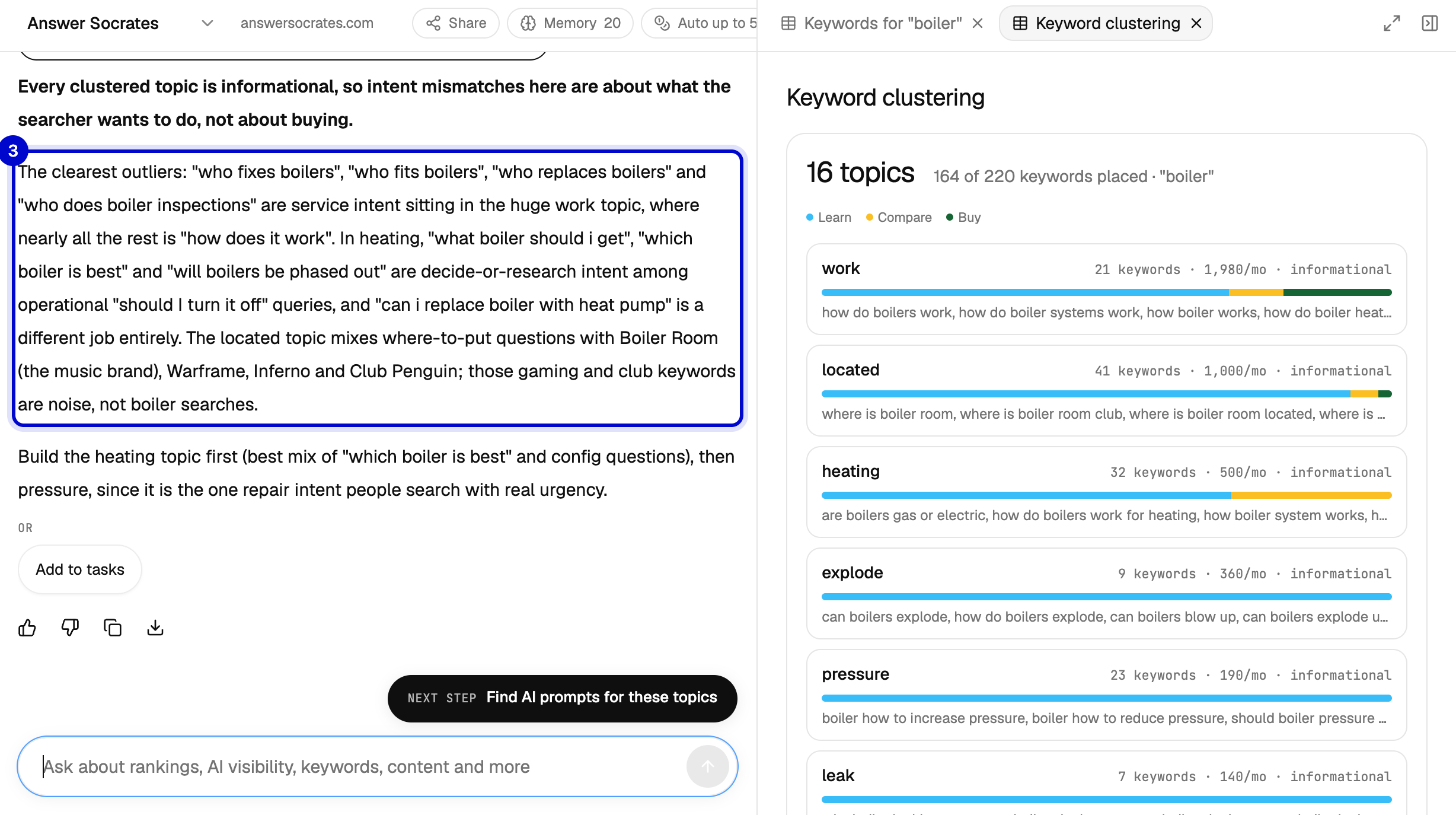
Treat the chat's answer as the intent half of the test. The results half is still yours to run.
Where to go next
| If you want to... | Read |
|---|---|
| Build the clusters this lesson starts from | Keyword clustering: turning a list into topics |
| Get a bigger keyword list first | How to do keyword research: find what people actually ask |
| Find the small searches that make good spoke pages | Long-tail keywords: finding the easy wins |
| Put your pages in the order you will write them | From cluster to content plan: what to write first |
| Link the hub and its spokes together | Internal links: connecting your pages |
Sources
- Redirects and Google Search, Google Search Central, 2026
- How to specify a canonical URL with rel="canonical" and other methods, Google Search Central, 2026
- Performance report (Search results): Overview and basic setup, Google Search Console Help, 2026
