Connecting Answer Socrates to Claude
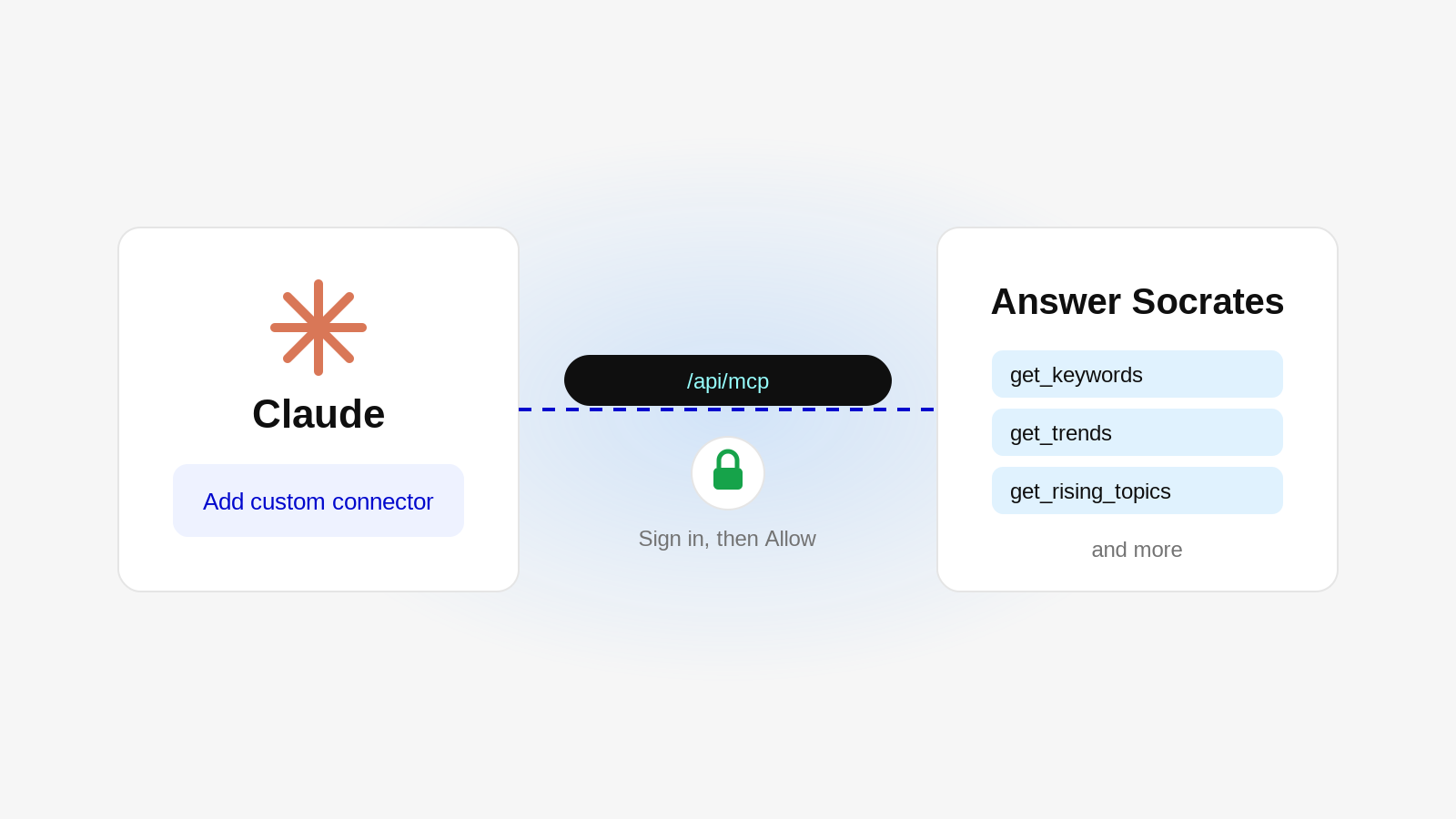
You connect Answer Socrates to Claude by adding https://answersocrates.com/api/mcp as a custom connector in claude.ai, or with one claude mcp add command in Claude Code. Once it is on, Claude pulls real Google searches and trends instead of guessing keywords from memory.
Key takeaways
- In claude.ai, click Plugins in the sidebar, then Add, choose Add custom connector and paste https://answersocrates.com/api/mcp. You sign in, so no API key is needed.
- Claude Code needs an API key from your Account page and one command: claude mcp add answersocrates --transport http with the URL and an Authorization header.
- Every data call costs 1 request: Free and Lite get 3 a month, Seneca 500, Aurelius 2,500 and Senate 25,000. Usage checks and project tools are free.
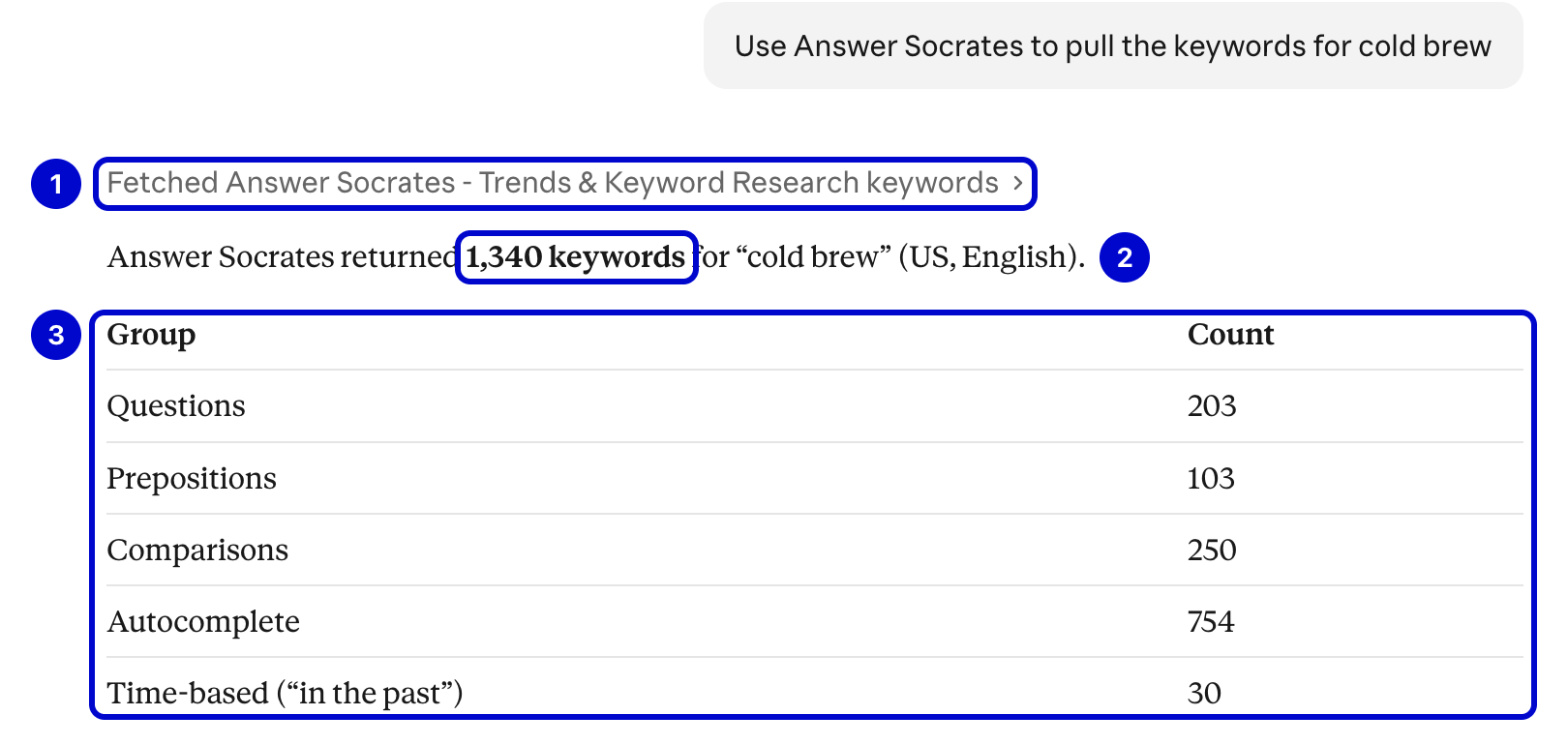
- A good first prompt is "Use Answer Socrates to pull the keywords for cold brew": one request that returns Questions, Prepositions, Comparisons and Autocomplete.
- If Claude answers without calling a tool, the connector is off in that chat: click +, open Plugins and switch Answer Socrates on.
One URL connects Claude to live search data
A connector is Claude's name for an outside tool it can call while it answers you. Answer Socrates runs one at a single address, https://answersocrates.com/api/mcp. Once you add it, you can type "pull the keywords for cold brew" and Claude fetches real Google searches instead of guessing from what it learned in training.
The address is an MCP server: a service that speaks the Model Context Protocol, the shared standard AI apps use to call outside tools. If that is new to you, read What is MCP? A plain-words guide for SEOs first. This lesson is only the setup.
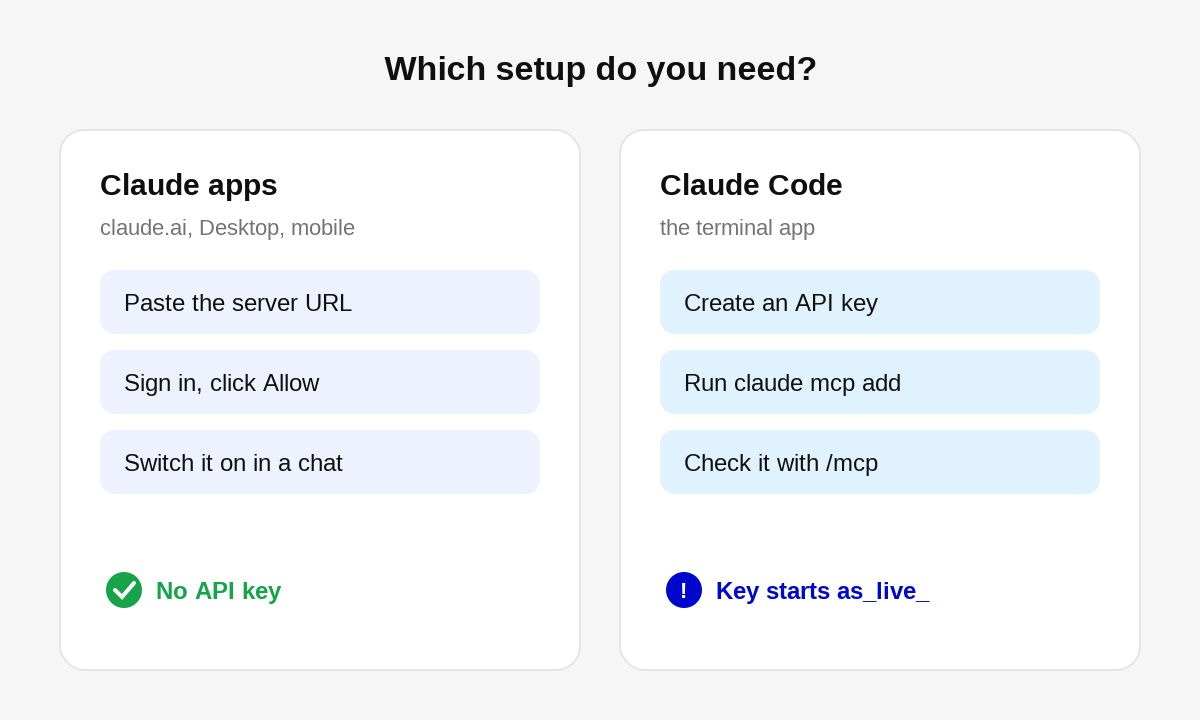
Two kinds of Claude need two kinds of setup:
- Claude apps (claude.ai on the web, Claude Desktop and the mobile apps): you paste the URL and sign in. No API key.
- Claude Code (the terminal app): you run one command with an API key from your Answer Socrates account.
Before you start: an account and requests
You need an Answer Socrates account. If you do not have one, the sign-in step during setup creates a free one, with no card needed.
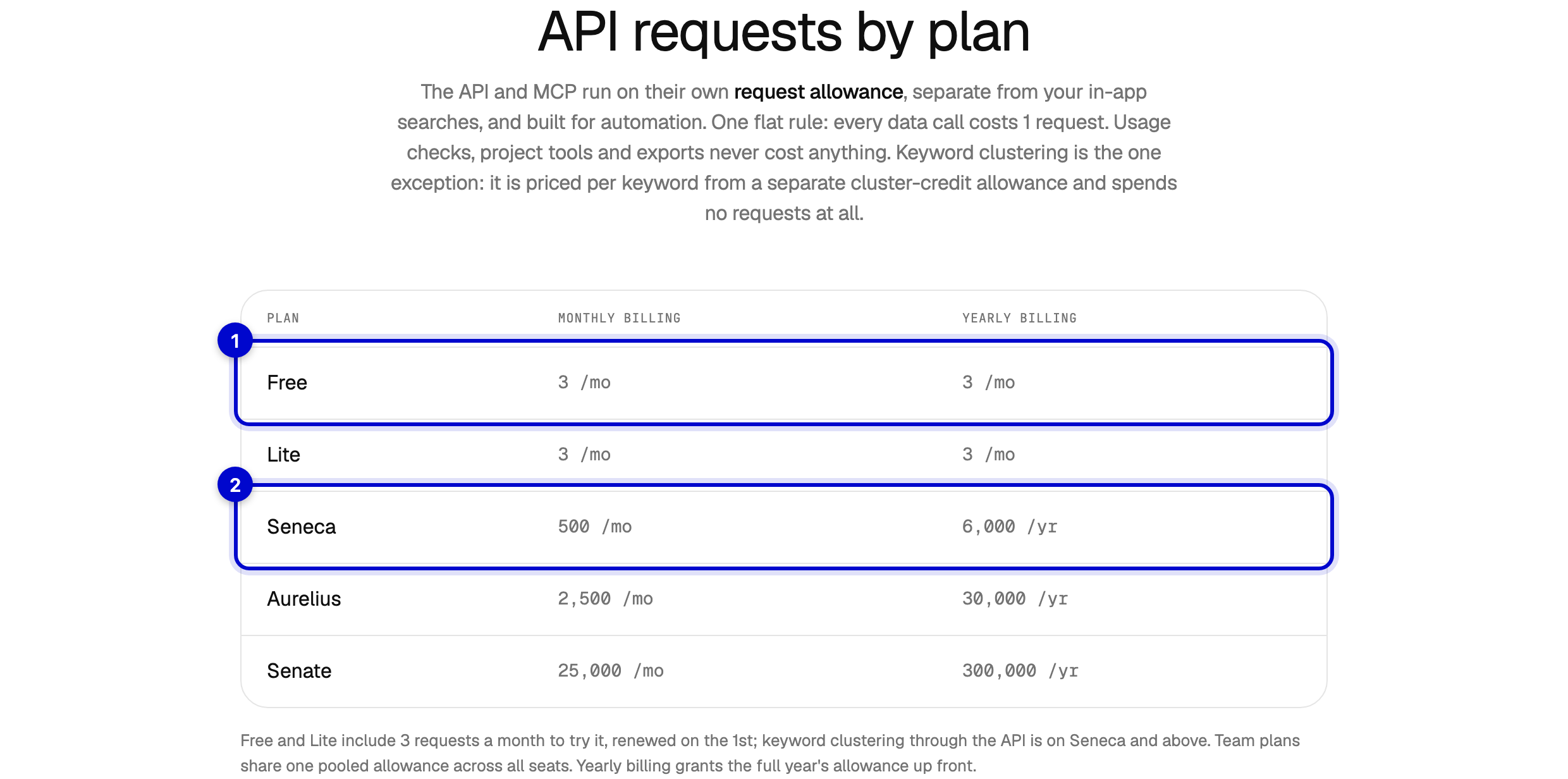
The connector runs on its own request allowance, separate from the searches you run inside the app. Every data call costs 1 request: one keyword pull, one trend line, one rising-topics check. Checking your usage and saving to projects cost nothing.
| Plan | Requests | Good for |
|---|---|---|
| Free or Lite | 3 a month, renewed on the 1st | Checking the setup works and running one real pull |
| Seneca | 500 a month (6,000 a year on yearly billing) | One person doing weekly research |
| Aurelius | 2,500 a month (30,000 a year) | A small team or an agency with a few clients |
| Senate | 25,000 a month (300,000 a year) | Heavy automation across many sites |
Keyword clustering is the one exception. It is priced per keyword from a separate cluster-credit allowance, spends no requests, and through the connector it is only on Seneca and above.
Three requests go fast. A trend comparison of five keywords is five requests, because Claude calls the trends tool once per keyword. On a free account, ask for one keyword pull first so you see real results before the allowance runs out.
How to connect Answer Socrates in claude.ai
This is the main path, and the one we recommend. Anthropic says custom connectors work on every Claude plan, including Free, but the Free plan is limited to one custom connector [1].
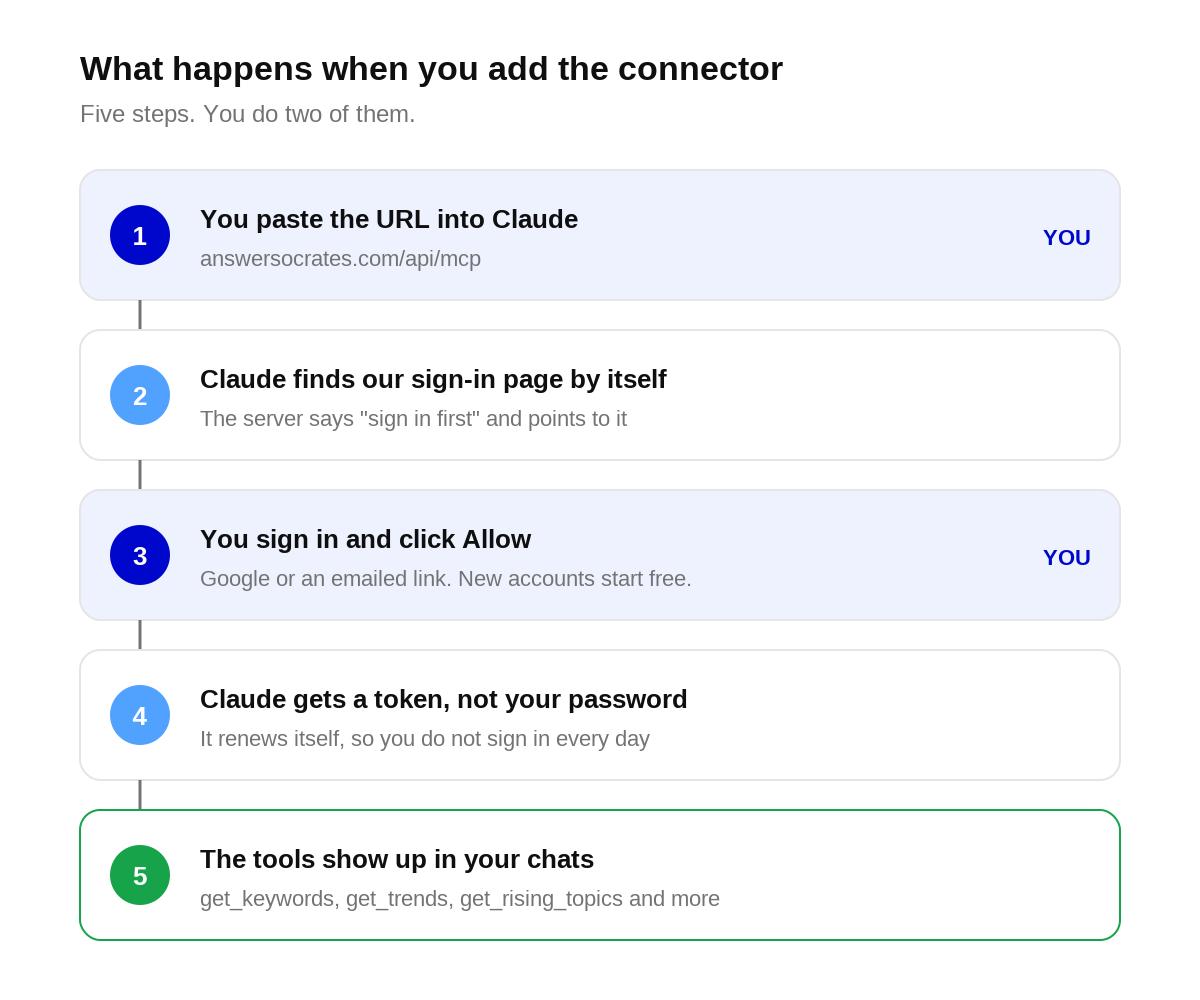
1. Copy the server URL. Open the Answer Socrates MCP page, scroll to the setup band, pick the Claude tab and click Copy next to the URL.
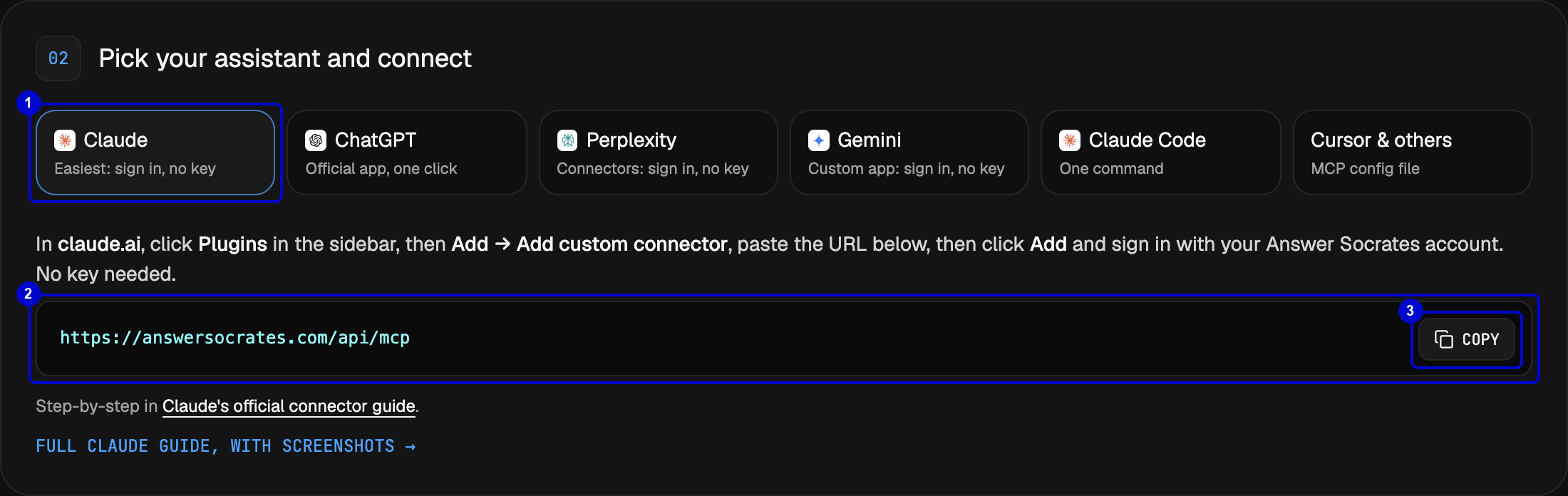
2. Open the connector settings in Claude. In Claude on the web, click Plugins in the left sidebar. Click Add, then Add custom connector. Older guides, including Anthropic's help page, call this page Customize, then Connectors [1].
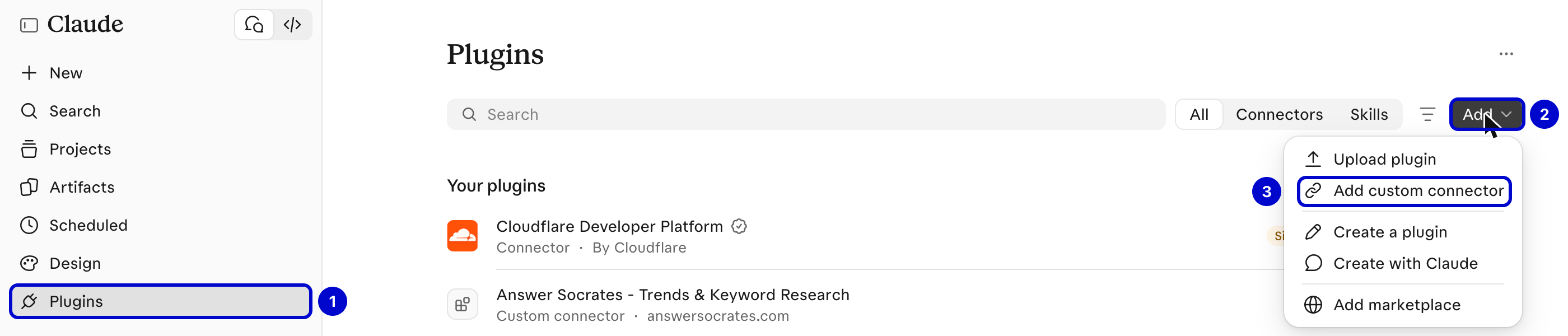
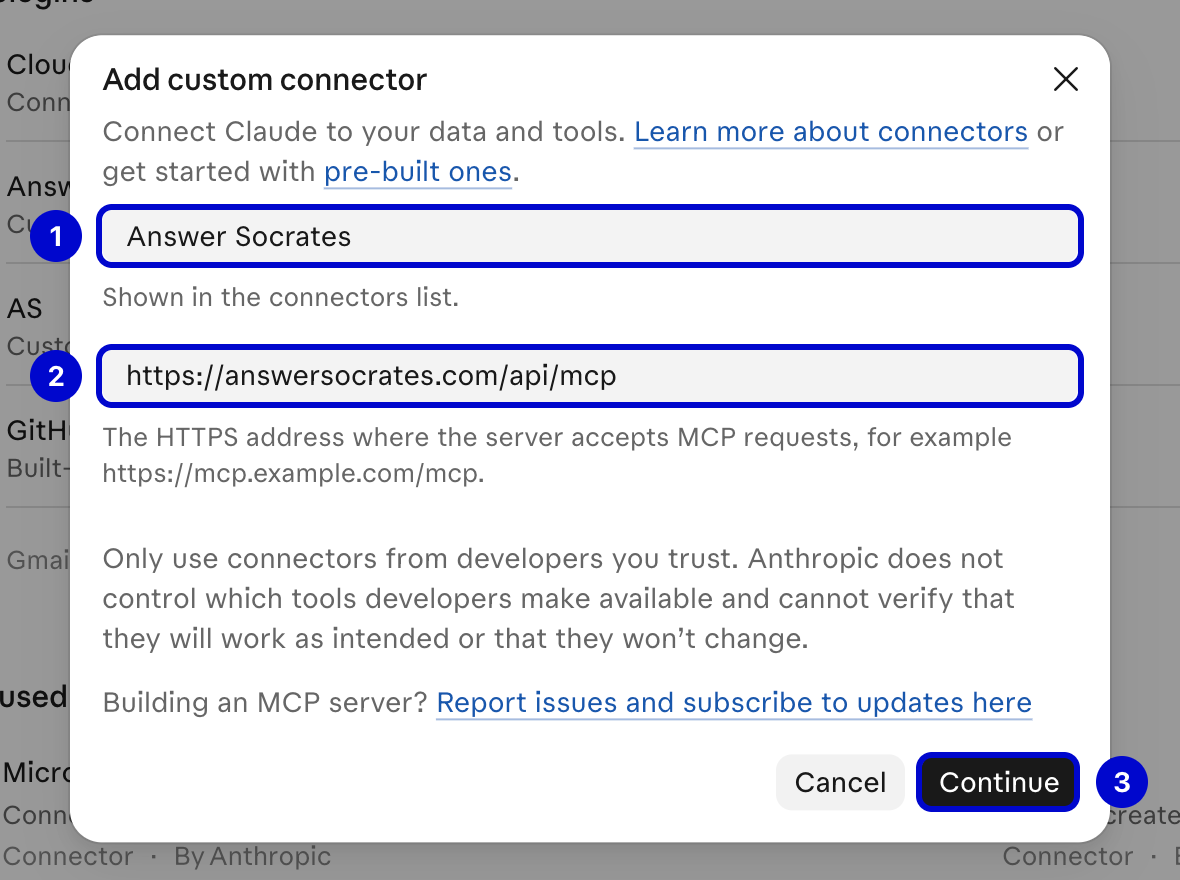
3. Name it and paste the URL. Type Answer Socrates as the name, paste the URL and click Continue. Claude reads the sign-in settings from our server by itself, so review them and click Continue again [1].
4. Choose to sign in now. Under Authentication, choose Sign in now, then click Add [1]. Leave the request headers empty: Claude apps do not need an API key.
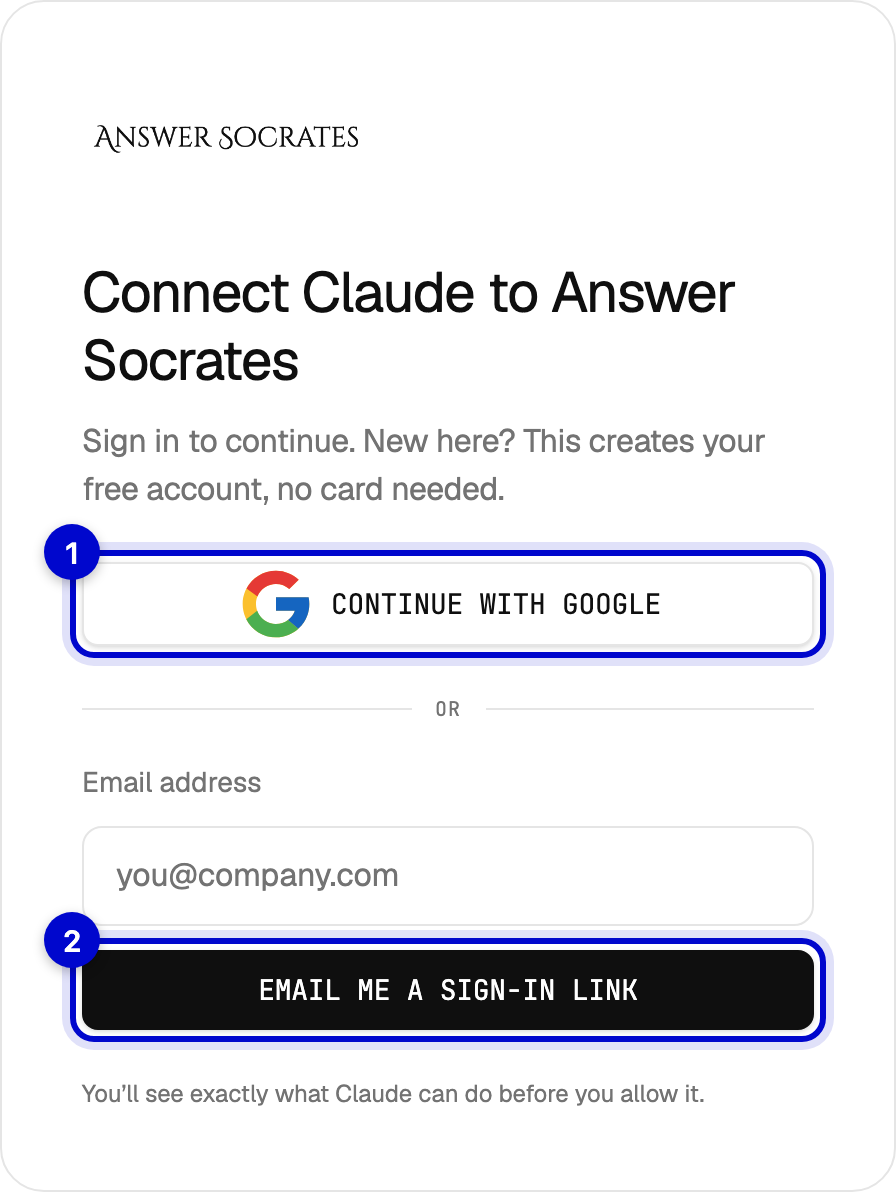
5. Sign in to Answer Socrates. A browser window opens on our sign-in step. Use Google or ask for an emailed sign-in link. A new email address creates a free account here.
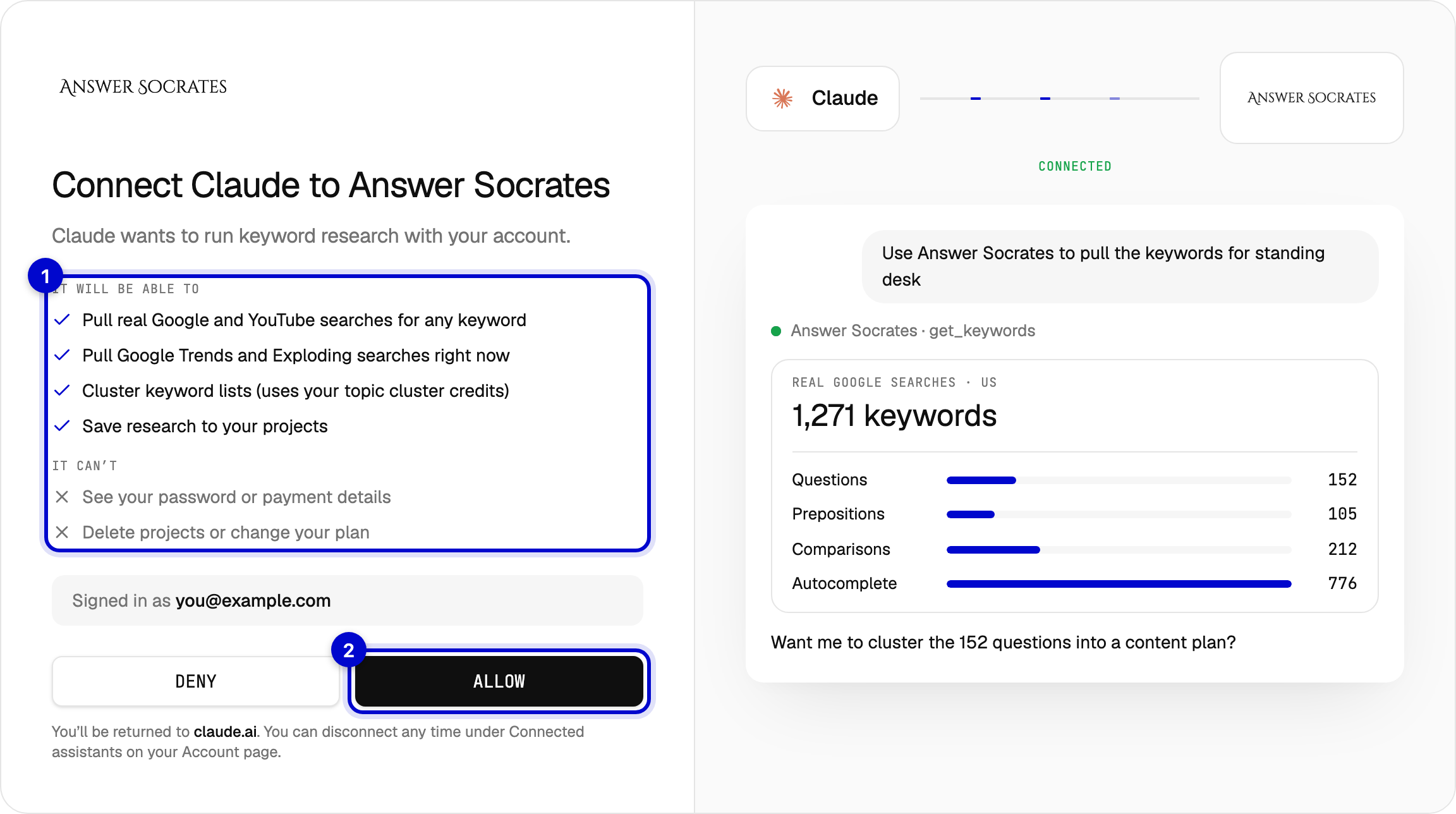
6. Click Allow. The next screen lists what Claude will be able to do and what it cannot. It can pull Google and YouTube searches, Google Trends data, cluster keyword lists and save research to your projects. It cannot see your password or payment details, delete projects or change your plan.
7. Switch it on in a chat. In any chat, click the + button at the lower left, open Plugins and turn Answer Socrates on [2]. Connectors are switched on per conversation, so a new chat may need the toggle again.
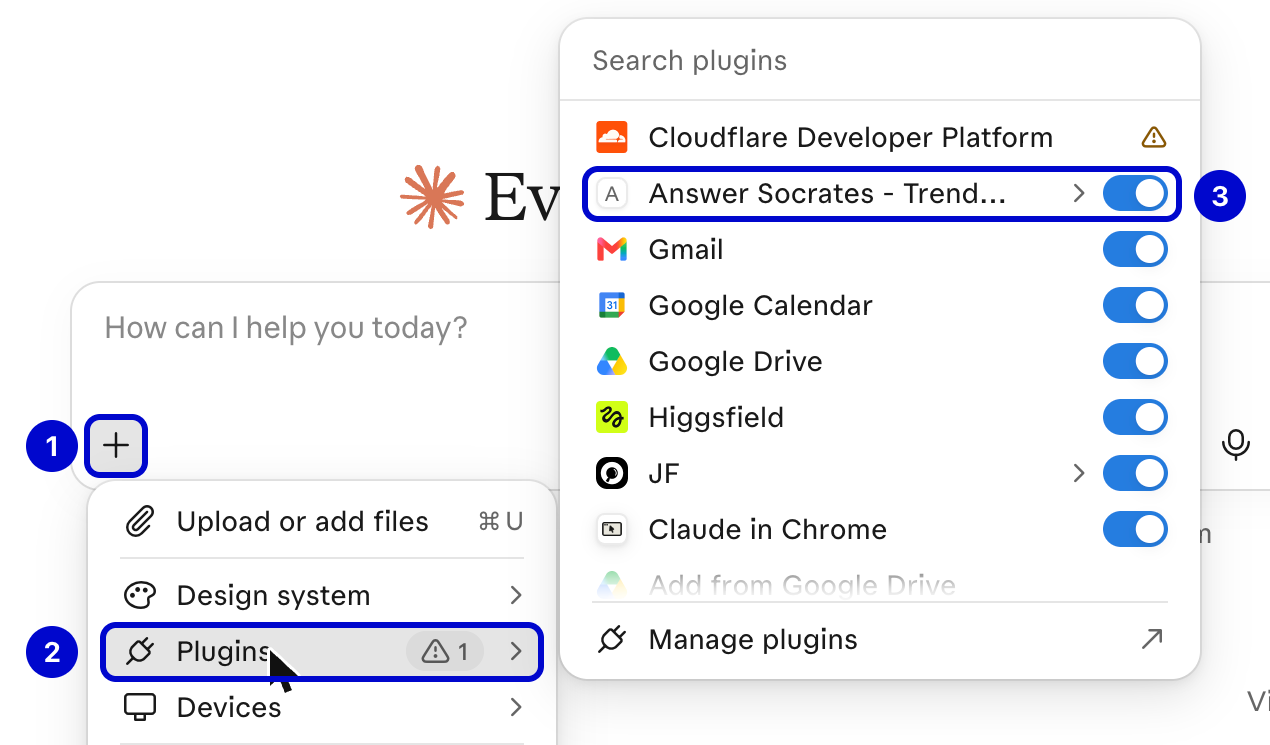
You do this once per Claude account. Anthropic says web connectors are available in Claude Desktop and the Claude mobile apps as well, so you do not repeat it on each device [2].
On Claude Team and Enterprise, members cannot add custom connectors themselves. An Owner adds it under Organization settings, then Connectors. Each member then finds Answer Socrates under Plugins and clicks Connect to sign in with their own Answer Socrates account [1].
How to connect Answer Socrates in Claude Code
Claude Code takes one command and an API key. The key starts with as_live_ and belongs to your Answer Socrates account.
1. Create an API key. On your Answer Socrates Account page, name the key and click Create key. The key is shown once, so copy it somewhere safe.
2. Build the command. On the MCP page, pick the Claude Code tab and paste your key into the box. It fills the key into the command for you. The key stays in your browser and is not sent anywhere.
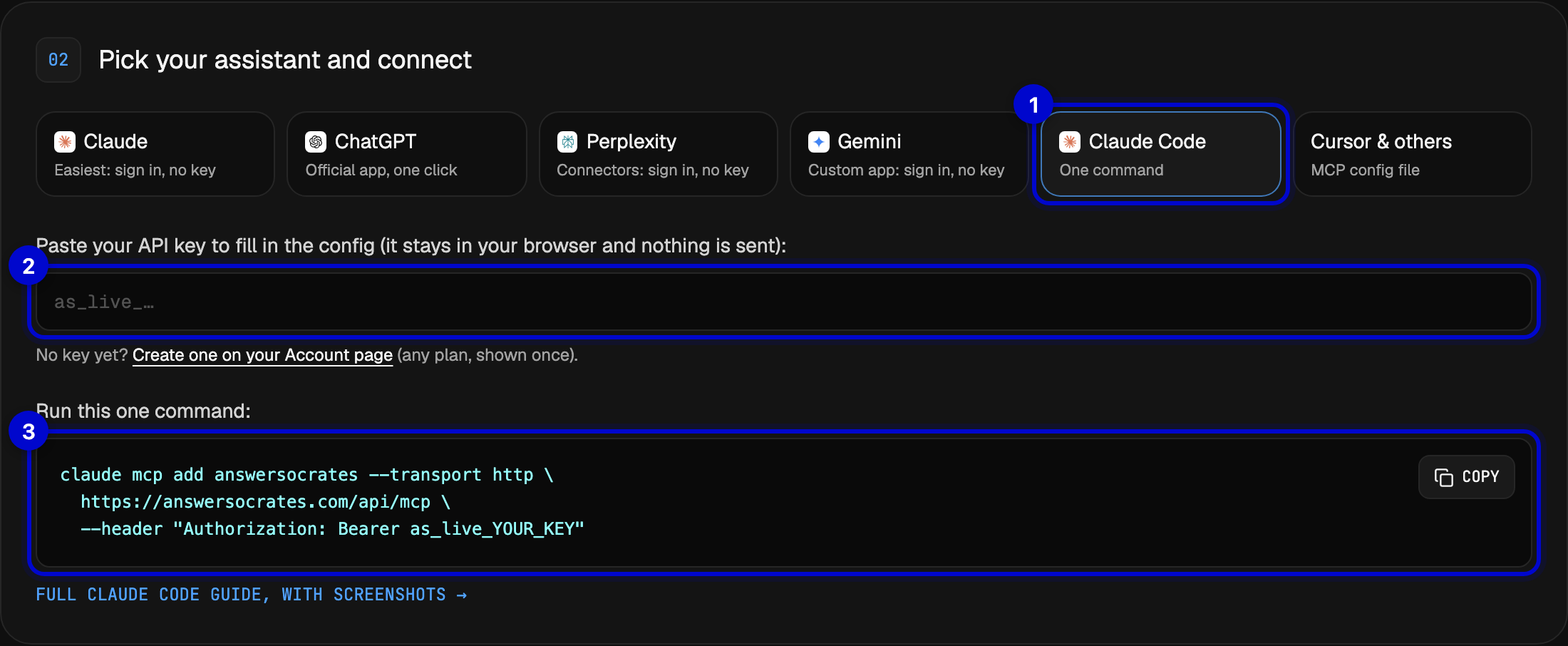
3. Run it in your terminal. The command looks like this, with your key in place of the placeholder:
claude mcp add answersocrates --transport http \
  https://answersocrates.com/api/mcp \
  --header "Authorization: Bearer as_live_YOUR_KEY"
This matches the form Anthropic documents for a remote HTTP server with a bearer token [3]. By default the server is added at local scope, which means only you, in the current project folder. Add --scope user to make it available in every project [3].
4. Check it connected. Start Claude Code with claude and type /mcp. You should see answersocrates listed as connected. From your normal shell, claude mcp list shows a status such as "Connected" or "Failed to connect" next to each server [3].
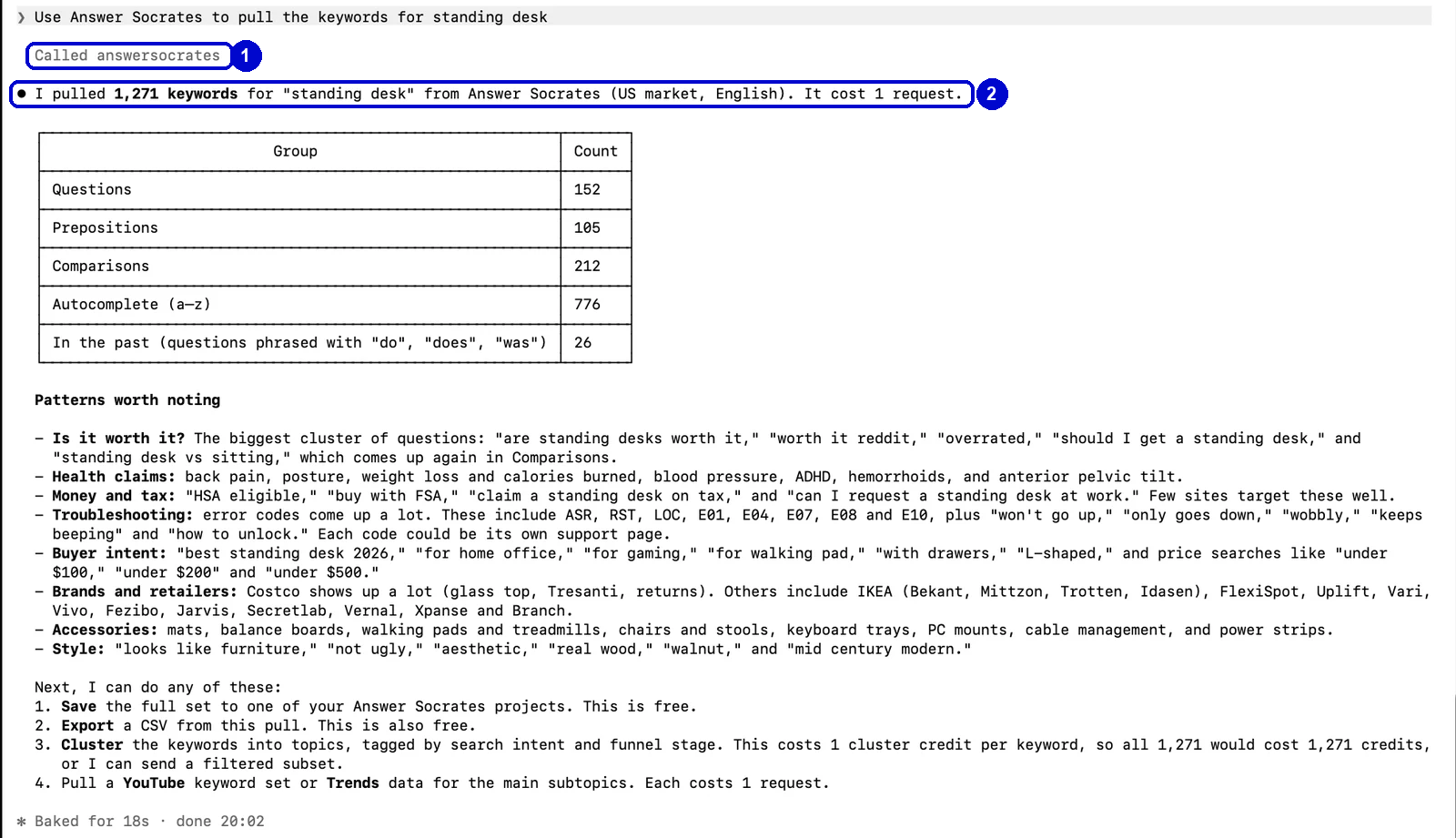
Another quick check is a real request, such as "Use Answer Socrates to pull the keywords for standing desk" (1 request). If Claude Code prints Called answersocrates above its answer, the connection works.
Your first prompt, and what comes back
You do not need to name tools. Answer Socrates tells Claude what each tool does, and Claude picks.
Claude calls get_keywords and gets back everything Google Suggest returns around the term, grouped into four sets:
- Questions: who, what, why, how ("how to make cold brew at home").
- Prepositions: for, with, near ("cold brew for iced lattes").
- Comparisons: vs, or, and ("cold brew vs iced coffee").
- Autocomplete: the raw a to z list Google suggests as you type.
Some pulls add a small time-based set too, such as searches with "in the past". A pull for "cold brew" on 2026-11-22 had 30 of those out of 1,340.
A real pull in Claude on 2026-10-23 for "cold plunge" returned 1,289 searches. Claude leads with the total, gives a count per group and then points out the themes that stand out. There are no search volumes in this data: it shows what people type, not how often.
A made-up example: a small coffee roaster in Leeds wants blog topics for the summer. They connect Claude, ask for the cold brew pull with country set to the UK ("pull the UK keywords for cold brew"), and ask Claude to list only the Questions. They save the list into their "Blog 2027" project with one more message. That is 1 request in total, because saving is free.
Other first prompts worth one request each:
- "What's rising around cold brew right now?" (rising topics, including Breakouts)
- "Show me 12 months of Google Trends for cold brew in the UK" (one trend line)
- "Pull the YouTube keywords for cold brew" (the same four groups from YouTube search)
In Claude Code you can also run the built-in commands. Anthropic's docs say MCP prompts appear as slash commands named /mcp__servername__promptname [3], so ours are /mcp__answersocrates__keyword_research and /mcp__answersocrates__website_research. Both run several tools in a row, so they spend more than one request.
Prefer not to set anything up? Ask Socrates, the chat inside Answer Socrates, runs the same kind of research without a connector.
What each tool costs from your requests
Claude may call more tools than you expect, for example a trend line per keyword in a comparison. This table helps you guess the cost before you ask.
| What you ask for | Tool Claude calls | Cost |
|---|---|---|
| Keywords for one term | get_keywords | 1 request |
| YouTube, TikTok or shopping keywords | get_youtube_keywords, get_tiktok_keywords, get_shopping_keywords | 1 request each |
| Rising searches around a topic | get_rising_topics | 1 request |
| Trends for 5 keywords | get_trends five times | 5 requests |
| Group a list into topics | cluster_keywords | 1 cluster credit per keyword, no requests (Seneca and above) |
| "How many requests do I have left?" | get_usage | Free |
| List, create or save to projects | list_projects, create_project, save_to_project | Free |
Asking Claude to chart, sort or export data it already pulled costs nothing. Only a new call to our server spends a request, so pull once and then rework the result as much as you like.
When it goes wrong: fixes for common errors
Most problems are one of these seven. The error text below is what our server sends back, so Claude usually repeats it to you word for word.
| What you see | Likely cause | Fix |
|---|---|---|
| Claude cannot connect after you click Add | The URL has a typo, a missing https:// or an extra path | Remove the connector and add it again with exactly https://answersocrates.com/api/mcp |
Claude Code: "Invalid or revoked API key", or claude mcp list says "Failed to connect" | The key was mistyped, deleted, or the Bearer word is missing | Create a fresh key on your Account page and run the claude mcp add command again |
| Claude answers but never calls a tool | The connector is off in this chat | Click +, open Plugins and switch Answer Socrates on [2] |
| No way to add a second custom connector | Claude's Free plan allows one custom connector [1] | Remove an unused one, or move to a paid Claude plan |
| "You've used this month's 3 API requests..." or "Monthly API quota exceeded..." | The request allowance is spent | Ask "how many requests do I have left?" (free). Free and Lite renew on the 1st, paid plans with the billing period |
| "Keyword clustering through the API is included on Seneca plans and above" | Clustering is not in the Free and Lite starter allowance | Use a paid plan, or cluster inside the app with the clustering tool |
| "Rate limit exceeded (60 requests/minute)" | Too many calls in one minute, often a big trend basket | Wait a minute and ask again with fewer keywords at once |
To cut the connection, open your Answer Socrates Account page and click Disconnect next to Claude under Connected assistants. You can also remove the connector on the Claude side.
Where to go next
| If you want to... | Read |
|---|---|
| Understand what MCP is and why it matters | What is MCP? A plain-words guide for SEOs |
| Set up the same thing in ChatGPT | Connecting Answer Socrates to ChatGPT |
| Get more from the connection with better prompts | Keyword research from inside Claude |
| Turn a keyword pull into an ordered plan | Building a content plan with an AI agent |
| Check the output before you trust it | Where AI agents get SEO wrong |
| Call the same data from scripts | Using the Answer Socrates API |
Sources
- Get started with custom connectors using remote MCP, Anthropic (Claude Help Center), 2026
- Use connectors to extend Claude's capabilities, Anthropic (Claude Help Center), 2026
- Connect Claude Code to tools via MCP, Anthropic (Claude Code docs), 2026
- Model Context Protocol specification: Authorization, Model Context Protocol, 2025
