Measuring traffic from AI search
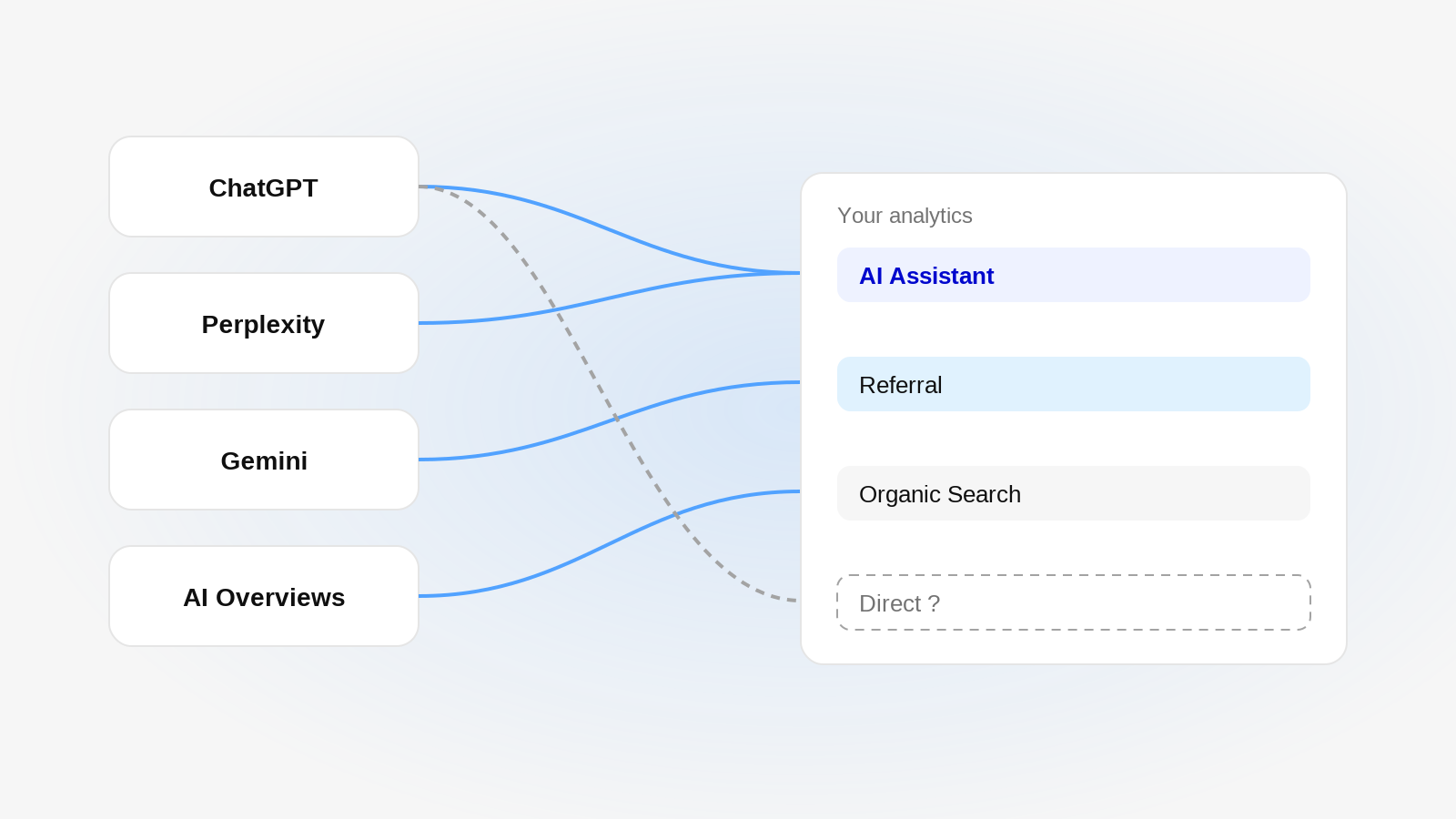
Measuring traffic from AI search means finding the visits AI assistants send you in your analytics, labelling them as one channel, and comparing what those visitors do with other traffic. It matters because a large part of AI's influence arrives unlabelled, so the number you can see is a floor, not the total.
Key takeaways
- GA4's default AI Assistant channel covers sources like ChatGPT, Gemini, Copilot and Grok, but Google says it excludes AI Overviews and AI Mode, which count as Organic Search.
- Start in Reports > Acquisition > Traffic acquisition with Session source / medium, and note the exact AI source names your property records.
- A custom channel group with one Source regex labels AI traffic; place it above Referral, because GA4 assigns each visit to the first channel it matches.
- Judge AI visits by engagement rate (sessions over 10 seconds, with a key event, or with 2 or more page views) and key events, compared with organic search.
- Visits with a stripped referrer land in Direct, and Google's AI clicks sit inside Search Console's Web search type, so read the untagged part as a trend.
AI visits are real, but they hide in four places
When someone clicks a link in an AI answer and lands on your site, your analytics records the visit. The trouble is where it records it. Some AI visits are labelled as AI. Many are filed under channels you already have, and some carry no clue at all about where they came from.
That gives three jobs, in this order:
- Find the AI visits your analytics can see.
- Label them, so they show up as one line in every report.
- Judge what they are worth, and how much you are missing.
This lesson uses Google Analytics 4 (GA4), Google's free analytics tool, because it is the one most sites have. The ideas carry over to any analytics tool that records the traffic source.
Where AI clicks show up in Google Analytics
GA4 sorts every visit into a channel using rules called the default channel group. Google added an AI Assistant channel to it: visits "from sources like ChatGPT, Gemini, Deepseek, Copilot, or Grok" [1]. The rule relies on the referrer matching Google's list of AI assistants, or on a medium of ai-assistant [1].
Three other channels matter here. Referral is a visit from a non-ad link on another site. Organic Search is a visit from unpaid search results. Direct is a visit with no source at all, which GA4 records as (direct) / (none) [1].
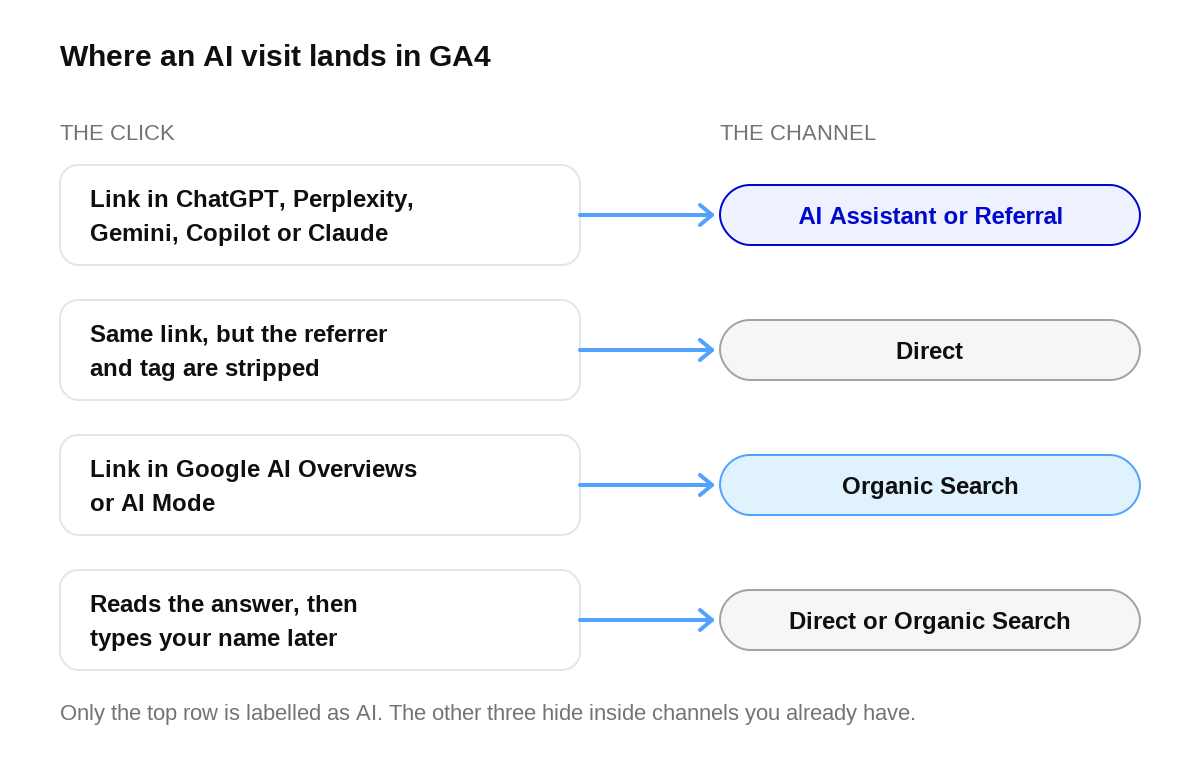
Here is how each source tends to arrive:
| Source | How it usually arrives | Where it lands in GA4 |
|---|---|---|
| ChatGPT | Links tagged utm_source=chatgpt.com [4] | AI Assistant, or Referral in older setups |
| ChatGPT Atlas browser | Often strips the referrer [5] | Direct or (not set) |
| Perplexity | Passes a referrer such as perplexity.ai [5] | AI Assistant or Referral |
| Gemini, Copilot, Claude | Referrer from the assistant's domain | AI Assistant or Referral |
| Google AI Overviews, AI Mode | Normal Google search click | Organic Search, never AI Assistant [1] |
The last row is the big one. Google's own definition says the AI Assistant channel "excludes Google's AI Overviews and AI Mode", and that Organic Search includes them [1]. So the AI answers with the widest reach are the ones you cannot split out in GA4.
Find AI visits in the reports you already have
Start by looking before you build anything. You want to see the exact source names your property records, because those are what your filters must match.
Step 1. Open Traffic acquisition. In GA4, go to Reports > Acquisition > Traffic acquisition. Its default dimension is the session's channel [9]. If your property shows an AI Assistant row, click it: that is the labelled share.
Step 2. Switch to source and medium. Change the main dimension to Session source / medium, "the source and medium associated with a new session" [9]. Type chatgpt in the search box, then perplexity, gemini, copilot and claude in turn. Note each exact source name you see, such as chatgpt.com / referral or perplexity.ai / referral.
Step 3. Check the landing pages. Add Landing page as a secondary dimension. AI visits usually land deep in a site, on the guide or comparison page an answer cited, not on the homepage. Those pages are your AI entry points.
Label AI traffic with a custom channel group
Searching for source names every month gets old. A custom channel group is your own version of GA4's channel rules, so AI traffic sits on one line in every report.
Even if your property already has the built-in AI Assistant channel, a custom group is worth it. You control which sources count, and Google says custom groups can be applied to reports retroactively, so you can look back at older data [2]. (Seer Interactive notes that the built-in channel is "a floor on your AI traffic, not a ceiling" [6].)
Step 1. Open channel groups. In GA4, go to Admin > Data display > Channel groups and click Create new channel group. This starts as a copy of the default group [2]. You need the Editor role. A standard property can have 2 custom groups, each with up to 50 channels [2].
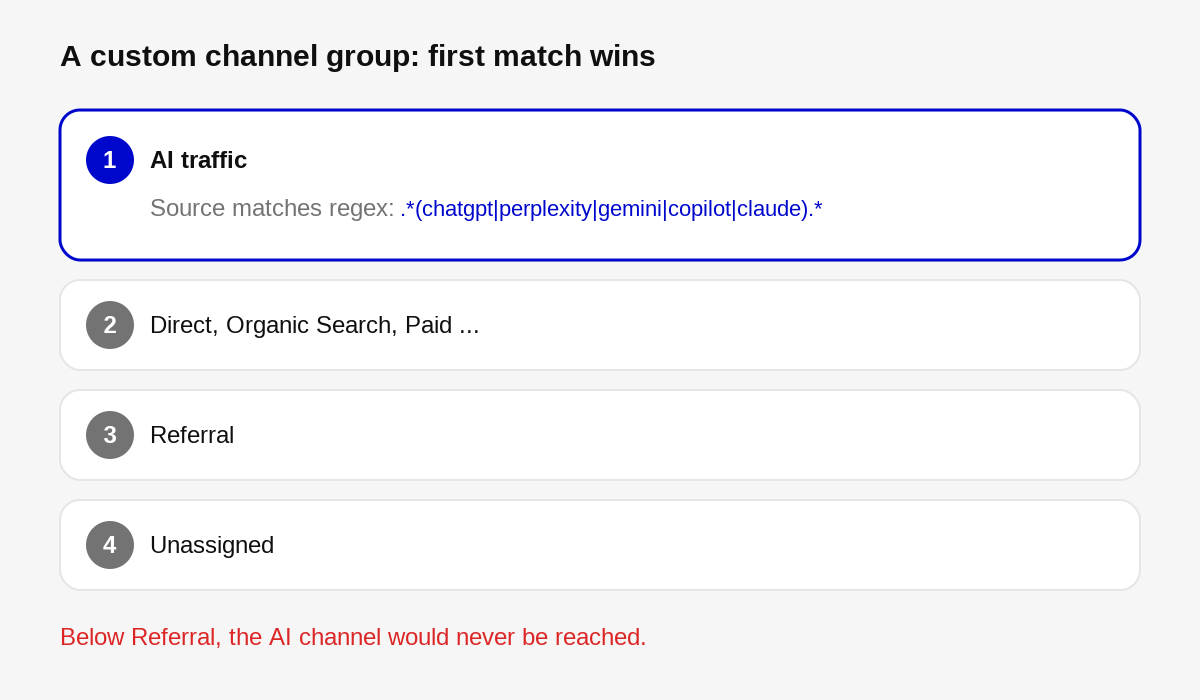
Step 2. Add an AI channel. Name it "AI traffic" and add one condition: Source matches regex:
.*(chatgpt|openai|perplexity|gemini\.google|copilot|claude\.ai|deepseek|grok).*
A regex (regular expression) is a pattern for matching text. The | means "or", and the .* at each end means "anything before or after", so chatgpt.com and chatgpt both match. Add any source name you found in the last section that this pattern misses.
Step 3. Move it above Referral. Traffic goes to the first channel it matches, so order matters. Google's own advice is to place the AI channel above Referral, and possibly above Organic Search [2]. Click Reorder, drag it up, then Apply and Save group [2].
Step 4. Use it in reports. In Traffic acquisition, open the dimension picker and choose your custom group in place of the default one. AI traffic now has its own row, with sessions, engagement and key events next to every other channel.
Judge what AI visits are worth
Counting visits is half the job. The other half is whether those visitors do anything. Two GA4 measures help.
- Engagement rate is the share of sessions that were engaged. GA4 counts a session as engaged if it lasts longer than 10 seconds, has a key event, or has 2 or more page views [7].
- Key events are the actions you mark as important to your business, such as a sign-up or a purchase. You mark an event as key in Admin > Data display > Events by clicking its star [8].
Compare the AI row with Organic Search and Referral over the same dates. A made-up example: a SaaS project-management app sees 340 AI sessions in a month against 9,200 from organic search. The AI sessions have a 71% engagement rate against 58% for organic, and a trial sign-up rate of 3.2% against 1.9%. AI is small, but each visit is worth more, which is a reason to invest in being cited.
| What you see | What it probably means | What to do |
|---|---|---|
| Few AI sessions, high key event rate | Buyers arrive late in their research | Track the prompts that cite you; protect those pages |
| Many AI sessions, low engagement | Answers send people to the wrong page | Check landing pages; make the cited page answer the question fast |
| AI sessions mostly to one page | One page is your AI entry point | Keep it current; link from it to your product pages |
| No AI sessions at all | Not cited, or visits arrive untagged | Check citations first, then Direct trends |
What analytics cannot show you
Every number in this lesson is a floor, not a total. Three gaps stay open whatever you build.
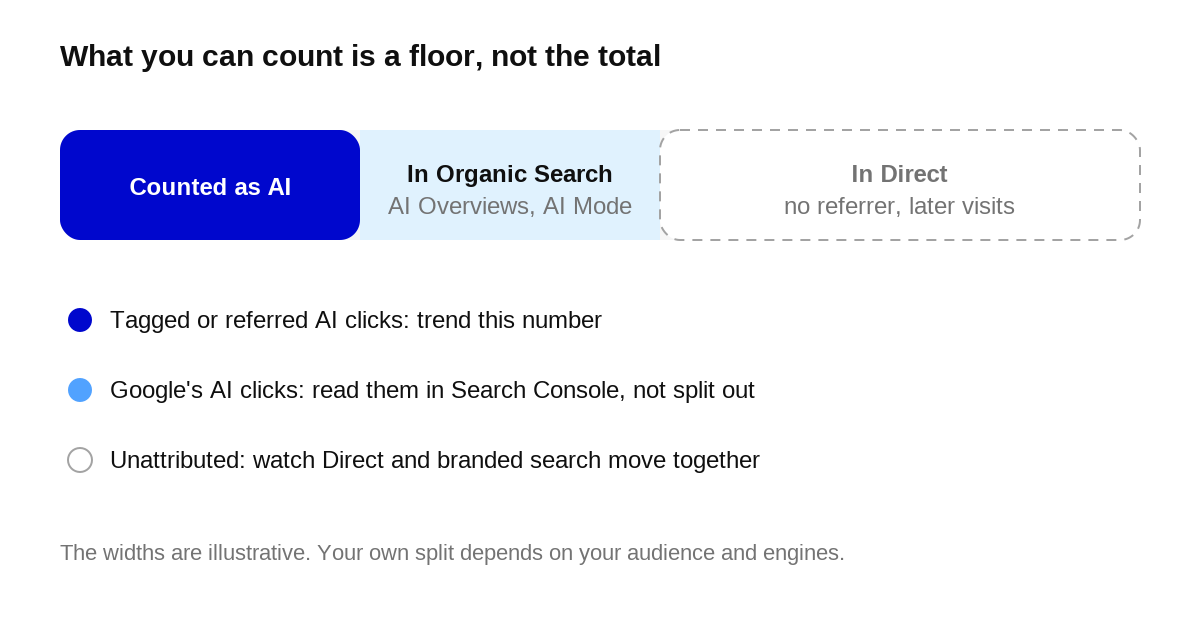
Google's AI clicks are mixed into search. Search Console is Google's free tool for a site's performance in Google Search. Google says clicks from AI Overviews and AI Mode are counted in its Performance report under the Web search type, with the rest of Search [3]. There is no separate AI row, so you cannot subtract them out. Watch the pages you know are cited there instead.
Some AI visits arrive with no referrer. Apps, in-app browsers and some AI browsers strip the referrer. One practitioner's tests found ChatGPT Atlas visits often show as Direct or (not set), and sometimes fail to register at all [5]. That is one person's testing across a few sites, not a measured share.
Many AI visits happen later. A reader sees your name in an answer, then types it into Google next week. That visit is branded organic search or direct, and nothing links it to the answer.
So read the untagged part by trend. If AI answers start naming you and your Direct traffic and branded searches rise at the same time, that is a fair signal, though never proof.
Connect AI traffic to AI visibility
Traffic tells you what happened. AI visibility tracking tells you why. Put them side by side.
In the LLM Brand Tracker, Your pages cited counts how often an engine cited a page on your own domain, and the Citations page lists those pages. Those are the landing pages to watch in GA4.
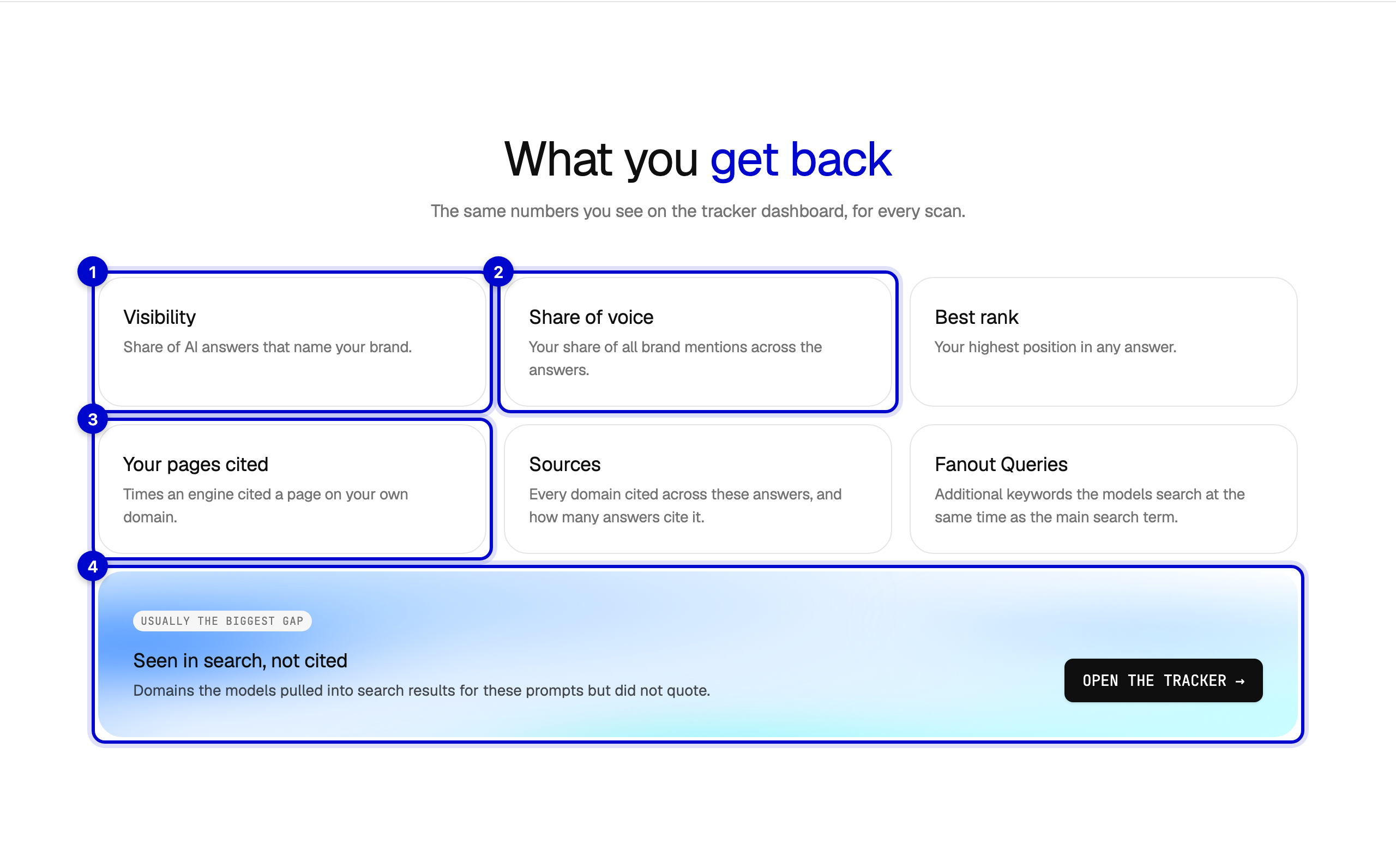
A simple monthly routine:
- In the tracker, list your pages the engines cite, and the prompts they are cited for.
- In GA4, check AI sessions, engagement rate and key events for those landing pages.
- In Search Console, check clicks to the same pages, knowing Google's AI clicks are inside them.
- Compare. A page that gets cited more and gets more AI visits is working. A page that gets cited more but no more visits may be cited without a link worth clicking.
The same numbers in Ask Socrates
Ask Socrates, the chat in Answer Socrates, can read the same Google Analytics data for you once Analytics is connected to your project. It reads only visits that arrived with an AI referrer, so it has the same blind spots as the reports above. Reading Analytics costs nothing.
Ask:
What came back for answersocrates.com on 23 November 2026:
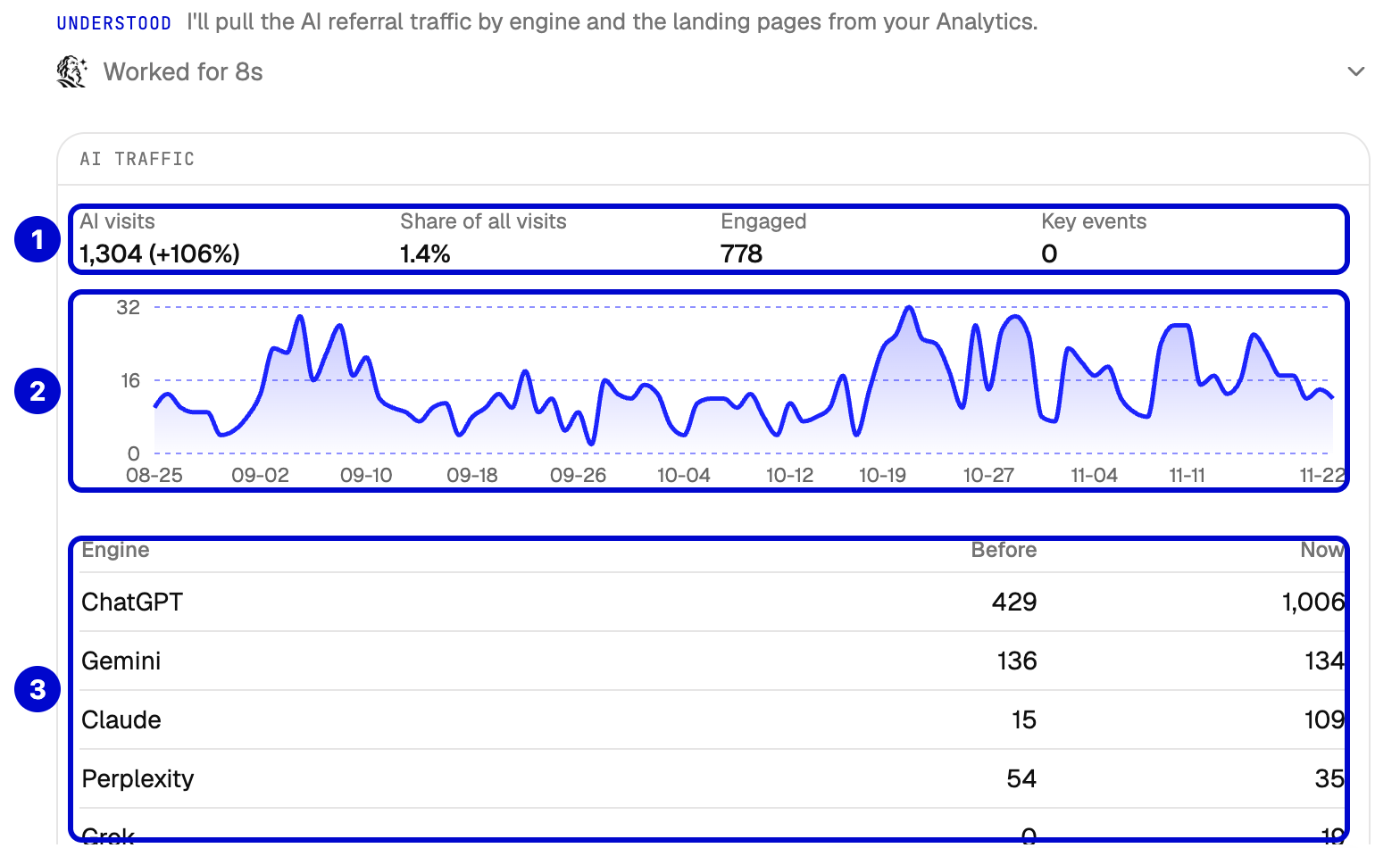
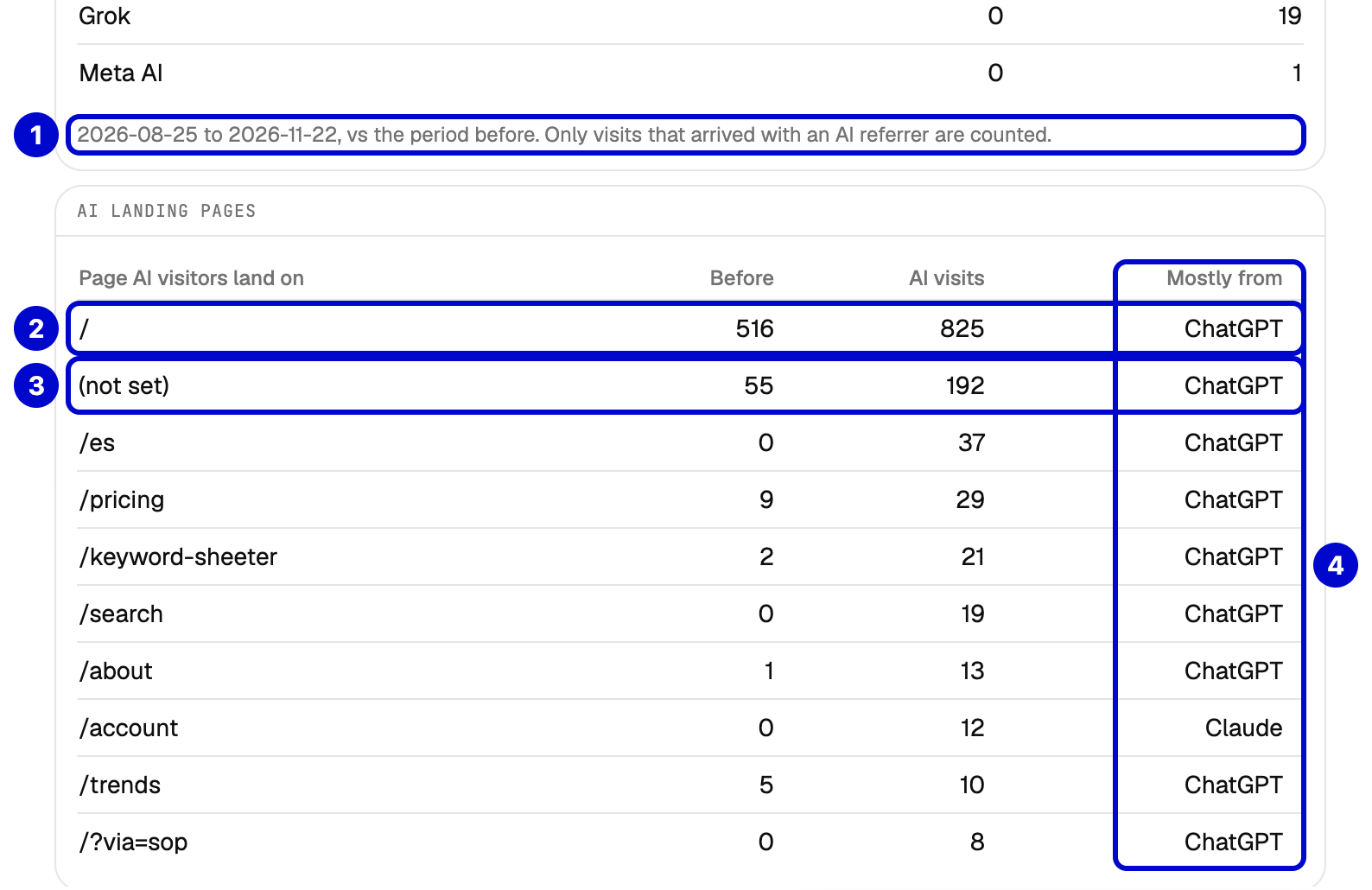
Then ask whether being named in answers is bringing those visits:
The chat sets your AI answer checks beside the AI visits, week by week.
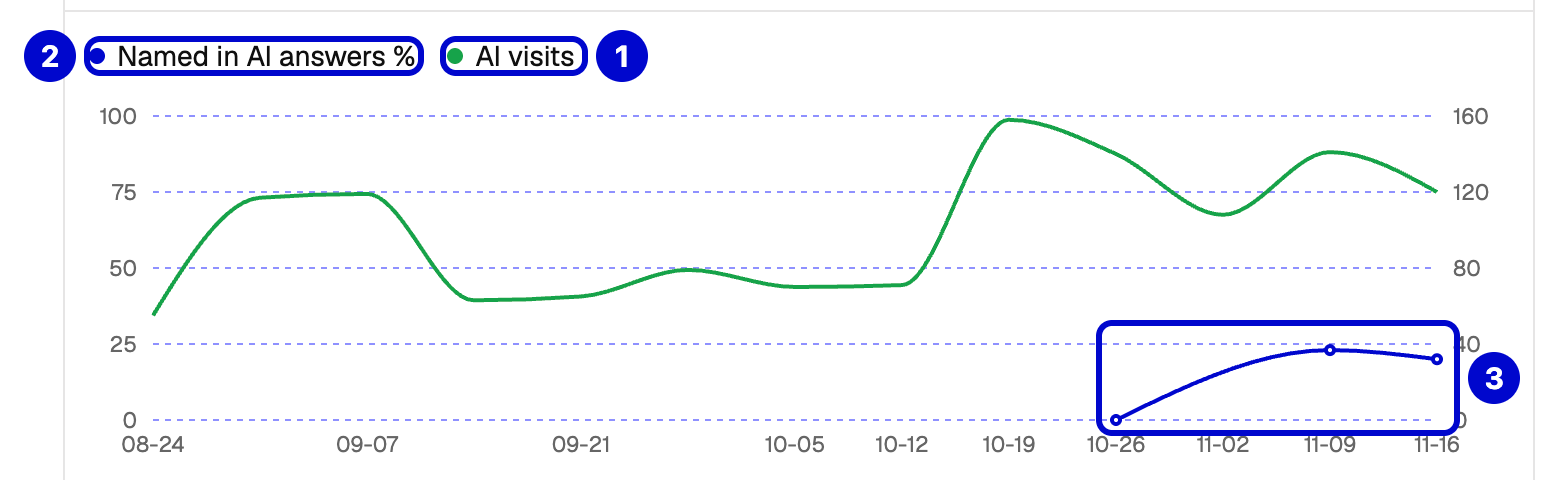
That last answer is the honest one. A few weeks of checks cannot prove cause. Track your key prompts on a schedule, and the chart fills in.
Where to go next
| If you want to... | Read |
|---|---|
| Learn how AI answers pick their sources | What is AI search? ChatGPT, AI Overviews and AI Mode |
| Watch your AI visibility week by week | Tracking AI visibility over time |
| Get more of your pages cited | Getting your pages cited in AI answers |
| See who gets named instead of you | Competitors in AI answers: who gets named instead of you |
| Check whether AI names your brand today | Is AI mentioning your brand? How to check |
Sources
- [GA4] Default channel group, Google Analytics Help, 2026
- [GA4] Custom channel groups, Google Analytics Help, 2026
- AI features and your website, Google Search Central, 2026
- OpenAI Drops UTM Parameters From ChatGPT Results (GPT-6), Search Engine Roundtable, 2026
- How GA4 records traffic from Perplexity Comet and ChatGPT Atlas, MarTech, 2025
- Your AI Traffic Is Hiding: A Practical Guide to Tracking ChatGPT, Claude, and More, Seer Interactive, 2026
- [GA4] Engagement rate and bounce rate, Google Analytics Help, 2026
- [GA4] Mark events as key events, Google Analytics Help, 2026
- [GA4] Traffic acquisition report, Google Analytics Help, 2026
