Connecting Answer Socrates to ChatGPT
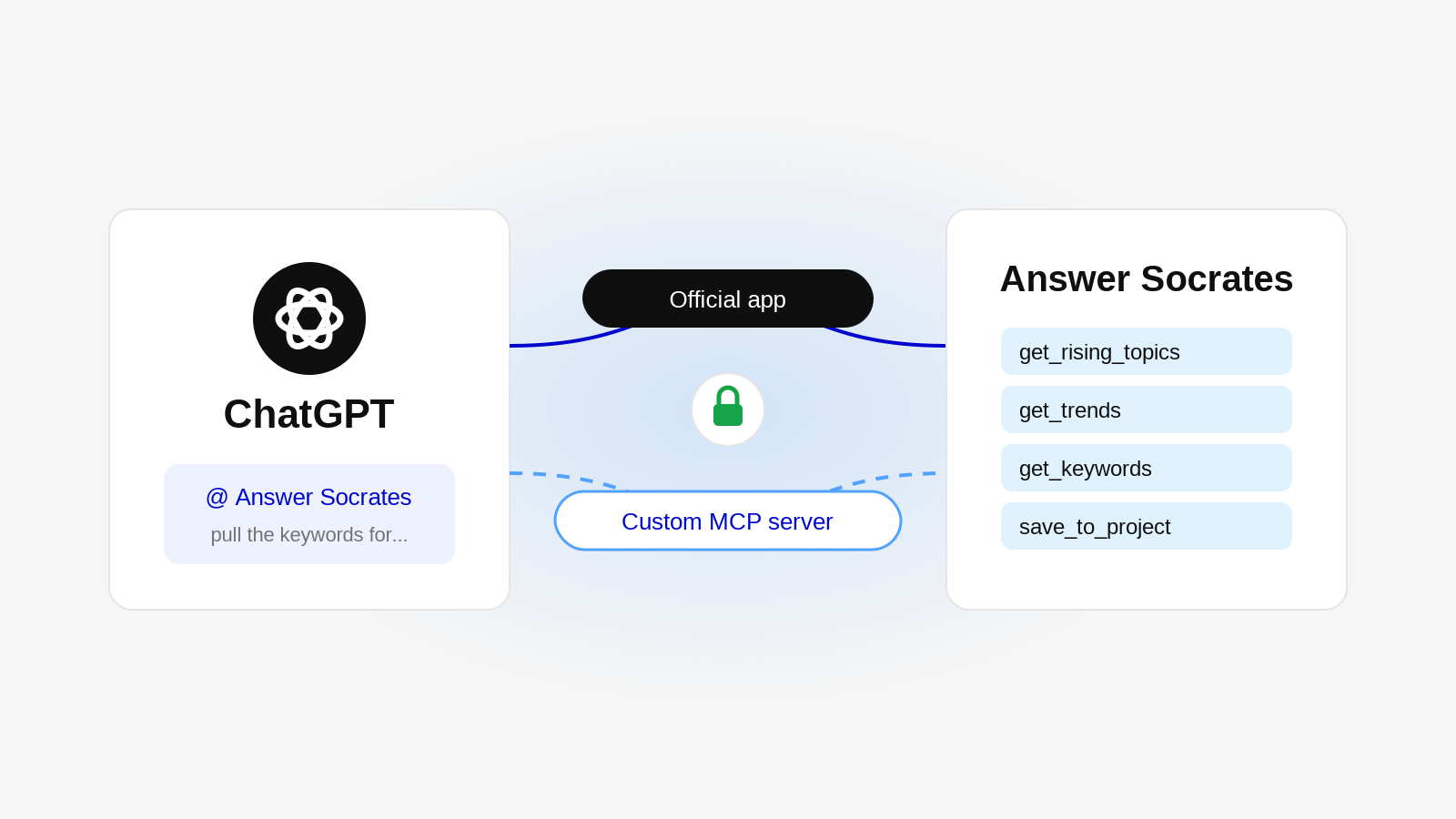
You connect Answer Socrates to ChatGPT by adding our official app from ChatGPT's plugin directory and signing in, or by pasting https://answersocrates.com/api/mcp as a custom MCP server on the web. Once it is on, ChatGPT pulls real Google searches and trends instead of guessing keywords from memory.
Key takeaways
- The official app needs no URL and no API key: open our ChatGPT page, click Get Answer Socrates in ChatGPT, click Connect, sign in and click Allow.
- The official app has 8 tools; a custom MCP server at https://answersocrates.com/api/mcp has all 12, including YouTube, TikTok and Shopping keyword pulls.
- OpenAI gives custom MCP servers full support on Business, Enterprise and Edu, read and fetch only on Pro, and on the web only, not in the mobile apps.
- Every data call costs 1 request: Free and Lite get 3 a month, Seneca 500, Aurelius 2,500 and Senate 25,000. Usage checks and project tools are free.
- If ChatGPT answers without using Answer Socrates, type @ and pick the app again: for custom servers the choice applies to one message at a time.
Two ways to connect Answer Socrates to ChatGPT
ChatGPT calls the outside tools it can use apps or plugins. Answer Socrates is one: once it is connected, you can type "pull the keywords for cold brew" and ChatGPT fetches real Google searches instead of guessing from what it learned in training.
Under the hood it is an MCP server, a service that speaks the Model Context Protocol, the shared standard AI apps use to call outside tools. If that is new to you, read What is MCP? A plain-words guide for SEOs first. This lesson is only the setup.
There are two ways in, and they reach the same account:
- The official app. Answer Socrates is listed in ChatGPT's plugin directory. You click Connect, sign in and click Allow. No URL and no API key.
- A custom MCP server. You paste
https://answersocrates.com/api/mcpinto ChatGPT on the web. It takes a minute longer, needs a ChatGPT plan that allows custom servers, and gives you every tool we have.
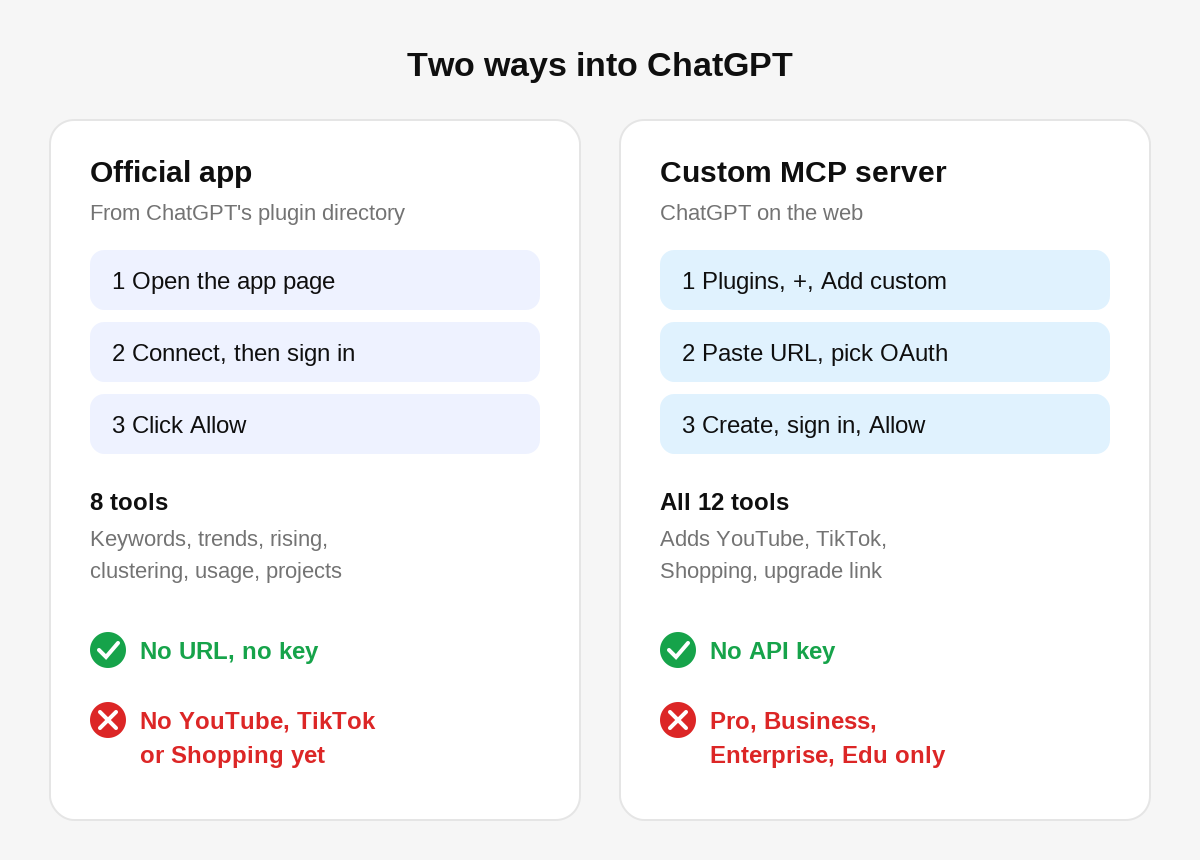
The official app has 8 tools: keywords, Google Trends, rising topics, clustering, your usage and the three project tools. The YouTube, TikTok and Shopping pulls and the upgrade link are not in it yet. We add new tools to the listed app only after OpenAI has reviewed them. The custom server gives you all 12.
Before you start: the plans on both sides
You need an Answer Socrates account. If you do not have one, the sign-in step during setup creates a free one, with no card needed.
The connection runs on its own request allowance, separate from the searches you run inside the app. Every data call costs 1 request: one keyword pull, one trend line, one rising-topics check. Checking your usage and saving to projects cost nothing.
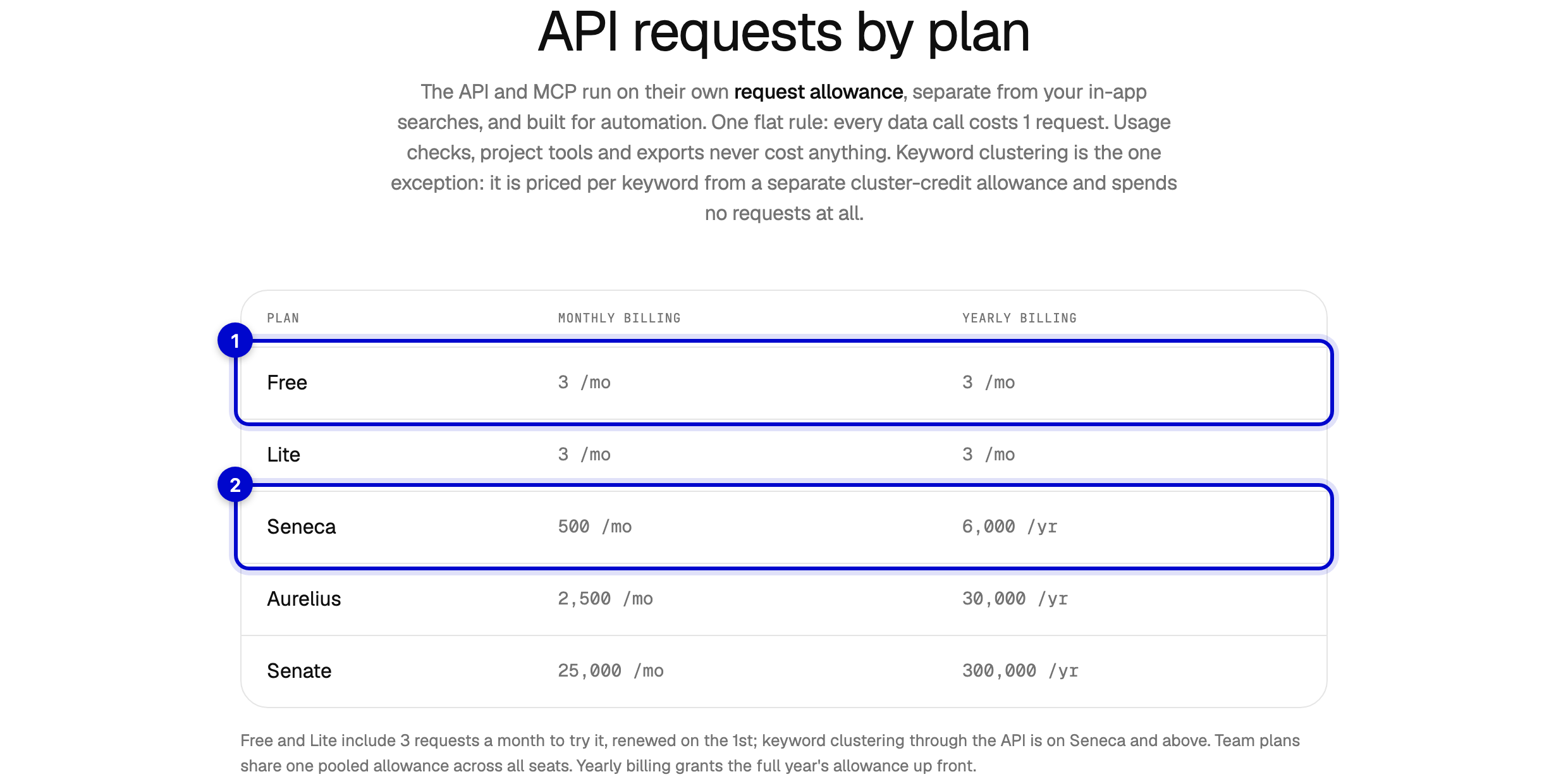
Free and Lite get 3 requests a month, Seneca 500, Aurelius 2,500 and Senate 25,000 (monthly billing). Clustering is the one exception: it spends topic cluster credits, 1 per keyword, and no requests, and through ChatGPT it is only on Seneca and above.
On the ChatGPT side, what you can add depends on your plan. OpenAI says custom MCP servers have full support on Business, Enterprise and Edu, while Pro users can connect them "with read/fetch permissions" only [1]. Custom servers work on the web only, not in the mobile apps [1]. For listed apps, OpenAI says availability "depends on the app, your ChatGPT plan, region, workspace, role, model" and interface [2], so the quickest check is to open our app page and see if Connect is offered.
| Your situation | Use |
|---|---|
| Any ChatGPT plan where the app page offers Connect | The official app |
| You want YouTube, TikTok or Shopping keywords in ChatGPT | A custom MCP server (Pro, Business, Enterprise or Edu) |
| ChatGPT Pro and you want to save to projects or cluster | The official app, because Pro custom servers are read only [1] |
| A Business, Enterprise or Edu workspace that hides the directory | Ask an admin to allow the app or add the custom server [1] |
| No ChatGPT plan that fits | Claude or Ask Socrates instead |
The Pro row matters because three of our tools write to your account: save_to_project, create_project and cluster_keywords (it saves each run to your history). We mark them as write tools, so on a read-only custom connection they may not be available.
How to add the official Answer Socrates app
This is the main path, and the one we recommend.
1. Open the app page. Go to the Answer Socrates ChatGPT page and click Get Answer Socrates in ChatGPT. It opens our listing in ChatGPT. You can also find it yourself: OpenAI's help page says to open Settings, then Plugins, and select the app [2]. Our MCP page still calls this list Apps, its older name.
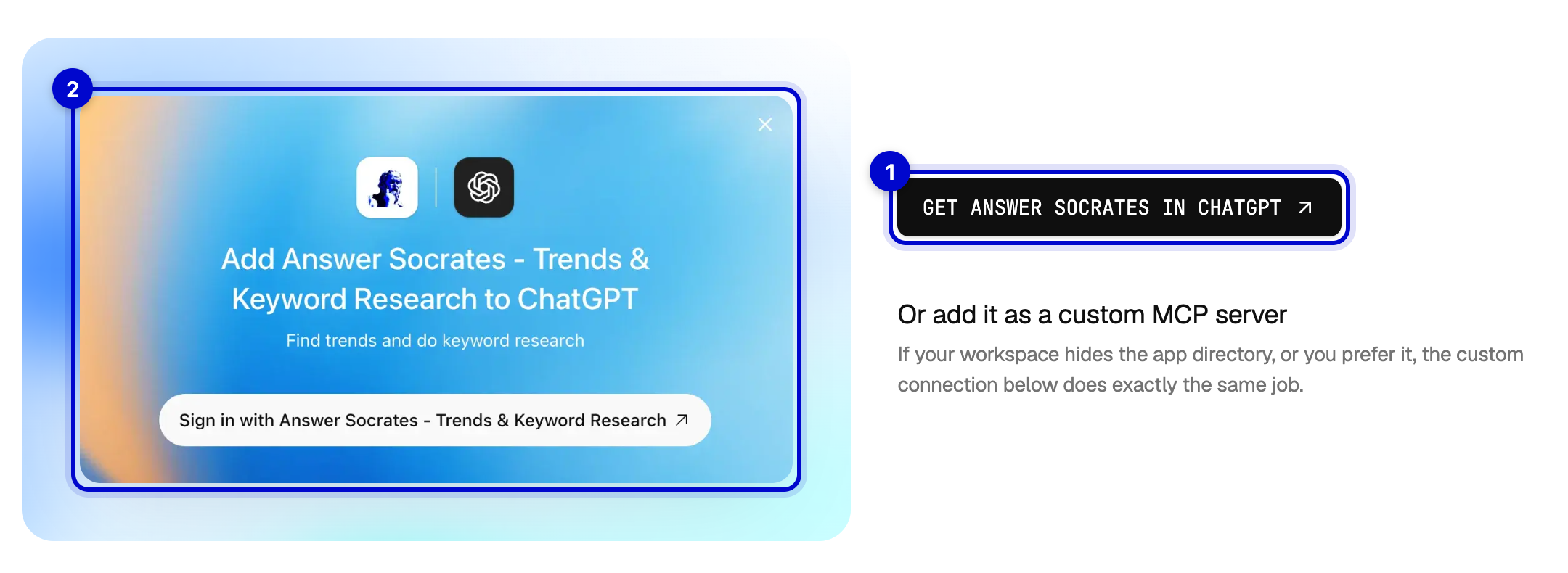
2. Click Connect, then sign in. ChatGPT shows the app's own dialog, titled "Add Answer Socrates - Trends & Keyword Research to ChatGPT". If ChatGPT shows Install plugin first, click it, then Connect [2]. Click the sign-in button at the bottom.
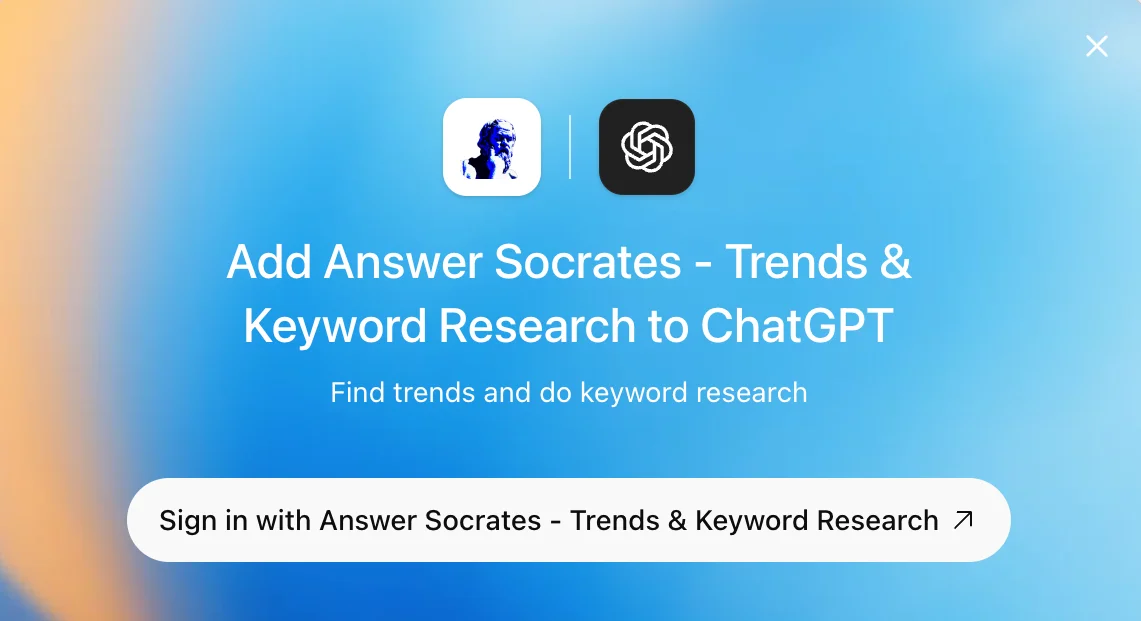
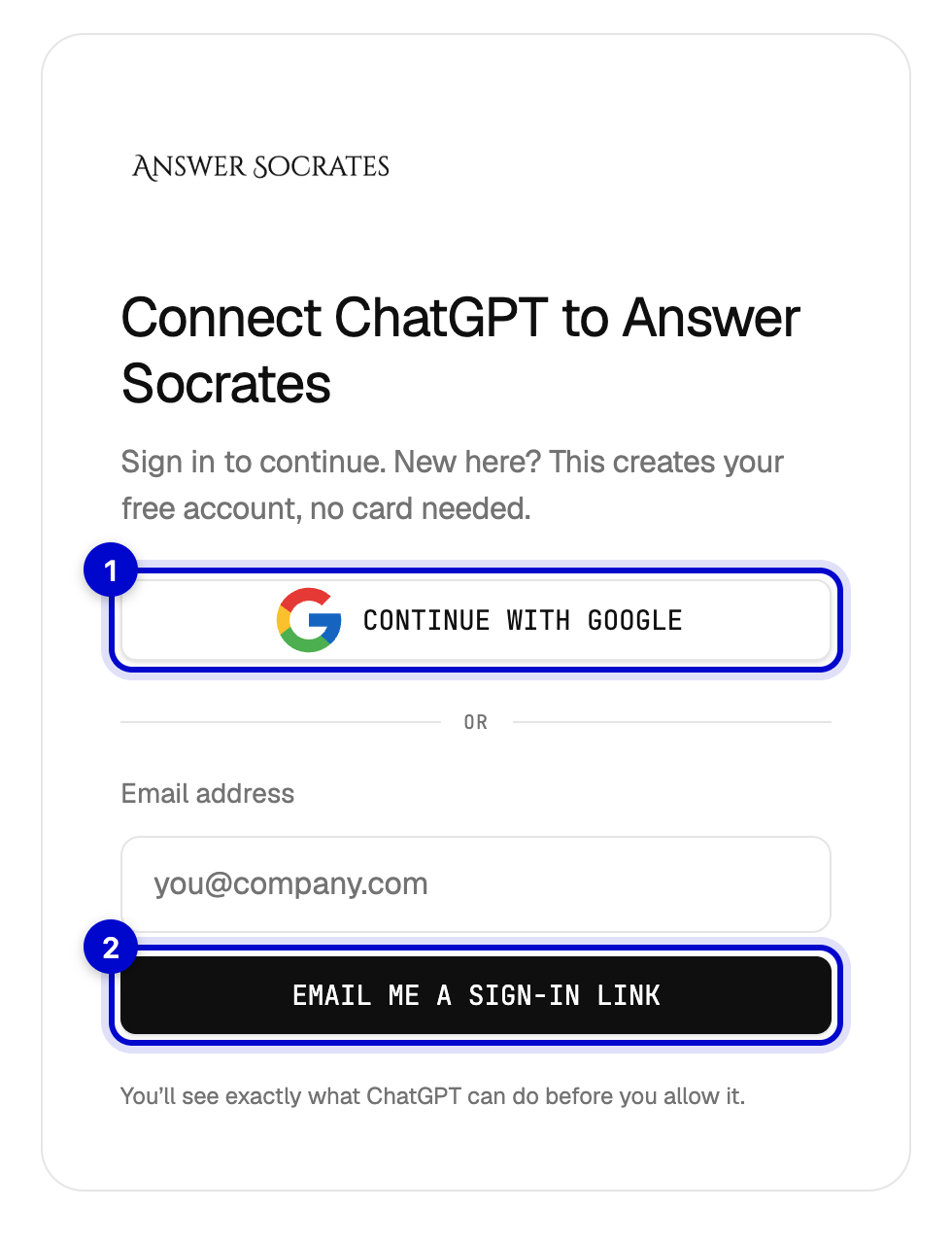
3. Sign in to Answer Socrates. A browser tab opens on our sign-in step. Use Google or ask for an emailed sign-in link. A new email address creates a free account here.
4. Click Allow. The next screen lists what ChatGPT will be able to do and what it cannot. It cannot see your password or payment details, delete projects or change your plan. Click Allow and you go back to chatgpt.com.
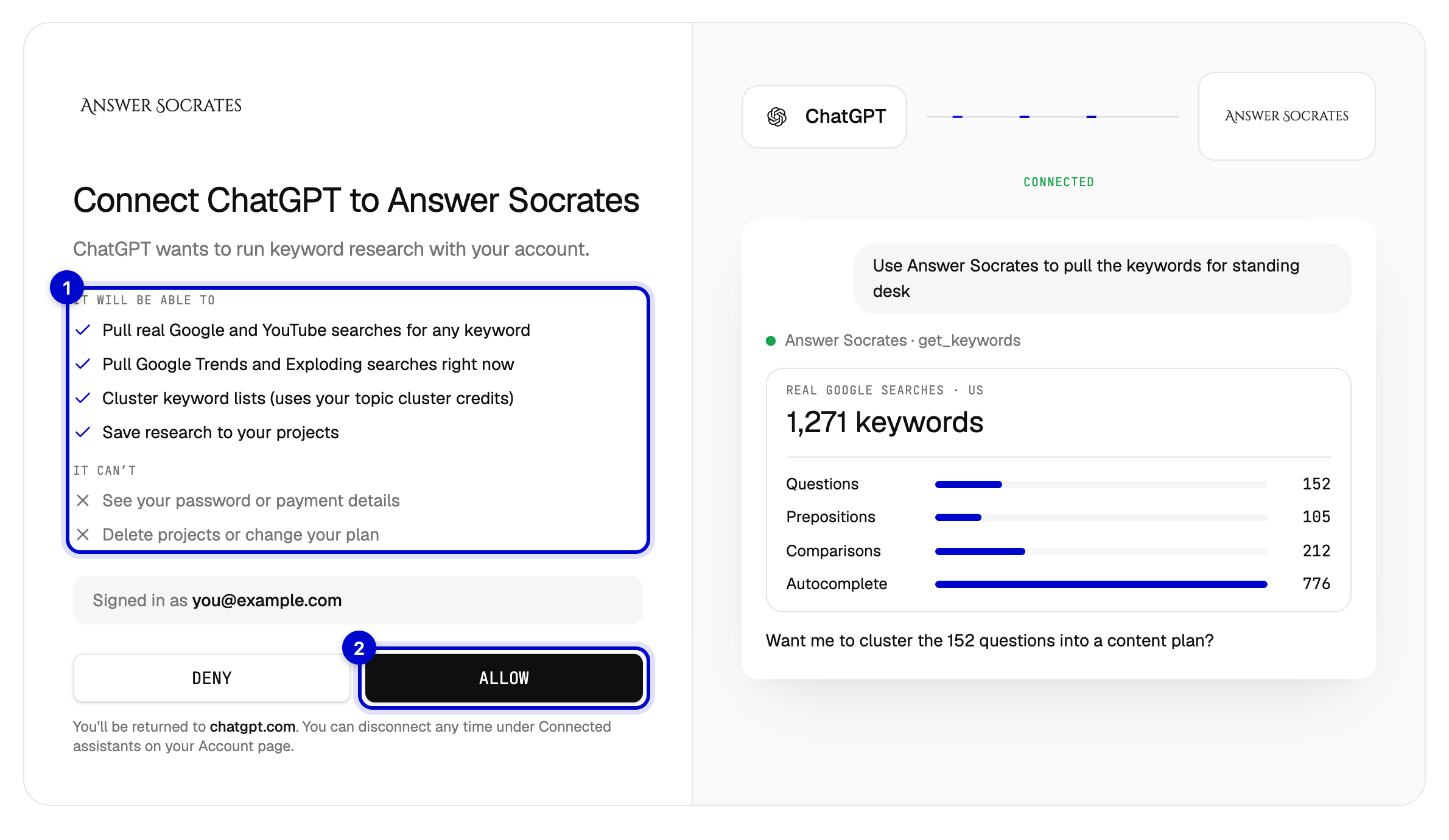
The consent list mentions YouTube searches because it is the same screen for every assistant. In the official ChatGPT app, YouTube pulls are not available yet.
5. Use it in a chat. Start a chat, type @ and pick Answer Socrates, or click + and choose it from the menu [2]. You can also just ask, and ChatGPT may pick the app by itself.
How to add it as a custom MCP server
Use this path if you need all 12 tools, or your workspace has no access to the directory. It works in ChatGPT on the web. You do not need to switch on developer mode first [1].
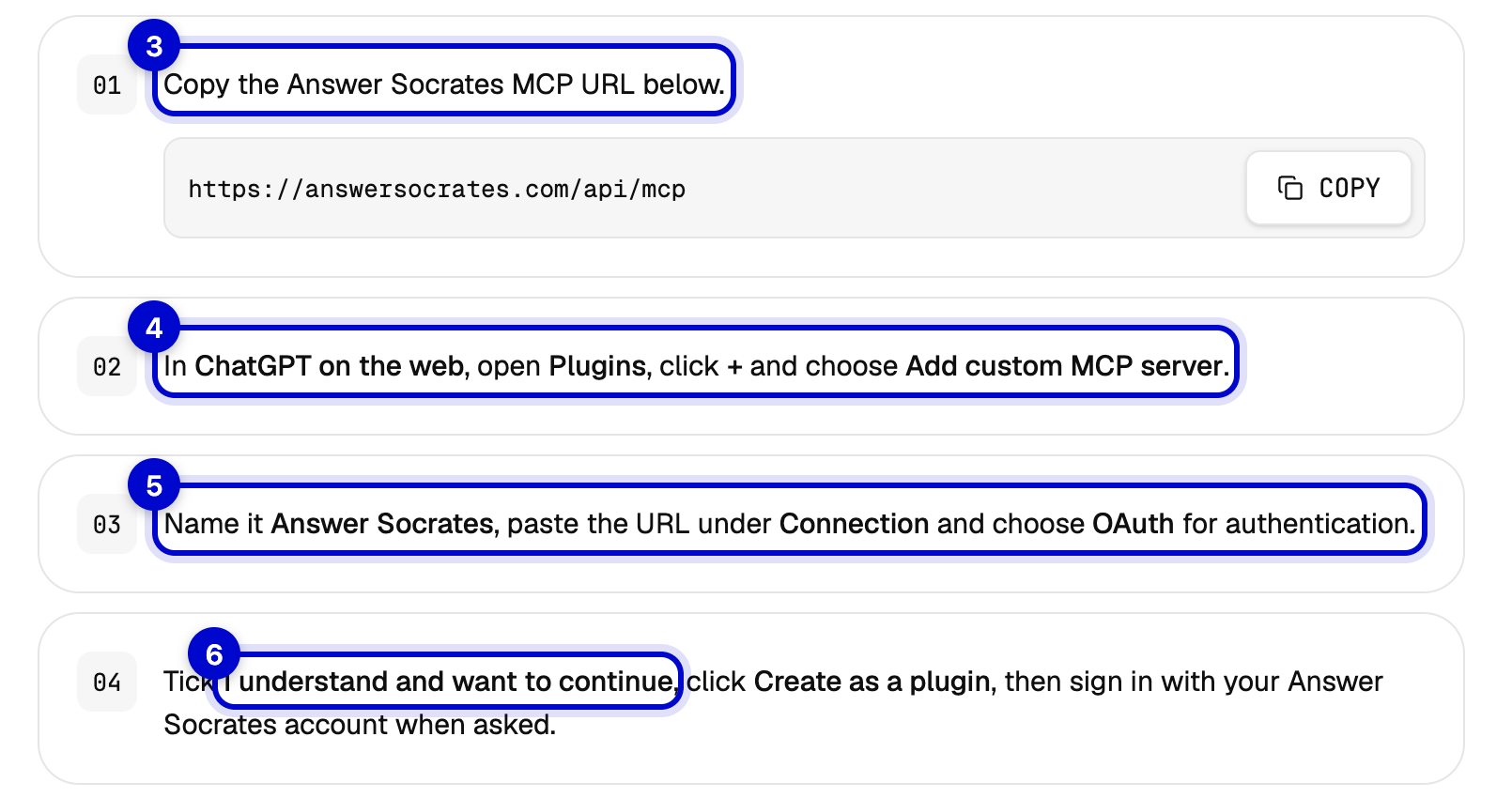
1. Copy the server URL. On the ChatGPT page, under "Or add it as a custom MCP server", click Copy next to https://answersocrates.com/api/mcp.
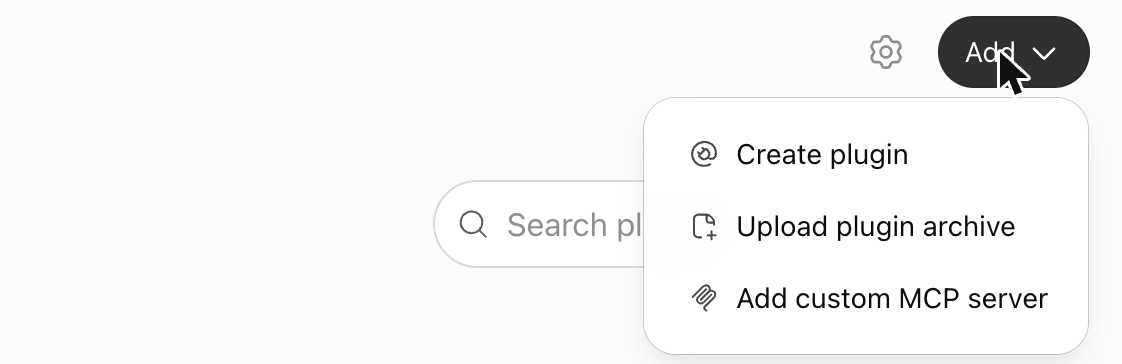
2. Open the custom server form. In ChatGPT on the web, open Plugins in the sidebar, click Add at the top right and choose Add custom MCP server [1]. When we checked on 23 November 2026 the option also showed on a Free account, so try it before you assume your plan blocks it.
3. Fill it in. Name it Answer Socrates. Under Connection, paste the URL. For authentication, choose OAuth. Leave the rest as ChatGPT finds it: our server tells ChatGPT where the sign-in page is.
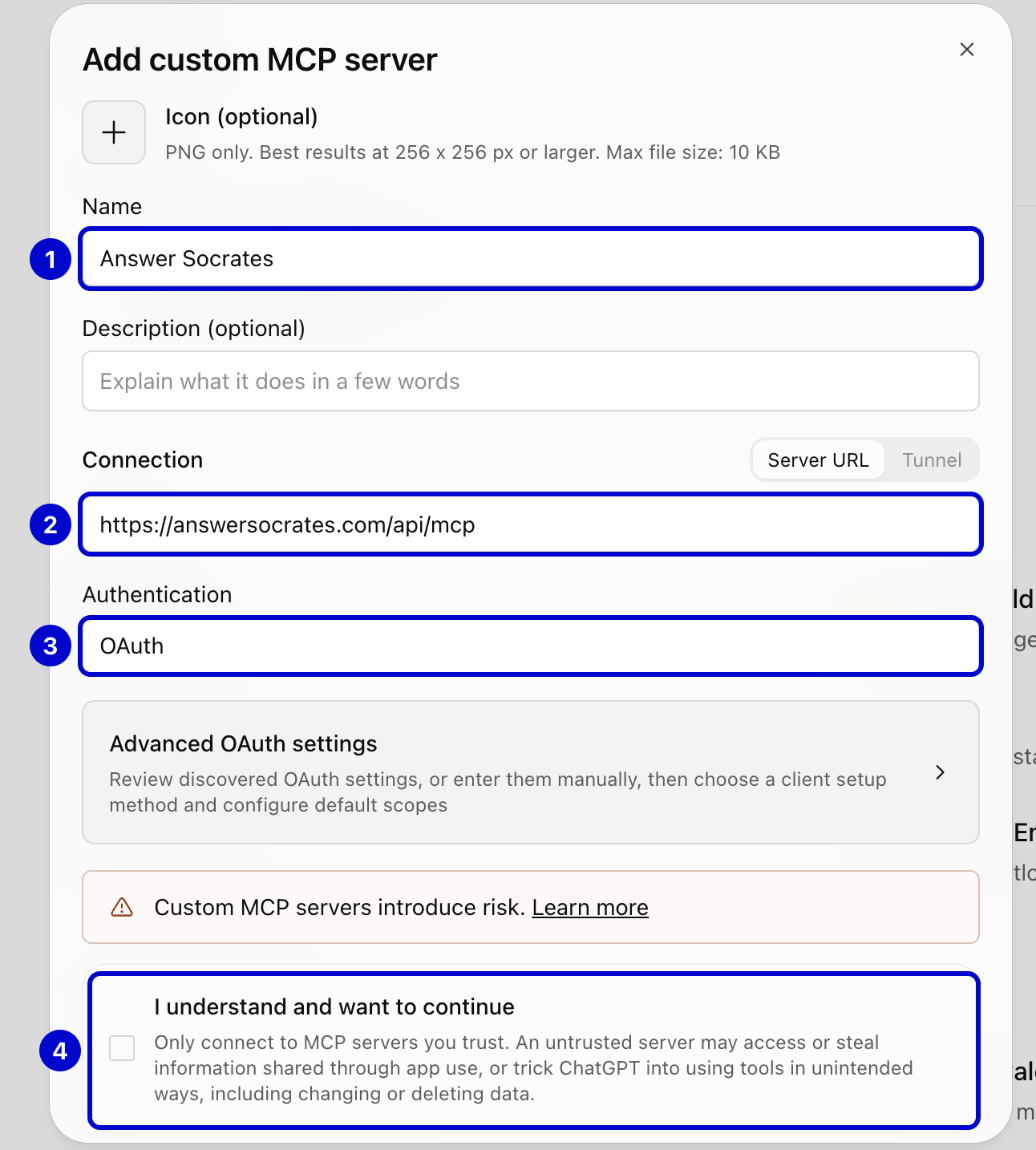
4. Accept the warning and create it. Tick I understand and want to continue, then click Create as a plugin [1]. ChatGPT lists the tools it found. You then sign in and click Allow on the same two screens as the official app.
5. Mention it in each message. For a custom server, OpenAI says app selection applies to that message only, so you @mention it again for follow-ups that need new data [1].
On a Business plan, only admins and owners can create and publish plugins for custom MCP servers [1]. On Enterprise and Edu, admins can let selected members create them [1]. If you cannot see Add custom MCP server, ask your admin.
Your first prompt, and what comes back
You do not need to name tools. Answer Socrates tells ChatGPT what each tool does, and ChatGPT picks.
ChatGPT calls get_keywords and gets back everything Google Suggest returns around the term, grouped into four sets: Questions (who, what, why, how), Prepositions (for, with, near), Comparisons (vs, or, and) and Autocomplete, the raw a to z list. Some pulls add a small time-based group too.
Here is a real pull in ChatGPT for "creatine gummies": 1,221 searches from one prompt, with the count per group, then the opportunities ChatGPT picked out of them.
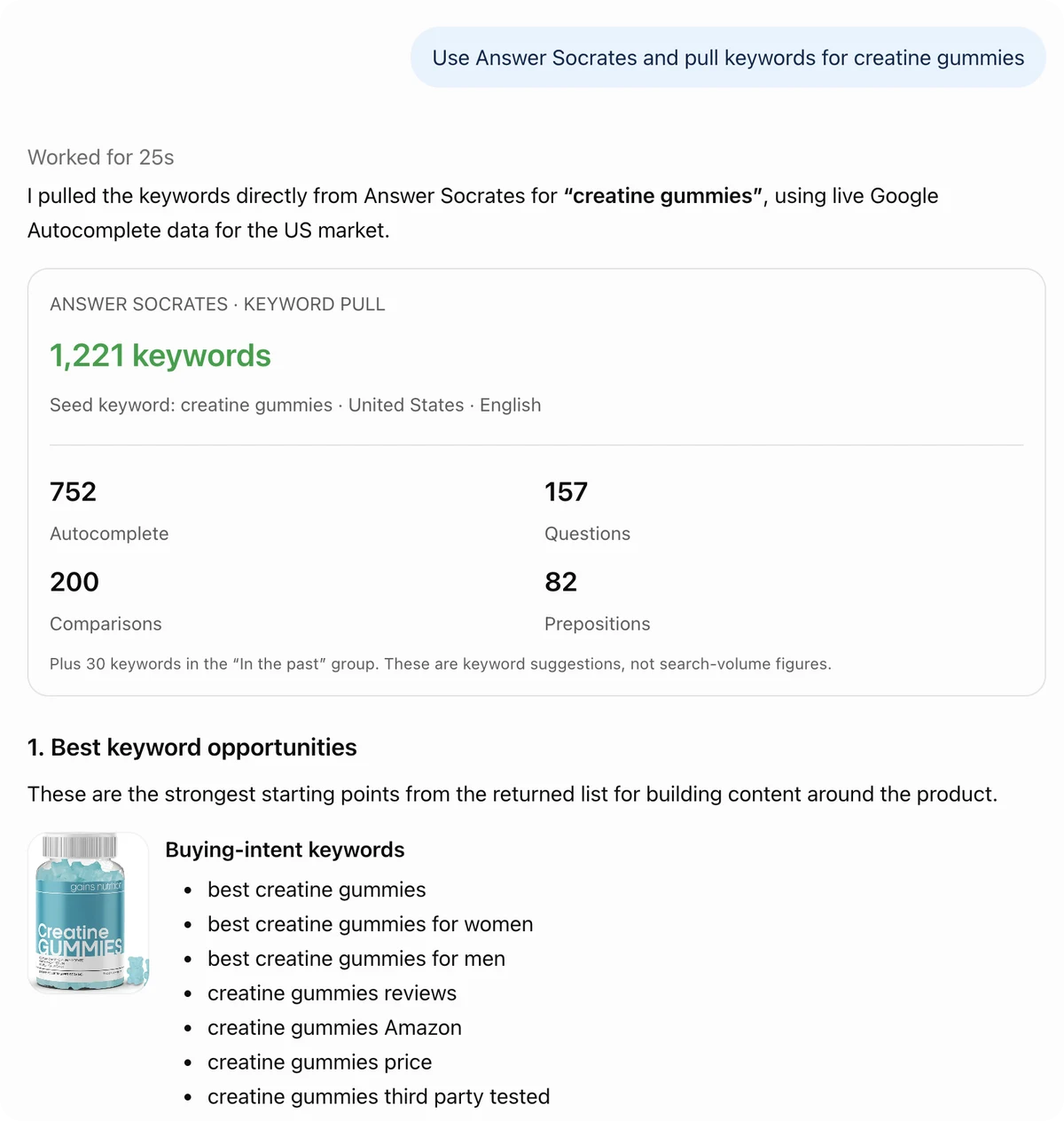
There are no search volumes in this data. It shows what people type, not how often. If ChatGPT adds a monthly volume, that number did not come from us.
A made-up example: a coffee roaster in Leeds plans its summer blog. In one chat they ask what is rising around cold brew in the UK, compare the top three terms over 12 months, pull the keywords for the winner, turn them into a table and save them to their Blog project.
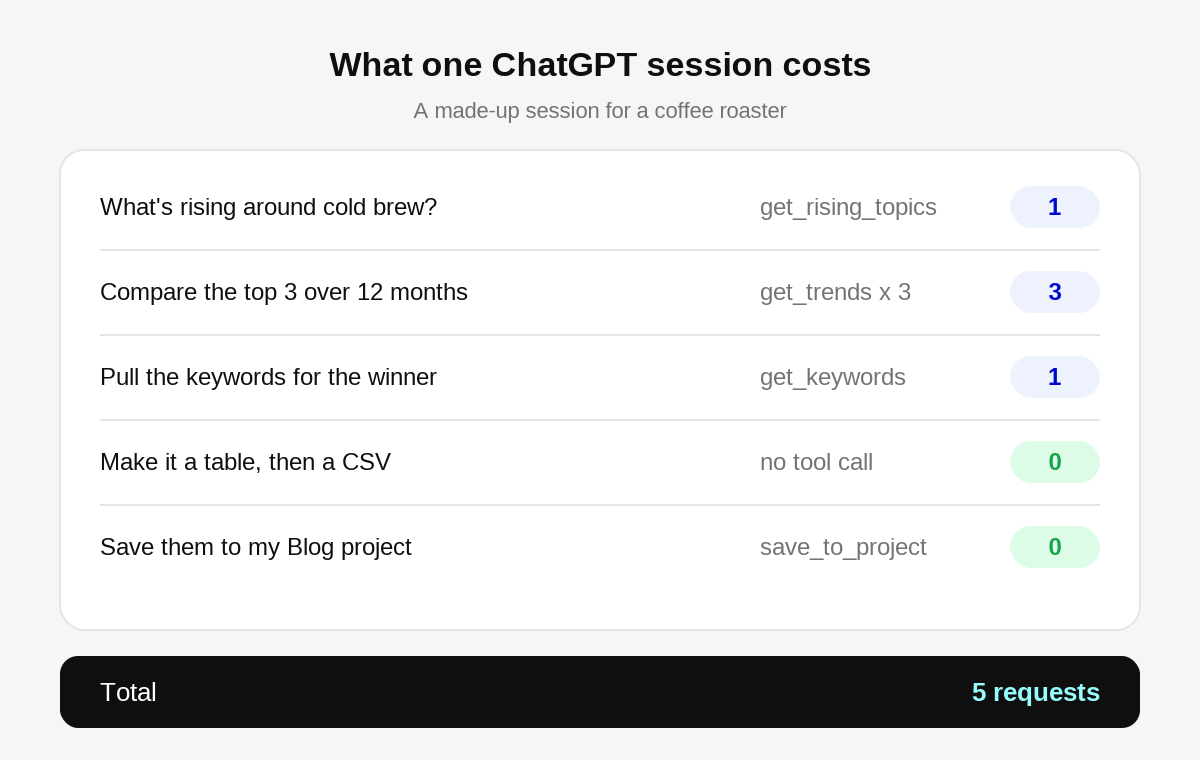
That is 5 requests. On a free account with 3, ask for one keyword pull first so you see real results before the allowance runs out.
Prefer no setup at all? Ask Socrates, the chat inside Answer Socrates, runs the same keyword, trends and rising-topics tools and saves to your projects, with nothing to connect.
What ChatGPT can and cannot do with it
This table shows which tools each path has and what each one costs.
| What you ask for | Tool ChatGPT calls | Official app | Custom server | Cost |
|---|---|---|---|---|
| Keywords for one term | get_keywords | Yes | Yes | 1 request |
| Rising searches around a topic | get_rising_topics | Yes | Yes | 1 request |
| 12 months of Google Trends | get_trends | Yes | Yes | 1 request per keyword |
| Group a list into topics | cluster_keywords | Yes | Yes | 1 cluster credit per keyword (Seneca and above) |
| YouTube, TikTok or shopping keywords | get_youtube_keywords, get_tiktok_keywords, get_shopping_keywords | Not yet | Yes | 1 request each |
| "How many requests do I have left?" | get_usage | Yes | Yes | Free |
| List, create or save to projects | list_projects, create_project, save_to_project | Yes | Yes | Free |
| An upgrade link | get_upgrade_link | No | Yes | Free |
ChatGPT has its own safety layer on top. OpenAI says it "may ask for approval before reading information or completing an action," and you can set an app to Always ask, Allow low-risk actions or Allow all actions [2]. Saving to a project is a write, so with the default setting expect a confirmation first.
When it goes wrong: fixes for common errors
Most problems are one of these. The error text is what our server sends back, so ChatGPT usually repeats it to you.
| What you see | Likely cause | Fix |
|---|---|---|
| No Connect button on the app page | Your plan, region or workspace does not allow it [2] | Try the custom server, or ask your workspace admin |
| No Add custom MCP server option | Your plan does not include custom servers, or you are on mobile [1] | Use the official app, or switch to ChatGPT on the web |
| ChatGPT answers but never calls Answer Socrates | The app is not selected for this message | Type @ and pick Answer Socrates again [1] |
| "Monthly API quota exceeded..." or "You've used this month's 3 API requests..." | The request allowance is spent | Ask "how many requests do I have left?" (free). Free and Lite renew on the 1st, paid plans with the billing period |
| "Keyword clustering through the API is included on Seneca plans and above" | Clustering is not in the Free and Lite allowance | Use a paid plan, or cluster inside the app with the clustering tool |
| ChatGPT says it has no YouTube tool | You are on the official app | Add the custom server, or pull YouTube keywords in the app |
In the official app, quota messages point you to our pricing page rather than an upgrade link.
To cut the connection, open your Answer Socrates Account page and click Disconnect next to ChatGPT under Connected assistants. You can also disconnect it in ChatGPT under Settings, then Plugins [2].
Where to go next
| If you want to... | Read |
|---|---|
| Understand what MCP is and why it matters | What is MCP? A plain-words guide for SEOs |
| Set up the same thing in Claude | Connecting Answer Socrates to Claude |
| Get better results with better prompts | Keyword research from inside Claude |
| Turn a keyword pull into an ordered plan | Building a content plan with an AI agent |
| Check the output before you trust it | Where AI agents get SEO wrong |
| Call the same data from scripts | Using the Answer Socrates API |
Sources
- Developer mode and MCP apps in ChatGPT, OpenAI Help Center, 2026
- Connected apps in ChatGPT, OpenAI Help Center, 2026
