What is MCP? A plain-words guide for SEOs
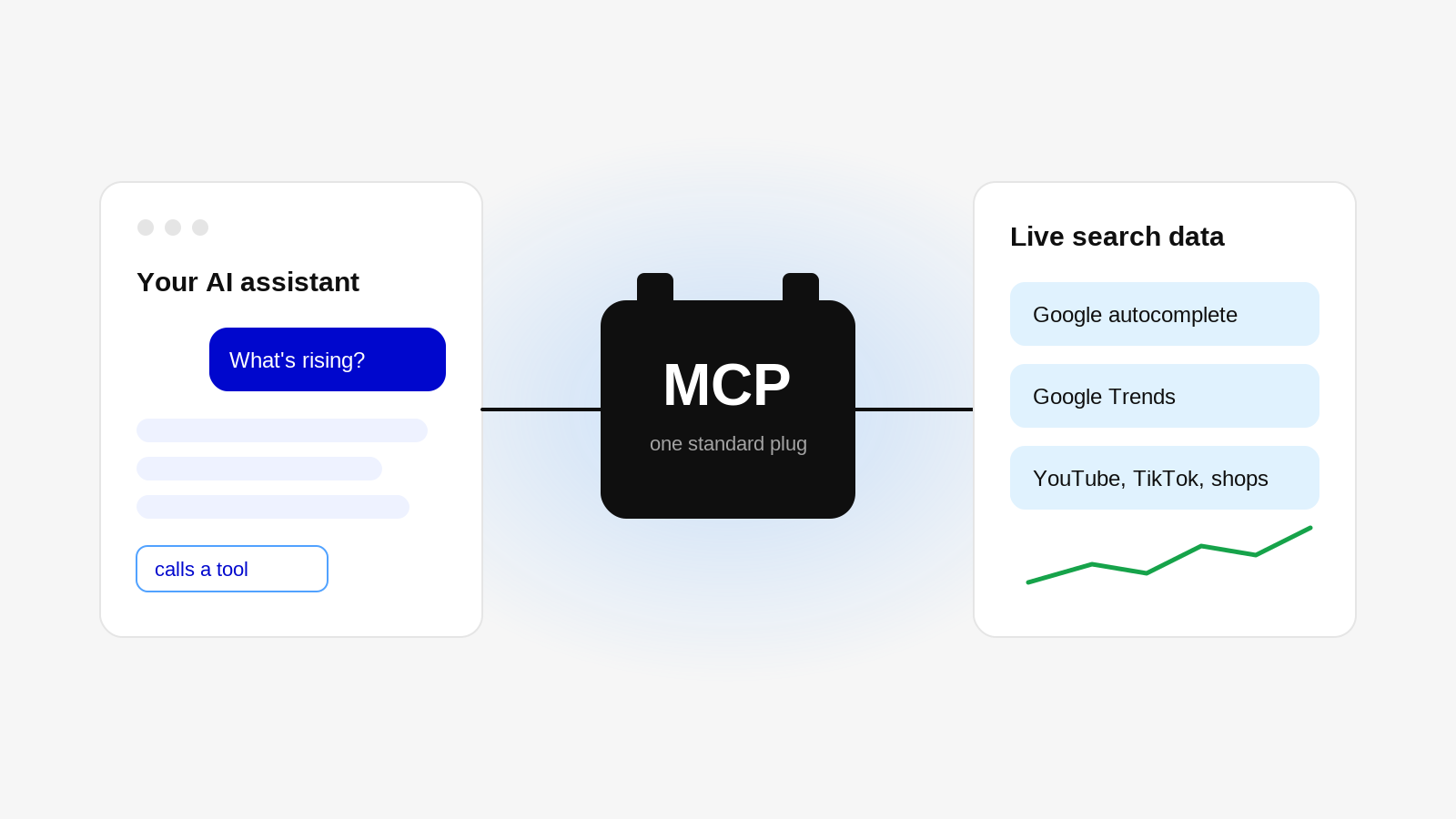
MCP (Model Context Protocol) is an open standard that lets AI assistants like Claude and ChatGPT call outside tools, such as a keyword database, in the middle of a chat. For SEO it means your assistant can answer from live search data instead of its memory, which is out of date and invents numbers.
Key takeaways
- MCP has three parts you need to know: the assistant (host), the MCP server, and the tools the server offers, which the assistant chooses to call by itself.
- An assistant without tools answers from training data, so it guesses search volumes; with MCP it can fetch real Google autocomplete phrases and 12 months of Google Trends when you ask.
- The Answer Socrates server has 12 tools, including get_rising_topics, get_trends, get_keywords and cluster_keywords, and every data call costs 1 request from your API allowance.
- Clustering is priced separately at 1 topic cluster credit per keyword (10 to 1,000 per call), while usage checks and project tools are free.
- The assistant can spend your allowance and save to projects, but it cannot delete projects, charge your card or edit your site, and you can disconnect it from your Account page.
MCP is a standard plug between AI and outside tools
MCP (Model Context Protocol) is an open standard for connecting AI apps to outside systems: files, databases, search engines and other tools [1]. Anthropic released it as open source in November 2024 [4], and Claude, ChatGPT, VS Code and Cursor are among the apps that support it today [1].
The official docs describe it as a USB-C port for AI [1]. Before USB-C, every device needed its own cable. Before MCP, every AI app needed its own custom link to every tool. Now a tool maker builds one MCP server, and any assistant that speaks MCP can use it.
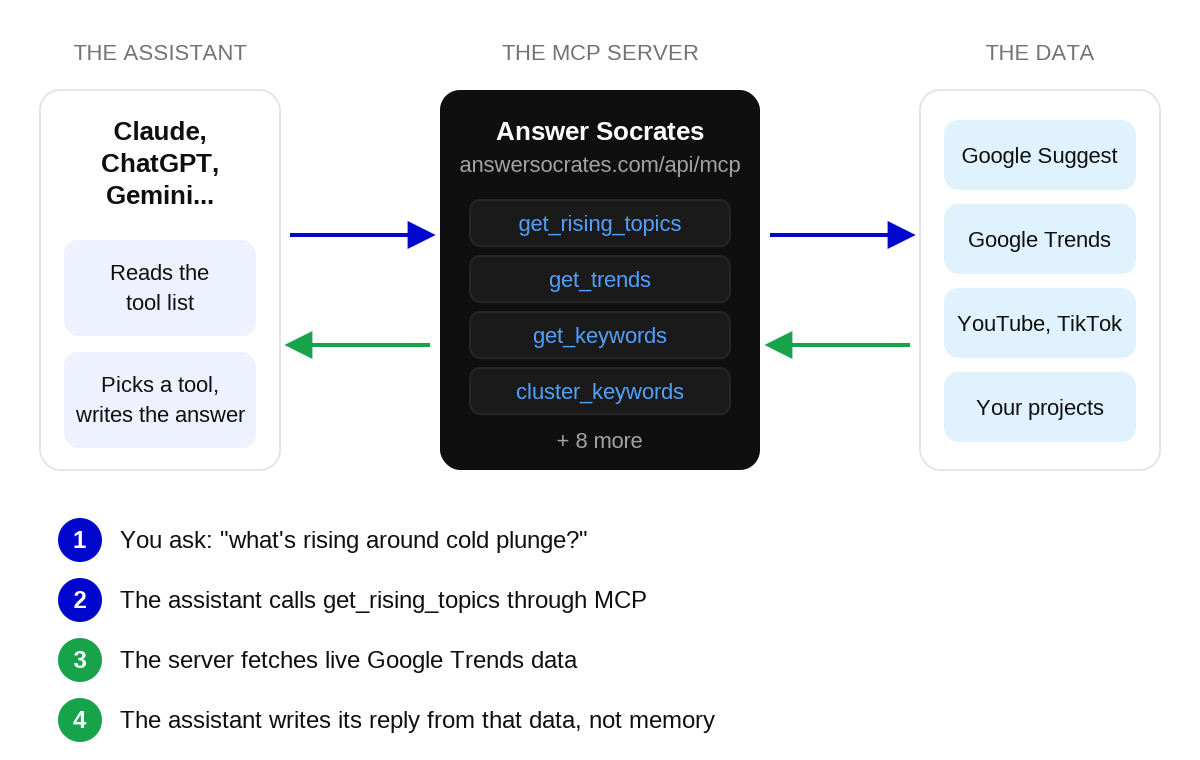
Here is the loop in one sentence: you ask a question, the assistant sees it needs data, it calls a tool on the MCP server, the server fetches the data, and the assistant writes its reply from what came back.
Three parts: the assistant, the server and the tools
MCP has a small vocabulary. You only need four words to follow any setup guide.
| Word | What it means | Example |
|---|---|---|
| Host (the assistant) | The AI app you chat with | Claude, ChatGPT, Gemini, Cursor |
| MCP server | A program that offers tools to assistants | The Answer Socrates server at answersocrates.com/api/mcp |
| Tool | One action the server can run, with a name and inputs | get_keywords with the input "cold plunge" |
| Prompt | A saved instruction the server ships, which you can run as a command | keyword_research |
The official architecture page calls the assistant the "host", and says the host keeps one connection per server [2]. A server can run on your own computer or on the web. Ours is a remote server: you connect over the internet and sign in, and nothing gets installed.
Tools are the part that matters for SEO work. The spec says tools are "model-controlled" [3]: the assistant reads each tool's name and description and decides by itself when to call one. That is why the descriptions on a good server read like instructions. They tell the model when a tool fits and what it costs.
Why SEOs should care: memory is stale and makes up numbers
An AI model on its own answers from what it learned in training. That knowledge stops at a cutoff date, and it never held live search data in the first place. Ask a plain assistant for "monthly search volume for cold plunge tub" and it will often give you a confident number. It has no way to know that number, so it is a guess dressed up as data.
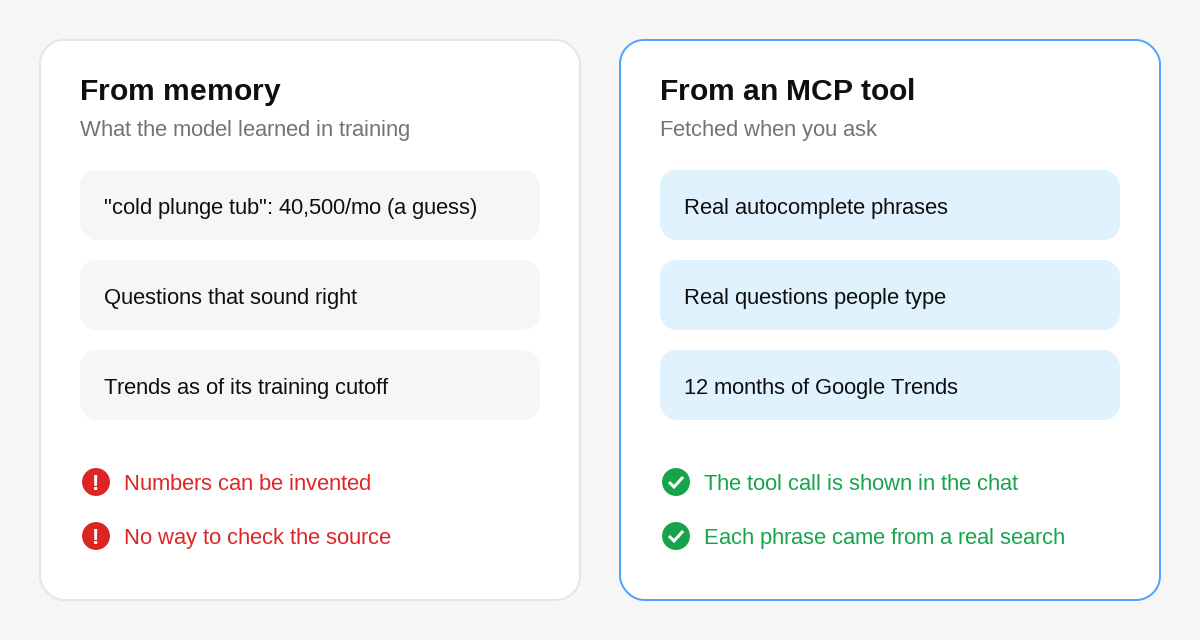
With an MCP connection, the assistant can fetch the real thing at the moment you ask. Our MCP page puts the difference in a simple table.
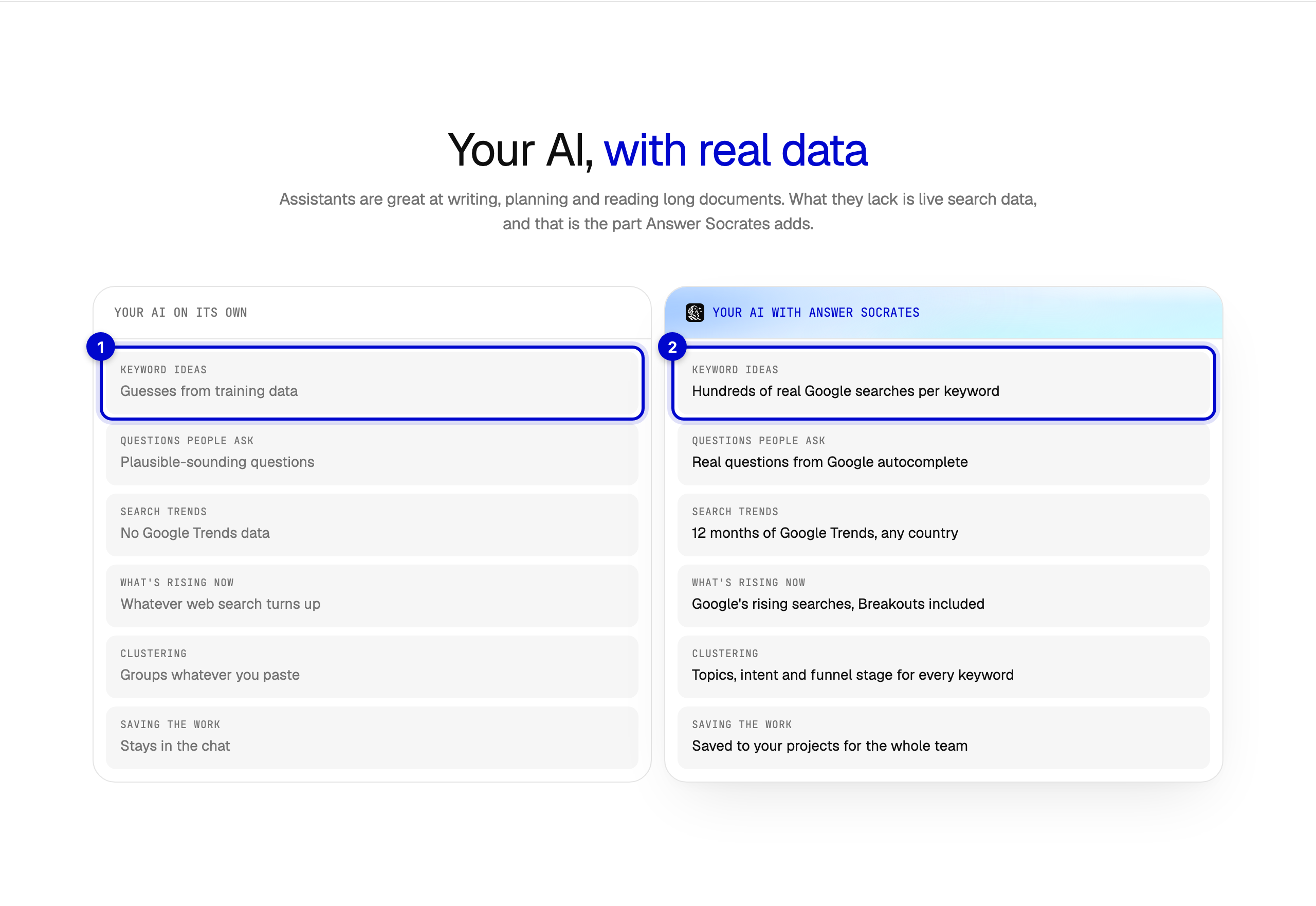
What the Answer Socrates MCP server offers
We run a hosted MCP server with 12 tools. Every data tool costs 1 request from your monthly API allowance, whichever tool it is. Account tools are free. Clustering is the one exception: it is charged in topic cluster credits, 1 credit per keyword, and spends no requests.
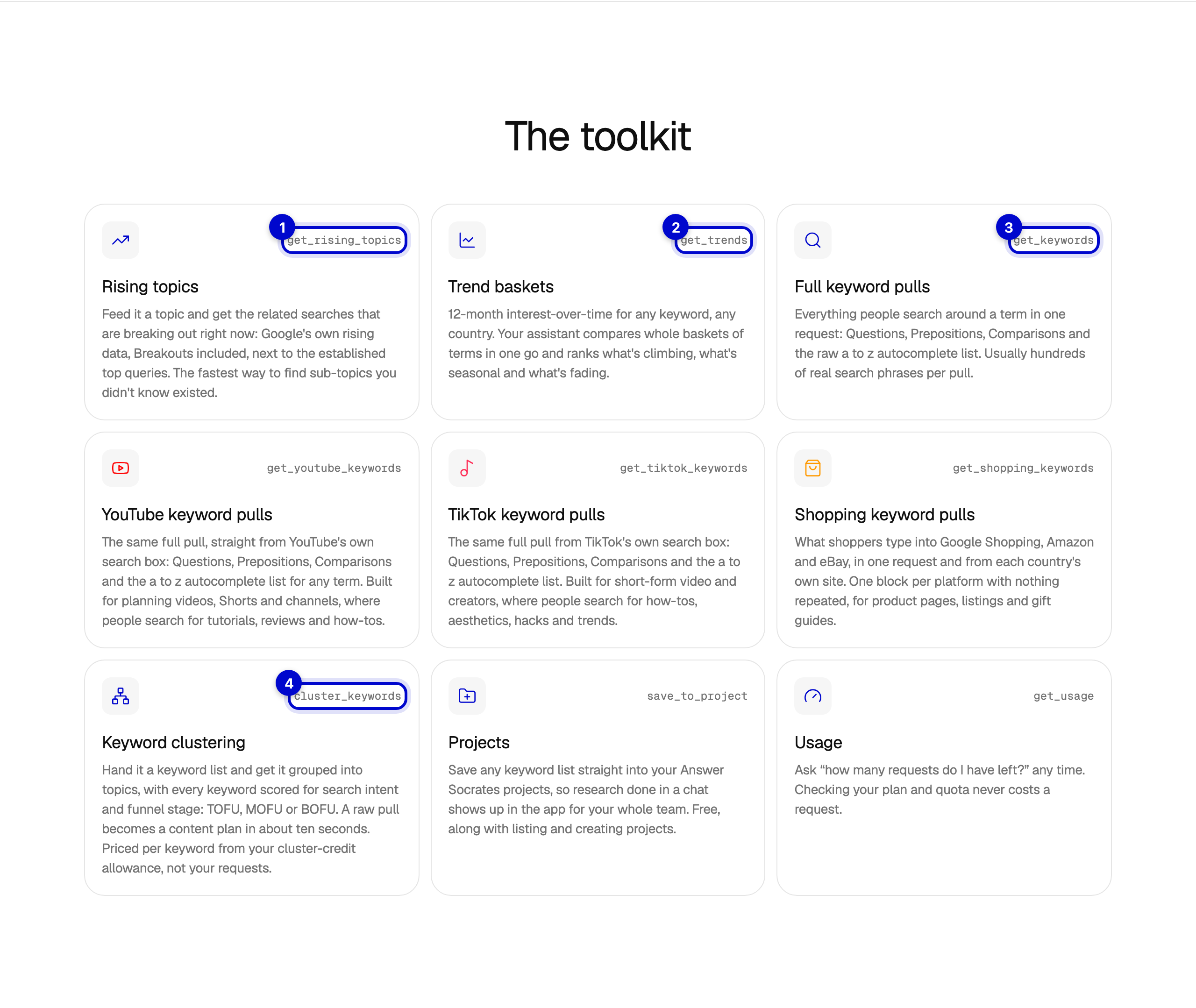
| Tool | What it does | Cost |
|---|---|---|
get_rising_topics | Google Trends related searches for a topic, split into rising (Breakouts included) and top | 1 request |
get_trends | 12 months of Google Trends interest for one keyword, weekly, per country | 1 request |
get_keywords | The full Google autocomplete pull: Questions, Prepositions, Comparisons and the a to z Autocomplete list, usually 500 to 900 keywords | 1 request |
get_youtube_keywords | The same pull from YouTube search | 1 request |
get_tiktok_keywords | The same pull from TikTok search | 1 request |
get_shopping_keywords | Shopping searches from Google Shopping, Amazon and eBay together | 1 request |
cluster_keywords | Groups 10 to 1,000 keywords into topics, with intent and funnel stage for each | 1 cluster credit per keyword |
get_usage | Your plan and what is left this period | Free |
list_projects, create_project, save_to_project | Find, create and save research into your Answer Socrates projects | Free |
get_upgrade_link | A Stripe link to upgrade your plan | Free |
Two notes. The YouTube, TikTok and Shopping pulls and the upgrade link are not in the ChatGPT app yet, because OpenAI reviews every new tool before it goes live there. And all data defaults to the US: name a country in your message and the assistant passes it along.
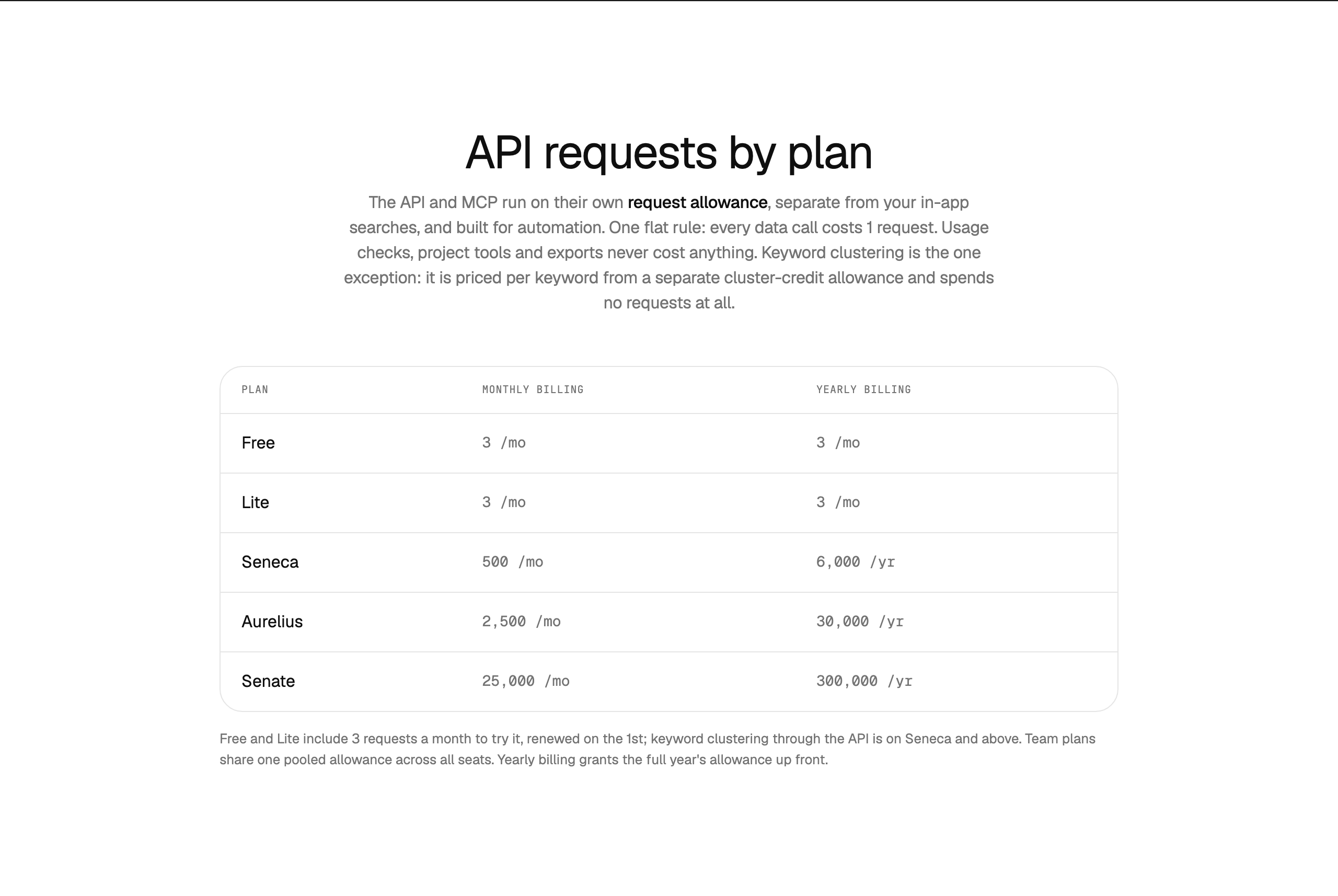
The allowance is 3 requests a month on Free and Lite, 500 on Seneca, 2,500 on Aurelius and 25,000 on Senate (monthly billing). Clustering through MCP needs Seneca or above.
What a tool call looks like in a real chat
You do not type tool names. You ask in plain words, and the assistant picks the tool. Claude, for example, shows a small line in the reply when a tool runs, so you can see the data was fetched and not remembered.
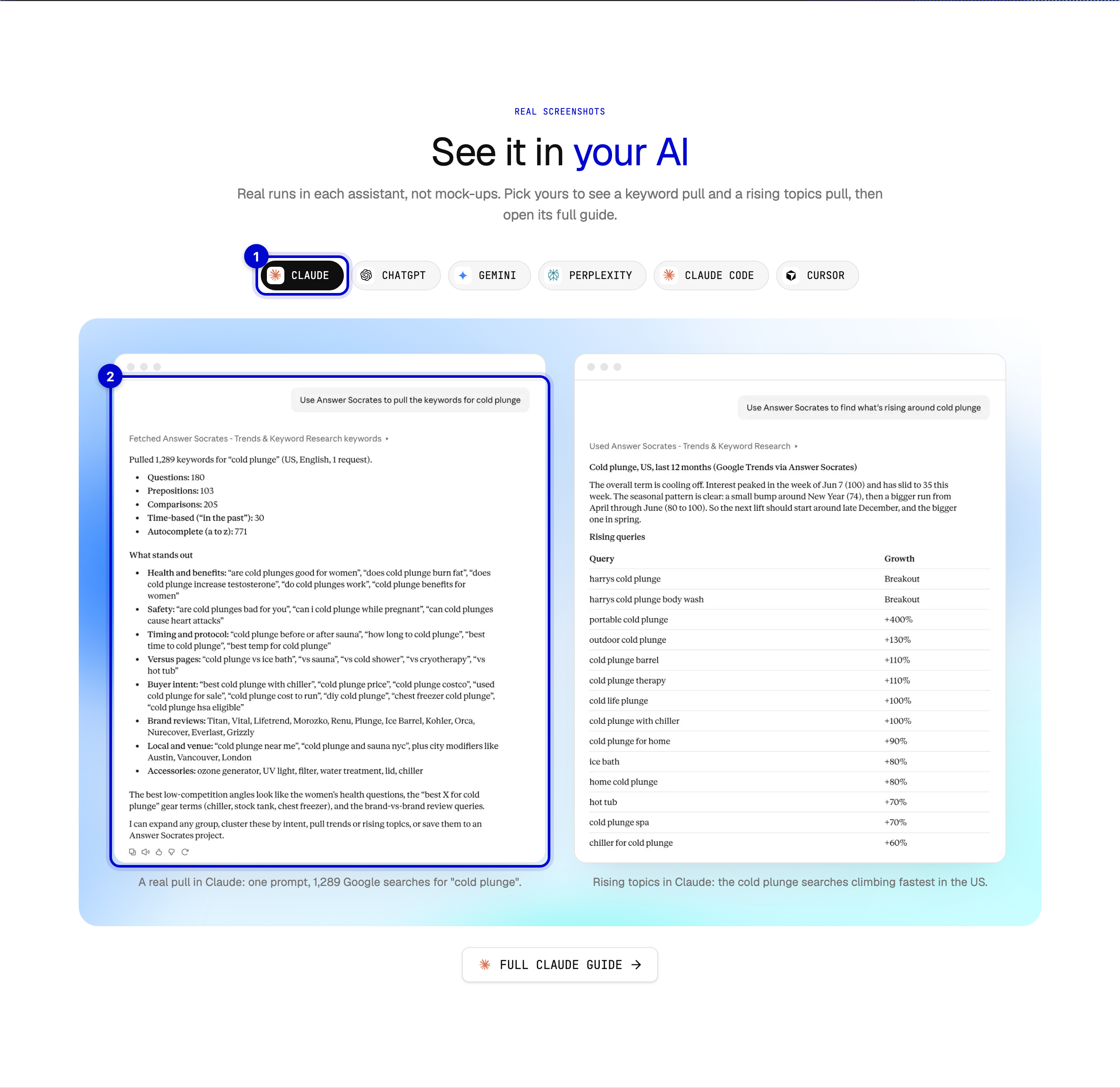
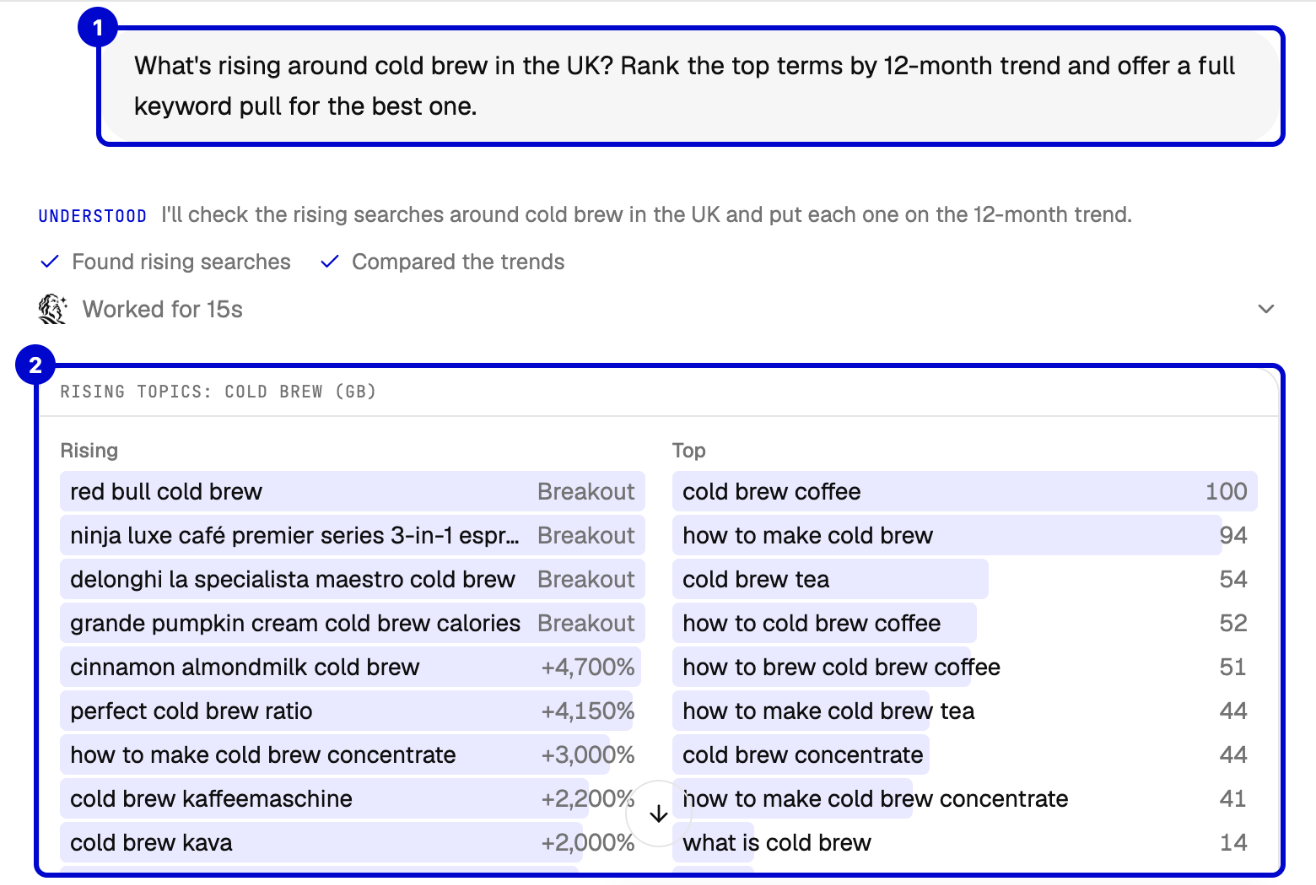
A made-up example: you run a small coffee roaster and want next month's blog topics. You type "What's rising around cold brew in the UK?" The assistant calls get_rising_topics with the country set to GB (1 request). It then offers to compare the best five terms with get_trends (5 more requests) and to pull the full keyword set for the winner with get_keywords (1 more). Seven requests later you have a ranked list built from real searches, and you can say "save these to my Roastery project" for free.
Our server tells the assistant to offer the follow-up pulls instead of running them uninvited. So a good session asks before it fans out, and you stay in charge of what gets spent.
How to do it in Answer Socrates
Connecting takes a few minutes. These steps follow the setup band on our MCP page.
-
Open the MCP page. Go to the MCP page. The top of the page names the two ways in: the MCP server for assistants and the REST API for your own scripts.
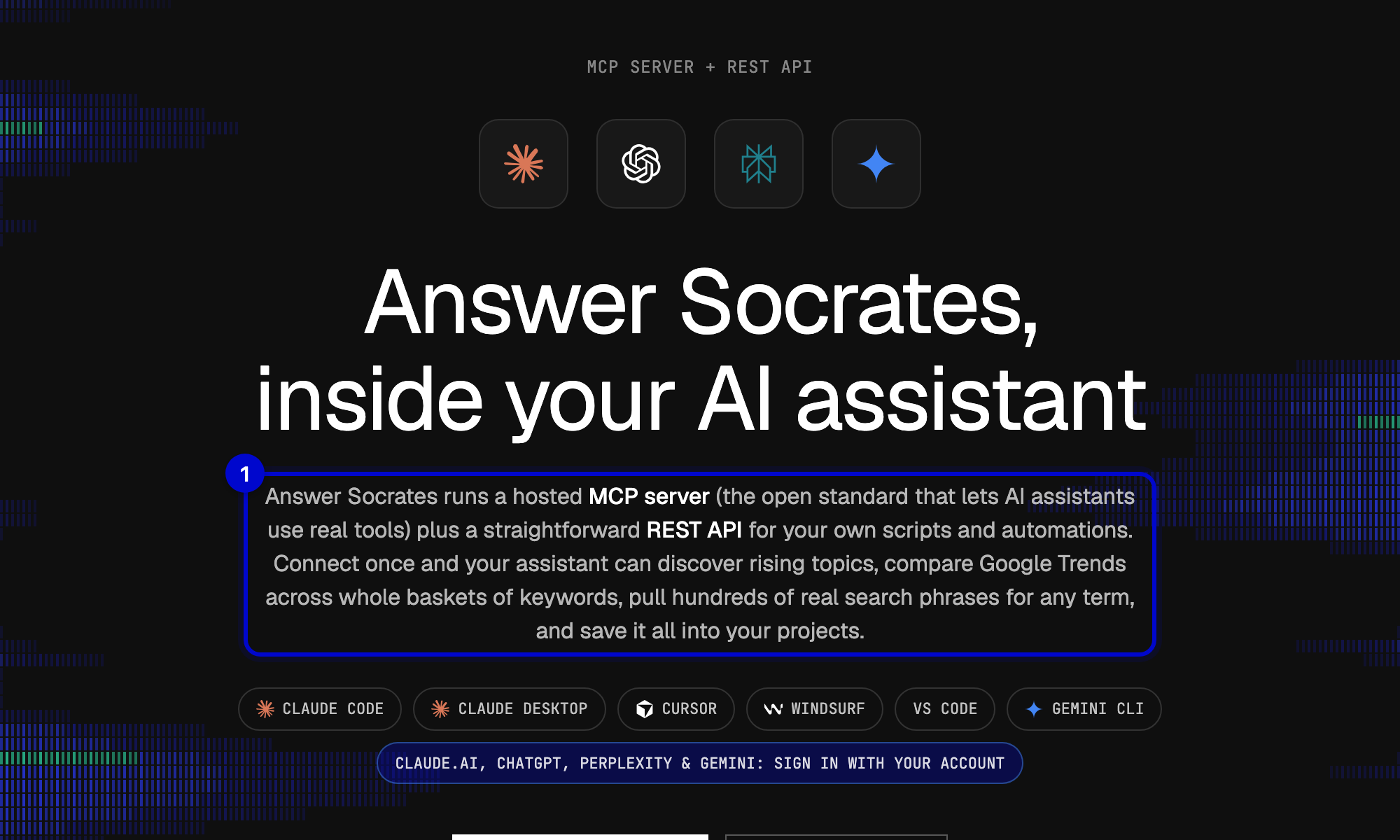
Box 1 is the one-paragraph summary: a hosted MCP server plus a REST API, connected once. -
Pick your assistant. In the "Connected in two minutes" band, choose a tab. For claude.ai, ChatGPT, Perplexity and Gemini you sign in with your Answer Socrates account, so you need no key (box 2). Coding tools like Claude Code and Cursor use an API key instead, which you create on your Account page (box 1).
-
Copy the server address. For a custom connector, paste https://answersocrates.com/api/mcp into your assistant's connector settings (box 3). In claude.ai that is Plugins in the left sidebar, then Add, then Add custom connector. (The MCP page still uses Claude's older names, Customize and Connectors.)
-
Just ask. Your assistant lists the tools itself. Try "what's rising in my niche?" or run the built-in
keyword_researchcommand (box 4).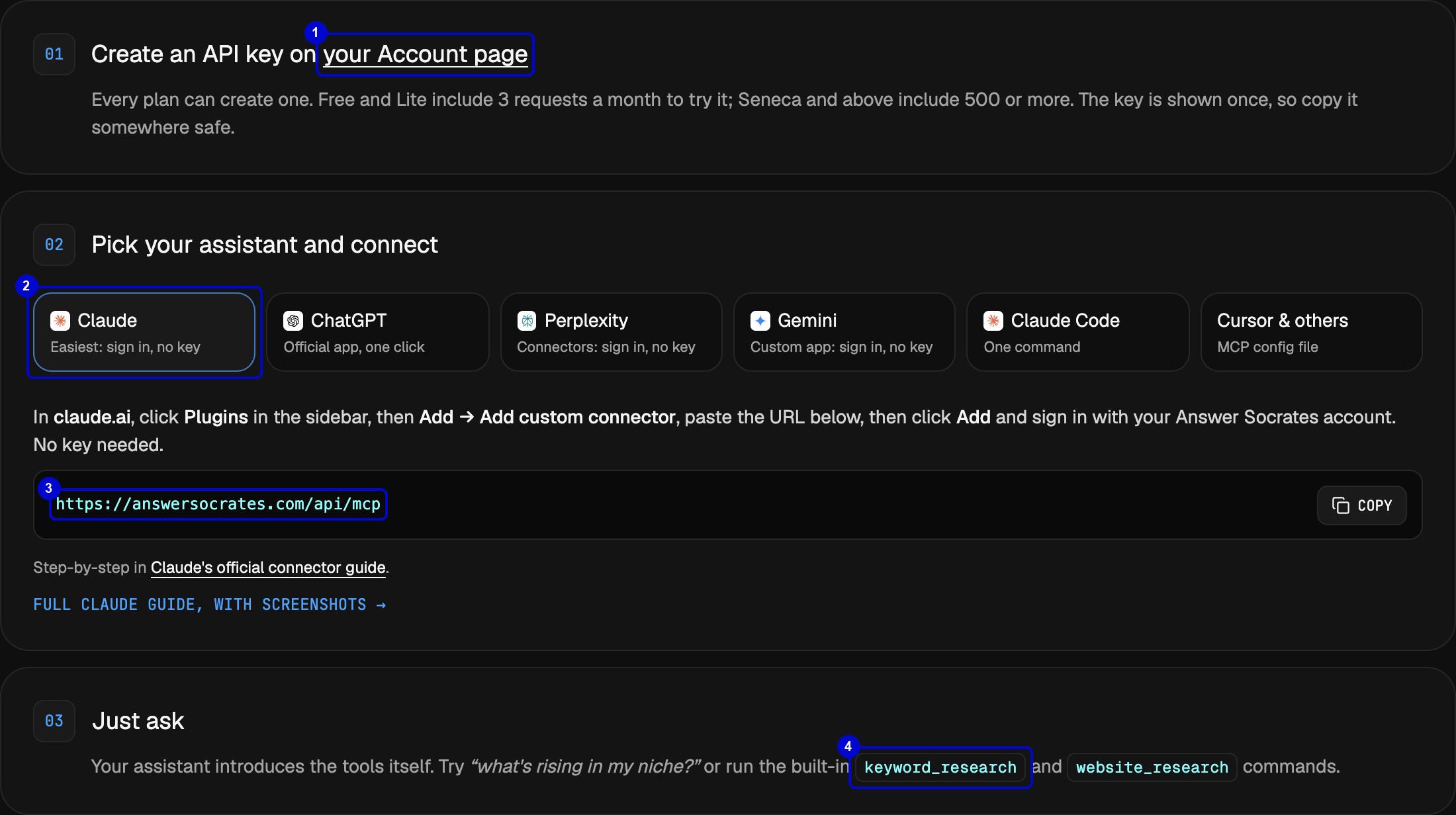
Box 1 is the key for coding tools, box 2 the sign-in tab for Claude, box 3 the server URL to paste, box 4 a ready-made command. -
Check the connection later. Your Account page has an API keys section. Once you have signed in from an assistant, a "Connected assistants" list appears under it, with every app you signed in with, when it was last used, and a Disconnect button.
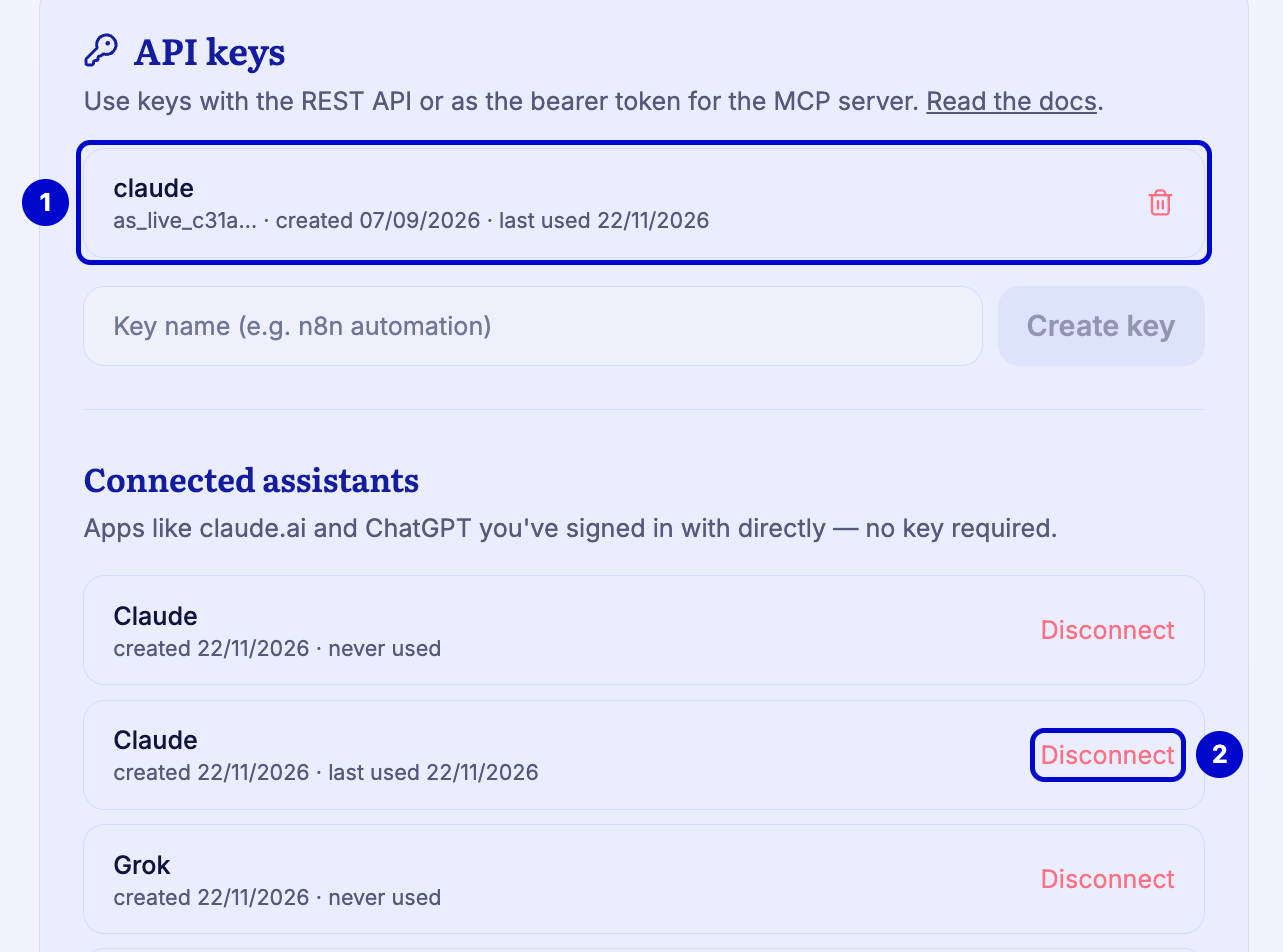
Your API keys (1) and every assistant you have signed in from. Disconnect (2) cuts one off at once.
The same thing in Ask Socrates
You do not need MCP to get these tools in a chat. Ask Socrates, the chat inside Answer Socrates, has the same keyword, trends, rising topics and clustering tools built in, and it can save to your projects. Use MCP when you want the data inside the assistant you already work in. Use Ask Socrates when you want it next to your projects with no setup.
Type: "What's rising around cold brew in the UK? Rank the top terms by 12-month trend and offer a full keyword pull for the best one."
| You want to... | Use |
|---|---|
| Research inside Claude, ChatGPT or Cursor while you write or code | The MCP server |
| Feed keyword data into your own scripts or sheets | The REST API |
| Research with no setup, next to your saved projects | Ask Socrates |
What the AI can and cannot do with the connection
Connecting a server gives the assistant real actions, so it is fair to ask what those are. Here is the full list for our server, taken from the tools it exposes.
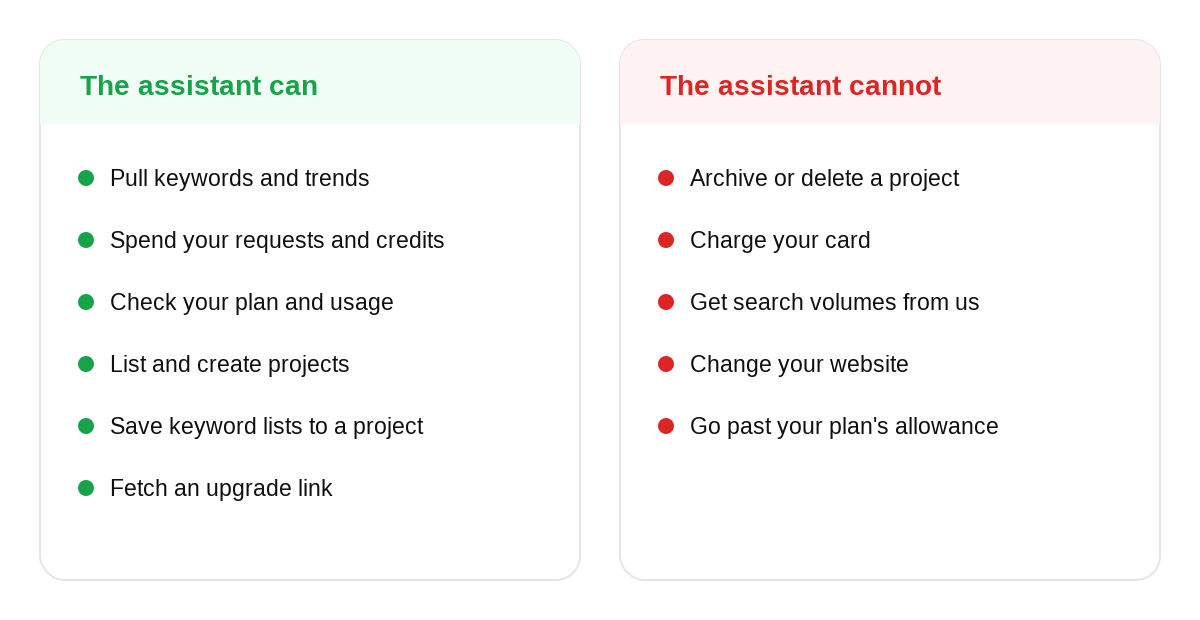
A few details behind that picture:
- Spending. Each data call spends 1 request. When your allowance runs out, calls stop with a "quota exceeded" error until it renews. They never run past it.
- Billing. The upgrade link opens Stripe, and you confirm on that page. The assistant cannot pay for you.
- Projects. Creating a project needs an owner or admin, and archiving or deleting happens only in the app.
- Your site. Nothing on our server reads or edits your website. If an assistant reads your site, it uses its own web access.
The bigger risks come from MCP in general, not from one server. The spec says a human should always be able to deny a tool call, and asks apps to show clearly when a tool runs [3]. Anthropic warns that "malicious MCP servers may include hidden instructions" and tells you to connect only servers you trust [5]. OpenAI gives the same warning for ChatGPT and adds that it may ask you to confirm write actions [6].
| Check | Pass if |
|---|---|
| Do you trust who runs the server? | It is a company you already pay or know |
| Can you see each tool call in the chat? | Your assistant shows a tool line or card |
| Does it ask before write actions? | You get a prompt before saving or creating |
| Can you cut it off? | There is a disconnect button or a key you can delete |
| Do the numbers have a source? | Every figure traces to a tool result, not memory |
Where to go next
| If you want to... | Read |
|---|---|
| Set up the connector in Claude step by step | Connecting Answer Socrates to Claude |
| Set it up in ChatGPT | Connecting Answer Socrates to ChatGPT |
| Learn prompts that turn the data into a plan | Keyword research from inside Claude |
| Use the data in your own scripts | Using the Answer Socrates API |
| Know what to double-check in agent output | Where AI agents get SEO wrong |
| Understand what clustering gives you | Keyword clustering: turning a list into topics |
Sources
- What is the Model Context Protocol (MCP)?, Model Context Protocol, 2026
- Architecture overview, Model Context Protocol, 2026
- Tools (MCP specification), Model Context Protocol, 2026
- Introducing the Model Context Protocol, Anthropic, 2024
- Get started with custom connectors using remote MCP, Claude Help Center, 2026
- Connecting custom MCP servers in ChatGPT, OpenAI Help Center, 2026
