Keyword research in one chat with Ask Socrates
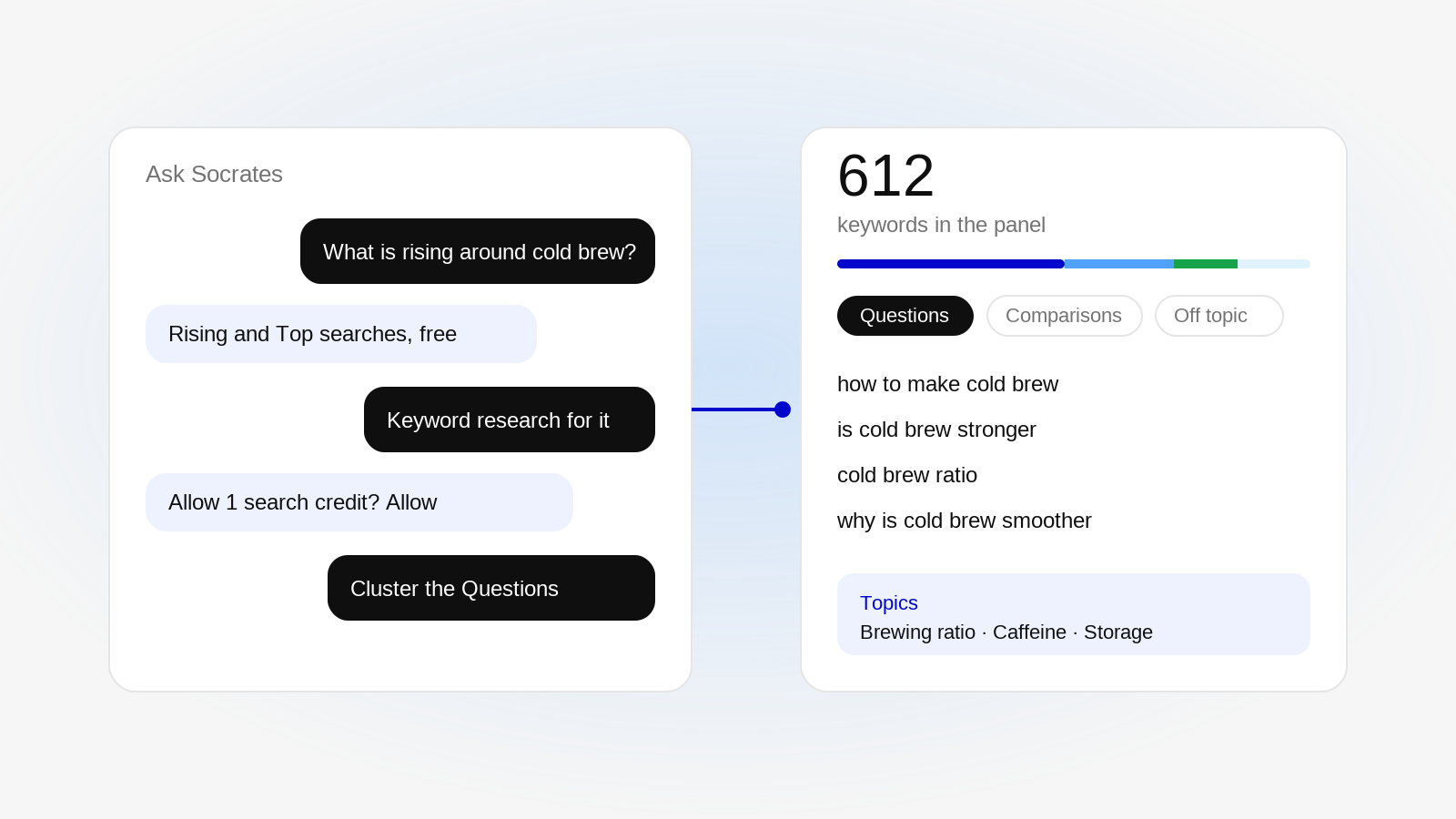
Ask Socrates is the Answer Socrates chat: you ask in plain words and it runs Google Trends, the full keyword pull and clustering for you, with every keyword open in a panel beside the conversation. Doing it in one chat means each answer shapes the next question, and only the steps that cost credits ask before they run.
Key takeaways
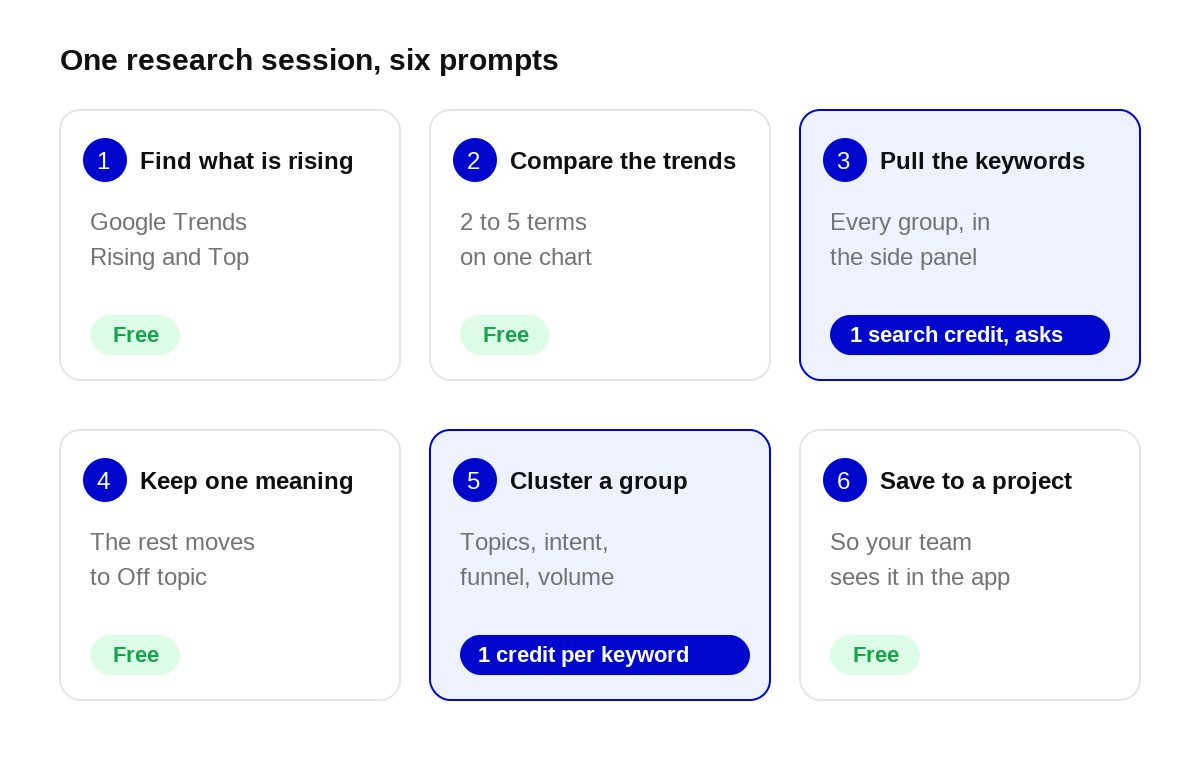
- A full session takes six prompts: rising topics, a trend comparison, a keyword pull, a meaning filter, clustering and saving to a project. Only the pull and clustering cost anything.
- A keyword pull costs 1 search credit and shows an approval card first; the same term and country pulled in the last 7 days, or any saved search, reopens free.
- Clustering costs 1 topic cluster credit per keyword (10 to 1,000), and the card shows the exact count before you approve.
- "Keep only the searches about..." is free and moves other meanings to an Off topic tab rather than deleting them; clustering later uses only what was kept.
- The chat reads up to 25 keywords per group while the panel holds them all, so filter the panel or cluster the group when you need the full list.
Ask Socrates runs the research tools from one chat
Ask Socrates is the Answer Socrates chat. You type a request in plain words, and it calls the same research tools you would otherwise open one page at a time: Google Trends, the full keyword pull, the clustering tool and your saved projects. A tool call is one of those jobs run on your behalf, such as "pull every Google suggestion for cold brew in the US".
The chat does not know more than the tools. The gain is that each answer feeds the next question: see what is rising, pull the best term, cut the other meanings, then group what is left into topics, with the data open beside the chat.
Who can use Ask Socrates today
Ask Socrates sits first in the top navigation, marked NEW. You need to be signed in.

Ask Socrates is open to every account. On the free plan you can try it with a few messages, using the free tools: rising topics, keyword searches and your saved results. Paid plans get the full chat, and anything that uses credits asks you first. Signed out, you see a sign-up screen.
Every step below also works in the classic tools, one page at a time: the keyword search, the clustering tool and the Trends pages.
How to run a research session in Ask Socrates
The session below is a made-up example for a small coffee roaster that sells cold brew concentrate online in the US. Type each prompt exactly as written, or swap in your own topic. Data defaults to the United States and English unless you name another country.
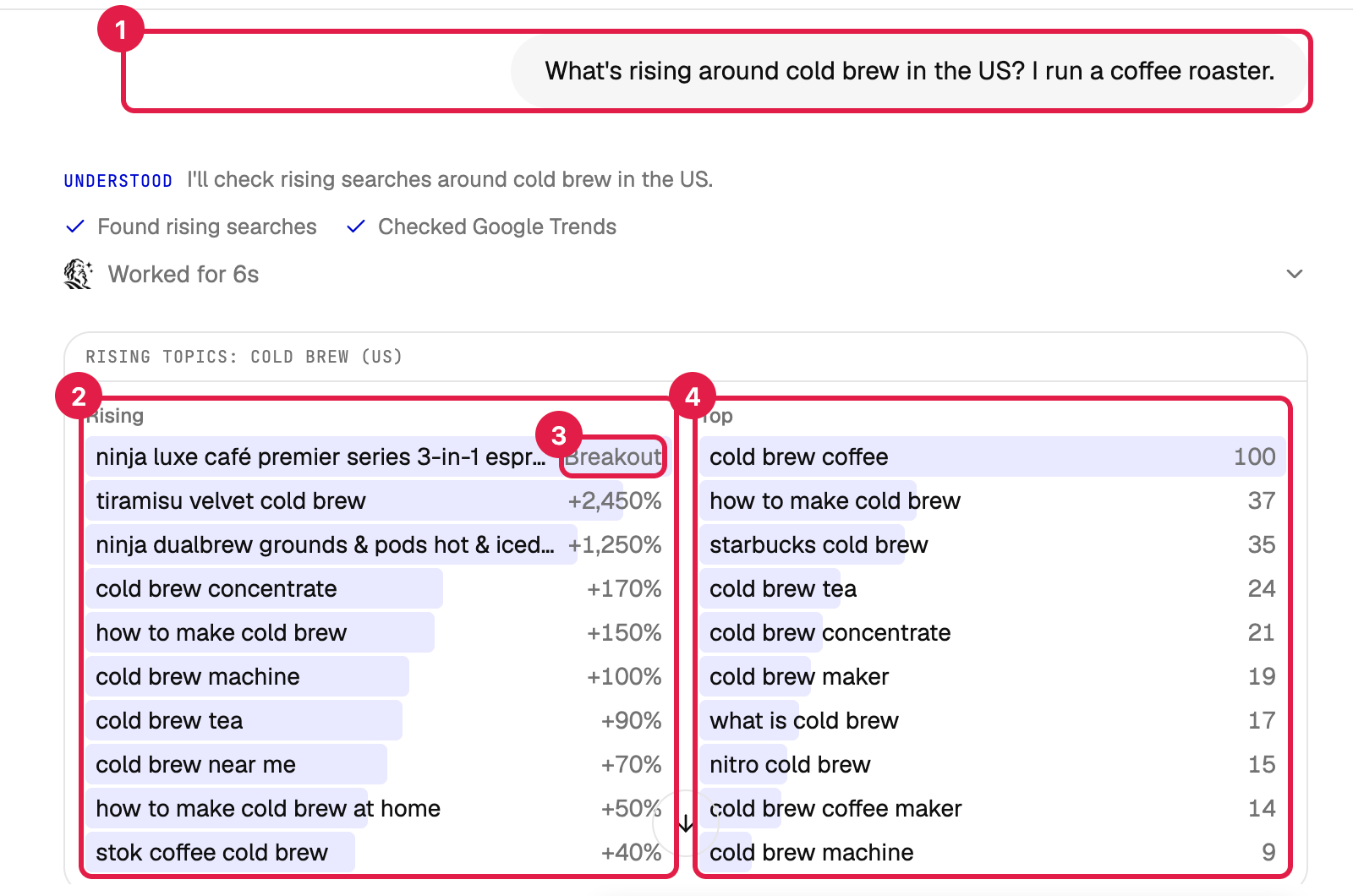
Step 1. Find what is rising. Start broad, before you spend anything.
The chat calls Google Trends' related searches, which are free. A card shows two columns: Rising, the related searches that grew most, with their growth as a percentage, and Top, the searches most often made alongside your term. Google labels a term "Breakout" when it grew by more than 5,000% [2]. The chat then says which of these are worth a closer look for your business.
Step 2. Compare the candidates on one chart. Pick the two to five terms that look most useful and put them side by side.
This runs one Google Trends comparison over the last 12 months, so all the lines share one 0 to 100 scale. Google scales each chart from 0 to 100 after normalising the data [1], which is why terms checked on separate charts cannot be compared. The reply names which term is bigger and which is growing faster, with one number each. Growth compares the last four weeks of the chart with its first four weeks, a year earlier. Free.
Step 3. Pull the keywords for the winner. Now spend one credit on the term that earned it.
Before anything runs, the chat checks whether you already pulled "cold brew" for the US in the last 7 days. If you did, it reopens that search for free. If not, an approval card appears: "Pull the full Google keyword set for "cold brew" (US). This costs 1 search credit." with Deny, Allow for this chat and Allow.
Click Allow and the full set opens in a panel beside the chat. Here is that panel from a real pull for "standing desk" in the United Kingdom:
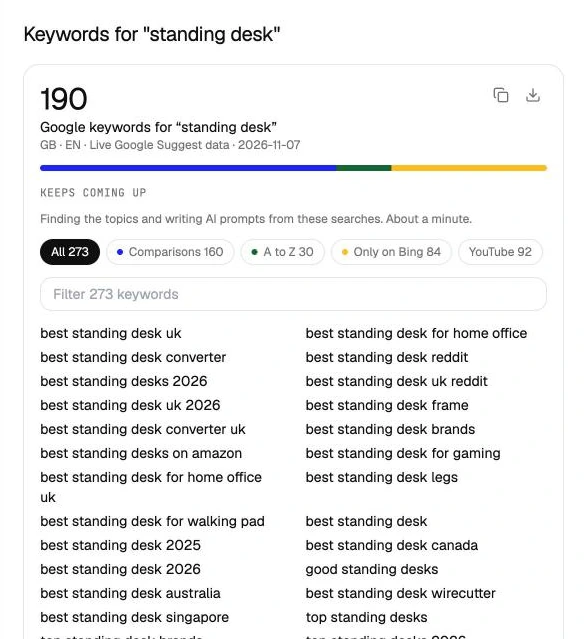
The panel holds everything the results page has: the Google groups, A to Z, People also ask, Only on Bing, and separate YouTube, TikTok and Shopping tabs, plus Keeps coming up (themes that repeat across the pull) and AI prompts written from these searches. Type in the filter box to narrow any tab, use the copy button to copy the tab you are on, or Download CSV for every tab at once (two columns: keyword and group).
The reply leads with the total and the count for each group, then picks the keywords that suit your business. Next-step buttons follow; any that spends shows its cost.
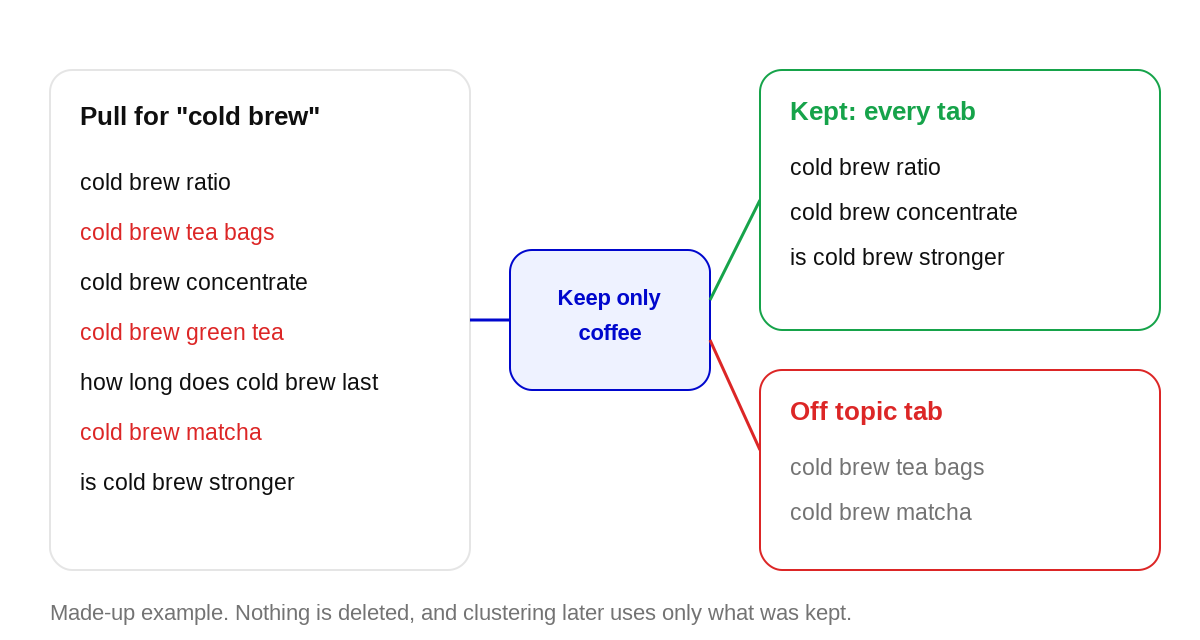
Step 4. Keep only the meaning you want. Short seeds often mean two things. "Cold brew" pulls coffee, but also tea and matcha.
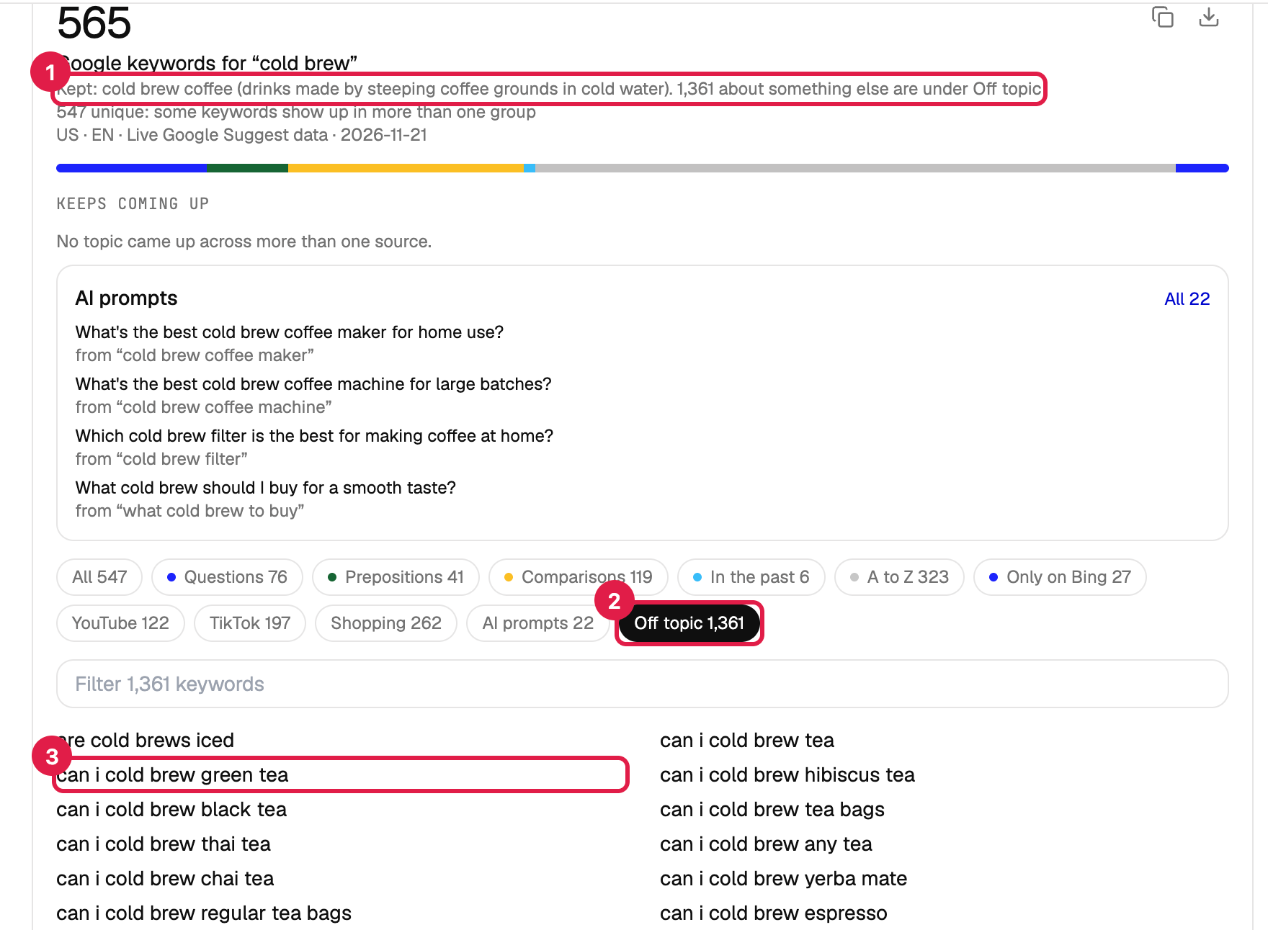
This filter is free. The chat keeps the keywords about your meaning and moves the rest to an Off topic tab, and the header says how many "about something else are under Off topic". The themes and AI prompts are filtered too.
Step 5. Cluster a group into topics. Clustering sorts a list into topics, labels each keyword with search intent and funnel stage, and adds search volumes. The full method is in Keyword clustering: turning a list into topics.
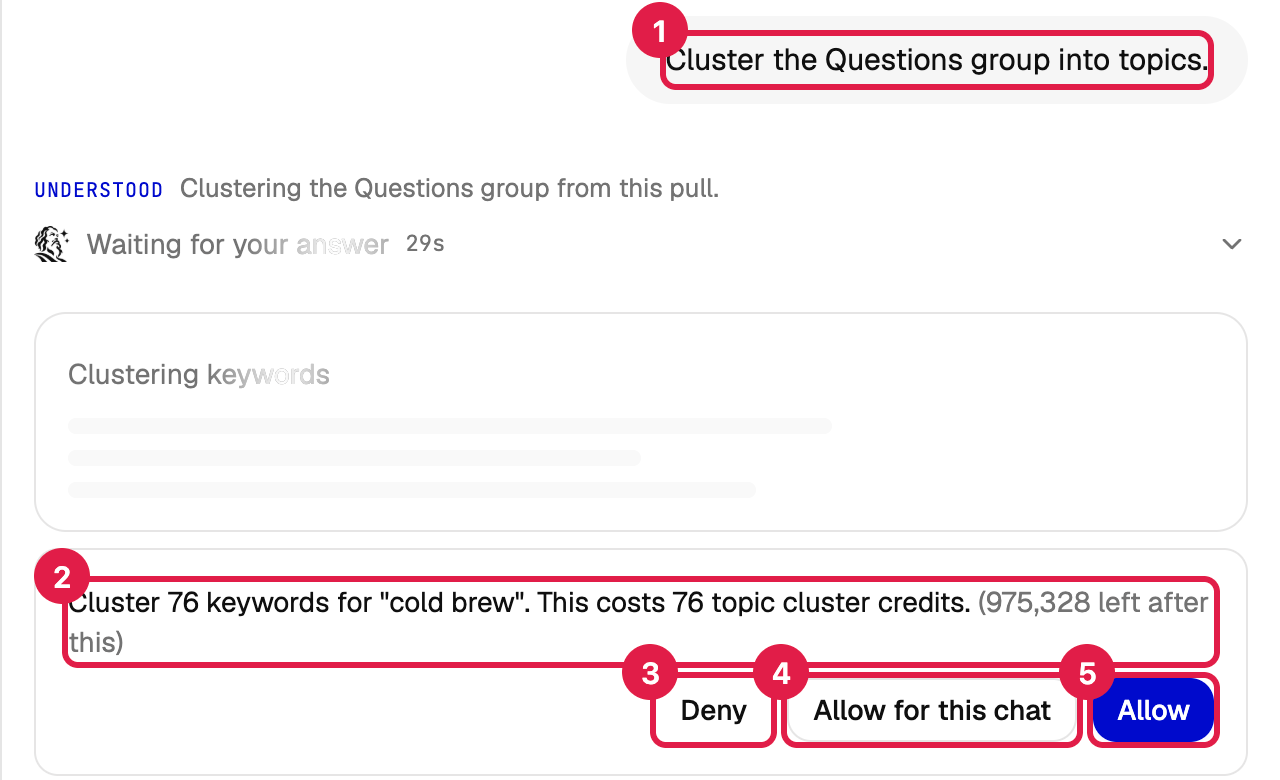
The chat loads every keyword in that group on the server, not just the sample it can read, and skips anything you moved to Off topic. Clustering is paid in topic cluster credits, one per keyword, so the approval card shows the exact count: "Cluster N keywords for "cold brew". This costs N topic cluster credits." An identical run you already did costs nothing.
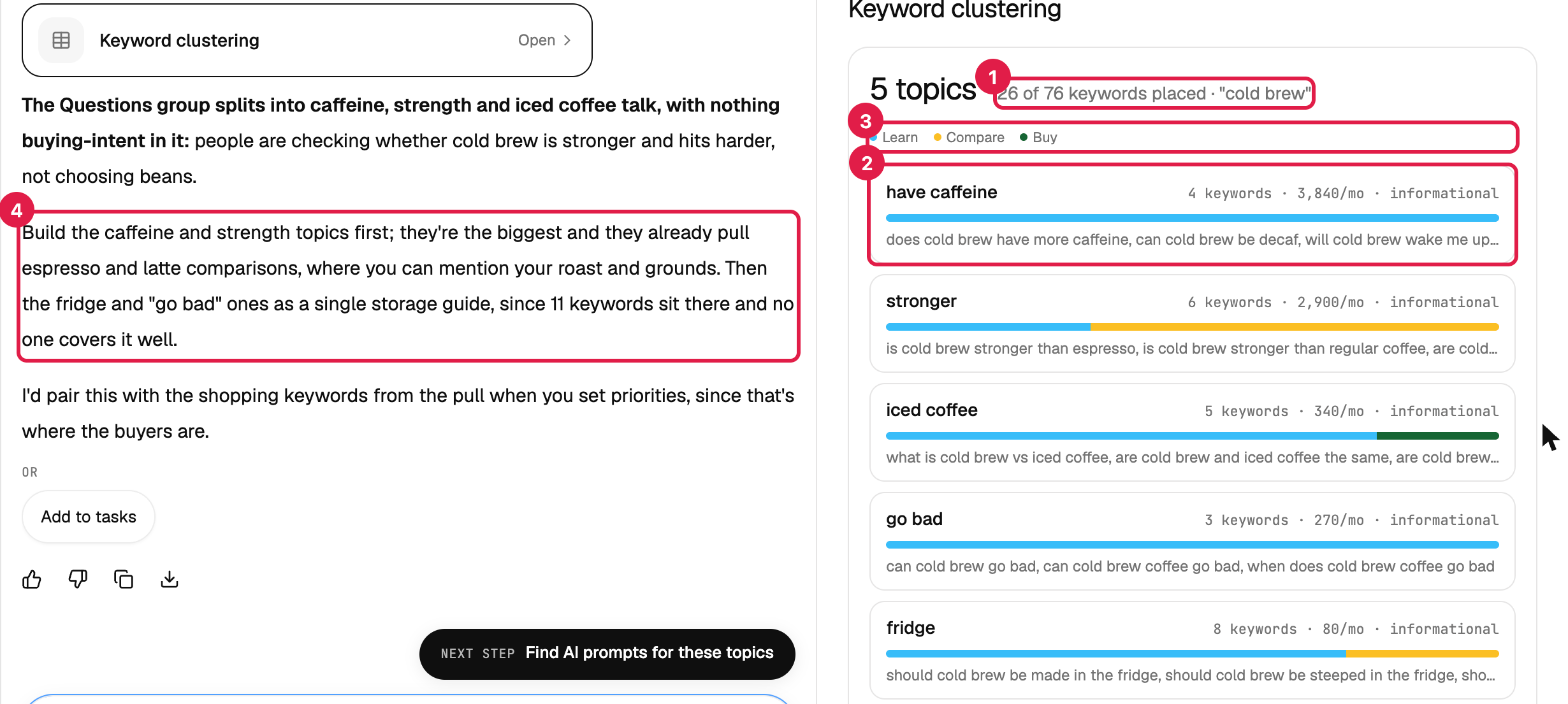
The run is also saved in the JEV AI keyword tool, and the reply names the two or three topics to build first.
Step 6. Save the list where your team can see it.
The chat confirms which project you mean, then saves the keywords into it. Free. The research now shows in the app for everyone on that project.
Every spend asks first, unless you say otherwise
Most of the session above is free, and the paid steps say so before they run.
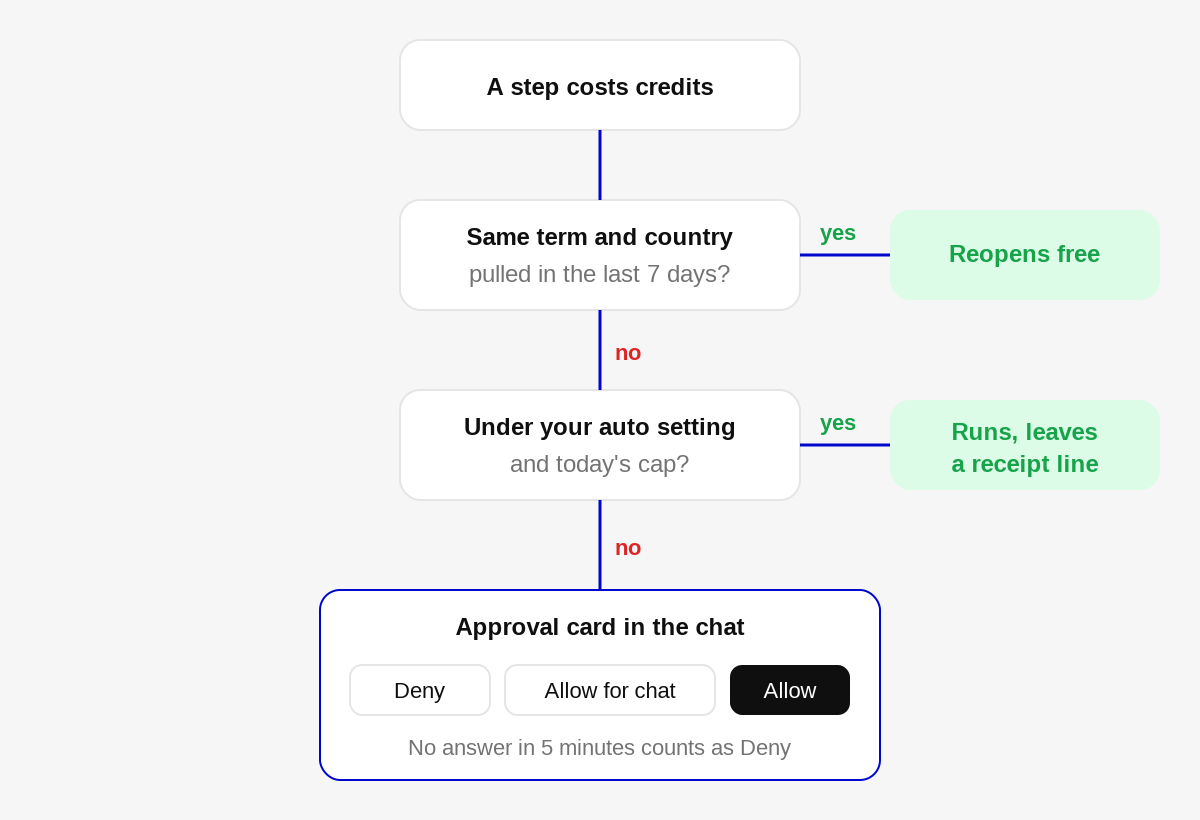
There are two allowances in play, counted in different units:
| Step | Costs | Asks first? |
|---|---|---|
| Rising topics, a single trend, a trend comparison | Nothing | No |
| Keyword pull (Google or YouTube) | 1 search credit per seed | Yes |
| Reopening a pull from the last 7 days, or any saved search | Nothing | No |
| Keeping one meaning (Off topic) | Nothing | No |
| Clustering | 1 topic cluster credit per keyword, 10 to 1,000 keywords | Yes, with the exact count |
| Saving to a project, listing past searches, checking your usage | Nothing | No |
Allow for this chat stops the card for that tool for the rest of the chat. To skip the card for small spends, open the spending button in the chat header (it reads "Asks before spending" by default). Keep Ask every time, or let spends up to 1, 5 or 25 credits run without a card, with a daily limit of 20, 50 or 200. Anything bigger still asks, nothing runs without enough credits, and an auto spend leaves a line saying what it used and how much of today's limit is left.
Reuse searches you already paid for
Every keyword search you run, on the results page, in the clustering tool or in a chat, is saved to your history. The chat checks it before offering a paid pull, and opens any of them without charging again.
- Within 7 days: ask for the same term and country again, and the pull reopens free, with every keyword. Say "pull fresh data" if you want a new run (that costs a credit).
- Older searches: type "What have I already searched?" The chat lists your saved keyword searches and cluster runs with the market, date and an Open button. Opening one is free, whatever its age.
- From a results page: click Ask about this search in the left menu, or the chat icon next to a search in your history. The chat opens with a request to load that saved search already in the box. Send it, and the results open in the panel for free.
A made-up example: a coffee roaster
A made-up example: Hillside Roasters is a small US roaster that sells beans and a cold brew concentrate online. The owner has an hour and two questions: what to write for the summer, and whether "nitro" is worth a page.
She runs the six steps above. Rising topics shows "cold brew concentrate" climbing. The comparison shows nitro is the smallest of the three terms. The pull comes back with tea and matcha mixed in, and the filter moves those to Off topic. Clustering the Questions group gives topics around ratio, caffeine and how long it keeps.
| Finding | Where it came from | Her call |
|---|---|---|
| "cold brew concentrate" is rising | Step 1, Rising | A product page and a how-to-use guide |
| Iced coffee dwarfs nitro cold brew | Step 2, one shared chart | No nitro page yet; a section inside the cold brew guide |
| "cold brew ratio" questions | Step 5, a ratio topic | Write the ratio guide first, with her own recipe |
| "how long does cold brew last" | Step 5, a storage topic | Add a storage section to the product page |
| cold brew tea searches | Step 4, Off topic | Ignore; she does not sell tea |
The cost: one search credit for the pull, plus one topic cluster credit per question clustered. Everything else was free.
A prompt cookbook
Copy these, then change the topic and country.
| You want | Type | What runs | Cost |
|---|---|---|---|
| Ideas before you commit | What's rising around topic in the UK? | Google Trends rising and top searches | Free |
| To choose between terms | Compare a, b and c on Google Trends | One shared trend chart, 2 to 5 terms | Free |
| When a topic peaks | Show me the 12-month trend for topic | One trend line with its peak week | Free |
| Every Google suggestion | Keyword research for topic | The full keyword pull | 1 search credit |
| Several seeds at once | Keyword research for these keywords, one pull each: a, b, c | One pull per seed (up to 5 from the start screen box) | 1 search credit each |
| What people type on YouTube | Pull YouTube keywords for topic | The pull on YouTube autocomplete, no volumes | 1 search credit |
| TikTok or shopping searches | What do the TikTok searches in that pull tell us? | Reads the pull you already have (open the TikTok or Shopping tab for the full list) | Free |
| One meaning of a seed | Keep only the searches about meaning | Off topic filter | Free |
| Topics from a group | Cluster the Comparisons group into topics | Clustering of every keyword in it | 1 topic cluster credit per keyword |
| Old research | What have I already searched for topic? | Your saved searches, with Open buttons | Free |
| A guided run | /keyword-research topic | The keyword research skill: pull, best keywords, sharper seeds, then an offer to cluster | 1 search credit |
| To keep it | Save these keywords to my project project | Save to project | Free |
The "/" opens the skill menu in the chat box. Skills are written routines the chat follows; a plain request routes to the same job.
What the chat does not do
- The chat reads a sample, the panel has everything. The chat sees up to 25 keywords per group. For "every question with caffeine in it", use the panel's filter box, or cluster the group, which loads the whole list on the server.
- No search volume in the pull. The pull is autocomplete data. Volumes arrive when you cluster, or with Check Metrics on the classic results page. The YouTube pull never has volumes.
- No separate TikTok or shopping pull. Those searches come inside the main Google pull as their own tabs. YouTube is the only other platform with a pull of its own.
- Clustering takes 10 to 1,000 keywords. Your plan may clip a long list further; the card says when it used only the first part.
- The meaning filter is AI, so check it. Open the Off topic tab before you trust the kept list.
- Themes and AI prompts take about a minute. The chat answers without them, and they appear in the panel when ready.
- Trends are relative. A single trend line is scaled to its own peak [1]. Only a comparison puts terms on one scale.
- Cards expire. An approval card left for five minutes counts as Deny. Ask again and a new card appears.
Where to go next
| If you want to... | Read |
|---|---|
| Understand every section of a keyword pull | How to do keyword research: find what people actually ask |
| Learn what clustering does to a list | Keyword clustering: turning a list into topics |
| Plan around the months a topic peaks | Google Trends: seasonal and rising topics |
| Go deeper on YouTube searches | YouTube keyword research: what people search on YouTube |
| Turn your topics into a plan | From cluster to content plan: what to write first |
| Run the same research from Claude instead | Keyword research from inside Claude |
Sources
- FAQ about Google Trends data, Google Trends Help, 2026
- Compare Trends search terms (related queries, Rising and Breakout), Google Trends Help, 2026
