Keyword clustering: turning a list into topics
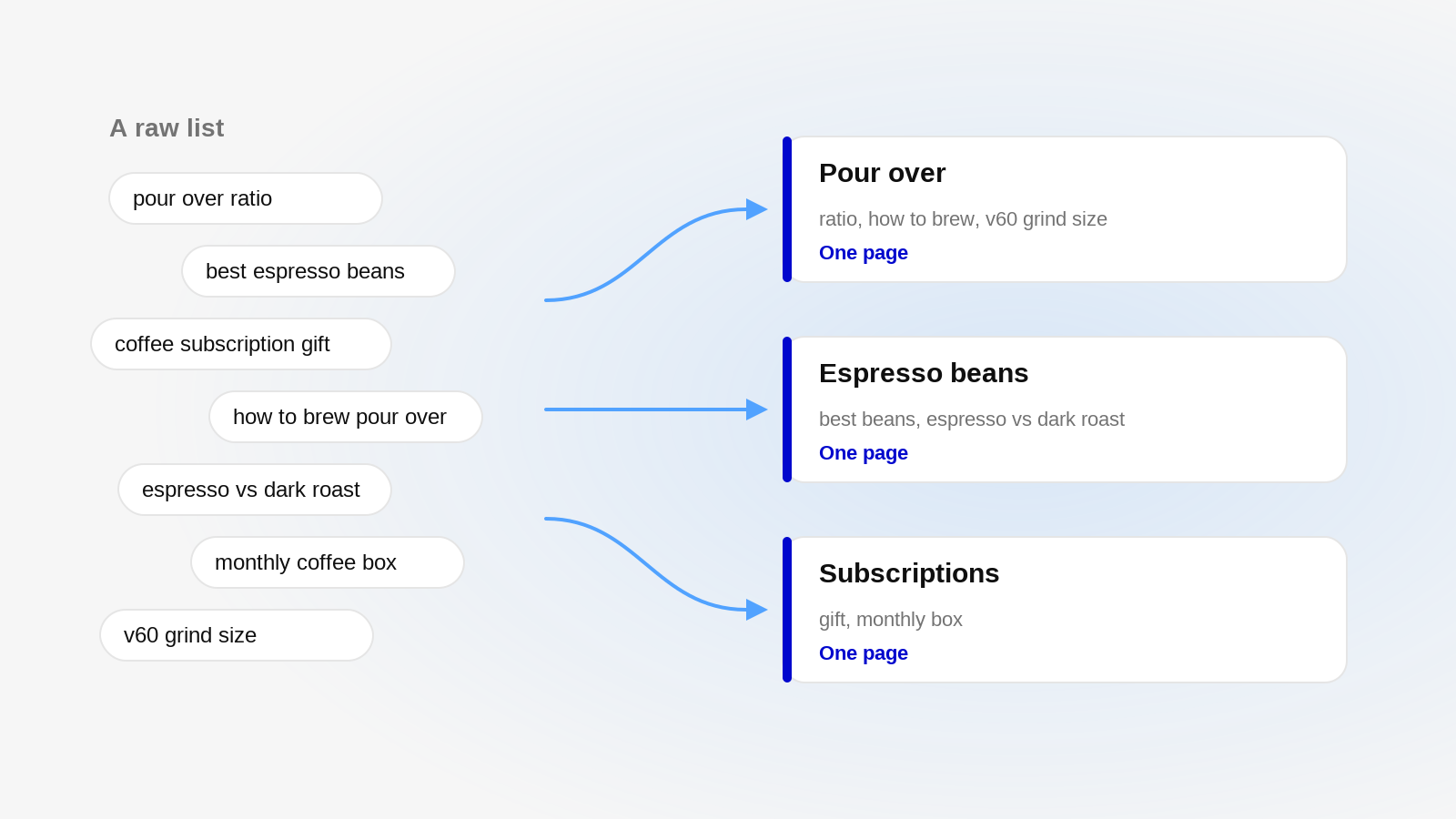
Keyword clustering sorts a long keyword list into groups, where each group is one topic a single page can answer. It turns hundreds of searches into a short list of pages to write, and stops you writing five near-identical posts that compete with each other.
Key takeaways
- A cluster is one page's worth of keywords: one reader with one job, so "pour over ratio" and "v60 grind size" go on the same guide.
- SERP-overlap clustering groups keywords that share Google results; meaning-based clustering groups keywords by what they mean. Answer Socrates uses meaning-based clustering in both its engines.
- A keyword list answers "what do people search?", a cluster answers "what goes on this page?", and a topical map arranges the clusters into pillar and supporting pages.
- In Answer Socrates you upload a CSV, pick the keyword column, then choose Classic (topics, volume, Excel export) or Jev AI (adds funnel stage, confidence and a hub and spoke plan) in the confirm dialog.
- Every run costs 1 topic cluster credit per unique keyword, shown before it runs; the standard free account gets 500 a month, and saved runs reopen free.
What keyword clustering does to a list
A keyword list is flat. It might hold 400 searches for a coffee roaster, and every line looks as important as the next. You cannot write 400 pages, and you should not try.
Keyword clustering sorts that list into groups, where each group is one topic a single page can answer. "pour over coffee ratio", "how to brew pour over coffee" and "v60 grind size" are three keywords but one reader with one job: make a good pour over at home. That is one cluster, and one page.
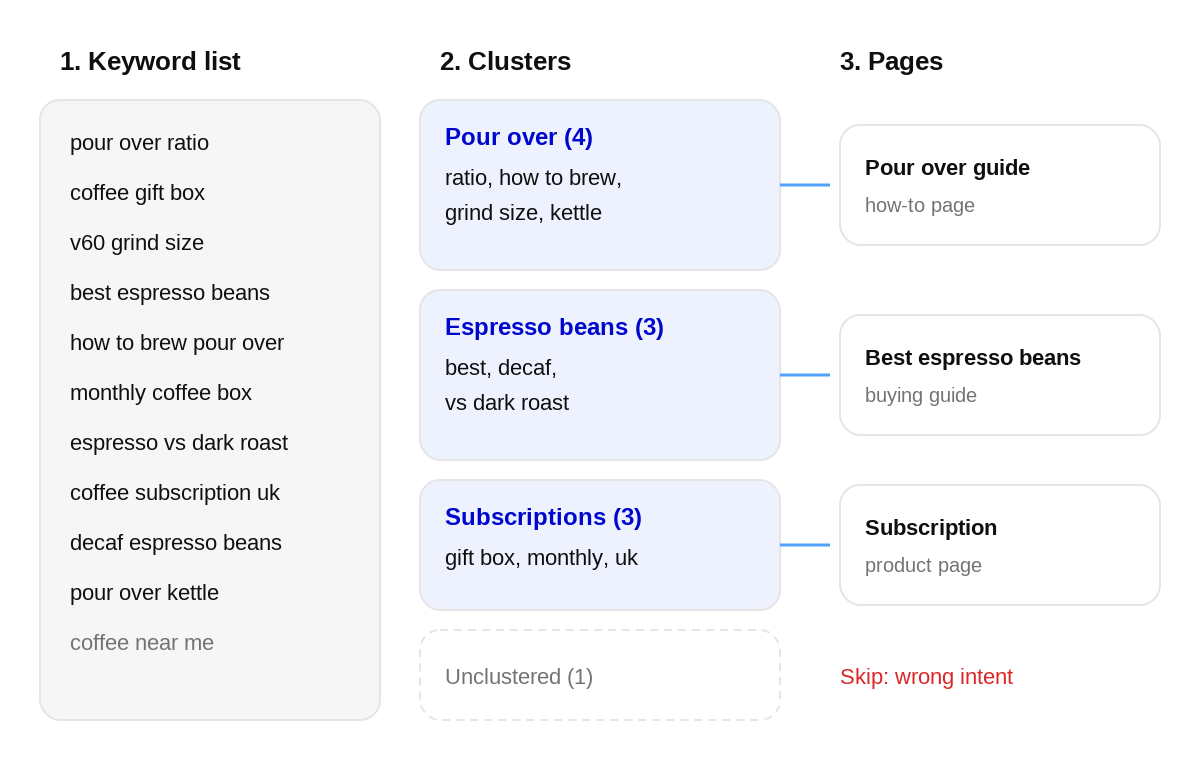
Clustering changes the question you ask. You stop asking "which keyword should I target?" and start asking "which topics do I need a page for, and which keywords does each page have to cover?" That second question is the one a content plan is built on.
In plain words: a cluster is a group of keywords that one page can answer well. A keyword is what someone types. A topic is what they want.
It also stops a common mistake. If you write a separate post for every keyword, you end up with five thin pages that say the same thing and compete with each other. Google's own guidance asks whether you are "producing lots of content on many different topics in hopes that some of it might perform well in search results" [1]. Clustering is how you avoid doing exactly that by accident.
SERP overlap and meaning: two ways to group
There are two main ways a tool decides that two keywords belong together. They answer slightly different questions, and it helps to know which one you are using.
SERP-overlap clustering looks at Google itself. The tool searches every keyword, records the top 10 results, and groups keywords whose results share the same pages. If "pour over ratio" and "coffee to water ratio pour over" return three or more of the same URLs, Google is already ranking the same pages for both, so one page can target both. The threshold is a setting you choose, not a Google rule.
Meaning-based clustering (also called semantic clustering) looks at the words. Each keyword is turned into a list of numbers that stands for its meaning, called an embedding, and keywords whose numbers sit close together form a group. "best espresso beans" and "decaf espresso beans" land close; "espresso machine repair" lands far away.
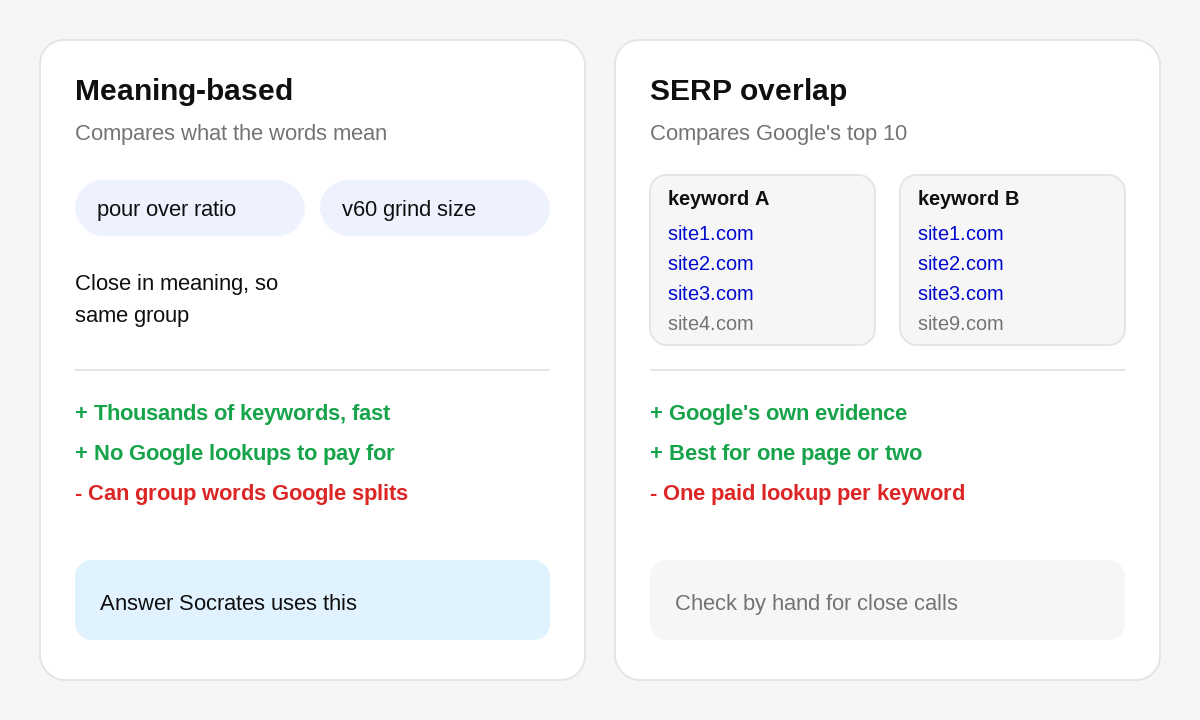
| Meaning-based | SERP overlap | |
|---|---|---|
| What it compares | What the words mean | Which URLs rank in Google's top 10 |
| Best at | Sorting hundreds or thousands of keywords into topics | Deciding if two close keywords need one page or two |
| Speed and cost | Fast, no Google lookups | One results-page lookup per keyword |
| Where it goes wrong | Can join keywords Google treats as different intents | Noisy for tiny keywords with few results |
| In Answer Socrates | Both clustering engines use it | Not offered today |
Answer Socrates clusters by meaning. Both engines (Classic and Jev AI, more on those below) group keywords by what they mean. A SERP-based page split has been built for the Jev AI tool, but it is switched off and not on the site, so do not expect it.
Keyword list vs cluster vs topical map
People use these three words loosely. They are different things, at different sizes, and each one answers a different question.
| Keyword list | Cluster | Topical map | |
|---|---|---|---|
| What it is | Every search you found, one per line | One group of keywords with the same job | All your clusters for a subject, arranged as pillar and supporting pages |
| Answers | "What do people search?" | "What goes on this one page?" | "Which pages does my site need, and how do they link?" |
| Size for the coffee roaster | 400 keywords | 3 to 20 keywords | 30 to 60 pages |
| You make it with | A keyword search | A clustering run | Clusters, plus your judgement about the pillar pages |
| Turns into | Clusters | One page and its brief | A content plan and an internal link plan |
A topical map is many clusters put in order. The broad subject ("home brewing") becomes a pillar page, which is a hub page that covers the whole subject at a high level and links down to the detailed pages. Each cluster under it ("pour over", "espresso", "French press") becomes one of those detailed pages, and each one links back up.
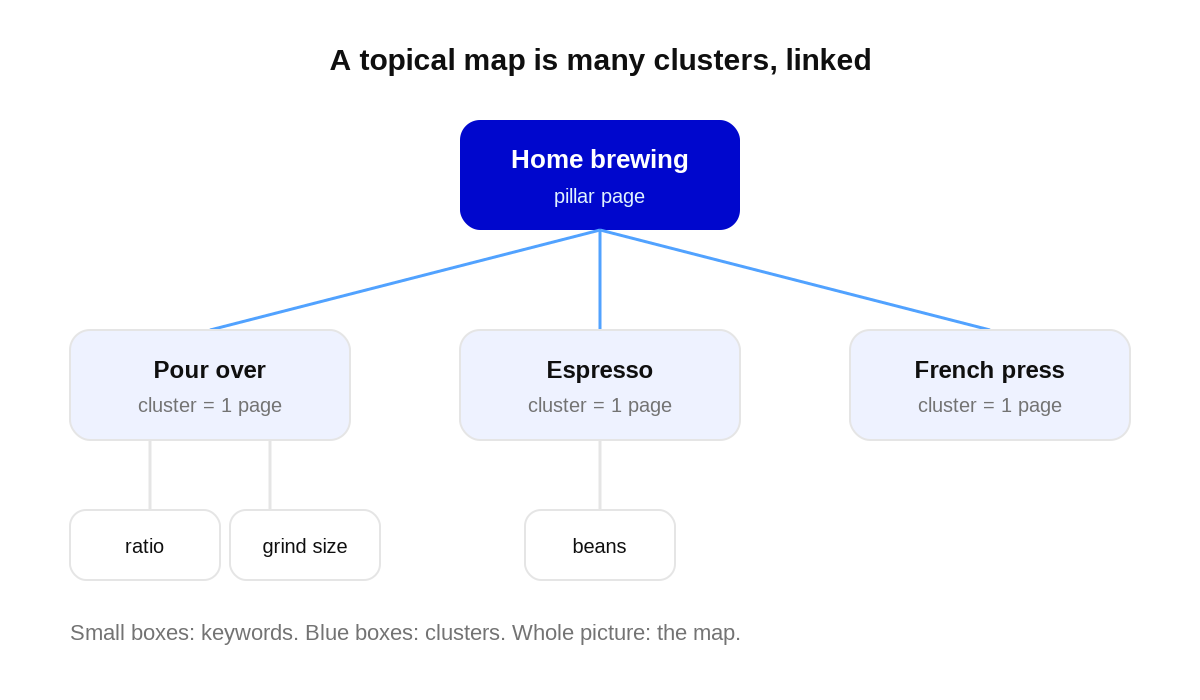
So clustering is the middle step. You need a decent list before it, and you need to arrange the clusters after it. The Jev AI engine does part of that arranging for you: its site structure view turns topics into hub pages with the keywords that deserve their own page split out underneath.
How a cluster becomes a page
A cluster is not a page yet. It is a pile of evidence about what one page should cover. Here is how to turn it into one.
A made-up example: a coffee roaster clusters 400 keywords and gets a group of nine about pour over. The biggest is "how to make pour over coffee". The rest include "pour over coffee ratio", "v60 grind size", "pour over kettle temperature" and "pour over vs french press".
- Pick the main keyword. Usually the one with the most searches that still matches the page you want to write. Here, "how to make pour over coffee". It goes in the title and the H1.
- Turn the rest into sections. "pour over coffee ratio" becomes an H2 with the actual ratio. "v60 grind size" becomes a short section with a photo of the grind. Most supporting keywords become a heading or a paragraph, not a page.
- Pull out anything with a different job. "pour over vs french press" is a comparison. It can be a short section here, but if it has real search volume it may deserve its own page later.
- Check the intent. A how-to cluster needs a guide. A cluster full of "best" and "buy" keywords needs a product or buying page. If the keywords in one cluster want different kinds of page, split it.
- Name it like a human would. The Classic tool labels each topic with one of its keywords. Rename it before you hand it to a writer.
| Check before you write | Pass | Fail |
|---|---|---|
| One reader, one job | Everyone searching wants to brew pour over at home | Half want to learn, half want to buy a kettle |
| One page type fits | All suit a step-by-step guide | Some want a guide, some a product page |
| Not already covered | No page on your site targets these | You have a "brewing guide" that already ranks for half |
| Worth a page | Combined searches justify the work | Three tiny keywords with no volume between them |
One thorough page that answers every question in a cluster gives the reader everything in one place. Five near-copies split your effort and make Google pick between your own pages.
How to cluster keywords in Answer Socrates
There are two engines, and both cost the same: 1 topic cluster credit per keyword. The difference is what comes back.
- Classic (the clustering tool) gives you topic groups with search volume, CPC and competition, and an Excel export.
- Jev AI (the Jev AI keyword tool) also labels every keyword with search intent and funnel stage (TOFU, MOFU, BOFU), gives a confidence score for each assignment, and builds a hub and spoke site structure.
When you start from the clustering tool or from keyword search results, you pick the engine in the confirm dialog before anything runs. The Jev AI tool page runs Jev AI.
Classic: upload a CSV
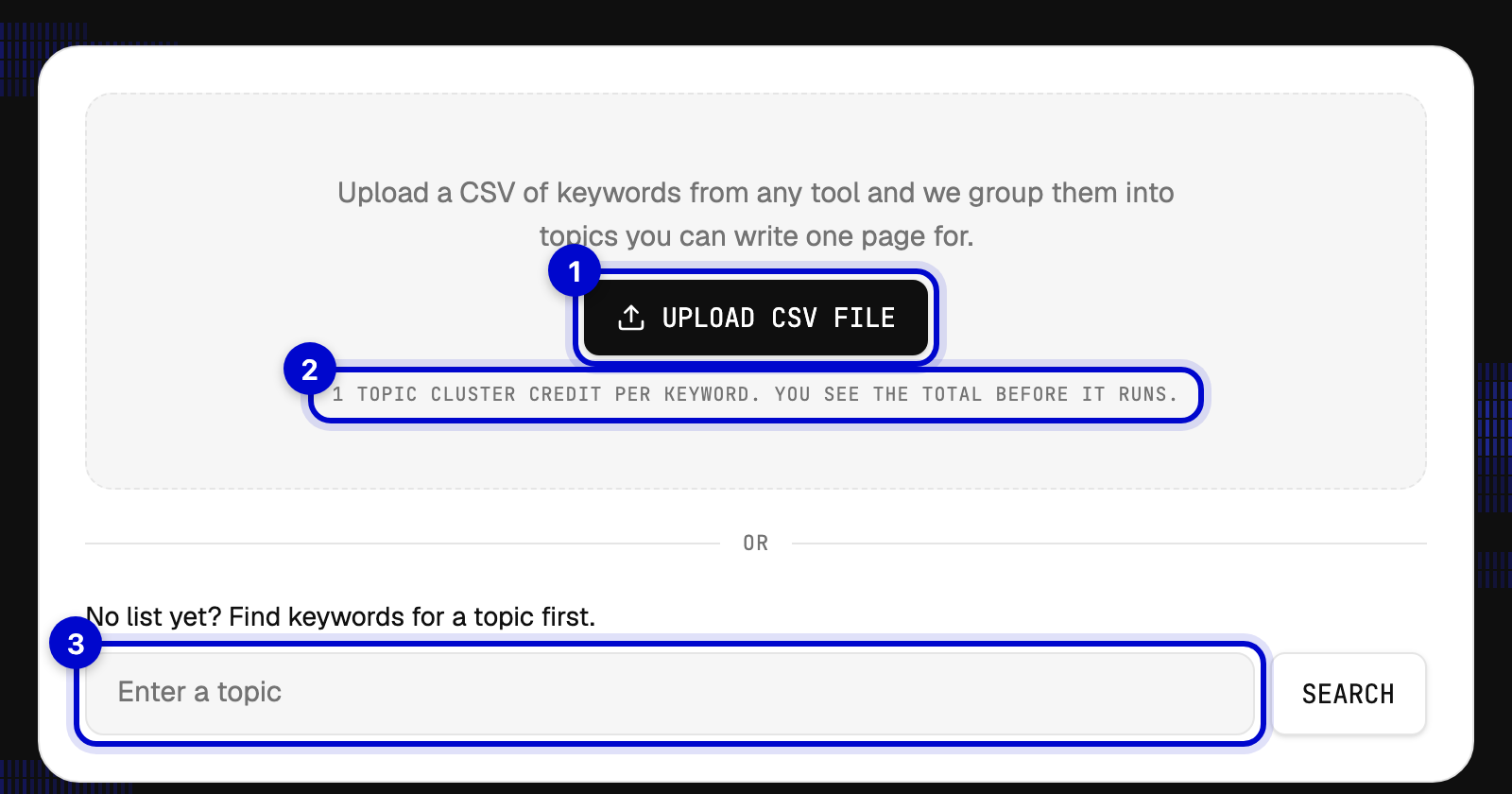
Step 1. Open the clustering tool and upload your list. Go to the clustering tool and click Upload CSV File (1). The note underneath (2) is the price: 1 topic cluster credit per keyword. No list yet? Type a topic in the box (3) and you are sent to the keyword search to build one first. You need to be signed in to upload.
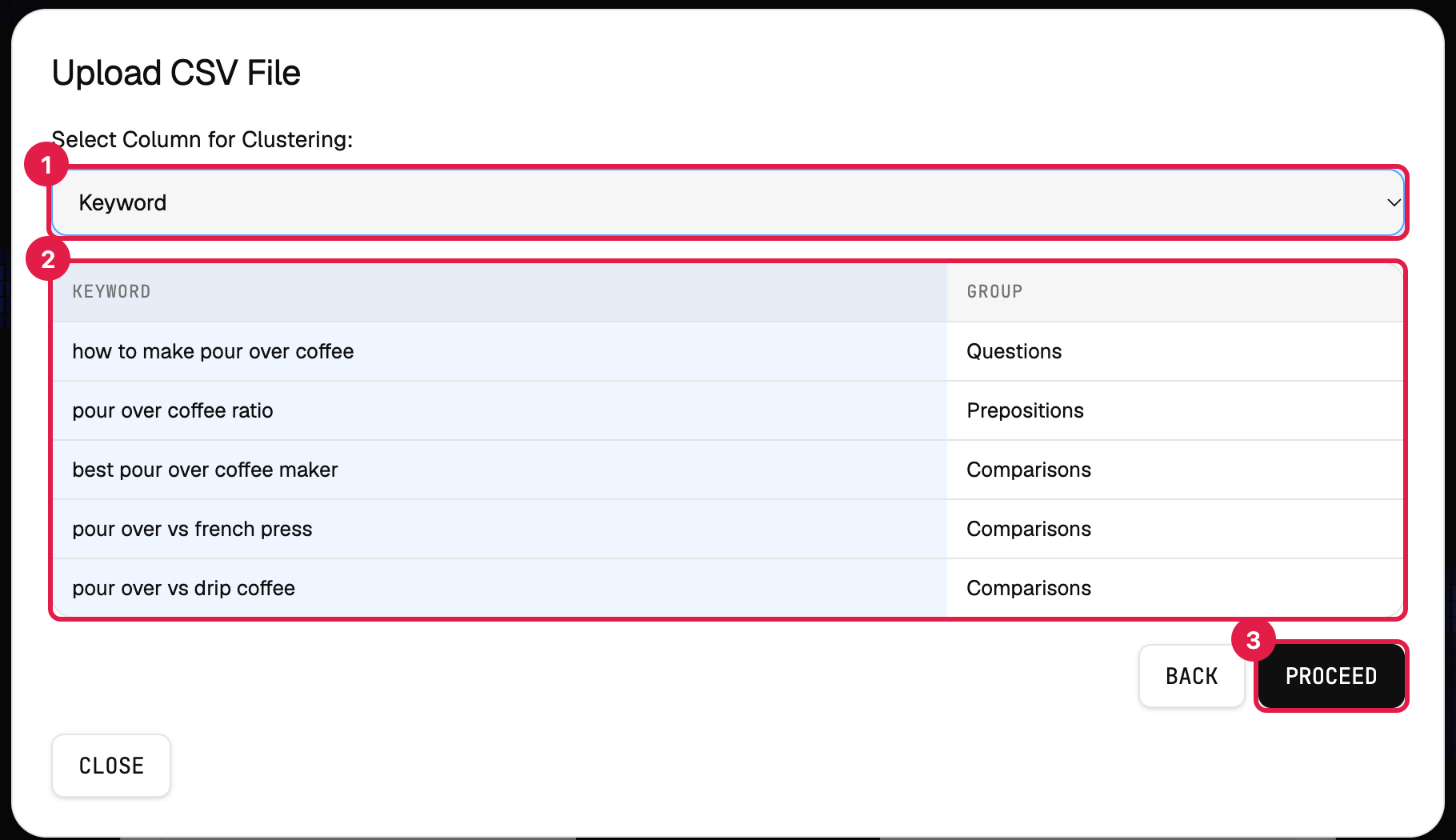
Step 2. Pick the column that holds your keywords. Your CSV needs a header row. After you choose the file, a preview of the first rows appears with a drop-down. Pick the keyword column and click Proceed. Duplicates are removed before anything is counted.
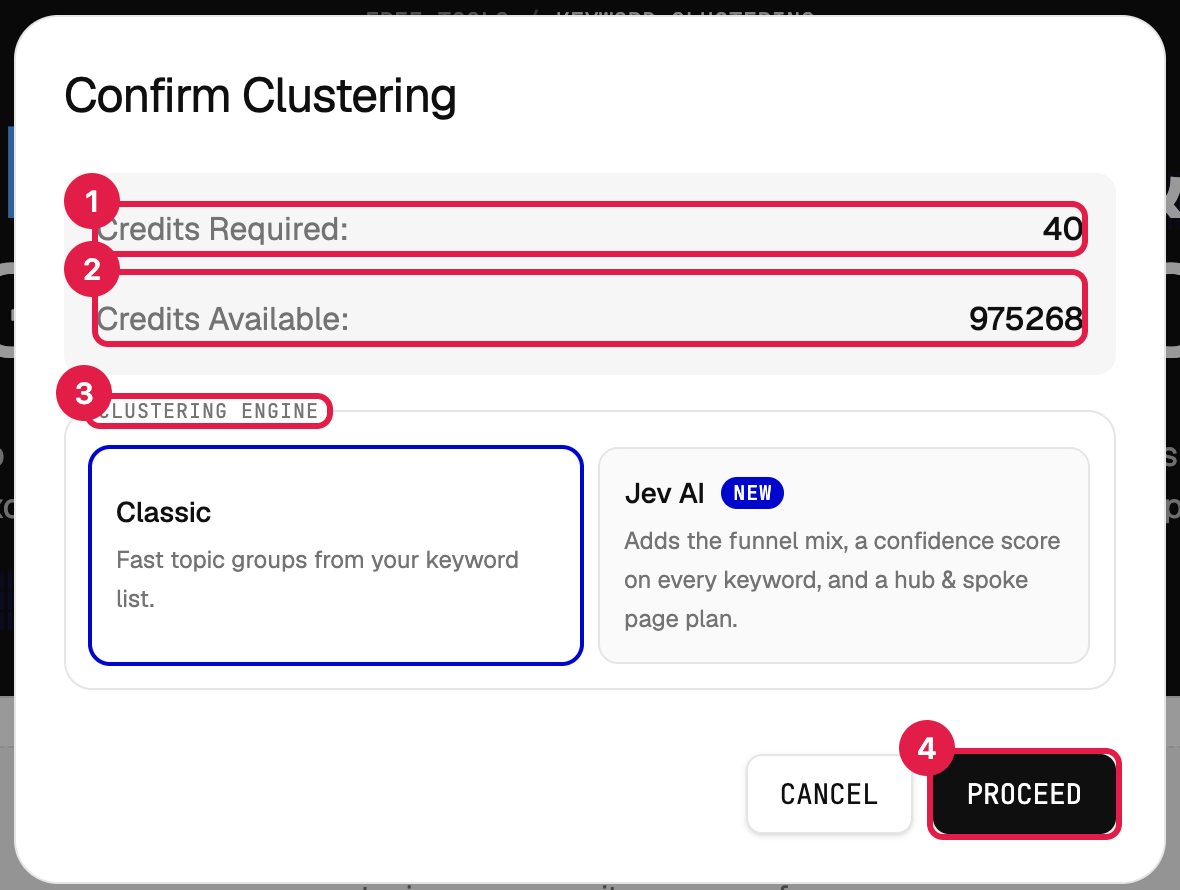
Step 3. Confirm the cost and choose the engine. The Confirm Clustering dialog shows Credits Required (one per unique keyword) and Credits Available. Below that, pick Classic or Jev AI. If you do not have enough credits, Proceed is greyed out, so nothing is charged by surprise.
Step 4. Read the results. A run usually takes a minute or two. At the top you get the metrics: total keywords, clustered keywords, number of topics, the clustered percentage and unclustered keywords. Below that are tabs: All topics, one tab per topic, and Unclustered keywords for anything that did not fit a group. Each topic card shows its keywords, and its icon opens the total search volume, average CPC and competition.
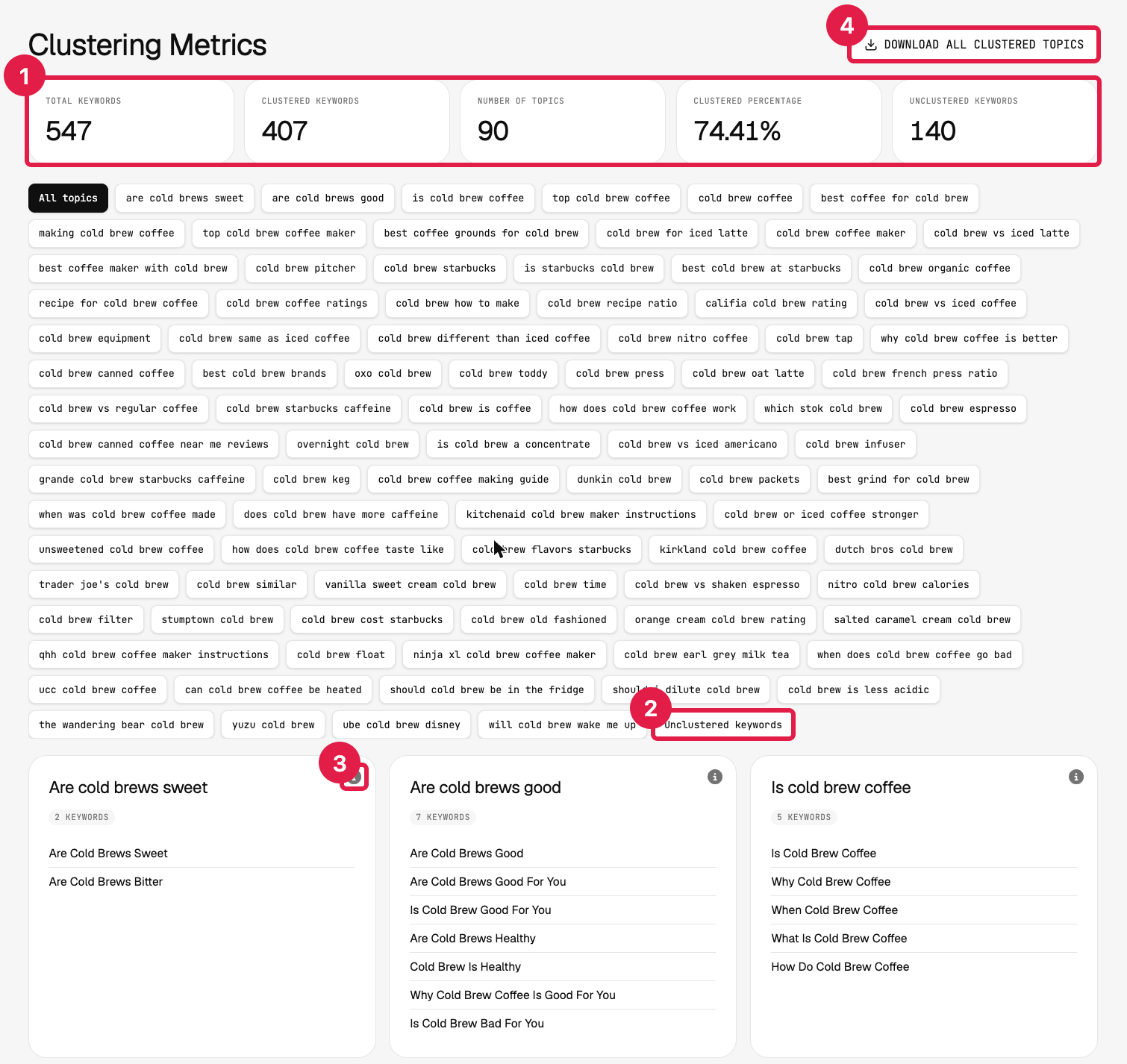
Step 5. Export and keep it. Download All Clustered Topics gives you an Excel file with every topic, every keyword, and the volume, CPC and competition data. The run is also saved in your search history in the sidebar, so you can come back to it.
One limit to know: search volumes in the Classic tool are United States figures, whatever country your list was built for. If you sell in the UK or Germany, treat the volumes as a rough guide to size, not a forecast.
Jev AI: paste, upload or reuse a search
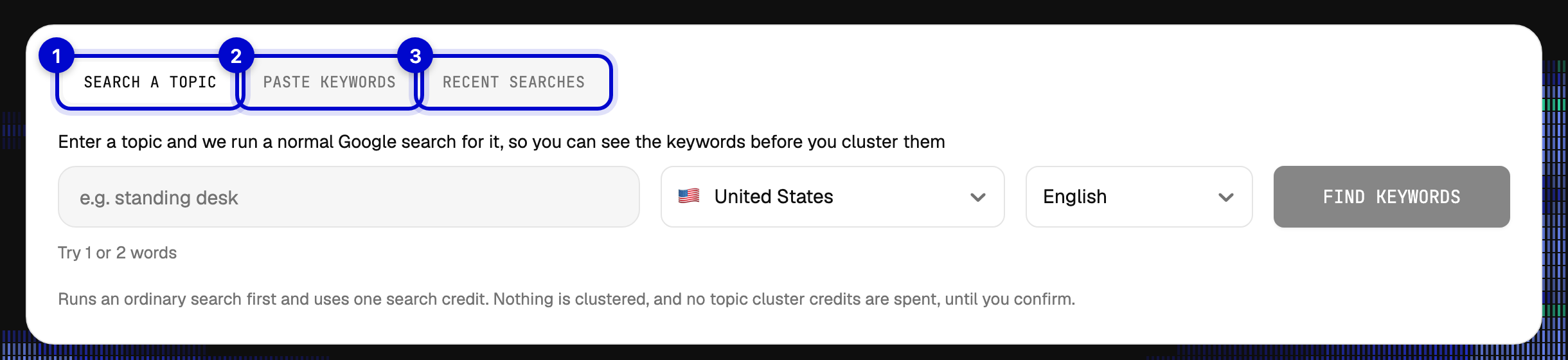
The Jev AI keyword tool has three ways in (1, 2, 3 below): Search a topic runs an ordinary keyword search first (one search credit) and shows you the keywords before you cluster them. Paste keywords takes your own list. Recent searches reuses keywords from searches you have already run.
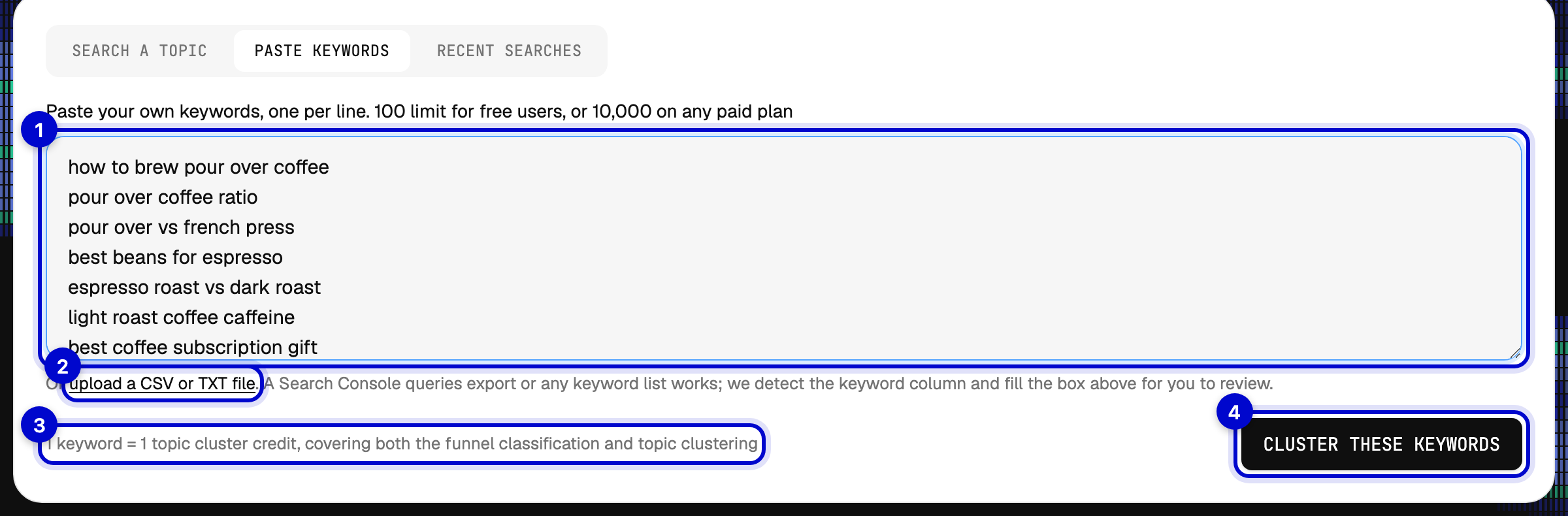
On Paste keywords, put one keyword per line (1) or upload a CSV or TXT file (2); the tool finds the keyword column and fills the box for you to check. The cost line (3) is the same as Classic: one credit per keyword covers both the funnel labels and the clustering. Then click Cluster these keywords (4). Free accounts can paste up to 100 keywords; paid plans up to 10,000.
Jev AI marks keywords it is not sure about as unclustered instead of forcing them into a group. Its site structure view is the closest thing in Answer Socrates to a ready-made topical map: one hub page per topic, with the keywords that deserve their own page listed underneath.
What a clustering run costs
Clustering has its own allowance, separate from searches. These are the rules in the code today:
| Action | Cost |
|---|---|
| Cluster a list (Classic or Jev AI) | 1 topic cluster credit per unique keyword |
| Build the list with "Search a topic" in the Jev AI tool | 1 search credit, then the cluster credits when you confirm |
| Reopen a saved cluster run from your history | Free |
| Run out mid-month | Proceed is disabled; nothing runs and nothing is charged |
The standard free account gets 500 topic cluster credits a month, which is one 500-keyword list or several small ones. Paid plans get more; the Pricing page has the exact numbers for each plan.
Because the keyword count is the price, trim before you cluster. Delete obvious junk (other brands, other meanings of your seed word, misspellings that repeat a keyword you already have). A tighter list gives cleaner groups and costs less.
The same thing in Ask Socrates
Ask Socrates is the Answer Socrates chat. It can pull keywords and cluster them in the same conversation, using the Jev AI engine. You can type something like:
Ask Socrates runs the keyword pull, then names the exact number of cluster credits. If your spending setting is "Asks before spending", it shows an approval card and nothing is clustered until you allow it. Then the topics come back biggest search volume first, each with its intent and funnel stage. The run is saved on the Jev AI tool page too, so you can open the full view there.
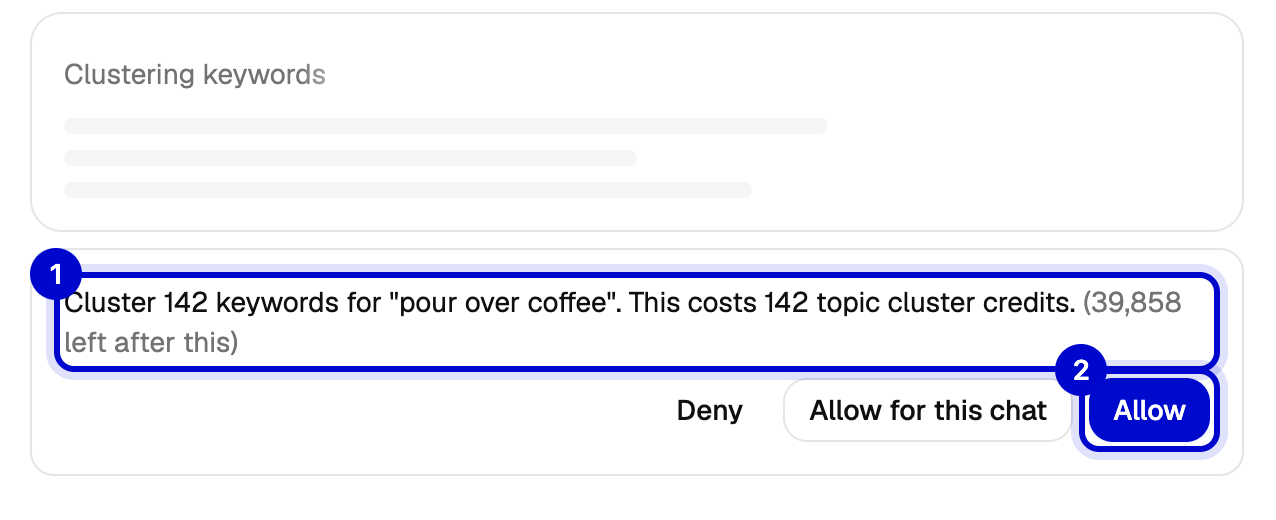
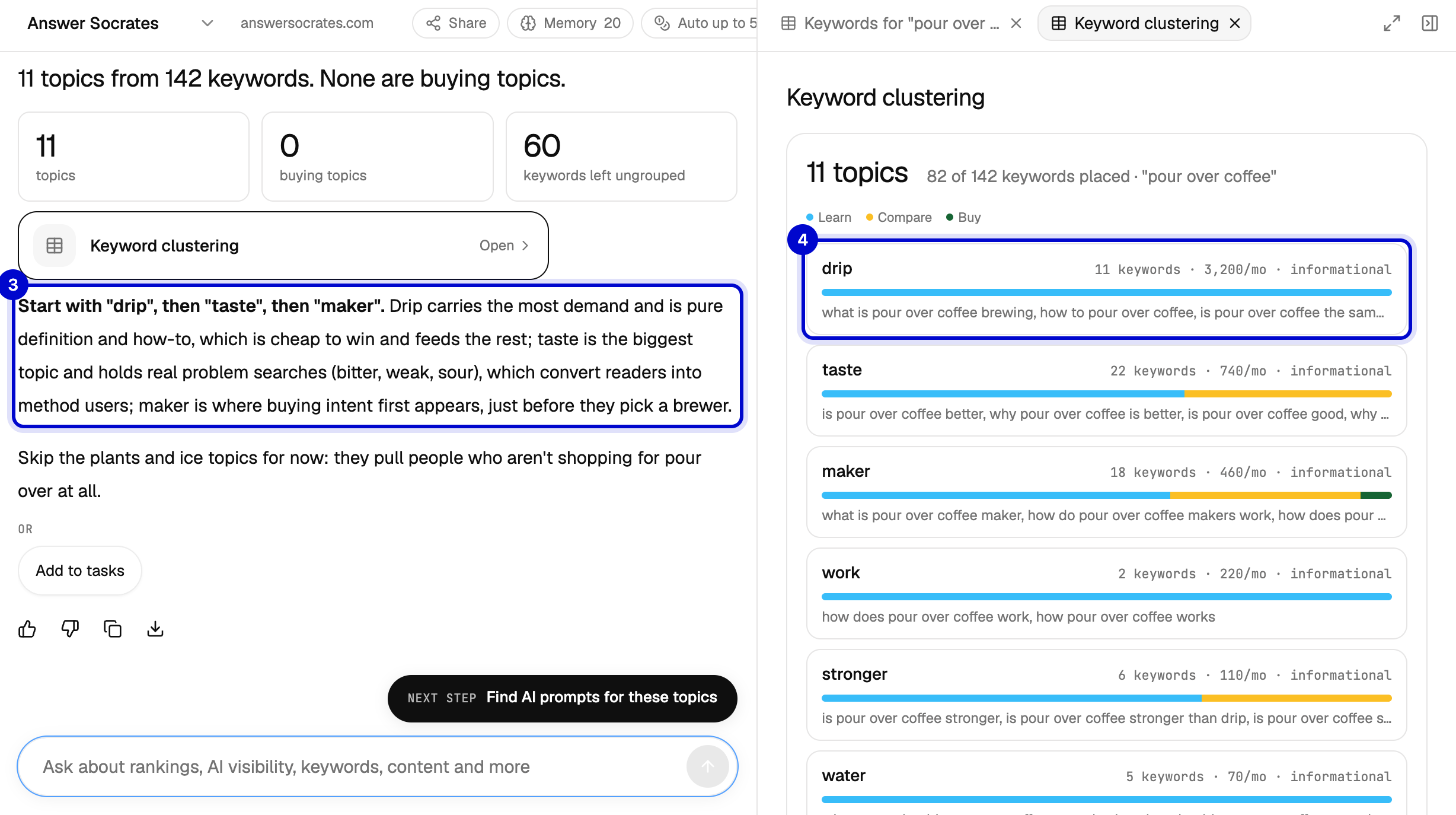
A few things worth knowing about clustering in chat:
- A chat run takes 10 to 1,000 keywords. For bigger lists, use the Jev AI tool page.
- You can cluster a whole group from a keyword pull (for example, all the Questions) without pasting anything. The cost is the full size of that group.
- Asking again for a run you already did reopens it from your history for free.
If Ask Socrates is not open on your account yet, the Jev AI keyword tool does the same run from its own page. A Topical map page for Ask Socrates, which reads your site and groups searches into pillars around your existing pages, is being built but is not open to everyone yet.
Where to go next
| If you want to... | Read |
|---|---|
| Build a bigger, better list before you cluster | How to do keyword research: find what people actually ask |
| Decide if two close keywords need one page or two | One page or many? Reading a keyword cluster |
| Do the whole thing in one conversation | Keyword research in one chat with Ask Socrates |
| Put your clusters in the order you will write them | From cluster to content plan: what to write first |
| Link the pages in a cluster to each other | Internal links: connecting your pages |
Sources
- Creating helpful, reliable, people-first content, Google Search Central, 2026
