How to do keyword research: find what people actually ask
Keyword research is finding the exact words people type into search about your topic, and question keywords are the most useful place to start because they show what the searcher wants. This guide walks through one real Answer Socrates search section by section, then explains what search volume, CPC, competition and trend actually measure.
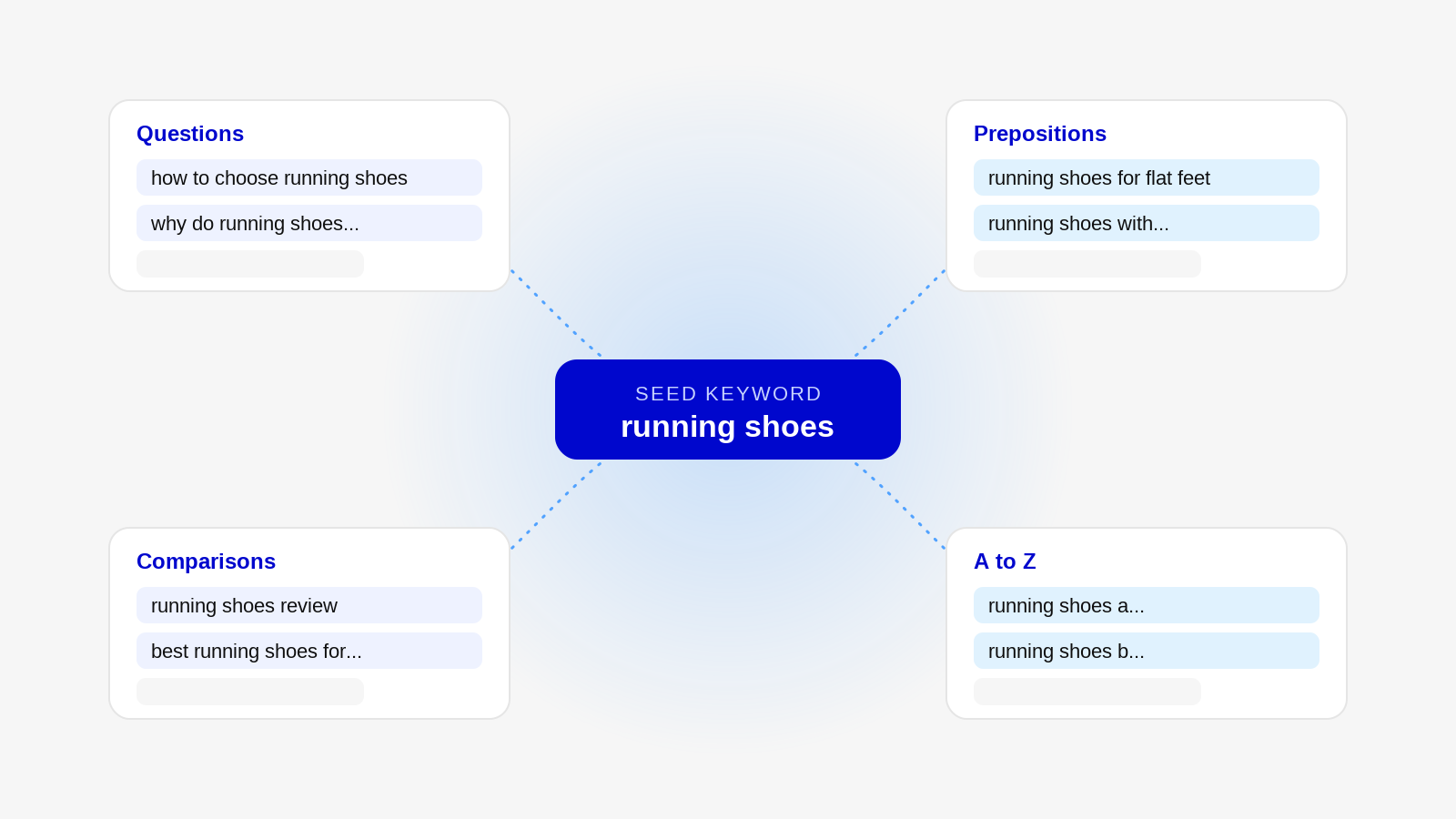
Key takeaways
- One seed ("running shoes", US) returned 2,841 keywords from Google autocomplete, TikTok, YouTube, Google Shopping, Amazon and eBay, each filed by the word that produced it.
- Each section suits a different page: Questions for guides, Prepositions for who it is for, Comparisons for buying pages, Social for videos, Shopping for product and category pages.
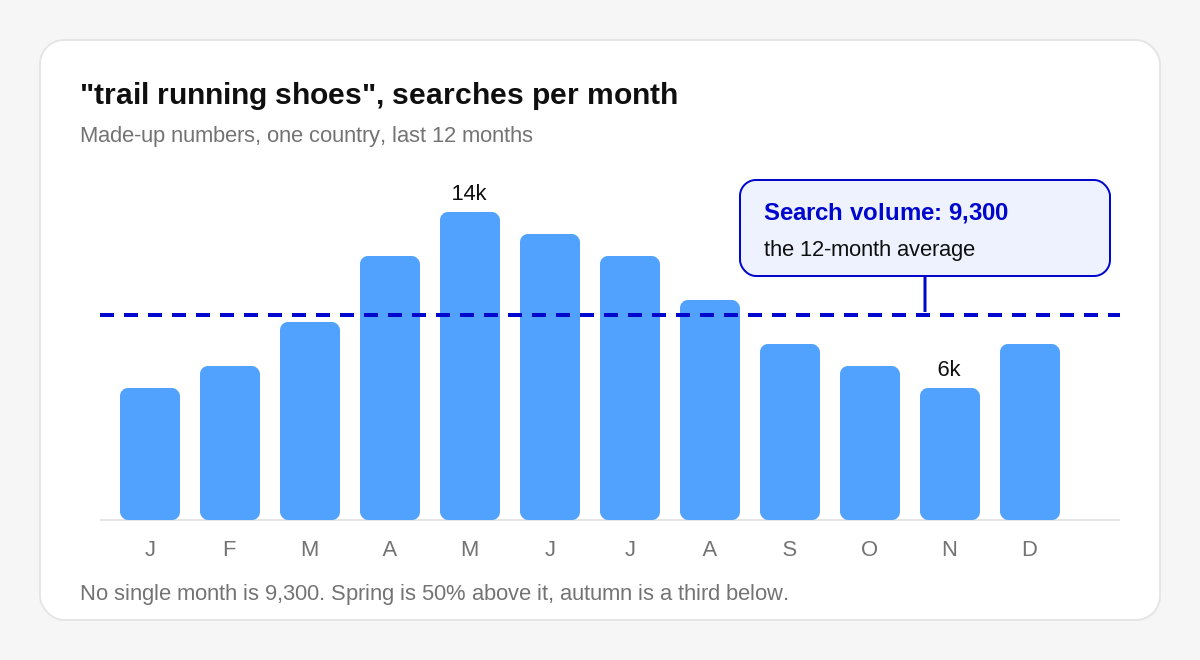
- Search volume is the average monthly searches over the last 12 months for one country and language; a seasonal keyword can be 50% above or below it in a given month.
- Competition (0 to 100) measures how many advertisers bid in Google Ads, not how hard it is to rank; CPC shows what a click is worth to advertisers.
- The TOFU, MOFU, BOFU, LOCAL, LOC and LONG labels come from word rules, so check any keyword you plan to build a page around.
Keyword research means finding the words people type
Keyword research is the work of finding the exact words people type into a search engine about your topic, so you can write pages that match them. A keyword is any search phrase, short or long: "running shoes" is a keyword, and so is "how often should you replace running shoes".
Most people start with a guess. They write the page they want to write, then hope someone searches for it. Keyword research turns that around: you look at what people already ask, then decide what to write.
It answers four practical questions:
- What do people call this? Your customers may say "trainers" while you say "running footwear".
- What do they want to know? Price, fit, how long it lasts, how it compares.
- How many people ask? Search volume tells you whether a topic has ten searchers a month or ten thousand.
- Which of those questions deserve a page? Not every search is worth your time.
This lesson covers all four. You will pull thousands of real searches from one seed word, read every section of the results, and learn what search volume, CPC, competition and trend really measure.
Questions show intent that head terms hide
A head term is a short, broad search like "running shoes". Lots of people type it, but you cannot tell what any one of them wants. They might want to buy a pair, read a review, find a shop nearby or learn how to start running.
Search intent is the goal behind a search: to learn something, to compare options, or to buy. A question keyword carries its intent in its own words.
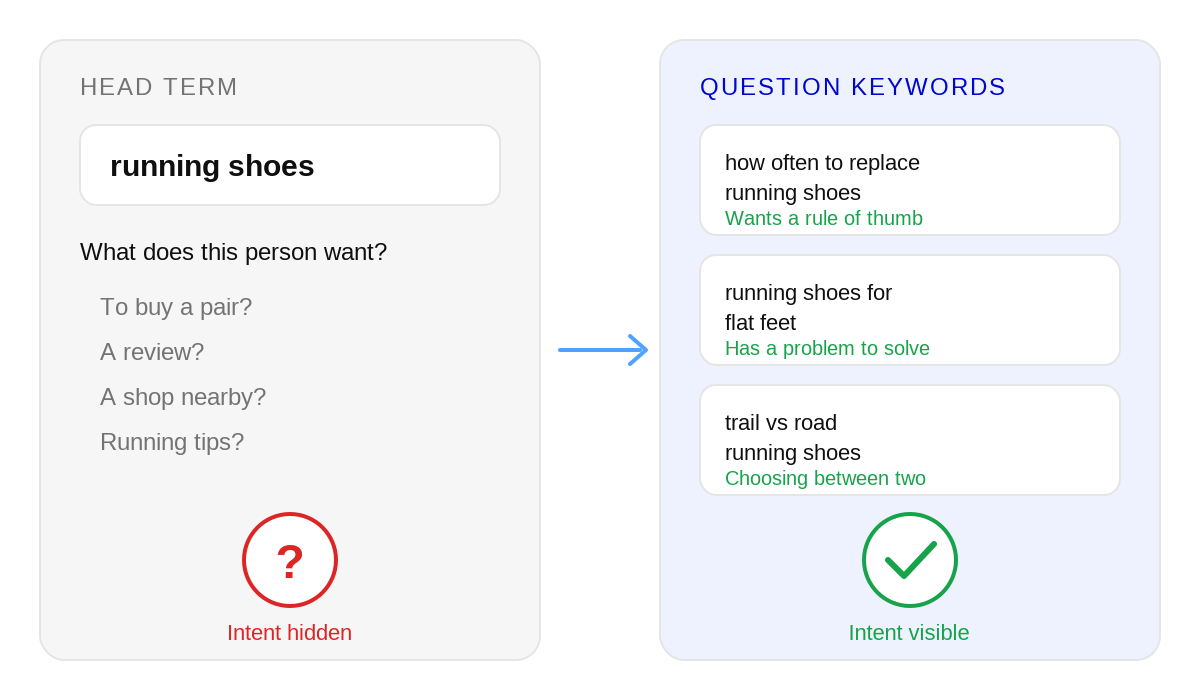
"How often to replace running shoes" wants a rule of thumb. "Running shoes for flat feet" has a problem to solve. "Trail vs road running shoes" is choosing between two. You could write the page for each one right now, because the searcher has told you what a good answer looks like.
There is a second reason to start with questions. Broad head terms are where the biggest sites compete. Specific questions are often answered badly or not at all, which gives a smaller site a real chance.
A page that answers one clear question is easy to judge as useful, by a reader and by a search engine. A page aimed at "running shoes" has to guess which of the many meanings to serve.
The trade-off is volume. Each question is searched less often than the head term. You make up for that by answering many of them, which is why you want hundreds of questions to choose from, not ten.
Where the questions come from: autocomplete
When you start typing in Google, it suggests ways to finish your search. These are autocomplete predictions. Google says they "reflect real searches that have been done on Google" and that its systems look for common queries that match what you have typed so far [1]. Predictions also depend on the language and location of the search, and on trending interest [1][2].
That makes autocomplete a free, live record of what people ask. The catch is that you only see a handful of predictions at a time, for exactly what you typed.
Answer Socrates does the typing for you, many times over:
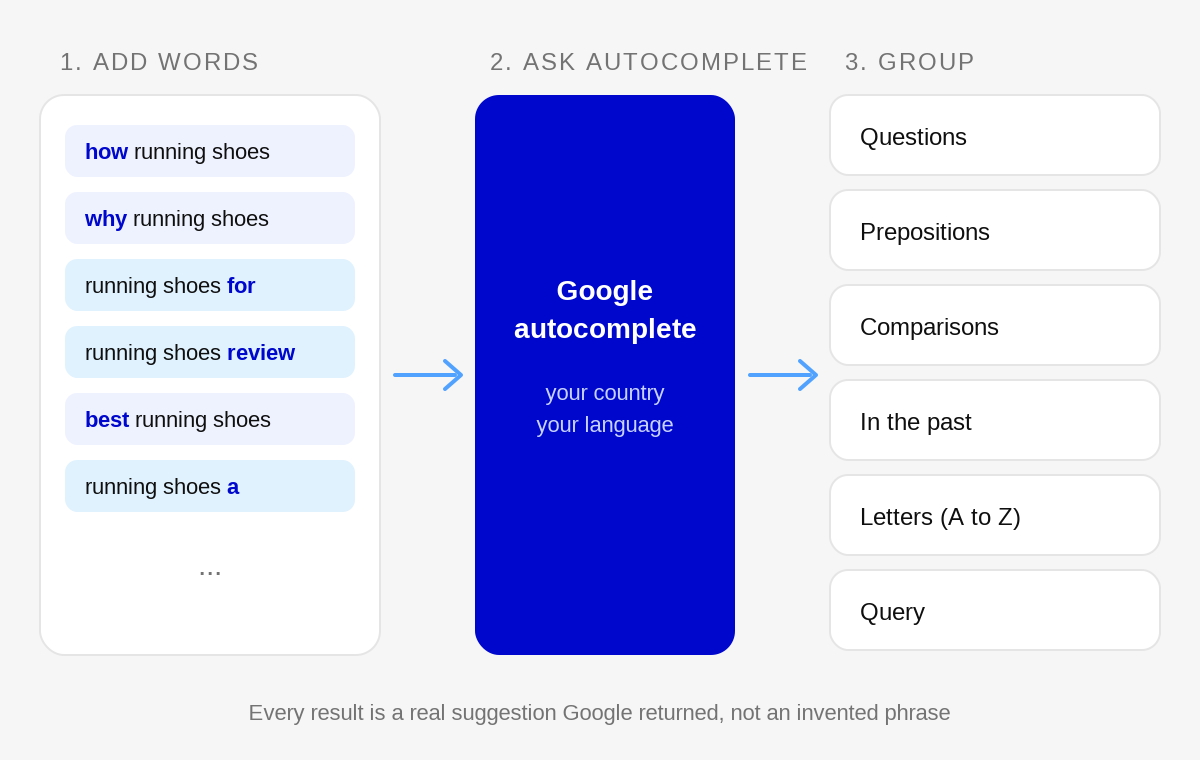
- Add words. We combine your seed with a list of modifiers: question words such as "how" and "why", prepositions such as "for" and "with", comparison words such as "best", "review" and "alternative", and the letters a to z.
- Ask autocomplete. Each combination is sent to Google autocomplete for the country and language you picked. We also send the seed on its own, and a version that asks Google to fill in the words before your seed.
- Ask other search boxes too. The same seed goes to TikTok and YouTube search, and to Google Shopping, Amazon and eBay, because people phrase things differently on each one.
- Group. Every suggestion is filed under the modifier that produced it, so all the "how" questions sit together, all the "for" searches sit together, and so on.
Nothing is made up along the way. If a phrase is in your keyword lists, a real search box suggested it for that market.
How to run a search in Answer Socrates
The classic keyword search lives on the New search page. Everything below comes from one real search: "running shoes", United States, English, run on 21 November 2026.
Step 1. Type a seed keyword. Use one or two words that name the topic, not a full sentence. The form itself says "Try 1-2 seed keywords". A short seed leaves room for autocomplete to add the rest.
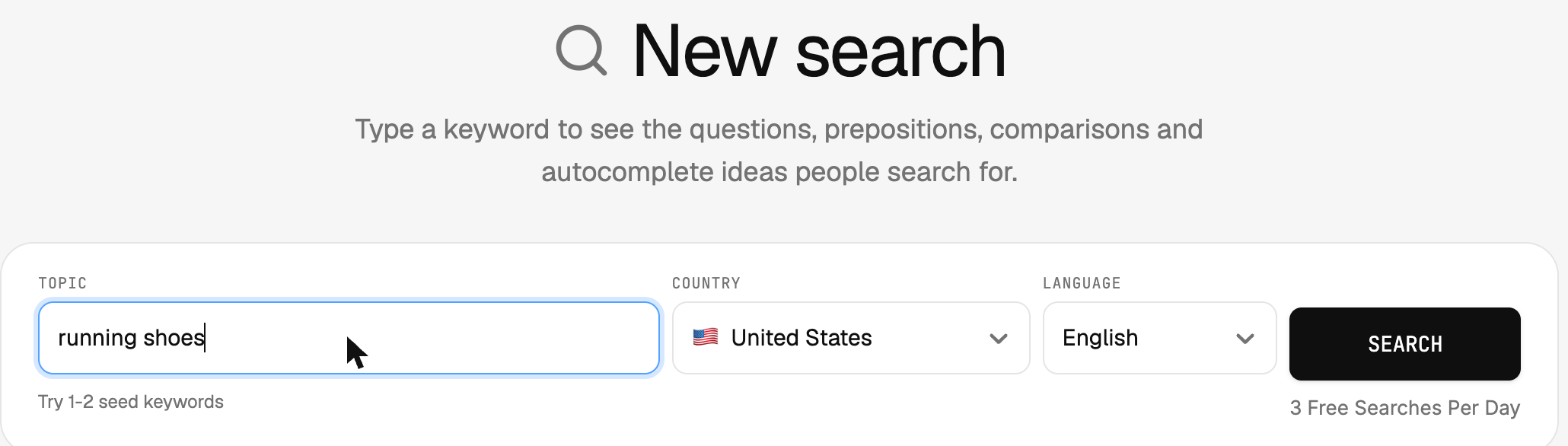
Step 2. Pick the country and language. Autocomplete differs by market. A running shoe store in the UK should search the United Kingdom in English, because British searchers say "trainers" and ask about different brands. Click the Country box and type to filter the list.
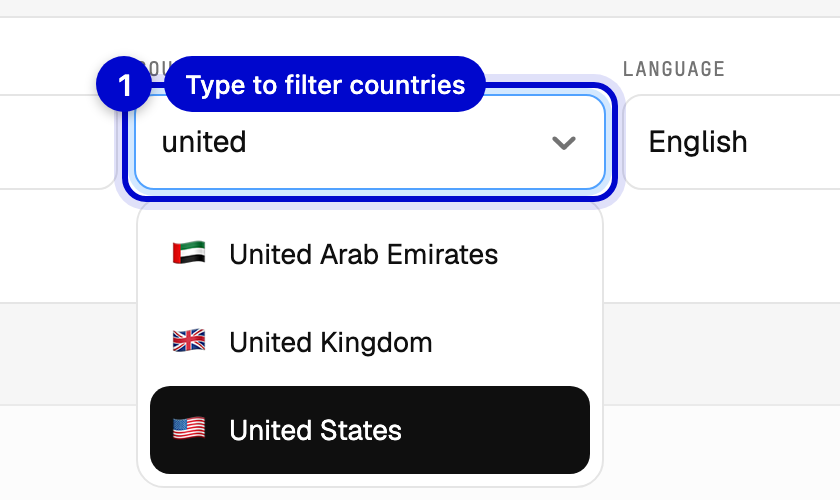
Step 3. Run the search. Click Search. The results page fills in as the lookups come back, and the social and shopping groups arrive last, so give it a few seconds before you judge the count.
Step 4. Read the header. The top of the results page sums up the whole pull and holds every action you can take on it.

- The count line. "2841 keywords · United States · English": every unique keyword found, and the market they came from. The chips count each source on its own, so their numbers add up to more.
- The source chips. All, AI Prompts, Google, Social and Shopping. Click one to show only that source. Each chip shows how many results it holds.
- Visualise opens the question wheel.
- Check Metrics adds search volume, CPC, competition and trend.
- Download CSV saves the list.
- Cluster Keywords groups the list into topics.
- Top by Search Volume shows the 50 biggest keywords once you have run Check Metrics.
Under the header, accounts without metrics see a banner: "Search volume, CPC, competition and 12-month trend for all 2841 keywords", with an Unlock Metrics button.
What each section of the results shows
The page is a long stack of sections. Each one comes from a different kind of lookup, and each is good for a different kind of page. Here they are in the order they appear.
People Also Asked and Google Trends
The first row shows two quick reads on the topic before the keyword lists start.
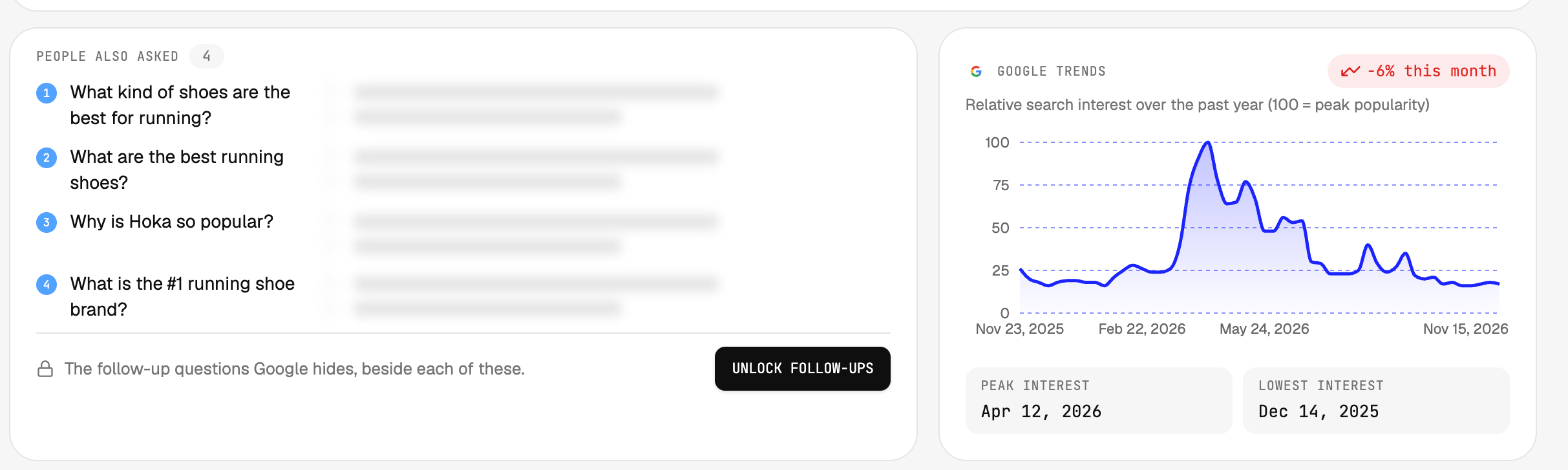
People Also Asked lists the questions Google shows in its "People also ask" box for your seed. Here it found four, including "Why is Hoka so popular?". Those are the questions Google itself thinks searchers want answered next, so they make strong H2s for a page about the topic. The follow-up questions Google hides behind each one are locked on free accounts.
Google Trends draws a year of interest, where 100 is the busiest week. It is relative, not a count: Google normalises the data and scales it from 0 to 100 [4], so it shows when people search, not how many. For running shoes the line climbs from February, peaks in April and drops through the autumn. The badge in the corner compares this month with last.
Keeps coming up
This section pulls out the themes that run through the whole pull.
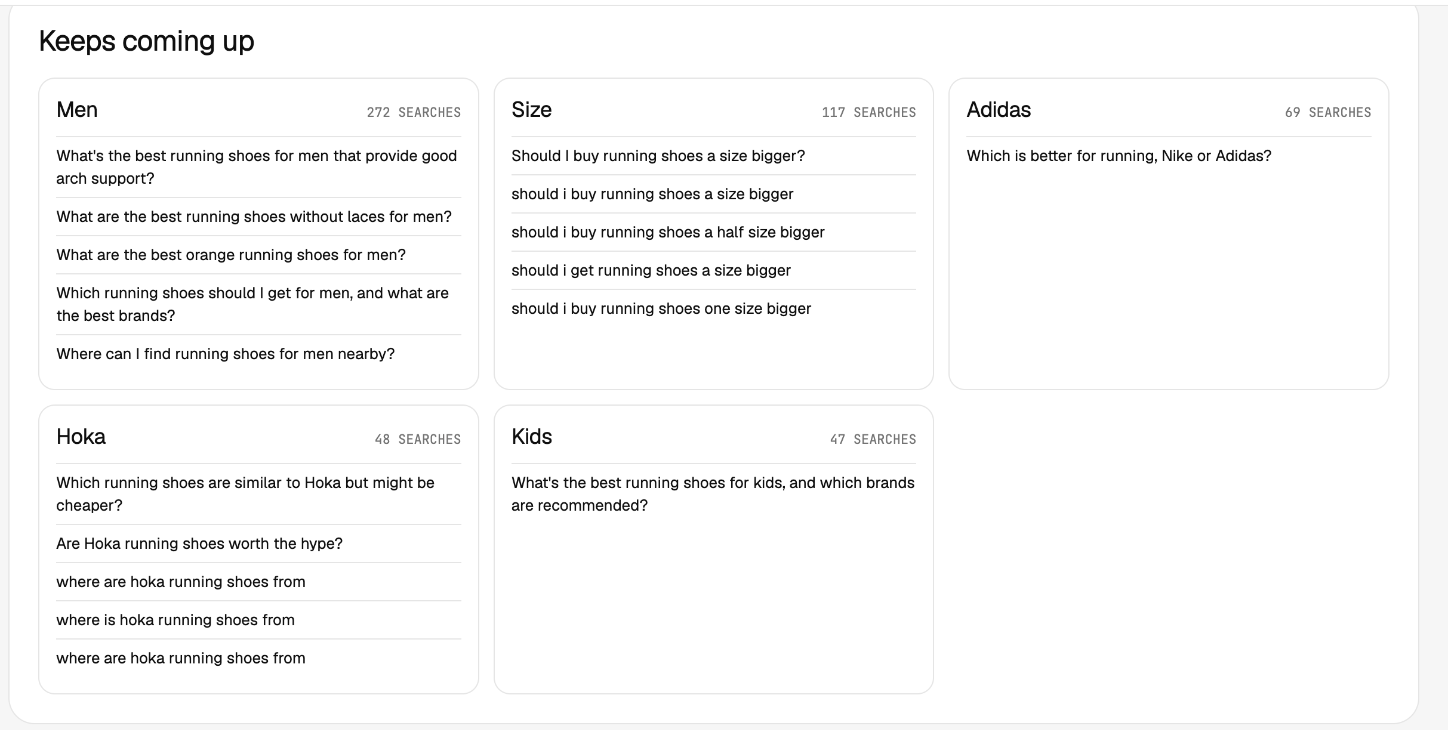
Each box is a theme, with a count of how many searches and AI prompts mention it, and up to five examples. A theme only shows here if at least three results mention it, so these are patterns, not one-offs. For "running shoes" the big ones are Men, Size, Adidas, Hoka and Kids.
Read this section as a shortlist of pages. "Size" with 117 searches, made of questions like "should I buy running shoes a size bigger", is a sizing guide waiting to be written.
AI Prompts
AI prompts are the full questions people ask ChatGPT, Gemini and other AI assistants. We write them from the real searches in your pull, so each one is grounded in something people do type.
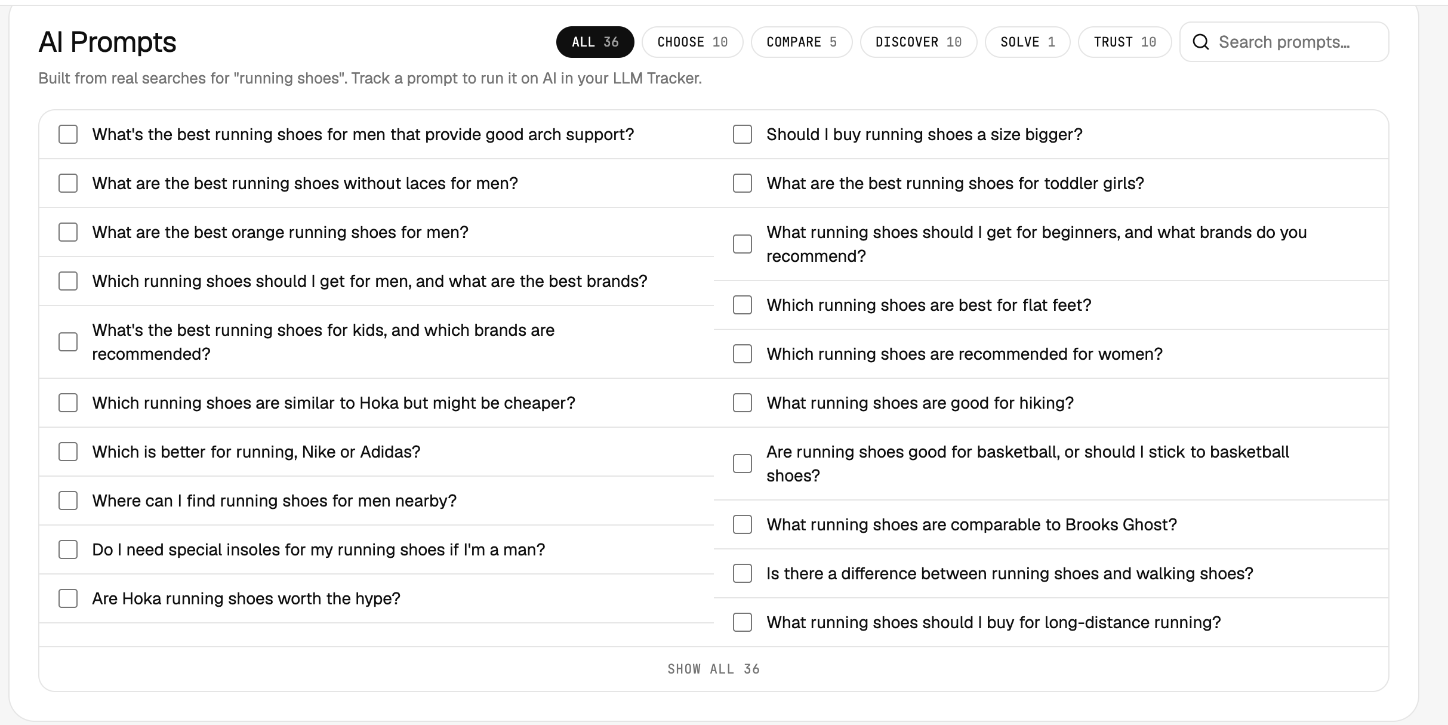
The chips sort prompts by intent. Discover and Solve prompts are early-stage: someone learning or fixing a problem. Compare and Trust are the middle: "Are Hoka running shoes worth the hype?". Choose prompts are ready to buy. Tick a prompt to track whether AI answers name your brand for it. That is covered in AI prompts: the new keywords.
Questions
The section most people come for: every suggestion that starts with, or contains, a question word.
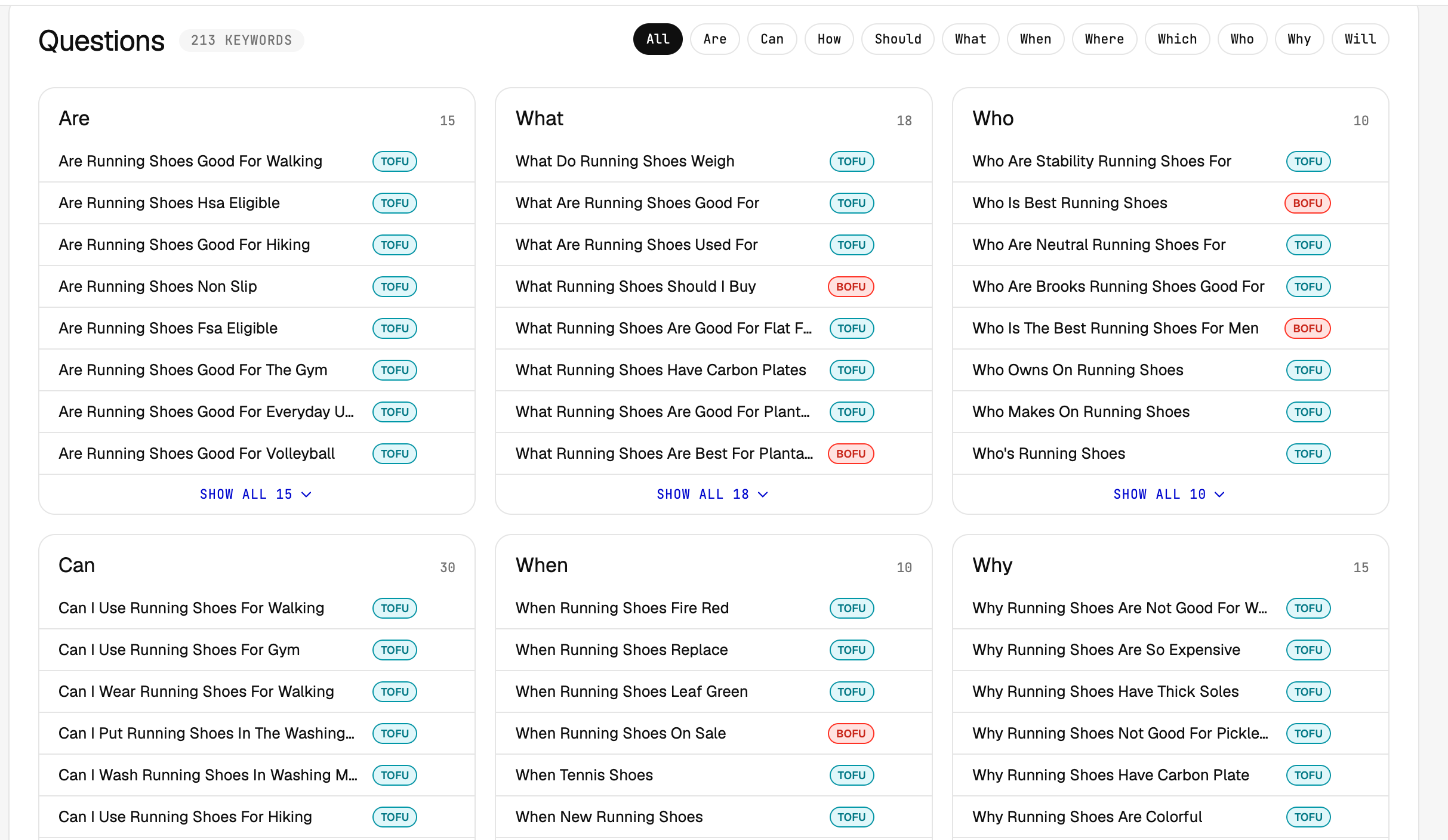
Each card holds one question word, with a count and a "Show all" link when there are more than eight. The question word tells you the shape of the answer:
- How wants steps ("how should running shoes fit").
- Why wants an explanation ("why running shoes are so expensive").
- Which and what ... should I buy want a recommendation.
- Can and are want a yes or no, then the reason ("can I use running shoes for walking").
Letters
The seed plus each letter of the alphabet. This catches the long tail that no modifier word would.
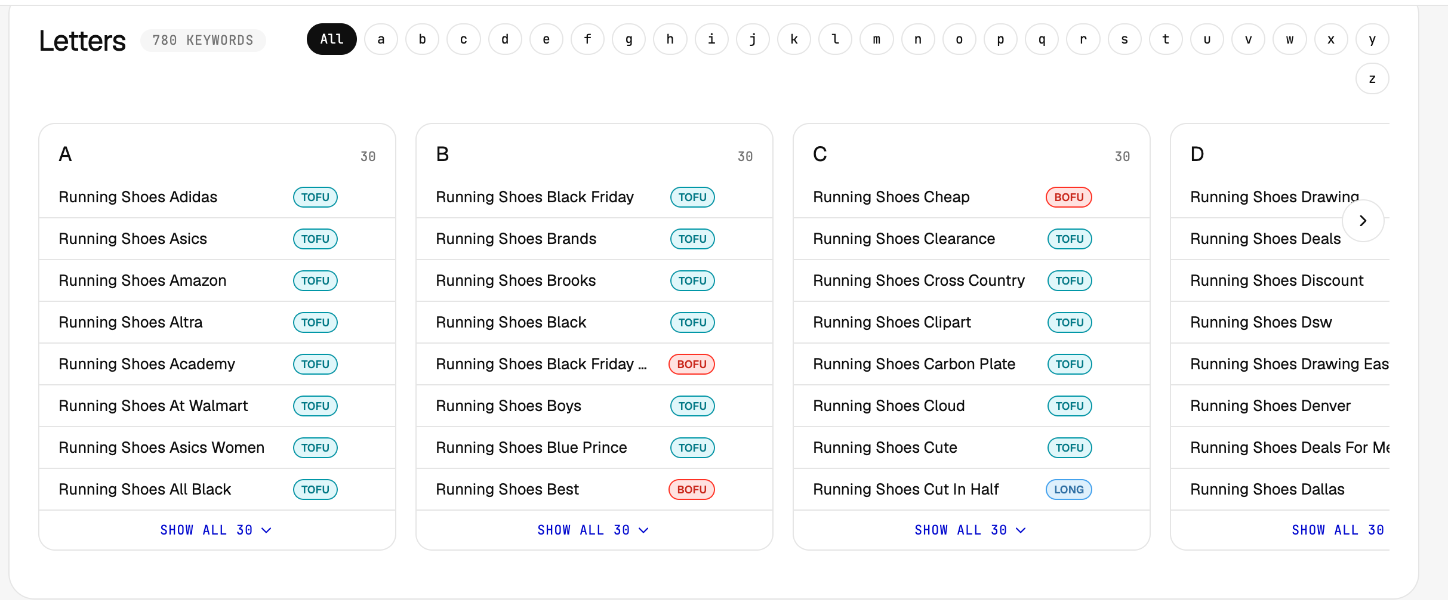
Letters is the noisiest section and often the most useful for products. For "running shoes" it surfaces brands, retailers, colours and sales events in one place. Scan it for patterns, not for single keywords.
Prepositions
Searches that join the seed with a word like for, with, without, near, to or can.
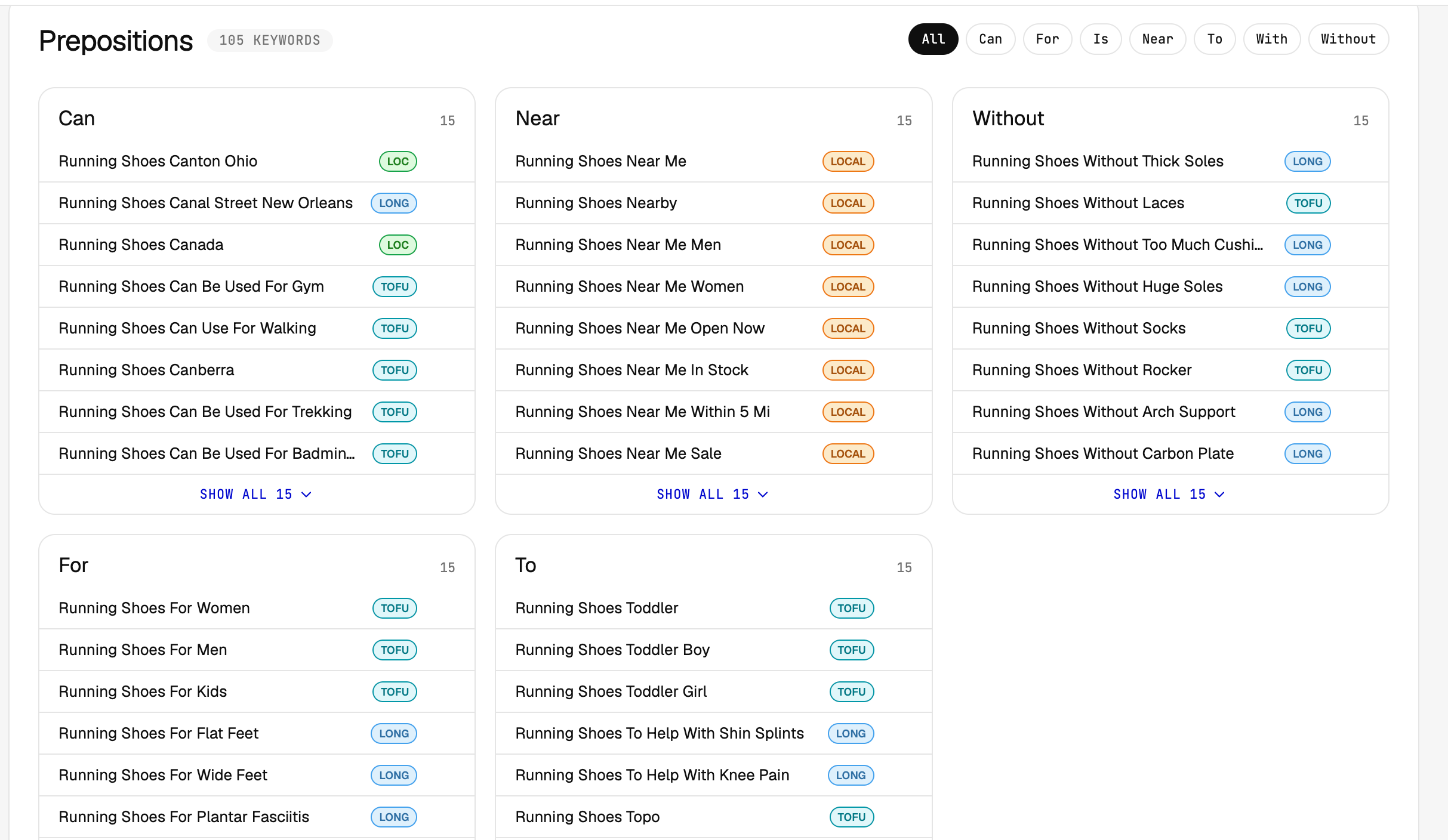
Prepositions are where buyers describe themselves. "Running shoes for wide feet", "running shoes to help with shin splints" and "running shoes without arch support" each describe a person with a problem, which makes each one a buying guide or a category page.
Comparisons
Searches with best, better, top, vs, alternative, review, price, cost, cheap and similar words.
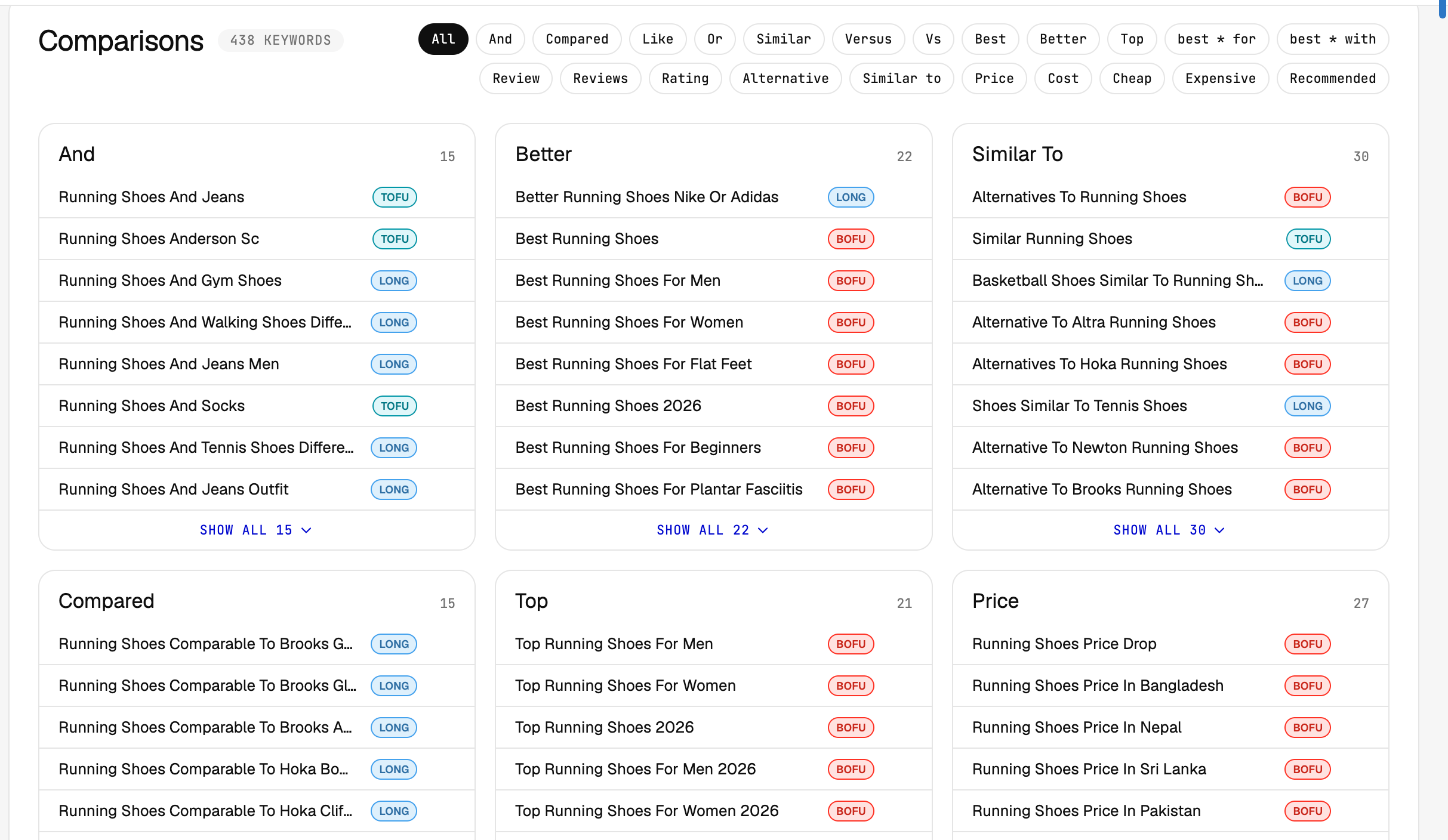
This is the money section. Someone searching "alternative to Brooks running shoes" or "top running shoes for women 2026" has already decided to buy and is choosing what. Comparison pages, "best" lists and alternatives pages come from here.
In The Past and Query
Two smaller groups finish the Google results.
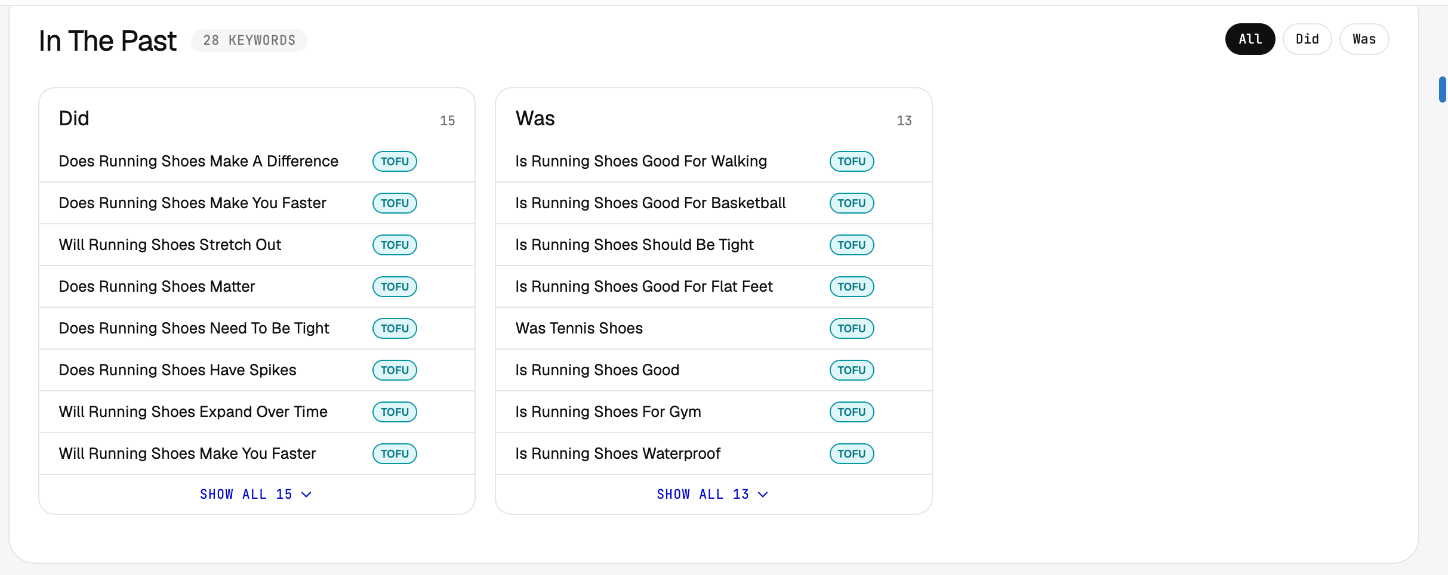
In The Past holds yes-or-no questions built on words like did, does, will, was and is: "does running shoes make you faster". They rarely deserve their own page, but they make good short answers inside one.
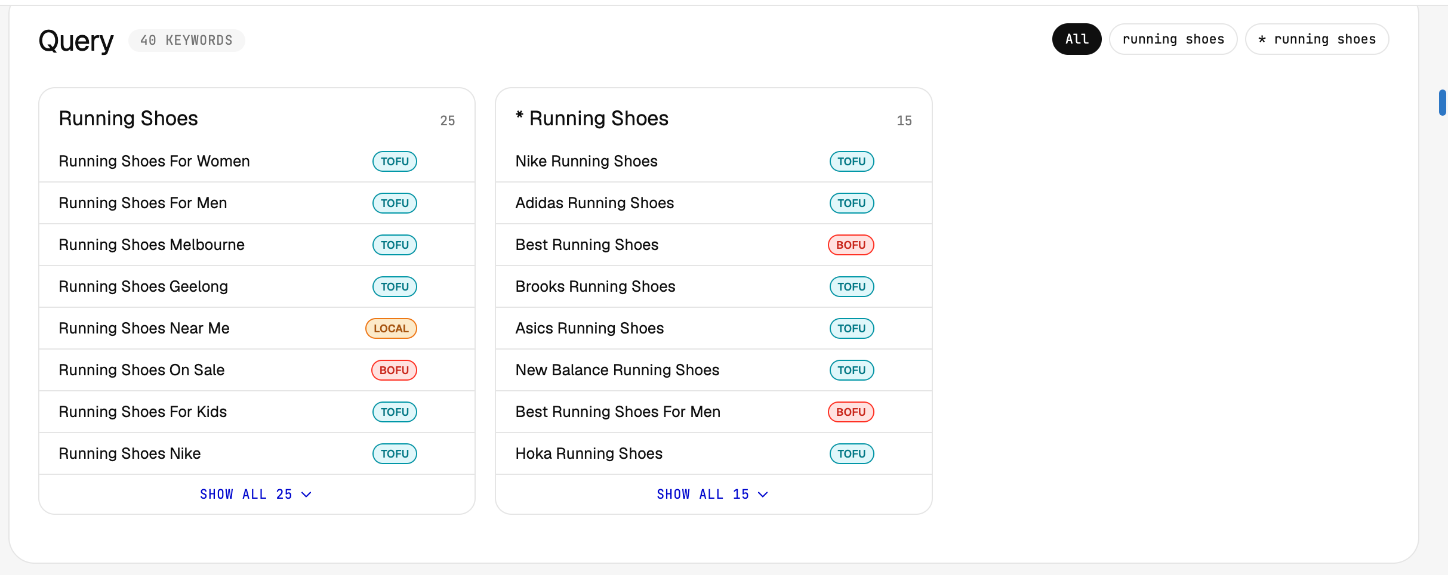
Query shows what Google suggests for the seed on its own (left card) and the words people type before it (right card, shown as "* running shoes"). The right card is often a list of brands, here Nike, Adidas, Brooks, Asics, New Balance and Hoka.
Social Media: TikTok and YouTube
The same seed sent to TikTok and YouTube search.
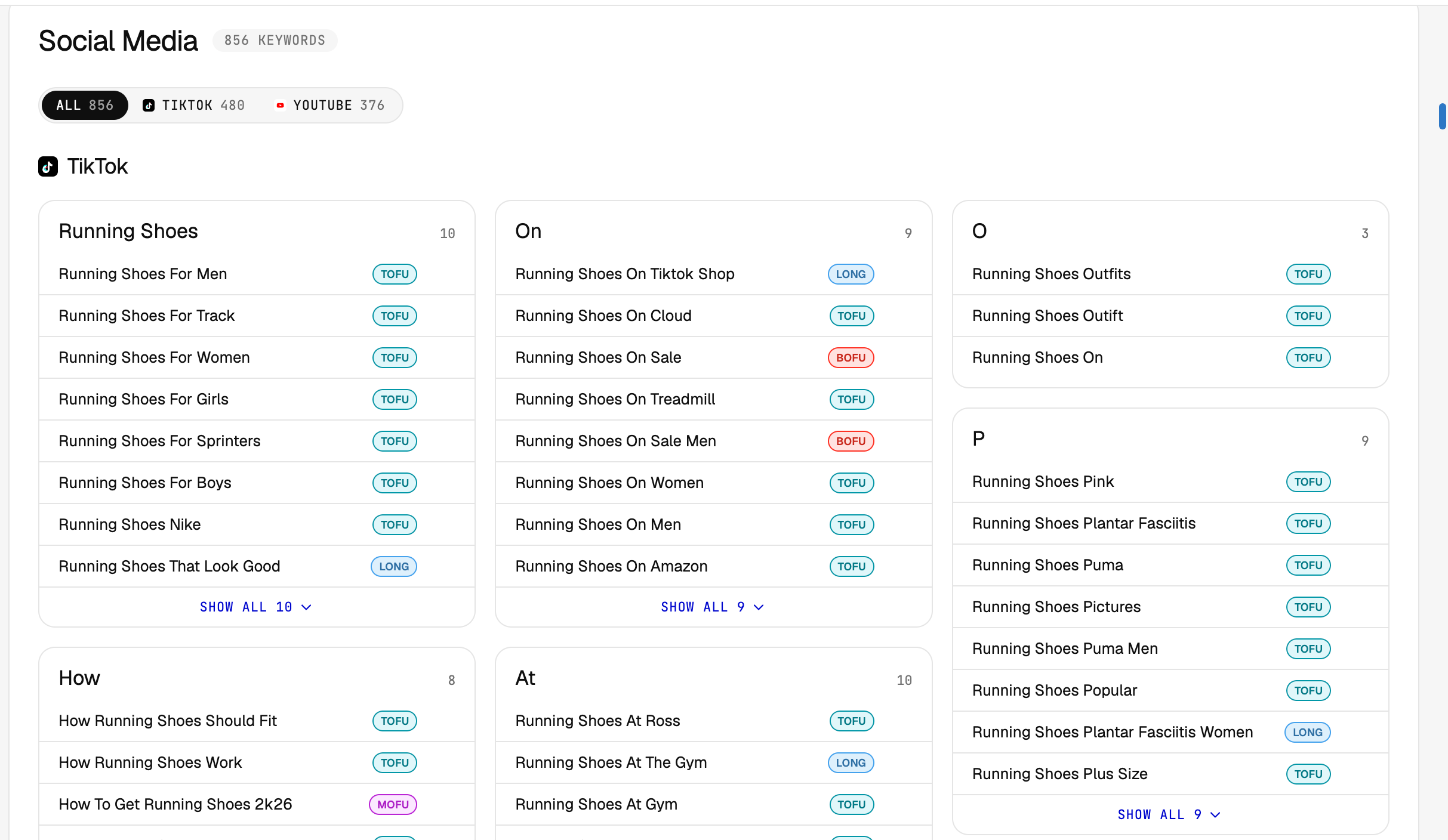
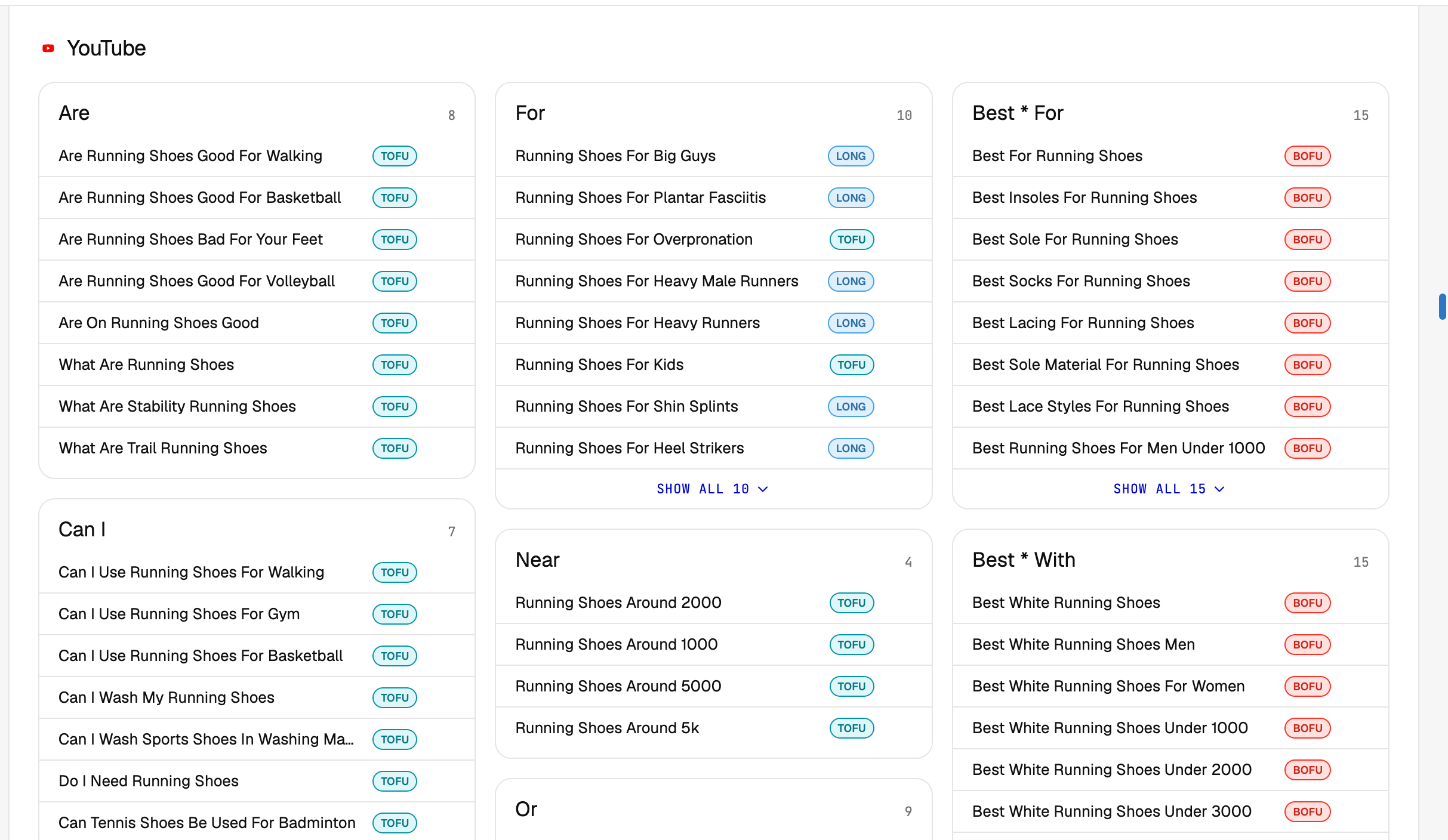
People search differently on each platform. TikTok searches for running shoes are about looks and trends ("running shoes outfits", "running shoes that look good"). YouTube searches are about fit, reviews and problems ("running shoes for heel strikers"). If you make videos, start here, not with Google. See YouTube keyword research for more.
Shopping: Google Shopping, Amazon and eBay
The seed sent to three shopping search boxes.
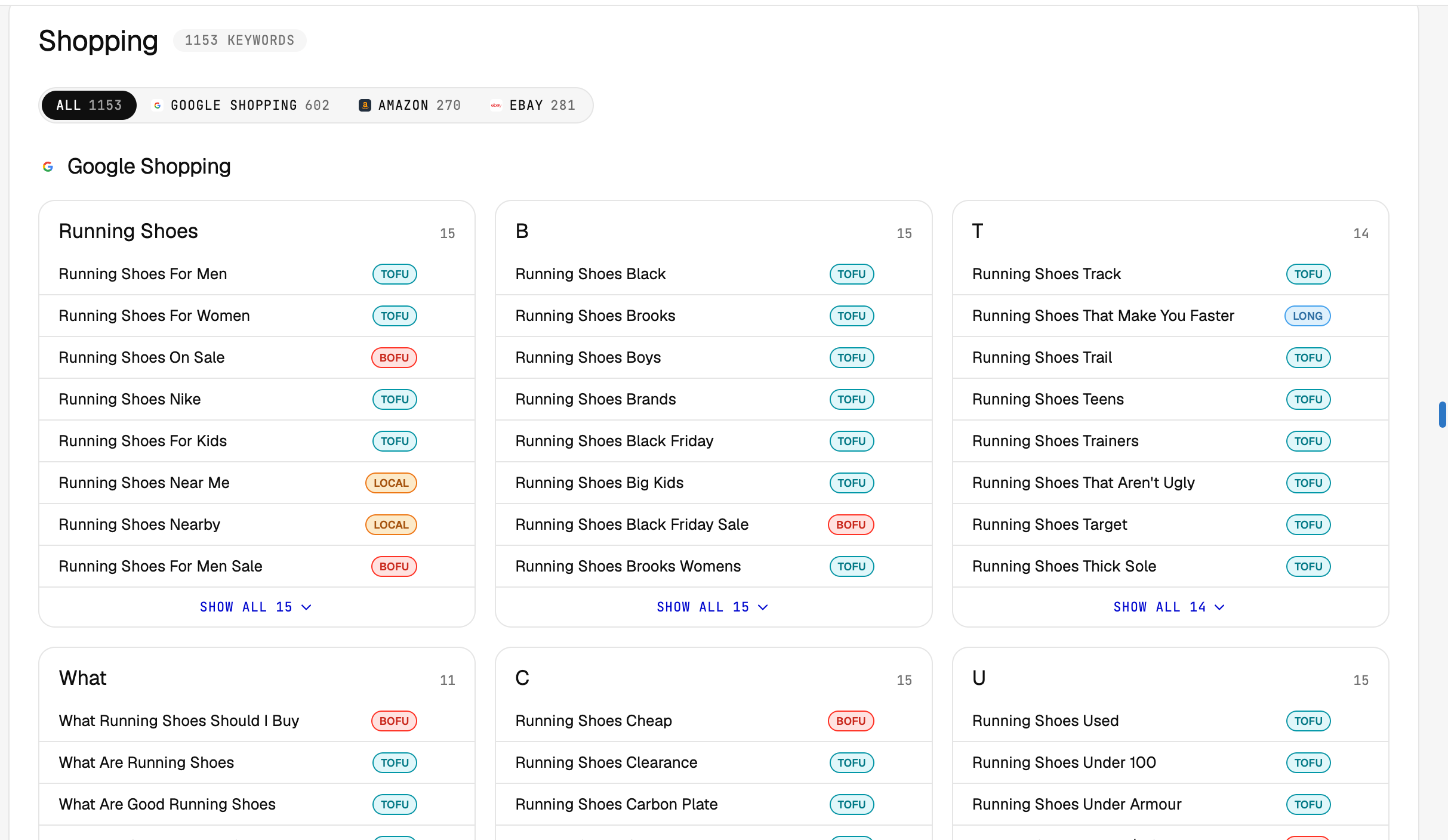
Shopping searches come from people already on a store. They name price limits ("running shoes under 100"), sizes, colours and deals. For an online store these are category pages and product titles.
The labels on every keyword
Every keyword has a coloured label. It is a quick guess at where the searcher is on the way to buying.
| Label | Means | Given when the keyword has... | Example from this search |
|---|---|---|---|
| TOFU | Top of funnel: learning | A question word (what, why, can, is) and nothing stronger | can I use running shoes for walking |
| MOFU | Middle of funnel: researching how | how to, guide, tips, ideas, examples, step by step | how to get running shoes 2k26 |
| BOFU | Bottom of funnel: ready to choose or buy | best, top, vs, alternative, review, price, cheap, sale, a currency sign | best running shoes for flat feet |
| LOCAL | Wants something nearby | near me, nearby, local, closest | running shoes near me |
| LOC | Names a place | A city, state or country name | running shoes canton ohio |
| LONG | Long tail | Five or more words and no other signal | running shoes without arch support |
The rules run in order: a place name wins over everything, then nearby words, then buying words, then how-to words, then question words. So "best running shoes in Denver" is LOC, not BOFU.
Search volume and the other metrics, explained
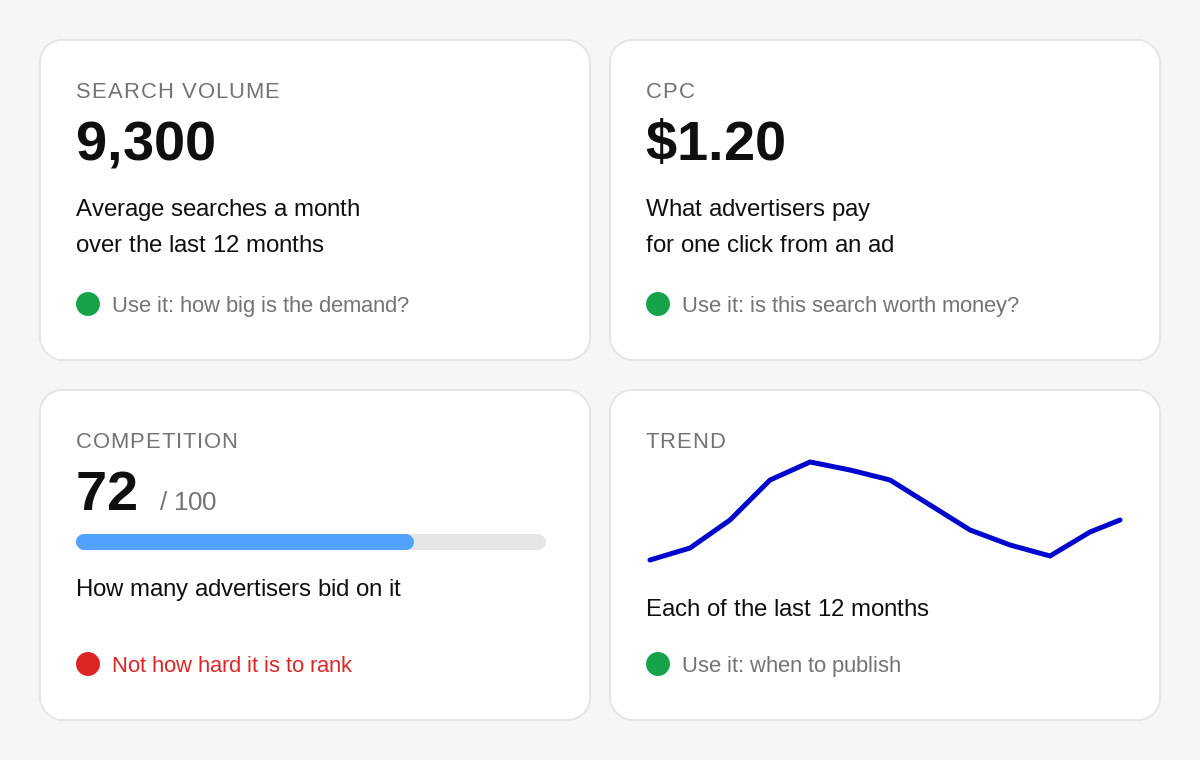
Autocomplete tells you a search is real. It does not tell you how many people make it. For that you need metrics. In Answer Socrates you add them with Check Metrics, and four numbers appear next to each keyword.
Search volume
Search volume is how many times a keyword is searched in a month, on average, in the country and language you picked. Our numbers come from Google Ads data, and they are the average of the last 12 months, the same default Google uses for its own "average monthly searches" [3].
That average hides a lot. A seasonal keyword can be well above it in one month and well below it in another:
Three more things to know about volume:
- It is a rounded estimate. Google says its search volume statistics are rounded [3], so treat 1,000 and 1,300 as "about the same", not as a ranking.
- It is per market. "Running shoes" in the United States and the United Kingdom are two different numbers. Change the country, and you need to check metrics again.
- Small still counts. Many questions show 10 or 20 searches, or no figure at all. A keyword in your list is still a real search that autocomplete suggested, and a page that answers 30 small questions can bring more visits than one page chasing a big head term.
In plain words: search volume answers "how many people ask this?". It does not say how many of them would click on you, or whether you could rank.
CPC
CPC (cost per click) is what advertisers pay, on average, when someone clicks their ad for that keyword. You do not pay it; you are not buying ads. It is a signal of money: if advertisers pay $3 a click for "running shoes for flat feet" and $0.10 for "running shoes clipart", the first one sells shoes and the second does not.
Use CPC to sort a long list of similar-sized keywords. Between two keywords with the same volume, the one with the higher CPC is usually closer to a sale.
Competition
Competition is a score from 0 to 100 for how many advertisers bid on the keyword in Google Ads, compared with all other keywords. 0 means almost no ads; 100 means it is one of the most fought-over searches for ads.
It is not keyword difficulty. It does not measure how hard it is to rank in the normal (organic) results. A question like "why are running shoes so expensive" can have low ad competition and still be hard to rank for, because big publishers have answered it. To judge ranking difficulty, search the keyword yourself and look at who ranks.
Trend
The trend is the search volume for each of the last 12 months, drawn as a small line. It shows you whether a keyword is growing, shrinking or seasonal. For running shoes the line rises every spring, so a new "best running shoes" page should be live by February, not April.
Running Check Metrics
- Run your search as normal.
- Click Check Metrics in the results header. It adds metrics for up to 999 keywords from the search and uses one search credit.
- The numbers appear next to each keyword, and Top by Search Volume becomes available: the 50 biggest keywords in one list.
- Download the list afterwards and the volume and CPC come with it.

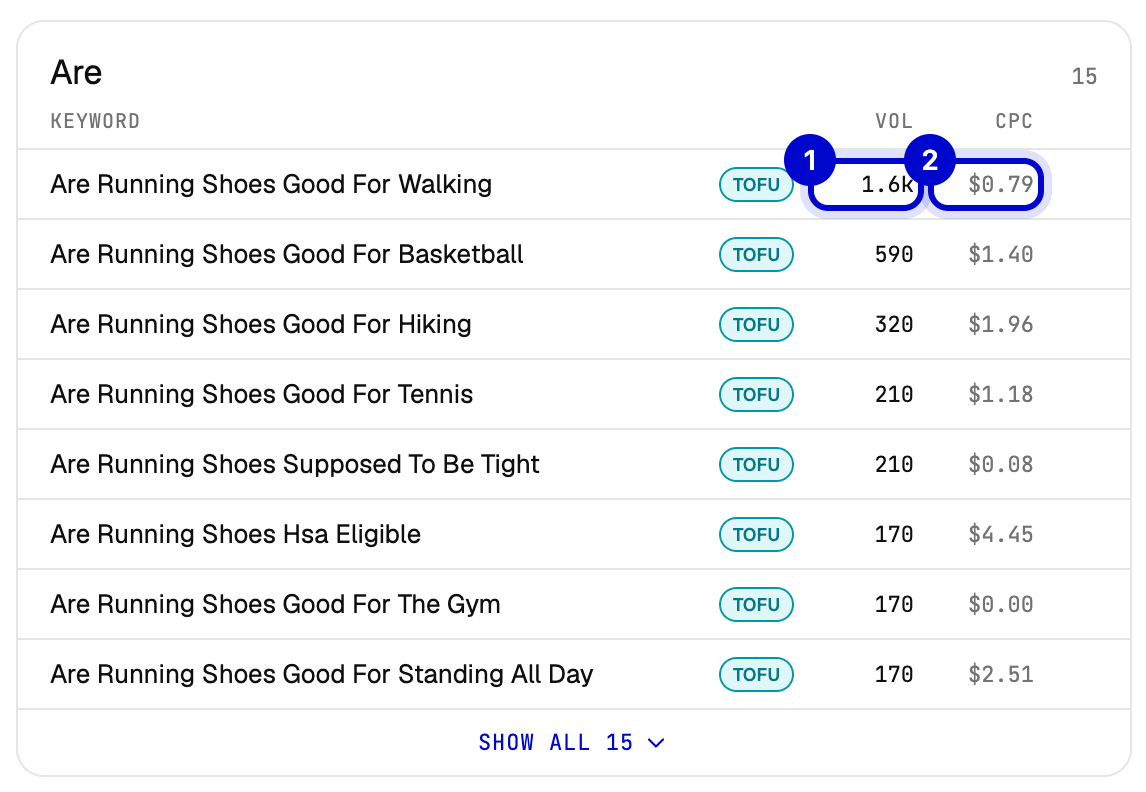
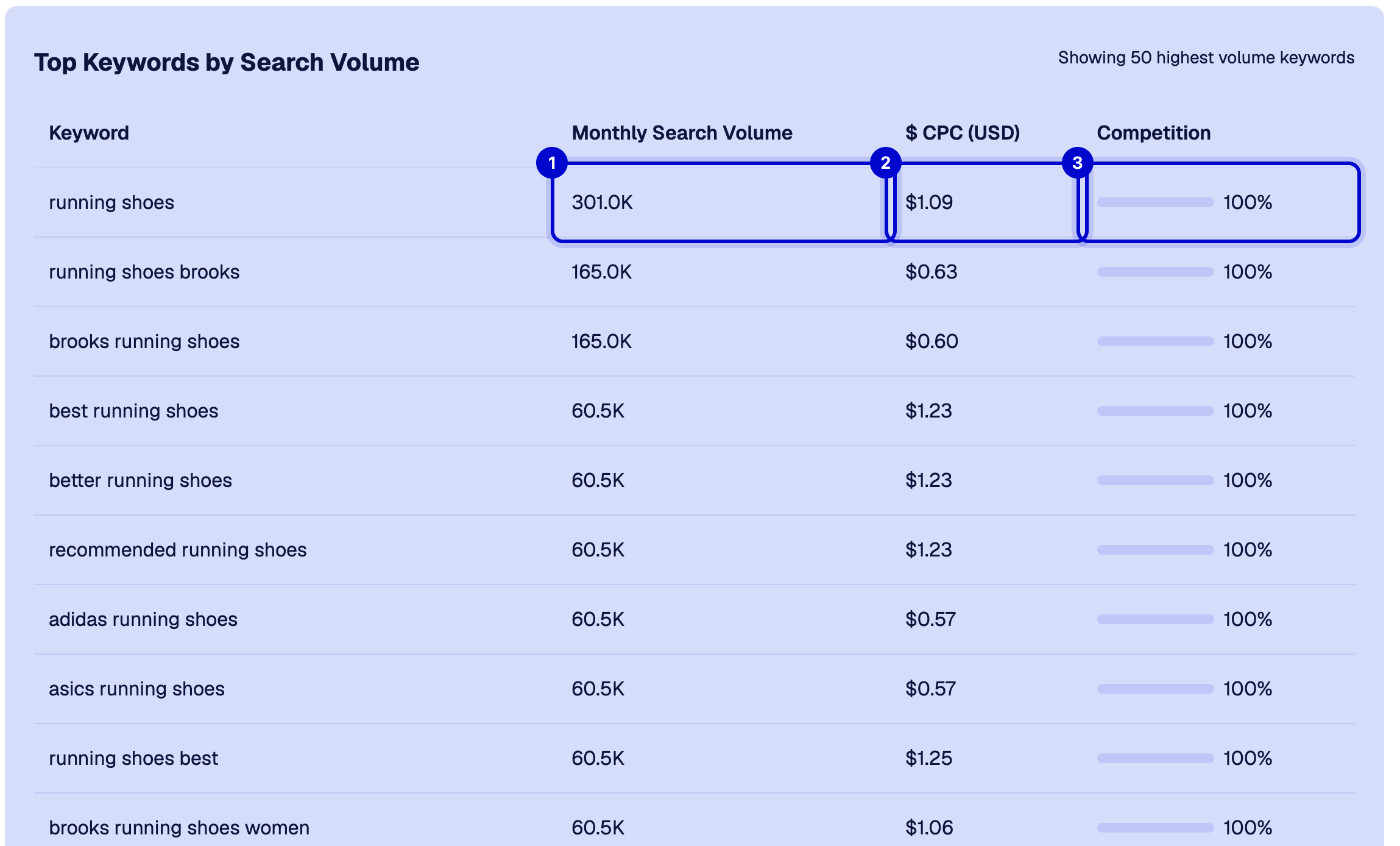
Metrics need a paid plan. On a free account the Check Metrics button shows "Upgrade to see metrics", and the banner under the header offers Unlock Metrics. Paid accounts also see a preview of the head term's numbers as soon as the search finishes.
After Check Metrics, open Top by Search Volume and cover the numbers with your hand. Guess which five keywords are biggest, then look. Most people guess the head terms and miss the brand and "near me" searches.
| You want to know... | Look at | Not at |
|---|---|---|
| Is anyone asking this? | The keyword being in the list at all | Search volume |
| How big is the demand? | Search volume | Trends (it is relative) |
| Will it lead to sales? | CPC and the BOFU label | Competition |
| When should I publish? | Trend and Google Trends | The 12-month average |
| Can I rank for it? | The real search results | Competition (it is about ads) |
See the whole picture with the wheel
Click Visualise in the header to open the question wheel above the lists. It draws the same groups as a circle: the inner ring is the section, the outer ring is the keywords in it.
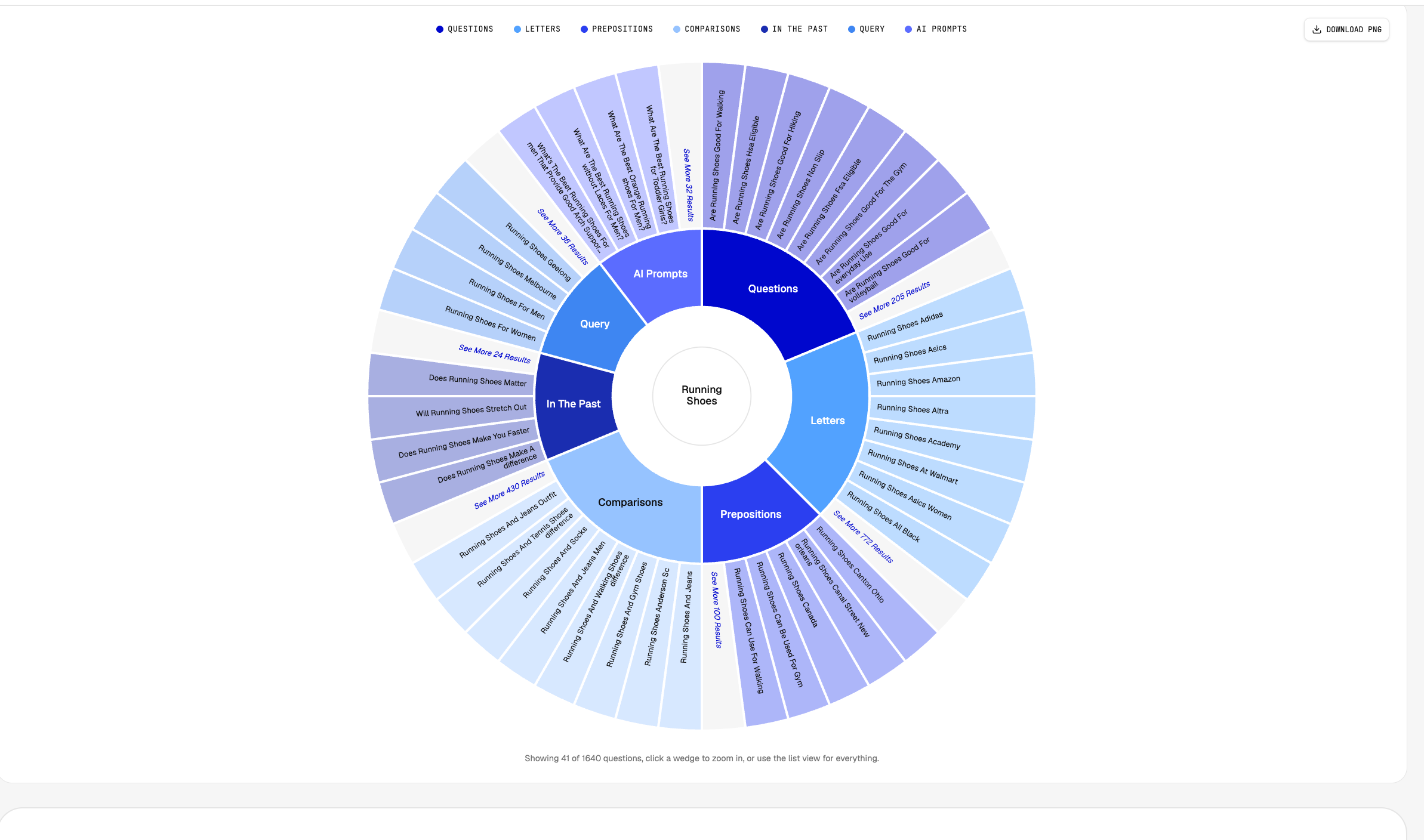
The wheel shows up to about eight keywords per group, with "See more" for the rest. It is good for two things: seeing which groups are biggest, and showing a client the shape of a topic in one picture with Download PNG. The lists below hold everything. Your choice to show the wheel is remembered in your browser.
Go a level deeper with recursive search
Under the Questions section there is a Go a level deeper bar. It runs every result back through Google to find the follow-up questions each one leads to.

A normal search finds questions about "running shoes". A recursive search finds the questions behind those questions: what people ask next after "running shoes for flat feet" or "should I buy running shoes a size bigger". It is how you go from a topic list to the detail a full guide needs. Free accounts get one a month; the full method is in Recursive search: going deeper on one question.
A made-up example: a running shoe store
A made-up example: Stride Lab is a small running shoe store in Ohio with a website and one shop. The owner has a product page for every shoe and almost no visitors from search. She runs a search for "running shoes" in the United States and Checks Metrics.
She does not try to use everything. She scans each section with one question in mind: could my shop give the best answer to this?
| Keyword found | Section | Her call | Why |
|---|---|---|---|
| should I buy running shoes a size bigger | Keeps coming up (Size) | Write a sizing guide | 117 searches mention size, and her staff fit shoes every day |
| running shoes for flat feet | Prepositions | Write a buying guide | She stocks stability shoes and offers gait checks |
| alternatives to Hoka running shoes | Comparisons | Write a comparison | Clear buyers, and she sells three brands that compete with Hoka |
| best running shoes | Comparisons | Skip for now | High volume, but large review sites own it |
| running shoes canton ohio | Prepositions (LOC) | Improve the shop page | A local search; her shop page and map listing answer it |
| running shoes outfits | Social (TikTok) | Make three short videos | Not a page, but her customers ask it where they watch |
Six keywords give her five different actions. That is the real output of keyword research: not a long list, but decisions about what to make and what to leave alone.
She also notices the trend line: interest peaks in April. She plans to publish the sizing guide and the comparison in February so they have time to be found before the spring rush.
Export your list to work on it
When a search is worth keeping, click Download CSV in the results header (button 5 in the header shot). Despite the name, the file is an Excel workbook (.xlsx) named after the market, language, term and date. It has one sheet, Keywords, with these columns:
- Type: the section the keyword came from, such as questions or comparisons
- Modifier: the word that produced it, such as "how" or "best"
- Question: the keyword itself
- Keyword Label: the intent label (TOFU, MOFU, BOFU and so on)
- Search Volume and CPC: filled in only for keywords you have run Check Metrics on, blank otherwise
A quick first pass: open the workbook and sort by Type, then by Modifier. You get every "how" question in one block, every "for" search in the next. That is often enough to sketch your first three or four page ideas before you do any clustering.
The same thing in Ask Socrates
Ask Socrates is the Answer Socrates chat. It runs the same keyword search from a plain request, then helps you read the results. You need to be signed in. From a results page, Ask about this search in the left menu opens the chat with that search already loaded.

Type a request that names the seed and the market:
The chat asks you to approve the spend before it runs, unless you have set an auto-approve limit under the spending settings at the top of the chat: a full keyword pull costs one search credit, the same as on the search page. If you already pulled the same term for the same country in the last week, the chat reopens that saved search for free instead.
The full set of keywords opens in a panel beside the chat, grouped the same way as the results page, with the a to z results under "A to Z". You can switch groups, filter the list by typing, copy a group, or download it as a CSV with a keyword column and a group column.
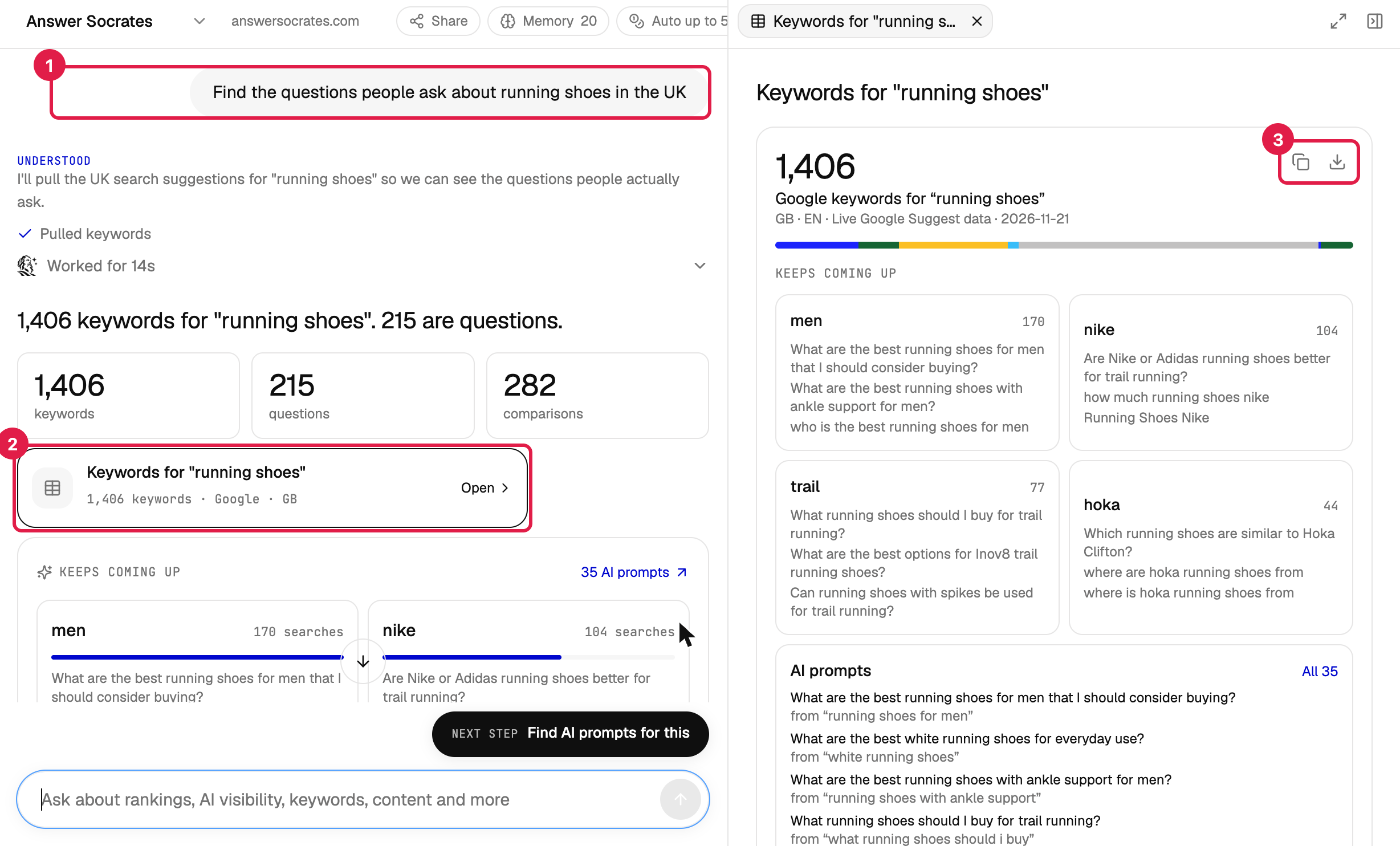
Where the chat earns its place is the follow-up. You can ask "which of these are buying questions?" or "keep only the questions about trail running", and it works from the pull you already have. If your seed means two things, such as a brand name that is also a common word, you can ask it to keep only the meaning you want; the removed keywords move to an "Off topic" group rather than vanishing.
| Use the classic search when | Use Ask Socrates when |
|---|---|
| You want to scan every section yourself | You want a summary first, then the list |
| You want metrics, the wheel and the .xlsx workbook | A CSV of keywords and groups is enough |
| You want social and shopping results side by side | You want to filter or question the results in plain words |
Where to go next
| If you want to... | Read |
|---|---|
| Dig deeper into one question you found | Recursive search: going deeper on one question |
| Pull the questions Google shows in its answer boxes | People Also Ask: pulling the questions Google shows |
| Find the low-volume searches that are easiest to win | Long-tail keywords: finding the easy wins |
| Plan around the months a topic peaks | Google Trends: seasonal and rising topics |
| Turn your list into topics | Keyword clustering: turning a list into topics |
| Do all of this from one conversation | Keyword research in one chat with Ask Socrates |
Sources
- How Google autocomplete predictions work, Google Search Help, 2026
- How Google autocomplete works in Search, Google (The Keyword blog, Danny Sullivan), 2018
- About Keyword Planner forecasts (historical metrics), Google Ads Help, 2026
- FAQ about Google Trends data, Google Trends Help, 2026
