Keyword research from inside Claude
Keyword research inside Claude means asking Claude to pull live Google autocomplete and Google Trends data through Answer Socrates, then letting it analyse what comes back. It matters because Claude's memory has no current searches, while a connected Claude works from what people type today.
Key takeaways
- Work wide first, then narrow: rising topics (1 request), trends on the best 3 to 10 terms (1 request each), then the full keyword pull on 1 to 3 winners.
- A good prompt names the tool, the job, one seed with its market and the shape you want back; every tool defaults to the US until you name a country.
- One keyword pull returned 1,289 real searches for cold plunge, split into Questions, Prepositions, Comparisons and Autocomplete, for 1 request.
- Sorting, charting and exporting data Claude already pulled is free; clustering costs 1 topic cluster credit per keyword and needs your yes first.
- Ask "save these keywords to my project" and Claude calls list_projects and save_to_project, both free, so the list shows up in your Answer Socrates history.
Live data turns Claude into a research partner
Claude on its own knows a lot about how people search, but it has never seen this week's searches. Ask it for "keywords for cold plunge" and it writes a plausible list from memory. With Answer Socrates connected, the same question goes to live Google autocomplete and Google Trends, and Claude works from what people actually type.
That changes what Claude is good for. It stops being the source of the data and becomes the analyst: it reads hundreds of real searches, spots the patterns and turns them into a plan you can act on.
You can always tell which mode Claude is in. When it fetches, a small line appears above the answer, such as "Used Answer Socrates - Trends & Keyword Research", and you can click it to expand the call. No line means no fetch: whatever follows came from memory, however confident it sounds. Make a habit of glancing at that line before you copy anything into a brief.
This lesson assumes the connector is already on. If it is not, follow Connecting Answer Socrates to Claude first. It takes a few minutes.
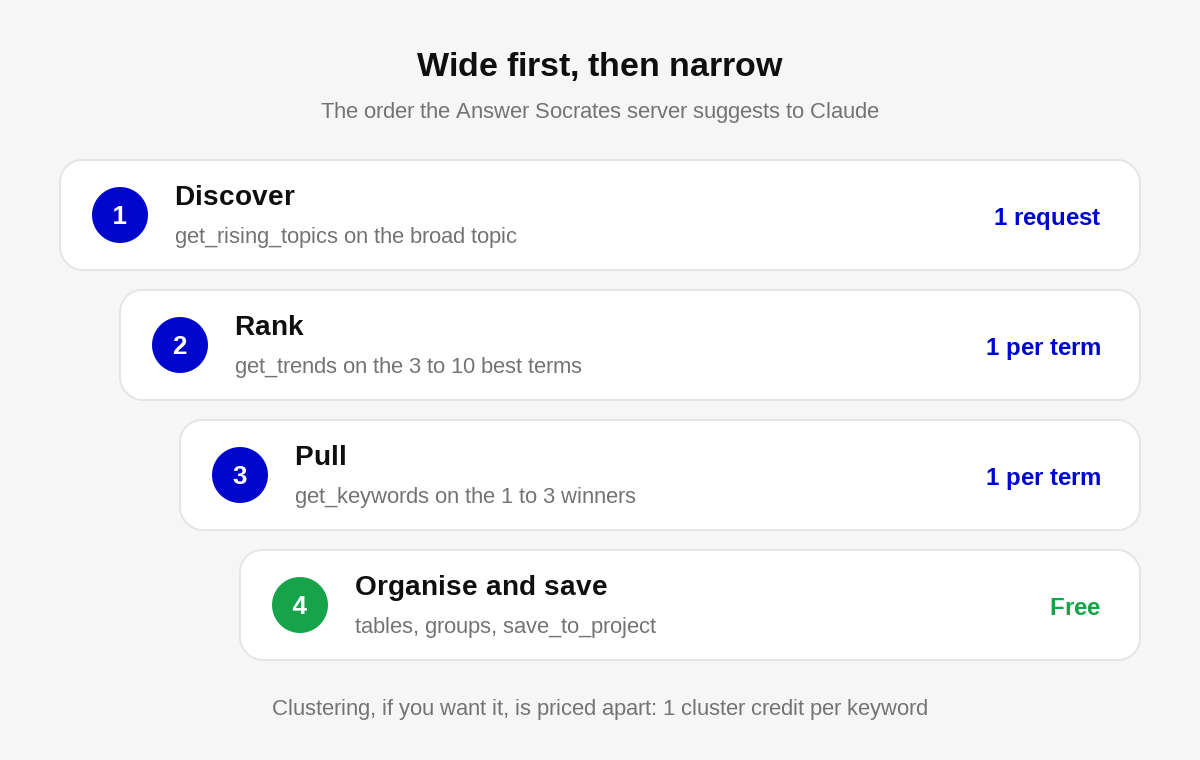
Our server hands Claude this order as its default: rising topics to find what is around a topic, trends to rank the best terms, then an offer of the full keyword pull for the winners rather than pulling everything uninvited. You can follow it one prompt at a time, as below, or ask for all of it in one message.
A good research prompt has four parts
You do not need to know tool names. Claude reads what each tool does and picks. Anthropic says Claude "can bring it into a conversation on its own when it fits what you're asking for" [1]. But a vague prompt gets a vague answer, and sometimes no tool call at all.
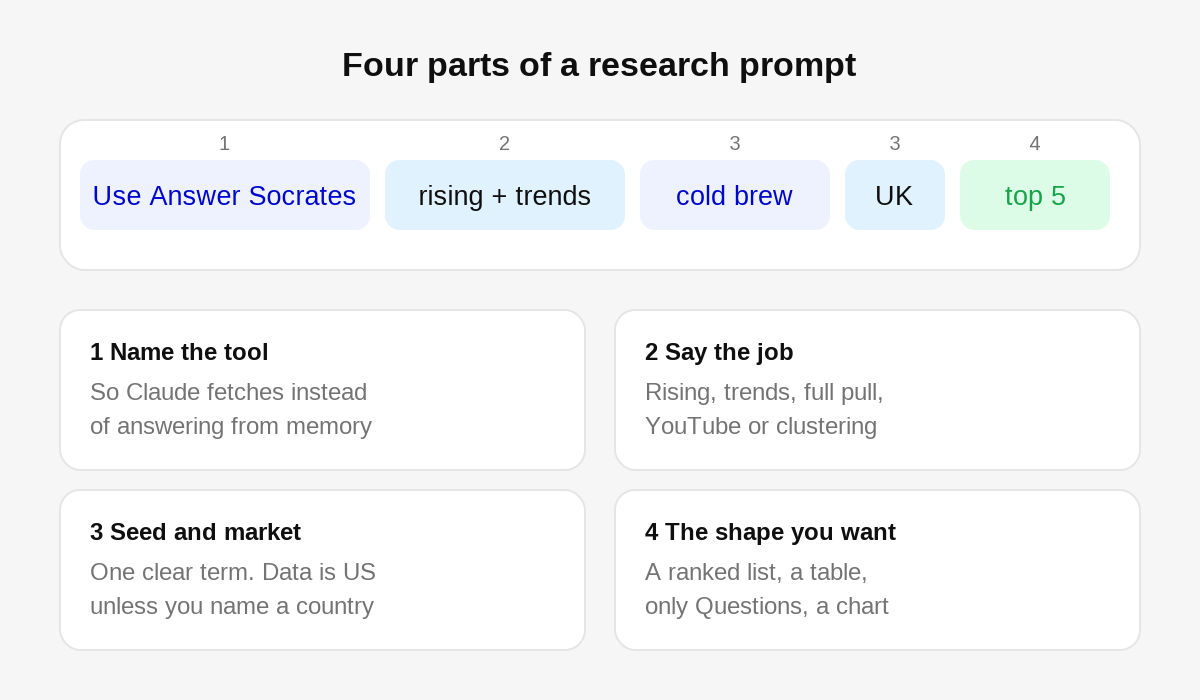
- Name the tool. "Use Answer Socrates" makes Claude fetch instead of answering from memory.
- Say the job. Rising searches, a trend comparison, the full keyword pull, YouTube keywords or clustering. Each is a different tool.
- Give one seed and a market. "Cold brew" in the UK. All data is from the US unless you name a country, and Claude passes the country code for you.
- Say the shape you want back. A ranked top 5, only the Questions, a chart, a table with one row per topic.
Start wide: what's rising around your topic
Rising topics come from Google Trends' related searches. Rising searches are the ones growing fastest next to your term, and Top searches are the ones most often searched in the same session [3]. "Breakout" means a search grew by more than 5,000% [3]. That is the fastest way to find sub-topics you would not have thought of.
Here is a real run in claude.ai for "cold plunge" in the US. Claude summed up the year first, then listed the climbers: two Breakouts for a branded product and a run of buying terms such as "portable cold plunge" (+400%) and "cold plunge with chiller" (+100%).
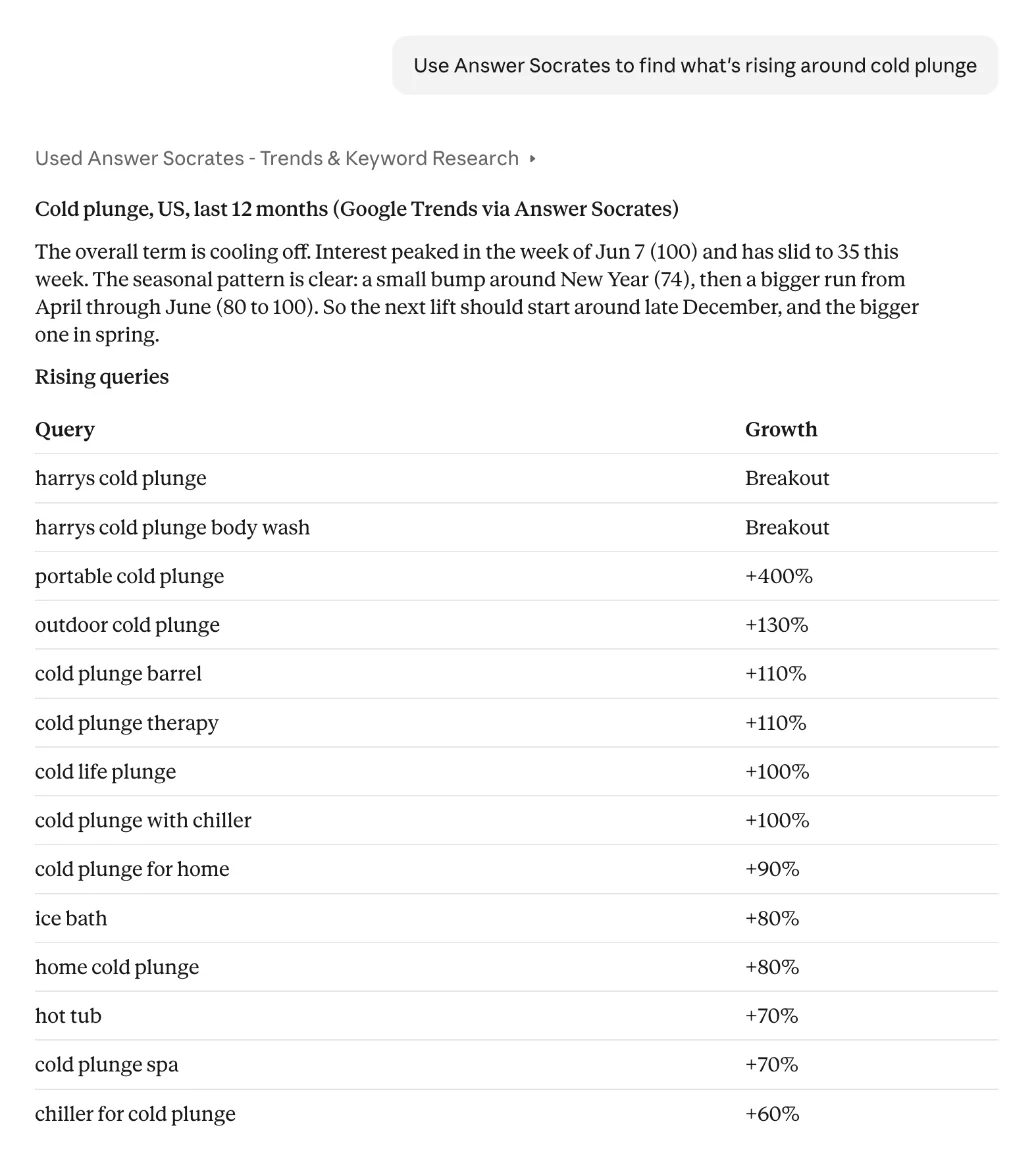
Read the list with some care. A Breakout tied to one brand can fade in a month. A product type that climbs +100% or more alongside your seed is more likely to last.
Rank the basket with 12 months of trends
Next, put the best terms side by side. Each trend line is one call, so a five-term comparison costs 5 requests. Name the countries if you sell in more than one.
Google Trends scores interest on a scale of 0 to 100 [2], and each line is scaled on its own. So two countries on one chart show shape and timing, not which country searches more. In the real run below, Claude says exactly that before it reads the lines.
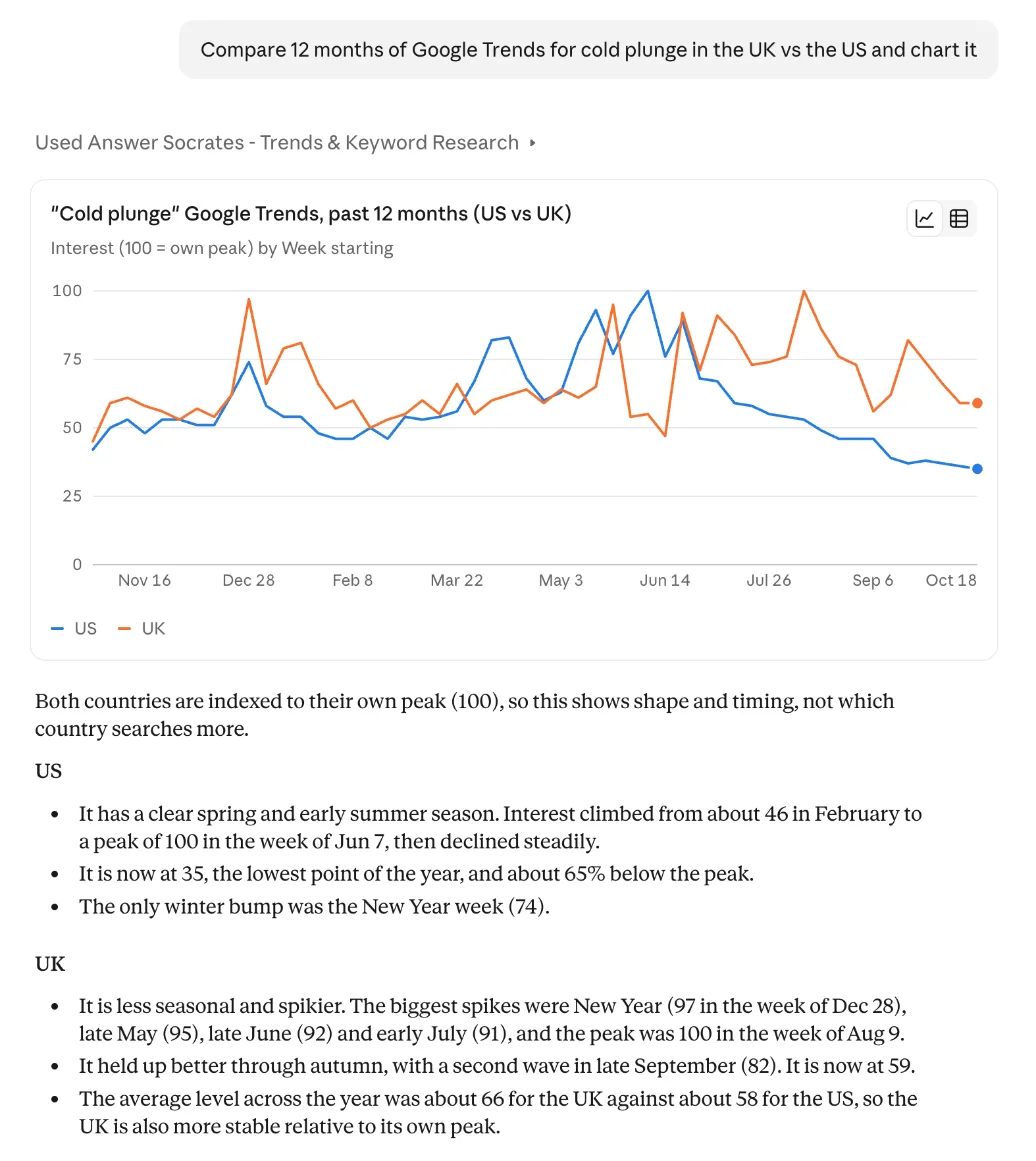
That timing is the useful part. If the US interest peaks in early summer, a US page should be live by spring. Ask Claude to call out "seasonal peaks, steady climbers and decliners" and it will sort the basket for you.
Pull the full keyword set for the winners
Now spend a request where it counts. One get_keywords call returns everything Google Suggest gives around a term, grouped into Questions, Prepositions, Comparisons and Autocomplete (the a to z list), sometimes with a small time-based group.
The real pull for "cold plunge" returned 1,289 searches for 1 request. Claude led with the total and the count per group, then pulled out themes: health questions, safety, timing, versus pages, buyer terms and brand reviews.
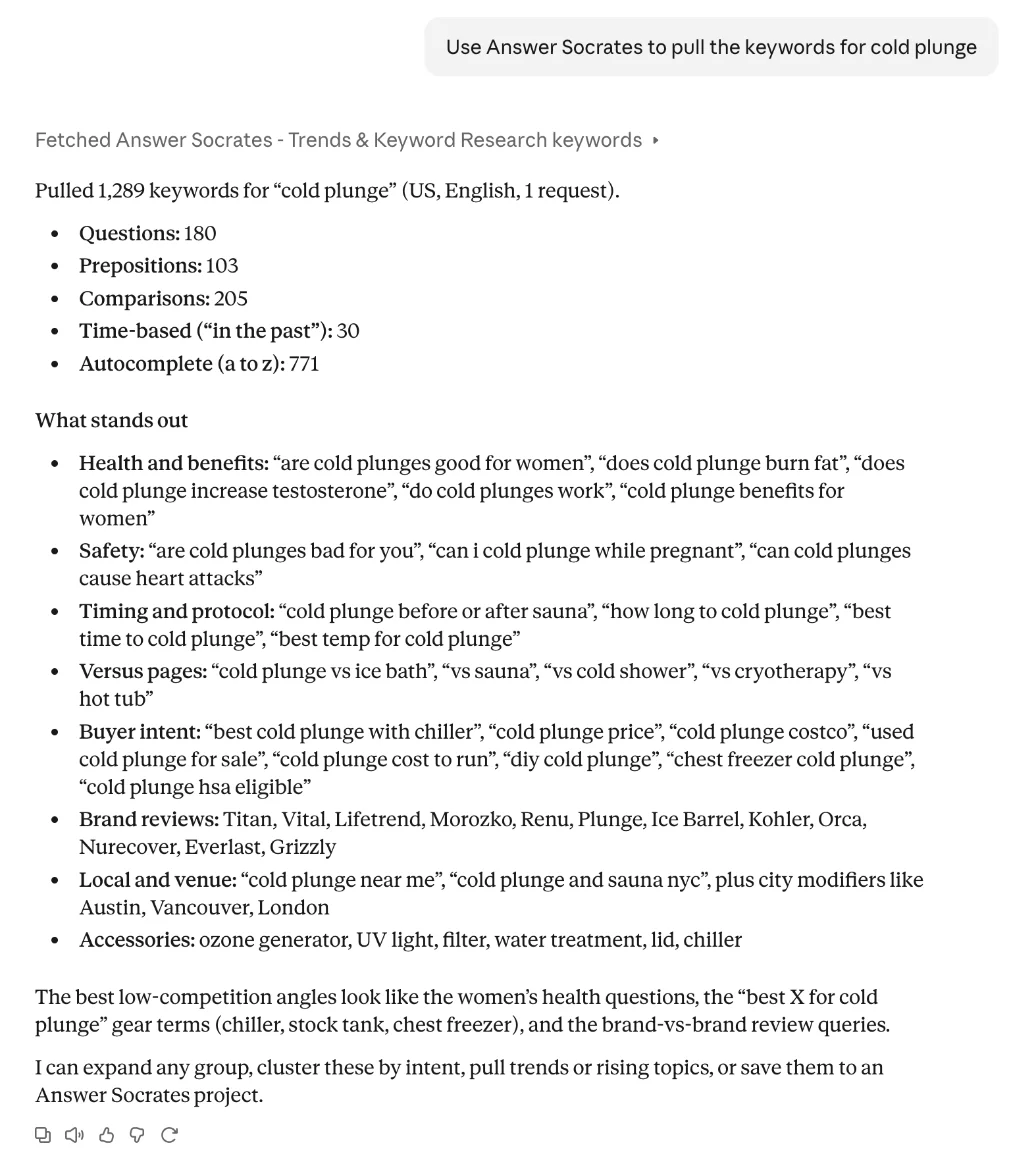
Before you trust the themes, spot-check them. Ask "list every keyword you put under Safety" and compare it with the raw Questions. Claude is good at naming patterns, but it can merge two ideas or drop a small group that matters to you, such as the local "near me" searches a studio owner would care about.
Follow-ups on data Claude already has cost nothing. "Show me only the Questions", "which of these are buyer terms?" and "make it a CSV" reuse the pull. Only a new call to our server spends a request.
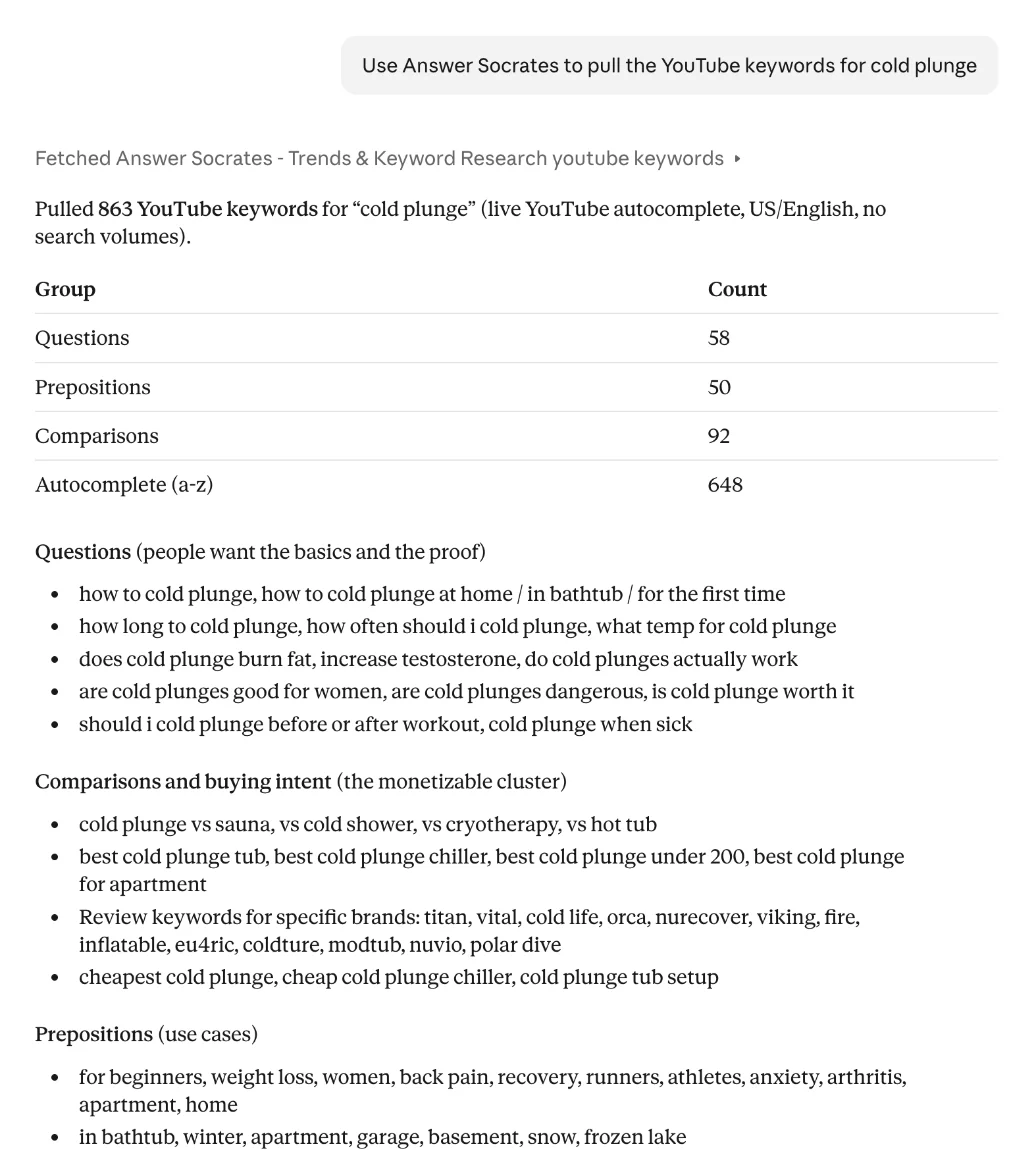
Planning video? The same pull exists for YouTube search, also 1 request. YouTube searches lean towards how-tos and reviews, so the list differs from Google's.
If you want keyword research for your own site, ask Claude to read the site first: "Read coldplungeco.com and do keyword research for the topics it covers." Claude reads it with its own web access, which spends none of your requests, then runs the same steps on the seeds it finds.
Turn the pull into groups and save it
A list of 1,289 searches is not a plan yet. Two ways to organise it:
- Ask Claude to group it. Free, because it reuses the pull. Good for a first look, but the groups are Claude's judgement.
- Run clustering.
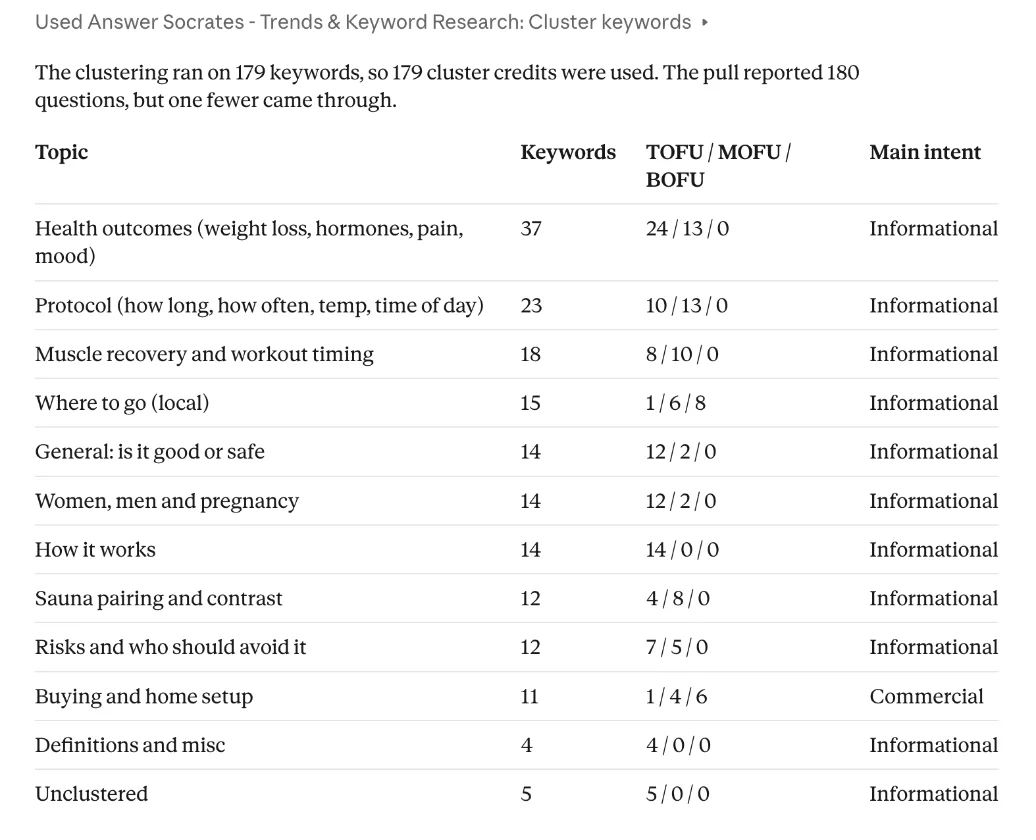
cluster_keywordssorts each keyword into a topic and labels its search intent and funnel stage. It costs 1 topic cluster credit per keyword, spends no requests and needs Seneca or above through the connector. Our server tells Claude to say the keyword count, and so the credit cost, and to wait for your yes first.
Here Claude clustered the 179 cold plunge Questions: 179 credits, 12 topics, each with its funnel split and main intent.
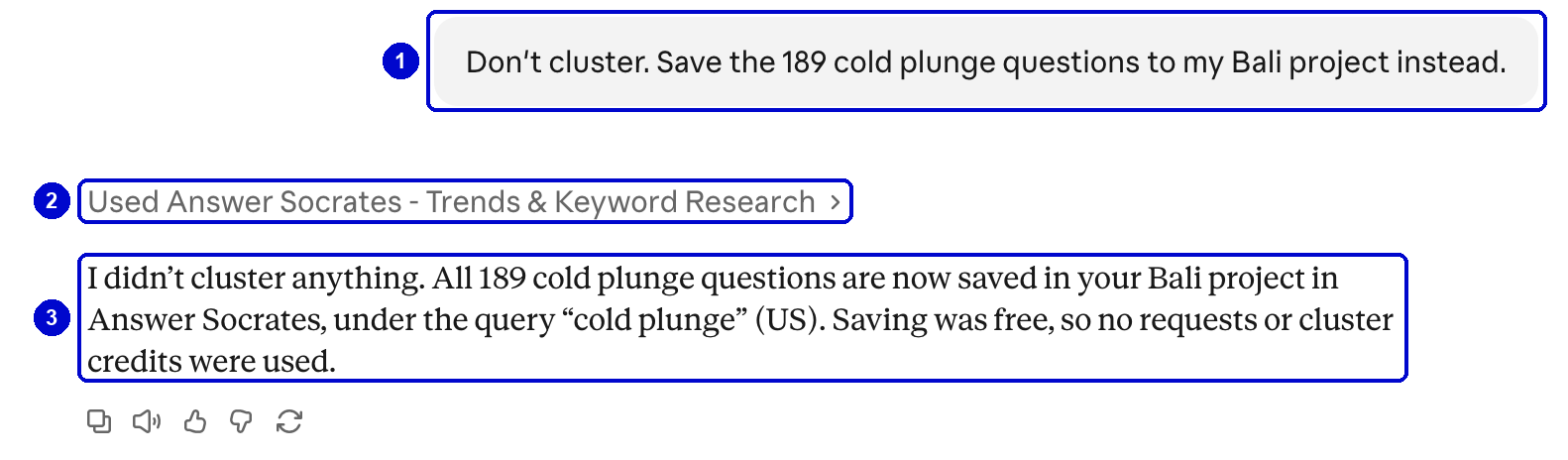
Then save the work so it is not stuck in one chat. Ask "save these keywords to my Cold Plunge project." Claude calls list_projects to find it and save_to_project to store the list. Both are free. The saved list opens in your Answer Socrates history like any keyword search, so your team sees it too.
The same thing in Ask Socrates
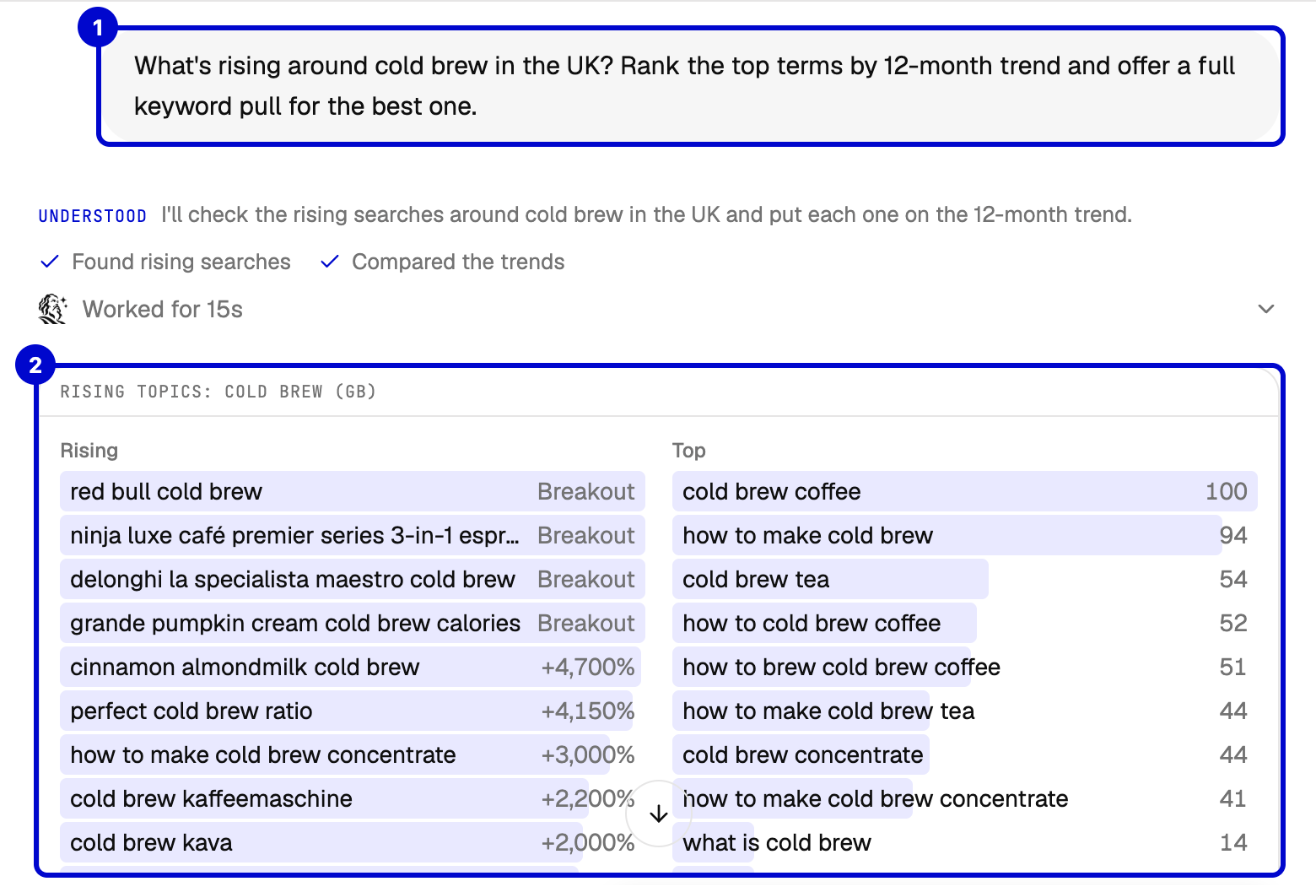
If you would rather not set up a connector, Ask Socrates, the chat inside Answer Socrates, has the same rising topics, trends, keyword and clustering tools, and it saves straight to your projects. Whether it asks before it spends depends on your spending setting.
Type: "What's rising around cold brew in the UK? Rank the top terms by 12-month trend and offer a full keyword pull for the best one."
| You want to... | Use |
|---|---|
| Research inside the Claude chat you already work in | The connector in claude.ai |
| Research while you code or write files | The connector in Claude Code |
| Research with no setup, next to your projects | Ask Socrates |
In Claude Code, our two built-in prompts also run as commands. Anthropic's docs say MCP prompts show up as /servername:promptname (MCP) and can be typed as /mcp__servername__promptname [4], so ours are /mcp__answersocrates__keyword_research and /mcp__answersocrates__website_research. Both run several tools in a row, so they spend several requests.
Prompts that waste requests, and better ones
A made-up example: a SaaS project-management app wants blog topics. The founder types "give me 50 keyword ideas for project management", gets 50 confident ideas with no tool call, and later learns half of them are not real searches. The fix is in how the prompt is worded.
| Weak prompt | What goes wrong | Better prompt |
|---|---|---|
| "Give me keyword ideas for project management" | No tool named, so Claude may answer from memory | "Use Answer Socrates to pull the keywords for project management software" |
| "Pull keywords for these 20 terms" | 20 requests before you know which terms matter | "Find what's rising around project management, rank the top 5 on trends, then offer a pull for the best 2" |
| "What's the search volume for kanban board?" | Our tools return no volumes, so any number is a guess | "Is kanban board growing or fading over 12 months?" |
| "Compare trends for Gantt chart" (seller in Germany) | Data defaults to the US | "Compare 12 months of trends for Gantt chart in Germany" |
| "Cluster everything" | Clustering 1,200 keywords spends 1,200 cluster credits | "Cluster only the Questions, and tell me the credit cost first" |
Where to go next
| If you want to... | Read |
|---|---|
| Set up the connector first | Connecting Answer Socrates to Claude |
| Do the same in ChatGPT | Connecting Answer Socrates to ChatGPT |
| Turn this research into an ordered content plan | Building a content plan with an AI agent |
| Know what to check before you trust the output | Where AI agents get SEO wrong |
| Read rising and seasonal data well | Google Trends: seasonal and rising topics |
| Understand clusters, intent and funnel stage | Keyword clustering: turning a list into topics |
Sources
- Use connectors to extend Claude's capabilities, Anthropic (Claude Help Center), 2026
- FAQ about Google Trends data, Google (Trends Help), 2026
- Find related searches, Google (Trends Help), 2026
- Connect Claude Code to tools via MCP, Anthropic (Claude Code docs), 2026
