Digital PR with data studies
Digital PR with data studies means collecting search data nobody has put together, finding one surprising finding, and pitching it to journalists who link to your study as the source. Done well, it earns links from news sites you could never email cold.
Key takeaways
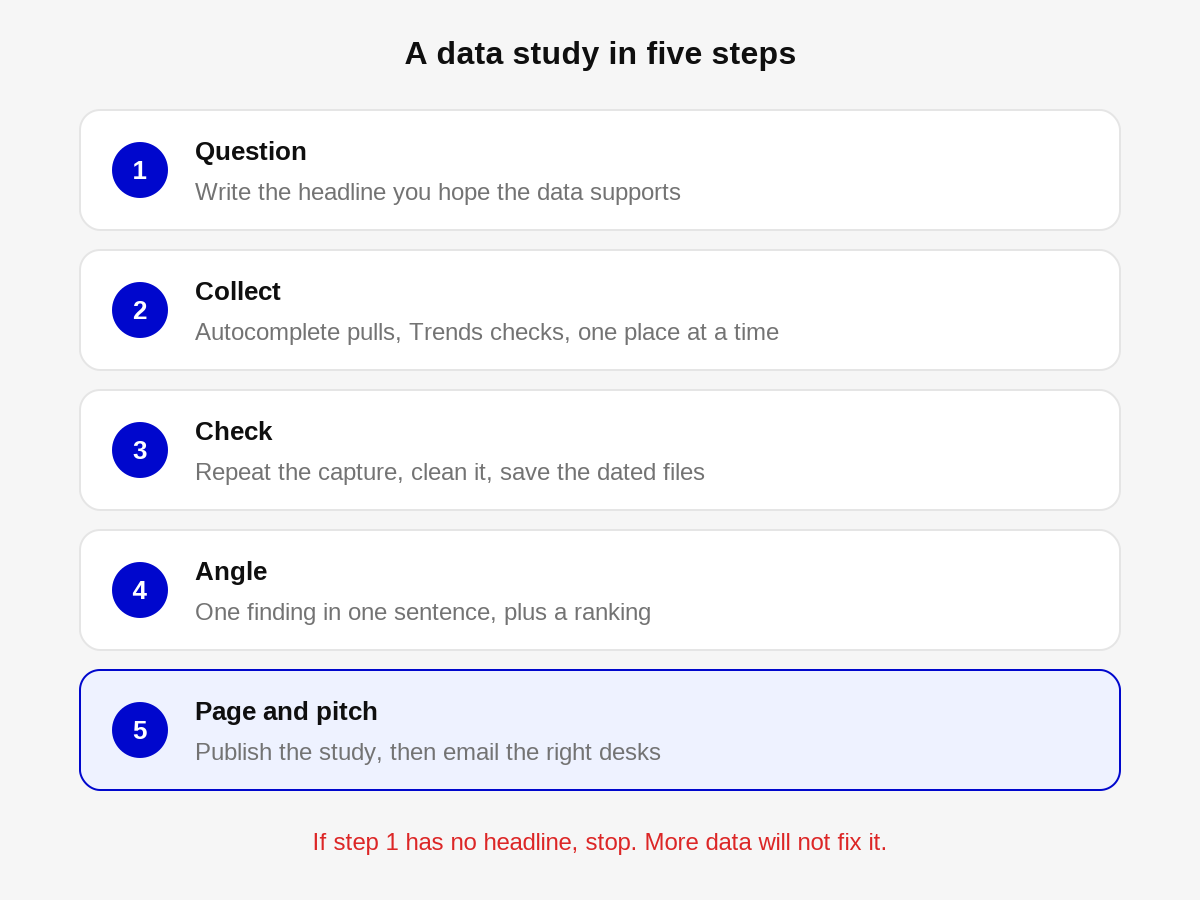
- Write the headline you hope for before collecting data; if no headline survives a quick trend check, drop the idea instead of gathering more data.
- Autocomplete shows what people type, Google Trends ranks places on a 0 to 100 share scale, and search volume gives counts; each needs its limit stated in the methodology.
- In Answer Socrates, run one keyword search per place with a fixed template and country, use the free trend check's Where it's searched most card to rank up to 12 regions, and export with Download CSV.
- Check every line across two captures, fix place names with two meanings, merge variants and save the query, country, language and date for each file.
- Pitch one finding in under 200 words: Muck Rack found 69% of journalists prefer that length and 88% disregard pitches outside their beat.
A data study is a story journalists can check
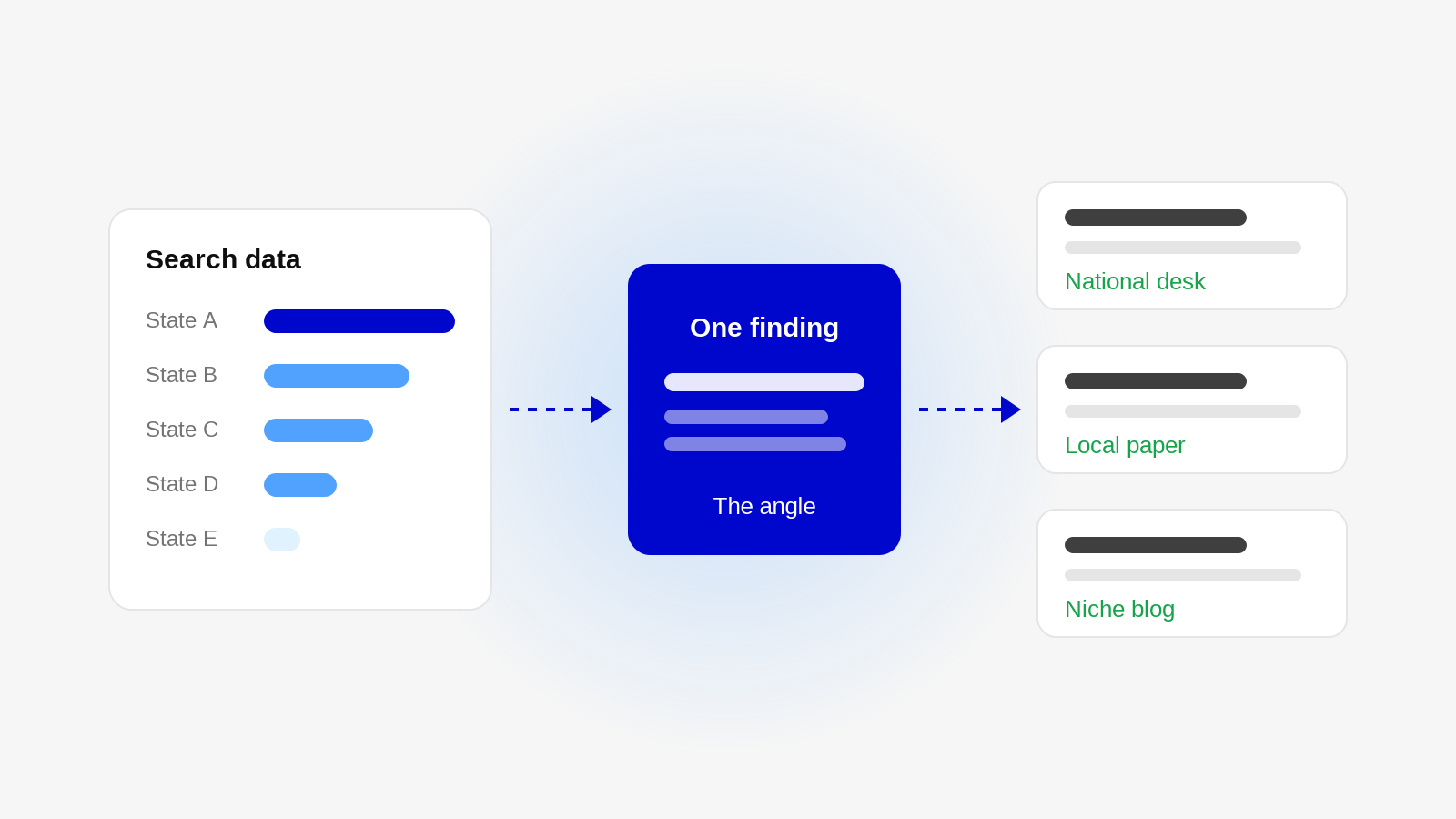
Digital PR is earning links from news sites by giving journalists something they want to write about. A data study is the most repeatable version: you collect numbers nobody has put together before, find one surprising finding, publish it on a page of your site, and pitch that finding to reporters. When they cover it, they link to your page as the source.
Search data is good raw material because everyone searches and the results feel personal. "Which state searches most about moving to Florida" is a question a reader in Ohio wants answered, and a reporter in Ohio wants to write.
The data alone earns nothing, though. A spreadsheet of 50 states is a lookup, not a story. What journalists cover is the angle: the one sentence that makes a reader say "really?". So the work runs in five steps, and the first one happens before you collect anything.
Three kinds of search data and what each proves
Most search-data studies use one of three sources. Each answers a different question, and each has a limit you must state in your methodology.
| Data | What it tells you | What it cannot tell you | Where to get it |
|---|---|---|---|
| Google autocomplete | What people type about a place or topic, in their own words | How many people search it, or whether it is true | A keyword search in Answer Socrates, one per place |
| Google Trends | Where and when interest is highest, on a 0 to 100 scale | Any count of searches | The free trend check on Trending Topics, Ask Socrates, or Google Trends itself |
| Search volume | Average monthly searches for an exact phrase in one country | Why people search, or what they think | Check Metrics on a keyword search (paid plans) |
Autocomplete gives you the questions. Google says its predictions "reflect real searches that have been done on Google", and that they depend on the language and location of the search and on trending interest [3]. Google also stops some predictions from showing at all, for example ones it judges hateful or dangerous [3]. So autocomplete shows what people commonly type, filtered. It is not a poll.
Google Trends gives you the ranking by place. Google normalises each point by the total searches for that place and time, then scales the result from 0 to 100 [1]. That makes small and big states comparable, which is exactly what a "most googled by state" study needs. It also means a state at 100 is not the state with the most searches, only the one where the term took the biggest share.
Search volume gives you a count, which makes the simplest ranking of all: one phrase per place, sorted by monthly searches. It comes from Google Ads data and is per country, so you get one number per phrase, not one per state.
How to collect the data in Answer Socrates
The made-up example for the rest of this lesson: Packwise is a small moving company in the US. They want links from local and national news, so they plan a study: "Where Americans want to move, and what they ask before they go."
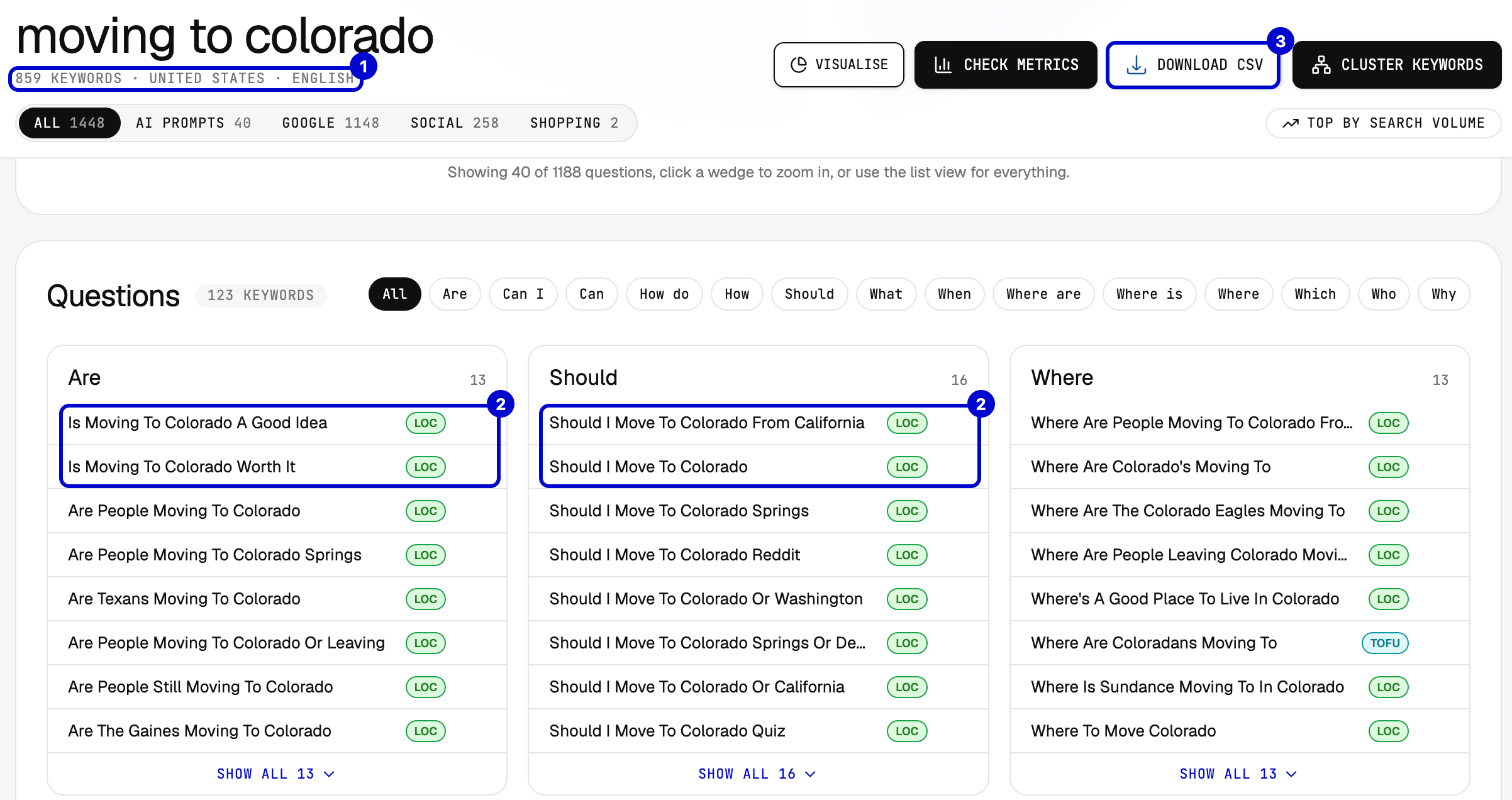
Step 1. Pull what people ask about each place. Open a new keyword search, type the template with one place in it ("moving to colorado"), and set the country and language to the market you are studying. Each search returns the questions, prepositions, comparisons and autocomplete lines for that phrase. Run the same template for every place on your list.
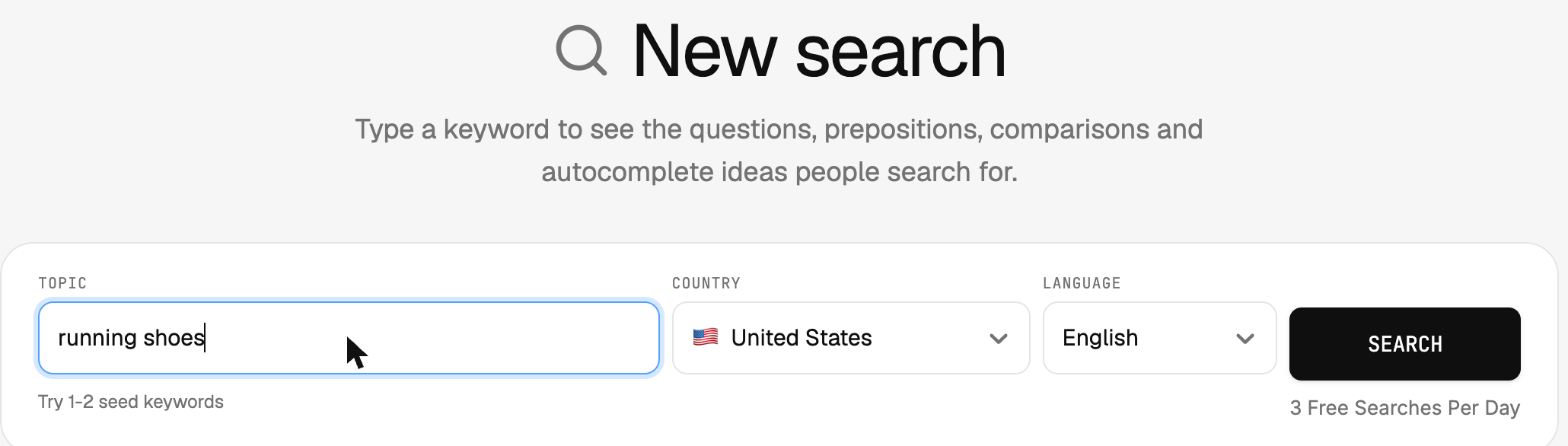
Each keyword search uses one search credit, so a 50-state study is 50 searches. Run five first and read them before you commit to the rest. If five states give you nothing quotable, fifty will not either.
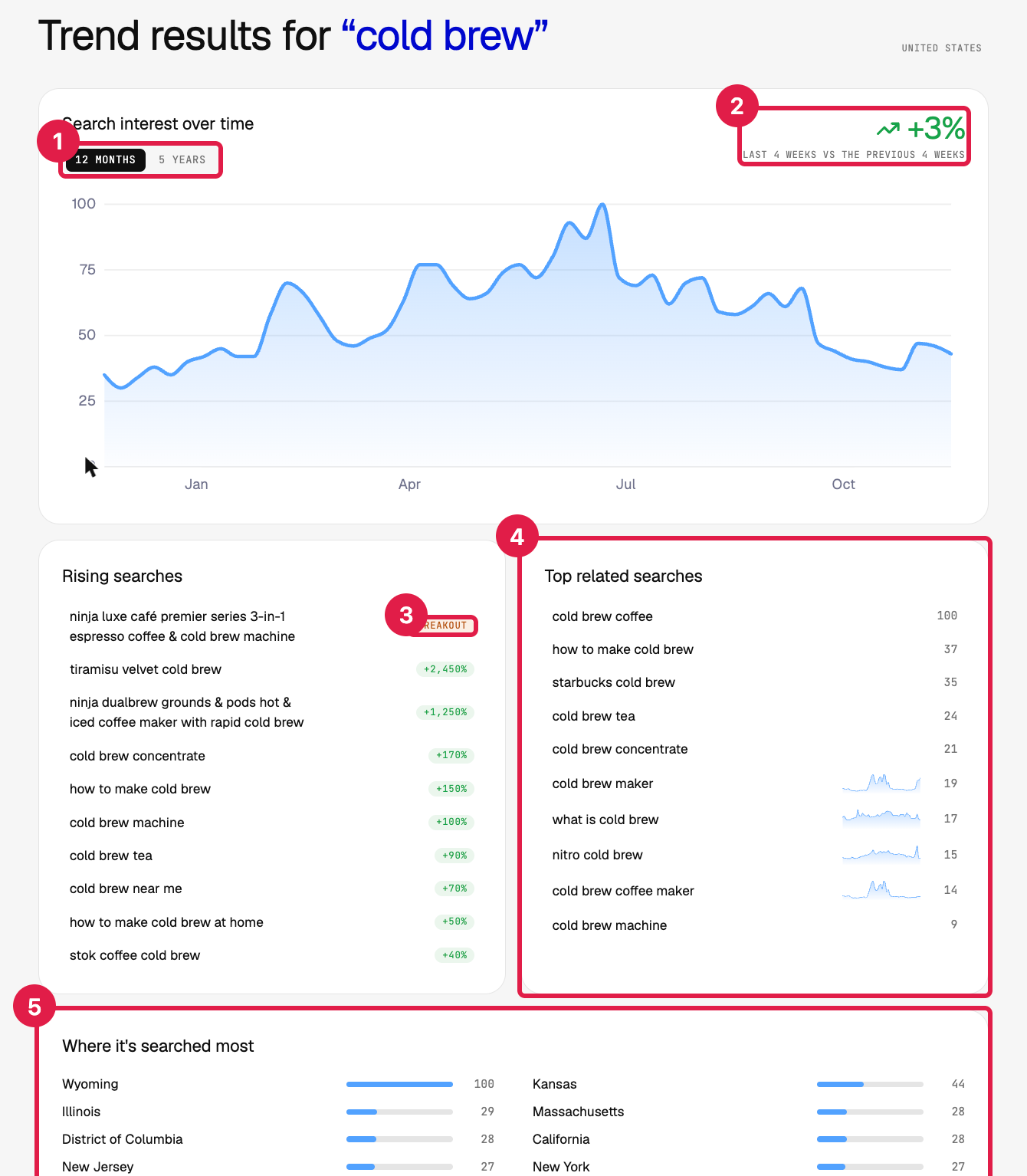
Step 2. Rank the places with Google Trends. The Trending Topics page checks any term against Google Trends; the page says trend checks "are free and do not use search credits". Type the phrase, pick the country, and click Check trend.

The results include a Where it's searched most card. It ranks up to 12 regions inside the country (states, for the US) on the same 0 to 100 scale. For "moving to florida", that card tells Packwise which states are most interested in a move to Florida, which is already a regional story.
Step 3. Compare terms on one scale. Two phrases checked separately each get their own 0 to 100 scale, so you cannot rank them against each other. Put them on one chart instead. Google Trends itself compares several terms at once and shows the result by subregion [2], which is how you find the most searched moving destination in each state. In Answer Socrates, Ask Socrates compares 2 to 5 terms in one country on a shared scale (see below).
Step 4. Add volume and export. On a paid plan, click Check Metrics on a keyword search to add Google Ads search volume, then Download CSV. Despite the name, the file is an Excel workbook with every keyword, its group and, after Check Metrics, its volume.

Check the data before you trust a single line
A journalist may retype your query and get a different answer. Autocomplete changes from day to day, and Google says Trends uses a sample of searches with a little random noise, most visible on terms with low interest [1]. Your study has to survive that. Run these checks before you write a headline.
| Check | Pass | Fail |
|---|---|---|
| Captured twice | The line appears in two captures on different days | It showed once and vanished |
| Same template everywhere | Every place pulled with the same phrase, country and language | "moving to ohio" for one state, "relocating to texas" for another |
| Names cleaned | Places with two meanings fixed by hand (Georgia the state and the country, Washington the state and the city) | A country's questions counted as a state's |
| Variants merged | "how much to move to texas" and "cost of moving to texas" counted as one idea | Two lines that say the same thing counted twice |
| Enough data | The finding holds across most places | It rests on two states with tiny numbers |
| Saved | Query, country, language and date stored with each file | Nothing to show when someone asks |
Then do an editorial pass. Autocomplete can return lines about crime, race, religion or sex that are fine in a spreadsheet and wrong in a headline. Decide line by line what goes on the page.
Find the angle: one finding, then a ladder
Before you build the page, answer four questions in writing:
- Has this been done? Search for past studies on the same data. If one exists, find the axis it missed: a different season, a different market, or a then-versus-now comparison.
- Why now? A date to launch against: a season, a holiday, a news moment. Use the 5 years view on the trend check to see when interest in your topic peaks, and pitch before that.
- Who is the reader? A person who recognises themselves in the finding ("I asked that before I moved").
- What is the one comparison? Then versus now, this state versus that one, top versus bottom.
If the finding does not fit in one sentence, it is not ready. "Florida is the top searched moving destination in most states, but Floridians search most about leaving for North Carolina" would be a story (made up here; only real data can say it). "Here is what every state asks about moving" is not.
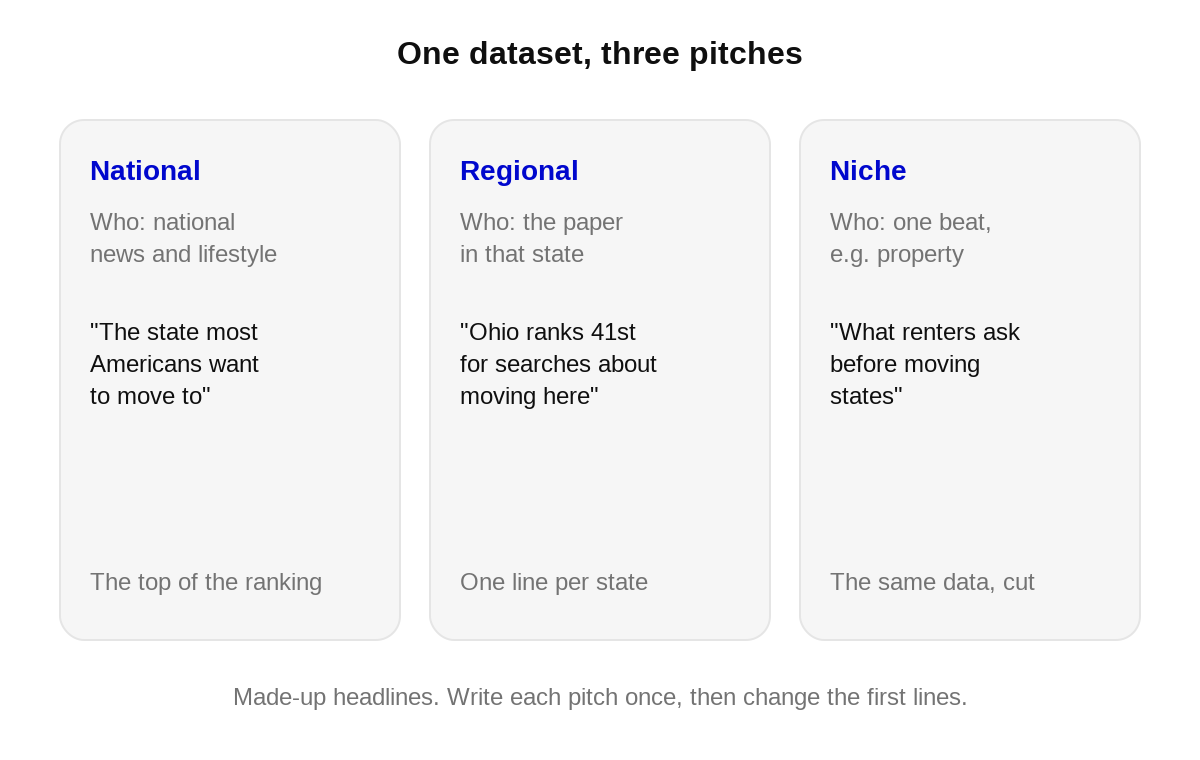
Then ladder the same data into several pitches. National desks want the superlative. Local papers want their own state's line. A beat reporter (property, travel, personal finance) wants the cut that fits their beat.
Build the study page, then pitch it
The links point at the study page, so build that first. Put the headline finding at the top with a date, one simple chart per finding, a table where every reader can find their own state, and a methodology section that lists the query template, country, language, capture dates and cleaning rules. A reporter who can see how you got the numbers is more willing to use them.
Do not ask for keyword-rich links. Google's spam policies list "links with optimized anchor text" in articles, guest posts or press releases distributed on other sites as link spam [5]. Journalists link to a source with its name or "a study by Packwise". That is the link you want.
Now the email. Muck Rack's 2026 survey of 1,044 journalists found that 62% prefer to be pitched by one-to-one email, 69% prefer pitches under 200 words, and 88% immediately disregard pitches that do not match what they cover [4]. More than half (54%) say they seldom or never respond to PR pitches at all [4], so most sends will get silence. That is normal.
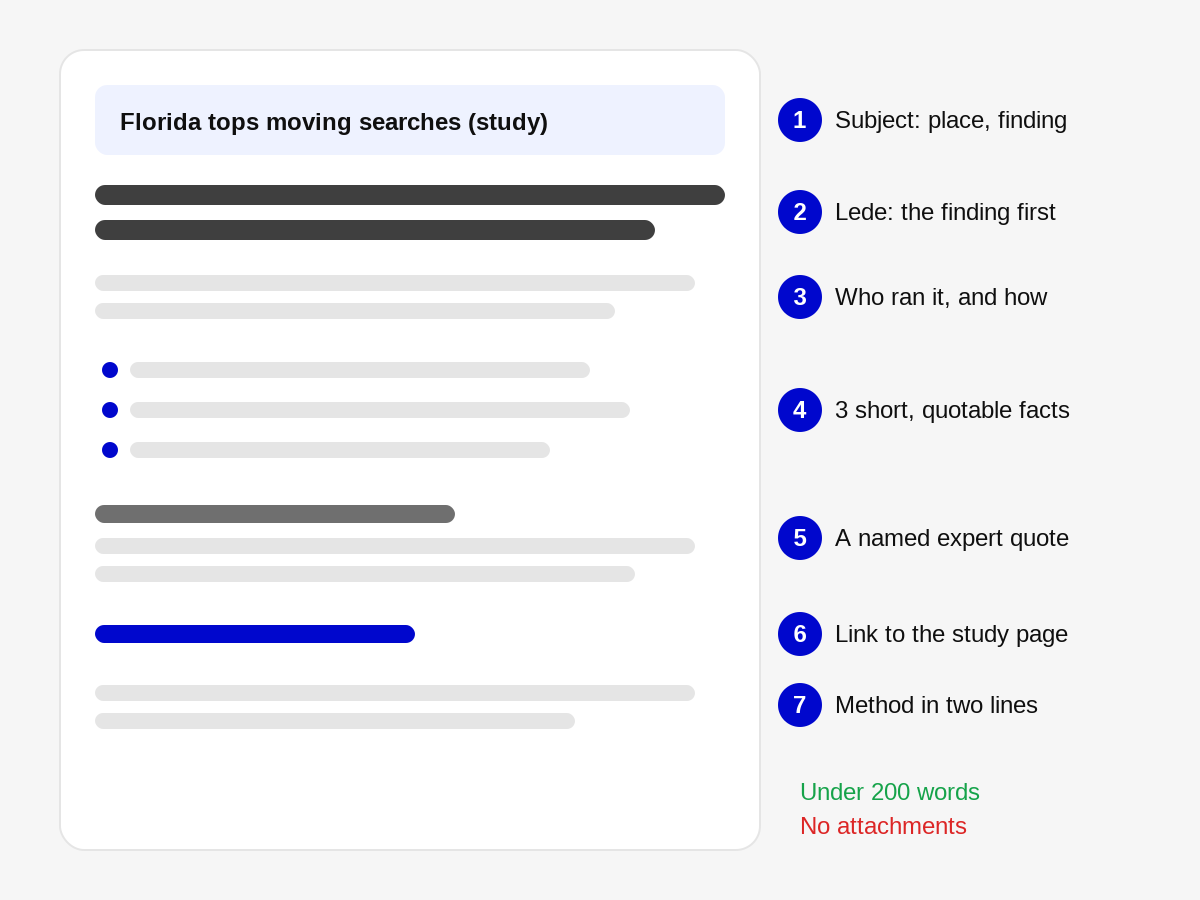
- Subject. The place and the finding, short, with "(study)" so the reporter knows what it is. A local paper needs its state's name in it.
- First line. The finding. Skip "Hope you're well": the first line shows in the inbox preview.
- Bullets. Three facts a reporter can paste: the top of the ranking, the bottom, and the surprise.
- Quote. One or two sentences from a named person at your company, with their job title.
- Link. The study page, with the full table. Offer per-state figures and charts to anyone who replies.
Personalise by segment, not by flattery: the Ohio pitch leads with Ohio. For follow-ups, the same survey found 50% of journalists call one follow-up ideal, and 51% want it 3 to 7 days later [4]. Send one, short, with one new fact, then stop. The lesson Writing outreach emails that get replies covers the email craft in full.
Answer Socrates does not find journalists. Build your list from the bylines on recent stories about your topic in each outlet, the newsroom address each outlet publishes, or a paid media database.
The same research in Ask Socrates
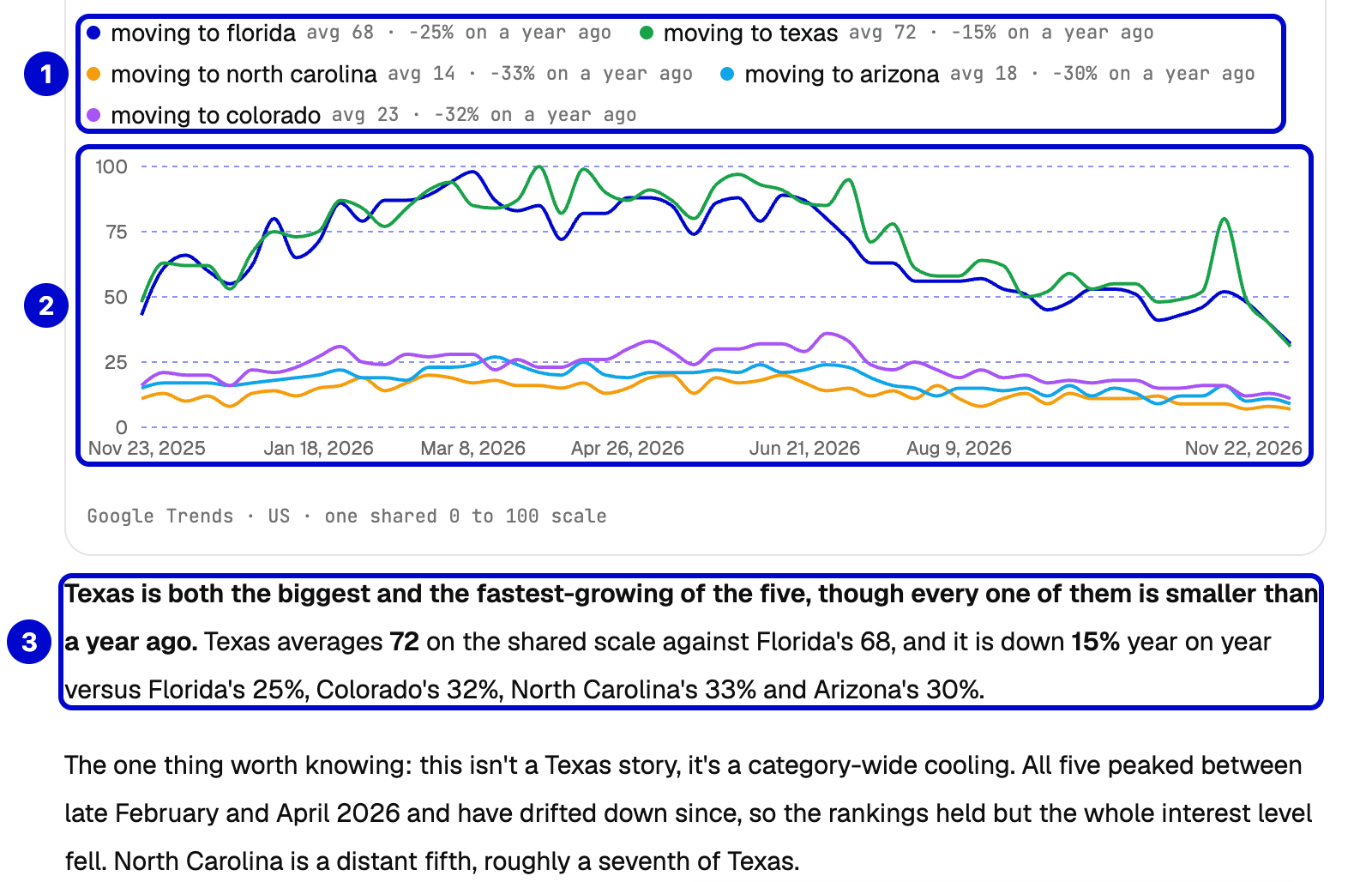
Ask Socrates, the chat in Answer Socrates, has the same Google Trends tools, and trend checks in the chat are free. Its Compare trends tool puts 2 to 5 terms on one chart for one country. Because they come from one request, they share one 0 to 100 scale, so the heights can be compared. For each term it reports interest now against a year ago, the change, and the peak week.
Type a request that names the terms and the country:
You can then ask the chat to run the keyword pull for the winners. A full keyword pull costs one search credit, as on the search page. Whether the chat asks first depends on your spending setting: with "Asks before spending", an approval card shows the cost before anything runs.
The chat does not build the state-by-state ranking for you, and it does not write or send pitches. Use it to narrow the list, then run the per-place pulls and the checks above.
Where to go next
| If you want to... | Read |
|---|---|
| Read Trends charts and Breakout terms properly | Google Trends: seasonal and rising topics |
| Write the pitch email itself | Writing outreach emails that get replies |
| See where digital PR fits among link tactics | Finding link opportunities |
| Understand why links from news sites count | What backlinks are and why they still matter |
| Pull every question for one place | How to do keyword research: find what people actually ask |
| Do the narrowing in one conversation | Keyword research in one chat with Ask Socrates |
Sources
- FAQ about Google Trends data, Google Trends Help, 2026
- Compare Trends search terms, Google Trends Help, 2026
- How Google autocomplete predictions work, Google Search Help, 2026
- The State of Journalism 2026, Muck Rack, 2026
- Spam policies for Google web search, Google Search Central, 2026
